Project 1 (Mini Project on Vehicle Direction Detection
AIM: To create a Simulink model of Vehicle Direction Detection as per the Requirement data.
Objective of Mini Project:
- Development of MATLAB Simulink model as per requirement.
- Tag the requirements to the simulink model; tagging requirement 1 & requirement 2 to their corresponding subsystems is fine.
- MBD compliant changes, Data Dictionary creation & code generation is added advantage, and that is not scope of this project.
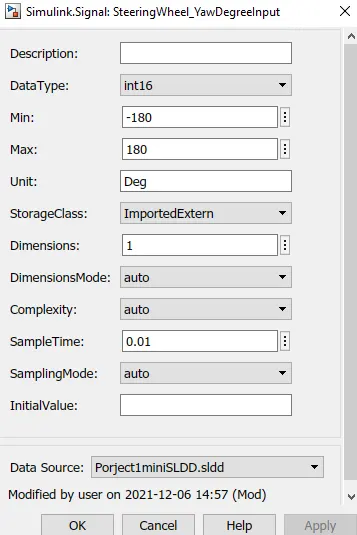
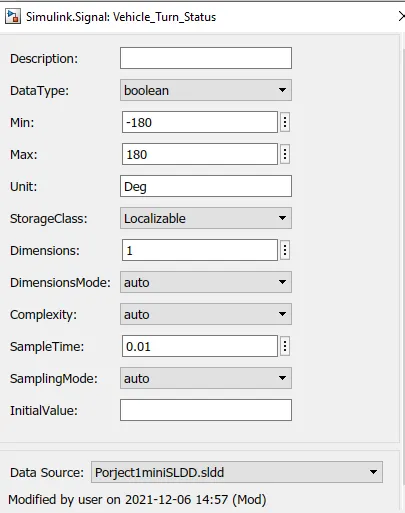
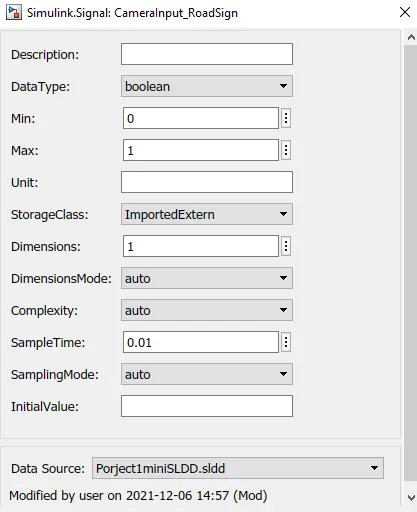
- If choosing code generation, Storage class for Input signals: ImportedExtern; Storage class for Output signal: Export to File; Storage class for local signals: localizable; Storage class for calibration signals: Const.
- Choose sample time for all signals as 0.01s
Requirement - 1:
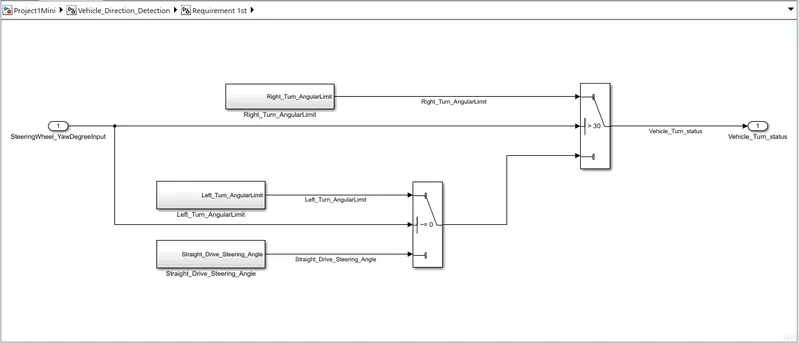
- Steering wheel input as yaw rate (Signal name: SteeringWheel_YawDegreeInput) is the input for this system.
- This is compared against 3 angular values, one each for left turn, right turn & straight drive (Calibration Values: Right_Turn_AngularLimit, Left_Turn_AngularLimit, Straight_Drive_Steering_Angle) to say which specific direction the steering wheel is turning towards.
- Use switch blocks to compare & develop this requirement. Keep this requirement in a subsystem & output of this requirement is a local signal (Signal Name: Vehicle_Turn_Status).
Requirement – 2:
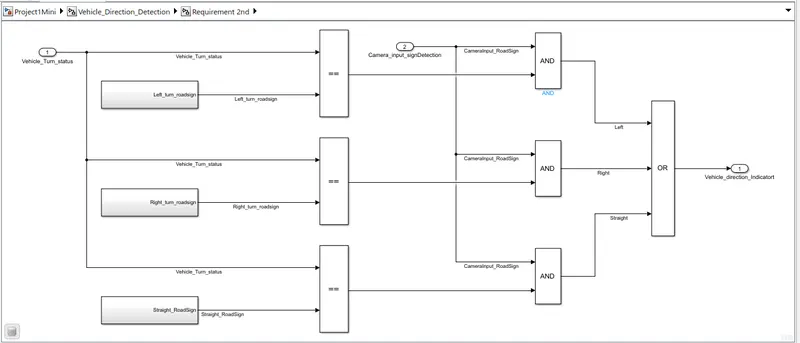
- Keep this requirement as a separate subsystem. Inputs to this requirement are local signal from requirement 1 (Signal Name: Vehicle_Turn_Status) & an input signal from camera (Signal Name: CameraInput_RoadSign), which confirms the occurrence of a road sign.
- Signal Vehicle_Turn_Status is compared against calibration values (Calibration Values: RightTurn_RoadSign, LeftTurn_RoadSign, Straight_RoadSign), if each of them is found equal, then each of the three corresponding output is compared against the camera input signal,
- Using a logical operator block, only one among them is finally given as output signal (Signal Name: Vehicle_Direction_Indicator).
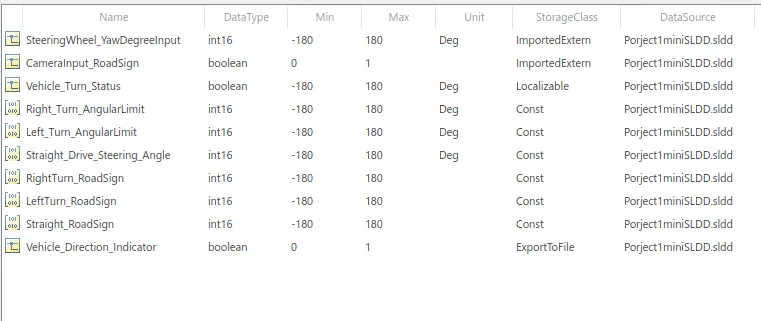
Signals & Calibration Data List:
|
Signal / Calibration Name |
Signal Type |
Data Type |
Dimension |
Min |
Max |
Initial Value |
Units |
|
SteeringWheel_YawDegreeInput |
Input |
Int16 |
1 |
-180 |
180 |
- |
Deg |
|
CameraInput_RoadSign |
Input |
Boolean |
1 |
0 |
1 |
- |
- |
|
Vehicle_Turn_Status |
Local |
Int16 |
1 |
-180 |
180 |
- |
Deg |
|
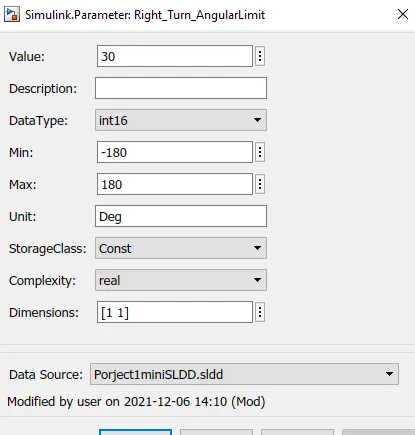
Right_Turn_AngularLimit |
Calibration |
Int16 |
[1 1] |
-180 |
180 |
30 |
Deg |
|
Left_Turn_AngularLimit |
Calibration |
Int16 |
[1 1] |
-180 |
180 |
-120 |
Deg |
|
Straight_Drive_Steering_Angle |
Calibration |
Int16 |
[1 1] |
-180 |
180 |
0 |
Deg |
|
RightTurn_RoadSign |
Calibration |
Int16 |
[1 1] |
-180 |
180 |
30 |
|
|
LeftTurn_RoadSign |
Calibration |
Int16 |
[1 1] |
-180 |
180 |
-120 |
|
|
Straight_RoadSign |
Calibration |
Int16 |
[1 1] |
-180 |
180 |
0 |
|
|
Vehicle_Direction_Indicator |
Output |
Boolean |
1 |
0 |
1 |
- |
- |
Model:
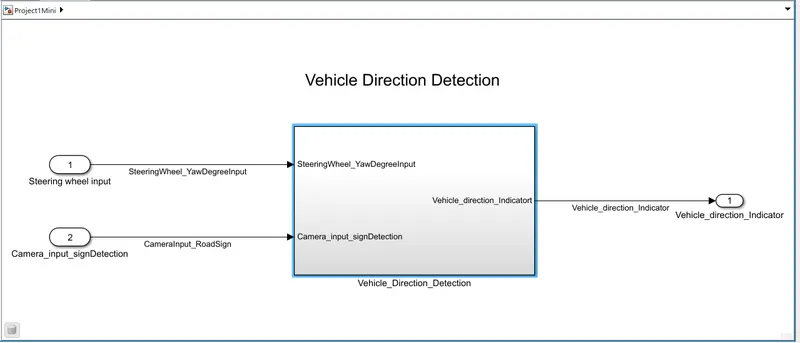
Vehicle Direction Detection Subsystem:
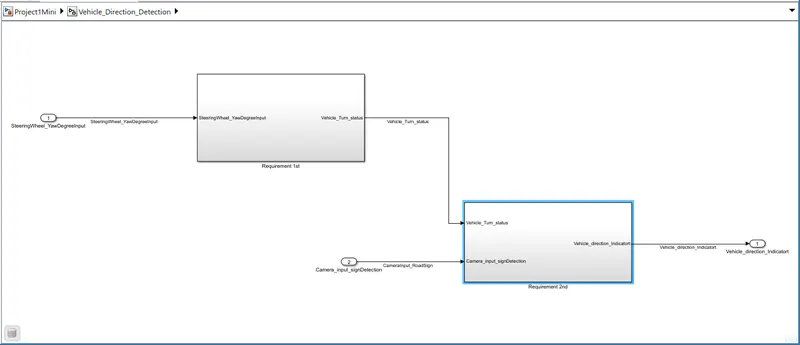
Requirment 1: Here we using the subsystem 1, in these we have Three turns which direction is need based on the data requirments we have to compare these signals .
Requirments 2: Here we have 2 inpts one is Vehicle_Turn_Status, Camerainput_RoadSign, with this we have to compare with 3 roadsign values acoording to data we have to turn the required output, the signal name is Vehicle_Direction_Indicator.
Here we compare the three signals with the SteeringWheel_YawDegreeInput .
when we compare ,it checks equal to 30 then it will say to Right_Turn.
when we compare ,it checks less than the -120 then it will say to Left_Turn .
when we compare ,it checks less than the 0 then it will say to Straight_Drive .
Signals & Calibration Data List:
To export a data dictionary:
- In the Current Folder pane of the MATLAB® Command Window, navigate to the location of the data dictionary.
- Double-click the name of the dictionary.
- In the Model Explorer, right-click the name of the data dictionary. If you have made changes to the dictionary, in the context menu, select Save Changes.
- Right-click the name of the data dictionary. In the context menu, select Export to Previous Version.
- In the Export Data Dictionary to Previous Version dialog box, specify the previous version of Simulink in which you want to save the model. Specify the folder into which you want Simulink to place the new version of the dictionary. The folder that you specify cannot contain dictionaries that are part of the existing dictionary hierarchy. Then, click OK.
- Verify that the new version of the data dictionary exists in the folder that you specified.
Result:
- Here we compare the three signals with the SteeringWheel_YawDegreeInput .
- when we compare ,it checks equal to 30 then it will say to Right_Turn.
- when we compare ,it checks less than the -120 then it will say to Left_Turn .
- when we compare ,it checks less than the 0 then it will say to Straight_Drive .