Project 1 - Interfacing a 16*2 LCD with Arduino using I2C protocol
Overview of the Project:
In this project implementing the Code for “Interfacing a 16*2 LCD with two Arduino’s (one for Master and one for Slave) using Inter-Integrated Circuit (I2C) communication protocol” by sending the message to LCD using I2C communication protocol and display the message on LCD screen.
AIM :
Goals:
- Communication between Arduino and 16*2 LCD using I2C protocol.
- Displaying the message sent by Master and received by slave i.e. LCD display.
Key Highlights of the Project:
- Using the inter-integrated circuit communication protocol, transferring the data i.e. the message we want to display is sent to the LCD.
- Two Arduino’s connected to the LCD display and the communication is executed using I2C protocol between Arduino and the LDC display.
Deliverables of this project:
- Communication between the Arduino’s and LCD using I2C.
- The message passed from master to slave and displayed on the 16*2 LCD.
Expected Outcomes:
- Students will get the Knowledge of I2C communication Protocol and the Arduino.
- The Hardware connection of all components used in this project.
- Displaying the message sent by master (Arduino) and received by the slave (16*2 LCD display)
Arduino board (e.g., Arduino Uno)
16x2 LCD with I2C module
I2C module (if not already attached to the LCD)
Breadboard and jumper wires
Wiring the LCD to Arduino:
Connect the GND pin of the I2C module to the GND pin of the Arduino.
Connect the VCC pin of the I2C module to the 5V pin of the Arduino.
Connect the SDA pin of the I2C module to the A4 pin of the Arduino.
Connect the SCL pin of the I2C module to the A5 pin of the Arduino.
This project focuses on interfacing an Arduino Uno with a PCF8574 module and a 16x2 LCD display using the I2C communication protocol. The aim is to send messages from the Arduino to the LCD display and showcase the communication between the components.
The Arduino Uno acts as the master device, while the PCF8574 module serves as an I/O expander, allowing the Arduino to control the LCD display with minimal pins. The PCF8574 module provides additional digital input/output pins through the I2C protocol.
The project involves the following steps:
Hardware Setup:
Connect the Arduino Uno to the PCF8574 module using the SDA (data) and SCL (clock) lines for I2C communication.
Connect the PCF8574 module to the 16x2 LCD display, wiring the appropriate pins for data, control, and power.
Software Implementation:
Write the code for the Arduino Uno to send messages to be displayed on the LCD screen.
Utilize the Wire library to establish I2C communication between the Arduino and the PCF8574 module.
Configure the PCF8574 module to control the LCD display by sending the necessary commands and data.
Message Display:
The Arduino Uno sends messages to the PCF8574 module via I2C.
The PCF8574 module receives the messages and controls the LCD display accordingly.
The LCD display shows the received messages in real-time.
By completing this project, you will gain a better understanding of I2C communication, learn how to interface the PCF8574 module with an Arduino Uno, and successfully display messages on a 16x2 LCD display. This project can serve as a foundation for more complex projects involving I2C-based communication and peripheral control.
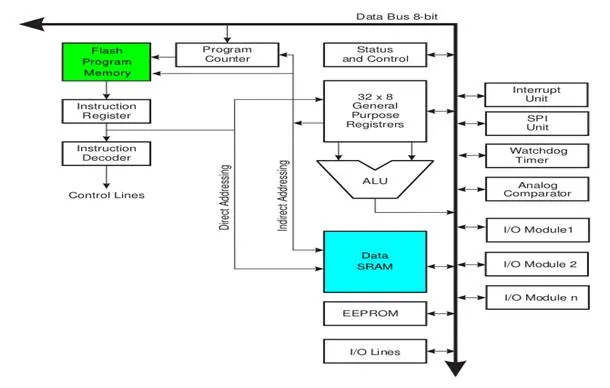
Arduino’s processor basically uses the Harvard architecture where the program code and program data have separate memory. It consists of two memories- Program memory and the data memory.The code is stored in the flash program memory, whereas the data is stored in the data memory. The Atmega328 has 32 KB of flash memory for storing code (of which 0.5 KB is used for the bootloader), 2 KB of SRAM and 1 KB of EEPROM and operates with a clock speed of 16MHz.
Arduino Uno consists of 14 digital input/output pins (of which 6 can be used as PWM outputs), 6 analog inputs, a 16 MHz crystal oscillator, a USB connection, a power jack, an ICSP header, and a reset button
Power Jack: Arduino can be power either from the pc through a USB or through external source like adaptor or a battery. It can operate on a external supply of 7 to 12V. Power can be applied externally through the pin Vin or by giving voltage reference through the IORef pin.
Digital Inputs: It consists of 14 digital inputs/output pins, each of which provide or take up 40mA current. Some of them have special functions like pins 0 and 1, which act as Rx and Tx respectively , for serial communication, pins 2 and 3-which are external interrupts, pins 3,5,6,9,11 which provides pwm output and pin 13 where LED is connected.
Analog inputs: It has 6 analog input/output pins, each providing a resolution of 10 bits.
ARef: It provides reference to the analog inputs
Reset: It resets the microcontroller when low.
We can also design our own Arduino by following the schematic given by the Arduino vendor and also available at the websites. All we need are the following components- A breadboard, a led, a power jack, a IC socket, a microcontroller, few resistors, 2 regulators, 2 capacitors.
- The IC socket and the power jack are mounted on the board.
- Add the 5v and 3.3v regulator circuits using the combinations of regulators and capacitors.
- Add proper power connections to the microcontroller pins.
- Connect the reset pin of the IC socket to a 10K resistor.
- Connect the crystal oscillators to pins 9 and 10
- Connect the led to the appropriate pin.
- Mount the female headers onto the board and connect them to the respective pins on the chip.
- Mount the row of 6 male headers, which can be used as an alternative to upload programs.
- Upload the program on the Microcontroller of the readymade Adruino and then pry it off and place back on the user kit.
CODE FOR INTERFACING A 16*2 LCD
//Preprocessor Library selection
#include <Wire.h>

/* Global Section */

void setup() {
  Wire.begin(); // Start I2C communication
}

/* Sub function definition */

void loop() {
  // Send a message to the Slave Arduino
  Wire.beginTransmission(0x27); // PCF8574 module address (change if needed)
  Wire.write("Hello from Master"); // Message to be sent
  Wire.endTransmission();
  delay(1000); // Delay between messages
}
Slave Arduino (Receiver):
#include <io.h>
#include <LiquidCrystal_I2C.h>

// Global section

LiquidCrystal_I2C lcd(0x27, 16, 2); // PCF8574 module address, LCD columns, LCD rows (change if needed)

void setup() {
  Wire.begin(9); // Set Slave Arduino address (change if needed)
  Wire.onReceive(receiveEvent); // Register the receive event
  lcd.begin(16, 2); // Initialize the LCD
  lcd.backlight(); // Turn on the LCD backlight
  lcd.setCursor(0, 0);
  lcd.print("Slave Arduino");
}

void loop() {
  // Slave Arduino loop code
}

void receiveEvent(int byteCount) {
  String receivedMessage = "";

  while (Wire.available()) {
    char c = Wire.read();
    receivedMessage += c;
  }

  lcd.clear();
  lcd.setCursor(0, 0);
  lcd.print(receivedMessage);
}
As a result of this project, you will obtain a working system where the Arduino Uno communicates with the PCF8574 module and controls a 16x2 LCD display. The messages sent from the Arduino Uno will be displayed on the LCD screen in real-time.
The key outcomes of this project include:
Successful interfacing: You will have successfully established communication between the Arduino Uno and the PCF8574 module using the I2C protocol. This demonstrates your ability to connect and communicate with external devices.
Expanded I/O capabilities: The PCF8574 module acts as an I/O expander, providing additional digital input/output pins to the Arduino Uno. This allows you to control the 16x2 LCD display without using a large number of pins directly on the Arduino.
Real-time message display: The messages sent from the Arduino Uno will be displayed on the LCD screen connected to the PCF8574 module. This demonstrates your ability to send data and control an output device.