Project 1 - Controlling a DC motor using PWM and monitoring its Running status
Overview of the Project:
Implement a system on the simulator for controlling a DC motor using L293 motor driver, monitor its status and print the running status of motor on the LCD Display.
Goals:
- Implement a system on simulator for Controlling the DC motor using L293 motor driver.
- Displaying the running status of DC motor on the LCD display.
Key Highlights of the Project:
- The DC motor can be controlled by using L293 motor driver.
- The speed of a DC motor can be controlled by varying its input voltage, for doing this is to use PWM (Pulse Width Modulation).
- L293D IC is a typical Motor Driver IC which allows the DC motor to drive on any direction.
Deliverables of this project:
- Implement the system for controlling DC motor.
- Controlling the speed of the DC motor using PMW.
- Displaying the present running status of DC machine on LCD display.
Expected Outcomes:
- Implement a system on simulator to control a DC motor using PMW
- Monitoring the running status of the DC motor using L293 motor driver which allows the DC motor to drive on any direction.
- Running status i.e. on which direction the DC motor is running is to be displayed on the LCD screen.
Firmware :
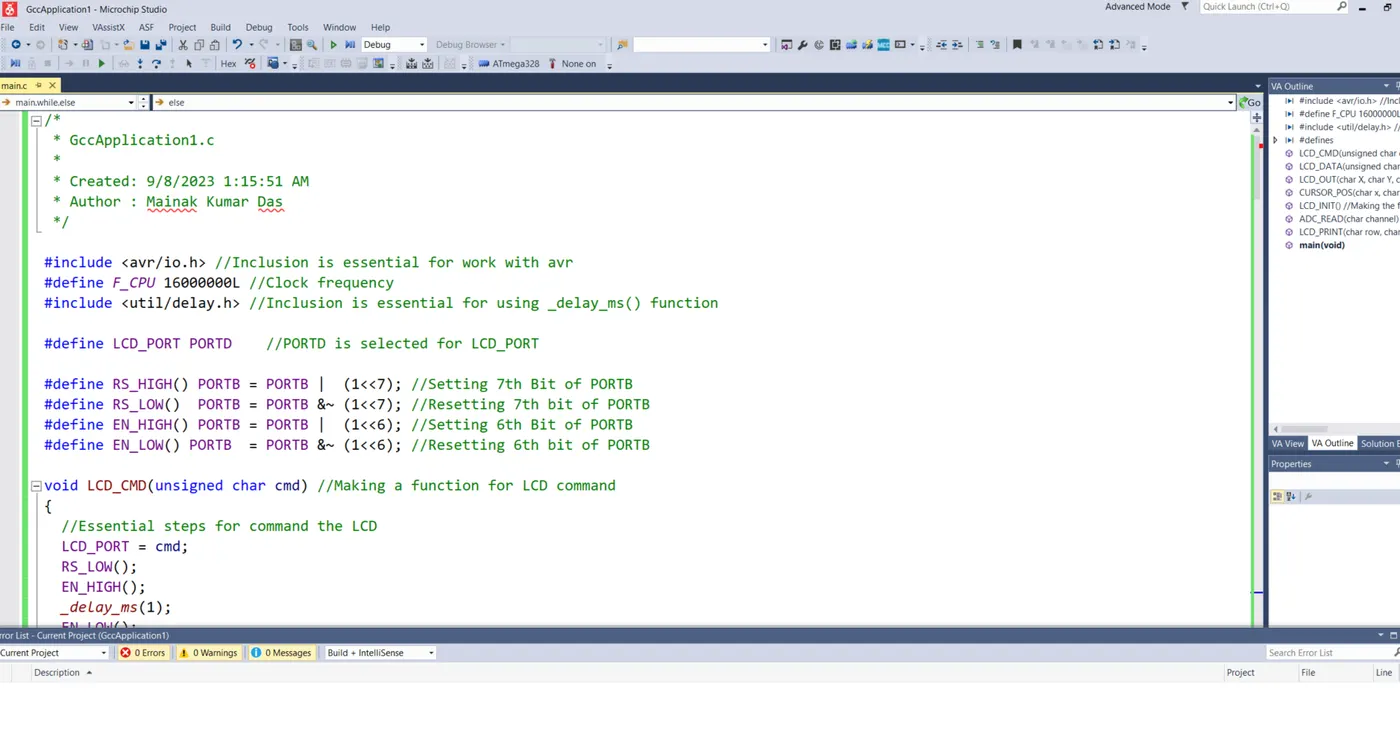
/*
* GccApplication1.c
*
* Created: 9/8/2023 1:15:51 AM
* Author : Mainak Kumar Das
*/
#include
#define F_CPU 16000000L //Clock frequency
#include
#define LCD_PORT PORTD //PORTD is selected for LCD_PORT
#define RS_HIGH() PORTB = PORTB | (1<<7>#define RS_LOW() PORTB = PORTB &~ (1<<7>#define EN_HIGH() PORTB = PORTB | (1<<6>#define EN_LOW() PORTB = PORTB &~ (1<<6>
void LCD_CMD(unsigned char cmd) //Making a function for LCD command
{
//Essential steps for command the LCD
LCD_PORT = cmd;
RS_LOW();
EN_HIGH();
_delay_ms(1);
EN_LOW();
}
void LCD_DATA(unsigned char data) //Making function for LCD data
{//Essential steps
LCD_PORT = data;
RS_HIGH();
EN_HIGH();
_delay_ms(1);
EN_LOW();
}
void LCD_OUT(char X, char Y, char *str) //Making the function to print the characters
{ //Vital Steps
CURSOR_POS(X,Y);
while(*str)
{
LCD_DATA(*str);
str++;
}
}
void CURSOR_POS(char x, char y) // Function to Choose cursor position
{
//Essential steps for selecting the cursor position
if((x<1>2)||(y<1>16))
{
x=1;
y=1;
}
if (x==1)
{
LCD_CMD(0x7f+y);
}
else
{
LCD_CMD(0xBf+y);
}
}
void LCD_INIT() //Making the function to initialize the LCD
{
//Essential steps
LCD_CMD(0x38);_delay_ms(5);
LCD_CMD(0x02);_delay_ms(5);
LCD_CMD(0x01);_delay_ms(5);
LCD_CMD(0x0c);_delay_ms(5);
LCD_CMD(0x06);_delay_ms(5);
LCD_CMD(0x80);_delay_ms(5);
}
int ADC_READ(char channel) //Making the function for Analog Read
{
//Vital Steps
unsigned int X, result;
ADMUX = channel;
ADCSRA = 0X80;
ADCH = 0X00;
ADCL = 0X00;
ADCSRA |= (1 << 6> // WAIT TILL THE CONVERSION IS FINISHED
while((ADCSRA & 0X40) !=0);
X = ADCL;
result = ADCH;
result = result << 8> result =result | X;
return result;
}
void LCD_PRINT(char row, char coloumn, unsigned int value, int digits) //Function for Speed of the print
{//Steps
unsigned int temp;
unsigned int unit;
unsigned int tens;
unsigned int hundred;
unsigned int thousand;
unsigned int million;
unsigned char flag=0;
if(row==0 || coloumn == 0) //Checking Conditions
{
CURSOR_POS(1,1);
}
else
{
CURSOR_POS(row,coloumn);
}
if(digits==5 || flag==1)
{
million = value/1000+48;
LCD_DATA(million);
flag=1;
}
if(digits==4 || flag==1)
{
temp = value/1000;
thousand = temp +48;
LCD_DATA(thousand);
flag=1;
}
if(digits==3 || flag==1)
{
temp = (value)/100;
hundred = (temp +48);
LCD_DATA(hundred);
flag=1;
}
if(digits==2 || flag==1)
{
temp = value/10;
tens = temp +48;
LCD_DATA(tens);
flag=1;
}
if(digits==1 || flag==1)
{
unit = value + 48;
LCD_DATA(unit);
}
if(digits>>5)
{
LCD_DATA('o');
}
}
int main(void)
{
DDRB = DDRB & ~(1<<3> PORTB = PORTB |(1<<3>
TCCR1B = 0b00000101; //Adding the pre-scaler Calculation : clock/1024
TCCR1A = 0b00000001; //PWM, Phase Correct BIT enabling
TCCR1B|= (1<<3> TCCR1A|= (1<<7> TCCR1A|= (1<<5> DDRB =0x06; //Setting the data direction register ,B1 and B2 Pin set as Output for two PWM wave generation
unsigned int volt, n,s; //Variable
LCD_INIT(); //initialized LCD Display
while(1)
{
LCD_OUT(1,1,"STATUS:");
LCD_OUT(2,11,"RPM:");
LCD_OUT(2,1,"SPEED:");
//If the switch B3 is pressed, Motor will rotate in Clockwise
if(!(PINB & 0x08))
{
volt = ADC_READ(3);
n=(255*(volt/100)*0.09);
s= (60*(volt/100)*0.09);
OCR1B = n;
OCR1A = 0;
LCD_PRINT(2,7,s,4);
if(volt>100)
{
LCD_OUT(1,8,"On_CW_");
}
else
{
LCD_OUT(1,8,"Off");
}
_delay_ms(1000);
}
else //If Switch B3 is OFF motor should rotate anti clock wise
{
volt = ADC_READ(3);
n=(255*(volt/100)*0.09);
s= (60*(volt/100)*0.09);
OCR1B = 0;
OCR1A = n;
LCD_PRINT(2,7,s,4);
if(volt>100)
{
LCD_OUT(1,8,"On_CCW");
}
else
{
LCD_OUT(1,8,"Off");
}
_delay_ms(1000);
}
}
return 0;
}
Image of Coding part
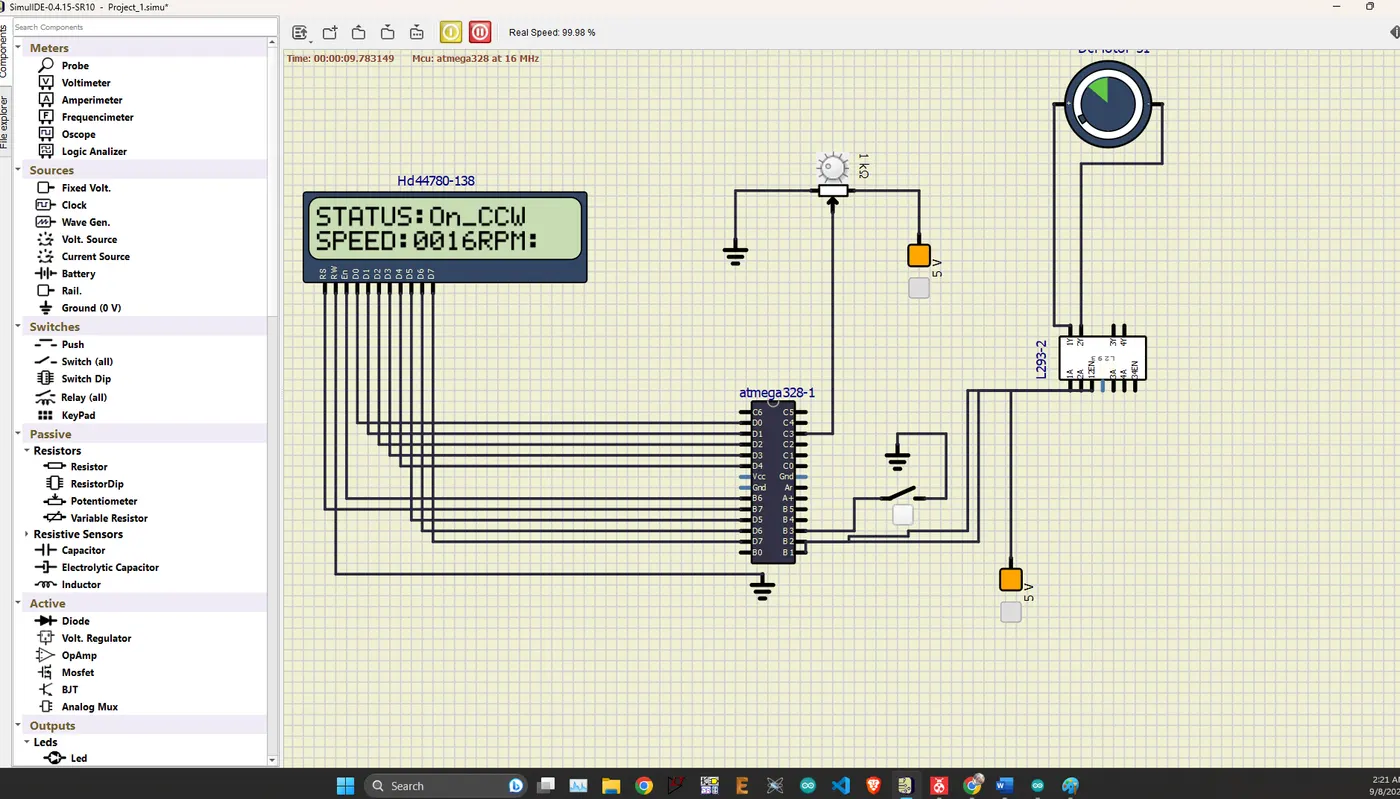
Simulation
At on Condition
Switch OFF : Motor Should Rotate at Counter Clockwise Direction
Speed : Variable
At on Condition
Switch ON : Motor Should Rotate at Clockwise Direction
Speed : Variable
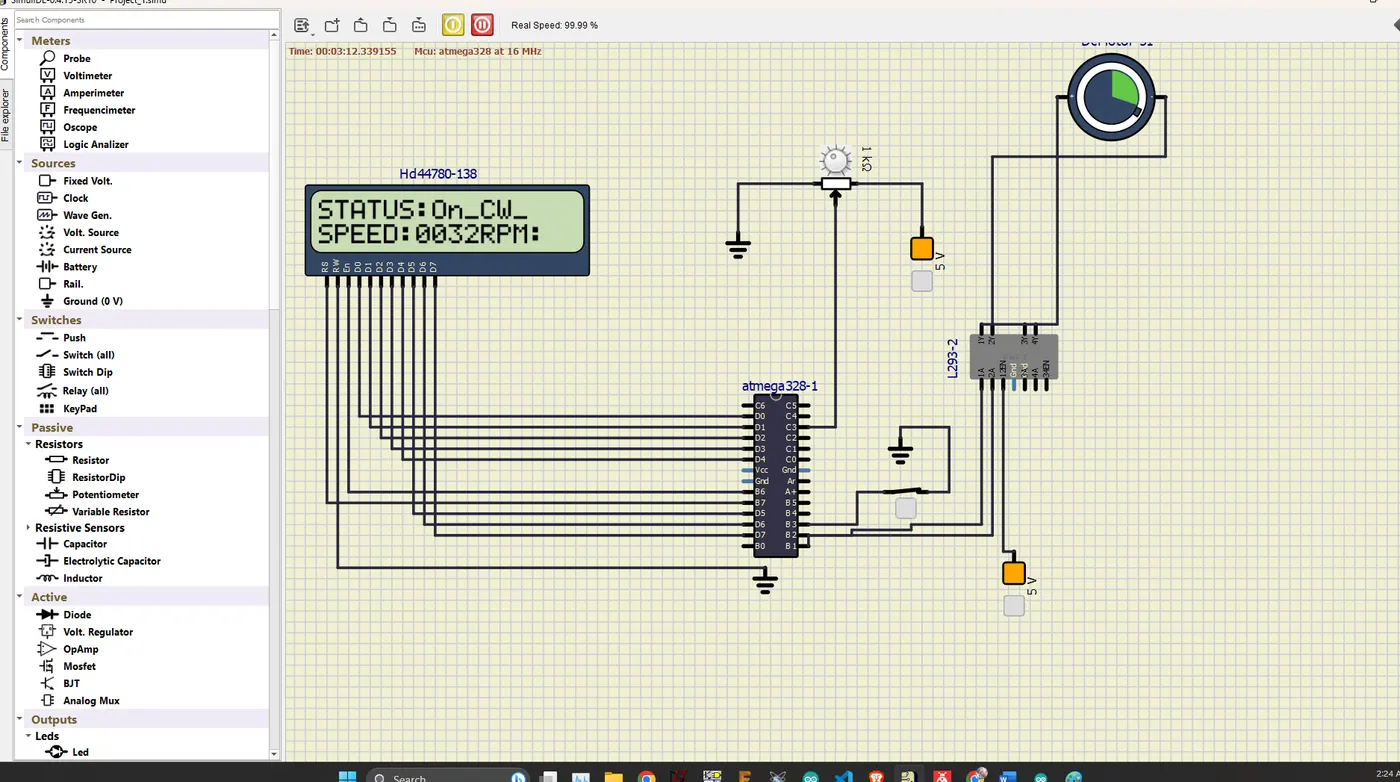
At on Condition
Switch ON : Motor Should Rotate at Clockwise Direction