Project 1 - Controlling a DC motor using PWM and monitoring its Running status
AIM:
Implement a system on the simulator for controlling a DC motor using L293 motor driver, monitor its status and print the running status of motor on the LCD Display.
Goals:
- Implement a system on simulator for Controlling the DC motor using L293 motor driver.
- Displaying the running status of DC motor on the LCD display.
program:
#include <avr/io.h>
#define F_CPU 16000000L
#include <util/delay.h>
#include "avr/interrupt.h"
#define lcdport PORTC //PORTC AS LCD, MACRO
#define rs_high() PORTD |= (1<<6); //D6 logical high
#define rs_low() PORTD &= ~(1<<6); //D6 logical low
#define en_high() PORTD |= (1<<5); //D5 logical high
#define en_low() PORTD &= ~(1<<5); //D5 logical low
#define direction (PIND & (1<<1))
#define power_button (PIND & (1<<4))
#define speed (PIND & (1<<2))
unsigned char var;
void lcd_cmd (unsigned char cmd)
{
lcdport=cmd;
rs_low(); //command register selected
en_high();
_delay_ms(1);
en_low();
}
void lcd_data (unsigned char data)
{
lcdport=data;
rs_high(); //data register selected
en_high();
_delay_ms(1);
en_low();
}
void lcd_init()
{
lcd_cmd(0x38); //5*7 matrix
_delay_ms(5);
lcd_cmd(0x02); //return home
_delay_ms(5);
lcd_cmd(0x01);//clear screen
_delay_ms(5);
lcd_cmd(0x0c);
_delay_ms(5);
lcd_cmd(0x06);
_delay_ms(5);
lcd_cmd(0x80);//first line
_delay_ms(5);
}
void cursor_pos(char x, char y)//x-row,y-col
{
if((x<1||x>2)||(y<1||y>16))//any typo mistakes
{
x=1;
y=1;
}
if (x==1) //0x80 -1,1 1,2-0x81 1,3-0x82.....
{
lcd_cmd(0x7F+y);//7F+2
}
else //0xC0
{
lcd_cmd(0xBF+y);//BF+5=C4
}
}
void lcd_out(char x, char y, char *str)
{
cursor_pos(x,y);//2,5
while(*str)
{
lcd_data(*str);
str++;
}
}
int main(void)
{
/* Replace with your application code */
DDRC = 0xFF;
DDRB = 0xFF;
PORTB = 0xFF;
DDRA |= (1<<0) | (1<<1);
DDRD &=~ (1<<4);
DDRD &=~ (1<<1);
DDRD |= (1<<5)|(1<<6);
PORTD |= (1<<1);// to enable pull up for direction button
PORTD |= (1<<4);// to enable pull up for power button
PORTD |= (1<<3); // to enable pull up for interrupt
sei();
GICR |= (1<<7);
var = 64;
TCCR0 = 0x64;
MCUCR = 0x80;
lcd_init(); //6 commands for lcd initialisation
while(1)
{
while(power_button == 0)
{
if(direction == 0)
{
PORTA = 0x01;
lcd_out(1,1,"Motor running");
_delay_ms(5);
lcd_out(2,1,"in Clockwise");
}
else
{
PORTA = 0x02;
lcd_out(1,1,"Motor running in");
_delay_ms(5);
lcd_out(2,1,"Anti-clockwise");
}
OCR0 = var;
}
PORTA = 0x00;
lcd_out(1,1,"Motor is OFF");
}
}
ISR(INT1_vect)
{
var = var + 25;
}
output:
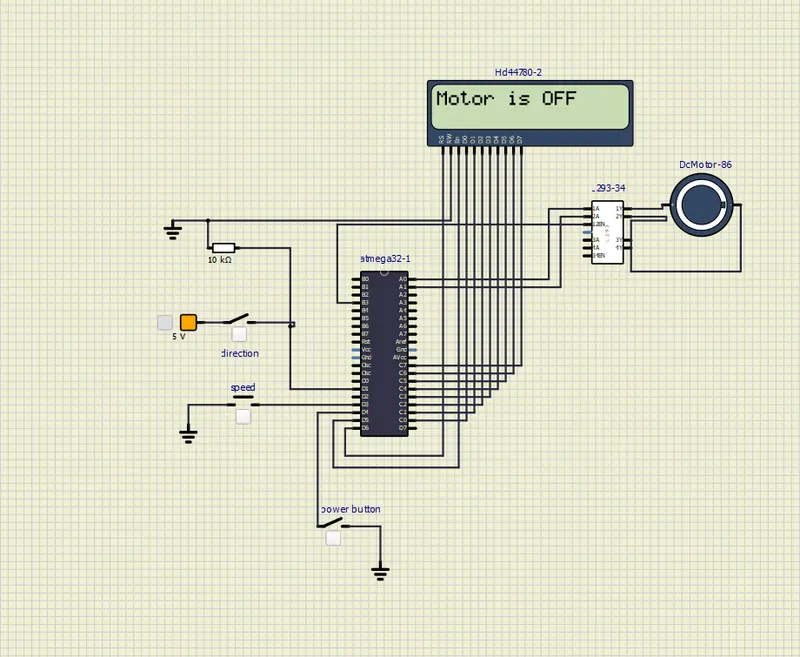
In the above snap the power button is open so the LCD display shows the "Motor is OFF"
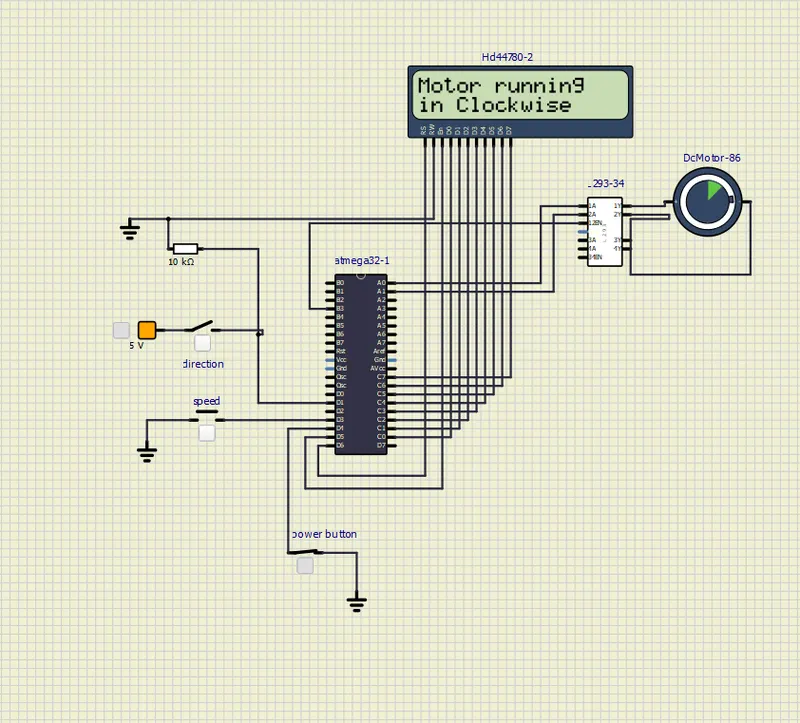
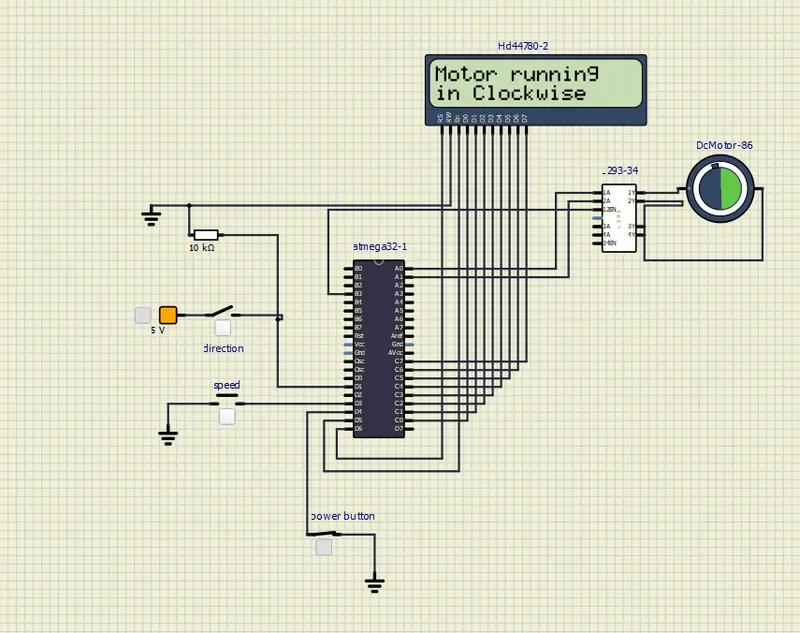
In the above snap the power button is closed and direction button is open so the LCD display shows the "Motor running in clockwise"
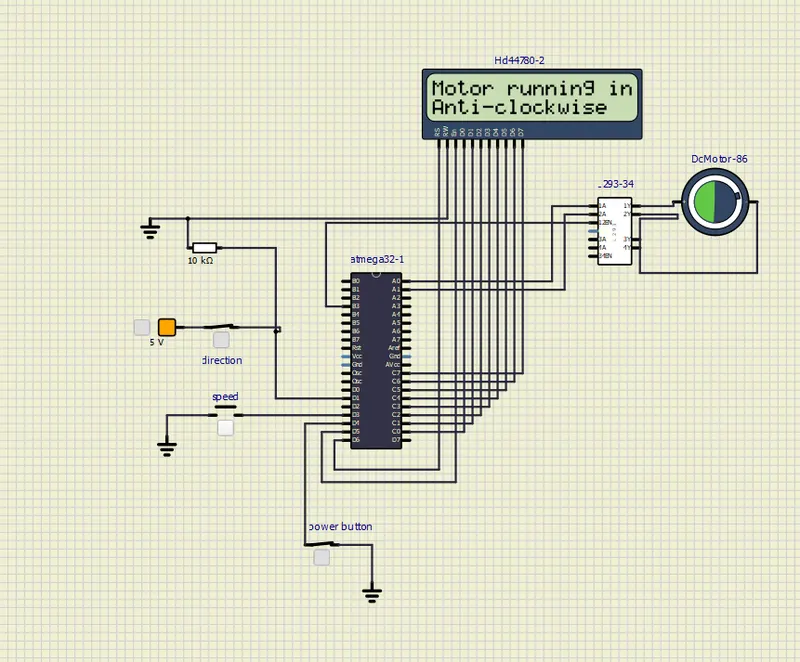
In the above snap the power button is closed and direction button is closed so the LCD display shows the "Motor running in Anti-clockwise"