Menu

IIT Certification Programs

Workshops

Projects

Blogs

Careers

Student Reviews


More

Academic Training

Informative Articles

Find Jobs

We are Hiring!


All Courses

Choose a category

Loading...

All Courses

All Courses

logo

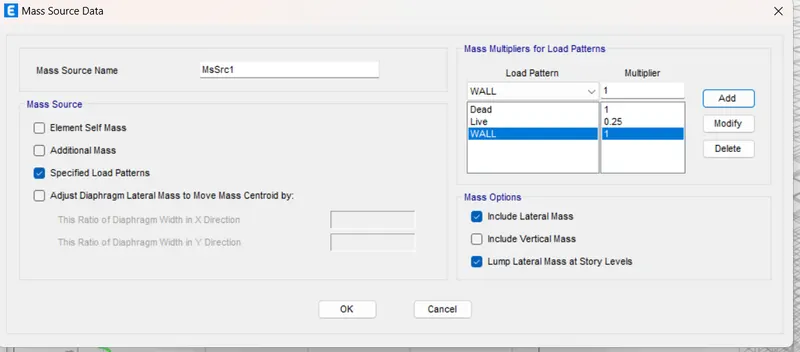
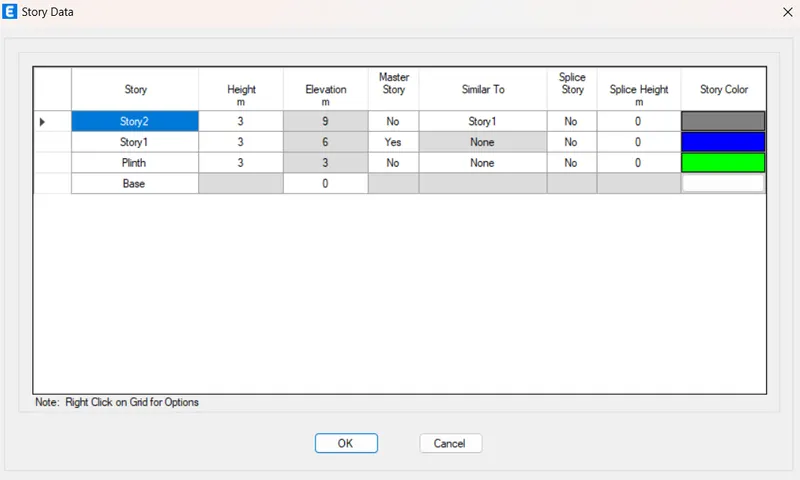
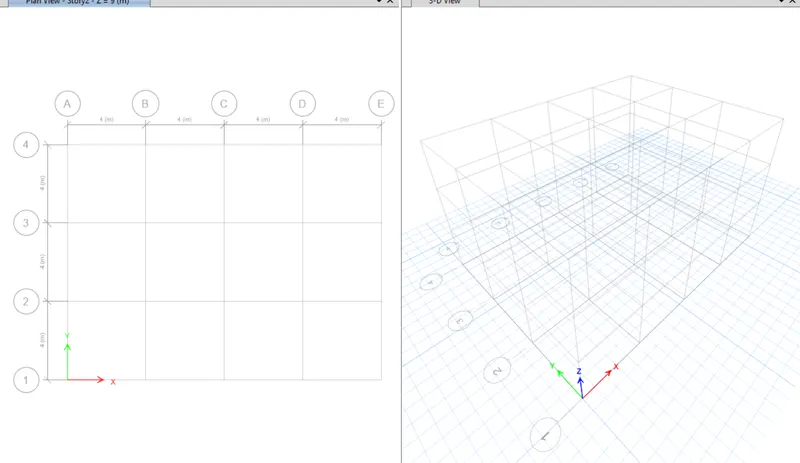
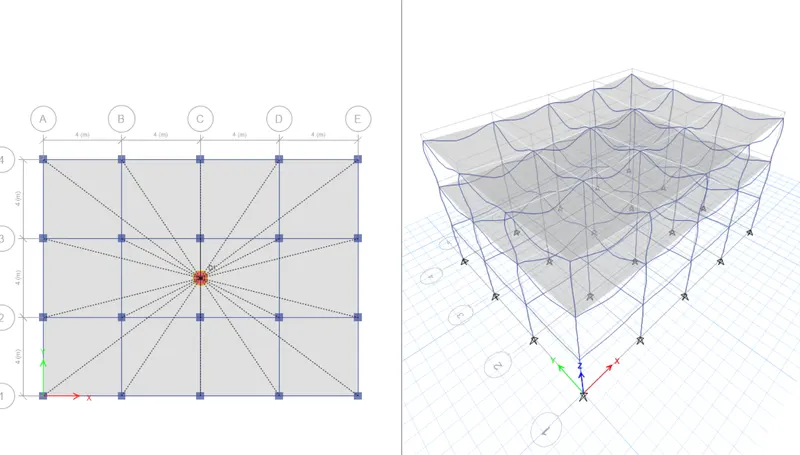
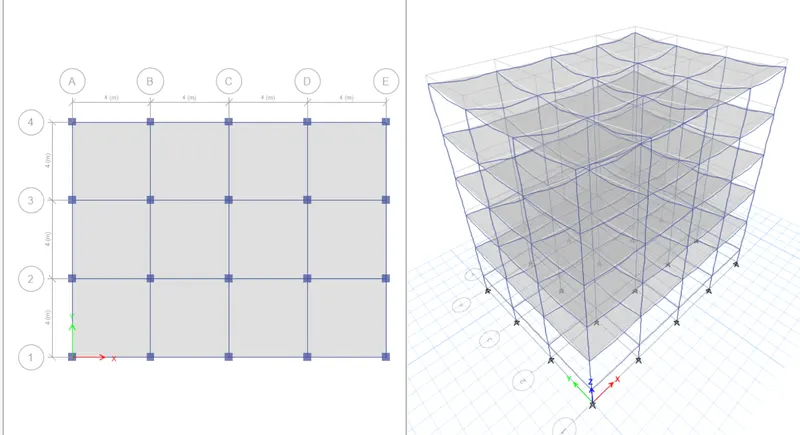
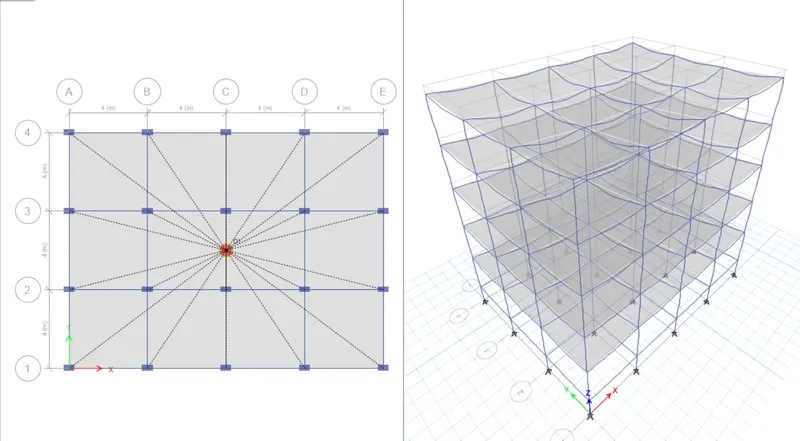
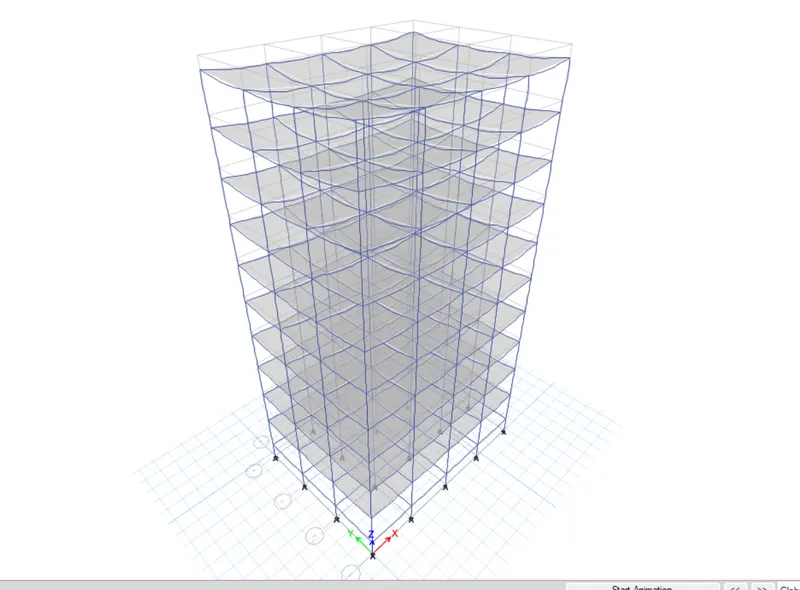
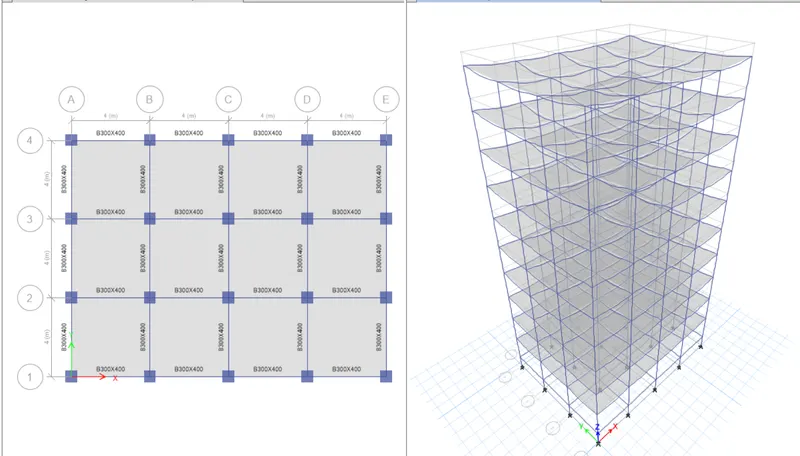
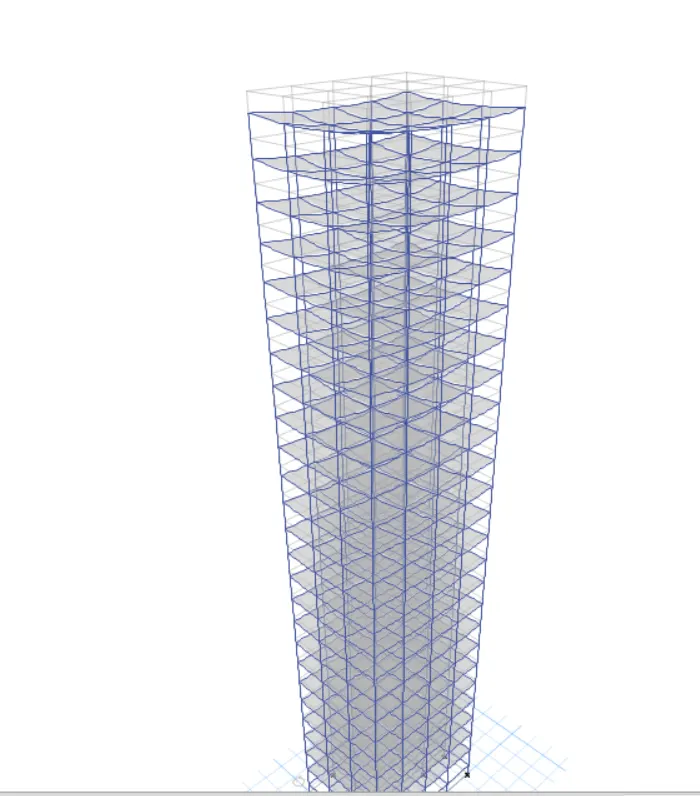
Project 1_Comparative study of different storey buildings for Seismic forces

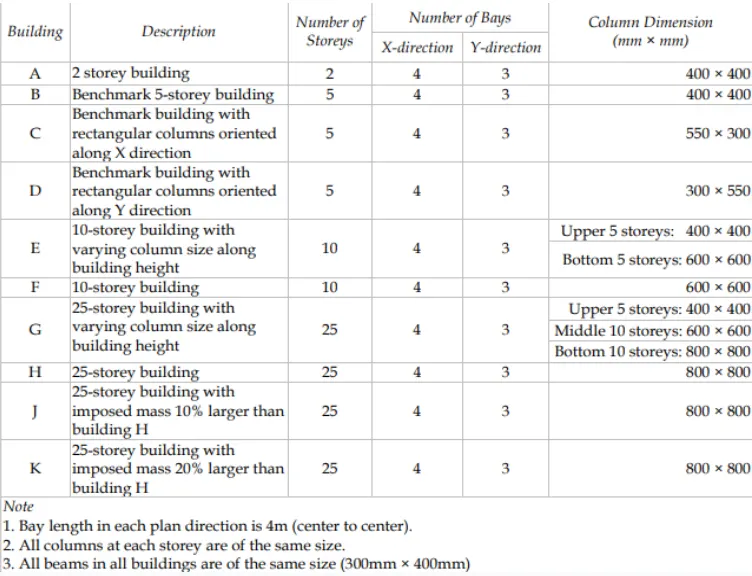
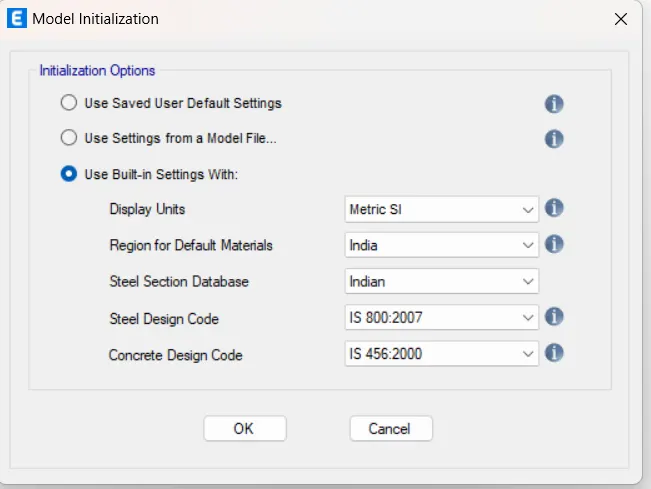
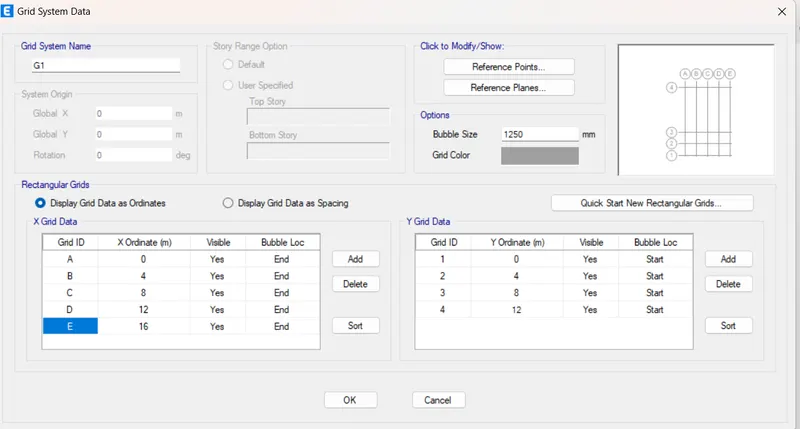
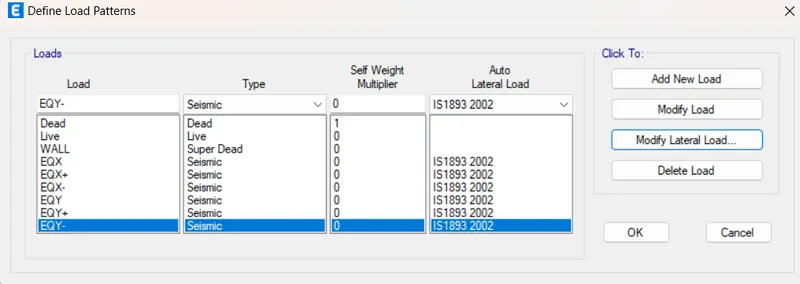
Factors influencing the dynamic characteristics of a building Building oscillate during earthquake shaking.The oscillation causes inertia force to be induced in the building. The intensity and duration of oscillation and the amount of inertia force induced in a building depends on featured of building called dynamic characteristuics.…

Project Details

Loading...

Leave a comment

Thanks for choosing to leave a comment. Please keep in mind that all the comments are moderated as per our comment policy, and your email will not be published for privacy reasons. Please leave a personal & meaningful conversation.

Please  login to add a comment

Other comments...

No comments yet!
Be the first to add a comment

Read more Projects by Irfana M (55)

Project 2

Objective:

Aim:To find maximum and minimum moment,shearProcedure:

calendar

23 Dec 2024 05:21 PM IST

    Read more

    Project 1

    Objective:

    Aim:To design a water tank for residential society has 200x2BHK flats and 100x3BHK flats.Procedure:

    calendar

    20 Dec 2024 01:02 PM IST

      Read more

      Project 2

      Objective:

      Aim:To model member roof with cable.Procedure:Open Rfem software and start a new model and enter the required data.Now set the units Choose points and line and then join all the points 

      calendar

      08 Sep 2024 04:24 AM IST

        Read more

        Project 2 - Review of Shear, Moment & Splice connections in StaadPro Connection Module

        Objective:

        Aim: To design and optimize braced connection in RAM connection. Procedure: Create a frame   Column splice: Beam to column joint:   Gusset plate connection: Result: Thus the shear,moment,splice connections are done.    

        calendar

        16 May 2024 08:57 AM IST

          Read more

          Project 1

          Objective:

          Aim: To perform Form finding and structural analysis of multiple masts. Procedure: Open RFEM software and input the required data.   Then now choose line and start drawing  Select the inclined line and choose rotate option and draw the copy of it and make all arches into polylines.And romove all the intermediate…

          calendar

          19 Apr 2024 02:29 PM IST

            Read more

            Project 1 - Review of Shear & Moment Connections in RAM Connection

            Objective:

            Aim: To design and optimize typical shear,moment and splice joints. Procedure:  After performing run the analysis and choose connection design Choose the beam which has to design its splice,beam column design etc, After choose it will take to staad pro.  

            calendar

            07 Mar 2024 12:42 PM IST

              Read more

              Project 2_Analyze and Design the RC office building as per IS standard code in TEKLA STRUCTURAL DESIGNER

              Objective:

              Aim: To analyse and design Rc structural buiding using tekla structural designer. Procedure: Open Tekla structure designer and open new From Manage property set define all members, From toolbar choose construction level Draw grid line and quick parallel all other lines. Ground floor: First floor: Roof: Frame : Define slab…

              calendar

              06 Jan 2024 08:20 AM IST

                Read more

                To Generate report for Steel Industrial and RC structures using TSD

                Objective:

                1.Generate report for the steel building design from challenges 1 – 6 along with the loading summary Aim: To generate the report. Procedure:  Go to report tab and select the report that to be displayed.  2.Generate report for RC structure along with the loading summary 3.Update the layers settings in the…

                calendar

                03 Jan 2024 10:33 AM IST

                  Read more

                  To Design slab and foundation for an RC residential building using TSD

                  Objective:

                  1. Aim: To design slab and foundation. Procedure: Select slab and design it,check the member If it fails redesign the member Change its reinforcement details. Design of foundation: To design foundation go to base and design the foundation  It will design automatically And provide the detailing,if it fails redesign…

                  calendar

                  03 Jan 2024 03:30 AM IST

                    Read more

                    To Design RC column and beam for RC residential structure using TSD

                    Objective:

                    1. Aim: To design column and beam Procedure: After the analysis is done check each column one by one . Select a column and design the member and check it . Follow the same for all column. For beam member repeat the same select one beam and design and check if it fails increase its size and redesign the member.Follow the…

                    calendar

                    21 Dec 2023 06:16 AM IST

                      Read more

                      To Generate seismic loading based on IS code and to run the analysis using TSD

                      Objective:

                      1. Aim: To generate  seismic load. Procedure: To generate seismic load first add load cases and then aplly seismic wizard and run the analysis.   Aim: 2. Aim: Summarize the results. After running the analysis we came to knoe about the shear and bending force can be noted as calculated if the shear force is first order…

                      calendar

                      20 Dec 2023 12:08 PM IST

                        Read more

                        To calculate the dead , live and wind load for RC residential structure and to apply them using TSD

                        Objective:

                        1. Aim: To calculate dead  load and apply it on the model. Procedure:   After calculating dead load apply dead loadd as area load from ground level apply load on all the slab.Apply brickwall loading for area required.   2. Aim: To calculate live load and apply it in the model. Procedure:  Apply live…

                        calendar

                        20 Dec 2023 10:49 AM IST

                          Read more

                          To Model a RC residential structure using TSD

                          Objective:

                           1. Aim: To setup parameter design in the Rc model. Procedure:   2. Aim: To model grid line. Procedure: Select grid and draw a grid line and quick parallel draw other grid lines. 3. Aim: To study layout and summary for general arrangement of the structure. It is a R.c building with one floor withoffice room,meeting…

                          calendar

                          18 Dec 2023 07:26 AM IST

                            Read more

                            Project 1_Analyze and design a steel building to 10T CRANE as per IS standard code using TEKLA STRUCTURAL DESIGNER.

                            Objective:

                            Aim: To design and analyze the steel building using Tekla structural designer. Procedure: Open software and check the setting and draw a grid line. And then create a construction levels. Now from base level construct a pedestral i.e.,concrete column from manage property set Then create a column from base to ground floor…

                            calendar

                            15 Dec 2023 10:36 AM IST

                              Read more

                              To Analysis and Design of Steel Structures using TSD

                              Objective:

                              1. Aim: To summarize the bending moment,shear forcr and deflection. Procedure: After application of load generate load combination and run the first order linear analysis. Shear force Bending moment:   Deflection: 2. Aim: To analyze the members. Procedure: Got to result view and design the member if it fails re design…

                              calendar

                              13 Dec 2023 06:17 AM IST

                                Read more

                                To calculate wind load for industrial steel structures and to apply it by using TSD

                                Objective:

                                1. Generate manual wind loading in the design report based IS code as per the following input Basic wind speed = 39m/s Terrain category 2 2. Based on the above calculation apply the loadings on the model To apply load on the model create load case  From dropdown list choose wind case type to apply it on the building…

                                calendar

                                09 Dec 2023 03:31 AM IST

                                  Read more

                                  To calculate dead and live load for industrial steel structures and to apply them using TSD

                                  Objective:

                                  1. 2. 3.  

                                  calendar

                                  29 Nov 2023 02:10 PM IST

                                    Read more

                                    To model beams and bracings for industrial steel structures using TSD

                                    Objective:

                                    1. Aim: To create beam properties and model the beam. Procedure: From manage set property choose new member steel beam. Enter the section    Result: Thus the beam is modeled. 2. Aim: To create rafter beam and bracing. Procedure:  From roof floor create a member and draw a rafter After draw a rafter in one…

                                    calendar

                                    29 Nov 2023 06:58 AM IST

                                      Read more

                                      To model columns for industrial steel structure using TSD

                                      Objective:

                                      1. Aim: To create column properties for column member for pedestral member. Procedure: Open TSD and from manage properties set . Choose new member and create a concrete column. Result: Thus the pedestral column is created and modeled. 2. Aim: To create steel column and model in the grid. Procedure: From manage propertie…

                                      calendar

                                      23 Nov 2023 07:32 AM IST

                                        Read more

                                        To plan a structural layout and to create grids using TSD

                                        Objective:

                                         1. Aim: To summarize the user interface of TSD Project workspace: Open TSD left side of the window there is a project workspace. Scene content: Scene views: Loading drop list:   Properties window: If we choose any member it will show its properties. Result: Thus the Project workspace,scene content,scene view,loading…

                                        calendar

                                        22 Nov 2023 06:53 AM IST

                                          Read more

                                          Project 2 - MODELLING, ANALYSIS & DESIGN OF COMPOSITE STUCTURES IN COMFLOR & ETABS

                                          Objective:

                                          From ETABS open project 1 and design and analysis it according to composite, Edit the slab properties as one way distribution slab. Change the local axes Run anaysis and design check the composite column After than from comflor software design the slab

                                          calendar

                                          08 Nov 2023 10:09 AM IST

                                          • ETABS
                                          Read more

                                          Project 1 - MODELLING, ANALYSIS & DESIGN OF TALL BUILDINGS IN ETABS

                                          Objective:

                                          Open Etabs  and open new model and select model inilization  Select grid assignments Assign storeys Define materials M50 grade anf Fe 500 rebars Define properties Define grame section beam Define column From slab section define slab Define wall properties Define load cases   Run analysis  Longitudinal reinforcement   …

                                          calendar

                                          18 Oct 2023 12:29 PM IST

                                            Read more

                                            Project 1

                                            Objective:


                                            calendar

                                            11 Oct 2023 04:35 AM IST

                                              Read more

                                              Project 2_Design & Analysis of a Hostel building at Guwahati, Assam

                                              Objective:

                                              AIM: To design a G+3 Rcc building at Guwahathi. PROCEDURE: Make a rough grid layout paln. Open Etabs software and initialize the start up setting. Create grid and storey data. Define properties like column beam and slab. Define load pattern from define toolbar. RESULT: Longitudinal reinforcement: Shear reinforcement: After…

                                              calendar

                                              07 Aug 2023 05:02 AM IST

                                                Read more

                                                Foundation Design using SAFE

                                                Objective:

                                                AIM: To design an isolated footing. PROCEDURE:   Define new properties like M20,Fe500 Define slab properties and draw the area and column and footing.Run the analysis. ` AIM: To design a pile. PROCEDURE: Open a safe software and initialize the setup settings. Define new material properties. Define slab properties for pile…

                                                calendar

                                                04 Aug 2023 03:06 AM IST

                                                  Read more

                                                  Design of Shallow Foundation (Isolated Footings)

                                                  Objective:

                                                  AIM: To design  a square footing. PROCEDURE:  

                                                  calendar

                                                  02 Aug 2023 02:58 PM IST

                                                    Read more

                                                    Structural Modelling using Etabs 2018

                                                    Objective:

                                                    AIM: To design a G+7 residential building in zone 5 using Etabs. PROCEDURE: Open Etabs software and initialize the settings.   Create grid data as required. Create number of story as required. Created grid view plan and 3d view. Define material properties i.e.M25 and Fe500 ,Fe415 Define frame section for column,beam and…

                                                    calendar

                                                    02 Aug 2023 01:19 PM IST

                                                      Read more

                                                      Analysis & Design of RCC shear walls in the model using ETABS

                                                      Objective:

                                                      Plan view: Elevation view of A11: Pier check: Longitudinal reinforcement: Shear reinforcement: Boundary element width:  

                                                      calendar

                                                      22 Jul 2023 01:24 PM IST

                                                        Read more

                                                        Reinforcement detailing of Columns from ETABS output

                                                        Objective:

                                                        Longitudinal reinforcement: Shear reinforcement:    

                                                        calendar

                                                        19 Jul 2023 06:31 AM IST

                                                          Read more

                                                          Reinforcement Detailing of Beams from ETABS output

                                                          Objective:

                                                          Maximum shear force=182.57

                                                          calendar

                                                          17 Jul 2023 10:24 AM IST

                                                            Read more

                                                            Project 1_Comparative study of different storey buildings for Seismic forces

                                                            Objective:

                                                            Factors influencing the dynamic characteristics of a building Building oscillate during earthquake shaking.The oscillation causes inertia force to be induced in the building. The intensity and duration of oscillation and the amount of inertia force induced in a building depends on featured of building called dynamic characteristuics.…

                                                            calendar

                                                            12 Jul 2023 05:14 AM IST

                                                            Read more

                                                            Modelling of 25 storey building with the specified properties using ETABS

                                                            Objective:

                                                             AIM: To model a 25 storey building using ETABS,with column 800x800mm and beam 300x400mm and slab 150mm. PROCEDURE: Open ETABS and set the initializatiion. Set the grids and storeys  Check if the translational fundamental natural period of vibration in both the x and y direction is approximately: Tx1��1=…

                                                            calendar

                                                            10 Jul 2023 05:56 AM IST

                                                            Read more

                                                            Conceptual design of a building with columns and shear walls

                                                            Objective:

                                                            1. Restrained of floor shrinkage: Observation:Fully restrained at all corners. Observation:Corner are left freebut restrain along the edges.   Observation:Non uniform restrains. Conclusion:Option a will have higher shrinkage and thus leads to cracks.Option b is average.Option c will not effectively shrinkage so less…

                                                            calendar

                                                            08 Jul 2023 03:47 AM IST

                                                              Read more

                                                              Concept on positioning of Columns

                                                              Objective:

                                                               1. Investigation of the framing plan with respect to symmetrical in X direction:             If we split the plan vertically half it looks mirrored,so it is symmetrical in X direction.  Investigation of the framing plan with respect to symmetrical in Y direction:             If we split the plan vertically half it looks…

                                                              calendar

                                                              05 Jul 2023 03:07 AM IST

                                                                Read more

                                                                Understanding the concepts on Degrees of Freedom

                                                                Objective:

                                                                calendar

                                                                28 Jun 2023 11:16 AM IST

                                                                  Read more

                                                                  Structural dynamics

                                                                  Objective:

                                                                    1. Differentiate Static analysis and Dynamic analysis with proper representing pictures The differents between static analysis and dynamic analysis are, The variation of load with respect to time Motion can not be disregarded Two additional force must be accounted i.e.,Inertia forces,damping forced   2. Explain the following…

                                                                  calendar

                                                                  27 Jun 2023 05:01 AM IST

                                                                    Read more

                                                                    Identification of Cracks

                                                                    Objective:

                                                                    1.a.It is a form of rupture.It forms a flexural failure due to earthquake.It is caused due to the stress reversal ,the top support exprence compression wherelse the bottom support experienses tension.It cannot be repaired. b.Its beam pullout because of insufficent of effective length.During earthquake the horizontal moment…

                                                                    calendar

                                                                    24 Jun 2023 09:17 AM IST

                                                                      Read more

                                                                      Project 2

                                                                      Objective:

                                                                      Prepare DL, LL, WL and EQL load calculations as per IS 875 standards WIND LOAD CALCULATION:

                                                                      calendar

                                                                      22 Jun 2023 05:03 AM IST

                                                                        Read more

                                                                        Project 1

                                                                        Objective:

                                                                        STAAD PRO.MODEL   AFTER SUPPORT: AFTER APPLYING LOADS DL WIND LOAD ALONG X AXIS Dead load and live load calculation: Earthquake load calculation: BBS

                                                                        calendar

                                                                        16 May 2023 07:55 AM IST

                                                                          Read more

                                                                          Week 3 Challenge

                                                                          Objective:

                                                                          1. 1. State the primary load cases to be considered for design. The primary load cases are, Dead load Imposed/Live load   2. What is One – Way slab?     One way slab is defined as when the value of ly/lx is greater than 2.     3. What is the value of unit weight of structural steel and soil?…

                                                                          calendar

                                                                          29 Apr 2023 12:36 PM IST

                                                                            Read more

                                                                            Week 2 Challenge

                                                                            Objective:

                                                                            1. 1. How will you assign Circular section to column? From STAAD model choose properties under that choose define from that we can assign circular.     2. How will you assign Unit system to a .std model file? Open staad pro model and search units and select set current input unit. And change the units  …

                                                                            calendar

                                                                            27 Apr 2023 03:01 PM IST

                                                                              Read more

                                                                              Week 1 Challenge

                                                                              Objective:

                                                                              1. 1. Write the steps involved to upload a .std file through web mail? Open STAADPro software anf from introduction page there is a option to share. Choose share throught mail and the file is upload as .std file.     2. Name the different materials that can be designed using STAAD Pro. Concrete Steel Aluminium…

                                                                              calendar

                                                                              24 Apr 2023 10:50 AM IST

                                                                                Read more

                                                                                Usage of Navigation tool , Timeliner and Clash Detection test using Naviswork

                                                                                Objective:

                                                                                1.Aim: To export revit architectural and structural model to naviswork cache file. Procedure: Open Revit file and choose new under that choose export and choose NWC file. If the file is not availbale download Neviswork export utility. Then save it with nwc format. Follow the same for structural model. Result: Thus the…

                                                                                calendar

                                                                                12 Apr 2023 08:11 AM IST

                                                                                  Read more

                                                                                  Creating Conceptual mass in REVIT and Creation of Sinusoidal curve and a Parametric stadium using Dynamo

                                                                                  Objective:

                                                                                  1.Aim: To create a sinusoidal point and curve using dynamo Procedure: Open revit and from manage tab go to dynamo. From dynamo page lets start drawings. Type slider and choose integer slider 3times for giving start,end and step. After creating integer type range. Have point by coordinates and code blocks. Have math.sin…

                                                                                  calendar

                                                                                  11 Apr 2023 05:11 AM IST

                                                                                    Read more

                                                                                    Creating Architectural and Structural model with 3D rendering using REVIT

                                                                                    Objective:

                                                                                     1) Select the type of structure you want to build from one of the three below: Multi unit residential appartment. 2) Assume reasonable assumptions for geographic and location details for your project modeling. Based on assumptions and type of structure selected identify the modeling requirements from NBC The …

                                                                                    calendar

                                                                                    04 Apr 2023 03:26 PM IST

                                                                                      Read more

                                                                                      3D Creation of Ceiling, Roof, Architectural plan, Structural plan, Sectional view, Elevation view and Camera specific view for a house plan using REVIT

                                                                                      Objective:

                                                                                      1.Aim: To create ceiling to the project. Procedure: From architectural toolbar choose ceiling. And choose sketch ceiling. Now choose pick line. And choose all the line. And chilick ok. Result: Thus the ceiling is created.   2.Aim: To model roof above the ceiling. Procedure: From architectural toolbar choose roof.…

                                                                                      calendar

                                                                                      26 Mar 2023 02:22 PM IST

                                                                                        Read more

                                                                                        Project 2_Creating a 3D rendered model for a Residential Building in AutoCad

                                                                                        Objective:

                                                                                        Aim: To create a 3 dimensional model of the residential building with a rendered view. Procedure: Set units in engineering and set limits Draw  plan as per the measurements and offset the line required. Next change the view to isometric . Create layer and boundary. Extrude all the object  seperately. And start…

                                                                                        calendar

                                                                                        12 Mar 2023 02:58 PM IST

                                                                                          Read more

                                                                                          Creating 3D Isometric view of various structural elements in AutoCAD

                                                                                          Objective:

                                                                                          Aim: To create a 3D isometric view of the building. Procedure: First draw the plan. Draw a rectangle of 10'9" ,10'9"  And create window. Next change the view to isometric and extrude it . Result: 3D isometric view Elevation: Aim: To create the 3D view of the building facade. Procedure: Draw the plan as per the given…

                                                                                          calendar

                                                                                          12 Mar 2023 09:08 AM IST

                                                                                            Read more

                                                                                            Creating various 3D Models like Furniture, Footing, Girder, Column drop with panel and Gable Wall in AutoCad

                                                                                            Objective:

                                                                                            Aim: To create 3D furniture element. Procedure: Open the auto cad drawing  Set the limits  Using rectangle command draw a rectanglr of 3',2'6" Extrude it at 2" Result: Aim: To create 3D model of an isolated footing. Procedure: Draw a rectangle of 2'x2' And extrude it to 6" From it centre draw a line of 2' and…

                                                                                            calendar

                                                                                            11 Mar 2023 09:24 AM IST

                                                                                              Read more

                                                                                              Creation of Multiple viewports, Scaling the drawing and setting in Template in AutoCad

                                                                                              Objective:

                                                                                              Aim: To create a layout of the plan and section. Procedure: Create a layout with template tutorial-mArch.dwt. Scale it as 1:50 Result: Aim: To create layout of the kitchen. Procedure: Draw the layout of scale  Fill the required places. Result: Aim: To create layout of the section. Result:    

                                                                                              calendar

                                                                                              09 Mar 2023 11:42 AM IST

                                                                                                Read more

                                                                                                Creating Kitchen layout, Hatching of Architectural elements and sectional view of an Industrial Building in AutoCad

                                                                                                Objective:

                                                                                                Aim: To create layout of kitchen and provide hatch patternn, Procedure: Draw a kitchen plan as per the dimensions. And offset the distances. And  hatch the places with hatch command. Result: Aim: To create elevation of a plan. Procedure: Draw a line of length And off set it Result: Aim: To create a section view of…

                                                                                                calendar

                                                                                                08 Mar 2023 05:00 PM IST

                                                                                                  Read more

                                                                                                  Creating Bar Bending schedule, Different Door types, and Creation of standard drawing templates using AutoCad

                                                                                                  Objective:

                                                                                                  Aim: To create the template. Procedure: Take a line command and draw a line. And offset the other lines. Use text command to write the text. And block it using block command B. And save the block. Result: Aim: To create door type for warehouse. Procedure: Draw a line of length and width of 2330,2750 and create a rectangle.…

                                                                                                  calendar

                                                                                                  08 Mar 2023 03:13 AM IST

                                                                                                    Read more

                                                                                                    Project 1 _Creating an Architectural plan for the provided plot size and develop relevant basic structural drawings

                                                                                                    Objective:

                                                                                                    Aim: To design and draft a layout residential building. Procedure: Open a new drawing and set it units and limits. Draw a line of 60'x20' And offset it and make a residential places. and draw its elevation and section. Result: Floor plan: ELEVATION: SECTION:

                                                                                                    calendar

                                                                                                    05 Mar 2023 05:17 AM IST

                                                                                                      Read more

                                                                                                      Sketch a G+1 residential plan according to Vaastu Shastra and Calculation of Loads as per IS code

                                                                                                      Objective:

                                                                                                      Sketch a G+1 floor residential plan, according to Vaastu Shastra, and list down the names of the structural drawings required to be provided to the site for construction. Also, assume the sizes of the structural elements (Column, Beam, Slab, etc.,) and accordingly calculate the individual corresponding loads from the members…

                                                                                                      calendar

                                                                                                      09 Feb 2023 03:18 AM IST

                                                                                                        Read more

                                                                                                        Project on Concrete Mix Design for various grades of Concrete

                                                                                                        Objective:

                                                                                                        AIM: To calculate the concrete mix design for M35 grade concrete with fly ash. STIPULATIONS FOR PROPORTIONING Grade designation:M35 Type of cement:OPC 43grade Type of mineral admixture:Fly ash  Maximum nominal size of aggregrate:20mm Workability:120mm Method of concrete placing:pumping Type of concrete:crushed angular…

                                                                                                        calendar

                                                                                                        06 Feb 2023 01:05 PM IST

                                                                                                          Read more
                                                                                                          Showing 1 of 55 projects