Project 1
A Multi-Parameter Patient Monitoring System to acquire physiological signals and display them on a color LED screen :-
Patient Monitoring System (PMS) is a very critical monitoring systems, it is used for monitoring physiological signals including Electrocardiograph (ECG), Respiration , Invasive and Non-Invasive Blood Pressure, Oxygen Saturation in Human Blood (SpO2), Body Temperature and other Gases etc.
In PMS, the multiple sensors and electrodes is used for receiving physiological signals like as ECG electrodes, SpO2 finger sensor, blood pressure cuff and temperature probe to measure the physiological signals.
A multi-parameter Patient Monitoring System (PMS) is used for multiple critical physiological signs of the patient to transmit the vital information like Electro cardiograph , Respiration Rate, Blood pressure etc. Therefore, multi parameter PMS has always been occupying a very significant position in the field of medical devices.
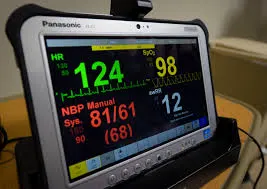
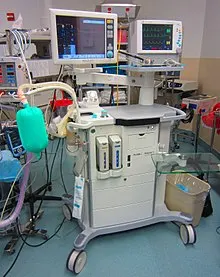
| S.No | Specifications |
| 1 | Patient Monitor, 5 Parameter |
| 2 | Description of Function |
| 2.1 | It should be suitable for usage in Emergency, Operation Room and ICU Capable of monitoring ECG, SPO2, Non Invasive Blood Pressure (NIBP), Respiration Rate and Temperature. |
| 3 | Operational Requirements |
| 3.1 | It shall operate on AC power supply as well as built-in battery |
| 4 | System Configuration |
| 4.1 | Five parameter Patient Monitor, portable with complete accessories |
| 5 | Technical Specifications |
| 5.1 | Monitor must be able to monitor ECG, Respiration, SpO2, NIBP and Temperature as a standard parameter. |
| 5.2 | At least 12” high resolution TFT display with LED backlight with touch screen. |
| 5.3 | Display waveform: simultaneously display of at least 10 waveforms along with related numerical parameters on single screen. |
| 5.4 | Monitor must have Lithium ion Battery. More than 3 hour battery Backup. |
| 5.5 | Should have Adult, Pediatric and neonatal measurement mode. |
| 5.6 | Shall have Protection system against defibrillator discharge. |
| 5.7 | Shall have atleast 72-hour ECG waveform data storage and recall with more than 2000 hour data trends, graphics and tabular view. |
| 5.8 | 2000 groups event, ARR and SpO2 storage |
| 5.9 | The monitor should be able to configure automatically for new parameters as they are connected. |
| 5.10 | Should have alarm indicators with different alarm tones and visible alarm lights indicators for different issues. |
| 5.11 | The key volume, alarm volume and beat volume should be adjustable according to clinical practices and/or preferences. |
| 5.1 | Shall have Integrated 3 channel thermal Printer to record the events. |
| 5.13 | Connection and interface: Should have network capability to connect central monitoring system. |
| 5.14 | Clinicians should be able to “freeze” applications at the bedside and have access to real-time ECG monitoring and other information at the same time. |
| 6 | NIBP |
| 6.1 |
Technique: Oscillometric Measurement mode: Manual , Automatic and STAT |
| 6.2 | Measuring time: <30 seconds (typical adult cuff) |
| 6.3 |
Measuring range: |
| 7 | SpO2 |
| 7.1 | Transducer: Dual-wave length LED, SpO2 measuring range: 0% ~ 100% SpO2 measuring accuracy: 2% for range from 70% to 100% |
| 7.2 | PR measurin range: 0 to 250 bpm. Accuracy +/- 2% |
| 8 | ECG |
| 8.1 | HR measuring range: 15bpm ~ 350bpm HR measuring accuracy: ± 1 % or ± 2bpm |
| 9 | TEMP |
| 9.1 | Measuring range : 21.0°C ~ 50.0°C Measuring accuracy: ±0.2°C for range from 25.0°C ~ 45.0°C |
| 10 | RESP |
| 10.1 | RR measuring range: 0 rpm ~ 120 rpm , RR measuring accuracy: ±5% or ±2rpm |
| 13 | Accessories, spares and consumables |
| 13.1 | All standard accessories, consumables and parts required to operate the equipment, including all standard tools and cleaning and lubrication materials, to be included in the offer. |
| 13.2 |
• NIBP reusable cuffs with hose of 3 various sizes (neonate, pediatric and adult) – 1 no. each. • ECG:- 3/5 lead ECG cable and wire- 1 set • TEMP:- Skin temperature probe- 1 set |
| 14 | Operating Environment |
| 14.1 | The product offered shall be designed to be stored and to operate normally under the conditions of the purchaser’s country. The conditions include Power Supply, Climate, Temperature, Humidity, etc. |
| 14.2 | Power supply: 220 – 240 VAC, 50Hz fitted with appropriate plug. |
| 15 | Standards and Safety Requirements |
| 15.1 | Must submit ISO13485:2003/AC:2007 for Medical Devices AND |
| 15.0 | Must Submit CE (93/42 EEC) Directive certificate and USFDA approved product certificate. |
| 15.4 | Shall meet IEC 61010-2-081 safety requirements for electrical equipment. |
| 16 | User Training |
| 16.1 | Must provide user training (including how to use and maintain the equipment). |
| 17 | Warranty |
| 17.1 | Comprehensive warranty for 2 years. |
| 17.2 | Maintenance Service During Warranty Period |
| 12.3 | During the warranty period supplier must ensure corrective/breakdown maintenance whenever required. (written document) |
| 18 | Installation and Commissioning |
| 18.1 | The bidder must arrange for the equipment to be installed and commissioned by certified or qualified personnel; any prerequisites for installation to be communicated to the purchaser in advance, in detail. |
| 19 | Documentation |
| 19.1 | User (Operating) manual in English. |
| 19.2 | Service (Technical / Maintenance) manual in English. |
| 19.3 | Certificate of calibration and inspection from factory. |
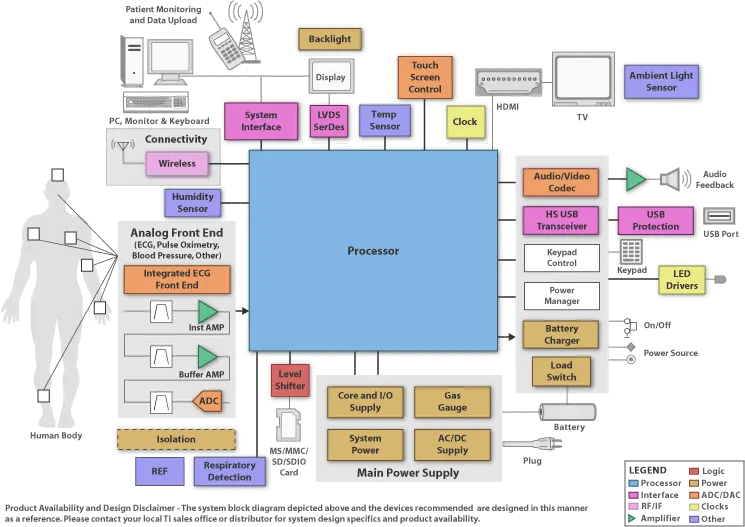
Block Diagram:
Display Screen :-
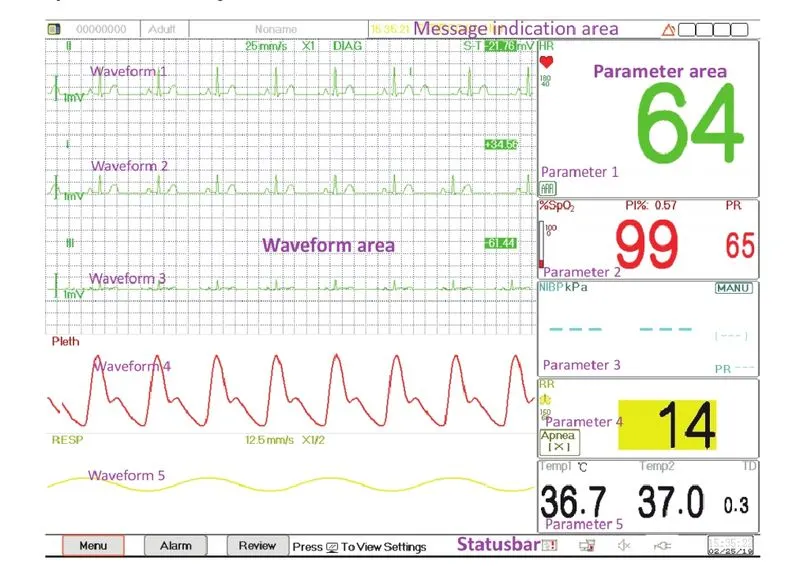
Generally, when there is no pop-up window on the screen, the screen layout of the device includes Message indication area, Waveform area, Parameter area and Statusbar. Message indication area is on the top of the screen and Statusbar is on the bottom; Parameter area is on the right of the screen and Waveform area is on the left.
Message Indication Area:
It shows patient information (including gender, patient ID, patient type and name), physiological alarm sources, alarm sound status and current date.
Status bar:
It shows "Menu", "Alarm", "Review" button, printer status, network connection status, power supply status, pilse beep status, current time.
Parameter Area:
It displays each parameter's value, unit and icon etc., Move navigation knob to focus on a certain parameter panel, the panel such as ECG parameter panel, will be highlighted, then press the navigation knob to enter corresponding parameter setting screen.
Waveform Area:
Generally, waveform area in the current view displays the waveform, parameter label and other information.
Intensive Care Unit (ICU) :-
Intensive care unit (ICU) is a dedicated facility for critically ill patients who require invasive life support, high levels of medical and nursing care and complex treatment. These specialty units are designed, equipped and staffed to treat critically ill patients or those requiring specialized care and equipment.
It has capability of continuous observation of vital functions of patients and can support these functions more promptly and efficiently than can be done elsewhere in the hospital.
Location :
It is preferable to have the ICU in close proximity to the operation theaters, accident and emergency department and medical imaging departments.
Environmental control:
Rooms in the ICU should be sound proof and air conditioned with facilities of environmental control for each room. Airconditioning should ensure 50-55% humidity, and 20-25°C temperature.
The following are recommended for ventilation in ICU:
➤ There should be 8-10 air changes per hour and positive air pressure maintained.
➤ Special provision of exhaust to eliminate any odour in ICU as and when required.
Beds:
Mechanically or electrically operated beds should be provided in the ICU. These should be capable of being readily adjustable to therapeutic positions and should have X-ray transparent bedsteam bottoms.
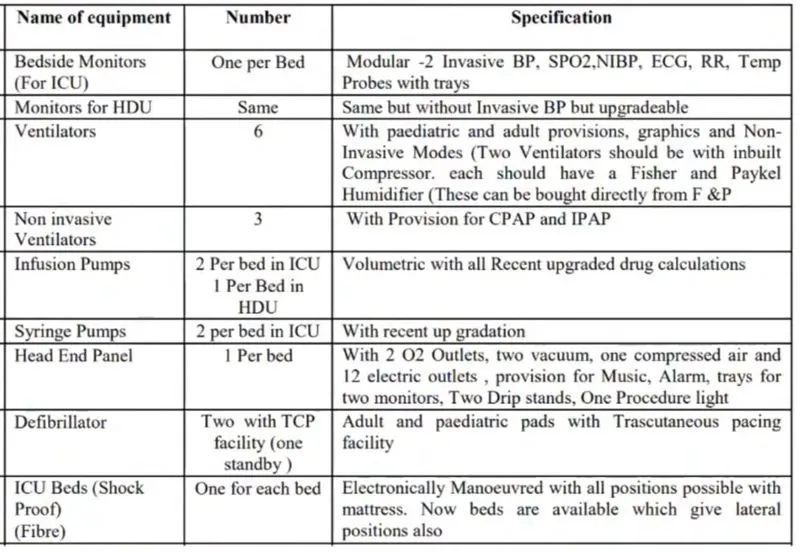
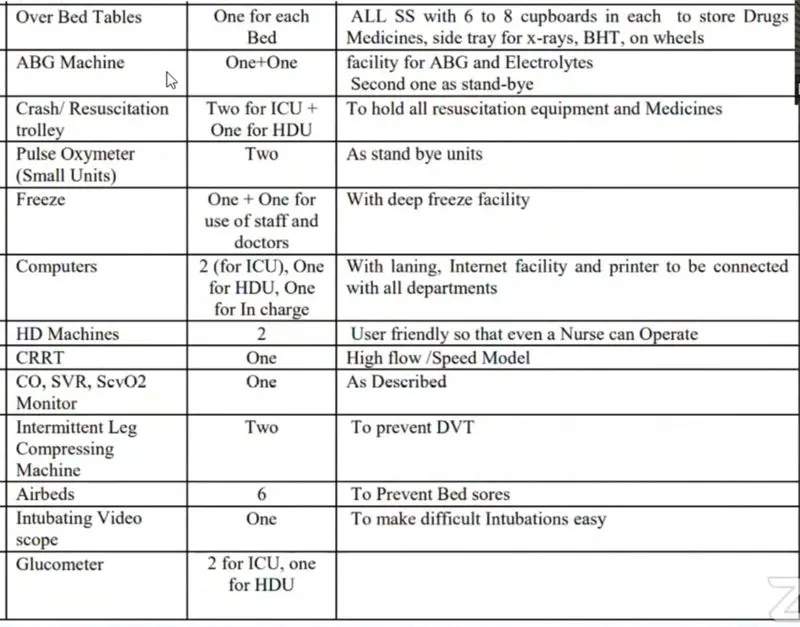
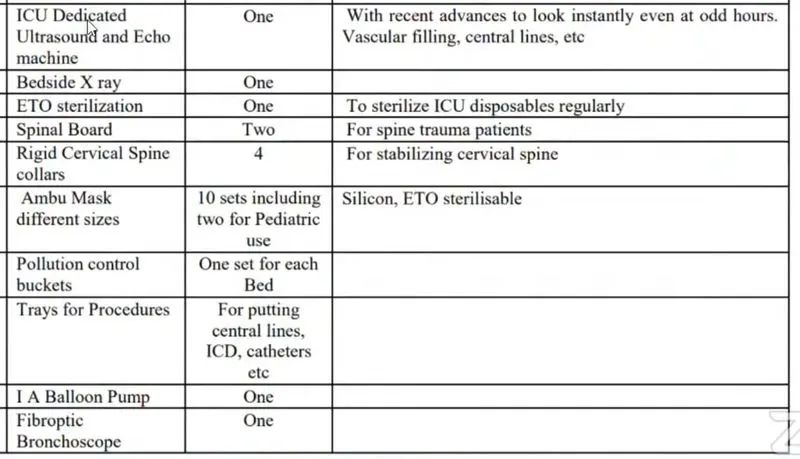
Equipments with specifications :-
Nursing Station :
Location should provide optimum visual observation of patients.
There should be provision for computerized individual monitors at the bed side with facilities for automatic communication to the computer located at the nursing station.
The nurses fatigue factor should also be considered while planning. U-shape or semi-circular layouts minimises the nurses fatigue factor.
ALARMS :-
Alarms, triggered by a vital sign that appears abnormal or by technical problems of the monitor, are indicated to the user by visual and audible alarm indications.
Alarm Categories:
By nature, the monitor’s alarms can be classified into three categories: physiological alarms, technical alarms and prompt messages.
1. Physiological alarms
Physiological alarms, also called patient status alarms, are triggered by a monitored parameter value that violates set alarm limits or an abnormal patient condition. Physiological alarm messages are displayed in the physiological alarm area.
2. Technical alarms
Technical alarms, also called system status alarms, are triggered by a device malfunction or a patient data distortion due to improper operation or mechanical problems. Technical alarm messages are displayed in the technical alarm area.
3. Prompt messages
Prompt messages are not alarm messages. Apart from the physiological and technical alarm messages, the monitor will show some messages telling the system status or patient status. Messages of this kind are included in the prompt message category and usually displayed in the prompt information area. Some prompt messages that indicate arrhythmia events are displayed in the physiological alarm area. For some measurements,
their related prompt messages are displayed in their respective parameter windows.
Alarm Lamp:-
| Lamp colour | Alarm level | Alarm event |
| Red flashing | High priority alarm | ECG Brady, ECG Tachy, Low battery, Vital sign alarm |
| Yellow flashing | Medium priority alarm | Lead off, Probe off, Sensor off, VE RonT, SVE RonT |
| Yellow | Low priority alarm | Other Arrhythmia event |
| Green | Normal |
Data Management :-
In the Patient Info. window, the operator can new add, edit, delete and apply a patient’s document as the current document for monitoring.
To edit a patient document requires the corresponding password. In “Patient Info” window, pressing “Edit” button, and if the password is entered correctly, then “Edit Patient Info.” window pops up on the screen. The item in grey is nonadjustable. Note: no password is needed to edit the default patient document. In the default patient document, only the patient type can be modified, and other items are not editable.
To delete a patient document requires the corresponding password. Notes:
1. When a patient document is deleted, all his corresponding records (ECG waveforms, ARR events, Alarm events, NIBP list etc.) will be deleted and can not be recovered.
2. The system prohibits to remove the default patient and the current patient documents.
Exporting data
USB data exporting function is available for the monitor with Plug-in module Series II, Series III and Series IV. Connect the USB disk (stick memory) to the USB data interface on the rear panel of the patient monitor and export the data successfully.