Project 1
Objective:
The aim of this challenge is to perform a a frequency analysis of a bridge to find out the natural frequencies and corresponding mode shapes. Such analysis plays critical role in safety of the bridges.
Case setup and execution:
First the parts of the assembly, namely, pillar and road were created in the Solidworks. The road was 100 m long, 10 m wide and 0.3 m thick. The pillar was 5 m high, 1 m wide and 1 m thick.
First the assembly of road and pillars was created.
Then from the “Solidworks add-ins”, “Simulation” option was selected. This opened the simulator GUI of the software.
Here the type of simulation was selected as "Frequency".
Then all the parts were assigned AISI 1020 material.
By right-clicking the “Fixtures” option, “Fixed geometry” option was selected. The bottom faces of the pillars and the 2 end faces of the road were given fixed support.
No external force was applied.
Local interactions were created to model the bonded contact between the pillars and road.
Then by right-clicking on “mesh” the “create mesh” option was selected to mesh the entire model.
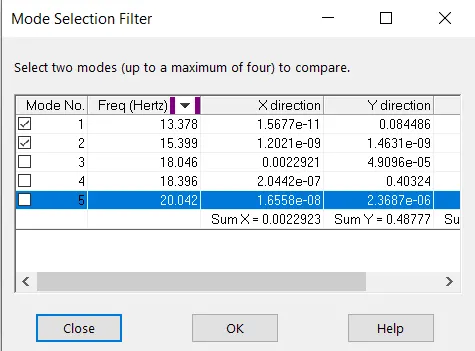
Then the “Run this study” option was selected to solve the simulation. From results, by right clicking on results, "compare modes" option was used to compare the frequencies of all the modes.
The results are presented below:
Results:
The mode shapes are as below:
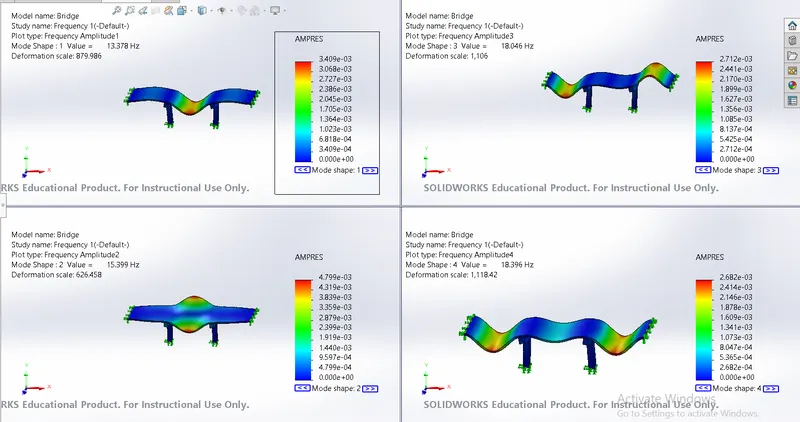
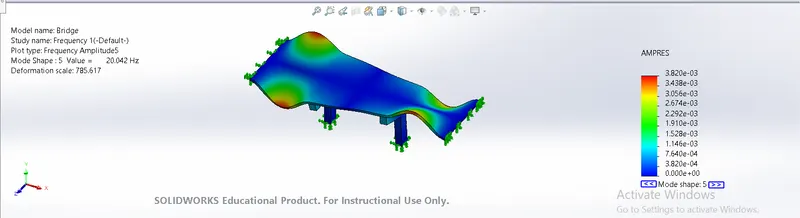
The natural frequencies are:
Conclusion:
Thus 5 mode shapes of the vibrations of the bridge were found out. The natural frequncy is the maximum in the mode shape 5 i.e. 20.042 Hz and minimum value is 13.378 Hz. Thus the simulation was successfully completed.