Project 1
Project 1 deals with the development of a forward energy-based fuel consumption model of a conventional vehicle.
The main goal of this project is to get familiar with the modeling process, writing scripts in Matlab, modeling in Simulink, analyzing data and generating plots.
Deals with the development of a forward energy-based fuel consumption model of a conventional vehicle.
Aim:
- Build Simulink model using blocks and complete the vehicle model.
- Writing scripts in MATLAB to load all the variables required for running the Simulink model.
- Tabulate the fuel economy numbers (kmpl) for UDDS and HWFET cycle.
- Plot the time trace for engine, transmission input, transmission output and wheel speed on one plot.
- Plot engine torque, engine power, fuel rate and fuel consumption using subplots
- Plot accelerator and brake pedal, gear command, vehicle desired and actual speed vehicle distance using subplots.
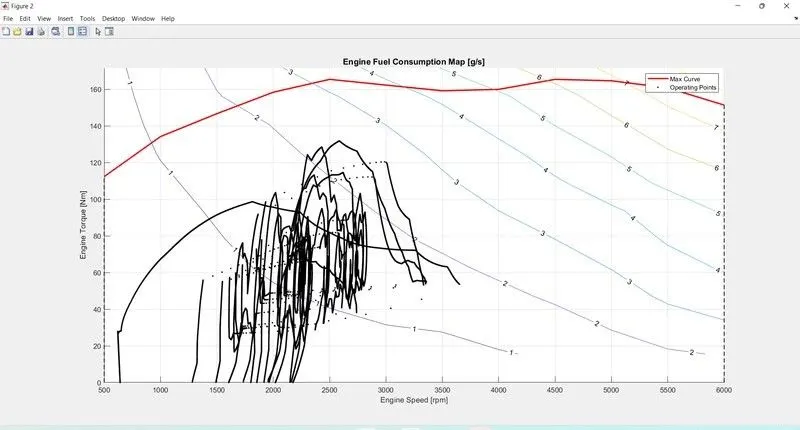
- Plot the engine operating points on the engine fuel map.
- Generate the plots for both drive cycles
- Study of Conventional vehicle Simulink model and creates graphs.
- Conventional Vehicle:
- Conventional vehicles use an internal combustion engine fueled by gasoline or diesel to power the wheels. In this the heat engine uses the principle of heat release through combustion f a fuel with an oxidizer in a combustion chamber to create expanding gases which pushes against a piston creating force and torque output.
- In this vehicle engine converts chemical energy stored in the fuel into heat which is used to produce useful work. Typically use fossil fuels like petroleum (petrol and diesel). The most popular type of engine is used in this system is 4 stroke reciprocating engine. Engine in cylinder process can be represented by ideal thermodynamic cycles such as Otto cycle, Diesel cycle. Otto cycle is a ideal cycle that describes the cycle process for spark ignited SI engine, and the Diesel cycle is the ideal cycle that describes the cycle process for a compression ignited Cl engine. Energy and performance of vehicle: In this system power demand on the wheel need to instant supplied by the powertrain. In other word the power coming from the powertrain dictates the power demand on the wheels (as per performance viz, acceleration, speed etc is determined by it. In tis vehicle the powertrain is consists of an engine connected to the wheels through a transmission therefore the power comes from the engine through the transmission. Conventional powertrain efficiency:
- The engine generates power by converting chemical energy stored into the mechanical energy by the process of combustion. This process of energy conversion also has an efficiency and the energy input is in the form of fuel consumption.
- Instantaneous fuel consumption is given as
Mf=Pe/(Ee.Et.QLHV)
Where,
mf-mass flow rate in [kg]
pe-Power of engine
pt-power of transmission
nt-efficiency of transmission
ne-efficiency of engine
QLHV-calorific value lower heating value of fuel.
In this system of IC engine if power at the wheels is zero the engine is idling and still consumes some fuel to overcome the engine drag loss and keep it spinning this is the idling fuel consumption and know as idling process. Above mentioned formula is applicable only when the wheel power is strictly power. When the wheel power is negative either the engine is disengaged and idling or the engine is engaged and providing some engine braking due to the engine drag losses. The engine is consuming fuel when it is idling but even for engine braking the engine might be consuming some fuel. The fuel consumption not only depend on the power requirement at the wheels but also is required to generate power to run the various engine and vehicle accessory loads.
Energy based models- To model the internal physical properties of the element and the losses there are basically two kinds of approach.
- Map based models: Elements are modeled using maps which characterized the relationship between the input and output, output and losses, etc.
- Analytical models: Elements are modeled using physical equation that represent the internal dynamics. These are the two extremes most models are a combination of the two with some dynamics models analytically and for some using maps. In this model We use Forward Model It also known as dynamic simulation. Dynamic models are used for detailed simulations. In this model force/torque/power is the input and the vehicle state variable velocity and acceleration are outputs. The models and simulations are more realistic due to physical casualty hence appropriate for control development. There is feedback loop to meet the desired vehicle state. It is mainly used to simulate a vehicle on a driving cycle to analyse the dynamic behaviour of the system helps significantly in control development.
Physical model of conventional vehicle using Simulink:
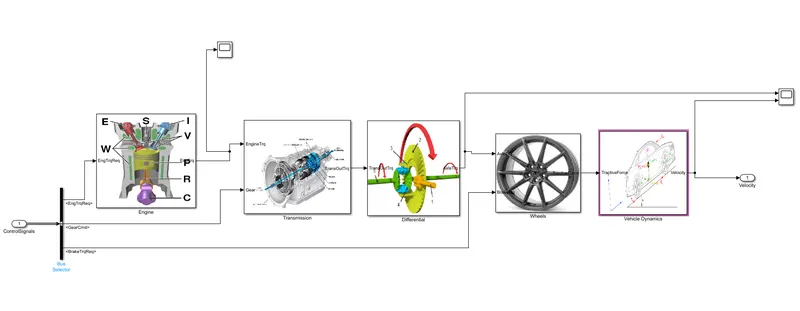
Fig.Simulink model of conventional vehicle.
Vehicle systems blocks are as follows:
1.Engine:
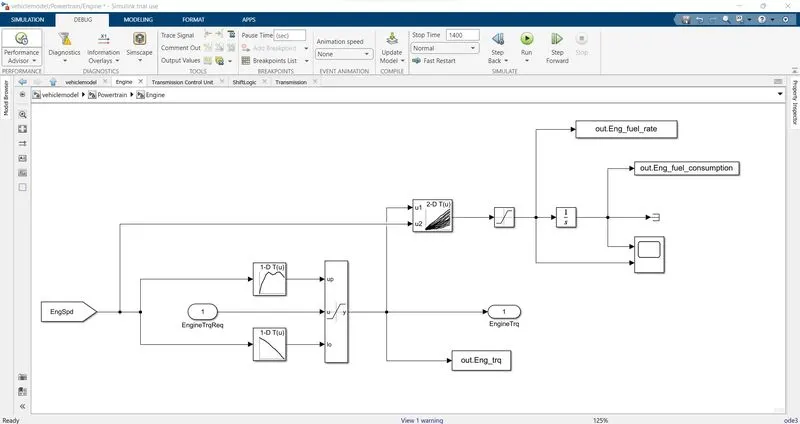
- Plots of Engine Model:
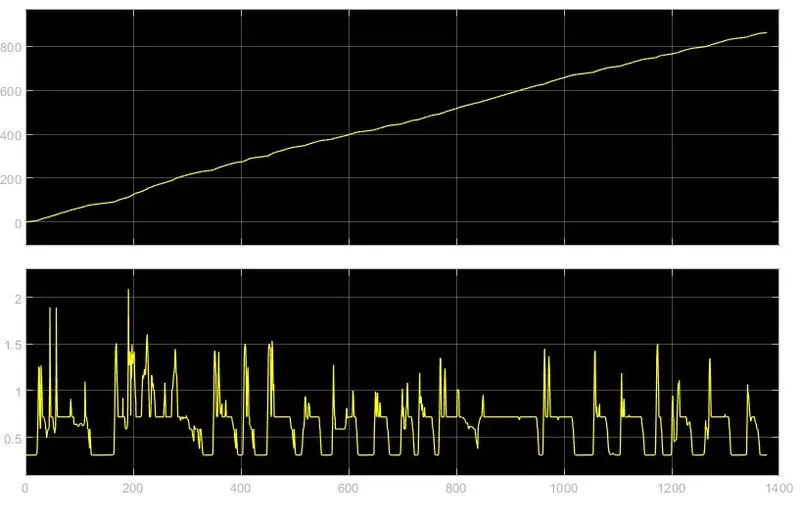
The above graph shows the relation between the speed fuel consumption and fuel rate which is plotted on x and y axis.
2.Transmission:
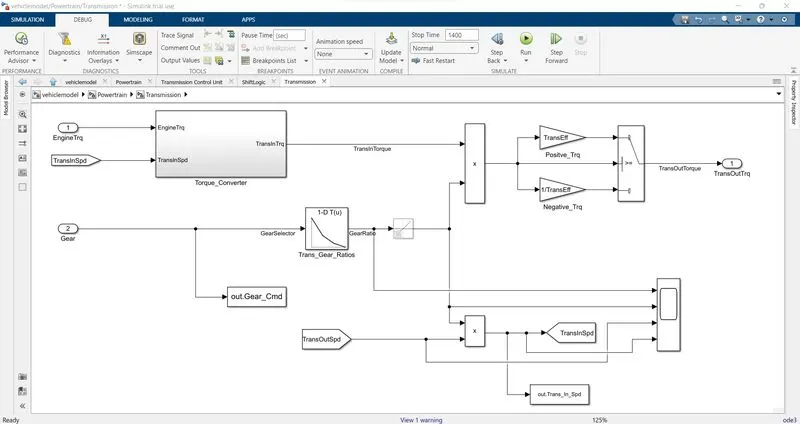
- Plots of Transmission Model:
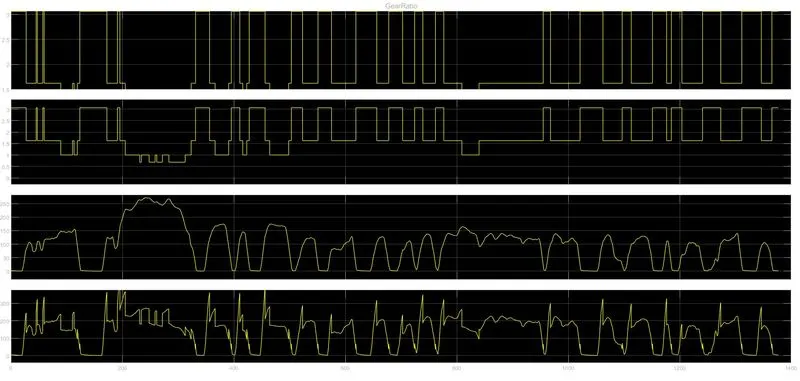
The above graph shows the output of transmission system with the help of scope.
3.Differential:
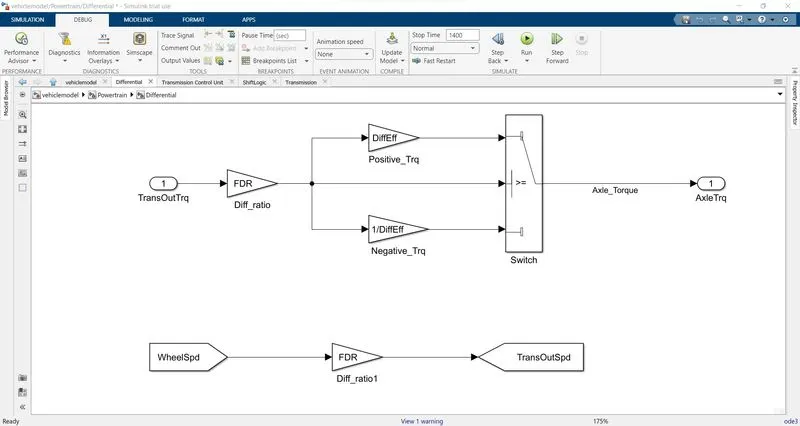
4.Wheel:
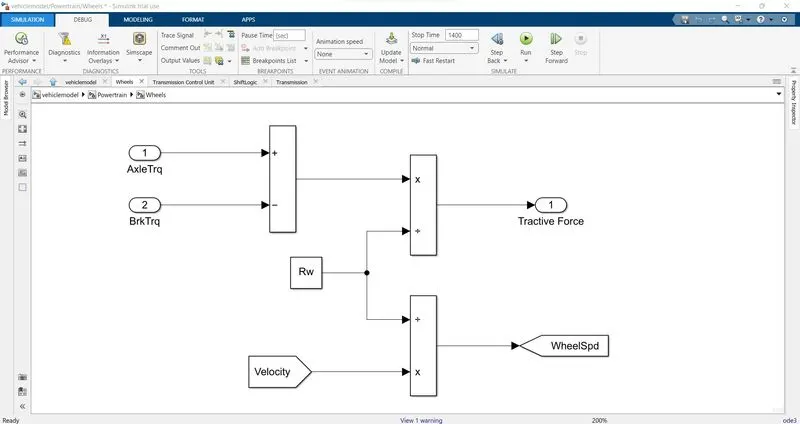
5.Vehicle Dynamics:
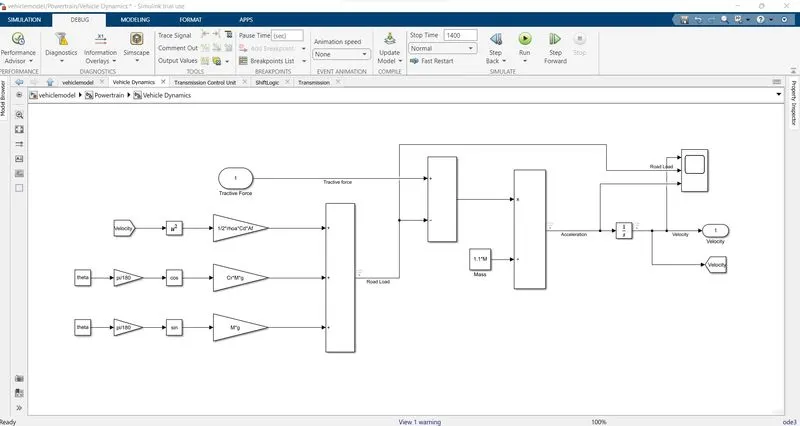
Plots of Vehicle Dynamics Model:
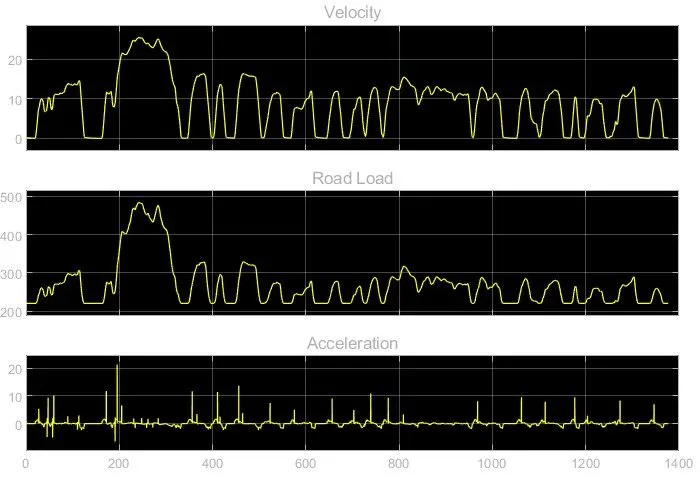
The above fig shows the output of vehicle dynamics graphs which indicates the velocity, acceleration, road load using the scope.
Matlab Script:
Used to load all the variables required for running the Simulink model and for post processing. The drive cycle selection is also done here. Before running the Simulink-vehicle model, run this initialization script
%%%%%%%%%%%%%%%%%%%%%%%%%%%%%%%%%%%%%%%%%%%%%%%%%%%%%%%%%%%%%%%%%%%%%
%% Skill-Lync -> Hybrid Drives Development
% Project 1 - Conventional Vehicle Model

% Description:

%% Initialization File
% Initialization file for loading the variables for the Conventional vehicle simulation model

%% Vehicle Parameters
M = 1500;       % Vehicle weight [kg]
Cr = 0.015;     % Rolling resistance coefficient
Rw = 0.35;      % Rolling radius [m]
Cd = 0.33;      % Drag coefficient
Af = 2;         % Frontal area [m2]
rhoa = 1.225;   % Air density [kg/m3]
Vwind = 0;      % Wind velocity [kmph]
g = 9.81;       % Gravitational acceleration [m/s2]
theta = 0;      % Slope [deg]
myu_road_tire = 1; % Coefficient of friction between tire - road interface

%% Powertrain Parameters
FDR = 3.73;                         % Final Drive Ratio / Diff Ratio
DiffEff = 0.99;                     % Differential efficiency (assumed independent of operating conditions)

NumGear = 4;                        % Number of gears in transmission
TransGear = 1:NumGear;            % Transmission Gears
TransRatio = [3.06, 1.62, 1, 0.7];  % Corresponding Transmission ratios
TransEff = 0.90;                    % Transmission efficiency (assumed independent of operating conditions)

TC_SR = [0, .5, .6, .7, .8, .87, .92, .94, .96, .97, 1];   % Torque Converter Speed Ratio (Matlab default) -> TurbSpd/PumpSpd
TC_TR = [2.232, 1.5462, 1.4058, 1.2746, 1.1528, 1.0732, 1.0192, 1, 1, 1, 1];   % Torque Converter Torque Ratio (Matlab default) -> TurbTrq/PumpTrq
TC_Cf = 1e-4 * [.72558, .66322, .63463, .59042, .51331, .4144, .29287, .22444, .12186, .04386, 0]; % Torque Converter Capacity Factor (Matlab default) -> PumpTrq/PumpSpd^2 [Nm/rpm^2]

load Vehicle_Data/Engine_data_1_9L_Saturn_95kW
load Vehicle_Data/Trans_Shift_map

%% Driver Parameters
Kp = 10;                    % P gain for driver PI model
Ki = 1;                     % I gain for driver PI model
Drive_Cycle_Select = 1;     % Drive cycle selection

% Drive cycle values in m/s

if Drive_Cycle_Select == 1
    load DriveCycles/UDDS;

elseif Drive_Cycle_Select == 2
    load DriveCycles/HWFET;

elseif Drive_Cycle_Select == 3
    load DriveCycles/FTP;

elseif Drive_Cycle_Select == 4
    load DriveCycles/US06;

elseif Drive_Cycle_Select == 5
    load DriveCycles/NEDC;

elseif Drive_Cycle_Select == 6
    load DriveCycles/WLTP;

end

time_end = cyc_time(end);
vel_end = cyc_vel(end);
first we have to run the model for UDDS cycle, by putting Drive cycle select = 1 in Above program
- The below shown is the code for the parameters given above to draw the various plots in the MATLAB
%% Skill-Lync -> Hybrid Drives Development
% Project 1 - Conventional Vehicle Model

% Description:
% The following file is to used with the Initialization file and Simulink
% results for post-processing of the data.
% The file is incomplete, has some examples of how the data is imported
% into a readable format, data analysis and plotting examples.
% Based on the project task, use commands in a similar format as given
% below, to analyse the data and generate required plots.
% You can change variable names if desired

%% Post-Processing File
%  File for post-processing the Conventional vehicle simulation model data

%% Renaming variables
Time = out.tout;
Acc_Pdl = out.Acc_Pdl;          % Accelerator pedal [%]
Brk_Pdl = out.Brk_Pdl;          % Brake pedal [%]
Gear_Cmd = out.Gear_Cmd;        % Transmission gear
Trans_In_Spd = out.Trans_In_Spd*30/pi;  % Transmission input speed [rpm]
Trans_Out_Spd = out.Trans_Out_Spd*30/pi;% Transmission output speed [rpm]
Eng_Trq = out.Eng_Trq;          % Engine brake torque [Nm]
Eng_Spd = out.Eng_Spd*30/pi;    % Engine speed [rpm]
Eng_Fuel_Consump = out.Eng_Fuel_Consumption;    % Engine fuel consumption [g]
Veh_Dist = out.Veh_Dist/1000;   % Distance traveled by vehicle [km]
Veh_Spd = out.Veh_Spd*18/5;     % Vehicle speed [kmph]
Eng_Fuel_Rate=out.Eng_Fuel_Rate


%% Data Analysis
Eng_Pwr = Eng_Spd.*pi/30.*Eng_Trq/1000;   % Engine brake power [kW]
rho_petrol = 0.7197;                    % Density of petrol [kg/L]
kmpl = Veh_Dist(end)/(Eng_Fuel_Consump(end)/1000/rho_petrol);    % Fuel economy [kmpl]


%% Plotting vehicle characteristics time trace
figure(1)
subplot(3,1,1)
hold on
grid on
plot(Time, Acc_Pdl, 'linewidth', 1, 'Color', 'black');
plot(Time, Brk_Pdl, 'linewidth', 1, 'Color', 'red');
ylabel('Pedal [%]')
xlim([0, Time(end)]);
legend('Accel','Brake');

subplot(3,1,2)


plot(Time, Trans_In_Spd, 'linewidth', 1, 'Color', 'black');
plot(Time, Trans_Out_Spd, 'linewidth', 1, 'Color', 'red');
ylabel('Speed [rpm]')
xlim([0, Time(end)]);
ylim([0, 6000]);
legend('Trans Input','Trans Output');
subplot(3,1,3)
hold on
grid on
plot(Time, Gear_Cmd, 'linewidth', 1, 'Color', 'black');
xlim([0, Time(end)]);
xlabel('Time [s]');
ylabel('Gear');


%% Plotting engine operating points on engine fuel map
figure(2)
hold on
grid on
title('Engine Operating Points','fontsize',12);
p1=plot(Eng_map_spd*30/pi,Eng_max_trq,'linewidth',2,'color','r');
p2=line([Eng_map_spd(end)*30/pi Eng_map_spd(end)*30/pi],[0 Eng_max_trq(end)]);
set(p2,'linewidth',1,'linestyle','--','color','k');
p3=line([Eng_map_spd(1)*30/pi Eng_map_spd(1)*30/pi],[0 Eng_max_trq(1)]);
set(p3,'linewidth',1,'linestyle','--','color','k');
[c,h] = contour(Eng_map_spd'*30/pi,Eng_map_trq,Eng_fuel_map');
clabel(c,h);
xlabel('Engine Speed [rpm]');
ylabel('Engine Torque [Nm]');
title('Engine Fuel Consumption Map [g/s]');
p4 = plot(Eng_Spd,Eng_Trq,'.','color','k');
legend([p1 p4],{'Max Curve','Operating Points'});
axis([Eng_map_spd(1)*30/pi Eng_map_spd(end)*30/pi 0 Eng_map_trq(end)]);


figure(3)
subplot(2,2,1)

plot(Time, Eng_Trq, 'linewidth', 1, 'Color', 'black');
xlabel('Time');
ylabel('Eng Torque');
hold on
grid on
legend('Eng Trq');


subplot(2,2,2)
plot(Time, Eng_Pwr, 'linewidth', 1, 'Color', 'blue');
xlabel('Time');
ylabel('Eng Power');
hold on
grid on
legend('Eng Pwr');


subplot(2,2,3)
plot(Time, Eng_Fuel_Rate, 'linewidth', 1, 'Color', 'red');
xlabel('Time');
ylabel('Eng Fuel Rate');
hold on
grid on
legend('Eng Fuel_Rate');

subplot(2,2,4)
plot(Time, Eng_Fuel_Consump, 'linewidth', 1, 'Color', 'Green');
xlabel('Time');
ylabel('Eng fuel consumption');
hold on
grid on
legend('Eng Fuel_Consump');
- Plot the time trace for engine, transmission input, transmission output and wheel speed on one plot
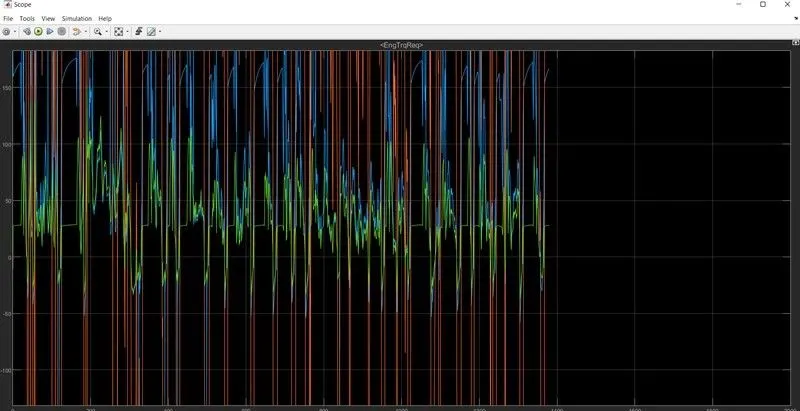
Fig. Time trace for engine, transmission input, transmission output and wheel speed
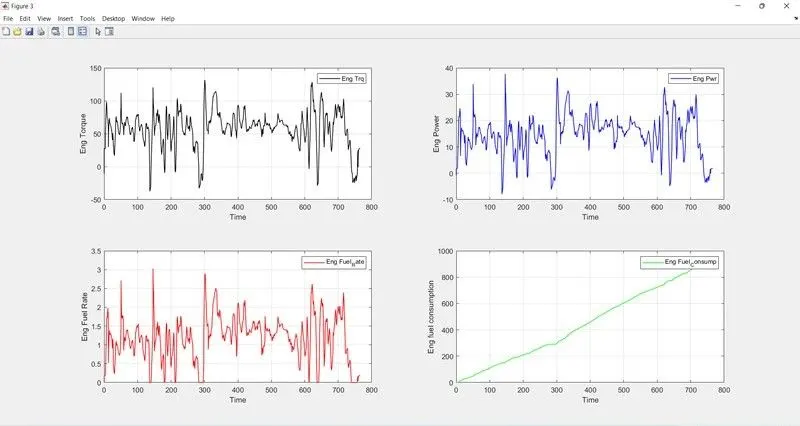
- Plot engine torque, engine power, fuel rate and fuel consumption using subplots.
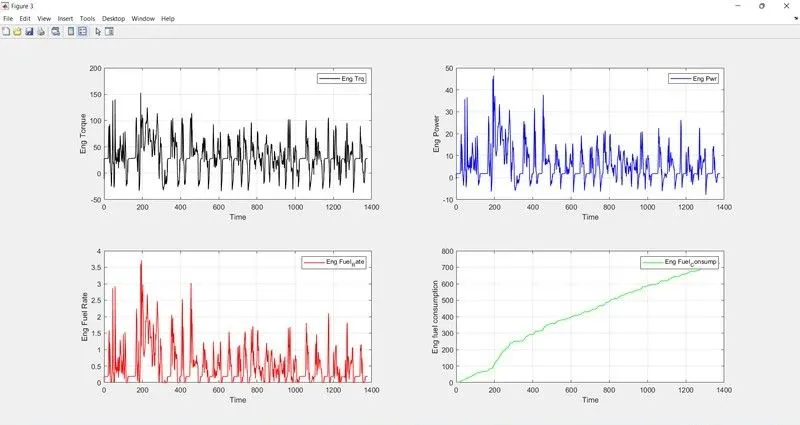
Fig. Time Vs Torque,power,fuel rate, fuel consumption
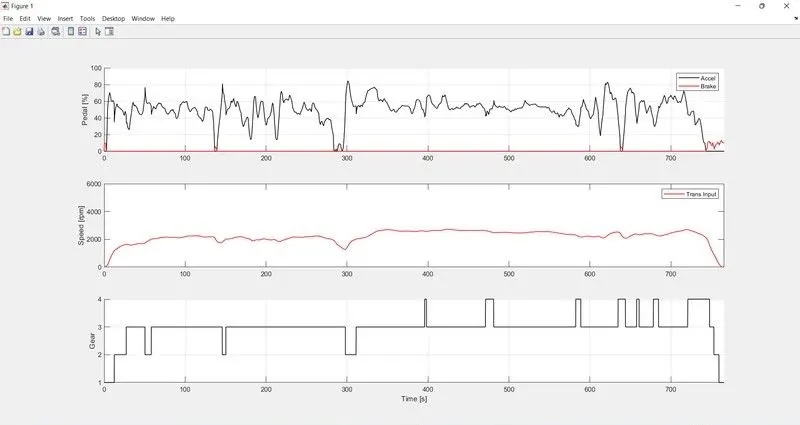
- Plot accelerator and brake pedal, gear command, vehicle desired and actual speed, vehicle distance using subplots.
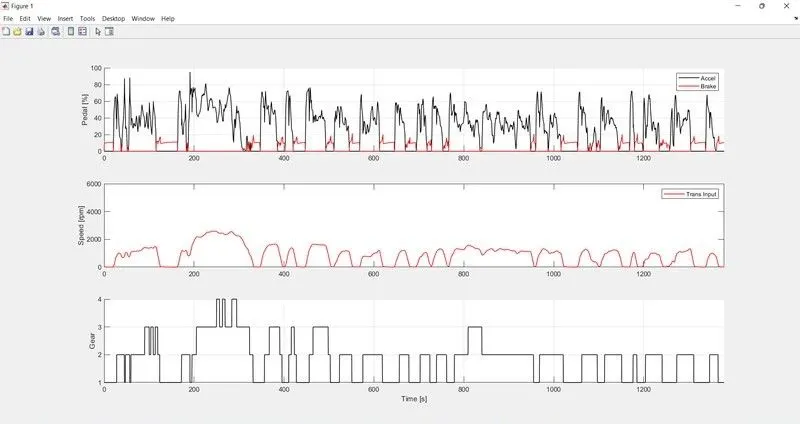
Fig. Accelerator and brake pedal, gear command, vehicle desired and actual speed, vehicle distance
- Plot the engine operating points on the engine fuel map.
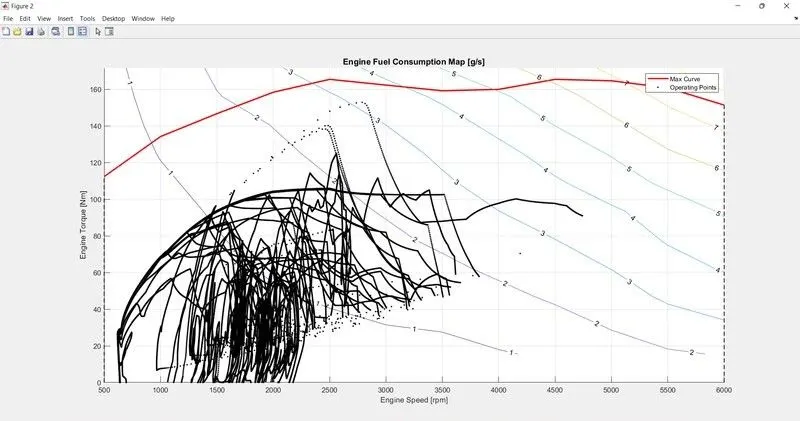
Fig. Engine operating points on the engine fuel map
In this system of IC engine if the power at the wheels is zero the engine is idling and still consumes some fuel to overcome the engine drag loss and keep it spinning this is the idling fuel consumption and know as idling process. When the wheel power is negative either the engine is disengaged and idling or the engine is engaged and providing some engine braking due to the engine drag losses. The engine is consuming fuel when it is idling but even for engine braking the engine might be consuming some fuel. The fuel consumption not only depend on the power requirement at the wheels but also is required to generate power to run the various engine and vehicle accessory loads.
- Conclusion-
Total power increasing slowly as increasing the rolling resistence,aerodynamic drag and inertial resistance
- To change it to HWEF cycle we just have to switch the cycle to the 2nd number which is in the MATLAB. By selecting the HWFET cycle we plot the graphs for HWFET cycle. And conclude the Result of both cycles that which is better one. In the 1st program where drive cycle select 1 is written instead of 1 we just have to go with 2 to switch the cycle to the HWFET
- Plot the time trace for engine, transmission input, transmission output and wheel speed on one plot
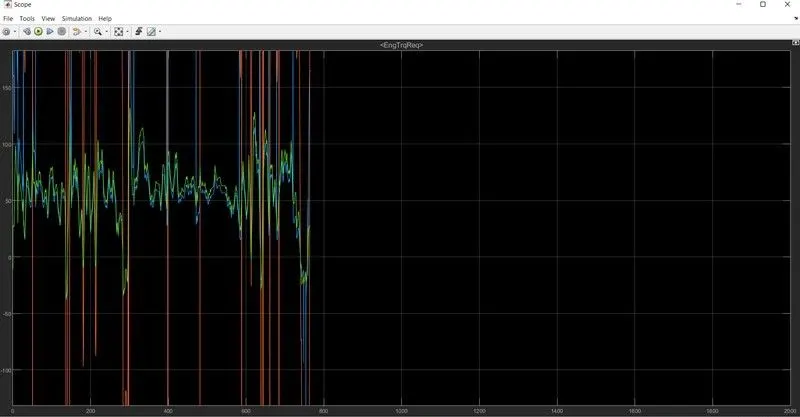
- Plot engine torque, engine power, fuel rate and fuel consumption using subplots.
- Plot accelerator and brake pedal, gear command, vehicle desired and actual speed, vehicle distance using subplots.
In this system of IC engine if the power at the wheels is zero the engine is idling and still consumes some fuel to overcome the engine drag loss and keep it spinning this is the idling fuel consumption and know as idling process. Above mentioned formula is applicable only when the wheel power is strictly power. When the wheel power is negative either the engine is disengaged and idling or the engine is engaged and providing some engine braking due to the engine drag losses. The engine is consuming fuel when it is idling but even for engine braking the engine might be consuming some fuel. The fuel consumption not only depend on the power requirement at the wheels but also is required to generate power to run the various engine and vehicle accessory loads.
- Plot the engine operating points on the engine fuel map:
Conclusion:
Total Power is increase slowly as increasing aerodynamic drag and inertial resistance. but in this drive cycle bad impact occurs due to decreasing rolling resistance.
Result:
As comparing both cycles we used to UDDS drive cycle. Its best for asses of fuel consumption and Pollutants emission of vehicle in a normalised way.