Program in Matlab to simulate the forward kinematics of a 2R Robotic Arm.
OBJECTIVE :
- To write a program in Matlab to simulate the forward kinematic of a Robotic Arm with 2 linkages.
- To create an animation video of the plot
TERMINOLOGY:
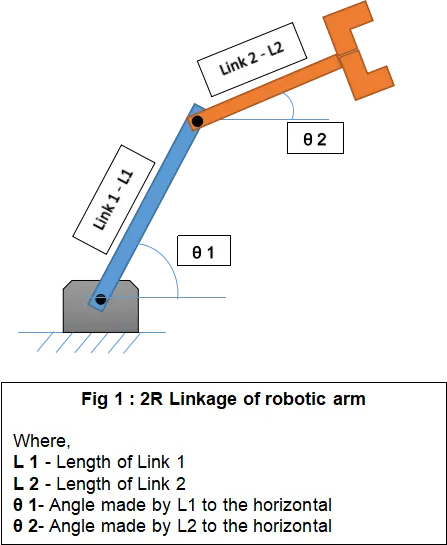
Kinematics : A branch of mechanics that describes the motion of object without reference to the cause of motion.The word “kinematics” comes from a Greek word “kinesis” meaning motion.
Forward Kinematics : It refers to calculate the relation between end effector and joint angles in linkage. In forward kinematics the angle (θ-Theta) made by the joint angles is the input which can be used to determine the coordinate of the end effector.
PROGRAMMING IN MATLAB :
Inputs:
L1 = 3 m
L2 = 2 m
θ 1 = Range of values between 0 to 135 degree
θ 2 = Range of values between 0 to 90 degree
In forward kinematcs we can calculate the coordinate of the manipulator or end effector if the angle is given.
Coordinates for Link 1:
X0 Y0 - Initial coordinate of Link 1
X1 Y1 - Final coordinate of Link 1
Coordinates for Link 2:
X1 Y1 - Initial coordinate of Link 2
X2 Y2 - Final coordinate of Link 2
clear all
close all
clc
%Program in Matlab to simulate the forward kinematics of a 2R Robotic Arm
%Inputs
L1 = 3;
L2 = 2;
theta1 = linspace(0,135,22.5);
theta2 = linspace(0,90,10);

ct=1;
for i = 1:length(theta1)
    THETA1= theta1(i);
     for j = 1:length(theta2)
         THETA2= theta2(j);

         X0 = 0;
         Y0 = 0;
         X1 = X0+L1*cosd(THETA1);
         Y1 = Y0+L1*sind(THETA1);
         X2 = X1+L2*cosd(THETA2);
         Y2 = Y1+L2*sind(THETA2);

         plot([X0 X1],[Y0 Y1],[X1 X2],[Y1 Y2],'linewidth',4);
         axis([-3 6 0 7])
         pause(0.03)
         M(ct)=getframe(gcf);
         ct = ct+1;

     end
end

movie(M);
videofile = VideoWriter('ForwardKinematics_sim.avi')
open(videofile);
writevideo(videofile,M);
close(videofile);
EXPLANATION
- An array of theta 1 and theta 2 is generated using the linspace command.
- A frame counting variable ‘ct’ is set to start at vaue 1.
- 2 for loops are initiated such that for each value of theta 1 position of the links is calculated using value of theta 2.They are stored in variables THETA 1 and THETA 2 respectively for each iteration.
- A kinematic link graph is generated using the plot command. Value of axis is set for X and Y.
- An array M is created to store the image generated of the current frame using the ‘getframe(gcf)’ function.
- The VideoWriter command creates a video file with the name ‘ForwardKinematics_sim’ and saves it in .avi format.
- The writevideo command insert the frame stored in array M into the videofile.
ERRORS
Error 1:
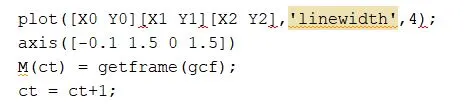
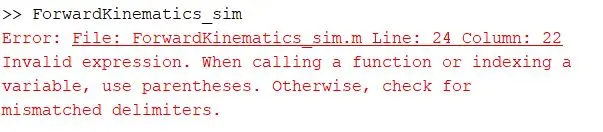
- This error was generated for not using , (comma) - delimiters.

Error 2:
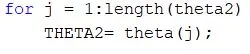
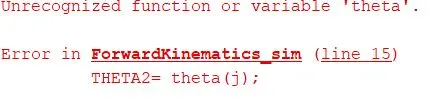
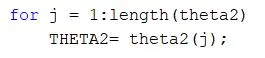
- Error was generate for not assigning the right array name to variable THETA2
- Array name was created as 'theta2'.
Error 3:
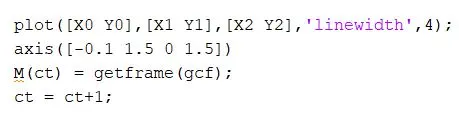

- Error was generated for assigning multiple input of X and Y values

RESULT:
A simulation video of forward kinematic of a robotic arm was created.