Menu

IIT Certification Programs

Workshops

Projects

Blogs

Careers

Student Reviews


More

Academic Training

Informative Articles

Find Jobs

We are Hiring!


All Courses

Choose a category

Loading...

All Courses

All Courses

logo

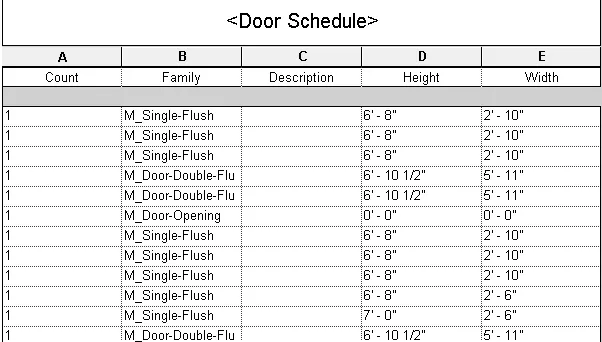
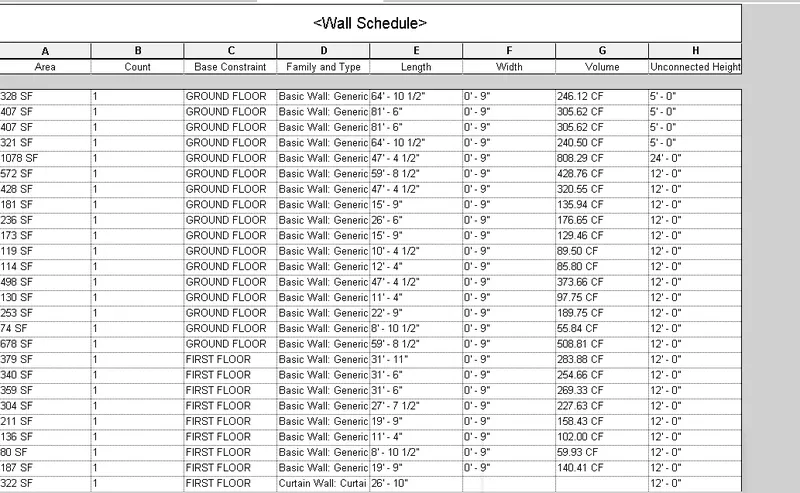
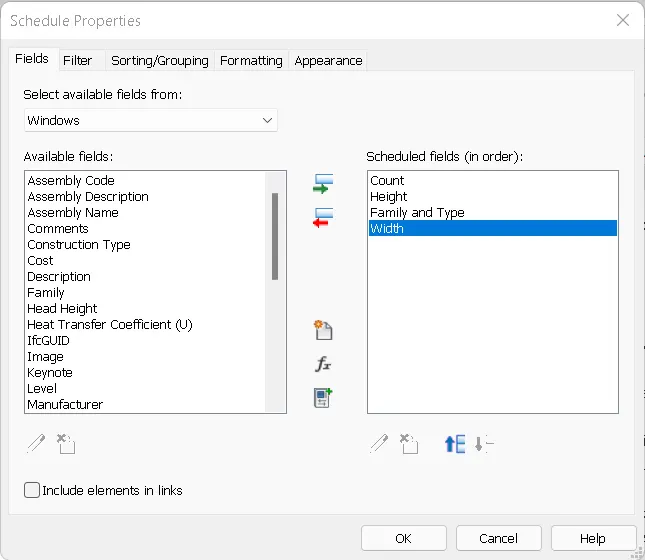
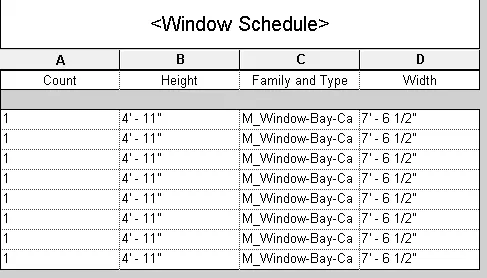
Preparing Schedule & Cost Estimation for a building using REVIT

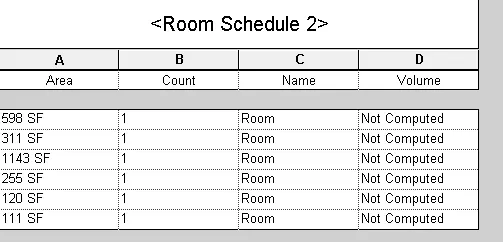
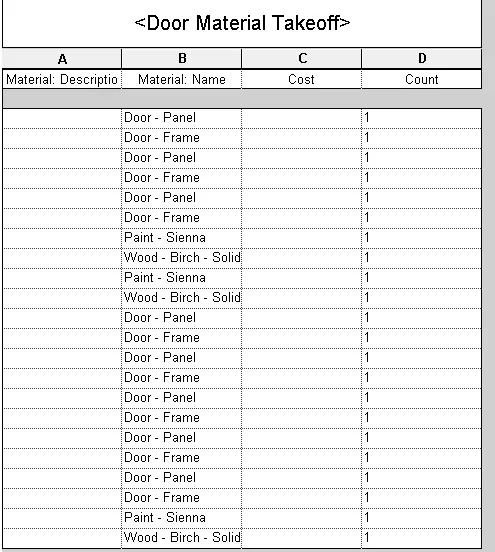
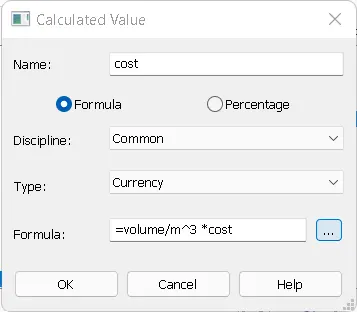
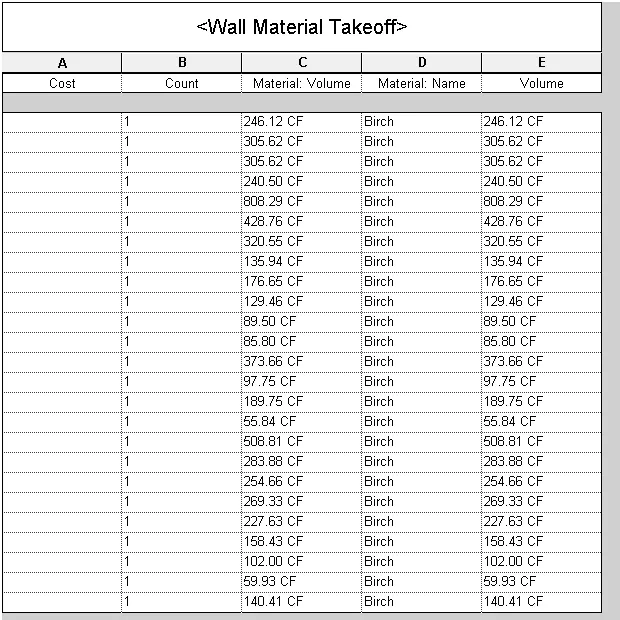
Q1 Aim:- to list the shot cut keys used to modify the model to create a section box use the command BX to add similar components use the command CS to reduce the thickness of the line using the command TL(thin line) to apply override setting use the command VG(visuality graphics) to increase the range of visibility use…
    Project Details

    Loading...

    Leave a comment

    Thanks for choosing to leave a comment. Please keep in mind that all the comments are moderated as per our comment policy, and your email will not be published for privacy reasons. Please leave a personal & meaningful conversation.

    Please  login to add a comment

    Other comments...

    No comments yet!
    Be the first to add a comment

    Read more Projects by Divya Vanaparthi (58)

    Week 3 Challenge

    Objective:

    Q1 1. primary loadcase to be considered in the design the self weight of the structure and the elements based on the material and its unit weight are considered as primary loads these are commonly termed as deadload   2.One way slab:- the slab which is supported on only two sides i.e., on parallel beams or parallel…

    calendar

    04 Jul 2022 02:33 AM IST

    • DESIGN
    Read more

    Week 2 Challenge

    Objective:

    Q1 1.How to assign a circular section to the column draw the column with a certain height then go to the properties command click on define select the circular section and specify the diameter then click on assign   2.how to assign unit system to the std model file open staadpro click om new then specify the project…

    calendar

    09 Jun 2022 06:22 AM IST

      Read more

      Week 1 Challenge

      Objective:

      Q1 2. list of different materials that can be designed using staadpro concrete aluminium timber steel 3. Is it possible to capture the image from staadpro yes, it is possible to take a picture using staadpro open a staadpro file go to utilities toolbar then click on take picture command   4.list of ways used for creating…

      calendar

      29 May 2022 07:06 AM IST

        Read more

        Project 2_Analyze and Design the RC office building as per IS standard code in TEKLA STRUCTURAL DESIGNER

        Objective:

        Aim:- to model the RC structure analyze and design the model elements as per the IS codal provisions procedure:- open a new template in tekla then go to settings from the home tab assign the design codes and units to be considered in the model define the structural default settings click on ok step 1:- to define the construction…

        calendar

        10 May 2022 06:03 AM IST

          Read more

          To Generate report for Steel Industrial and RC structures using TSD

          Objective:

          Q1 Aim:- To generate the report for the steel building with the loading summary Procedure:- firstly open the steel model in tekla before we generate the report we need to analyse the model go to analyze tab from the toolbar click on 1st order linear analysis/ analyse all static then go to report tab from the toolbar then…

          calendar

          06 May 2022 11:18 AM IST

          Read more

          To Design slab and foundation for an RC residential building using TSD

          Objective:

          Aim:- to design slab panels of the RC model Procedure:- open the tekla RC model with all the structural elements added and analysed now select all the slab elements right click on the slab panel to view the design options now select on the check panel option if it shows that no valid loadcombinations are found then we…

          calendar

          05 May 2022 01:11 PM IST

            Read more

            To Design RC column and beam for RC residential structure using TSD

            Objective:

            Q1 Aim:- to run the analysis of the structure and design reinforced concrete beam and column procedure:- open the tekla model and run the analysis  now select any of the column member and right click on it then select the interactive design from the given option check whether the member is passing through all the…

            calendar

            04 May 2022 12:46 PM IST

              Read more

              To Generate seismic loading based on IS code and to run the analysis using TSD

              Objective:

              Q1 Aim:- to generate the seismic loading using seismic wizard as per the standards of IS code Given data:- the structure belongs to Zone 2 and assume the necessary data procedure to generate seismic wizard firstly go to load cases and add seismic load then click on seismic wizard from the toolbar then select the analysis…

              calendar

              04 May 2022 09:00 AM IST

                Read more

                To calculate the dead , live and wind load for RC residential structure and to apply them using TSD

                Objective:

                 Q1 Aim:- to calculate the dead load as per the design and IS code specifications Given data:- thickness of the floor finish is 50mm assume the thickness of the exterior wall as 230mm assume the thickness of the interior wall as 150mm Calculation of dead load dead load due to floor finish thickness of the floor finish…

                calendar

                28 Apr 2022 04:00 PM IST

                  Read more

                  To Model a RC residential structure using TSD

                  Objective:

                  Q1 Aim:- to setup the RC building design as per the given parameters Given parameters:-                            nominal cover (below GL)                …

                  calendar

                  27 Apr 2022 10:55 AM IST

                    Read more

                    Project 1_Analyze and design a steel building to 10T CRANE as per IS standard code using TEKLA STRUCTURAL DESIGNER.

                    Objective:

                    Aim:- To analyze and design a steel building as per IS standard code Given data:- assuming the wind speed as 39 m/s thickness of the wall as 150mm wall and roof loading to be considered as 1.5 Kn/m^2 live loads and equipment loads should be assumed as per IS 875 part 2 wind load calculated as per IS 875 part 3 Step 1:-…

                    calendar

                    26 Apr 2022 06:37 AM IST

                      Read more

                      To Analysis and Design of Steel Structures using TSD

                      Objective:

                      Q1 Aim:- To analyse the model and summarize the study of bending moment, shearforce, and deflection for th elements of the model satisfying all the loads and load combinations as per the code open the previous model with all the loads assigned to the model before perfoming analysis check for the setting of the analysis…

                      calendar

                      23 Apr 2022 08:06 AM IST

                        Read more

                        To calculate wind load for industrial steel structures and to apply it by using TSD

                        Objective:

                        Q1 Aim:- to calculate the wind loading for the given data calculate extenal pressure coefficients calculate internal pressure coefficients net pressure coefficients design pressure for wall wind loading to be applied on the wall panel Given data:- basic wind speed is 39m/s terrain category is 2 probable design life of…

                        calendar

                        18 Apr 2022 12:10 PM IST

                          Read more

                          To calculate dead and live load for industrial steel structures and to apply them using TSD

                          Objective:

                          Q1 Aim:- to calculate the dead load and define load cases in the model Step 1:- calculation of dead load floor finishes with a thickness of 50mm floor finishes will be applied as area loading on the slab panels considering unit weight of the concrete as 24 Kn/m^3 total load is 0.05 x 24 = 1.2 Kn/m^2 self weight of the…

                          calendar

                          14 Apr 2022 05:39 AM IST

                            Read more

                            To model beams and bracings for industrial steel structures using TSD

                            Objective:

                            Q1 Aim:- to model the structure by adding pedestal members, columns and beams   step 1:-to create construction levels open tekla> new template click on construction levels from the model menu bar specify the elevation of the levels click on ok step 2:- to create grid lines go to model tab from the menu bar click…

                            calendar

                            20 Mar 2022 05:49 PM IST

                              Read more

                              To model columns for industrial steel structure using TSD

                              Objective:

                              Q1 AIM:-To create concrete column propeties for the pedestal and model in the grids created step 1:- to create a construction levels open tekla> new template go to model click on construction levels and specify the floor levels  click on ok step 2:-to create a grid lines as per the drawings provided go to model…

                              calendar

                              20 Mar 2022 02:29 PM IST

                                Read more

                                To plan a structural layout and to create grids using TSD

                                Objective:

                                Q1 Aim:- to summarise the user interface with the tekla structural design Access and usage of the project workspace  open tekla structural designer click on new >open template To demonstrate the use of scene content The elements and different levels of the structure are associated with lot of information so, scene…

                                calendar

                                20 Mar 2022 06:56 AM IST

                                  Read more

                                  Project 2_Design & Analysis of a Hostel building at Guwahati, Assam

                                  Objective:

                                  AIM:- to analyse and design the structure using etabs for the architechtural plan of G+3 hostel building provided which is situated in assam and also design the foundation details using safe GIVEN DATA:- achitechtural plan of the building elevation section view of the building walls are constructed with AAC blocks ground…

                                  calendar

                                  19 Mar 2022 10:12 AM IST

                                  Read more

                                  Foundation Design using SAFE

                                  Objective:

                                  Q1 AIM:- to design a isolated footing GIVEN DATA:- size of the footing is taken as 3.2 x 3.2m size of the column is taken as 400 x 400mm safe bearing capacity of the soil is 150KN/m^2 factored load is given as 2000kn assume the depth of the footing as 500mm grade of the concrete as M25 grade of the steel as Fe500 subgrade…

                                  calendar

                                  18 Mar 2022 02:09 PM IST

                                    Read more

                                    Design of Shallow Foundation (Isolated Footings)

                                    Objective:

                                    AIM:- to design a isolated square footing GIVEN DATA:- size of the column is 400 x 400 axial compressive load is 2000KN including the selfweight of the footing and overburden soil safe soil bearing capacity is 150 kn/m^2 at a depth of 2m from the existing ground level assuming the grade of concrete as M25 Calculation of…

                                    calendar

                                    16 Mar 2022 12:20 PM IST

                                    Read more

                                    Structural Modelling using Etabs 2018

                                    Objective:

                                    AIM:- to model the structure confirming to the IS CODE 1893 and IS CODE 13920 for the given architectural plan of G+7 residential buidling GIVEN DATA:- drawings of the typical floor plan, section view of the building, and parking layout a brick wall made of AAC blocks finishes- floor tiles of 75mm thickness water tank…

                                    calendar

                                    15 Mar 2022 03:54 PM IST

                                    Read more

                                    Analysis & Design of RCC shear walls in the model using ETABS

                                    Objective:

                                     Aim:- to provide the following the details of the shear wall for the G+6 building given longitudinal steel ratio boundary element length shear reinforcing ratio sketch the reinforcing details of the shear wall and its cross section To analyse and design shear wall @A11 (size of the shear wall is given as 300 x 1500)…

                                    calendar

                                    12 Mar 2022 12:33 PM IST

                                      Read more

                                      Reinforcement detailing of Columns from ETABS output

                                      Objective:

                                      Aim:- to provide longitudinal reinforcement details, shear reinforcement details, and special confining reinforcement details for the columns @3A, 3B for the g+4 building given   step 1:- to analyze and design the structure open etabs and open the model from challenge 7 run the analysis go to start design/check after…

                                      calendar

                                      11 Mar 2022 11:19 AM IST

                                        Read more

                                        Reinforcement Detailing of Beams from ETABS output

                                        Objective:

                                        Aim:- to give structural detailing of beams for the given G+4 building longitudinal and shear reinfocement details of 3 span beam along grid A longitudinal and shear reinfocement details of 7 span beam along grid 3 step 1:- to run the analysis of given G+4 building plan view of the beam of first floor click on run analysis…

                                        calendar

                                        10 Mar 2022 11:52 AM IST

                                          Read more

                                          Project 1_Comparative study of different storey buildings for Seismic forces

                                          Objective:

                                          AIM:- to do a comparative study of 10 different buildings for the following aspectsfactors influencing the dynamic characteristics of the buildingfactors influencing the natural period of a buildingfactors influencing the mode shape of oscillationsGIVEN DATA:-height of the story as 3mheight of the plinth as 1.5mdead load…

                                          calendar

                                          09 Mar 2022 07:04 AM IST

                                            Read more

                                            Modelling of 25 storey building with the specified properties using ETABS

                                            Objective:

                                            AIM:- to model the 25 story building using E-tabs GIVEN DATA size of the beam 300x400mm size of the column 800x800mm the thickness of the slab is 150mm grade of concrete M30 grade of steel Fe415 dead load on beams from infill walls is assumed as 10KN/M live load on the floor is taken as 3 KN/M^2   STEP 1: to modify…

                                            calendar

                                            07 Mar 2022 10:12 AM IST

                                              Read more

                                              Conceptual design of a building with columns and shear walls

                                              Objective:

                                              Q1 Aim:- To distinguish between the three alternatives of providing shear walls with respect to technical aspects like lateral stiffness and torsion etc technical aspects     shear wall arrangement (a)    shear wall arrangement (b)        shear wall arrangement (c) restraint to shrinkage…

                                              calendar

                                              05 Mar 2022 05:15 AM IST

                                                Read more

                                                Concept on positioning of Columns

                                                Objective:

                                                Q1 aim:- to observe the aspects like symmetry, redundant, bi-directional stiffness, and ductility of the structural frame given since the columns and beams are equally spaced along both the x-axis and y-axis the structural frame is symmetrical in both directions the given structural frame is redundant due to the equal…

                                                calendar

                                                02 Mar 2022 03:57 PM IST

                                                  Read more

                                                  Understanding the concepts on Degrees of Freedom

                                                  Objective:

                                                  AIM:- to calculate the base shear force and combined base shear for the given modes and to find the number of modes required to achieve 90% of the model mass participating ratio GIVEN DATA:- the structure has 5 degrees of freedom  5 mode shape corresponding to the period of vibrations pseudo-spectral acceleration…

                                                  calendar

                                                  02 Mar 2022 07:59 AM IST

                                                    Read more

                                                    Calculation of Stiffness in Structural elements

                                                    Objective:

                                                    Q1 Aim:- To calculate the lateral stiffness of the frame shown  step 1:- consider unit deformation at u1 stiffness coefficient of the column is 12EI/h^3 stiffness coefficient of the beam rotation is EI/h^3  step 2:- consider unit deformation at u2 stiffness coefficient of the column at u2 is 6EI/h^2 stiffness…

                                                    calendar

                                                    28 Feb 2022 03:58 PM IST

                                                      Read more

                                                      Identification of Cracks

                                                      Objective:

                                                      Q1 Aim:- To explain the modes of failure of the images shown BEAM COLUMN CONNECTION FAILURE this type of failure is due to the formation of plastic hinges at the undesirable locations this type of failure occurs when the elements are subjected to very high shear force during seismic activity plastic hinges should be formed…

                                                      calendar

                                                      26 Feb 2022 04:13 AM IST

                                                        Read more

                                                        Usage of Navigation tool , Timeliner and Clash Detection test using Naviswork

                                                        Objective:

                                                        Q1 AIM:- to export the architectural model to navis work cache file open architectural model in Revit then click on file>export select format as nwc select the destination file  check the save type as NWC.format then click on save     Q2 AIM:- to walk through the model and create the movement as an animation…

                                                        calendar

                                                        23 Feb 2022 10:56 AM IST

                                                          Read more

                                                          Structural analysis of a buidling using Robot Structural Analysis

                                                          Objective:

                                                          Q1 Aim:- To explain what is HVAC system is and the essential requirements of the model The heating, ventilation, and air conditioning system is designed to meet the environmental requirements for the comfort of occupants it provides environmental comfort and assures air quality it acts as an important part of the structure…

                                                          calendar

                                                          22 Feb 2022 03:29 PM IST

                                                          Read more

                                                          Creating Conceptual mass in REVIT and Creation of Sinusoidal curve and a Parametric stadium using Dynamo

                                                          Objective:

                                                           Q1 Aim:- To create a sinusoidal point, curve, and surface area of the curve open Revit architecture template then go to the manage tab click on dynamo    step 1:- to create sinusoidal points connect integer slider to range the coordinates connect range to math. sin and X coordinates connect the amplifier…

                                                          calendar

                                                          22 Feb 2022 10:15 AM IST

                                                            Read more

                                                            Preparing Schedule & Cost Estimation for a building using REVIT

                                                            Objective:

                                                            Q1 Aim:- to list the shot cut keys used to modify the model to create a section box use the command BX to add similar components use the command CS to reduce the thickness of the line using the command TL(thin line) to apply override setting use the command VG(visuality graphics) to increase the range of visibility use…

                                                            calendar

                                                            21 Feb 2022 07:31 AM IST

                                                              Read more

                                                              Creating Architectural and Structural model with 3D rendering using REVIT

                                                              Objective:

                                                              Q1 Answer:- I have selected a multi-story residential building for my project from the given options GROUND FLOOR PLAN  FIRST FLOOR PLAN     Q2 Aim:- to design the project as per the guidelines of NBC As per NBC guidelines the setback distance should be provided as per the norms of the municipality in that…

                                                              calendar

                                                              19 Feb 2022 01:56 PM IST

                                                                Read more

                                                                Usage of Collaborate tool in REVIT

                                                                Objective:

                                                                Q1 Aim:- to set the project base point and create project shared coordinates step 1: To create a project shared coordinates open architectural template go to the manage tab Click on the project coordinates>specify the project coordinates specify the point for which the coordinates are required give the coordinates …

                                                                calendar

                                                                16 Feb 2022 09:10 AM IST

                                                                  Read more

                                                                  Introduction to National Building Code and Steps in a Construction project

                                                                  Objective:

                                                                  Q1 The necessity of the use of  building codes while modeling or drafting the plan The model building code organization is a set of building codes that is improvised and maintained by the standard organizations these organizations follow the jurisdiction of the government council and set the standards that provide…

                                                                  calendar

                                                                  13 Jan 2022 11:31 AM IST

                                                                  Read more

                                                                  3D Creation of Celing, Roof, Architectural plan, Structural plan, Sectional view, Elevation view and Camera specific view for a house plan using REVIT

                                                                  Objective:

                                                                  Q1 AIM:- To create a ceiling for the first floor open the week 3 project go to architechteture select the ceiling Click on the boundary lines  specify the boundary lines the plan then click on the OK    Q2 AIM:- To create a ceiling using footprint at the slope of 10 degrees go to architecture select roof…

                                                                  calendar

                                                                  07 Jan 2022 07:43 AM IST

                                                                    Read more

                                                                    Creating Walls, Partition walls and Floors for a residential layout using REVIT

                                                                    Objective:

                                                                    Q1 AIM:- To create the floor to the layout with the appropriate material for the model created in week 2  open week 2 file residential model go to architecture from the menu bar select floor select boundary lines  pick the boundary lines  go to edit type to change the properties of the floor   select…

                                                                    calendar

                                                                    31 Dec 2021 02:31 PM IST

                                                                      Read more

                                                                      Creating Levels, Grids, Layout and model elements for a residential unit using REVIT

                                                                      Objective:

                                                                      Q1 BIM:- Building information model is an intelligent 3D model-based process that gives architecture, construction, structural tools to give better plans, designs, and models. it is a process that supports various tools, technologies, and contracts involving the generation and management of digital representation of physical…

                                                                      calendar

                                                                      26 Dec 2021 08:45 AM IST

                                                                      Read more

                                                                      Introduction to REVIT concepts

                                                                      Objective:

                                                                      Q1 AIM:- To create a project file  open the Revit  then click on the File menu then click on the new option to create a new project then a dialogue box pops up showing the template option then select any of the templates as per the requirement then click on OK Q2 AIM:- to save the project created firstly project…

                                                                      calendar

                                                                      24 Dec 2021 02:01 PM IST

                                                                      Read more

                                                                      Project 2_Creating a 3D rendered model for a Residential Building in AutoCad

                                                                      Objective:

                                                                      AIM:- To create a 3d view of a residential building command used line polyline rectangle trim erase move copy offset extrude 3drotate 3dorbit etc creation of layers take a layer command Click on create a new layer option change the properties of the layer as per the requirement similarly other such type of layers can be…

                                                                      calendar

                                                                      14 Dec 2021 03:22 AM IST

                                                                        Read more

                                                                        Creating 3D Isometric view of various structural elements in AutoCAD

                                                                        Objective:

                                                                         Q1 AIM:-to create the plan and elevation of the building in 3D step 1:- to create a plan in 2D as per the given dimensions take a rectangle command specify the first point  specify the next point as (10'9", 10'9") then take an offset command specify the offset distance as 9" create an offset of the rectangle…

                                                                        calendar

                                                                        08 Dec 2021 01:35 PM IST

                                                                          Read more

                                                                          Creating various 3D Models like Furniture, Footing, Girder, Column drop with panel and Gable Wall in AutoCad

                                                                          Objective:

                                                                          Q1 AIM:- To create a given object in the 3d  firstly switch the drawing workspace from 2D to 3D basics set up the units of the drawing to the required units as (feet and inches) in the top view draw the rectangle as per the given dimensions then take a command 3DORBIT change the view of the drawing  construct…

                                                                          calendar

                                                                          03 Dec 2021 01:00 PM IST

                                                                            Read more

                                                                            Creation of Multiple viewports, Scaling the drawing and setting in Template in AutoCad

                                                                            Objective:

                                                                            aim:- to create a layout of the plan and section of the drawing for the given template selecting A1 paper size  take a command layout select the template tutorial mArch right-click on the layout tab Click on the page setup option and select the page size as A1 take a vport command create a viewport of  the given…

                                                                            calendar

                                                                            01 Dec 2021 01:20 PM IST

                                                                              Read more

                                                                              Creating Kitchen layout, Hatching of Architectural elements and sectional view of an Industrial Building in AutoCad

                                                                              Objective:

                                                                              Q1 AIM:- to draw the kitchen layout as per the given dimensions and hatch the properties step 1:- to draw the boundaries of the kitchen take a rectangle command specify the first point specify the next point as (4200,3600) then provide the wall thickness take an offset command specify the offset distance as 300 offset…

                                                                              calendar

                                                                              27 Nov 2021 03:43 AM IST

                                                                                Read more

                                                                                Creating Bar Bending schedule, Different Door types, and Creation of standard drawing templates using AutoCad

                                                                                Objective:

                                                                                Q1 AIM:- To create a given template and convert it to block take a line command specify the first point then draw the table using line command as per the required then take a mtext command specify the first point  and write the text as given in the table after creating the table and writing the text convert it to…

                                                                                calendar

                                                                                06 Nov 2021 02:08 AM IST

                                                                                  Read more

                                                                                  Project 1 _Creating an Architectural plan for the provided plot size and develop relevant basic structural drawings

                                                                                  Objective:

                                                                                  INTRODUCTION:- This project deals with AUTOCAD software which is widely used for drafting the plans, elevations, and all other required drawings for the execution of the work using various commands. AIM:- to draw the floor plan of the given plot size of 60' x 20' facing east  to draw elevation, sections of the plan…

                                                                                  calendar

                                                                                  30 Oct 2021 03:42 AM IST

                                                                                  Read more

                                                                                  Creating a Layout, Section and Elevation with dimensions using AutoCad

                                                                                  Objective:

                                                                                  Q1 AIM:- To draw the floor plan of the building as per the given dimensions and add text and dimensions as required step 1:- to draw the exterior walls and partitions  take an xline command specify the first point and draw a horizontal line similarly, draw a vertical line take the width of exterior walls as 230mm …

                                                                                  calendar

                                                                                  26 Oct 2021 03:07 AM IST

                                                                                    Read more

                                                                                    Creating a Wardrobe detailed drawing, Floor Plan, Kitchen Layout and Column Detail using AutoCad

                                                                                    Objective:

                                                                                     Q1 AIM:- to draw the elevation, cross-section, and side view of the wardrobe take a line command specify the first point and draw a baseline then by taking an offset command to specify the optimum offset distance and construct all other lines take a trim command and edit the drawing create a new layer as dimensions…

                                                                                    calendar

                                                                                    17 Oct 2021 03:17 AM IST

                                                                                      Read more

                                                                                      Creation of Column Schedule and Drawing Template using AutoCad

                                                                                      Objective:

                                                                                       Q1 AIM:- To create a column schedule step 1:- to draw the cross-section of the column take a line command specify the first point  specify the next point and construct the crosssection of the column specify the cover to the column crosssection specify the number of main reinforcement bars specify the stirrups…

                                                                                      calendar

                                                                                      03 Oct 2021 12:00 PM IST

                                                                                        Read more

                                                                                        Creating a Residence Layout, Seating plan, Toilet and Utility room plan using AutoCad

                                                                                        Objective:

                                                                                        Q1 Aim:- to draw a layout of a residential plan as per the given dimensions and also to show doors, windows, and text commands used:- layers line offset rotate mirror copy step 1:- creation of layers step 1:- to draw external and internal walls and staircase width of the external wall as 9" width of the internal wall as…

                                                                                        calendar

                                                                                        28 Sep 2021 05:13 PM IST

                                                                                          Read more

                                                                                          Drafting of various geometries using Chamfer, Fillet tool in AutoCad

                                                                                          Objective:

                                                                                          Q1 Aim:- to sketch a given image using the various commands and tools step 1:- to draw the outer lines of the image as per the above-mentioned dimensions take a line command specify the first point  specify the next point as 3 then change the polar tracking setting of the OS set the polar tracking angle as 45,9,135…

                                                                                          calendar

                                                                                          26 Sep 2021 03:38 PM IST

                                                                                            Read more

                                                                                            Creating a Floor plan, Footing detail and Isometric view using AutoCad

                                                                                            Objective:

                                                                                            Q1.  Aim:- to sketch a cross-section of a load-bearing wall over a spread footing. step 1:-to sketch a substructure take a rectangle command  specify the first point  specify the next point as 0.9, 0.25 Click enter to leave a command then take a line command specify the start point at a distance of 0.2 units…

                                                                                            calendar

                                                                                            22 Sep 2021 09:32 AM IST

                                                                                              Read more

                                                                                              Creation of geometries by Coordinate system methods using AutoCad

                                                                                              Objective:

                                                                                              AIM:- to draw the geometrics given using the coordinate systems, line command, circle command in AutoCAD and write the step-by-step procedure of creating the drawing. units should be set to decimal the procedure of creating p1 geometry using rectangle coordinate system:- take a line command by entering L in the command…

                                                                                              calendar

                                                                                              20 Sep 2021 01:30 PM IST

                                                                                                Read more

                                                                                                Sketch a G+1 residential plan according to Vaastu Shastra and Calculation of Loads as per IS code

                                                                                                Objective:

                                                                                                aim:- to sketch a residential building as per the guidelines of Vaastu sastra and the structural drawings required to be provided to the site for construction and calculation of dead load, live load calculation of the members of the designed building as per IS code  list of drawings to be provided for the construction…

                                                                                                calendar

                                                                                                14 Sep 2021 02:57 PM IST

                                                                                                  Read more

                                                                                                  Project on Concrete Mix Design for various grades of Concrete

                                                                                                  Objective:

                                                                                                  Aim:- To determine the mix proportions of all ingredients of concrete for M35 grade of concrete with fly ash and M50 grade concrete with OPC cement following the specifications given in IS code 10262:2009 and IS code 456:2000. Introduction to concrete mix design:-  concrete mix design is the process of selection of…

                                                                                                  calendar

                                                                                                  05 Sep 2021 09:52 AM IST

                                                                                                  Read more
                                                                                                  Showing 1 of 58 projects