PID controller
AIM: To study the PID controller of a DC motor and understand the tunning process.
OBJECTIVES
1. In which situations does feedforward control of DC motor fails? Prepare a MATLAB script for feedforward control and test it.
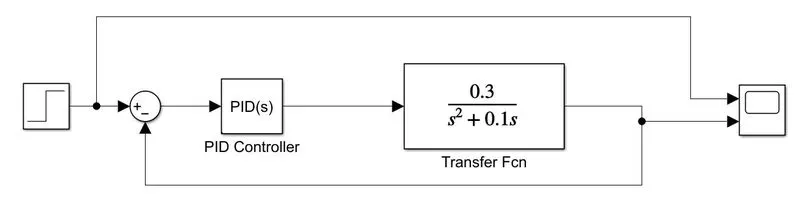
2. Assume a plant and a controller to prepare the same structure in Simulink as shown in the below figure. Also, use the PID Controller block in Simulink and verify system response with General Observations for PID gain:
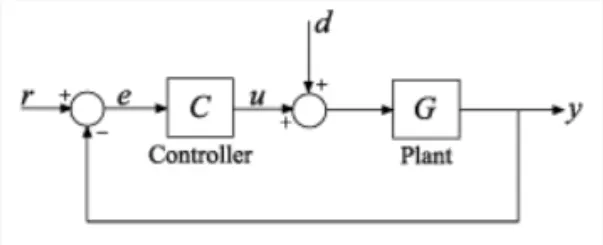
3. Consider the below system-
The Plant in this example is:
`plant = (0.3)/(s^2 +0.1s)`
Use MATLAB PID tuner and prepare a table showing PID values with response time and transient behavior coefficient.
INTRODUCTION:
Feedforward Control
Feedforward control has generally been considered an advanced control method that can overcome many of the disadvantages of feedback control.
Feedback control strategies are effective in tracking setpoint changes and compensating for low-frequency disturbances. The philosophy of feedforward control is to provide an appropriate corrective action before the disturbances affect the process.
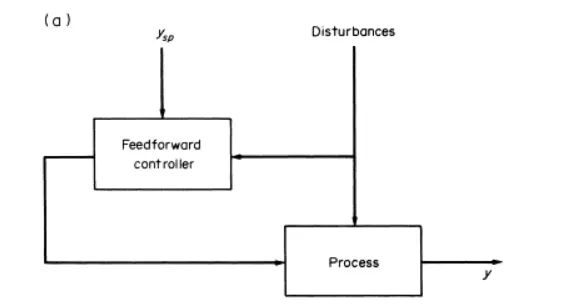
The disturbance must be measured online for effective use of feedforward control, and a reasonably accurate process model is required. This means that feedforward control cannot compensate for unmeasured disturbances and any errors in the process model. Thus, it would be expected that the addition of feedback control may correct for unmeasurable disturbances and modeling errors. This is often referred to as feedback trim. A combined feedforward-feedback control has become an accepted practice in the chemical process industries since the 1960s.
OBJECTIVE 1 - In which situations does feedforward control of DC motor fails? Prepare a MATLAB script for feedforward control and test it.
Situations where Feedforward control of a D.C. Motor fails –
- Feedforward control cannot compensate for unmeasured disturbances and any errors in the process model
- Feedforward design neglects process dynamics. How fast the controlled variable responds to changes in the load and manipulated variables. Thus, it is often necessary to include a dynamic compensation in the feedforward controller.
- A correct mathematical model should be known for exact disturbance rejection.
- Feedforward controller structure will change with disturbance type & sensor used.
- Recommended for slow varying process only.
- Feedforward control alone cannot give desired response hence it always has to be used with a feedback controller.
- The disturbance variables must be measured online. In many applications, this is not feasible.
- To make effective use of feedforward control, at least an approximate process model should be available. In particular, we need to know how the controlled variable responds to changes in both the disturbance and manipulated variables. The quality of feedforward control depends on the accuracy of the process model.
- Ideal feedforward controllers that are theoretically capable of achieving perfect control may not be physically realizable. Fortunately, practical approximations of these ideal controllers often provide very effective control.
Preparing the MATLAB SCRIPT
In armature controlled DC motor the applies voltage Va controls the angular velocity of the shaft.
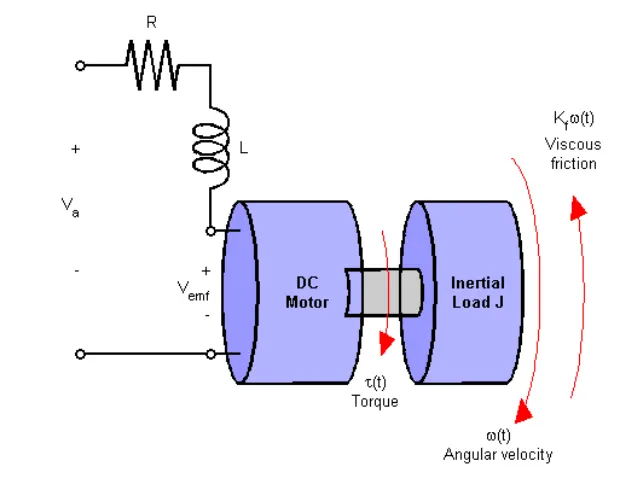
Both electrical and mechanical components are represented here, with the DC motor modeling constants as:
`T = K_m I_a`
`V_amf = K_b ω`
The torque T(t) and angular velocity w(t) are what we are interested in
Electrical:
`V_a = I_aR_a +L(di)/dt +V_(emf)`
`V_a - V_(emf) = (T)/K_m (R_a + L_s)`
`T = (K_m)/(R_a + L_s) (V_a-V_(emf))`
Mechanical
`T = J (d ω)/dt + T_(load)`
`T = J(d ω)/dt + K_(f ω)`
`T = ω(J_s + K_f)`
`ω = (T)/(J_s + K_f)`
A simplified model of the DC motor is shown above. The torque Td models load disturbances. You must minimize the speed variations induced by such disturbances.
CODE
%% DC Motor Control
% This example shows the comparison of three DC motor control techniques
% for tracking setpoint commands and reducing sensitivity to load
% disturbances:
%
% * feedforward command
% * integral feedback control
% * LQR regulation
%
% See "Getting Started:Building Models" for more details about the DC
% motor model.

%   Copyright 1986-2014 The MathWorks, Inc.

%% Problem Statement
% In armature-controlled DC motors, the applied voltage Va controls the
% angular velocity w of the shaft.
%
% <<../dcdemofigures_01.png>>
%
% This example shows two DC motor control techniques for reducing the
% sensitivity of w to load variations (changes in the torque opposed by the
% motor load).
%
% <<../dcdemofigures_02.png>>
%
% A simplified model of the DC motor is shown above. The torque Td
% models load disturbances. You must minimize the speed variations
% induced by such disturbances.
%
% For this example, the physical constants are:

R = 2.0;                % Ohms
L = 0.5;                % Henrys
Km = 0.1;               % torque constant
Kb = 0.1;               % back emf constant
Kf = 0.2;               % Nms
J = 0.02;               % kg.m^2/s^2
First construct a state-space model of the DC motor with two inputs (Va,Td) and one output (w):
%%
% First construct a state-space model of the DC motor with two inputs
% (Va,Td) and one output (w):

h1 = tf(Km,[L R]);            % armature
h2 = tf(1,[J Kf]);            % eqn of motion

dcm = ss(h2) * [h1 , 1];      % w = h2 * (h1*Va + Td)
dcm = feedback(dcm,Kb,1,1);   % close back emf loop
Note: Compute with the state-space form to minimize the model order.
Now plot the angular velocity response to a step-change in voltage Va:
%%
% Note: Compute with the state-space form to minimize the model order.

%%
% Now plot the angular velocity response to a step change in voltage Va:
%
stepplot(dcm(1));

%%
% Right-click on the plot and select "Characteristics:Settling Time" to
% display the settling time.
%
STEP RESPONSE PLOT:
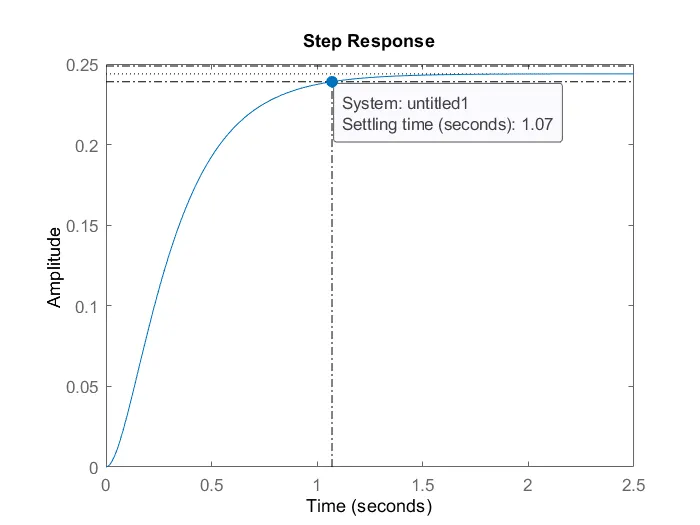
OBSERVATION:
We actually plot of (dcm) transfer function, so we are going to plot the step response for this. Look at the step response, the step response is following the point 0.25. Settling time is around 1.07 sec. Steady-state at 0.22 sec. It's never gonna reach to 1. therefore, this DC Motor system required High Gain Control for System. this step response is for natural transfer function without any controller.
Feedforward DC Motor Control Design:
1.FeedForward control is nothing but applying simple gain before the system model.
2.Va is now presetted with Kff, so Kff is feedforward gain.
3.FeedForward is exactly the value of the gain which is inverse to DC gain of the system.
4.You can use this simple feedforward control structure to command the angular velocity w to a given value w_ref.
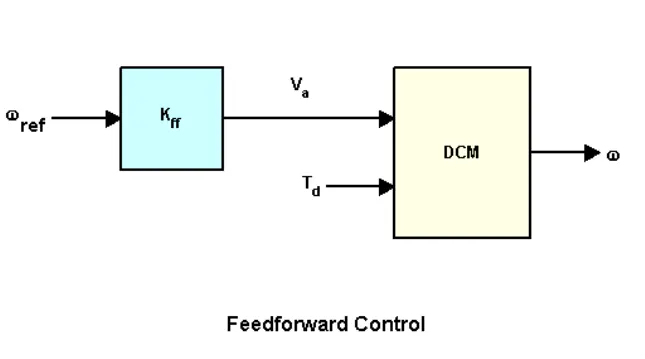
The feedforward gain kff should be set to the reciprocal of the DC gain from Va to w
%% Feedforward DC Motor Control Design
% You can use this simple feedforward control structure to command
% the angular velocity w to a given value w_ref.
%
% <<../dcdemofigures_03.png>>
%
% The feedforward gain Kff should be set to the reciprocal of the DC gain
% from Va to w.
%
Kff = 1/dcgain(dcm(1))

1. System is modified as we apply Kff = 4.1.
2.system is modified by considering the diameter of Kff and 1.
3. so Clff is another transfer function that is closed-loop and feedforward, where Kff is multiplied to Diagonal.
4. Adding Feedforward gain to the Diagonal element of matrices "a" is going to become Clff.
To evaluate the feedforward design in the face of load disturbances, simulate the response to a step command w_ref=1 with a disturbance Td = -0.1Nm between t=5 and t=10 seconds:
%%
% To evaluate the feedforward design in the face of load disturbances,
% simulate the response to a step command w_ref=1 with a disturbance Td =
% -0.1Nm  between t=5 and t=10 seconds:
%
t = 0:0.1:15;
Td = -0.1 * (t>5 & t<10);       % load disturbance
u = [ones(size(t)) ; Td];       % w_ref=1 and Td

cl_ff = dcm * diag([Kff,1]);    % add feedforward gain
cl_ff.InputName = {'w_ref','Td'};
cl_ff.OutputName = 'w';

h = lsimplot(cl_ff,u,t);
title('Setpoint tracking and disturbance rejection')
legend('cl_ff')

% Annotate plot
line([5,5],[.2,.3]);
line([10,10],[.2,.3]);
text(7.5,.25,{'disturbance','T_d = -0.1Nm'},...
            'vertic','middle','horiz','center','color','r');
SETPOINT tracking and Disturbance Rejection Plot
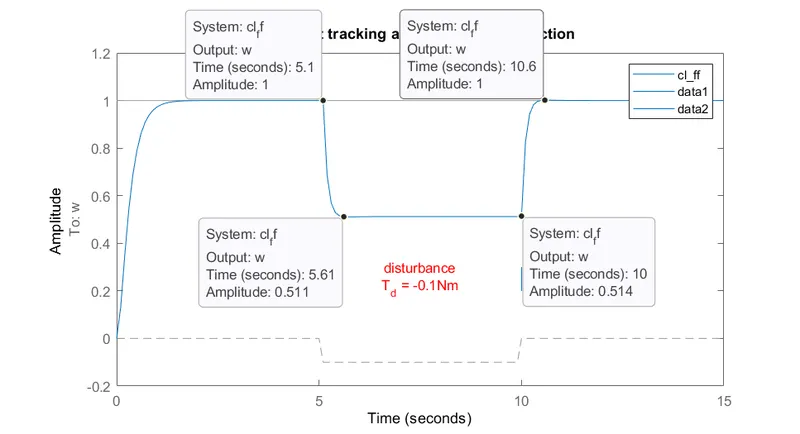
OBSERVATION:
1.After applying feedforward control, although all parameters have improved (rise time, steady-state error, settling time), the output also shows how poor the response is to disturbance
, With the Gain Kff = 4.1 the setpoint is the track.
2. Adding a disturbance by applying 0.1Nm of load torque in the opposite direction of the DCM completely changes the step response between 5-10 seconds. The system is unable to reject the disturbance and hence is unstable in that time interval.
3. So, wherever Torque Disturbance of -0.1 Nm is applied the amplitude or w(omega) is not tracking the set point.
4.So, Feedforward works well and it increases the w(omega) from point 0.25 to 1.
5. Steady-State also occurs within enough amount of settling time but Disturbance is not rejected.
6. Speed reduce by approx 50% in the Disturbance phase.
7.This is a huge limitation to this method. As soon as there appears disturbance that is unaccounted for, the system becomes unstable as there is no sensor to detect the error and adjust the system accordingly using feedback control. Realistically, it will seldom be possible to account for every possible disturbance, and without that, this feedforward control method would not be recommended.
OBJECTIVE 2 - Assume a plant and a controller to prepare the same structure in Simulink as shown in the below figure. Also, use the PID Controller block in Simulink and verify system response with General Observations for PID gain:
RESULTS scope: (Untunned PID)-
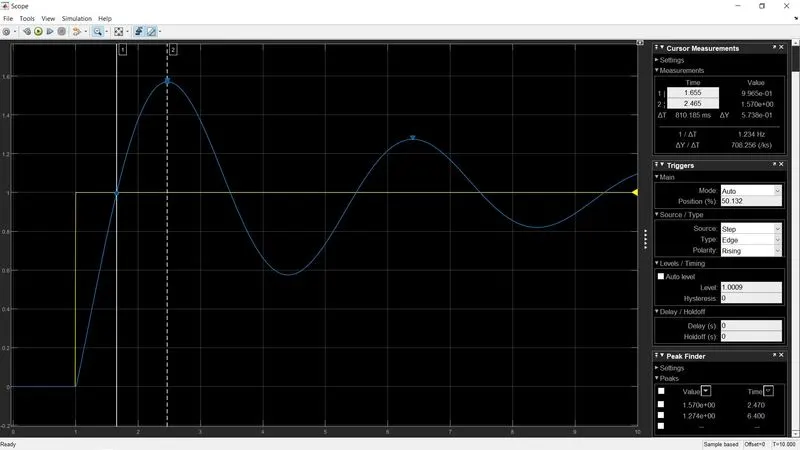
- It is evident that the step response of this function is unstable, as it continues to rise with time.
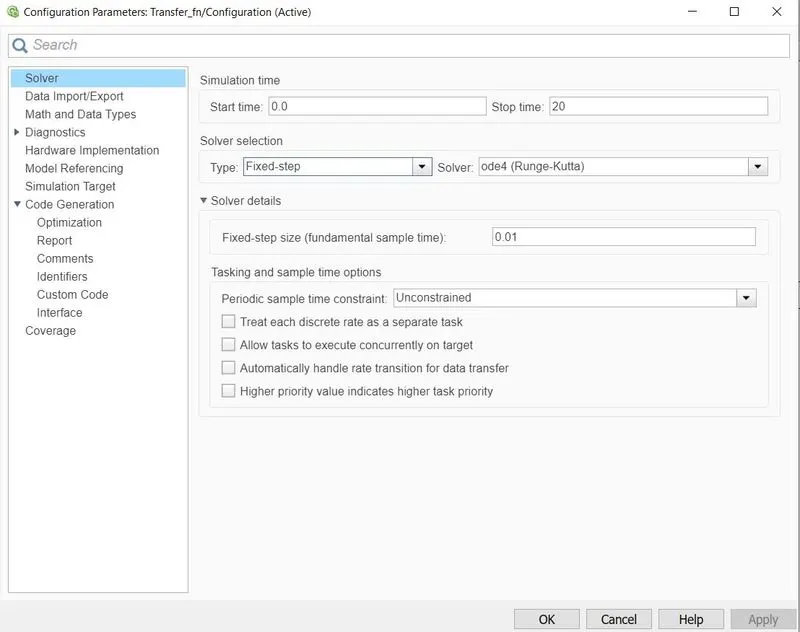
- Change the solver configuration to ode4(Runge-Kutta) which helps solve the PID controller otherwise, there will be some kind of error.
Testing Kp, Ki, Kd
1.) Kp = 10; Ki = 10; Kd = 0
RESULTS:
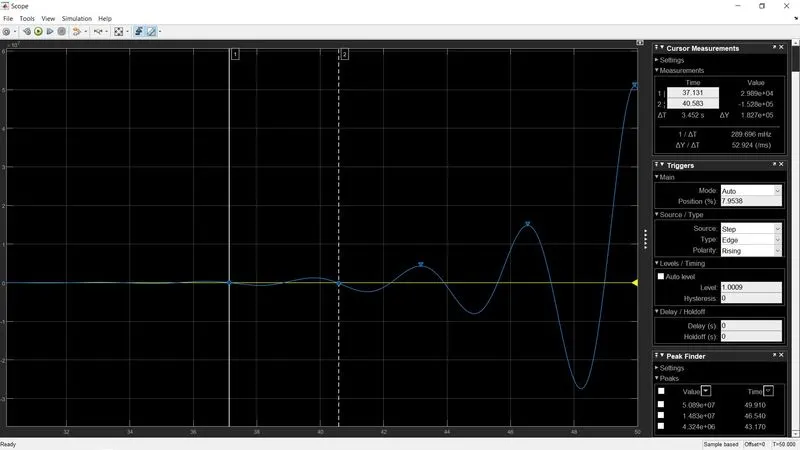
Kp increased; Ki increase; Kd unchanged - Rise time reduced, Overshoot increased, Settling time increased (as both Kp and Ki are incremented), and S-S error increases from37-38 sec to end of iteration time i.e 50sec.
Transfer function response for given plant is unstable till end as Kd is unchanged.
2.) Tunning parameters: Kp = 10; Ki = 10; Kd = 5
RESULTS:
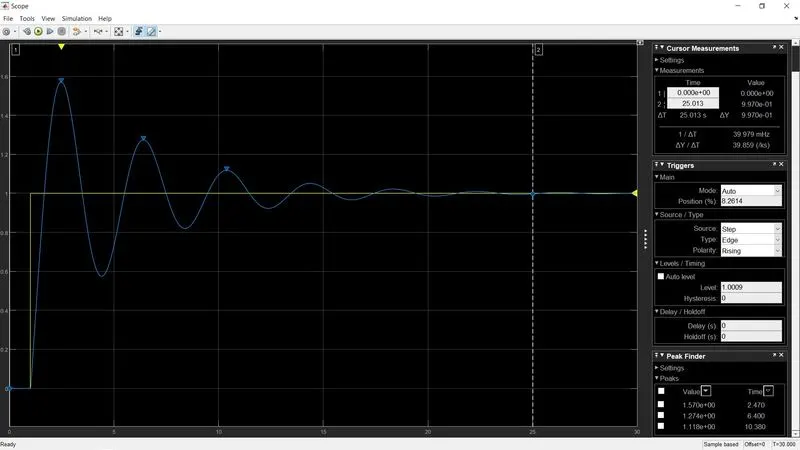
Kp unchanged; Ki unchanged; Kd increased by 5 - Minimal change in Rise time, Overshoot reduceds as Kd varies from 0 to 5, Settling time reduced, Minimal change in S-S error
3.) Tunning parameters: Kp = 10; Ki = 10; Kd = 15
RESULTS:
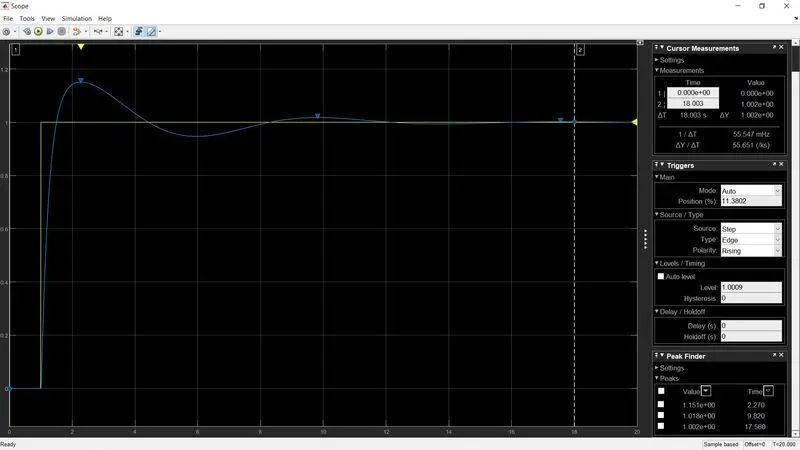
Kp unchanged; Ki unchanged; Kd increased to 15 - higher the Kd gain tends to Minimal change in Rising time, Overshoot reduced, Settling time reduced, Minimal change in S-S error.
General Observation for PID gain:
|
Gain |
Rise time |
Overshoot |
Settling time |
Steady-state error |
| Kp |
Decrease |
Increase |
Small change |
Decrease |
| Ki |
Decrease |
Increase |
Increase |
Eliminate |
| Kd |
Small change |
Decrease |
Decrease |
Small change |
OBJECTIVE 3 - Use MATLAB PID tuner with the below example and prepare a table showing PID values with response time and transient behavior coefficient.
`plant = 0.3/(s^2 +0.1s)`
clear all
close all
clc

%% G(s)
num = [0.3];
den = [1 0.1 0];
tf_G = tf(num,den)

pidtool(tf_G)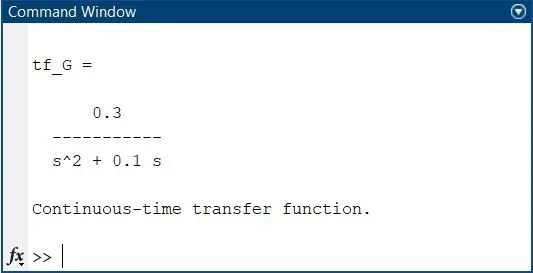
RESULT OF COMMAND pidtool
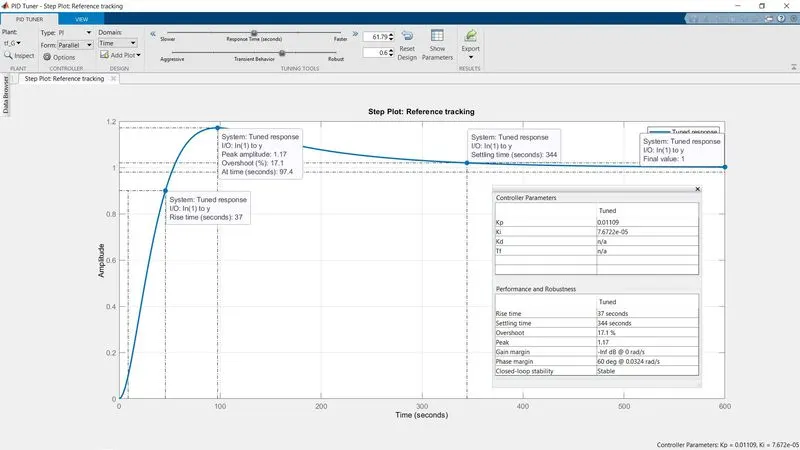
OBSERVATION:
1. PIDTOOl can be applied in a simple form where we have to write command pidtool and transfer_function of G(s) i.e - {pidtoo(Tf_G)}.
2. So, Whenever we call this it is actually going to generate value by Iterative Methode & this helps us in understanding the Tunned Parametere's of Kp, Ki, Kd.
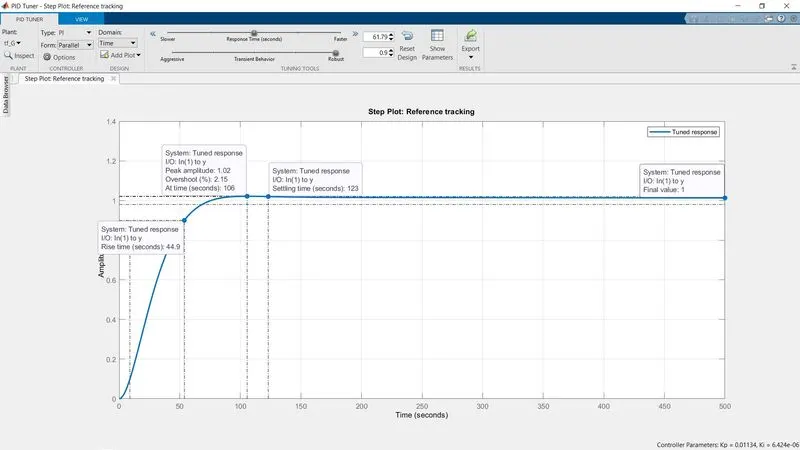
3.So, Here we the Tunned Parameter of Kp, Ki, Kd & with this we can actually decide what is actually a type of response we want and what type of transient behavior we want.
4. We can also Export the PID controller's Tunned Value of Kp, Ki, Kd in Workspace for Further Calculation in Matlab Script.
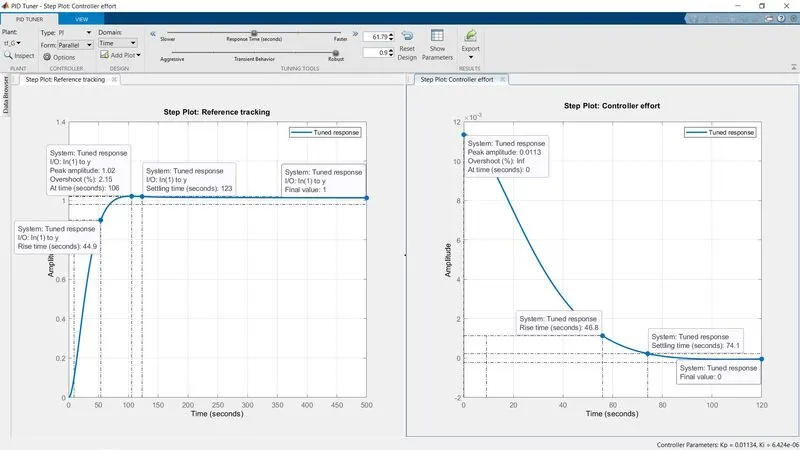
5. We can also Add a Plot to Compare the Tunned parameter of PID with Plant, Open-Loop, Reference Tracking: 1) Controller Effort, 2)Input Disturbance Rejection. 3)Output Disturbance Rejection. BODE PLOT: 1) Plant 2) Controller Effort 3)Disturbance Rejection.
6.Above we have compared the Tunned PID controller of the given plant with Reference tracking Controller Effort.
Conclusion:-
- Feedforward control is having a lot of disadvantages we can see from the example so we are not using this controller.
- We found that using PID we can make a system stable and good and quick
- Using the PID tuner we got, we can make the system cleaner with the tuner, which helps get the particular tuning using the plant and PID tuner.