Maximizing a Stalagmite function using genetic algorithm in MATLAB.
Aim - To solve a stalagmite function in Matlab and maximizing the function using a genetic algorithm.
INTRODUCTION -
Genetic algorithm-
Genetics is the word the is mostly derived from the evolution theory proposed by Charles Darwin, which states that " it is not the strongest that survive nor the most intelligent, but the one that is most suitable for the change ". A Genetic algorithm or GA is derived for the same theory that was proposed in the theory of evolution. GA is a method that is used to solve both the constrained and unconstrained optimization problem using the natural selection process that is the same as the genetic theory. The genetic algorithm randomly selects the individuals from the current population and uses them as parents for making the children's nest generation. Every time the children have generated a new population is evolved and it reaches the optimal solution.
The Genetic algorithm can be applied to various other problems that are not suited for the normal optimization problem. This can even be used for the functions that are discontinuous, non-differentiable, or highly nonlinear.
How Genetic algorithm works -
- Initialization - The entire population is a vast range of data and that contains various solutions. The initial population is generated randomly which contains the entire range of possible solutions.
- Selection - During each successive generation, a portion of the existing population is selected to breed a new generation. Individual solutions are selected through a fitness-based process.
- Genetic operator - This is the cross-over phase that is done using the genetic operator, the parents that are selected in the previous phase are combine and the children's products will be creating the new population.
- Termination - This generational process is repeated until a termination condition has been reached.
Genetic algorithm syntax -
x = ga (@func, nvars) where func is the name of the function and nvars is the number of the variables.
x = ga (@func, nvars, A, B, Aeq, Beq) a set of upper bound and the ower bond are given so that the solution lies in that range.
x = ga (@func, nvars, A, B, Aeq, Beq, lb, ub, nonlcon, intcon, options).
where
Ab = linear equality constraints
Aeq, Beq = linear equality constraints
lb = lower bound.
ub = upper bound
nonlcon = non-linear constrain.
intcon = vector with a positive integer.
options = optimization with options.
Stalagmite function
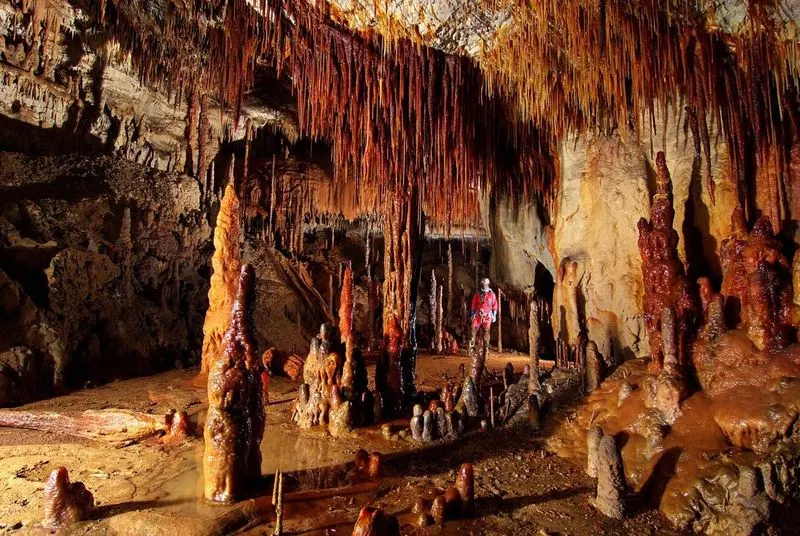
Stalagmites are the rocky formations that rise from the floor or the roof of the cave due to material deposition. These formations are formed due to various materials that may be from lava, or mud, to pits inside the caves.
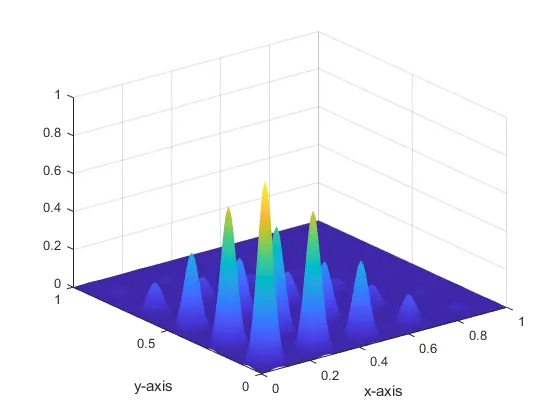
A stalagmite function is a function when solved and represented on a plot will show the data in the form of these stalagmites. The equations for the stalagmite function are
`f(x,y) = f_1x, f_2x, f_1y, f_2y,`
`f_1x = [sin(5.1pix+0.5)]^6` `f_1y =[sin(5.1piy+0.5)]^6`
`f_2x = exp[-4ln(2)(x-0.0667)^2/0.64]`
`f_y2 = exp[-4ln(2)(y-0.0667)^2/0.64]`
MATLAB CODE -
Function code -
%writing the stalagmite function
function f = stalagmite_ga(input_vector)
x = input_vector(1);
y =input_vector(2);
f1x = (sin(5.1*pi*x+0.5))^6;
f1y = (sin(5.1*pi*y+0.5))^6;
f2x = exp((-4*log(2)*(x-0.007)^2)/0.64);
f2y = exp((-4*log(2)*(y-0.007)^2)/0.64);
f= -(f1x*f1y*f2x*f2y);
end
Main Code -
clear all
close all
clc
%defining x and y
x = linspace(0,1,150);
y = linspace(0,1,150);

[X,Y] = meshgrid (x,y);
num_cases = 50; %number of times GA will run

%evaluating stalagmite function
for i = 1:length (X)
    for j = 1:length(y)
        input_vector(1) = X(i,j);
        input_vector(2) = Y(i,j);
        f(i,j) = stalagmite_ga(input_vector);
    end
end

%plotting the stalagmite function
figure (1)
surfc(X,Y,-f);
xlabel('x-axis');
ylabel('y-axis');
shading interp

%genetic algorithum
[inputs, f_val] = ga(@stalagmite_ga,2);
tic

%study -1 unbounded condition
for i = 1:num_cases
    [inputs, fopt(i)] = ga(@stalagmite_ga,2);
    xopt(i) = inputs(1);
    yopt(i) = inputs(2);
end
study1_time = toc; %to calculate the time that is required to execute.
figure(2)
subplot (2,1,1)  %to have multiple plots in the same figure
hold on
surfc(X,Y,-f)
shading interp
plot3(xopt,yopt,-fopt,'marker','o','markersize',5,'markerfacecolor','r')  %plotting output of the GA
title ('unbound inputs')
subplot (2,1,2)
xlabel('x-axis');
ylabel('y-axis');
plot (-fopt)
xlabel('Iteration')
ylabel ('function minimum')

%study-2 Upper bound and lower bound
tic
for i = 1:num_cases
    [inputs,fopt(i)] = ga(@stalagmite_ga,2,[],[],[],[],[0;0],[1;1]);  %GA with upper and lower bounds
     xopt(i) = inputs(1);
    yopt(i) = inputs(2);
end
study2_time = toc;
figure(3)
subplot (2,1,1)
hold on
surfc(X,Y,-f)
shading interp
plot3(xopt,yopt,-fopt,'marker','o','markersize',5,'markerfacecolor','r')
title ('bound inputes')
subplot (2,1,2)
plot (-fopt)
xlabel('Iteration')
ylabel ('function minimum')

%Study-3 Bounded with increase population size
options = optimoptions('ga');
options = optimoptions(options,'populationsize',600); %specifing the population size
tic
for i = 1:num_cases
    [inputs,fopt(i)] = ga(@stalagmite_ga,2,[],[],[],[],[0;0],[1;1],[],[],options);
     xopt(i) = inputs(1);
    yopt(i) = inputs(2);
end
study3_time = toc;
figure(4)
subplot (2,1,1)
hold on
surfc(X,Y,-f)
shading interp
plot3(xopt,yopt,-fopt,'marker','o','markersize',5,'markerfacecolor','r')
title ('bound inputes with optimization')
subplot (2,1,2)
plot (-fopt)
xlabel('Iteration')
ylabel ('function minimum')
Explanation -
- First, we started with the stalagmite function, a very simple code to write the equations of the function and putting them into the formate. As our main aim is to maximize the function using a genetic algorithm.
- A genetic algorithm is basically a minimizing function, but for our problem, we have to maximize the function hence we have introduced the -ve sign to the final equation.
- The main program starts with the introduction of the variables that are x and y using a linspace command, later using the meshgrid we made an array of all the values of x and y.
- Using the simple for loops we will be introducing the stalagmite function in the code. By surf command, we will be plotting the results of this function.
- At this stage, we must have a clear stalagmite plot of our function.
- Now we will be putting this function through GA. There will be three different cases we will be running for the function Unbounded, with a lower and upper bound, with specific population size.
- For the unbounded case, we will be using the first GA syntax that is shown in the theory. We will be putting out the function and the number of variables in the syntax. This will be contained in for loop as we have to run multiple iterations.
- For plotting this output, we will be using the subplot so that we can have multiple plots in the same figure. As we are working for maximizing the problem so for the results to be plotted right we are using -f and -fopt for the plotting.
- For case 2 the formate will be the same just by changing the syntax of the GA. As we will be introducing the lower and upper bound of [0;0] and [1;1] to the system for more accurate answers.
- In case 3 we will be having a specific population size using the command 'optimoptions', along with the lower and upper bound, this will finally give us the exact optimized solution.
- The GA will be running for the set number of iterations, once the iterations are reached will result in the termination of the code.
OUTPUT -
stalagmite function
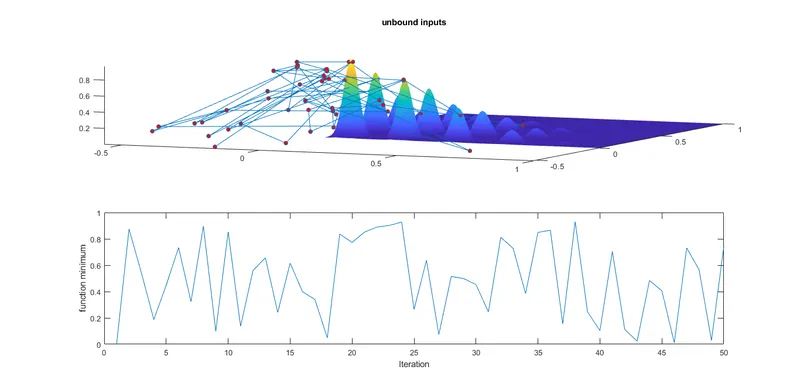
GA case 1 - Unbounded condition
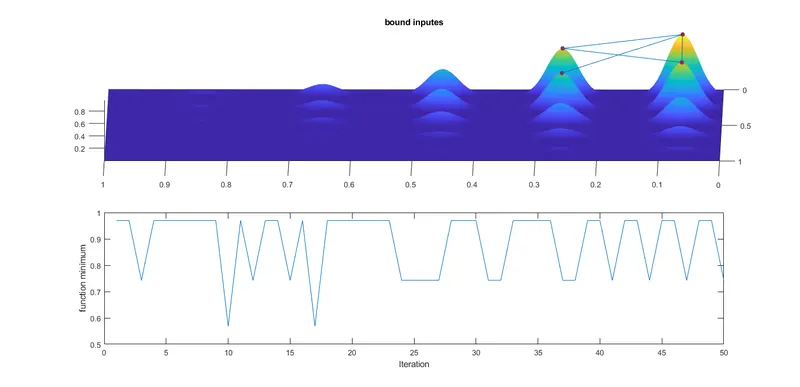
GA case 2 - the bounded condition with Upper and lower bounds.
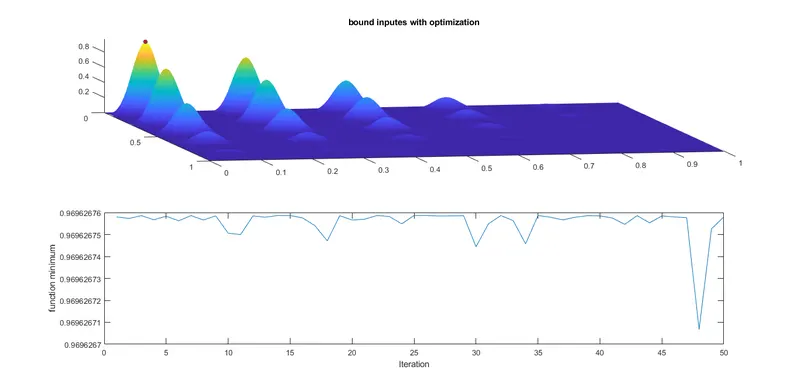
GA case 3 - the bounded condition with optimize population size
Observations
- As compared in the three different conditions, the plot in the unbounded conditions is vaguely distributed and is completely disturbed. It is very difficult to conclude where the optimal solution is.
- While applying the upper and lower bound to the function we were able to get a much more optimized output than the unbounded plot. The upper bound and the lower bound were able to reduce the scatteredness of the function.
- The final plot gives us the most optimum solution to our problem. As along with the upper and lower bound we specified the population size to the function. By applying those additional inputs we constrained the function to it limited and hence we were able to get a more optimized solution. The peak value is the maximum value of the function.
CONCLUSION - From the above results we can conclude that GA can be used to even maximize the Stalagmite function. As we increase the input or the bounds on the function we keep on getting more confined answers, and we can achieve an optimized solution for the function.
ERRORS -
There was no technical or syntax error that occurs during the programming. The only error was initially the plots were not coming right in the execution of the code. 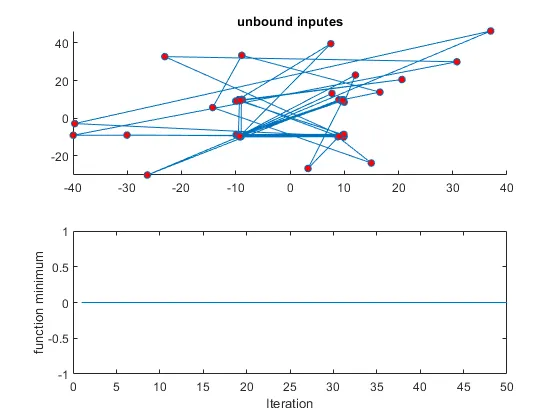
WRONG PLOT
This error was because I missed the '-ve' sign in the code for the functions. As we were coding for the maximum output so we have to put the '-ve' sign on the function.