Creating a Simple pendulum animation using MATLAB
AIM - To generate a plot for a simple pendulum and create the animation for the same.
INTRODUCTION -
A simple pendulum is an arrangement in which a weighted mass is suspended with the help of a string, which is fixed at one end and free at another end. This weighted mass free to move in space when provided with an external force. When the mass is displaced sideways from its equilibrium position it is subjected to restoring force due to gravity, which tries to pull it back to the equilibrium position. This restoring force tends to oscillate the mass about its equilibrium position moving it back and forth. This motion of the pendulum will keep going until the restoring force is less than the gravity and the frictional force due to the surrounding atmosphere.
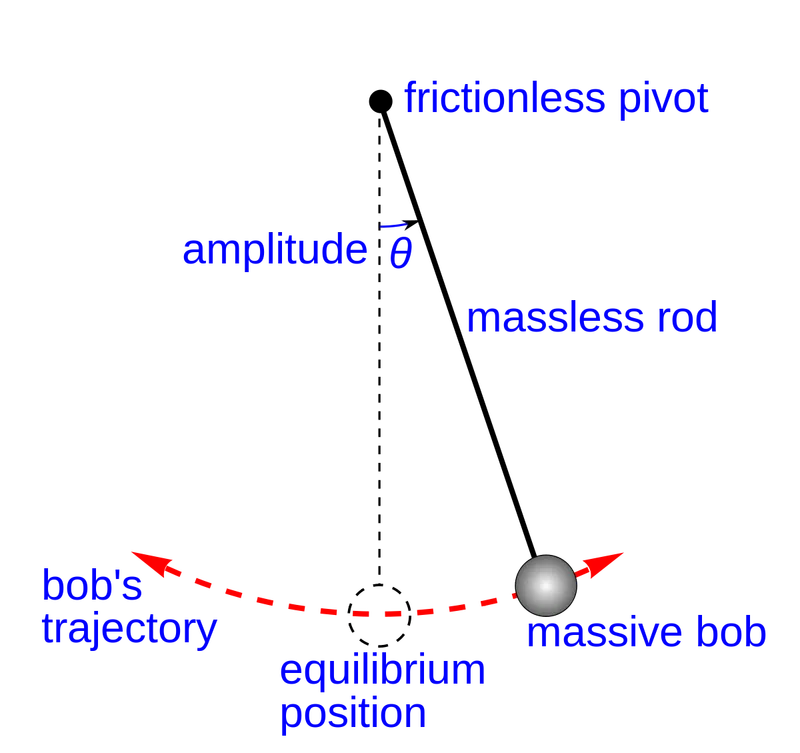
The motion of the pendulum is a circular arc. Every motion of the pendulum will make an angle θ with the vertical axis. This angle θ defines the amplitude of the oscillatory motion in the vertical plane. greater the angle higher are the oscillations and bigger is the arc created by the bob. We have to solve for the angle θ to trace the motion path of the bob, to find the change in velocity according to the time.
GOVERNING EQUATION -
The governing equation that represents the motion of the pendulum in air is
`(d^2θ)/dt^2 + b/m (dθ)/dt + g/l sinθ = 0`
In the above equations
b = Damping coefficient
m = mass of the bob
g = acceleration due to gravity
l = length of the string
This is a second-order differential equation, which first needs to be simplified for the angle θ and can be directly solver in Matlab for the Time and velocity plot of the motion. Later this output can be used for generating the animation of the moving pendulum.
To solve this equation we first need to convert it into a first-order ODE. Which then can be used as an input function in the code, and by using the ode45 command we can compute the results by giving proper initial conditions and input parameters.
MATLAB CODE -
function [dtheta_dt] =second_orderODE_pendulum(t,theta,b,g,l,m)

% angle made by the pendulum with the axis
theta1 = theta(1);
theta2 = theta(2);

% simplified ODE
dtheta1_dt = theta2;
dtheta2_dt = -(b/m)*theta2-(g/l)*sin(theta1);

%solution matrix containing both the ODE
dtheta_dt = [dtheta1_dt;dtheta2_dt];
end
Explanation -
- In this above code, we have created a function that represents the given IDE for the simple pendulum.
- The input for the function is time, theta, b,g,l,m using these inputs we can solve the ode and generate the output.
- We have simplified the second-order ODE into 2 first-order ODE and included two variables for them θ1 and θ2. These θ1 and θ2 are the two variables that will be defining our output vector of the ODE.
- In this function, we have included the θ1 and θ2 angles, the simplified form of our second-order ODE, and the solution matrix.
clear all
close all
clc
%Input parameters
b = 0.05;
g = 9.81;
l = 1;
m = 1;
ct = 1;

%Initial conditions
theta_0 = [0;3];

%time length
t_span =  linspace(0,20,600);

%ODE for pendulum
[t,results] = ode45(@(t,theta) second_orderODE_pendulum(t,theta,b,g,l,m), t_span ,theta_0);

%plotting
figure (1)
hold on
plot (t,results (:,1))
plot (t,results (:,2))
xlabel ('time')
ylabel ('velocity')
grid on

%creating animation for the pendulum
theta2 = results(:,1);
for i = 1:length(theta2)
    theta_x = theta2(i);

    x0 = 0;
    y0 = 0;

    x1 = l*sin(theta_x);
    y1 = -l*cos(theta_x);

    %ploting the pendulum
    figure(2)
    plot([-1 1],[0 0],'color','g','linewidth',6);
    hold on
    plot([x0 x1],[y0 y1],'color','b','linewidth',3);
    hold on
    plot (x1,y1,'o','markers',15,'markerfacecolor','r');
    hold off
    grid on
    axis([-1.5 1.5 -1.5 0.5]);
    pause (0.002);
    M(ct) = getframe(gcf);
    ct = ct+1;
end
movie (M)
videofile = VideoWriter('pendulum_animation.avi','Uncompressed avi');
open(videofile);
writeVideo(videofile,M)
close(videofile)
Explanation -
- First, we entered our input variables that are b,m,l,g, and ct. Along with that, we had our initial conditions for displacement and velocity i.e. 0m and 3 rad/sec respectively.
- Next, we introduced the time vector, as we have to simulate the motion between 0-20 seconds we will be using the linspace command to generate the time vector.
- With using the command ode45 we will introduce the ode solver into our code. (t,theta) are the variables defining the ode, second_orderODE_pendulum(t, theta,b,g,l,m) is the function that we created, t-span is the time vector that will change according to time, theta_0 are the initial conditions for the function.
- This solver will be solving the ode as per the inputs and initial conditions that are provided.
- The next step will be plotting the velocity and displacement profile. The x and y-axis will have time and velocity respectively. By using simple plotting command we can easily plot the output of the ode that is solved.
- Now to generate the animation of the plot, first, we will define a variable theta2 to the results that are generated. Then this variable will be introduced into a for loop which will later be assigned the steps to a new variable theta_x.
- By giving the conditions for the string i.e. x0 and y0 is the fixed point of the string and the other point will be defined by x1 and y1 which will change w.r.t time.
- For plotting the animation, first, we will be plotting the fixpoint of the animation, next will be the string that is attached to the fixed point and the bob at the other end, at the last we will be using the marker command to plot to bob.
- For generating the movie first we will be creating an array 'M' which will be storing the frames generated, ct is the counter that will be incrementing the frame count.
- VideoWriter will help us to generate the avi file for the animation. First, we will be opening the video file, writeVideo will write the videofile and using array M, finally, we will be closing the video.
OUTPUT -
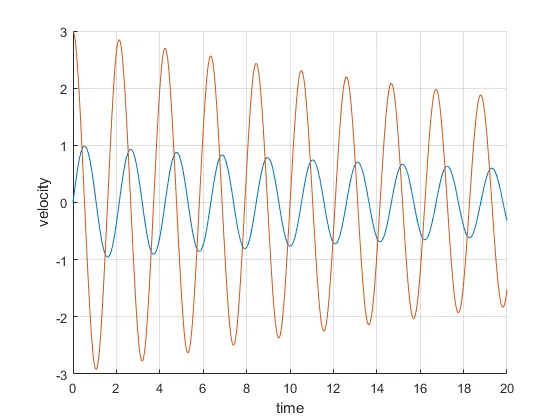
- This is the velocity, time, and displacement plot generated by the above code. Red is the velocity as the initial conditions show velocity is 3 rad/s initially and blue is the displacement as it starts from 0m.
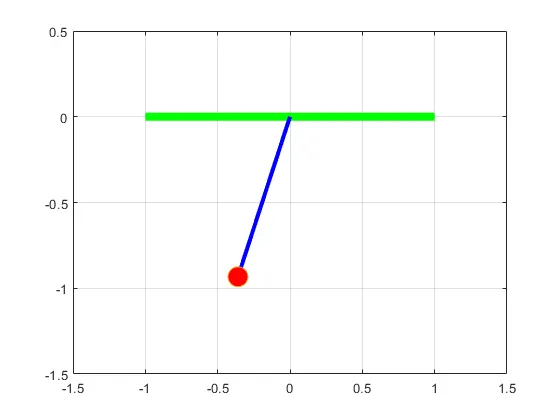
- The geometry that was plotted using the commands will be animated.
LINK FOR THE ANIMATION VIDEO AND OUTPUT FILE -
https://drive.google.com/file/d/19tllmcqlBGSnz92cxxaoBdfaOWrSe3ou/view?usp=sharing
Use this link to access the animation of the pendulum
https://docs.google.com/spreadsheets/d/1gDnADvtM1abFoNUfNu_pVdAVLM73qKFHV1uEhSPRbPw/edit?usp=sharing
Use this like to access the output file of the program.
ERRORS-
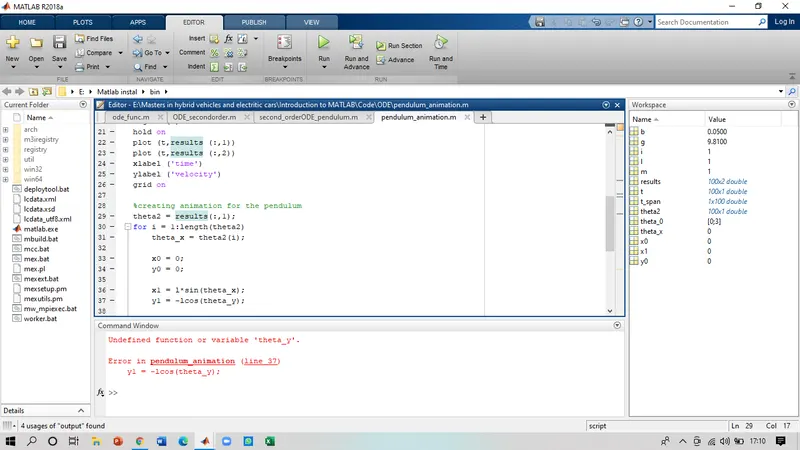
In line number 37, missed the '*' sign which created the error mentioned. Got solved by adding the sign.
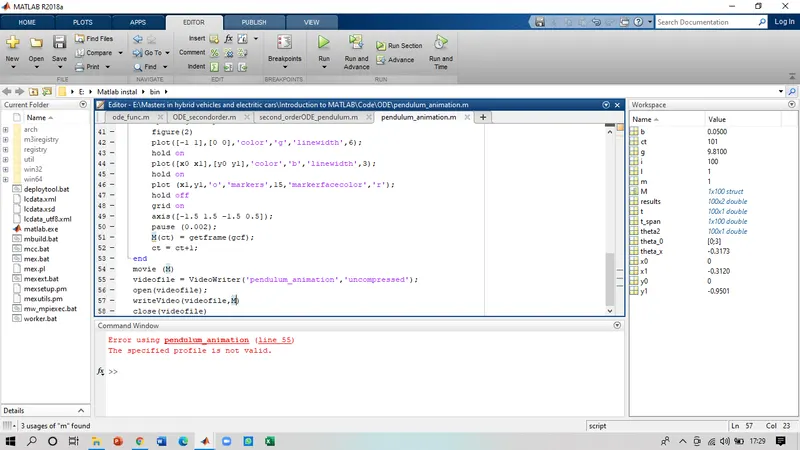
Didn't add the required extension for the for generating the video file. It got corrected by adding the .avi to the formate.
CONCLUSION -
- The above work can conclude that Matlab can be used for solving the ode of any order mentioned. As seen in the output plot the displacement of the pendulum was slowly getting reduced because of the damping provided. The amplitude os the velocity is also decreasing as the time passes by.
- The animation generated is also supporting the results that we concluded, as the time proceeds the bob slow down and the amplitude of the swing reduces.