Parsing the NASA Thermodynamic data and calculating the various thermodynamic properties for 53 species
The NASA thermodynamic data file contains seven high-temperature and seven low-temperature thermodynamic coefficients of 53 different species along with their local temperature ranges. Thermodynamic data for individual species are necessary for performing equilibrium chemistry and finite-rate chemical kinetics calculations. These data typically provide the thermodynamic properties (enthalpy, entropy, and specific heat) of a species as a function of temperature.
The NASA polynomials have the form:
     Cp = R*[a1 + a2*T + a3*T^2 + a4*T^3 + a5*T^4] => Specific heat

     H = R*T*[a1 + a2*T/2 + a3*T^2/3 + a4*T^3/4 + a5*T^4/ 5 + a6/T] => Enthalpy

     S = R*[a1*ln(T) + a2*T + a3*T^2/2 + a4*T^3/3 + a5*T^4/4 + a7] => Entropy
Where a1, a2, a3, a4, a5, a6, and a7 are the numerical coefficients supplied in the THERMO.dat file and R is the universal gas constant.

In this sample above, the first 7 numbers starting on the second line of each species entry (five of the second line and the first two of the third line) are the seven coefficients (a1 through a7, respectively) for the high-temperature range (above 1000 K, the upper boundary is specified on the first line of the species entry). The following seven numbers are the coefficients (a1 through a7, respectively) for the low-temperature range (below 1000 K, the lower boundary is specified on the first line of the species entry).
Here is a copy of the NASA thermodynamic data used for this project: THERMO.dat
This project attempts to phrase the coefficients and data from this NASA thermodynamic file and calculate the specific heat, enthalpy and entropy of all the 53 species in the file.
Some theory:
Specific heat (Cp):
Specific heat is the ratio of the heat required to raise the temperature of a body to one degree to that of the temperature increase of an equal mass of water one degree.
Enthalpy (H):
Enthalpy is a measure of the total energy of a thermodynamic system. It includes the energy required to create a system and the amount of energy required to make room for it by displacing its environment and establishing its volume and pressure.
Enthalpy, H = U + pV (KJ)
Where U is the internal energy of the system, p is pressure and V is the volume.
Entropy (S):
Entropy is a function of a quantity of heat that shows the possibility of conversion of that heat into work. In other words, entropy shows the randomness of molecules. So, the entropy of a solid is almost equal to zero while the entropy of gases is large. Entropy is a property of the system and is an extensive property. The higher the entropy increase of the universe, the higher will be the irreversibility of the process.
Generally,
Entropy, dS = dQ/T
Aim: To write a code that extracts the 14 coefficients and calculates the enthalpy, entropy and specific heats for all the species from the NASA thermodynamic data file.
Objectives:
- Calculate the Cp, H and S values for each species
- Plot the Cp, Enthalpy and Entropy for the local temperature range (low temperature: high temperature) specific for each species.
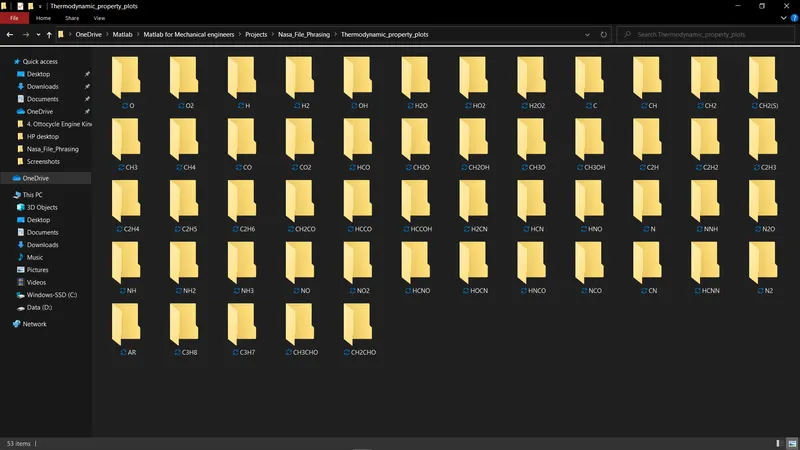
- Save the plots as images with appropriate names and dump them in separate folders for each species with a suitable name. All these should be generated automatically.
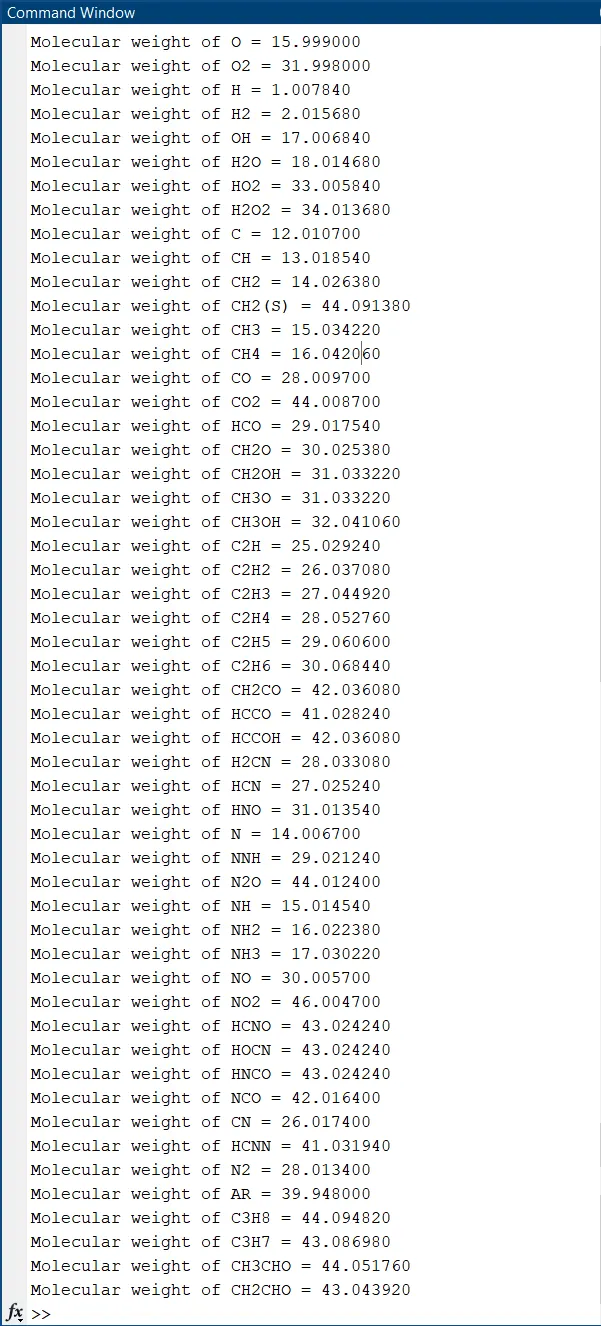
- Calculate the molecular weight of each species and display it in the command window.
Main Logic behind the code:
- The lines containing the coefficients are either starting with space" " or a negative sign "-". This is how we tell the program that they are the required coefficient lines to praise.
- If the lines don't contain " " or "-" at the start, then this line will contain the species name and its local temperature values.
- The coefficients are separated by identifying the position E. In this file, every time, 12 indexes to the left and 3 indexes to the left of E will get one coefficient value.
- The last character at the end of each line is deleted because it's of no use for the calculations.
Main Code:
close all
clear global
clc

%% Getting the global temperature values from the file
file = fopen('THERMO.dat','r'); % Reading the nasa thermo file
fgetl(file); % Skipping the 1st line by not assigning it to any variable
temp = fscanf(file,'%f'); % Reading the 2nd line and converting the string to float values
% Global temperature values
global_low_temp = temp(1);
global_mid_temp = temp(2);
global_high_temp = temp(3);

%% Skipping 3 text lines
for i = 1:3
    fgetl(file); % Skipping 3 lines by not assigning it to any variable
end

clear i % Clearing i to save memory
%% Parsing the data

% Initializing the variables for speed
all_coeffs = zeros();
i = 1; nos = 0;
species = {zeros}; local_low_temp = zeros(); local_high_temp = zeros(); local_mid_temp = zeros();

while ~feof(file) % Run loop until the end of file line by line, This loop will run for 212 times
    line = fgetl(file); % Reading the current line

	x = line(1); % The 1st letter of the current line

    % Reading the coefficients
    if x == ' ' || x == '-' % If the first letter is ' ' or '-' then,
        pos_E = strfind(line,'E'); % Finding the position of E in the coefficients
        k = 1; % Initilizing the variable k
        for j = 1:length(pos_E)
           coeff_line = line(k:pos_E(j)+3); % Capture characters upto position of E + 3
           k = pos_E(j) + 3 + 1; % Increment the value of k. Here 1 denotes the space between coefficients
           all_coeffs(i) = str2double(coeff_line); % Convert the coefficients from strings to doubles
           i = i + 1; % Increment i
        end
    else
        name = line(1:6); % Reading the name of the species
        % Name altering
        nos = nos + 1;
        for e = 1:length(name)
            if name(end) == " " % The ending of names is filled with spaces
                name(end) = []; % Removing the spaces
            end
        end
        species{nos} = name; % Assigning all the names to a cell array 'species'

        local_temp = line(49:75); % Reading the local temperature values of current species
        % Converting from strings to numbers
        local_low_temp(nos) = str2double(local_temp(1:7));
        local_high_temp(nos) = str2double(local_temp(10:17));
        local_mid_temp(nos) = str2double(local_temp(20:27));
    end
end
species(end) = []; local_low_temp(end) = []; local_high_temp(end) = []; % removing the ending characters of these arrays

clear i j k nos line name x e % Clearing temporary variables to save memory

%% Sorting the coefficeients
sos = 7; % Size of split
coeffs_split = reshape(all_coeffs, sos, length(all_coeffs)/sos); % Segrigating the arrays
coeffs = num2cell(coeffs_split,1);

htcs = {zeros}; ltcs = {zeros}; % Initializing the cell arrays for speed

n = 1;
for i = 1:length(coeffs)/2
    htcs{i} = coeffs{n}; % High temperature coeffcients
    ltcs{i} = coeffs{n+1}; % Low temperature coeffcients
    n = n + 2;
end

clear i n

%% Molecular weight of the species

mw = molecular_weight(species); % Molecular weight function
for i = 1:length(mw)
    fprintf('Molecular weight of %s = %f',species{i},mw(i)) % Displaying the molecular weights in command centre
    fprintf('n')
end

%% Calculation and plotting the NASA thermodynamic data

create_new_directory();

R = 8.3144; % Universal gas constant in J/(mol*K)

Cp = {zeros}; H = {zeros}; S = {zeros}; % Initializing cell arrays for speed

for i = 1:length(species)
    diff_in_temp = local_high_temp(i) - local_low_temp(i); % Temperature difference
    t = linspace(local_low_temp(i),local_high_temp(i),diff_in_temp); % Temperature range
    for j = 1:length(t)
        if t(j) >= global_mid_temp % If the local temperature is greater than or equal to global mid temperature
            a = htcs{i}; % Assign the 7 high temperature coefficient values to variable a for simplicity
            Sol = equations(a,t(j),R); % Equations function
            Cpx(j) = Sol(1,:); % Specific heat values in a cell array
            Hx(j) = Sol(2,:); % Enthalpy values in a cell array
            Sx(j) = Sol(3,:); % Entropy values in a cell array
        end
        if t(j) < global_mid_temp % If the local temperature is lesser than global mid temperature
            a = ltcs{i}; % Assign the 7 low temperature coefficient values to variable a for simplicity
            Sol = equations(a,t(j),R); % Equations function
            Cpx(j) = Sol(1,:); % Specific heat values in a cell array
            Hx(j) = Sol(2,:); % Enthalpy values in a cell array
            Sx(j)= Sol(3,:); % Entropy values in a cell array
        end
    end
    Cp{i} = Cpx; H{i} = Hx; S{i} = Sx;
    Cpx = zeros(); Hx = zeros(); Sx = zeros();
    % Plotting
    plots(i,t,Cp,H,S,species,mw);
end

close all % Closing all the plots for convinence
clear i j a t % Clearing temporary variables to save memory
Main code step-wise explanation:
- Line 6: Reading the document 'THERMO.dat' to variable file using the 'fopen' command.
- Line 7: Skipping the 1st line by not assigning it to any variable.
- Line 8: Reading the 2nd line and converting the string to float values. This line contains the global temperature values. The temp variable casts these values.
- Line 10-12: The global temperature values are assigned to their respective variable names.
- Line 15-17: Skipping 3 lines by not assigning them to any variable 'cause these lines contains commented texts.
- Line 27-59: The while loop will run loop until the end of the file line by line. This loop will run 212 times.
- Line 28: For every iteration of this loop, the 'fgetl' command will read the next line and store it in variable 'line'.
- Line 30: The 1st letter of the line is stored in x variable 'x'.
- Line 33-41: If clause - If the first letter is ' ' or '-' then proceed with the below steps:
- Line 34: Finds the position of 'E' in the current line.
- Line 36-41: For every position of E in the line, concatenate 12 characters before and 3 characters after E and include E as well.
- After concatenating, convert the string into a number and assign it to the variable matrix all_coeffs.
- Line 42-58: Else clause - If the first letter is not ' ' or '-': It means what this line doesn't contain the coefficient values, but rather the name of the species and their local temperature ranges.
- There is a maximum of 6 characters in the name of the species in this NASA document.
- Line 43: So, assigning the 1st 6 characters of variable 'line' to variable 'name' which is further processed to eliminate the spaces captured in short species names from lines 45 to 50.
- Line 51: A 53 cell array called 'species' is created to hold all the species name in it.
- The local temperatures for each species in available towards the end of the line, with the last character being an index to the species information - it is removed in line 60 of the code.
- Line 53-57: The local temperatures are assigned to their respective variables for each species in three local temp variables.
- Line 58: The if-else clause ends
- Line 59: The while loop ends after 212 iterations.
- Line 65-76: Sorting the coefficients into two parts - 'High-temperature coefficients' and 'Low-temperature coefficients' for each species.
- Line 65: The 'sos' indicates the number of coefficients that should contain in high-temperature coefficients or low-temperature coefficients for each species.
- Line 66: The reshape command segregates the values in variable 'all_coeffs' into 'sos' number of parts and assigns it to a 7x10⁶ matrix called 'coeffs_split'.
- Line 67: All the strings in the coeffs_split matrix are now converted into double integers and a 106 cell array called 'coeffs' is created where all these values are put in. Each cell of the array has 7 coefficients.
- In the coeffs cell array, every odd cell contains the 7 high-temperature coefficient values and every even cell contains the 7 low-temperature coefficient values for each species.
- Line 71-76: This for loop puts all the high-temperature coefficients values and all the low-temperature coefficient values from the coeffs cell array into the 'htcs' and 'ltcs' cell arrays respectively.
- The htcs and ltcs cell arrays are both of the size 1x53 with each cell containing 7 coefficient values concerning the species.
- There are 53 cells because there are 53 species in the data.
- Line 82: Function to create a directory to store all the species folders which each contain thermodynamic plots. Refer to the 'New directory function code' to learn how.
- Line 88-109: Calculation and plotting the thermodynamic results from the NASA thermodynamic data
- Line 88: This loop will run for every species which is 53 in this case
- Line 89: The difference in the local temperature range is calculated for each species.
- Line 90: An array 't' of all the temperatures from local_low to local_high with difference 1 is generated.
- Line 91: A loop is initiated to run until it covers all the temperatures in the array t.
- Line 92-98: If clause - If the local temperature is greater than or equal to global mid-temperature then, assign the 7 high-temperature coefficient values to variable a for simplicity.
- Line 94-97: Call the equations function and input the variables a, t and R into it. More details on this function can be found in the 'Equations function code' section of this report.
- Finally, the Cp, H and S values are obtained in three 53 celled arrays called Cp, H and S respectively. Where each cell contains 7 values of each thermodynamic property.
- Line 98: This if clause ends here
- Line 99-105: If clause - If clause - If the local temperature is lesser than the global mid-temperature then, assign the 7 low-temperature coefficient values to variable 'a' for simplicity.
- Repeat the instruction from line 94 to 98.
- Line 105: This if clause ends here.
- Line 107: Calling the plotting function. More information on this function code is given in its respective section in this report.
- Line 92-98: If clause - If the local temperature is greater than or equal to global mid-temperature then, assign the 7 high-temperature coefficient values to variable a for simplicity.
- Line 108: The loop 'j' ends here after 'diff_in_temp' iterations.
- Line 109: The loop 'i' ends here after 53 iterations.
- Line 116: Calling the molecular weight function. More information on this given in the molecular weight section included in the report.
- Line 117-120: Code to display molecular weights in the command window.
- END OF CODE
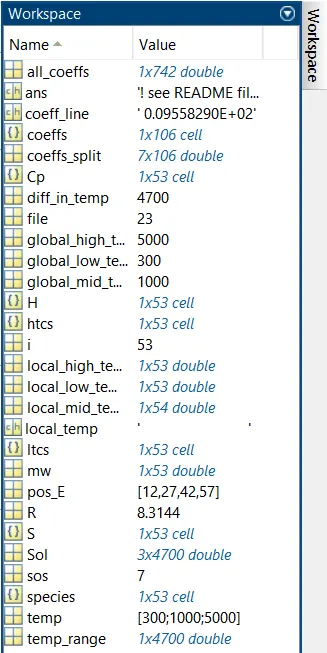
Here is a screenshot of the workspace window for your reference:
Equations function code: (Cp,H,S)
function [Sol] = equations(a,t,R)
    Cp = R*(a(1) + a(2)*t + a(3)*t^2 + a(4)*t^3 + a(5)*t^4); % Equation for Specific heat
    H = R*t*(a(1) + a(2)*t/2 + a(3)*(t^2)/3 + a(4)*(t^3)/4 + a(5)*(t^4)/5 + a(6)*t); % Equation for Enthalpy
    S = R*(a(1)*log(t) + a(2)*t + a(3)*(t^2)/2 + a(4)*(t^3)/3 + a(5)*(t^4)/4 + a(7)); % Equation for Entropy
    Sol = [Cp;H;S]; % Solution set
end
Explanation:
- The equations function returns the values of Specific heat, Enthalpy and entropy through the 1x3 sol array.
New directory function code:
function create_new_directory()
    if not(isfolder('Thermodynamic_property_plots')) % Checks If this folder exits or not
        mkdir Thermodynamic_property_plots % Create the folder it doesn't exist already
    else % If the folder already exists
        rmdir('Thermodynamic_property_plots','s') % Delete the contents of the folder and the folder
        mkdir Thermodynamic_property_plots % Re-create the folder
    end
end
Explanation:
- Line 1: Define the function - this function does not return any value but will only execute the functions
- Line 2: If clause - If the folder named 'Thermodynamic_property_plots' is not present in the current directory, then make a new folder or directory with the same name
- Line 4: else clause - If the folder already exists, delete the contents in the folder and the folder itself. Then make a new folder with the same name.
- Line 7: End of If else clause.
- Line 8: End of function.
Plotting and saving function code:
function plots(i,t,Cp,H,S,species,mw)

    % Plot for Specific heat
    figure(1)
    plot(t,Cp{i},'linewidth',2,'Color','r');
    title("Specific heat vs Temperature of '" + species(i) + "'" + ". Molecular weight = " + mw(i))
    xlabel("T (K)")
    ylabel("Cp (J/(Kg K)")

    % Plot for enthalpy
    figure(2)
    plot(t,H{i},'linewidth',2,'Color','g');
    title("Enthalpy vs Temperature of '" + species(i) + "'" + ". Molecular weight = " + mw(i))
    xlabel("T (K)")
    ylabel("H (J/Kg)")

    %Plot for Entropy
    figure(3)
    plot(t,S{i},'linewidth',2,'Color','b');
    title("Entropy vs Temperature of '" + species(i) + "'" + ". Molecular weight = " + mw(i))
    xlabel("T (K)")
    ylabel("S (J/K)")

    % Saving

    inpath = ('C:UsersroshaOneDriveMatlabMatlab for Mechanical engineersProjectsNasa_File_PhrasingThermodynamic_property_plots'); % Defining the path
    cd(inpath) % Changing the directory where the species folder needs to be saved
    name = species{i}; % Assigning the ith species name to variable name for simplicity
    mkdir (pwd,name) % Creating a new folder with ith species name. pwd means current folder
    fpath = (['C:UsersroshaOneDriveMatlabMatlab for Mechanical engineersProjectsNasa_File_PhrasingThermodynamic_property_plots',name]); % Defining the path
    cd(fpath) % Changing the directory where the thermodynamic data plots need to be saved in each species folder
    saveas(figure(1),fullfile(pwd, "1. Cp vs T of " +species(i) + ".png")); % Saving the Cp/T plot
    saveas(figure(2),fullfile(pwd, "2. H vs T of " +species(i) + ".png")); % Saving the H/T plot
    saveas(figure(3),fullfile(pwd, "3. S vs T of " +species(i) + ".png")); % Saving thr S/T plot

    % Taking the current directory to 'Nasa_File_Phrasing'
    cd .. % This takes one step back from the current directory
    cd ..

    clear figure(1) figure(2) figure(3) name repath % Clearing temporary variables to save memory
end
Molecular weight function code:
function [mw] = molecular_weight(species)
    % Automic weights of the elements
    aw_H = 1.00784; aw_C = 12.0107; aw_O = 15.999; aw_N = 14.0067; aw_Ar = 39.948; aw_S = 30.065; % u
    aw_element = [aw_H, aw_C, aw_O, aw_N, aw_Ar, aw_S]; % An array of automic weights respective to the elements above
    elements = ['H' 'C' 'O' 'N' 'A' 'S']; % Element symbols

    mw = zeros(); swm = zeros(); % Innitiating the variables for speed

    for i = 1:length(species)
        s = species{i}; % The ith species name is copied to variable s for simplicity
        for j = 1:length(s)
            pos = strfind(elements,s(j)); % Finding the position of element from s in the elements array
            if pos >= 1 % If the position of element is defined
                swm(j) = aw_element(pos); % Assignt its respective automic weight
            end
            if isempty(pos) == 1 && s(j) ~= 'R' % If the character is not there in the list, it means its a number
                if s(j) ~= '(' && s(j) ~= ')' % Neglecting the '(', ')' and 'R' characters
                    n = str2double(s(j)); % Convert the string to number type
                    swm(j) = swm(j-1)*n - swm(j-1); % Multiply the number with the previous element's automic weight
                end
            end
        end
        mw(i) = sum(swm); % Calculating the molecular weight of each species
        swm = zeros(); % Emptying the swm arraay for fresh re-start
    end
    clear i s j pos swm n % Clearing temporary variables to save memory
end
Step-wise explanation of Molecular weight function code:
- Line 1: The molecular_weight function is defined with variable 'species' as an input argument. This function produces a matrix 'mw' of containing all the molecular weights of the species.
- Line 4: The atomic weights of individual elements are defined and put in the array 'aw_element'.
- Line 5: The names of the individual arrays are defined in an array called elements.
- Line 9-25: The loop is initiated to run 53 times.
- Line 10: The ith species name is copied to variable 's' for simplicity.
- Line 11-22: A loop is started and it will run for the number of characters in the species name.
- Now finding the position of every character in the species name in the 'elements' array. (Note that this will only give positions to characters H, C, O, N, A and S but not numbers).
- Line 13: If clause - If the position of the character is defined, then a temporary variable array called 'swm' will collect the atomic weight for that element. And end this clause.
- Line 16: If clause - If the character is not there in the list, it means it's a number and the character shouldn't be 'R' not '(' nor ')'. Then,
- Line 18: Convert the character into a number and assign it to variable 'n'.
- Line 19: Multiply n by the molecular weight of the previous element and subtract it by the molecular weight of the previous element.
- This is done because later we will be adding all the numbers in the 'swm' matrix and assign it to the main output variable 'mw'.
- Line 21: End the if clause.
- Line 23: Summation of all the number in the 'swm' matrix and put it in the 'mw' for every loop iteration.
- Line 24: Clear the values in 'swm' for the fresh restart of this temporary variable else the values will overlap.
- Line 25: End of function.
Results:
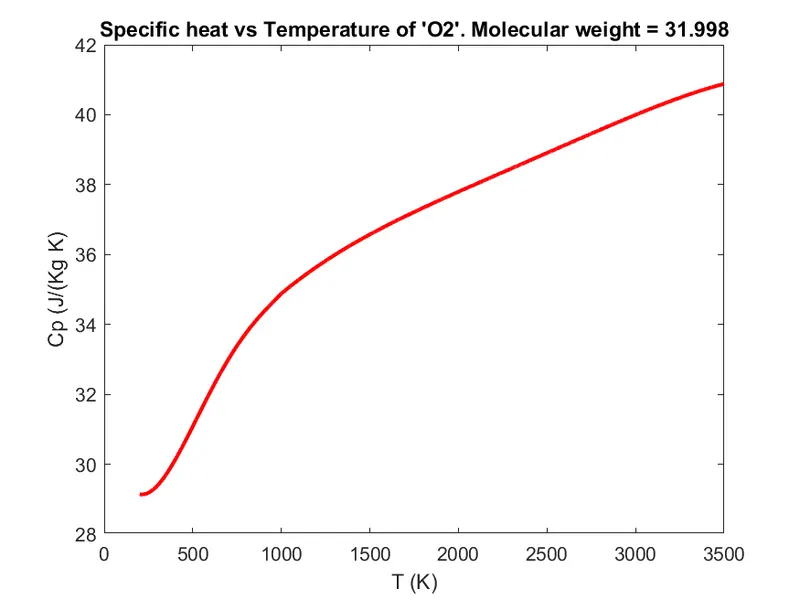
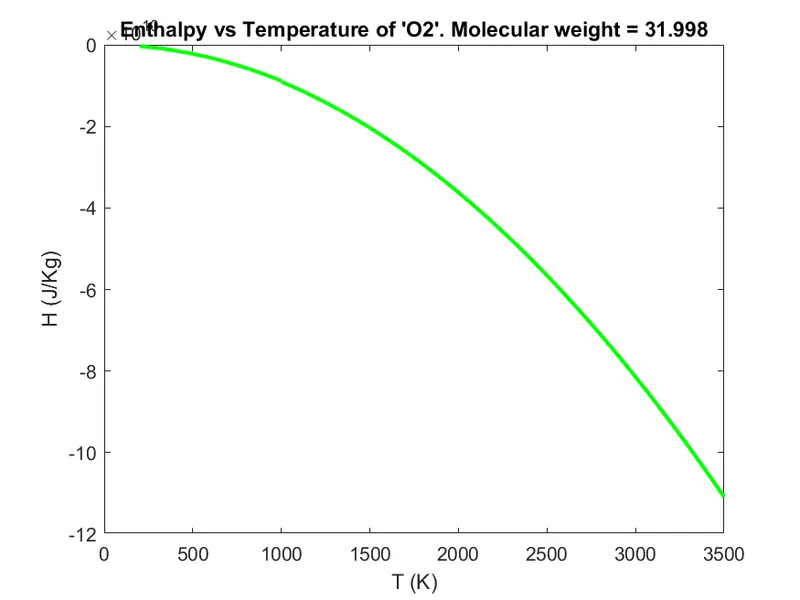
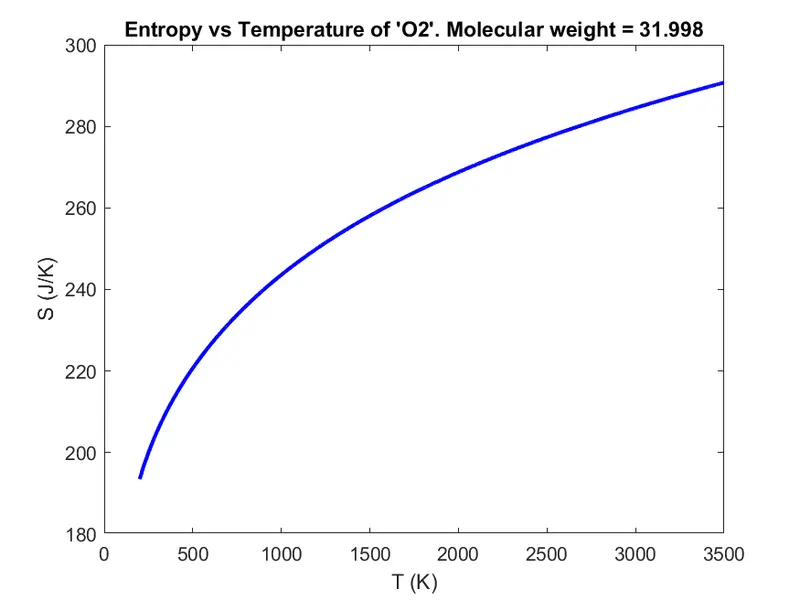
Plots of O2, N2 and CO2:
| Specific heat vs Temperature | Enthalpy vs Temperature | Entropy vs Temperature |
| 1. Thermodynamic property plots for Oxygen (O2) molecule | ||
 |
 |
 |
| 2. Thermodynamic property plots for Nitrogen (N2) molecule | ||
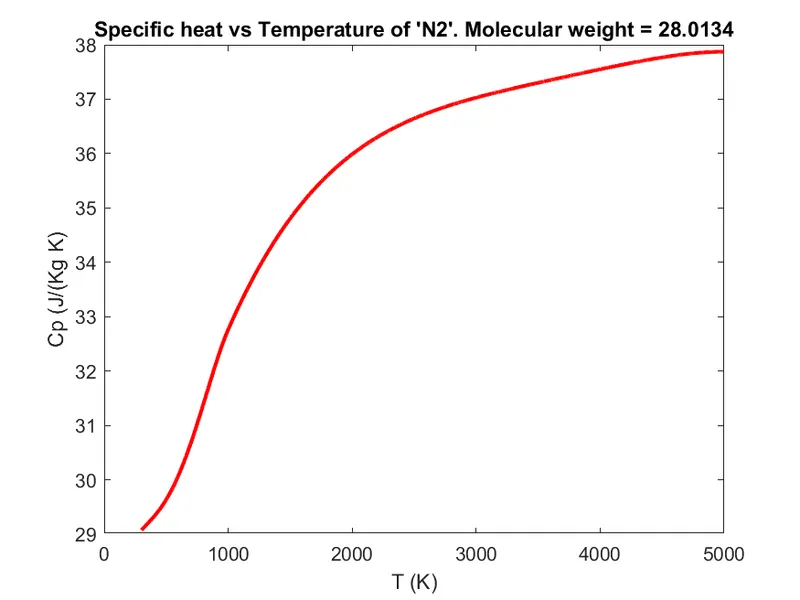 |
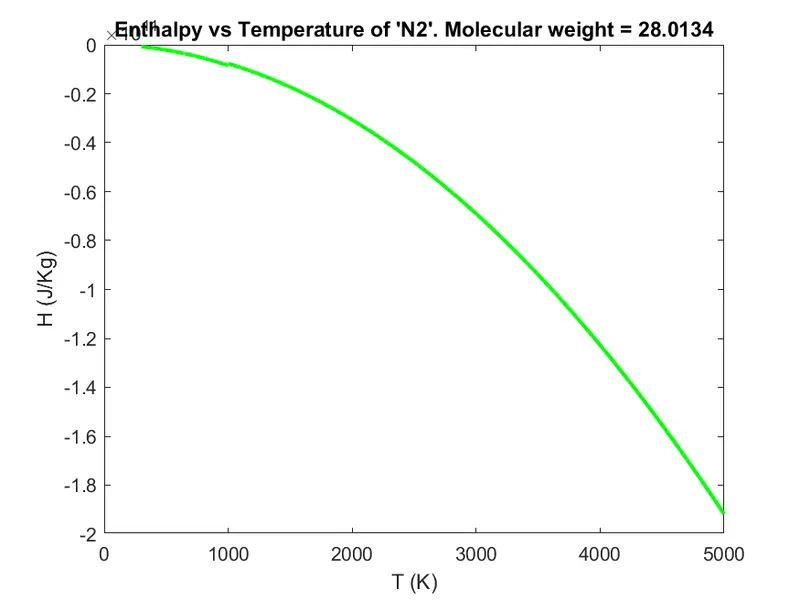 |
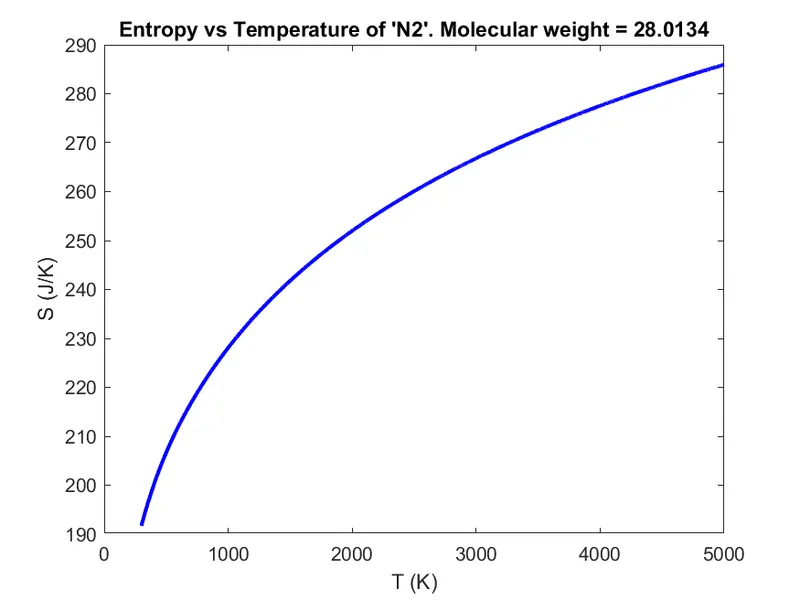 |
| 3. Thermodynamic property plots for Carbon dioxide (CO2) molecule | ||
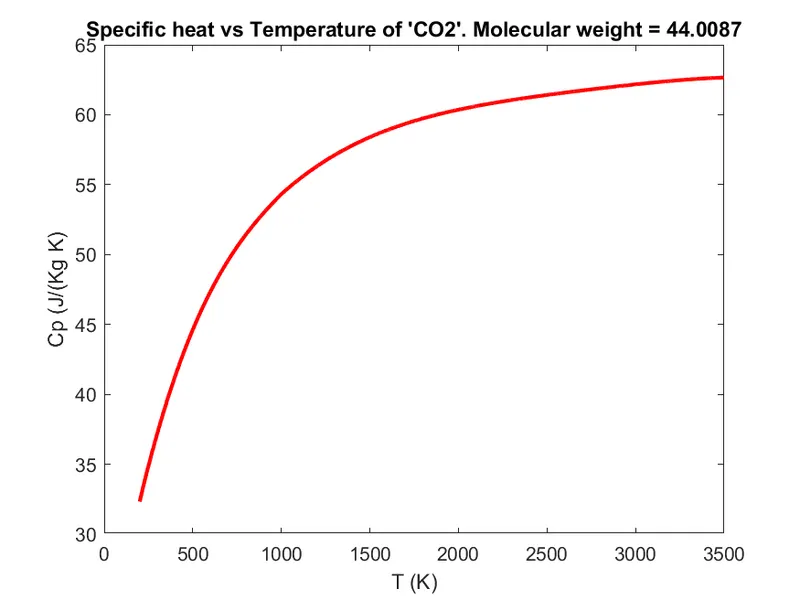 |
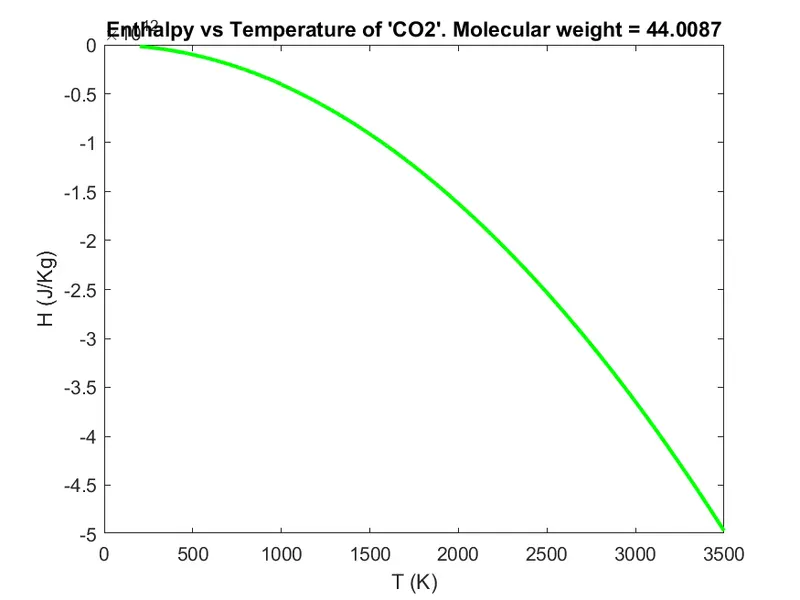 |
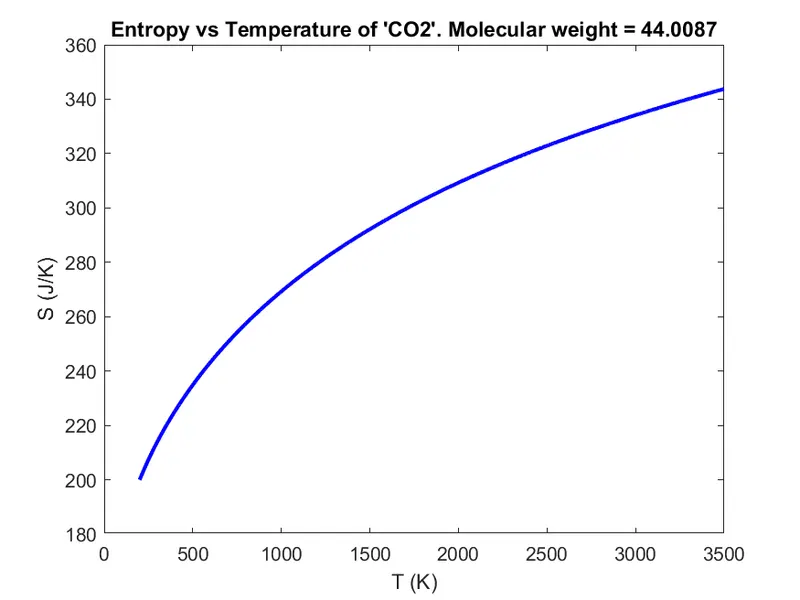 |
The molecular weight of elements in the command window:
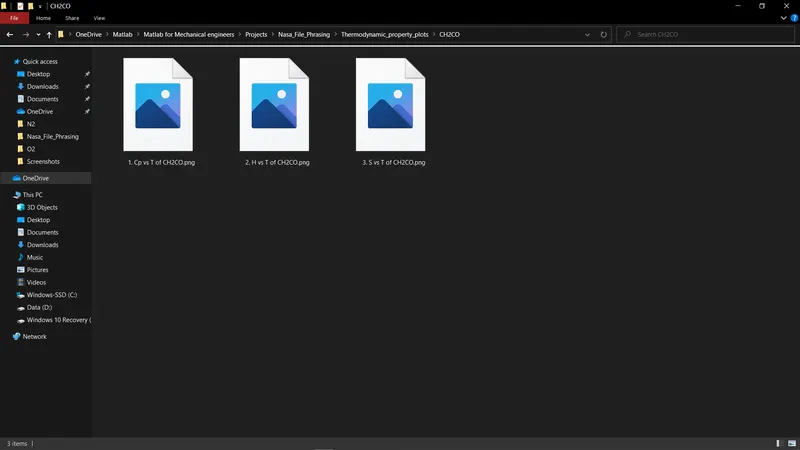
The folder where all the species plots are saved:
ERRORS FACED DURING THE DEVELOPMENT OF THIS CODE:
Error screenshot:
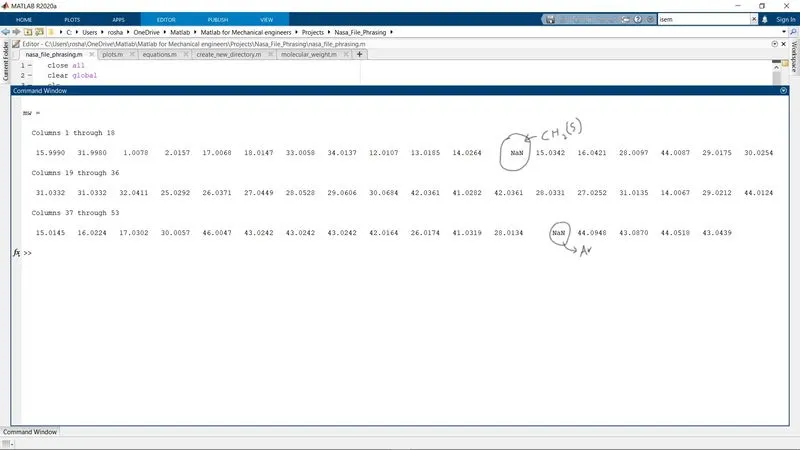
- Error: When calculating the molecular weight of the species, it was not solving for Argon 'AR' and Thioformaldehyde 'CH2(S)'
- Reason for error: AR has two characters, so the program was also reading the letter R and going into the if function where the position of the element is not defined. So its value was getting erased from the memory completely. Whereas, CH2(S) has two special characters '(' and ')' in it so the same thing happened as it happed to AR.
Here is the solution:

- Solution: In the if clause, mention that if the element is not equal to any of these characters, this solved the problem.
*IF YOU HAVE ANY QUESTIONS PLEASE FEEL FREE TO ASK THEM IN THE COMMENTS BELOW! THANKS!*