Introduction to National Building Code and Steps in a Construction project
1) Why are building codes or standards essential for the modeling/ efficiency of drawings in Revit ?
A model building code is a set of building codes that are developed and maintained by a standard organisations which operates indepently for the jurisdiction or area in which the building code code standards are developed.
Local government or councils can adopt these building codes as they se warly, in order to better observation of construction within area.
These codes establish minimum safety, construction and materials required for the builders to adhere it. To achieve the minimum standards of safety and welfare of residents of a building, the governing body defines sa set guidelines to regulate the construction activities termed as building codes.
National Building Code(NBC) is a comprehensive building code, which is a national instrument providing guidelines for regulation of building constructions activities across the countries. It serves as a model code adopted by all agencies involved in building constructions. The code code mainly consists of administrative regulations, development control rules and general building requirements.
_______________________________________________________________________________________________________________________
2) From the National Building Code list the groups that will be essential to you when you begin modeling in Autodesk Revit.
For the convience of the users this information is in the following five groups of the NBC:
-Group 1: For the development, building planning and related aspects
-Group 2: For structural design and related aspects
-Group 3: For construction related aspects including safety
-Group 4: For aspects relating to building services
-Group 5: For aspects relating to plumbing services including solid waste.
[or]
-Group A: Residential
-Group B: Educational
-Group C: Institutional
-Group D: Assembly
-Group E: Business
-Group F: Mercantile
-Group G: Industrial
-Group H: Storage
-Group I: Hazardous
_______________________________________________________________________________________________________________________
3) List the five major steps that occur in project cycle . The steps should include from conceptualization of project to maintenance and final stage.
- Location / siting
- Conceptualization and planning
- Designing and detailing
- Construction / excecution
- Maintanance and repair
_______________________________________________________________________________________________________________________
4) Give examples of different disciplines involved in construction of a project
- Architect
- Civil Engineer
- Structural engineer
- Geotechnical engineer
- Electrical engineer
- Plumbing engineer
- Fire protection engineer
- Accoustic speacialist
- Health,safety and environmental specialists
- Town planner
- Urban designer
- Interior designer
- Security system specialist
- Project/contruction manager
_______________________________________________________________________________________________________________________
5) How are buildings classified ? Place the following buildings under each category
a. Four unit apartments
b. School with capacity of 1000 students
c. A single unit shop.
d. Multi story Shopping complex
e. Steel machine factory
Buildings are classified as
-Group A: Residential
-Group B: Educational
-Group C: Institutional
-Group D: Assembly
-Group E: Business
-Group F: Mercantile
-Group G: Industrial
-Group H: Storage
-Group I: Hazardous
| Four unit apartments | Group A(Residential Building) | Sub-Division A-4 |
| School with capacity of 1000 students | Group B(Educational Building) | Sub-Division B-2 |
| A single unit shop | Group F(Mercentile Builiding) | Sub-Division F-1 |
| Multi story Shopping complex | Group D(Assembly Building) | Sub-Division D-4 |
| Steel machine factory | Group G(Industrial Buiding) | Sub-Division G-1 |
_______________________________________________________________________________________________________________________
6) Distinguish the roles of Design team and Management team
| Project Management Team | Design Team Management |
| Focuses on management of project related activities | Focuses of management of design related activities |
| Temporary management process | Permanent management process |
| Have more resposnibilities than design manager | Have less responsibilities than project manager |
| Process includes starting project, planning, executing, monitoring and controlling and then finally terminating. | Process includes defining problem, gathering information, set budget, preparing design, monitoring and finally repair and protection |
_______________________________________________________________________________________________________________________
7) Refer to NBC, Identify the modeling requirements for the project ( from week 4).
a. Height Limitations
b. Area Limitations
c. Room sizing
d. Wall height
e. Thickness based on fire life and safety
f. Passageway requirements
-Height Limitations
- Height of the building should not exceed 15m and for such buildings there is no need to provide lifts
- Housing for the low-income group shall preferably upto maximum of two storeys
- Buildings taller than 15m should be resorted in exceptional circumstances and it should be governed by provisions laid down this code.
-Area Limitations
- The maximum plot size with the ground coverage should not exceed 75% and shall not be less tha 40m^2 in small and medium town and shall not the less than 30m2 in metropolitan cities.
- Plot size below 30m^2 but not less than 15m^2 may be permitted in case of cluster planning. However in such cases 5th the groung coverage and far shall be 100%.
-Room Sizing.
- The area of the habitable room shall not be less tan 9.5m2 where there is only one room with a minimum width of 2.4m
- Where there is two rooms, one of these shall not be less than 9.5m^2 and the other should not be lass than 7.5m^2 with a minimum width of 2.1m
-Wall Height
THe minimum height of rooms-
- Habitable room - 2.6m
- Kithchen - 2.6m
- Bath/water closet 2.1m
- Corridor - 2.1m
- In case of sloping roofs, the average height of roofs for the habitable rooms shall be 2.6m and the minimum height shall be 2m
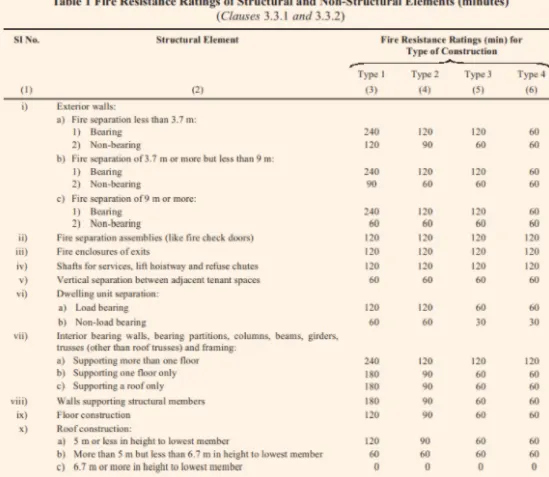
-Thickness based on firse and safety
-Passageway requirement
- Passageway shall be of widht not less than the calculated aggregated width of exit doorways lending from them in the directiom of travel to the exit
- In case of building, there is a central corriodor which is a part of exit access, the door of rooms shall open for rooms having assembly inwards permit smooth flow traffic in the corriodor.
_______________________________________________________________________________________________________________________
8) We have identified requirements for modeling from question 7, Use these numbers from code book and verify the numbers used in modeling the unit from week 2 to week 4. If the numbers are not reasonable, use the numbers obtained from the code book to create a revision of the mode.
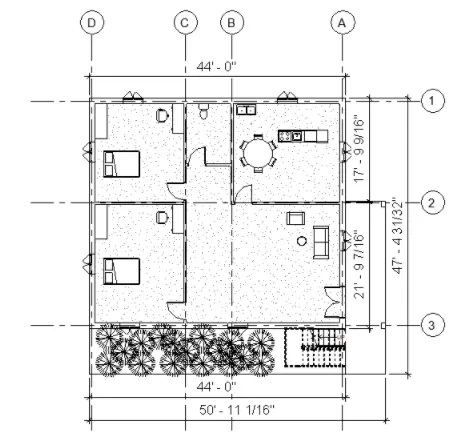
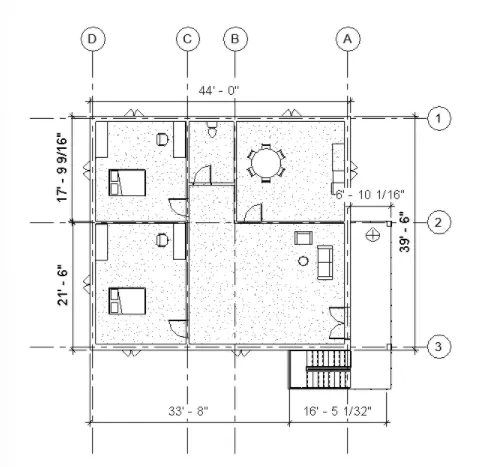
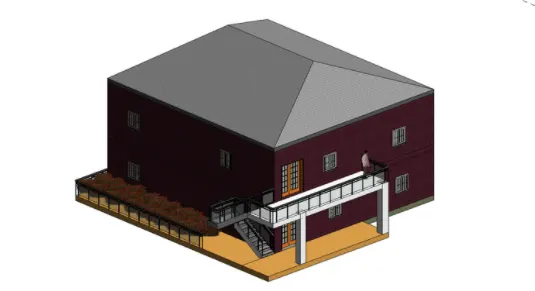
This model resembles the actual modeling requirements for Project 1 of course work