How to FIt a Curve in a Perfect manner?
Aim:
- To write code to fit a linear and cubic polynomial for the given data and also to write a code in split wise method to fit a cubic curve.
- To plot the linear and cubic fit curves along with the raw data points.
Objectives:
- Write a code to create Linear and cubic polynomial for the given data .
- And to find the value of co-efficient for cp.
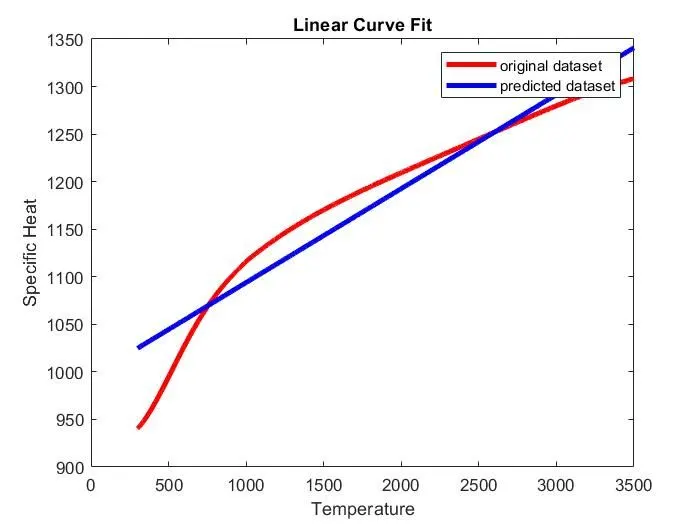
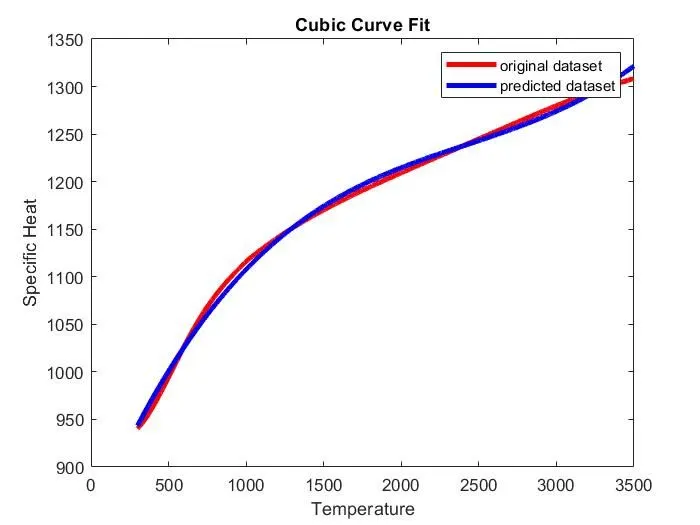
- Plot the curve for Linear to Cubic polynomial degree for the given dataset.
- And also plot the curve for predicted dataset of Linear and cubic polynomial degree to compare with previous curve of original dataset to get a fitness of curve.
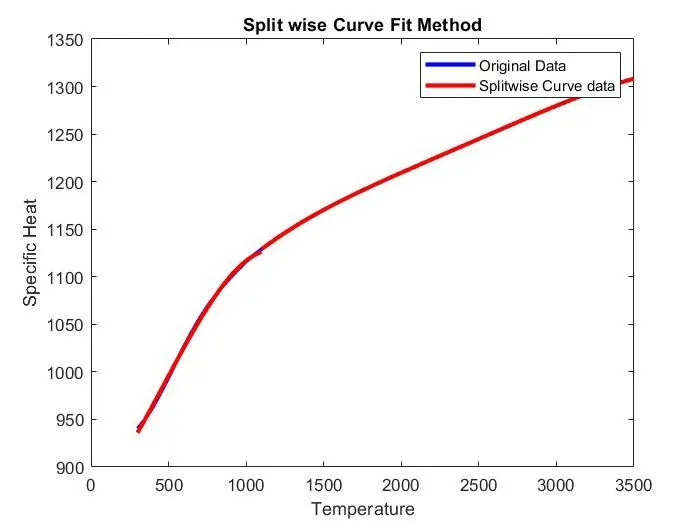
- Again, write a program in split-wise method by centering and scaling of errors to avoid the errors.
Curve Fitting:
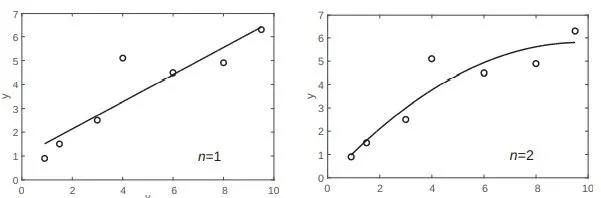
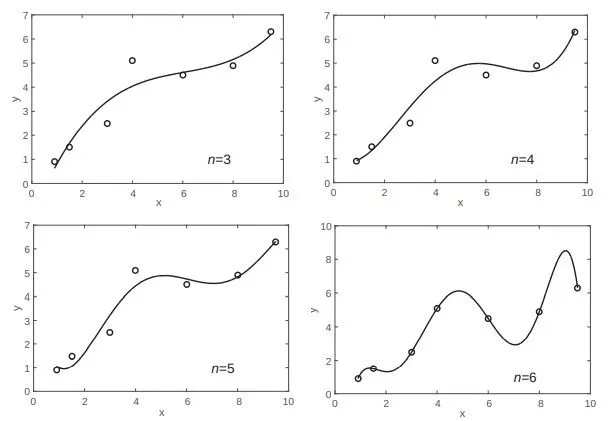
Curve fitting, also called regression analysis, is a process of fitting a function to a set of data points. The function can then be used as a mathematical model of the data. Since there are many types of functions (linear, polynomial, power, exponential, etc.), curve fitting can be a complicated process. Many times, one has some idea of the type of function that might fit the given data and will need only to determine the coefficients of the function. In other situations, where nothing is known about the data, it is possible to make different types of plots that provide information about possible forms of functions that might fit the data well.
Figure.1 Fitting data with different polynomial orders
Program Description:
- Linear Curve Fit:
clear all
close all
clc

% Write code to fit a Linear polynomial for the Cp data
% Load the given data
cp_data = load('data');

% Assign the Value
temperature = cp_data(:,1);
cp = cp_data(:,2);

% Co-efficients of Curve
co_eff = polyfit(temperature,cp,3);
predicted_cp = polyval(co_eff,temperature);

% Curve fit
plot(temperature, cp,'linewidth',3,'color','r');
hold on
plot(temperature, predicted_cp,'linewidth',3,'color','b');
xlabel('Temperature');
ylabel('Specific Heat');
title('Cubic Curve Fit');
legend('original dataset','predicted dataset');- First Load the given ‘data’ file by using ‘load’ command and that would be stored in a variable called ‘cp_data’.
- Assign the values of ‘temperature’ and ‘specific heat’ from the data file.
- Here, temperature is taken as first column of cp_data and specific heat (cp) is taken as second column of cp_data.
- To find the co-efficients for Linear polynomial equation by using ‘polyfit’ command,
Cp = aT + b
- Then calculate the value of the polynomial equation by using ‘polyval’ command and stored in a variable called ‘predicted_cp’.
- Finally, plot the curves for original dataset and Predicted dataset and to compare them.
- Cubic Curve fit:
- First Load the given ‘data’ file by using ‘load’ command and that would be stored in a variable called ‘cp_data’.
- Assign the values of ‘temperature’ and ‘specific heat’ from the data file.
- Here, temperature is taken as first column of cp_data and specific heat (cp) is taken as second column of cp_data.
- To find the co-efficients for cubic polynomial equation by using ‘polyfit’ command,
Cp = aT^3 + bT^2+cT+d
- Then calculate the value of the polynomial equation by using ‘polyval’ command and stored in a variable called ‘predicted_cp’.
- Finally, plot the curves for original dataset and Predicted dataset and to compare them.
clear all
close all
clc

% Write code to fit a cubic polynomial for the Cp data.
% Load the given data
cp_data = load('data');

% Assign the Value
temperature = cp_data(:,1);
cp = cp_data(:,2);

% Co-efficients of Curve
co_eff = polyfit(temperature,cp,3);
predicted_cp = polyval(co_eff,temperature);

% Curve fit
plot(temperature, cp,'linewidth',3,'color','r');
hold on
plot(temperature, predicted_cp,'linewidth',3,'color','b');
xlabel('Temperature');
ylabel('Specific Heat');
title('Cubic Curve Fit');
legend('original dataset','predicted dataset');
iii. Split-wise method:
clear all
close all
clc

% Write a code to show splitwise method.
% Load the given data
cp_data = load('data');

% Assign the Value
temp = cp_data(:,1);
cp = cp_data(:,2);

% Split the datas into 4 equal intervals
temp1 = cp_data(1:800,1);
cp1 = cp_data(1:800,2);
temp2 = cp_data(801:1600,1);
cp2 = cp_data(801:1600,2);
temp3 = cp_data(1601:2400,1);
cp3 = cp_data(1601:2400,2);

temp4 = cp_data(2401:3200,1);
cp4 = cp_data(2401:3200,2);

% Co-efficients of Curve
[cp_coeff1,s1,mu1] = polyfit(temp1,cp1,3);
predicted_cp1 = polyval(cp_coeff1,temp1,s1,mu1);
[cp_coeff2,s2,mu2] = polyfit(temp2,cp2,3);
predicted_cp2 = polyval(cp_coeff2,temp2,s2,mu2);
[cp_coeff3,s3,mu3] = polyfit(temp3,cp3,3);
predicted_cp3 = polyval(cp_coeff3,temp3,s3,mu3);
[cp_coeff4,s4,mu4] = polyfit(temp4,cp4,3);
predicted_cp4 = polyval(cp_coeff4,temp4,s4,mu4);

% Curve fit
plot(temp,cp,'color','b','linewidth',2.5);
hold on;
plot(temp1,predicted_cp1,'color','r','linewidth',2.5);
plot(temp2,predicted_cp2,'color','r','linewidth',2.5);
plot(temp3,predicted_cp3,'color','r','linewidth',2.5);
plot(temp4,predicted_cp4,'color','r','linewidth',2.5);
hold off;
xlabel('Temperature');
ylabel('Specific Heat');
title('Split wise Curve Fit Method');
legend('Original Data', 'Splitwise Curve data');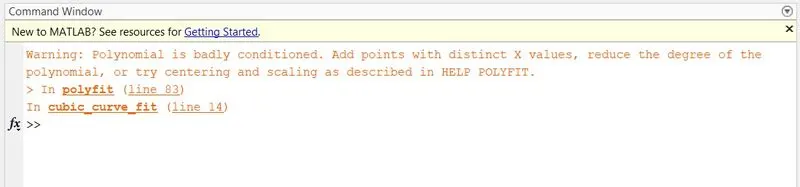
- By using higher order polynomial degree, it shows warning message like this.
- To eliminate this error, we have to use Centering and Scaling.
- During calculating co-efficients, we will also calculate error estimation structure (s) and centering scaling values (mu).
- Here ‘S’ is a structure and it has 3 factors. They are Triangular Factor(R), Degree of freedom (DoF), Co-efficient of cp.
- And ‘mu’ contains two element vectors of centering and scaling. Mu(1) is mean(x) and mu(2) is std(x).
- Then given data is split into 4 divisions.
- Then find the co-efficient of cp for each division of cubic polynomial degree.
- Finally, plot the curves for original dataset and predicted dataset for each division.
Errors Faced While Programming:
No major errors I have found. I found only this error.
Error-1:
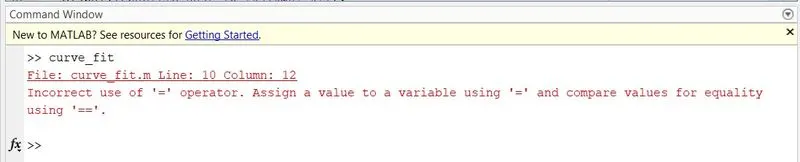
Figure.2 Error-1
I was used wrong operator (-)for assigning the value for the cp_data. Then I modified the Equal operator (=) for assigning the value of cp_data to overcome that error.
Result:
Conclusion:
- How to make a curve fit perfectly?
A perfect curve fit is a fit of original curve with giving of particular degree of polynomial without showing any errors. In this case we can use the method of centering and scaling of errors.
2. How to get the best fit?
In this case we can increase the polynomial degree to get a best fit of the curve. But its not a correct method and it shows the errors for using higher order polynomial. I think Split wise method also provides the best fit for the curve.
3. What could be done to improve the cubic fit?
Split the given data for required divisions, and to eliminating the errors by centering and scaling of errors. Then it makes the perfect cubic fit.
References:
https://projects.skill-lync.com/projects/Curve-Fitting-and-criterion-to-choose-best-fit-41860