Forward Kinematics of a Robotic Arm using Matlab.
Aim: The of this challenge is to create a code to find the path of the Robotic Arm with two rotational axes and create a Video file of the movement of the Arms.
Working:
Let's consider the below Two links as the robot arm and this arm has two rotational axes(θ">θθ1,θ">θθ2). We will be assuming the rotational axes. The L1 will be the length of the first link and L2 the length of the second link
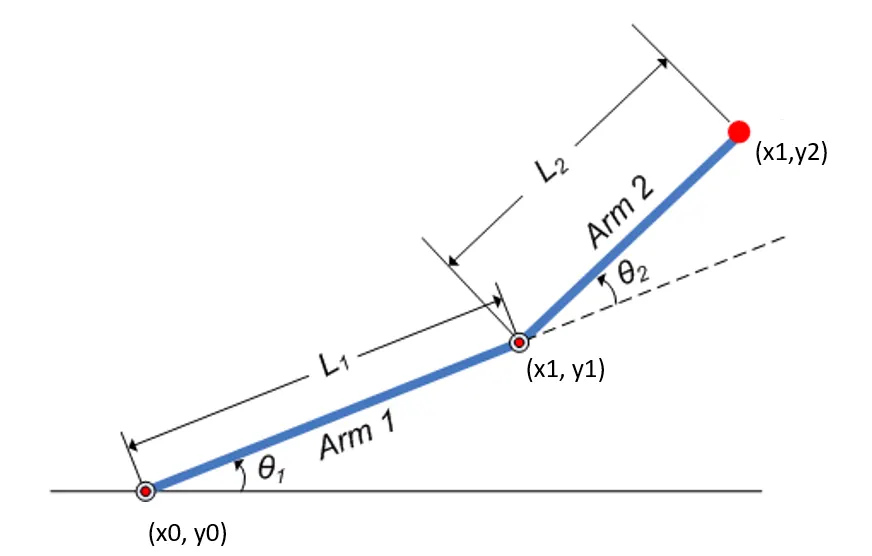
The Origin of the First link will be (0,0) which is (x0,y0) and we will have to calculate the values of (x1,y1) and (x2,y2).
Lets Assume
x1=0
y1=0
L1=1 meter or centimeter as we are assuming the length values.
L2=0.5
theta1=linspace(0,90,10);
theta2=linspace(0,90,10);
ct=1;
So the theta1 and theta2 values are from 0 to 90' and the linspace command is used so that 10 values will be extracted between 0 to 90.
The ct=1 is used for the video output where the ct is a variable, here the 1 represents the first frame in the Video.
Since the theta1 and theta2 values are in array formate we need them to be in single variable value so that we can calculate each value in separate frames. we will be introducing a for a loop.
for i=1:length(theta1)
    THETA1=theta1(i);
    for j=1:length(theta2)
        THETA2=theta2(j);
So inside the for loop i=1: length(theta1) refers to the values of 1 to 10, 1 being 0'and 10 being 90'. And each time the value of will change from THETA1=theta1(0) to theta(90'), And for each theta1 value theta2 will change its degree from 0 to 90'. Hence a Loop junction is used and for each theta2 value is substituted into the variable THETA2.
x1=L1*cosd(THETA1)
y1=L1*sind(THETA1)

x2=x1+L2*cosd(THETA2)
y2=y1+L2*sind(THETA2)
The above are the formulas used to calculate x1,x2,y1,y2 using the THETA1, THETA2, L1 and L2 values. So once all the values are found we need to plot them.
%Plotting
plot([x0 x1],[y0 y1],[x1 x2],[y1 y2],'linewidth',3)
axis([-0.1 1.5 0 1.5])
The plot command is used to plot the above values and the linewidth is assigned as 3. The axis command controls the axis in the Graph.
M(ct)=getframe(gcf);
ct=ct+1;
M is a new array and each individual frame is represented by ct. The get frame command is used to capture the current figure window. And once the figure window is captured the ct is incremented so that we can capture the next frame.
movie(M)
videofile=VideoWriter('Linkage.avi','Uncompressed AVI');
open(videofile)
writeVideo(videofile,M)
close(videofile)
Using the Movie command we can generate a movie using all the frames in the Array M. The VideoWriter command is used to create the video file while we provide the name of the File and its format. After which we Open the video file, write the frame that we have captured and close the video file. Once all the above coding is done we can run the program.
Error's encountered while writing the program.
Below are the errors that were found while executing the code.
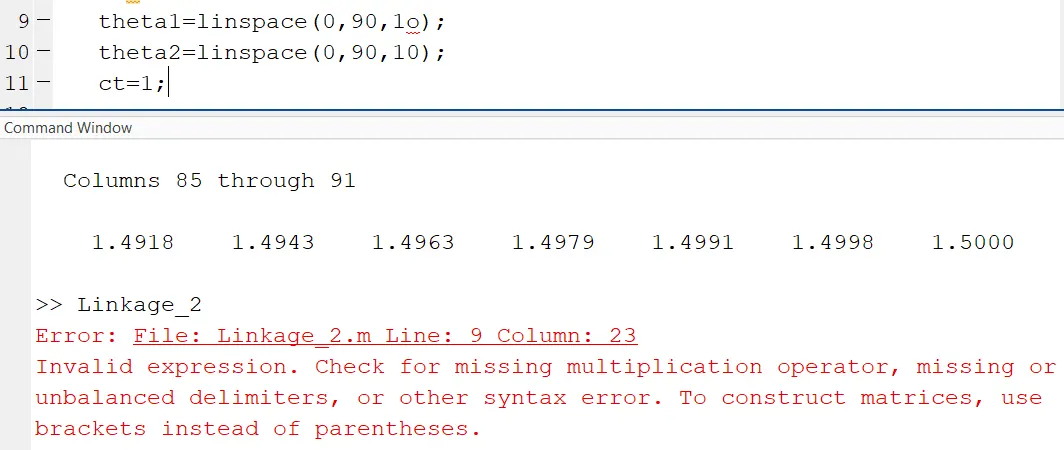
Instead of "0", I had entered "o" leading to this error.
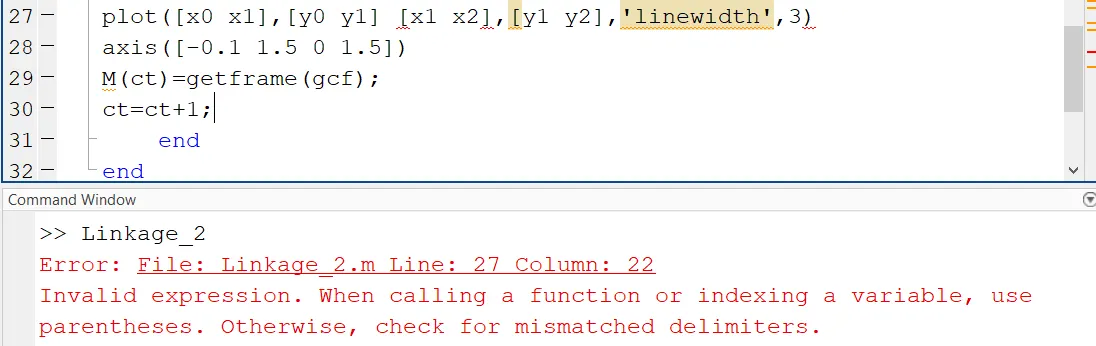
Missed a comma "," for the above error between the co-ordinates.
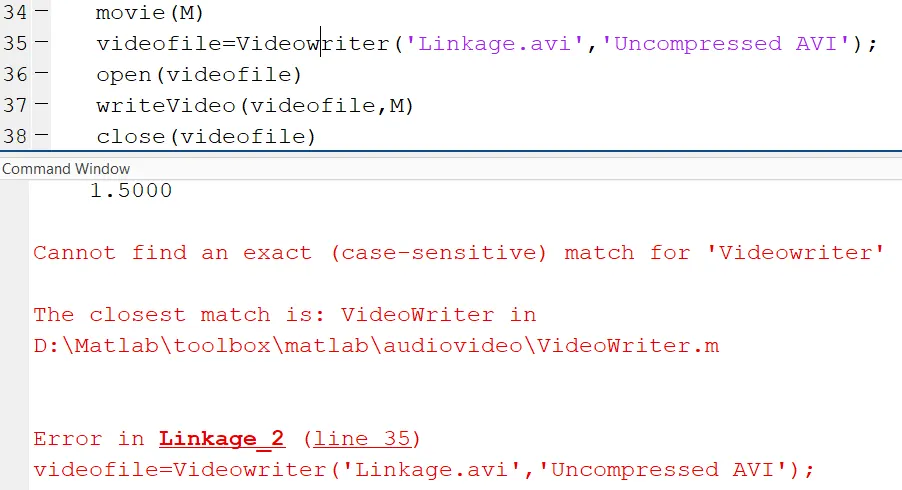
Missed a Capital letter in the command VideoWriter and encountered the above error.
Below is the complete code for the 2-Link robotic arm.
%Forward Kinematics of 2R Linkage Robot video
clear all
close all
clc

%Inputs
L1=1;
L2=0.5
theta1=linspace(0,90,10);
theta2=linspace(0,90,10);
ct=1;

for i=1:length(theta1)
    THETA1=theta1(i);
    for j=1:length(theta2)
        THETA2=theta2(j);
        x0=0;
        y0=0;

x1=L1*cosd(THETA1)
y1=L1*sind(THETA1)

x2=x1+L2*cosd(THETA2)
y2=y1+L2*sind(THETA2)

%Plotting
plot([x0 x1],[y0 y1], [x1 x2],[y1 y2],'linewidth',3)
axis([-0.1 1.5 0 1.5])
M(ct)=getframe(gcf);
ct=ct+1;
    end
end

movie(M)
videofile=VideoWriter('Linkage.avi','Uncompressed AVI');
open(videofile)
writeVideo(videofile,M)
close(videofile)
Below is code for a 3-Link robotic arm working on the same principle.
%Forward Kinematics of 3R Linkage Robot video
clear all
close all
clc

%Inputs
L1=1;
L2=0.5;
L3=0.3;
theta1=linspace(0,90,10);
theta2=linspace(0,90,10);
theta3=linspace(0,90,10);
ct=1;

for i=1:length(theta1)
    THETA1=theta1(i);
    for j=1:length(theta2)
        THETA2=theta2(j)
        for k=1:length(theta3)
        THETA3=theta3(k)
        x0=0;
        y0=0;

x1=L1*cosd(THETA1)
y1=L1*sind(THETA1)

x2=x1+L2*cosd(THETA2)
y2=y1+L2*sind(THETA2)

x3=x2+L3*cosd(THETA3)
y3=y2+L3*sind(THETA3)

%Plotting
plot([x0 x1],[y0 y1],[x1 x2],[y1 y2],[x2 x3],[y2 y3],'linewidth',3)
axis([-0.1 2 0 2])
M(ct)=getframe(gcf);
ct=ct+1;
        end
end
end

movie(M)
videofile=VideoWriter('Linkage_1.avi','Uncompressed AVI');
open(videofile)
writeVideo(videofile,M)
close(videofile)
Results:
The results for the above codes are in the below links.
https://drive.google.com/drive/folders/1_921fUIcWDfMsgwsSWCNdYyzvdMmEL1n?usp=sharing