FORWARD KINEMATICS OF A 2R ROBOTIC ARM MANIPULATOR
FORWARD KINEMATICS OF 2R ROBOTIC ARM MANIPULATOR
AIM:
Matlab code for 2 arm robot manipulator
GOVERNING EQUATIONS: (used to obtain coordinates of the linkages)
x1 = l1*cos(θ1)
y1 = l1*sin(θ1)
x2 = x1+l2*cos(θ2)
y2= y1+l2*sin(02)
OBJECTIVES
- in order to simulate a forward kinematics of a 2 r robotic arm whivh explores the two dimensional workspace.
- forward kinematics refers to the use of kinematic equations of a robot to compute the position.
- therefore it has two linkages and two rotational joints. hence it is used in various applications like welding a presision componenets.
- the linkages has two degree of freedom in the workspace.
- For different position of the first link, the second link is capable to at diffrent angles.
- once the plots are generated combine them to create an animation.
code:
% forward kinematics 2R robotic arm manipulator
clear all
close all
clc
% inputs
l1 = 1; % the value of length coreesponding to link 1
l2 = 0.5; % the value of length coreesponding to link 2
theta1 = linspace(0,90,10); % value of theta1 ranging from 0 to 90 in 10 values
theta2 = linspace(0,90,10); % value of theta2 ranging from 0 to 90 in 10 values
ct = 1 % initial value of the counter
for i = 1:length(theta1) % to iterate through each loop from 1 to 10
    THETA1 = theta1(i);  % to assign the variable THETA1 to each value of i in theta 1
    for j = 1:length(theta2)% in order to create a nested for loop of each angle link 2
        THETA2 = theta2(j); % to assign the variable THETA2 to each value of j in theta 2
        x0 = 0; % these are the fixed coordinates of arm1
        y0 = 0;
        % to determine the value of coordinates in each linkages

        x1 = l1*cosd(THETA1);
        y1 = l1*sind(THETA1);

        x2 = x1 + l2*cosd(THETA2);
        y2 = y1 + l2*sind(THETA2);

        % plotting


        plot([x0 x1],[y0 y1],[x1 x2],[y1 y2],'linewidth',3)
        axis([-0.1 1.5 0 1.5]) % gives limit of x and y axis
        pause(0.03);
        M(ct) = getframe(gcf); % getting the figure and saving in an array called M
        ct = ct+1; % increment of counter value

    end
end
movie(M)
videofile = VideoWriter('robotic_arm.avi','uncompressed AVI'); % format to store
open(videofile) % opens the movie file
writeVideo(videofile,M) % writes the movie file in given array
close(videofile)
output:
For the sample ouput
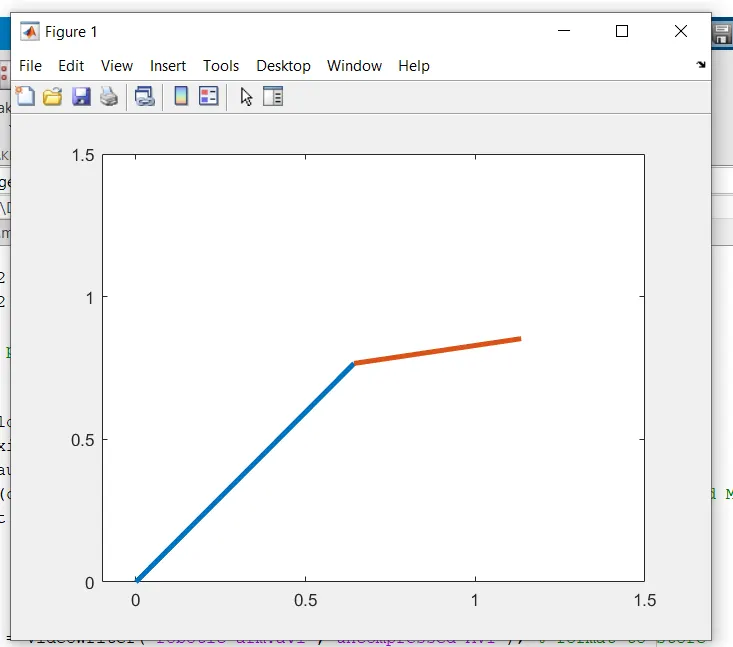
To refer the output in the animation:
https://drive.google.com/file/d/1uVInJvFtBoAcaXD6Ls54ayO2gSILgNPC/view?usp=sharing
CONCLUSION:
- From this forward kinematics manipulator the robotic arm can perform the basic operations in the 2D workspace
- Hence its degree of freedom is restricted because it moves in a single plane.