Drafting of various geometries using Chamfer, Fillet tool in AutoCad
AIM:-
To create the various geometries using Chamfer, Fillet tool in AutoCAD.
INTRODUCTION:-
The main objective of this challenge is to get in touch with various tools in AutoCad like rectangle, polylines, modification tools like copy, move, offset, Chamfer, Fillet, Mirror, Trim. These tools will be understood by creating Various geometries.
Q.1:-
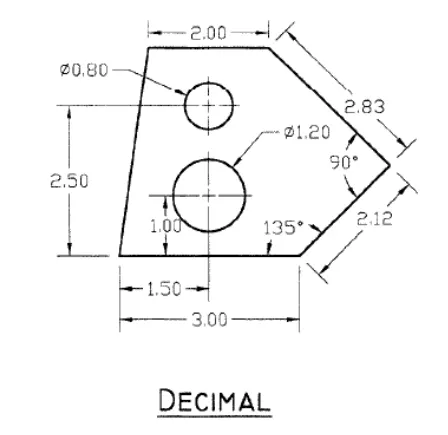
Procedure:-
- Command: UN
- UNITS
- Command: LIMITS
- Reset Model space limits:
- Specify lower left corner or [ON/OFF] <0.000,0.000>:
- Specify upper right corner <420.000,297.000>:
- Command: L
- LINE
- Specify first point: 1,1
- Specify next point or [Undo]: 3
- Specify next point or [Undo]: @2.12<<45
- Specify next point or [Close/Undo]: @2.83<135
- Specify next point or [Close/Undo]: 2
- Specify next point or [Close/Undo]: C
- Command: C
- CIRCLE
- Specify center point for circle or [3P/2P/Ttr (tan tan radius)]: 2.5,2
- Specify radius of circle or [Diameter]: .6
- Command: C
- CIRCLE
- Specify center point for circle or [3P/2P/Ttr (tan tan radius)]: 2.5,3.5
- Specify radius of circle or [Diameter] <0.600>: .4
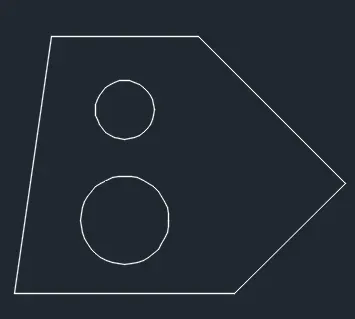
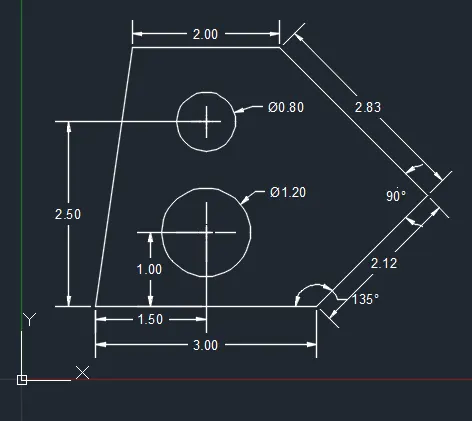
Give the dimensions as per the drawing using the dimension command from the command bar.
Q.2:-
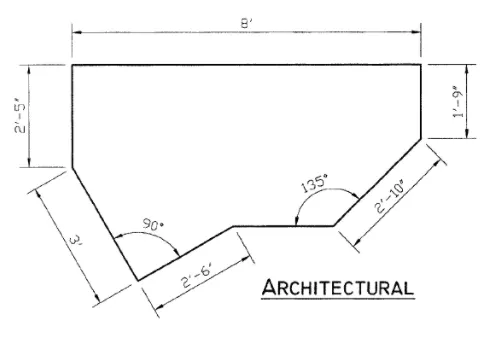
Procedure:-
- Command: UN
- UNITS
- Command: L
- LINE
- Specify first point: 25,5
- Specify next point or [Undo]:
- >>Enter new value for ORTHOMODE <1>:
- Resuming LINE command.
- Specify next point or [Undo]: @3'<120
- Specify next point or [Undo]: 2'5"
- Specify next point or [Close/Undo]: 8'
- Specify next point or [Close/Undo]: 1'9"
- Specify next point or [Undo]: @2'10"<225
- Specify next point or [Undo]: *Cancel*
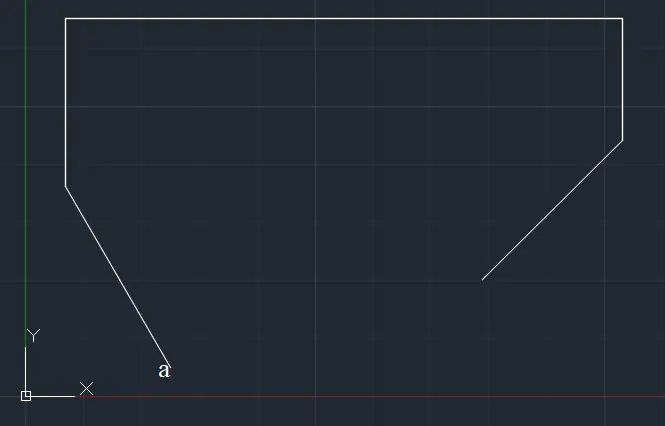
- Command: L
- LINE
- Click on Point "a"
- Specify next point or [Undo]: @2'6"<30
- Specify next point or [Undo]:
- Specify next point or [Close/Undo]: *Cancel*
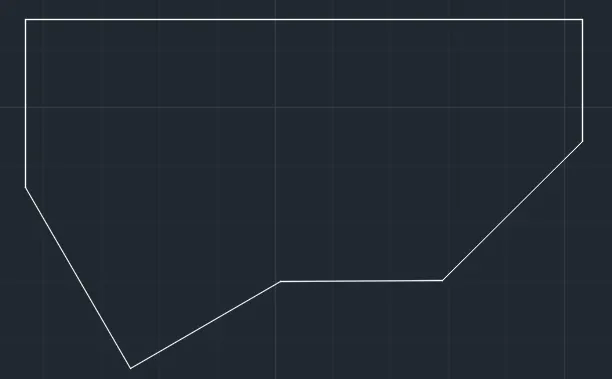
Give the dimensions as per the drawing using the dimension command from the command bar.
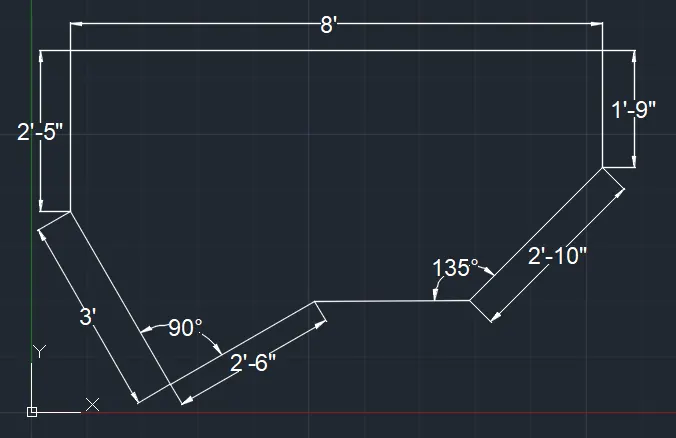
Q.3:-
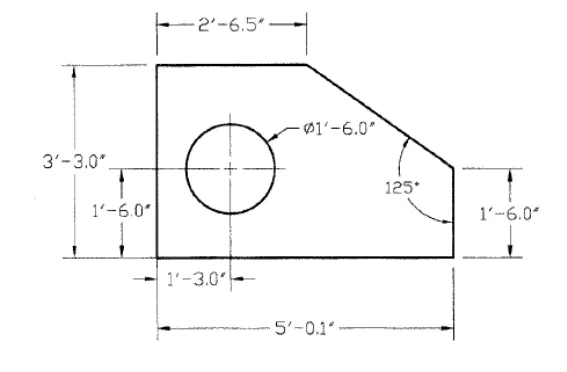
Procedure:-
- Command: UN
- UNITS
- Command: _line
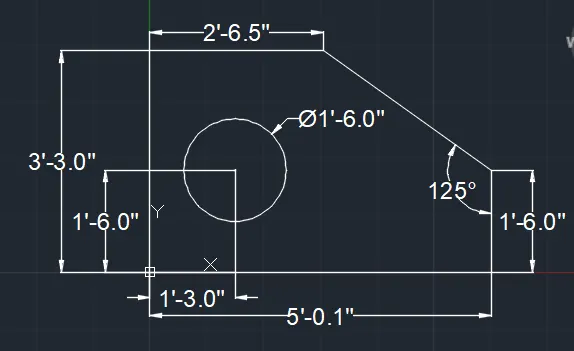
- Specify first point: 2'6.5",3'3"
- Specify next point or [Undo]: 2'6.5"
- Specify next point or [Undo]: 3'3"
- Specify next point or [Close/Undo]: 5'0.1"
- Specify next point or [Close/Undo]: 1'6"
- Specify next point or [Close/Undo]: *Cancel*
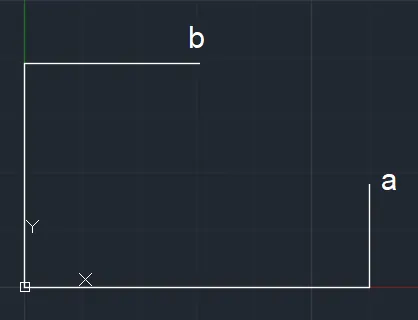
Using Line Command Join "a" & "b".
- Command: _circle
- Specify center point for circle or [3P/2P/Ttr (tan tan radius)]: 1'3",1'6"
- Specify radius of circle or [Diameter]: 9"
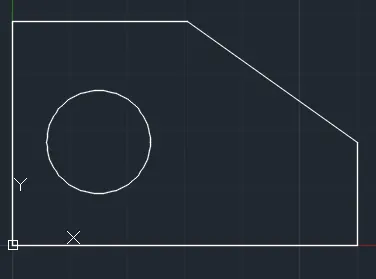
Give the dimensions as per the drawing using the dimension command from the command bar.
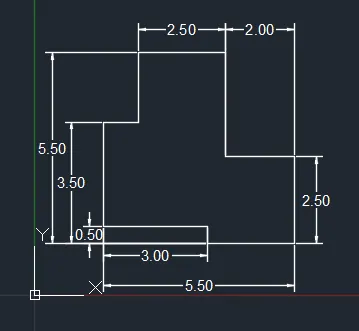
Q.4:-
Procedure:-
- Command: UN
- UNITS
- Command: L
- LINE
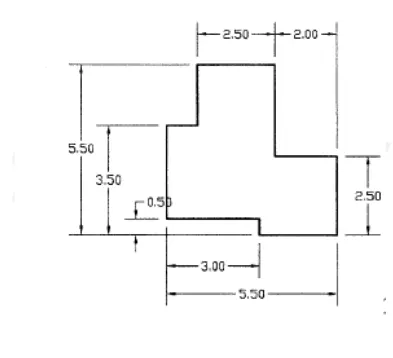
- Specify first point: 2,2
- Specify next point or [Undo]: 3
- Specify next point or [Undo]: 1
- Specify next point or [Close/Undo]: 2
- Specify next point or [Close/Undo]: 2.5
- Specify next point or [Close/Undo]: 3
- Specify next point or [Close/Undo]: 2
- Specify next point or [Close/Undo]: 2.5
- Specify next point or [Close/Undo]: 2.5
- Specify next point or [Close/Undo]: .5
- Specify next point or [Close/Undo]: C
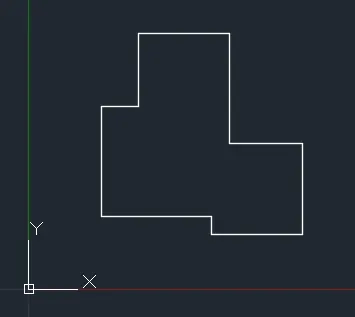
Give the dimensions as per the drawing using the dimension command from the command bar.
Q.5:-
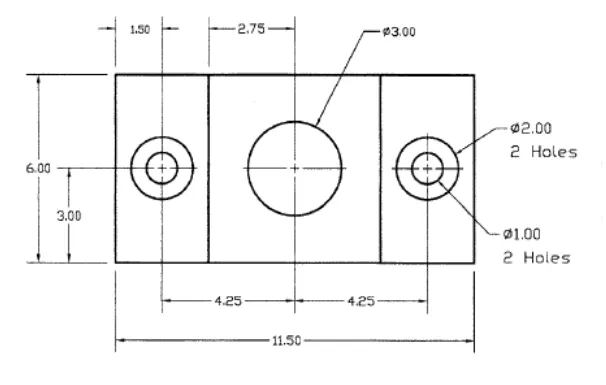
Procedure:-
- Command: UN
- UNITS
- Command: REC
- RECTANG
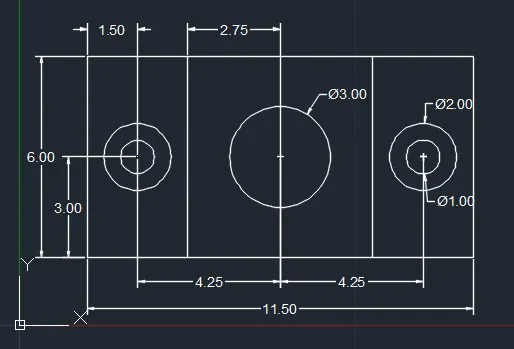
- Specify first corner point or [Chamfer/Elevation/Fillet/Thickness/Width]: 2,2
- Specify other corner point or [Area/Dimensions/Rotation]: @11.5,6
- Command: LINE
- Specify first point: 5,2
- Specify next point or [Undo]: 6
- Specify next point or [Undo]: *Cancel*
- Command: LINE
- Specify first point: 10.5,2
- Specify next point or [Undo]: 6
- Specify next point or [Undo]: *Cancel*
- Command: CIRCLE
- Specify center point for circle or [3P/2P/Ttr (tan tan radius)]: 3.5,5
- Specify radius of circle or [Diameter] <9.00>: .5
- Command: CIRCLE
- Specify center point for circle or [3P/2P/Ttr (tan tan radius)]: 3.5,5
- Specify radius of circle or [Diameter] <0.50>: 1
- Command: CIRCLE
- Specify center point for circle or [3P/2P/Ttr (tan tan radius)]: 7.75,5
- Specify radius of circle or [Diameter] <1.00>: 1.5
- Command: MIRROR
- Select objects: Specify opposite corner: 2 found
- Select objects:
- Specify first point of mirror line:
- Specify second point of mirror line:
- Erase source objects? [Yes/No] : no
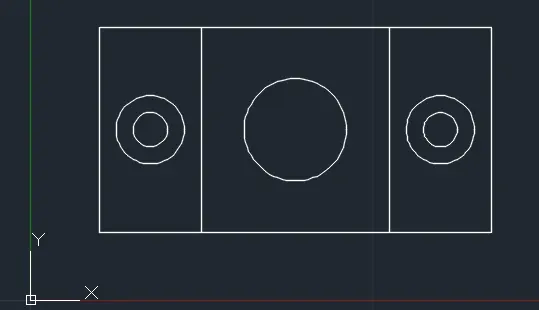
Give the dimensions as per the drawing using the dimension command from the command bar.
Q.6:-
Procedure:-
- Command: UN
- UNITS
- Command: REC
- RECTANG
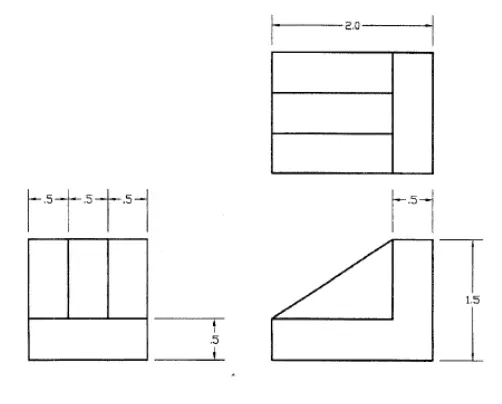
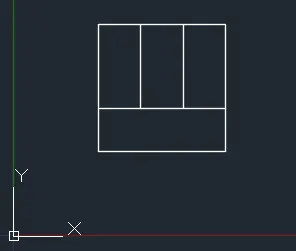
- Specify first corner point or [Chamfer/Elevation/Fillet/Thickness/Width]: 1,1
- Specify other corner point or [Area/Dimensions/Rotation]: @1.5,1.5
- Command: _line
- Specify first point: 1,1.5
- Specify next point or [Undo]: 1.5
- Specify next point or [Undo]: *Cancel*
- Command: LINE
- Specify first point: 1.5,1.5
- Specify next point or [Undo]: 1
- Specify next point or [Undo]: *Cancel*
- Command: LINESpecify first point: 2,1.5
- Specify next point or [Undo]: 1
- Specify next point or [Undo]: *Cancel*
- Command: L
- LINE
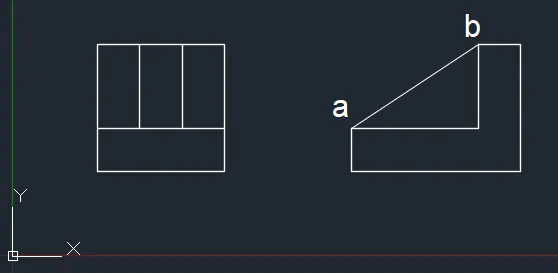
- Specify first point: 4,1
- Specify next point or [Undo]: 2
- Specify next point or [Undo]: 1.5
- Specify next point or [Close/Undo]: .5
- Specify next point or [Close/Undo]: 1
- Specify next point or [Close/Undo]: 1.5
- Specify next point or [Close/Undo]: C
- Join the two points "a" & "b" using line command.
- Command: REC
- RECTANG
- Specify first corner point or [Chamfer/Elevation/Fillet/Thickness/Width]: 4,3
- Specify other corner point or [Area/Dimensions/Rotation]: @2,1.5
- Command: LINE
- Specify first point: 4,3.5
- Specify next point or [Undo]: 1.5
- Specify next point or [Undo]: 1
- Specify next point or [Close/Undo]: *Cancel*
- Command:
** STRETCH ** - Specify stretch point or [Base point/Copy/Undo/eXit]:.5
- Command: OFFSET
- Current settings: Erase source=No Layer=Source OFFSETGAPTYPE=0
- Specify offset distance or [Through/Erase/Layer] <0.50>:
- Specify point on side to offset or [Exit/Multiple/Undo] :
- Select object to offset or [Exit/Undo] : E
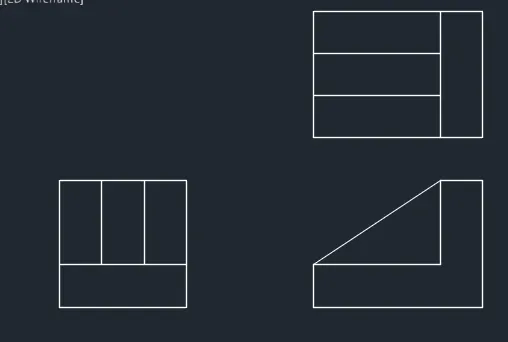
Give the dimensions as per the drawing using the dimension command from the command bar.
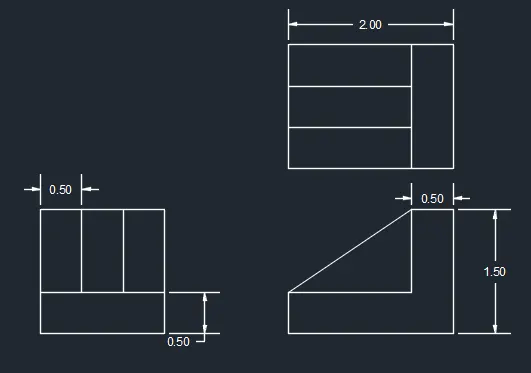
Q.7:-
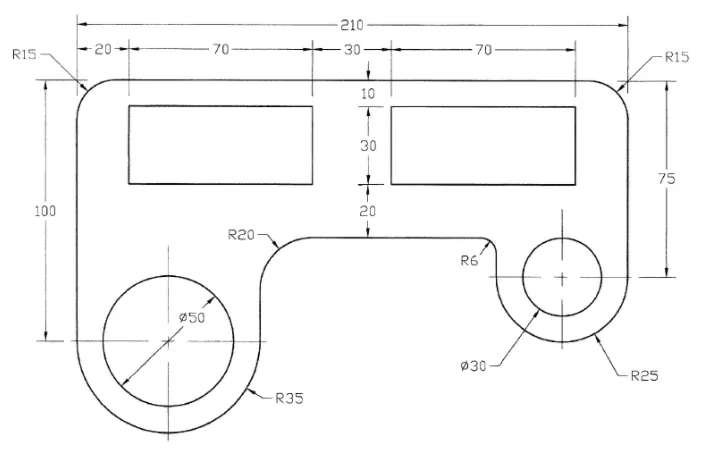 Procedure:-
- Command: UN
- UNITS
- Command: LINE
- Specify first point:
- Specify next point or [Undo]: 70
- Specify next point or [Undo]: 100
- Specify next point or [Close/Undo]: 210
- Specify next point or [Close/Undo]: 75
- Specify next point or [Close/Undo]: 50
- Specify next point or [Close/Undo]: *Cancel*
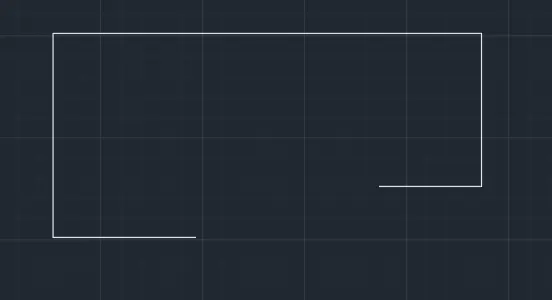
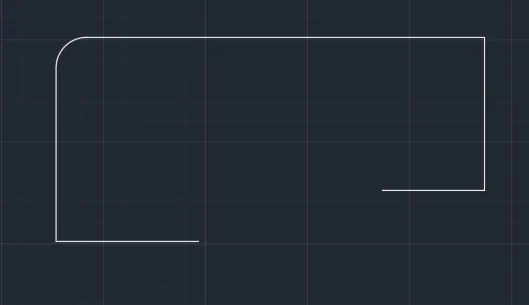
- Command: _fillet
- Current settings: Mode = TRIM, Radius = 0.00
- Select first object or [Undo/Polyline/Radius/Trim/Multiple]: R
- Specify fillet radius <0.00>: 15
- Select first object or [Undo/Polyline/Radius/Trim/Multiple]:
- Select second object or shift-select to apply corner or [Radius]:
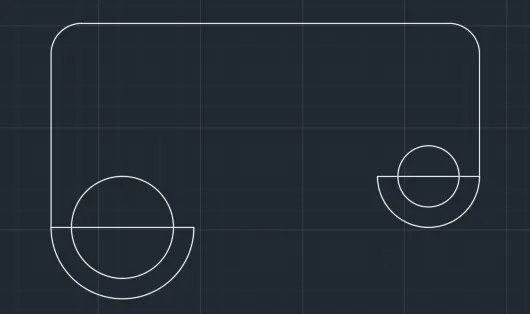
- Command: _fillet
- Current settings: Mode = TRIM, Radius = 15.00
- Select first object or [Undo/Polyline/Radius/Trim/Multiple]: R
- Specify fillet radius <15.00>:
- Select first object or [Undo/Polyline/Radius/Trim/Multiple]:
- Select second object or shift-select to apply corner or [Radius]:
- Command: _circle
- Specify center point for circle or [3P/2P/Ttr (tan tan radius)]:
- Specify radius of circle or [Diameter]: 15
- Command: _circle
- Specify center point for circle or [3P/2P/Ttr (tan tan radius)]:
- Specify radius of circle or [Diameter] <15.00>: 25
- Command: _arc
- Specify start point of arc or [Center]:
- Specify second point of arc or [Center/End]: _c
- Specify center point of arc:
- Specify end point of arc (hold Ctrl to switch direction) or [Angle/chord Length]
- Command: _arc
- Specify start point of arc or [Center]:
- Specify second point of arc or [Center/End]: _c
- Specify center point of arc:
- Specify end point of arc (hold Ctrl to switch direction) or [Angle/chord Length]:
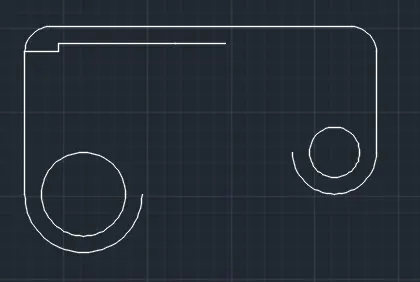
- Command: LINE
- Specify first point:
- Specify next point or [Undo]: 20
- Specify next point or [Undo]: 5
- Specify next point or [Close/Undo]: 70
- Specify next point or [Close/Undo]: 30
- Specify next point or [Close/Undo]: *Cancel*
- Command: REC
- RECTANG
- Specify first corner point or [Chamfer/Elevation/Fillet/Thickness/Width]:
- Specify other corner point or [Area/Dimensions/Rotation]: @70,-30
- Command: REC
- RECTANG
- Specify first corner point or [Chamfer/Elevation/Fillet/Thickness/Width]:
- Specify other corner point or [Area/Dimensions/Rotation]: @70,-30
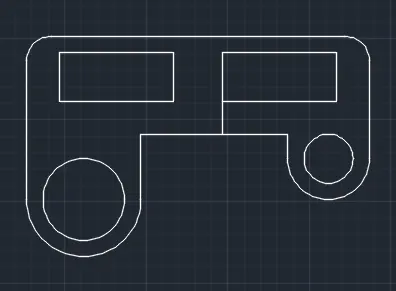
- Remove unwanted lines.
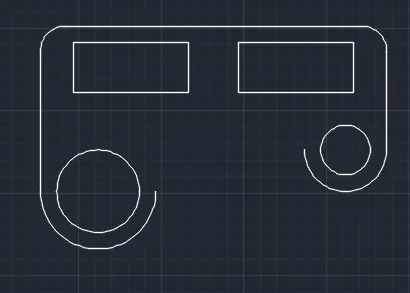
- by using line command draw these lines and remove unwanted lines.
- Command: _fillet
- Current settings: Mode = TRIM, Radius = 15.00
- Select first object or [Undo/Polyline/Radius/Trim/Multiple]: R
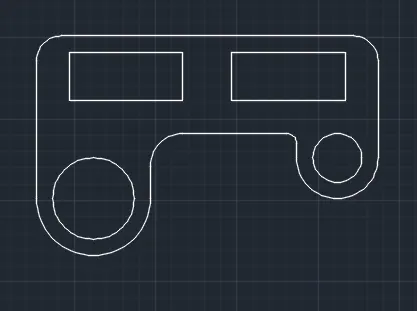
- Specify fillet radius <15.00>: 20
- Select first object or [Undo/Polyline/Radius/Trim/Multiple]:
- Select second object or shift-select to apply corner or [Radius]:
- Command: FILLET
- Current settings: Mode = TRIM, Radius = 20.00
- Select first object or [Undo/Polyline/Radius/Trim/Multiple]: R
- Specify fillet radius <20.00>: 6
- Select first object or [Undo/Polyline/Radius/Trim/Multiple]:
- Select second object or shift-select to apply corner or [Radius]:
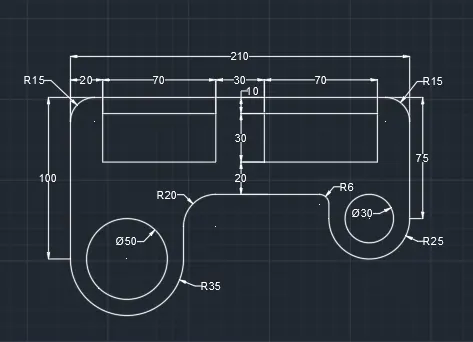
Give the dimensions as per the drawing using the dimension command from the command bar.
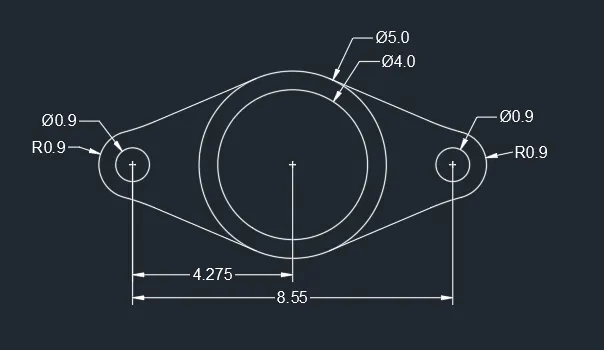
Q.8:-
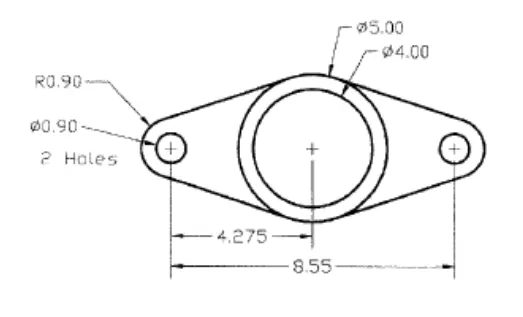 Procedure:-
- Command: UN
- UNITS
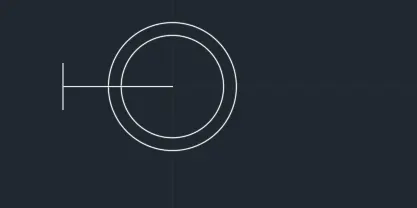
- Command: CIRCLE
Specify center point for circle or [3P/2P/Ttr (tan tan radius)]: 20,20
Specify radius of circle or [Diameter]: 2.5 - Command: OFFSET
Current settings: Erase source=No Layer=Source OFFSETGAPTYPE=0
Specify offset distance or [Through/Erase/Layer] : 0.5
Select object to offset or [Exit/Undo] :
Specify point on side to offset or [Exit/Multiple/Undo] :
Select object to offset or [Exit/Undo] : E - Command: LINE
Specify first point:
Specify next point or [Undo]: 4.275
Specify next point or [Undo]: .9
Specify next point or [Close/Undo]: *Cancel*
Command:
Command:
** STRETCH **
Specify stretch point or [Base point/Copy/Undo/eXit]:.9
- Command: CIRCLE
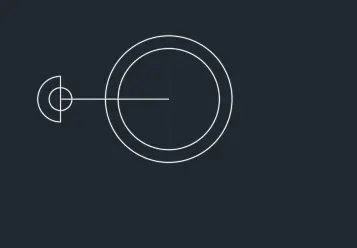
Specify center point for circle or [3P/2P/Ttr (tan tan radius)]:
Specify radius of circle or [Diameter] <2.50>: .45 - Command: _arc
Specify start point of arc or [Center]:
Specify second point of arc or [Center/End]: _c
Specify center point of arc:
Specify end point of arc (hold Ctrl to switch direction) or [Angle/chord Length]:
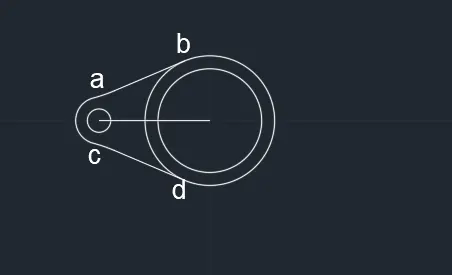
- Turn on Tangent from Object Snap.
- Join "a" & "b" point and "c" & "d" point using the Line command.
- Command: MIRROR
Select objects: 1 found
Select objects: 1 found, 2 total
Select objects: 1 found, 3 total
Select objects: 1 found, 4 total
Select objects: 1 found, 5 total
Select objects: 1 found, 6 total
Select objects:
Specify first point of mirror line:
Specify second point of mirror line:
Erase source objects? [Yes/No] : N
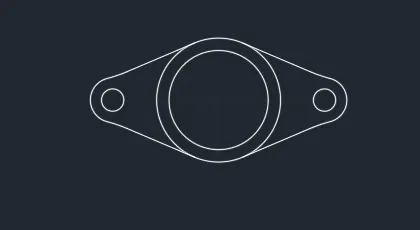
Give the dimensions as per the drawing using the dimension command from the command bar.
Q.9:-
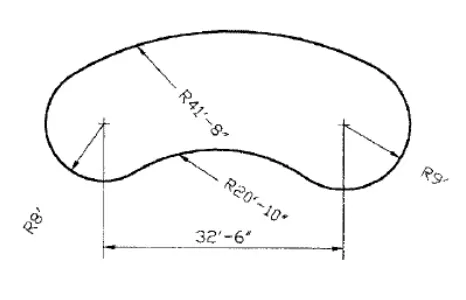 Procedure:-
- Command: UN
- UNITS
- Command: LINE
Specify first point:
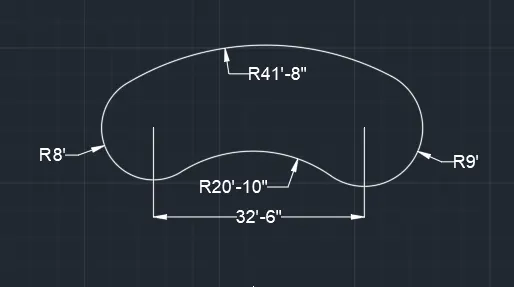
Specify next point or [Undo]: 32'6"
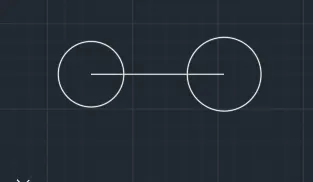
Specify next point or [Undo]: *Cancel* - Command: CIRCLE
Specify center point for circle or [3P/2P/Ttr (tan tan radius)]:
Specify radius of circle or [Diameter] <0'-0.5">: 8' - Command: CIRCLE
Specify center point for circle or [3P/2P/Ttr (tan tan radius)]:
Specify radius of circle or [Diameter] <8'-0.0">: 9'
- Command: CIRCLE
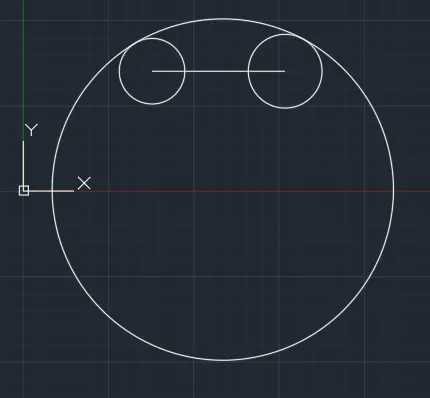
Specify center point for circle or [3P/2P/Ttr (tan tan radius)]: T
Specify point on object for first tangent of circle:
Specify point on object for second tangent of circle:
Specify radius of circle <9'-0.0">: 41'8"
- Command: C
CIRCLE
Specify center point for circle or [3P/2P/Ttr (tan tan radius)]: T
Specify point on object for first tangent of circle:
Specify point on object for second tangent of circle:
Specify radius of circle <41'-8.0">: 20'10"
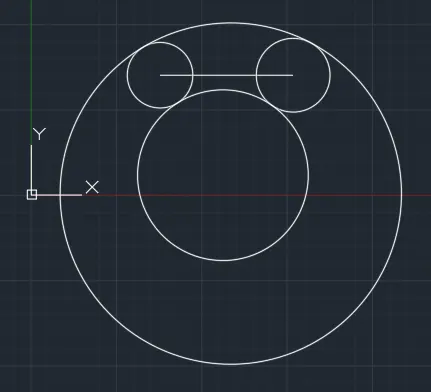
- Trim and erase unwanted lines.
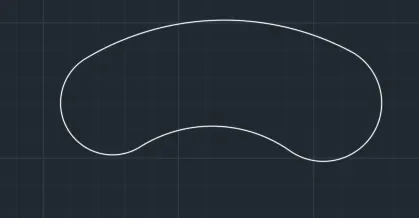
Give the dimensions as per the drawing using the dimension command from the command bar.
Q.10:-
 Procedure:-
- Command: UN
- UNITS
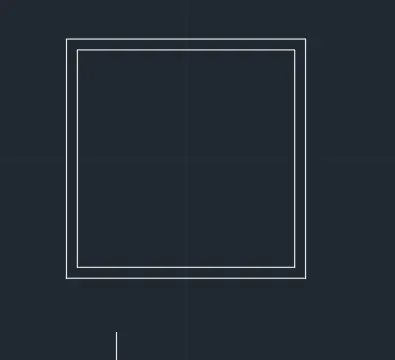
- Command: _RECTANG
- Specify first corner point or [Chamfer/Elevation/Fillet/Thickness/Width]: 5,5
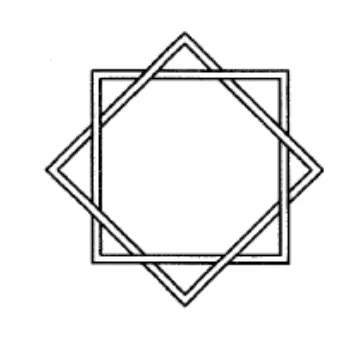
- Specify other corner point or [Area/Dimensions/Rotation]: @10,10
- Command: OFFSET
- Current settings: Erase source=No Layer=Source OFFSETGAPTYPE=0
- Specify offset distance or [Through/Erase/Layer] : 0.5
- Select object to offset or [Exit/Undo] :
- Specify point on side to offset or [Exit/Multiple/Undo] :
- Select object to offset or [Exit/Undo] : E
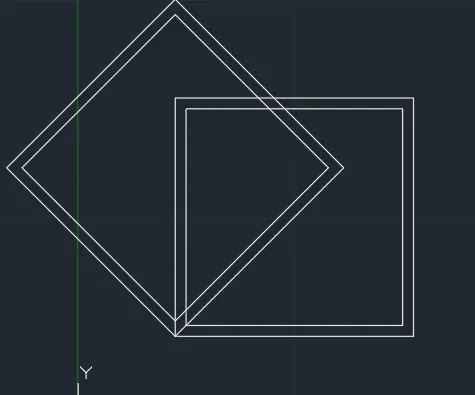
- Command: RO
- ROTATE
- Current positive angle in UCS: ANGDIR=counterclockwise ANGBASE=0
- Select objects: Specify opposite corner: 2 found
- Select objects:
- Specify base point:
- Specify rotation angle or [Copy/Reference] <0>: c
- Rotating a copy of the selected objects.
- Specify rotation angle or [Copy/Reference] <0>: 45
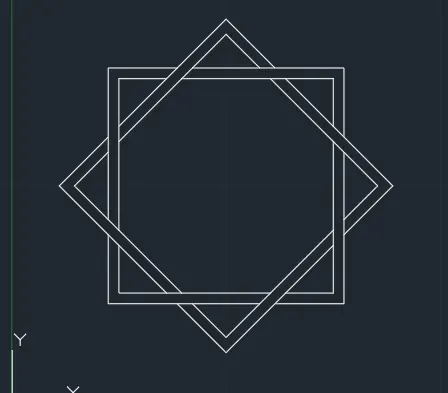
- Move the rotate rectangle and place it in center.
- trim the additional line as [er the diagram given.
Q.11:-
Procedure:-
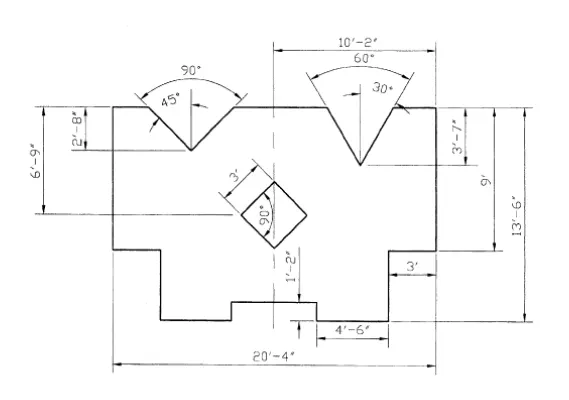
- Command: UN
- UNITS
- Command: LINE
Specify first point:
Specify next point or [Undo]: 2'6"
Specify next point or [Undo]: 1'2"
Specify next point or [Close/Undo]: 4'6"
Specify next point or [Close/Undo]: 4'6"
Specify next point or [Close/Undo]: 3'
Specify next point or [Close/Undo]: 9'
Specify next point or [Close/Undo]: *Cancel*
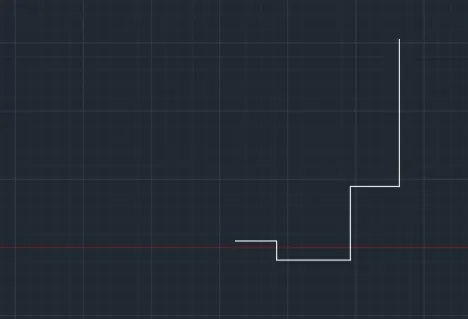
- Command: MI
MIRROR
Select objects: Specify opposite corner: 6 found
Select objects:
Specify first point of mirror line:
Specify second point of mirror line:
Erase source objects? [Yes/No] : N
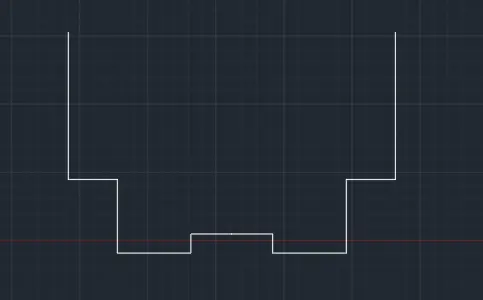
- Command: _line
Specify first point:
Specify next point or [Undo]: 3'7"
Specify next point or [Undo]: 8'7"
Specify next point or [Close/Undo]: *Cancel* - For 30,60,90,120 degrees Turn on polar tracking and draw the lines.
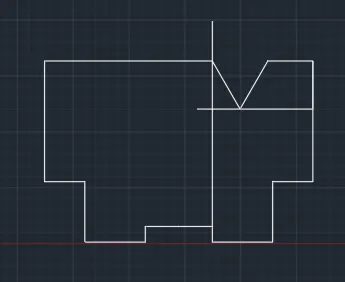
- Command: _line
Specify first point:
Specify next point or [Undo]: 2'8"
Specify next point or [Undo]: 8'
Specify next point or [Close/Undo]: *Cancel* - For 45,90,135 degrees Turn on polar tracking and draw the lines. erase unnecessary lines.
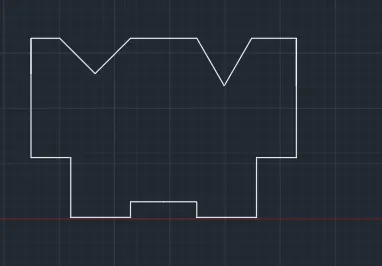
- Command: _line
Specify first point:
Specify next point or [Undo]: 6'9"
Specify next point or [Undo]:
Specify next point or [Close/Undo]: *Cancel* - Command: _rectang
Specify first corner point or [Chamfer/Elevation/Fillet/Thickness/Width]:
Specify other corner point or [Area/Dimensions/Rotation]: @3',3' - Command: _rotate
Current positive angle in UCS: ANGDIR=counterclockwise ANGBASE=0
1 found
Specify base point:
Specify rotation angle or [Copy/Reference] <90>: 45 - Command: MOVE
Select objects: Specify opposite corner: 1 found
Specify base point or [Displacement] <Displacement>:
Specify second point or <use first point as displacement>:
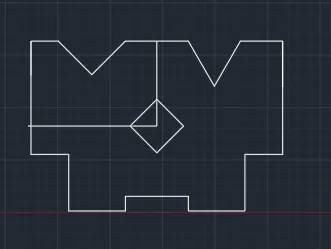
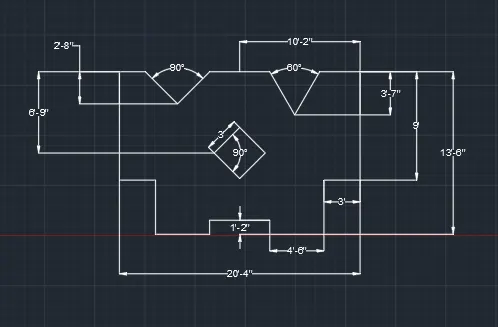
Remove unnecessary lines and Give the dimensions as per the drawing using the dimension command from the command bar.
CONCLUSION:-
All result of each drawing has been attached which was taken from AutoCAD.