Drafting of various geometries using Chamfer, Fillet tool in AutoCad
AIM:
Drafting of various geometries using Chamfer, Fillet tool in AutoCad
Creating a New Drawing:
FILE > NEW > Select Wizard > Advance setup
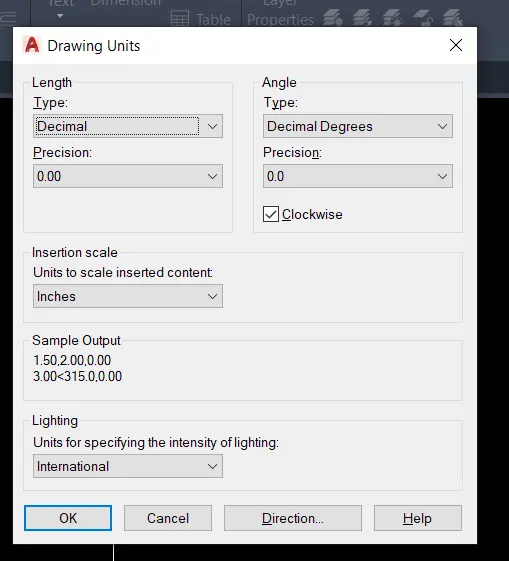
Advance setup > Units > Decimal > Precision > 0.00
Angle > Decimal > Precision > 0.0
Angle measure > East
Angle direction > clockwise
Area > 50 X 50
Drawing-1:
Required tools:
LINE, CIRCLE, OFFSET, TRIM, DIMENSION
PROCEDURE FOR DRAWING:
LINE:
Invoking the tool:
RIBBON: Home > Draw > Line
TOOLBAR: Draw > Line
MENUBAR: Draw > Line
TOOL PALLETS: Draw > Line
COMMAND: L >
Specify first line: select the point anywhere on worksheet
Specify next point or [Undo]: 3.0
Specify next point or [Undo]: @2.12<315 (Angle direction > clockwise)
Specify next point or [Close/Undo]: @2.83<225
Specify next point or [Close/Undo]: 2.0
Specify next point or [Close/Undo]: close>
OFFSET:
Invoking the tool:
RIBBON: Home > Modify > Offset
TOOLBAR: Modify > Offset
COMMAND: OFFSET/OFF >
Specify offset distance or [Through/erase/Layer]: 1.0
Select object to offset or [Exit/Undo]: select the baseline of 3.0 length
Specify point on side to offset or []Exit/Multiple/undo]: Upside
Specify offset distance or [Through/erase/Layer]: 2.50
Select object to offset or [Exit/Undo]: select the baseline of 3.0 length
Specify point on side to offset or []Exit/Multiple/undo]: Upside
Object snap mode: F3 ON/OFF
Invoking the tool:
COMMAND: OS >
Select the Midpoint mode: >
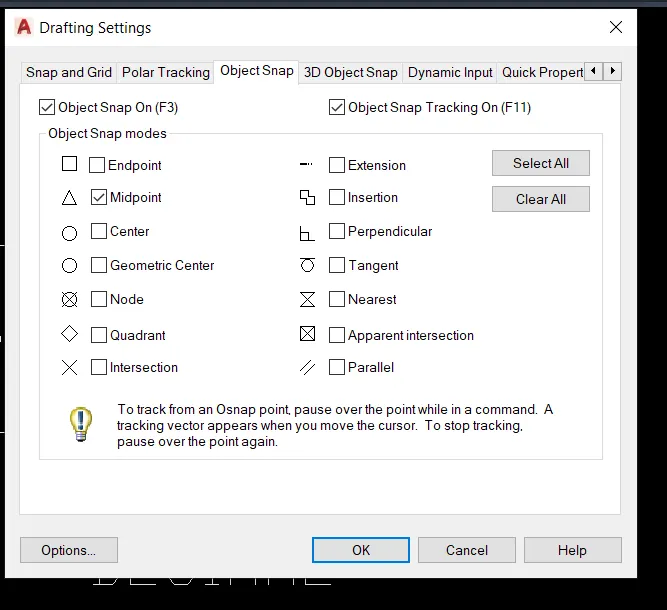
COMMAND: L >
Draw a line by mid of the baseline for creating the center point of a circle
CIRCLE:
Invoking the tool:
RIBBON: Home > Draw > circle
TOOLBAR: Draw > circle
MENUBAR: Draw > circle
TOOL PALLETS: Draw > circle
COMMAND: Circle/C >
Specify center point for circle: select the point at 1.0 offset line
Specify radius of circle or [Diameter]:D>
Specify diameter of circle: 1.20
Escape >
Specify center point for circle: select the point at 2.50 offset line
Specify radius of circle or [Diameter]:D
Specify diameter of circle: 0.80
Escape >
Delete the offset lines
DIMENSIONS:
Invoking the tool:
RIBBON: Annotate > Dimensions > Linear, Aligned, Diameter
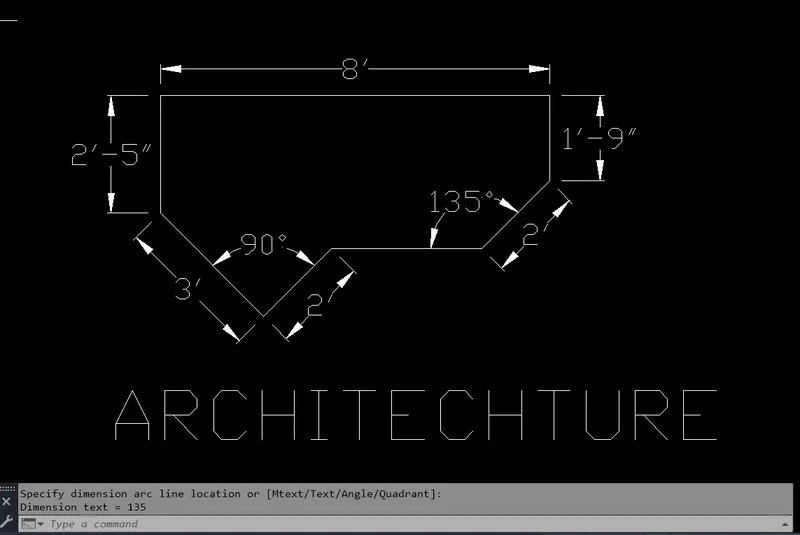
RESULT:
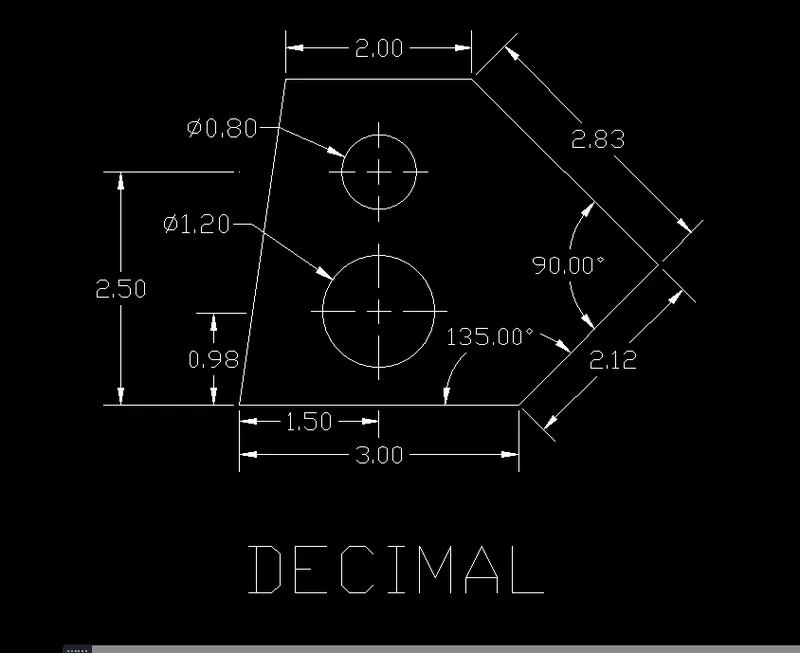
Drawing-2:
Setting out:
UNITS:
COMMAND: UN >
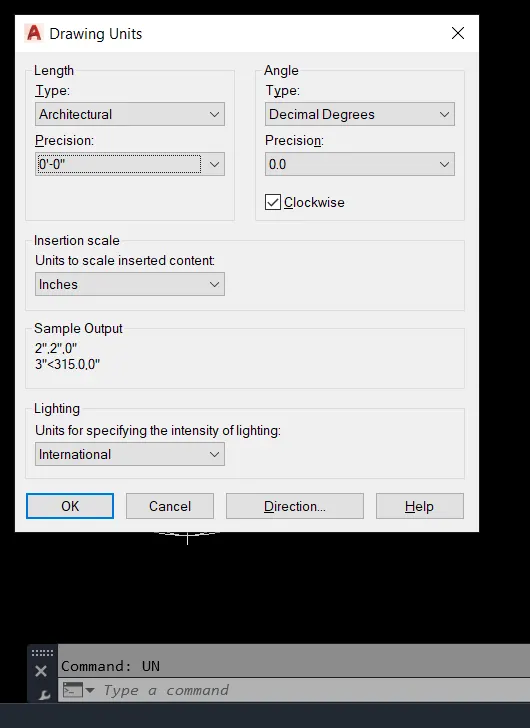
Required tools:
LINE, DIMENSION
PROCEDURE FOR DRAWING:
LINE:
Invoking the tool:
RIBBON: Home > Draw > Line
TOOLBAR: Draw > Line
MENUBAR: Draw > Line
TOOL PALLETS: Draw > Line
COMMAND: L >
Specify first line: select point anywhere on work sheet
Specify next point or [Undo]: @2'-6"<134 (Angle direction > clockwise)
Specify next point or [Close/Undo]: @3'<225
Specify next point or [Close/Undo]: 2'-5"
Specify next point or [Close/Undo]: 8'
Specify next point or [Close/Undo]: 1'-9"
Specify next point or [Close/Undo]: @2'-10"<135
Specify next point or [Close/Undo]: close>
DIMENSIONS:
Invoking the tool:
RIBBON: Annotate > Dimensions > Linear, Aligned,
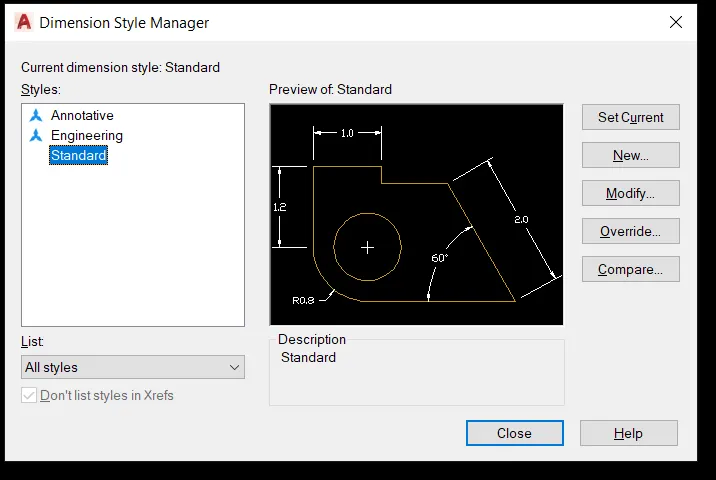
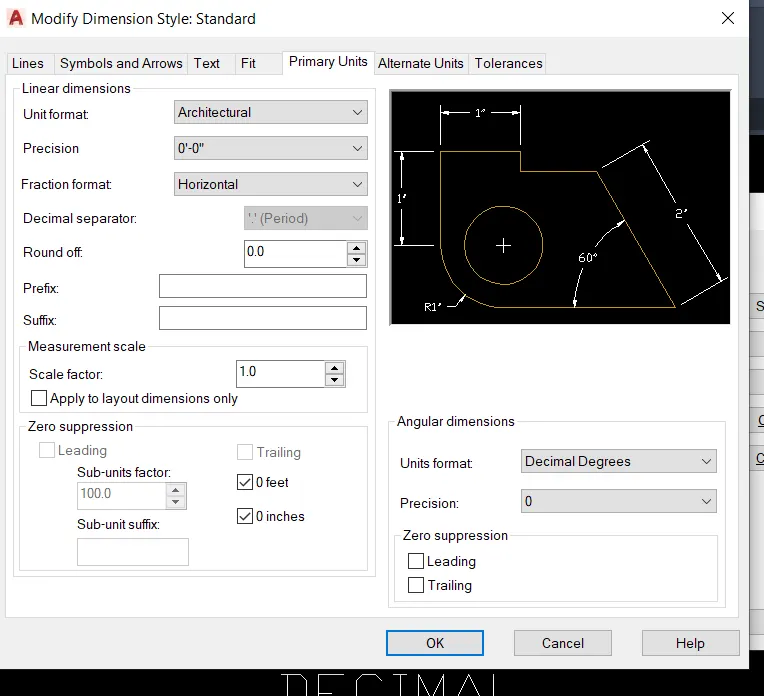
Change the Required Dimension Style:
Invoking the tool:
COMMAND: D > Modify >
RESULT:
Drawing-3:
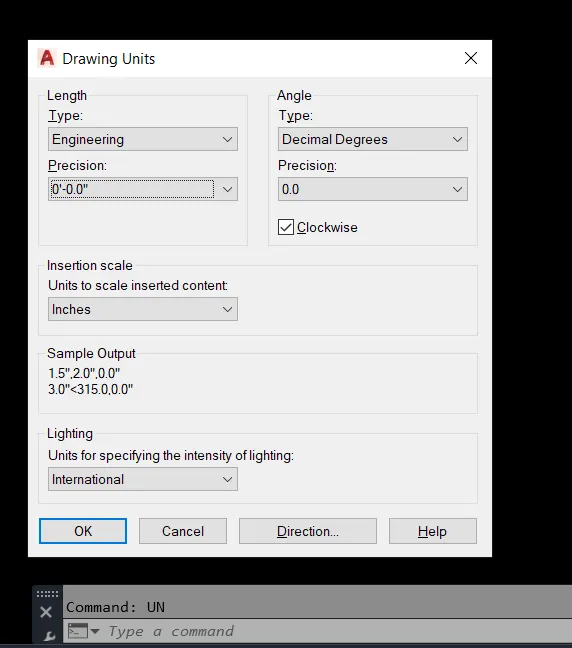
Setting out:
UNITS:
COMMAND: UN >
Required tools:
LINE, CIRCLE, OFFSET, DIMENSION
PROCEDURE FOR DRAWING:
LINE:
Invoking the tool:
RIBBON: Home > Draw > Line
TOOLBAR: Draw > Line
MENUBAR: Draw > Line
TOOL PALLETS: Draw > Line
COMMAND: L >
Specify first line: select the point anywhere on worksheet
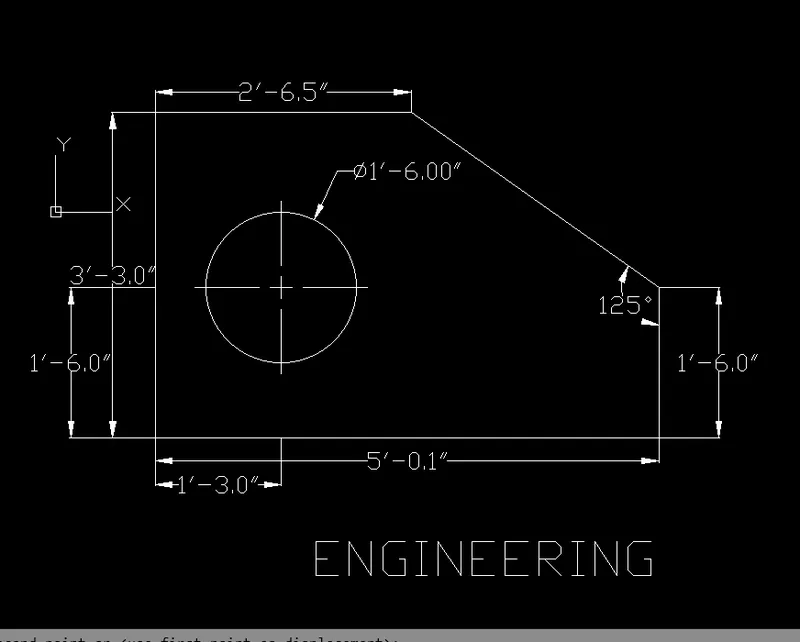
Specify next point or [Undo]: 2'-6.5"
Specify next point or [Close/Undo]: 3'-30"
Specify next point or [Close/Undo]:5'-0.1"
Specify next point or [Close/Undo]: 1'-6"
Specify next point or [Close/Undo]: close>
OFFSET:
Invoking the tool:
RIBBON: Home > Modify > Offset
TOOLBAR: Modify > Offset
COMMAND: OFFSET/OFF >
Specify offset distance or [Through/erase/Layer]: 1'-60"
Select object to offset or [Exit/Undo]: select the baseline
Specify point on side to offset or [Exit/Multiple/undo]: Upside
Specify offset distance or [Through/erase/Layer]: 1'-3"
Select object to offset or [Exit/Undo]: select the left side verticle line
Specify point on side to offset or [Exit/Multiple/undo]: Right side
CIRCLE:
Invoking the tool:
RIBBON: Home > Draw > circle
TOOLBAR: Draw > circle
MENUBAR: Draw > circle
TOOL PALLETS: Draw > circle
COMMAND: Circle/C >
Specify center point for circle: select the point at center of two offset lines
Specify radius of circle or [Diameter]: D>
Specify diameter of circle: 1'-6"
Escape >
Delete the offset lines
DIMENSIONS:
Invoking the tool:
RIBBON: Annotate > Dimensions > Linear, Aligned, Diameter
RESULT:
Drawing-4:
Setting out:
UNITS:
COMMAND: UN >
Required tools:
LINE, DIMENSION
PROCEDURE FOR DRAWING:
LINE:
Invoking the tool:
RIBBON: Home > Draw > Line
TOOLBAR: Draw > Line
MENUBAR: Draw > Line
TOOL PALLETS: Draw > Line
COMMAND: L >
Specify first line: select the point anywhere on worksheet
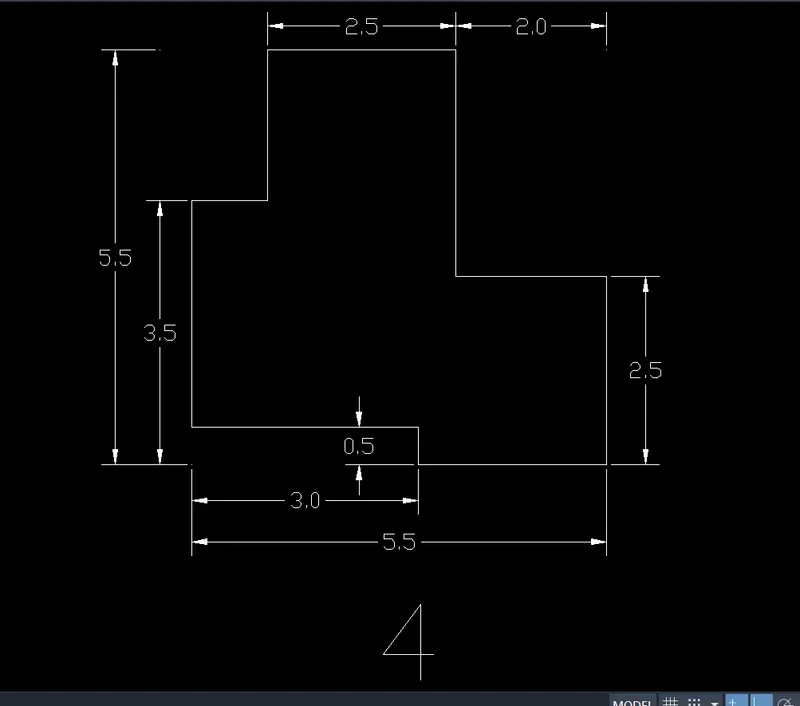
Specify next point or [Undo]: 3.50
Specify next point or [Undo]: 3.0
Specify next point or [Close/Undo]: 0.50
Specify next point or [Close/Undo]:2.5
Specify next point or [Close/Undo]: 2.5
Specify next point or [Close/Undo]:2.0
Specify next point or [Close/Undo]: 3.0
Specify next point or [Close/Undo]:2.50
Specify next point or [Close/Undo]: 2.0
Specify next point or [Close/Undo]: close>
DIMENSIONS:
Invoking the tool:
RIBBON: Annotate > Dimensions > Linear, Aligned, Diameter
RESULT:
Drawing-5:
Setting out:
UNITS: Decimal
Required tools:
LINE, CIRCLE, OFFSET, DIMENSION
PROCEDURE FOR DRAWING:
LINE:
Invoking the tool:
RIBBON: Home > Draw > Line
TOOLBAR: Draw > Line
MENUBAR: Draw > Line
TOOL PALLETS: Draw > Line
COMMAND: L >
Specify first line: select the point anywhere on worksheet
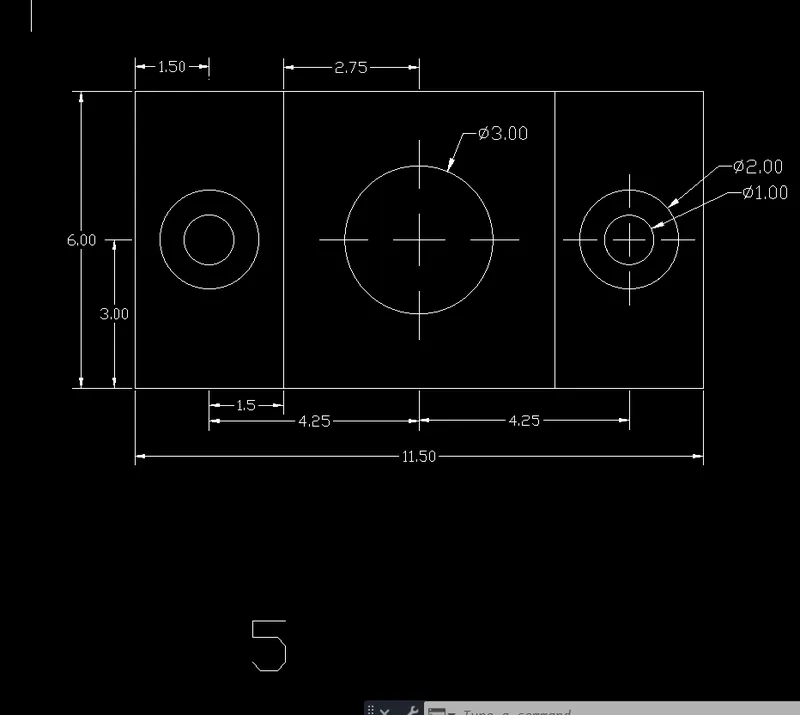
Specify next point or [Undo]: 11.50
Specify next point or [Undo]: 6.0
Specify next point or [Close/Undo]: 11.50
Specify next point or [Close/Undo]: close>
OFFSET:
Invoking the tool:
RIBBON: Home > Modify > Offset
TOOLBAR: Modify > Offset
COMMAND: OFFSET/OFF >
Specify offset distance or [Through/erase/Layer]: 3.0
Select object to offset or [Exit/Undo]: select the baseline
Specify point on side to offset or [Exit/Multiple/undo]: Upside
Specify offset distance or [Through/erase/Layer]: 1.50
Select object to offset or [Exit/Undo]: select the left side verticle line
Specify point on side to offset or [Exit/Multiple/undo]: Right side
Specify point on side to offset or [Exit/Multiple/undo]: Right side
Specify offset distance or [Through/erase/Layer]: 2.75
Select object to offset or [Exit/Undo]: select the left side verticle line
Specify point on side to offset or [Exit/Multiple/undo]: Right side
Specify point on side to offset or [Exit/Multiple/undo]: Right side
Specify offset distance or [Through/erase/Layer]: 1.50
Select object to offset or [Exit/Undo]: select the left side verticle line
Specify point on side to offset or [Exit/Multiple/undo]: Right side
CIRCLE:
Invoking the tool:
RIBBON: Home > Draw > circle
TOOLBAR: Draw > circle
MENUBAR: Draw > circle
TOOL PALLETS: Draw > circle
COMMAND: Circle/C >
Specify center point for circle: select the point at center of two offset lines (Left side)
Specify radius of circle or [Diameter]: D>
Specify diameter of circle: 1.0
COMMAND: Circle/C >
Specify center point for circle: select the point at center of two offset lines (Left side)
Specify radius of circle or [Diameter]: D>
Specify diameter of circle: 2.0
COMMAND: Circle/C >
Specify center point for circle: select the point at center of two offset lines (center)
Specify radius of circle or [Diameter]: D>
Specify diameter of circle: 3.0
COMMAND: Circle/C >
Specify center point for circle: select the point at center of two offset lines (Right side)
Specify radius of circle or [Diameter]: D>
Specify diameter of circle: 1.0
COMMAND: Circle/C >
Specify center point for circle: select the point at center of two offset lines (Left side)
Specify radius of circle or [Diameter]: D>
Specify diameter of circle: 2.0
Delete the offset lines
DIMENSIONS:
Invoking the tool:
RIBBON: Annotate > Dimensions > Linear, Diameter
RESULT:
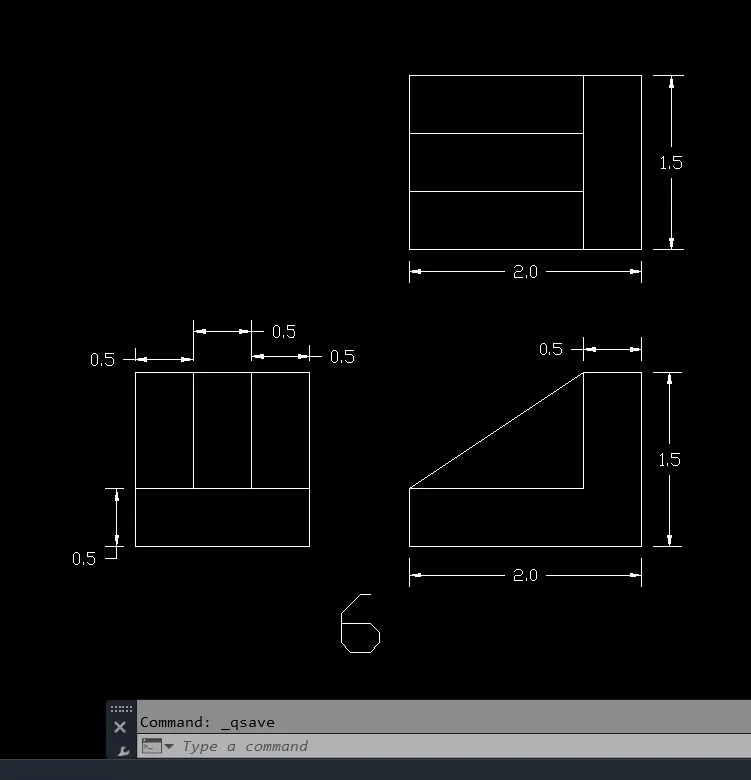
Drawing-6:
Setting out:
UNITS: Decimal
Required tools:
LINE, OFFSET, TRIM, DIMENSION
PROCEDURE FOR DRAWING:
LINE:
Invoking the tool:
RIBBON: Home > Draw > Line
TOOLBAR: Draw > Line
MENUBAR: Draw > Line
TOOL PALLETS: Draw > Line
COMMAND: L >
Specify first line: select the point anywhere on worksheet
Specify next point or [Undo]: 1.5
Specify next point or [Undo]: 1.5
Specify next point or [Close/Undo]: 1.5
Specify next point or [Close/Undo]: close>
OFFSET:
Invoking the tool:
RIBBON: Home > Modify > Offset
TOOLBAR: Modify > Offset
COMMAND: OFFSET/OFF >
Specify offset distance or [Through/erase/Layer]: 0.5
Select object to offset or [Exit/Undo]: select the baseline
Specify point on side to offset or [Exit/Multiple/undo]: Upside
Specify offset distance or [Through/erase/Layer]: 0.5
Select object to offset or [Exit/Undo]: select the left sideline
Specify point on side to offset or [Exit/Multiple/undo]: Right
Specify point on side to offset or [Exit/Multiple/undo]: Right
Specify point on side to offset or [Exit/Multiple/undo]: Right
TRIM:
Invoking the tool:
RIBBON: Home > Modify > Trim
TOOLBAR: Modify > Trim
COMMAND: Trim/TR > >
Trim the extended line
COMMAND: L >
Specify first line: Track the baseline of the first drawing and select first point near to that
Specify next point or [Undo]: 2.0
Specify next point or [Undo]: 1.5
Specify next point or [Close/Undo]: 0.5
Specify next point or [Close/Undo]: 1.0
Specify next point or [Close/Undo]: 1.5
Specify next point or [Close/Undo]: close>
COMMAND: L >
Specify first line: Select point at a corner of L shape
Specify next point or [Undo]: Select point at another corner of L shape
COMMAND: L >
Specify first line: Track the verticle of the second drawing and select first point near to that
Specify next point or [Undo]: 2.0
Specify next point or [Undo]: 1.5
Specify next point or [Close/Undo]: 2.0
Specify next point or [Close/Undo]: close>
COMMAND: OFFSET/OFF >
Specify offset distance or [Through/erase/Layer]: 0.5
Select object to offset or [Exit/Undo]: select the baseline
Specify point on side to offset or [Exit/Multiple/undo]: Upside
Specify point on side to offset or [Exit/Multiple/undo]: Upside
COMMAND: Trim/TR > >
Trim the extended line
DIMENSIONS:
Invoking the tool:
RIBBON: Annotate > Dimensions > Linear,
RESULT:
Drawing-7:
Setting out:
UNITS: Decimal
Required tools:
LINE, OFFSET, TRIM, DIMENSION
PROCEDURE FOR DRAWING:
LINE:
Invoking the tool:
RIBBON: Home > Draw > Line
TOOLBAR: Draw > Line
MENUBAR: Draw > Line
TOOL PALLETS: Draw > Line
COMMAND: L >
Specify first line: select the point anywhere on the worksheet
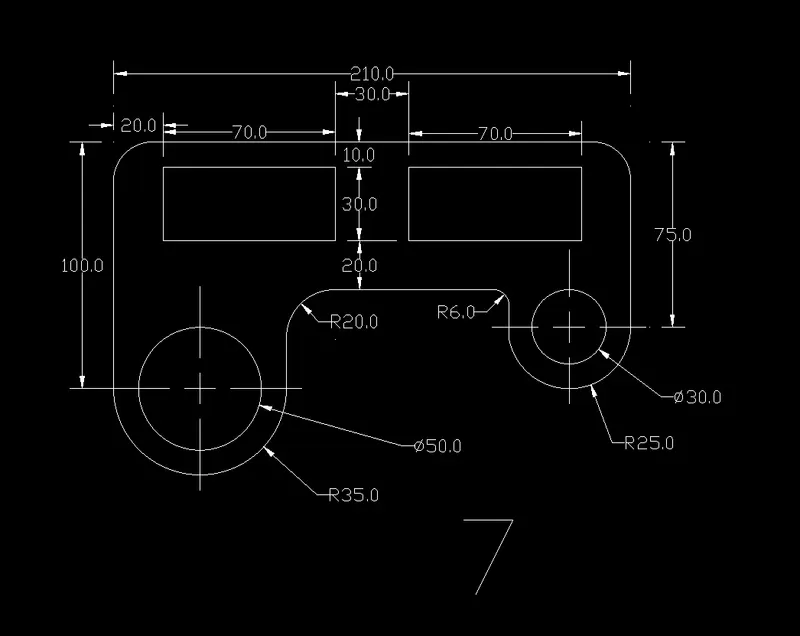
Specify next point or [Undo]: 100
Specify next point or [Undo]: 210
Specify next point or [Close/Undo]: 75
Specify next point or [Close/Undo]: 50
Specify next point or [Close/Undo]: 15
Specify next point or [Close/Undo]: 90
Specify next point or [Close/Undo]: 40
Specify next point or [Close/Undo]: close>
COMMAND: OFFSET/OFF >
Specify offset distance or [Through/erase/Layer]: 20
Select object to offset or [Exit/Undo]: select the left side line
Specify point on side to offset or [Exit/Multiple/undo]: inside
Specify offset distance or [Through/erase/Layer]: 20
Select object to offset or [Exit/Undo]: select the right side line
Specify point on side to offset or [Exit/Multiple/undo]: inside
Specify offset distance or [Through/erase/Layer]: 10
Select object to offset or [Exit/Undo]: select the top line
Specify point on side to offset or [Exit/Multiple/undo]: inside
Rectangle:
Invoking the tool:
RIBBON: Home > Draw > Rectangle
TOOLBAR: Draw > Rectangle
MENUBAR: Draw > Rectangle
TOOL PALLETS: Draw > Rectangle
COMMAND: REC >
Specify first corner point or [Chamfer/Elevation/Fillet/Thickness/Width]: Select at offset corner point (Left side REC.)
Specify other corner point or [Area/Dimensions/Rotation]: @70,-30
COMMAND: REC >
Specify first corner point or [Chamfer/Elevation/Fillet/Thickness/Width]: Select at offset corner point (Rightside REC.)
Specify other corner point or [Area/Dimensions/Rotation]: @-70,-30
Delate the offset lines.
CIRCLE:
COMMAND: Circle/C >
Specify center point for circle: select the point at a distance of 35 from Left side lline
Specify radius of circle or [Diameter]: D>
Specify diameter of circle: 50 >
COMMAND: Circle/C >
Specify center point for circle: select the same point
Specify radius of circle or [Diameter]: 35 >
COMMAND: Circle/C >
Specify center point for circle: select the point at a distance of 25 from Right side lline
Specify radius of circle or [Diameter]: D>
Specify diameter of circle: 30 >
COMMAND: Circle/C >
Specify center point for circle: select the same point
Specify radius of circle or [Diameter]: 25 >
TRIM:
Invoking the tool:
COMMAND: Trim/TR > >
Trim the extended line.
FILLET:
Invoking the tool:
RIBBON: Home > Modify > Fillet
TOOLBAR: Modify > Fillet
COMMAND: FILLET/ F >
Select first object or [Undo/Polyline/Radius/Trim/Multiple]: R
Specify fillet radius: 20
Select first object or [Undo/Polyline/Radius/Trim/Multiple]:
Select second object or shift-select to apply corner or [Radius]:
Select first object or [Undo/Polyline/Radius/Trim/Multiple]: R
Specify fillet radius: 6
Select first object or [Undo/Polyline/Radius/Trim/Multiple]:
Select second object or shift-select to apply corner or [Radius]:
Select first object or [Undo/Polyline/Radius/Trim/Multiple]: R
Specify fillet radius: 15
Select first object or [Undo/Polyline/Radius/Trim/Multiple]:
Select second object or shift-select to apply corner or [Radius]:
Select first object or [Undo/Polyline/Radius/Trim/Multiple]: R
Specify fillet radius: 15
Select first object or [Undo/Polyline/Radius/Trim/Multiple]:
Select second object or shift-select to apply corner or [Radius]:
DIMENSIONS:
Invoking the tool:
RIBBON: Annotate > Dimensions > Linear, Radius, Diameter
RESULT:
Drawing-8:
Setting out:
UNITS: Decimal
Required tools:
LINE, CIRCLE, ARC, DIMENSION
PROCEDURE FOR DRAWING:
LINE:
Invoking the tool:
COMMAND: L >
Specify first line: select the point anywhere on the worksheet
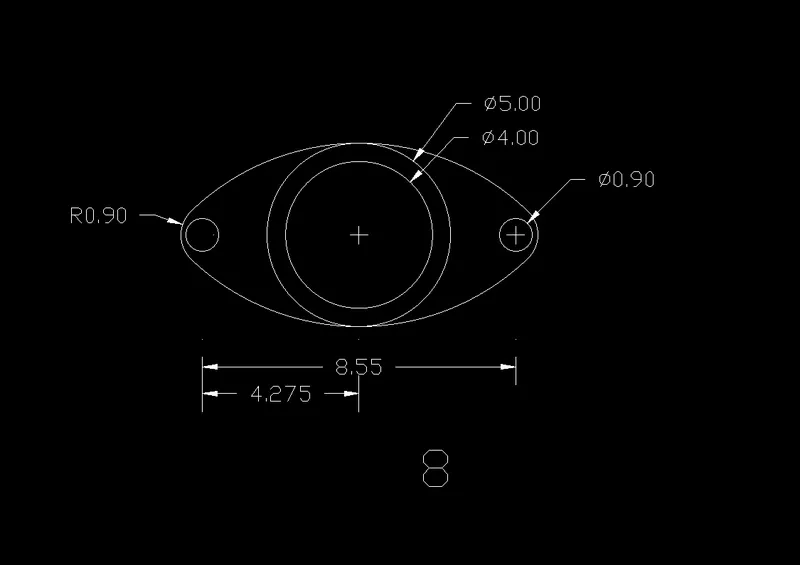
Specify next point or [Undo]: 8.55
Escape>
CIRCLE:
COMMAND: Circle/C >
Specify center point for circle: select the point at corners of line
Specify radius of circle or [Diameter]: D>
Specify diameter of circle: 0.90 >
Same as Other End
COMMAND: Circle/C >
Specify center point for circle: select the same point at corners of line
Specify radius of circle or [Diameter]: 0.90>
Same as Other End
COMMAND: Circle/C >
Specify center point for circle: select the point at center of line
Specify radius of circle or [Diameter]: D>
Specify diameter of circle: 0.40 >
COMMAND: Circle/C >
Specify center point for circle: select the point at center of line
Specify radius of circle or [Diameter]: D>
Specify diameter of circle: 0.50 >
ARC:
Invoking the tool:
RIBBON: Home > Draw > ARC drop-down > 3-Point
TOOLBAR: Draw > ARC
MENUBAR: Draw > ARC
TOOL PALLETS: Draw > ARC
COMMAND: ARC >
Specify start point of arc or [Center]: Track the horizontal line to first circle and select the corner point
Specify second point of arc or [Center/End]: select point at the top of circle by tracking center point
Specify end point of arc: Track the horizontal line to last circle of other end and select the corner point
Create an arc similarly to bottom
TRIM:
Invoking the tool:
COMMAND: Trim/TR > >
Trim the extended line and circle.
FILLET:
Invoking the tool:
COMMAND: FILLET/ F >
Select first object or [Undo/Polyline/Radius/Trim/Multiple]: R
Specify fillet radius: 0.90
Select first object or [Undo/Polyline/Radius/Trim/Multiple]: Top side Arc
Select second object or shift-select to apply corner or [Radius]: Bottom side Arc
Same as other end
DIMENSIONS:
Invoking the tool:
RIBBON: Annotate > Dimensions > Linear, Radius, Diameter
RESULT:
Drawing-9:
Setting out:
UNITS: Engineering
Required tools:
LINE, CIRCLE, DIMENSION
PROCEDURE FOR DRAWING:
LINE:
Invoking the tool:
COMMAND: L >
Specify first line: select the point anywhere on the worksheet
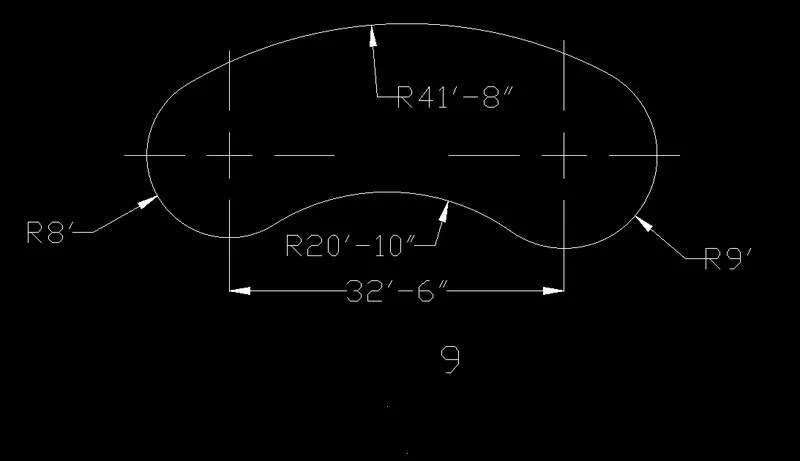
Specify next point or [Undo]: 32'-6"
Escape>
CIRCLE:
Invoking the tool:
COMMAND: Circle/C >
Specify center point for circle: select the point at corners of line
Specify radius of circle or [Diameter]: 8'>
COMMAND: Circle/C >
Specify center point for circle: select the point at other corners of line
Specify radius of circle or [Diameter]: 9'>
CIRCLE:
Invoking the tool:
RIBBON: Home > Draw > Circle drop-down > Tan-tan-radius
Specify point on object for first tangent of circle: Select the tangent at top of first circle
Specify point on object for second tangent of circle: Select the tangent at top of second circle
Specify radius of circle: 41'-8"
COMMAND: Circle/C >
Specify center point for circle or [3P/2P/Ttr (tan tan radius)]: _ttr
Specify point on object for first tangent of circle: Select the tangent at bottom of first circle
Specify point on object for second tangent of circle: Select the tangent at bottom of second circle
Specify radius of circle: 20'-10"
TRIM:
Invoking the tool:
COMMAND: Trim/TR > >
Trim the extended line and circle.
DIMENSIONS:
Invoking the tool:
RIBBON: Annotate > Dimensions > Linear, Radius
RESULT:
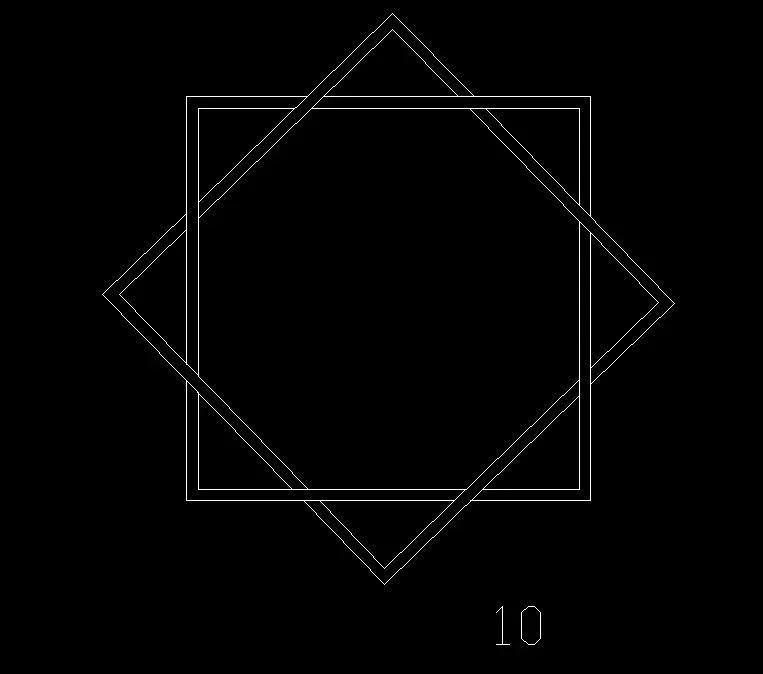
Drawing-10:
Setting out:
UNITS: Engineering
Required tools:
CIRCLE, POLYGON, OFFSET, TRIM
PROCEDURE FOR DRAWING:
CIRCLE:
Invoking the tool:
RIBBON: Home > Draw > circle
TOOLBAR: Draw > circle
MENUBAR: Draw > circle
TOOL PALLETS: Draw > circle
COMMAND: Circle/C >
Specify center point for circle: select the point at required place
Specify radius of circle or [Diameter]: D>
Specify diameter of circle: 4'
POLYGON:
Invoking the tool:
RIBBON: Home > Draw > Polygon
TOOLBAR: Draw > Polygon
TOOL PALLETS: Draw > Polygon
COMMAND: Polygon/POL>
POLYGON Enter number of sides: 4 >
Specify center of polygon or [Edge]: Select the point at center of circle
Enter an option [Inscribed in circle/Circumscribed about circle] <I>: I
Specify radius of circle: @4'<90
COMMAND: Polygon/POL>
POLYGON Enter number of sides: 4 >
Specify center of polygon or [Edge]: Select the point at center of circle
Enter an option [Inscribed in circle/Circumscribed about circle] <I>: I
Specify radius of circle: 4' >
OFFSET:
Invoking the tool:
COMMAND: OFFSET/OFF >
Specify offset distance or [Through/erase/Layer]: 1'
Select object to offset or [Exit/Undo]: select the rectangle
Specify point on side to offset or [Exit/Multiple/undo]: outside
COMMAND: OFFSET/OFF >
Specify offset distance or [Through/erase/Layer]: 1'
Select object to offset or [Exit/Undo]: select the Polygon
Specify point on side to offset or [Exit/Multiple/undo]: outside
TRIM:
Invoking the tool:
COMMAND: Trim/TR > >
Trim the Overlaying line as shown in the drawing.
RESULT:
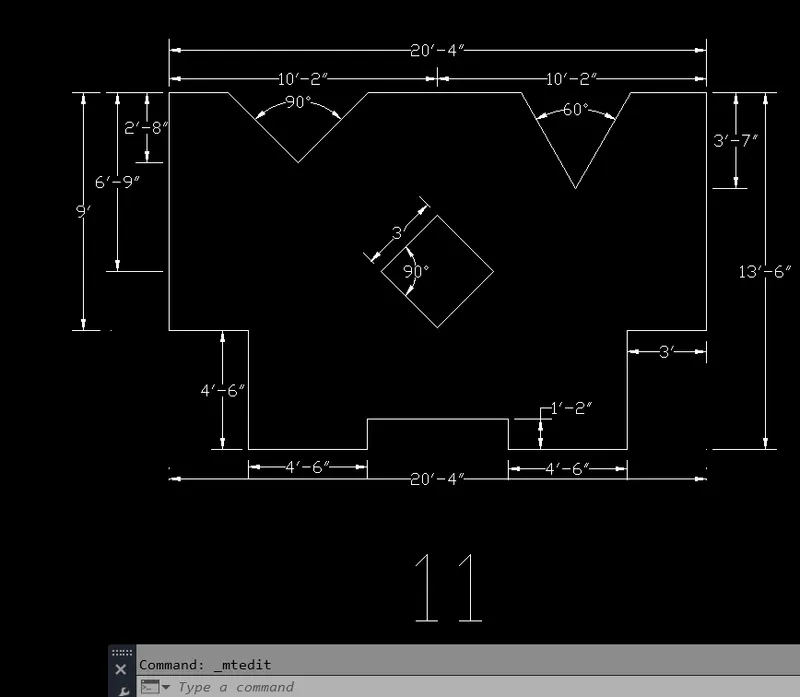
Drawing-11:
Setting out:
UNITS: Engineering
Required tools:
LINE, OFFSET, POLYGON, DIMENSION
PROCEDURE FOR DRAWING:
LINE:
Invoking the tool:
RIBBON: Home > Draw > Line
TOOLBAR: Draw > Line
MENUBAR: Draw > Line
TOOL PALLETS: Draw > Line
COMMAND: L >
Specify first line: select the point anywhere on worksheet
Specify next point or [Undo]: @3'-9"<135
Specify next point or [Undo]: @3'-9"<225
Specify next point or [Close/Undo]:2'-3"
Specify next point or [Close/Undo]:6'-9"
Specify next point or [Close/Undo]:3'
Specify next point or [Close/Undo]:4'-6"
Specify next point or [Close/Undo]:4'-6"
Specify next point or [Close/Undo]:1'-2"
Specify next point or [Close/Undo]:5'-4"
Specify next point or [Close/Undo]:1'-2"
Specify next point or [Close/Undo]:4'-6"
Specify next point or [Close/Undo]:4'-6"
Specify next point or [Close/Undo]:3'
Specify next point or [Close/Undo]:9'
Specify next point or [Close/Undo]:2'-10"
Specify next point or [Close/Undo]:@4'-2"<240
Specify next point or [Close/Undo]: close>
OFFSET:
Invoking the tool:
COMMAND: OFFSET/OFF >
Specify offset distance or [Through/erase/Layer]: 6'-9"
Select object to offset or [Exit/Undo]: select the top line
Specify point on side to offset or [Exit/Multiple/undo]: Inside
COMMAND: OFFSET/OFF >
Specify offset distance or [Through/erase/Layer]: 10'-2"
Select object to offset or [Exit/Undo]: select the left sideline
Specify point on side to offset or [Exit/Multiple/undo]: Inside
POLYGON:
Invoking the tool:
RIBBON: Home > Draw > Polygon
TOOLBAR: Draw > Polygon
TOOL PALLETS: Draw > Polygon
COMMAND: Polygon/POL>
POLYGON Enter number of sides: 4 >
Specify center of polygon or [Edge]: Select the point at center of offset lines
Enter an option [Inscribed in circle/Circumscribed about circle] <I>: I
Specify radius of circle: @3'<90
Delate the offset lines.
DIMENSIONS:
Invoking the tool:
RIBBON: Annotate > Dimensions > Linear, Angular,Aligned
RESULT: