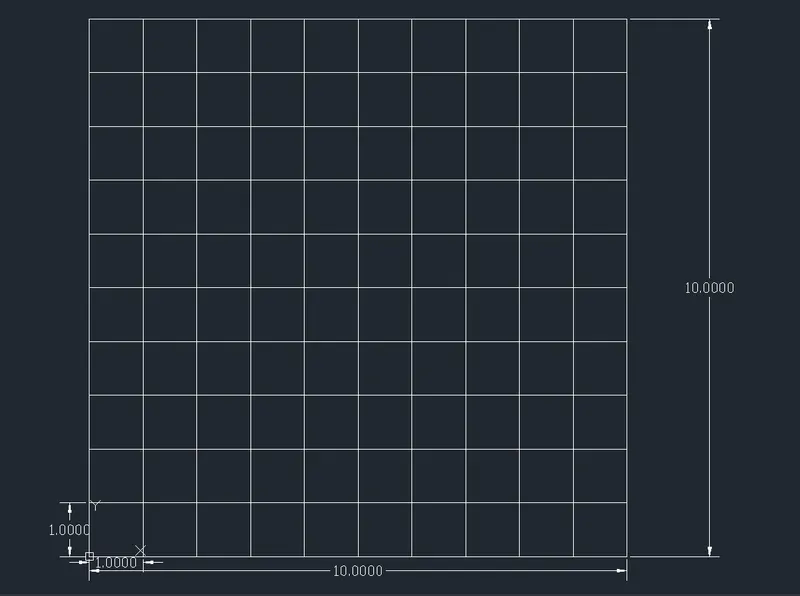
Creation of geometries by Coordinate system methods using AutoCad
AIM:
To Create the geometries from P-1 to P-8 using all the co-ordinate system methods.
Types of Co-ordinates:
1. Absolute Co-ordinate system
2. Relative Co-ordinate system
a) Relative Rectangular coordinate system
b) Relative Polar coordinates system
3. Direct distance entry system
Required Tools:
- Line
- Circle
- Rectangle
- Offset
PROCEDURE:
Step-1 Open the AutoCAD software
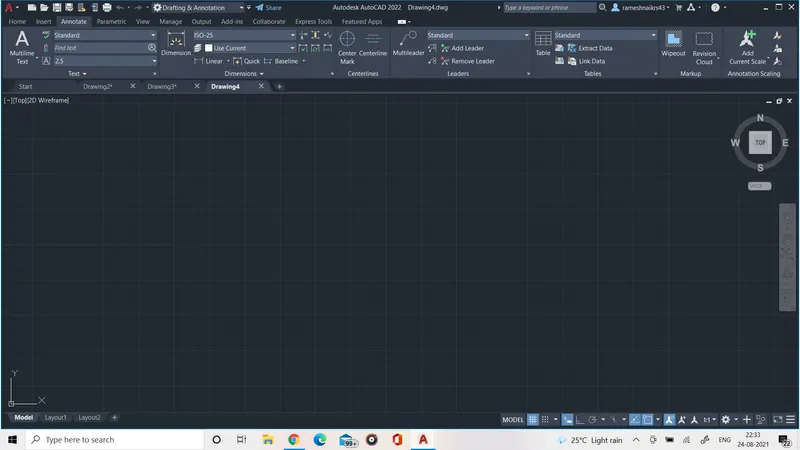
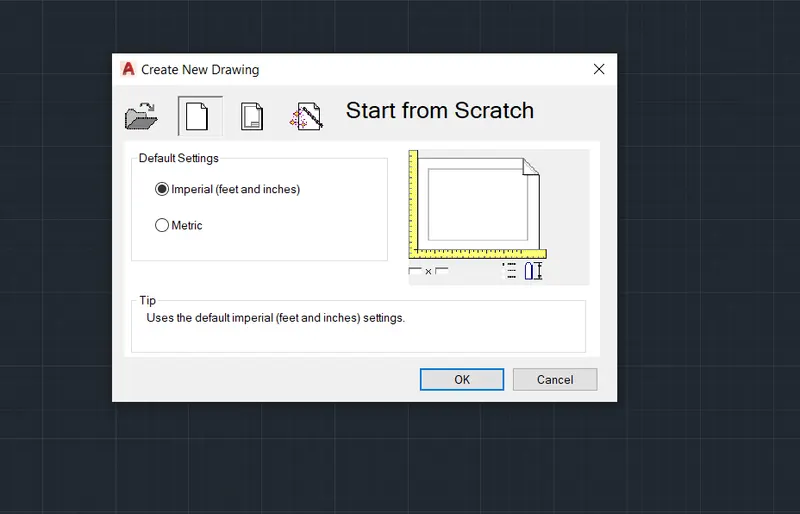
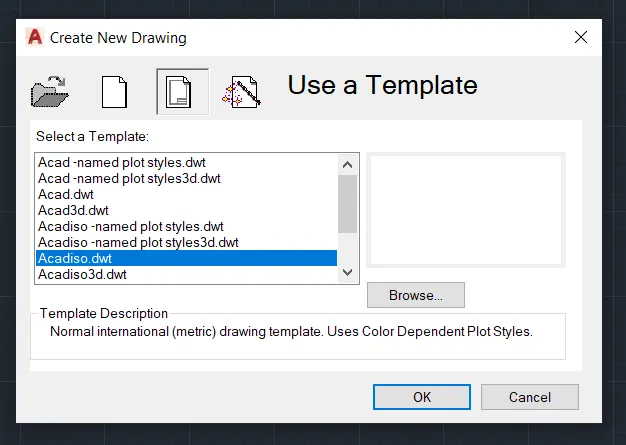
Step-2 Create a new drawing file:
APPLICATION > NEW > STARTUP FROM SCRATCH > USE TAMPLETE > USE A WIZARD
Imperial (feet & inch) acad.dwt units, angle, angle measure, angle distance, area
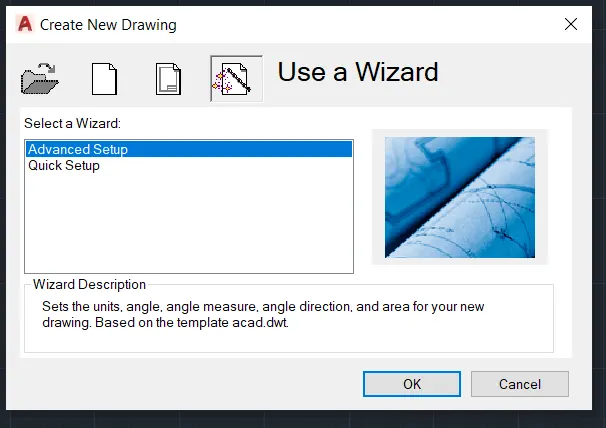
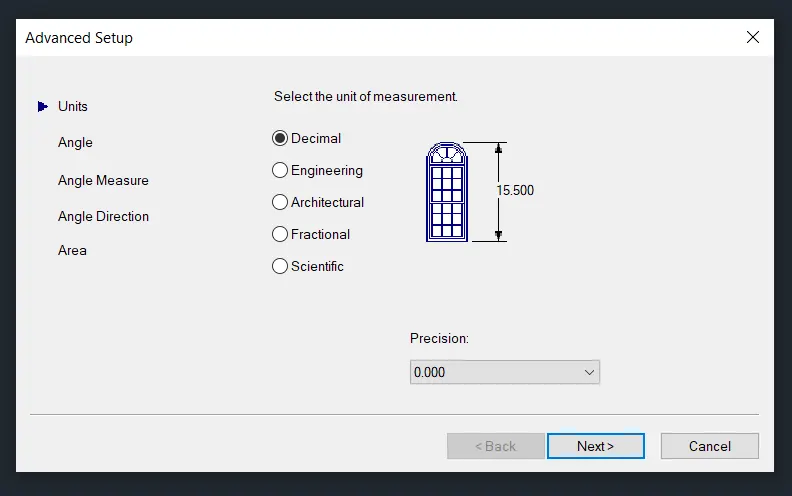
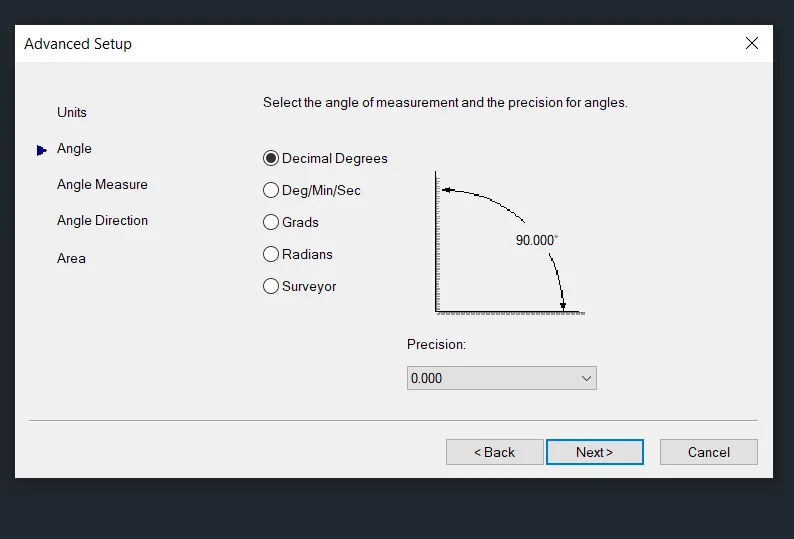
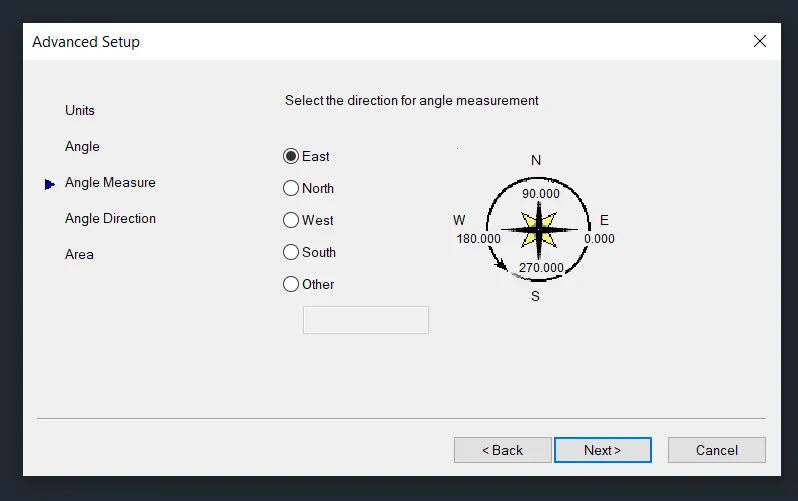
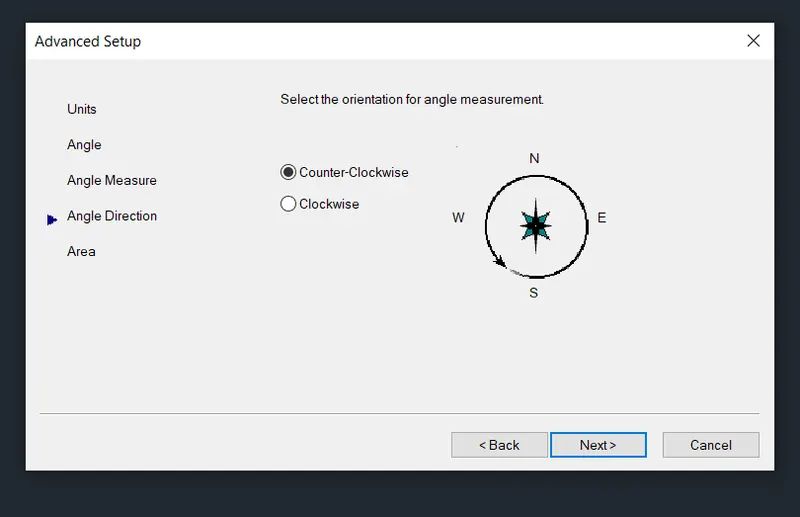
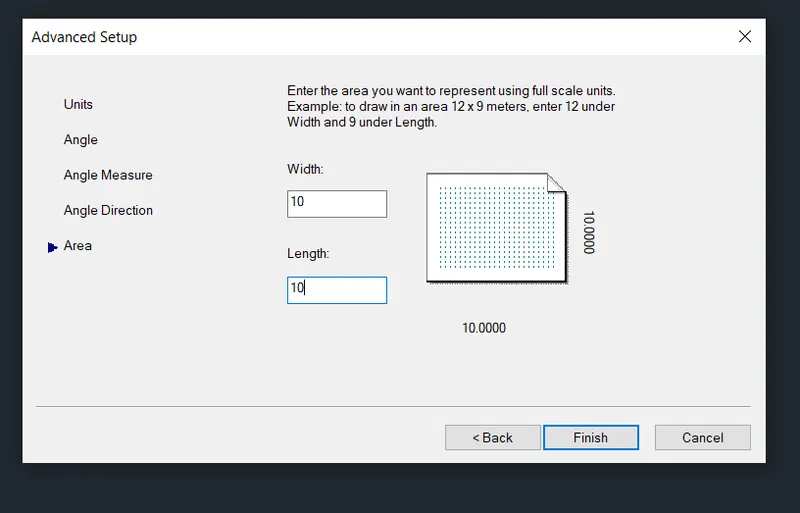
STEP-3 DRAW THE DRAWINGS BY USING THE TOOLS:
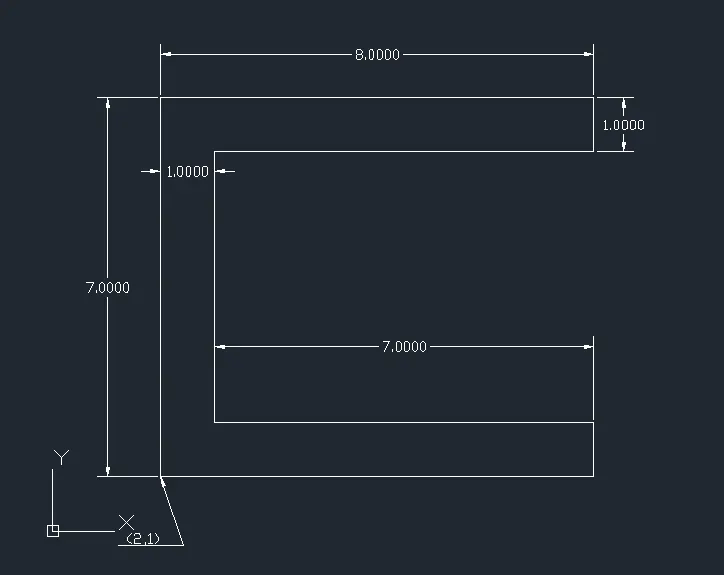
P-1 Drawn by using Absolute coordinate system:
TOOLS USED: Line tool
Command: L >
Command: Specify first point: (2,1)
Command: Specify next point or[Undo]: (2,8)
Command: Specify next point or[Close/Undo]: (10,8)
Command: Specify next point or[Close/Undo]: (10,7)
Command: Specify next point or[Close/Undo]: (3,7)
Command: Specify next point or[Close/Undo]: (3,2)
Command: Specify next point or[Close/Undo]: (10,2)
Command: Specify next point or[Close/Undo]: (10,1)
Command: Close
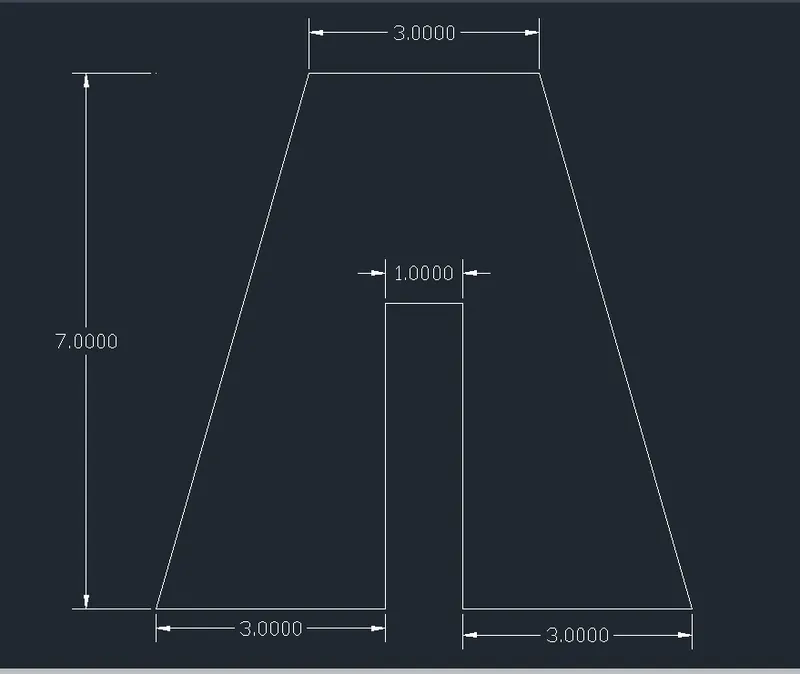
P-2 Drawn by using relative rectangular coordinate system:
TOOLS USED: Line tool
Command: L >
Command: Specify first point: (2,1)
Command: Specify next point or[Undo]: (@ 2,7)
Command: Specify next point or[Close/Undo]: (@ 3,0)
Command: Specify next point or[Close/Undo]: (@ 2,-7)
Command: Specify next point or[Close/Undo]: (@ -3,0)
Command: Specify next point or[Close/Undo]: (@ 0,4)
Command: Specify next point or[Close/Undo]: (@ -1,0)
Command: Specify next point or[Close/Undo]: (@ 0,-4)
Command: Close
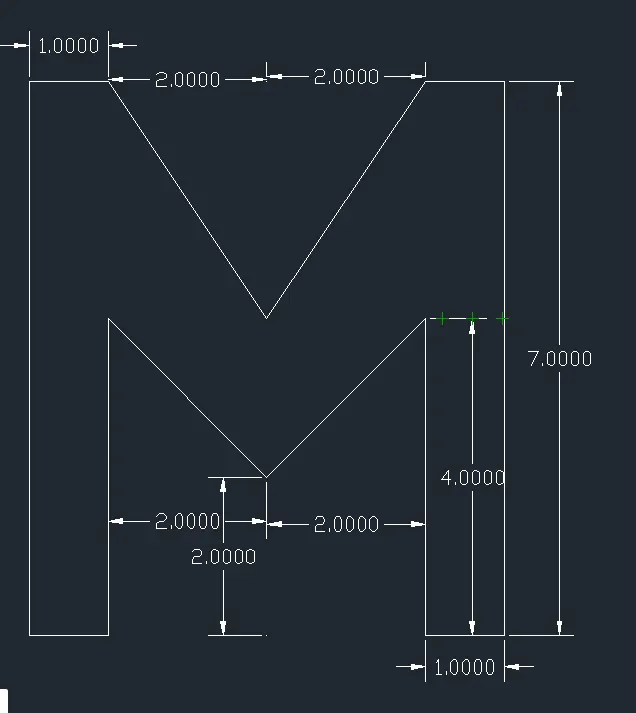
P-3 Drawn by using relative rectangular coordinate system:
TOOLS USED: Line tool
Command: L >
Command: Specify first point: (2,1)
Command: Specify next point or[Undo]: (@ 0,8)
Command: Specify next point or[Close/Undo]: (@ 1,0)
Command: Specify next point or[Close/Undo]: (@ 2,-3)
Command: Specify next point or[Close/Undo]: (@ 2,3)
Command: Specify next point or[Close/Undo]: (@ 1,0)
Command: Specify next point or[Close/Undo]: (@ 0,-8)
Command: Specify next point or[Close/Undo]: (@ -1,0)
Command: Specify next point or[Close/Undo]: (@ 0,4)
Command: Specify next point or[Close/Undo]: (@ -2,-2)
Command: Specify next point or[Close/Undo]: (@ -2,2)
Command: Specify next point or[Close/Undo]: (@ 0,-4)
Command: Close
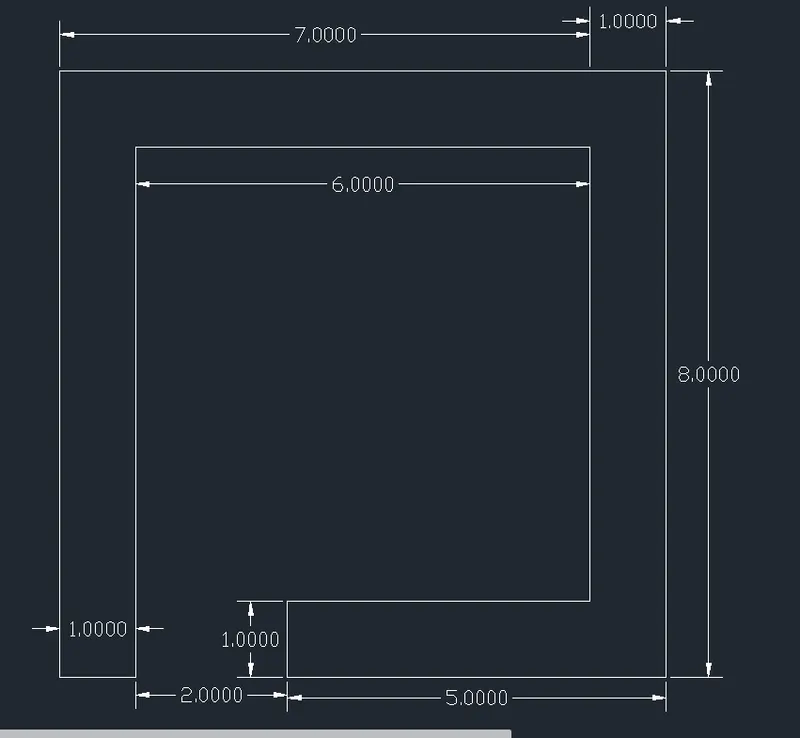
P-4 Drawn by using Direct distance entry system:
TOOLS USED: Line tool
Command: L >
Command: Specify first point: (2,1)
Command: Specify next point or[Undo]: (8) Upward
Command: Specify next point or[Close/Undo]: (7) Right side
Command: Specify next point or[Close/Undo]: (8) Downward
Command: Specify next point or[Close/Undo]: (5) Left side
Command: Specify next point or[Close/Undo]: (1) Upward
Command: Specify next point or[Close/Undo]: (4) Right side
Command: Specify next point or[Close/Undo]: (6) Upward
Command: Specify next point or[Close/Undo]: (5) left side
Command: Specify next point or[Close/Undo]: (7) Downward
Command: Close
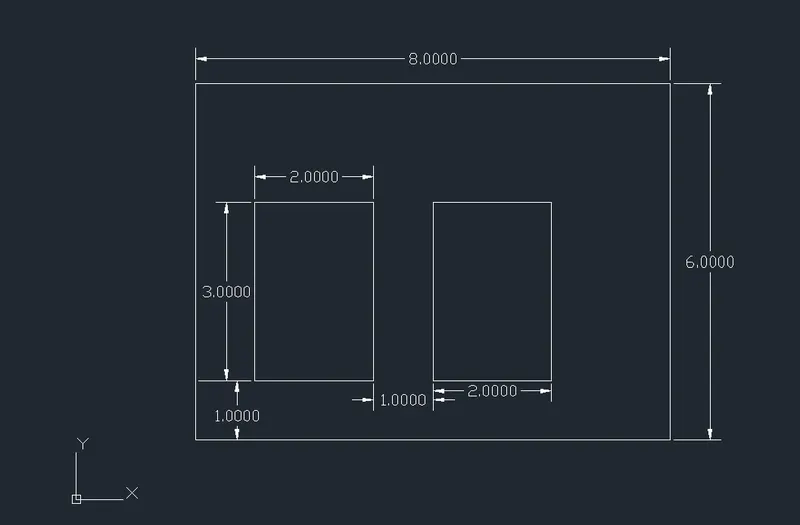
P-5 Drawn by using Absolute coordinate system:
TOOLS USED: Rectangle tool
Command: REC >
Command: Specify first corner point or [Chamfer, Elevation, Fillet, Thickness, Width]: (2,1)
Command: Specify next corner point or[Area, Dimension, Rotation]: (8,6)
Command: Specify first corner point or [Chamfer, Elevation, Fillet, Thickness, Width]: (3,2)
Command: Specify next corner point or[Area, Dimension, Rotation]: (2,3)
Command: Specify first corner point or [Chamfer, Elevation, Fillet, Thickness, Width]: (6,2)
Command: Specify next corner point or[Area, Dimension, Rotation]: (2,3)
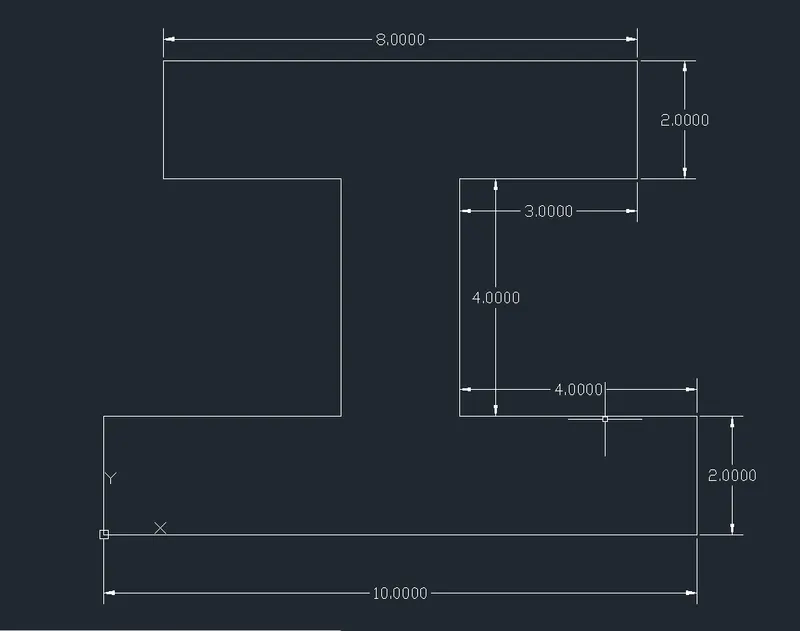
P-6 Drawn by using relative rectangular coordinate system:
TOOLS USED: Line tool
Command: L >
Command: Specify first point: (0,0)
Command: Specify next point or[Undo]: (@ 0,2) Upward
Command: Specify next point or[Close/Undo]: (@ 4,0) Right side
Command: Specify next point or[Close/Undo]: (@ 0,4) Upward
Command: Specify next point or[Close/Undo]: (@ -3,0) Left side
Command: Specify next point or[Close/Undo]: (@ 0,2) Upward
Command: Specify next point or[Close/Undo]: (@ 8,0) Right side
Command: Specify next point or[Close/Undo]: (@ 0,-2) Downward
Command: Specify next point or[Close/Undo]: (@ -3,0) Left side
Command: Specify next point or[Close/Undo]: (@ 0,-4) Downward
Command: Specify next point or[Close/Undo]: (@ 4,0) Right side
Command: Specify next point or[Close/Undo]: (@ 0,-2) Downward
Command: Close
P7 Drawn by using relative rectangular coordinate system:
TOOLS USED: Line tool
Command: L >
Command: Specify first point: (1,1)
Command: Specify next point or[Undo]: (@ 0,7)
Command: Specify next point or[Close/Undo]: (@ 4,-2)
Command: Specify next point or[Close/Undo]: (@ 0,-2)
Command: Specify next point or[Close/Undo]: (@ -3,0)
Command: Specify next point or[Close/Undo]: (@ 0,-2)
Command: Specify next point or[Close/Undo]: (@ 1,0)
Command: Specify next point or[Close/Undo]: (@ 0,1)
Command: Specify next point or[Close/Undo]: (@ 3,0)
Command: Specify next point or[Close/Undo]: (@ 0,-2)
Command: Close
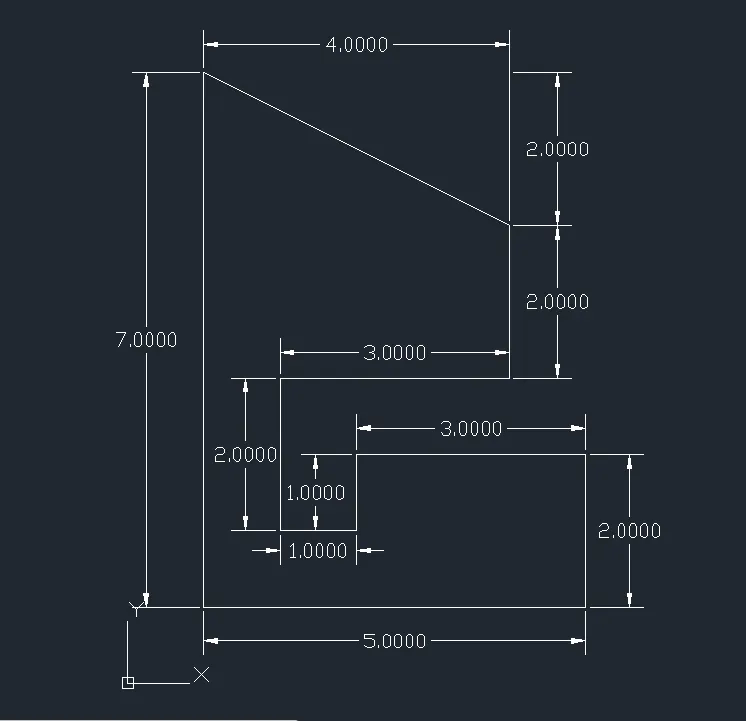
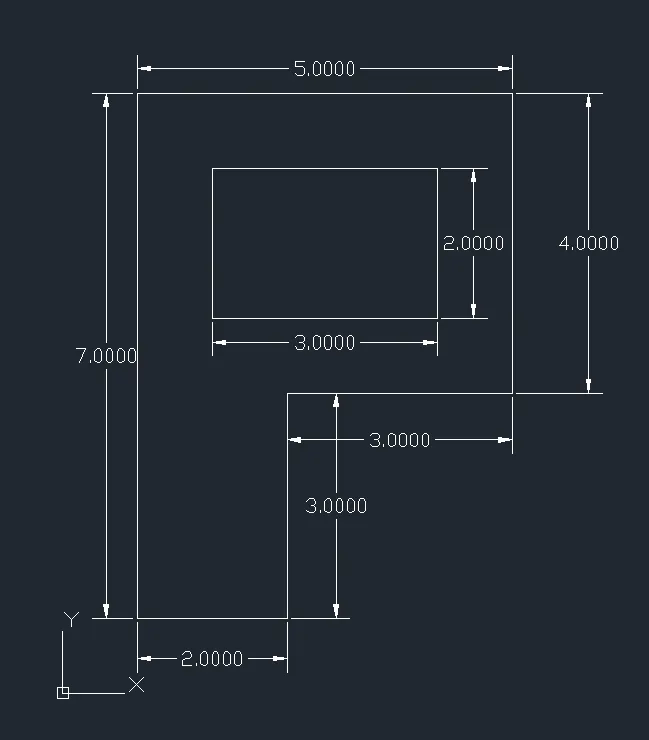
P8 Drawn by using relative rectangular coordinate system:
TOOLS USED: Line tool & Rectangle tool
Command: L >
Command: Specify first point: (1,1)
Command: Specify next point or[Undo]: (@ 0,7)
Command: Specify next point or[Close/Undo]: (@ 5,0)
Command: Specify next point or[Close/Undo]: (@ 0,-4)
Command: Specify next point or[Close/Undo]: (@ -3,0)
Command: Specify next point or[Close/Undo]: (@ 0,-3)
Command: Close
Command: REC >
Command: Specify first corner point or [Chamfer, Elevation, Fillet, Thickness, Width]: (2,5)
Command: Specify next corner point or[Area, Dimension, Rotation]: (3,2)
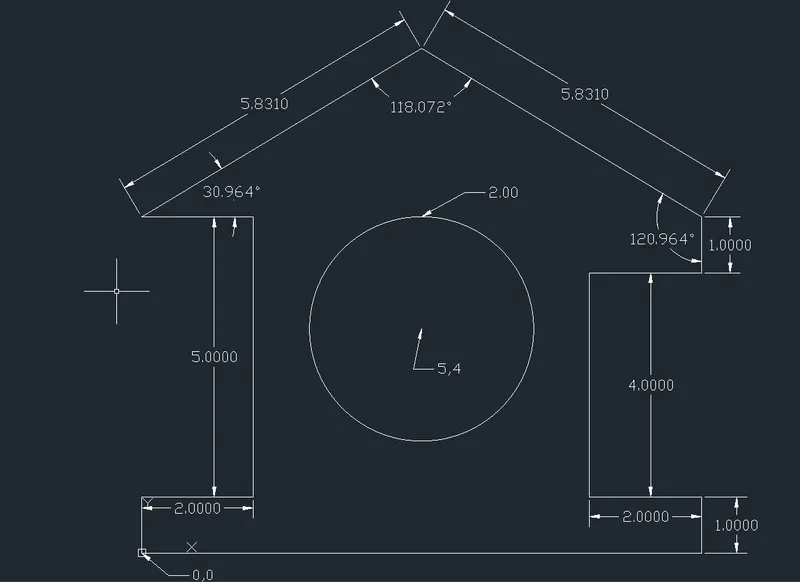
PROFILE WOOD:
Drawn by using relative rectangular coordinate system:
TOOLS USED: Line tool & Circle tool
Command: L >
Command: Specify first point: (0,0)
Command: Specify next point or[Undo]: (@ 0,1)
Command: Specify next point or[Close/Undo]: (@ 2,0)
Command: Specify next point or[Close/Undo]: (@ 0,5)
Command: Specify next point or[Close/Undo]: (@ -2,0)
Command: Specify next point or[Close/Undo]: (@ 5.831>30.964)
Command: Specify next point or[Close/Undo]: (@ 5.831>329.036)
Command: Specify next point or[Close/Undo]: (@ 0,1)
Command: Specify next point or[Close/Undo]: (@ -2,0)
Command: Specify next point or[Close/Undo]: (@ 0,-4)
Command: Specify next point or[Close/Undo]: (@ 2,0)
Command: Specify next point or[Close/Undo]: (@ 0,-1)
Command: Close
Command: C >
Command: Specify center point for circle or [3P, 2P Ttr(tan tan radius)] : (5,4)
Command: Specify radius of circle or [Diameter]: select the diameter
Command: Specify diameter of circle: 2>
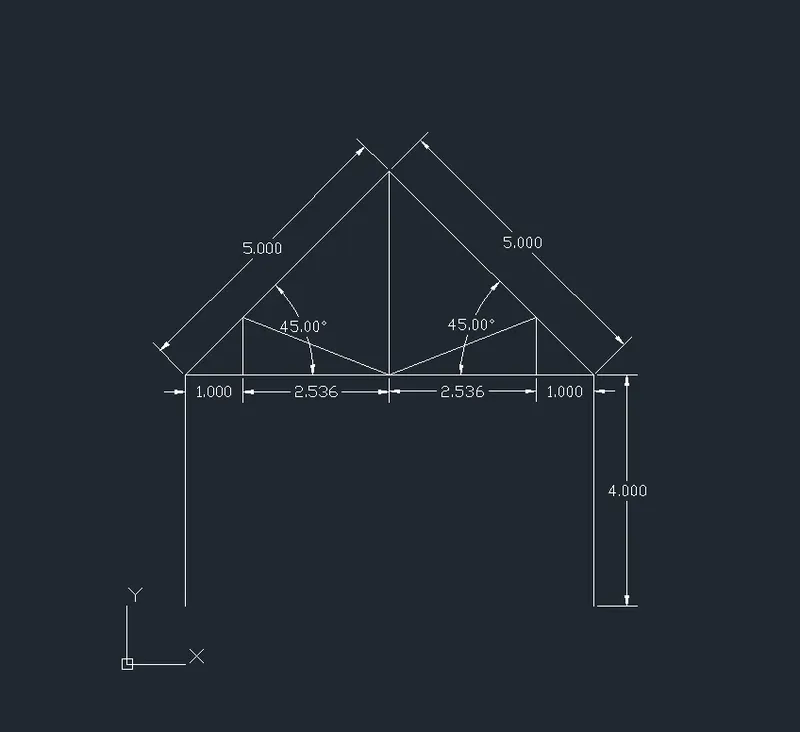
QUEEN POST TRUSS:
Drawn by using relative polar coordinate system & Direct entry system:
TOOLS USED: Line tool
Command: L >
Command: Specify first point: (1,1)
Command: Specify next point or[Undo]: (4) upword
Command: Specify next point or[Close/Undo]: (@ 5<45)
Command: Specify next point or[Close/Undo]: (@ 5<315)
Command: Specify next point or[Close/Undo]: (4) Downword
Command: L >
Command: Specify first point or[Undo]: (1,5)
Command: Specify next point or[Close/Undo]: (1) Right side
Command: Specify next point or[Close/Undo]: (2.536) Right side
Command: Specify next point or[Close/Undo]: (2.536) Right side
Command: Specify next point or[Close/Undo]: (1) Right side
Command: L >
Command: Specify first point or[Undo]: selecting the center point at the middle of the span
Command: Specify next point or[Close/Undo]: (3.56) upword
Command: L >
Command: Specify first point or[Undo]: (2,5)
Command: Specify next point or[Close/Undo]: (1) upward
Command: Specify next point or[Close/Undo]: selecting the center point at the middle of the span
Command: L >
Command: Specify first point or[Undo]: selecting the point 1 unit from the right side of the span
Command: Specify next point or[Close/Undo]: (1) upward
Command: Specify next point or[Close/Undo]: selecting the center point at the middle of the span
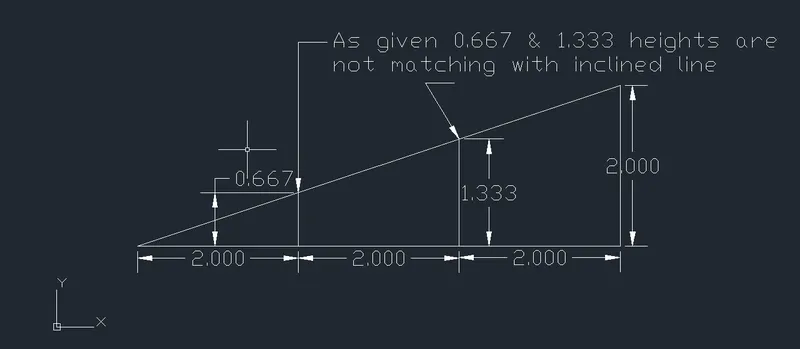
MONO PITCH
Drawn by using relative rectangular coordinate system:
TOOLS USED: Line tool
Command: L >
Command: Specify first point: (1,1)
Command: Specify next point or[Undo]: (@ 0,1)
Command: Specify next point or[Close/Undo]: (@ 6,0) Right side
Command: Specify next point or[Close/Undo]: (@ 0,2) Upward
Command: Close
Command: L >
Command: Specify first point: (3,1)
Command: Specify next point or[Undo]: (0.667) Upward
Command: L >
Command: Specify first point: (5,1)
Command: Specify next point or[Undo]: (1.333) Upward
GRIDLINES:
TOOLS USED: Line tool & Offset
Command: L >
Command: Specify first point: (0,0)
Command: Specify next point or[Undo]: (10) Upward
Command: Specify next point or[Undo]: (10) Right side
Command: Specify next point or[Undo]: (10) Downward
Command:close
Command: OFFSET>
Command: Specify offset distance or[Through, Erase, Layer]: (1) >
Command: Select object to offset or [Exit, Undo]: First verticle line >
Command: Specify point on side to offset or [Exit, Multiple, Undo]: Multiple >
Command: Specify point on side to offset or [Exit, Undo]: Next object > up to 9 offset lines
Command: OFFSET>
Command: Specify offset distance or[Through, Erase, Layer]: (1) >
Command: Select object to offset or [Exit, Undo]: First horizantal line >
Command: Specify point on side to offset or [Exit, Multiple, Undo]: Multiple >
Command: Specify point on side to offset or [Exit, Undo]: Next object > up to 9 offset lines