Drafting of various geometries using Chamfer, Fillet tool in AutoCad
Aim:
To draw the all given drawings in the attachment for this challenge as given the dimensions on the sketches using AutoCAD 2023 software.
Introduction:
- The drawings are given for practice using the AutoCAD 2023 software
- Here totally 11 drawings for practice
- The drawings are creating depends on the type of length. For ex: Decimal, Architectural and Engineering
- The drawings are given below
Procedure:
Drawing-01:
Step-1: Open the software and creating the units and the limits
- First of all open the AutoCAD 2023 software.
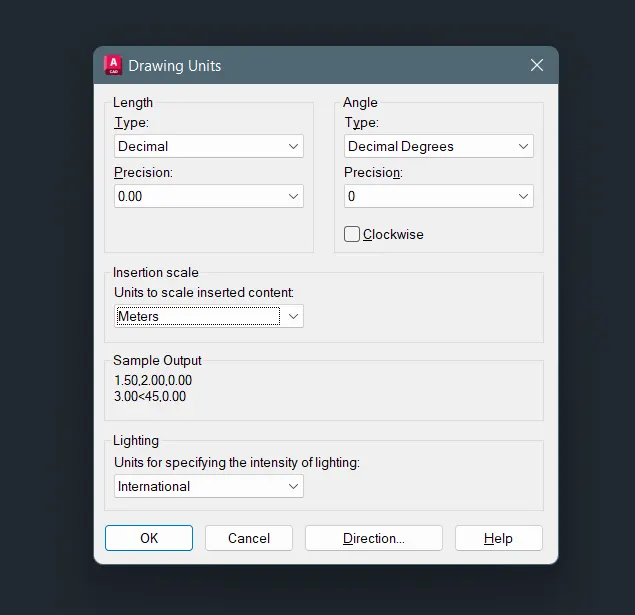
- Then, click UNITS and then give the units waht you want
- Here the type of length is DECIMAL and the precision is 0.00
- Select the insertion scale is Meters
- Type LIMITS and give the limits the first point is 0,0 and the last top right corner bottom is 100,100
Step-2: To draw the sketch
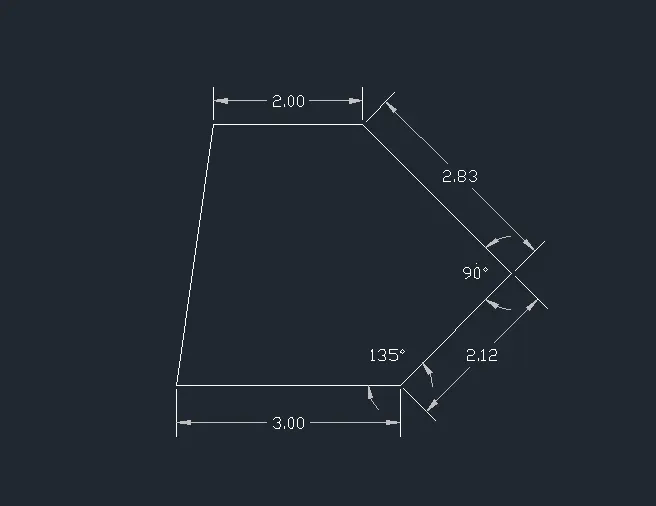
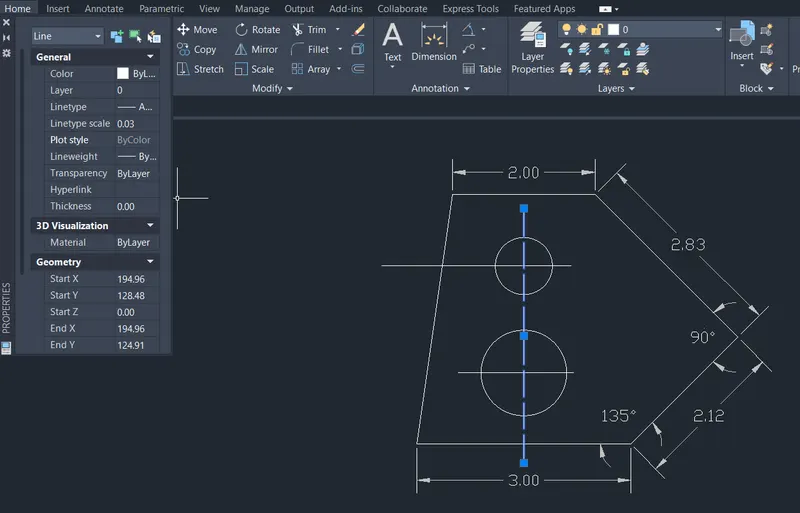
- Go to the properties panel - click load - and take the braching line and use this line and give the linetype scale is 0.03
- Draw using the line command the shortcut of L and click anywhere i want
- And draw the all lines using given dimensions
- And draw the circle the shortcut of C and type R, R stands for radius and give the radius for the circle
Step-3: Marking the dimesions
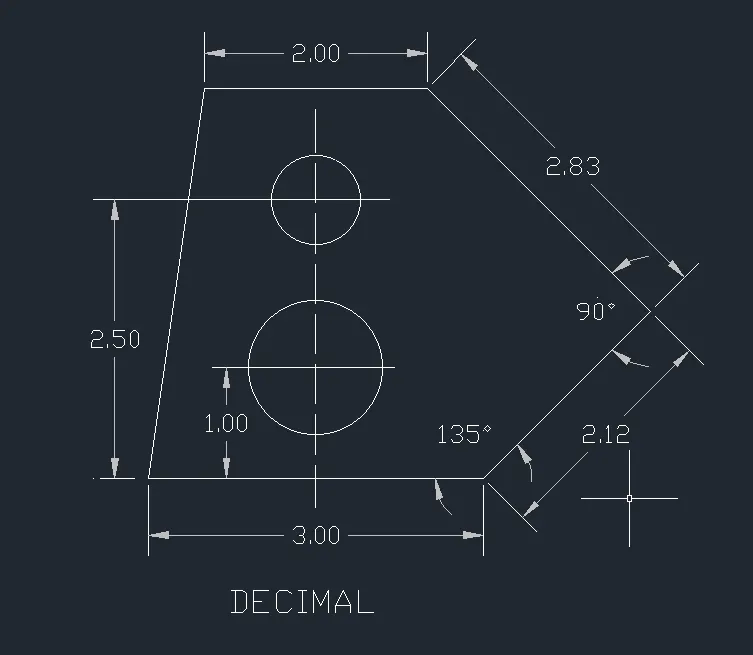
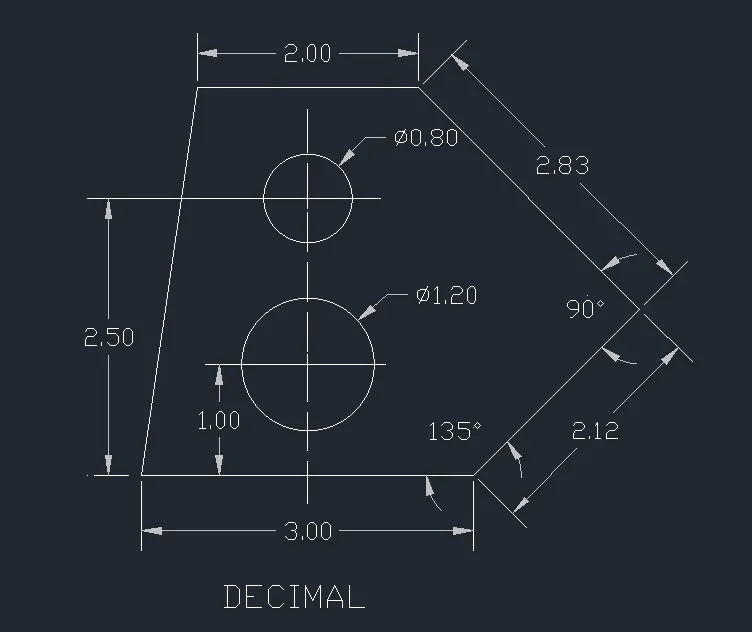
- The dimesions are using the DIM command or click the annotation panel - dimension
- Take the Linear, Aligned, Angular and the diameter
- The angle is click two lines which one is i want and drag the degrees and fix it
- The diameter is click the object and drag it and fix it
- Aligned is using for inclined lines to measure the lines
- The dia of the circle is 1.20 and 0.80
- Click the first point and to the second point for where i want the dimesions and mark the distance
- Using the MText command and type the title name is DECIMAL and finish the drawing
- Finally give all the dimesions and take the screenshot using the Snipping Tool
- And upload all the drawings
Drawing-02:
Step-1: Open the software and creating the units and the limits
- First of all open the AutoCAD 2023 software.
- Then, click UNITS and then give the units waht you want
- Here the type of length is ARCHITACTURAL and the precision is 0'-0"
- Select the insertion scale is Inches
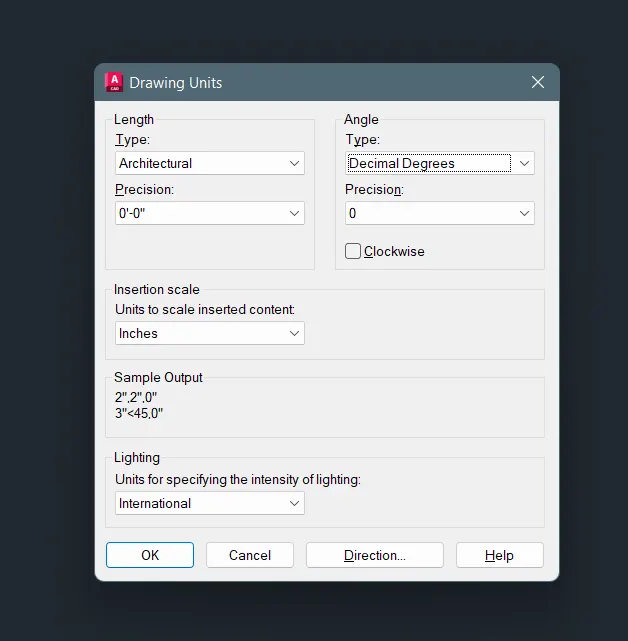
- Type LIMITS and give the limits the first point is 0,0 and the last top right corner bottom is 500,500
Step-2: To modify the dimesion style
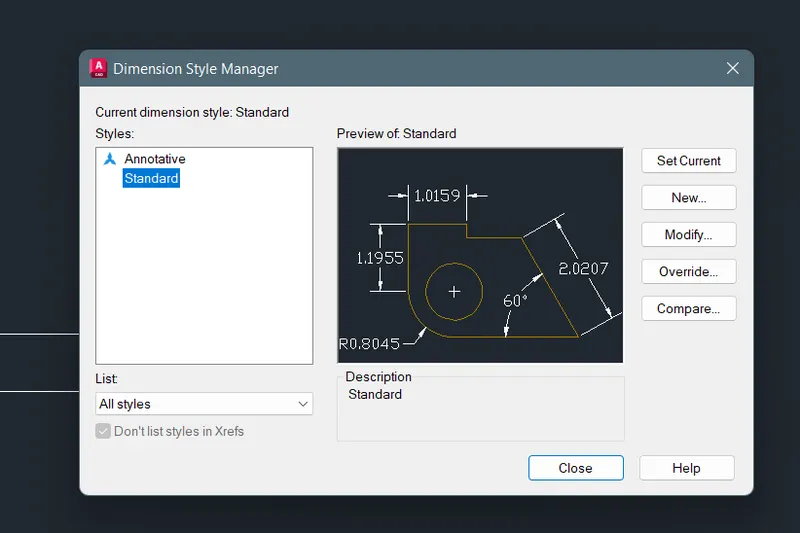
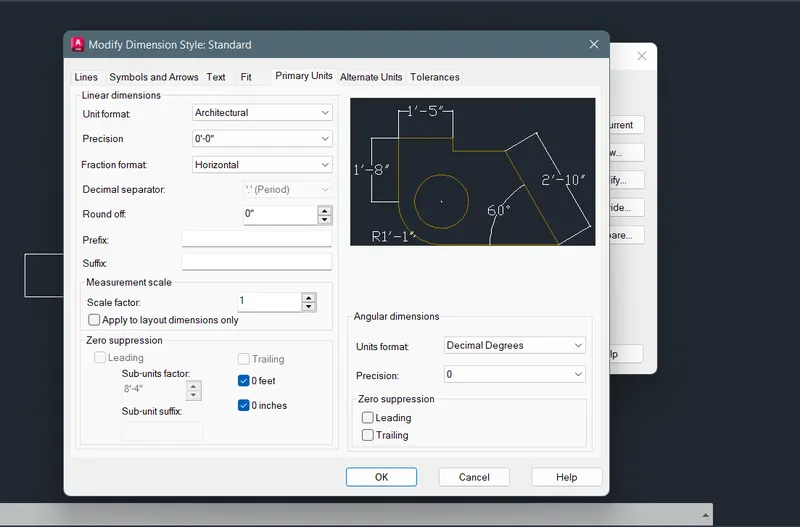
- First type on search bar DIMSTYLE
- And select the DIMSTYLE and open the dialogue box show as below
- Click modify then, selcect primary units and then, select Architectural and the precision is 0'-0"
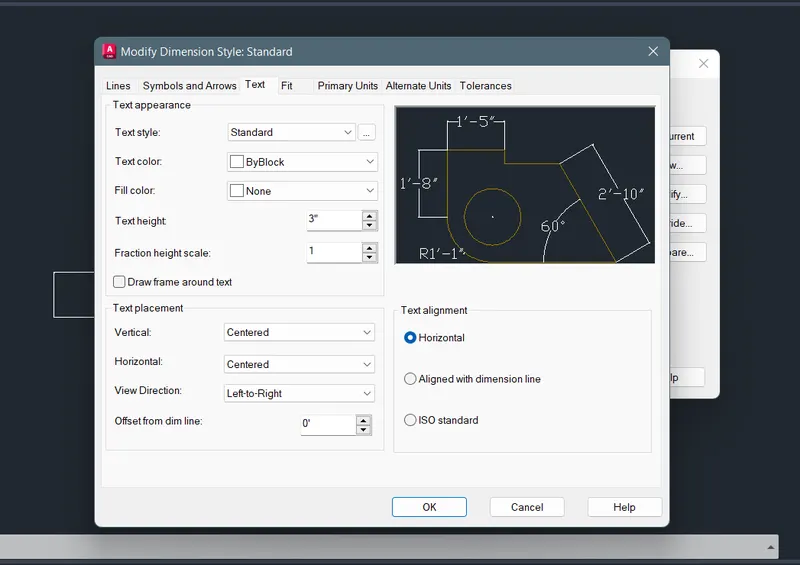
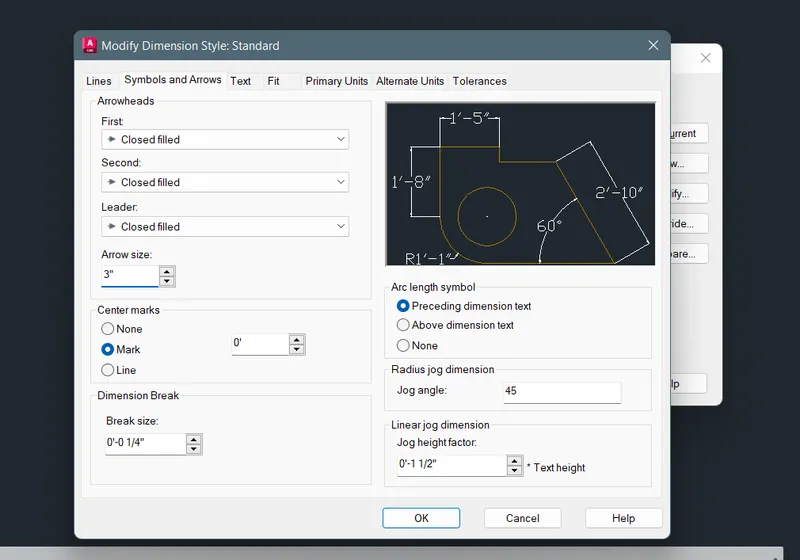
- Then, select the Symbols and Arrows give the Arrow size as 3" and
- Click Text then give 3" and select OK
- And select the SetCurrent and the click Close
Step-03: To draw the sketch
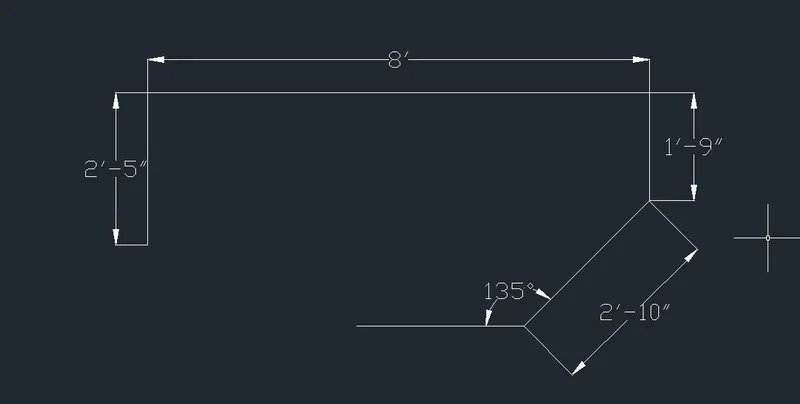
- Draw using the line command the shortcut of L and click anywhere i want
- And draw the all lines using given dimensions
- And then, click the mouse anywhere in the screen move the arrow mark upward and give the dimension 2'-5"
- These process is using in all the lines
Step-04: Marking the dimensions
- The dimesions are using the DIM command or click the annotation panel - dimension
- Take the Linear, Aligned, Angular and the diameter
- The angle is click two lines which one is i want and drag the degrees and fix it
- The angle is 135 degree and the 90 degree
- Aligned is using for inclined lines to measure the lines
- Click the first point and to the second point for where i want the dimesions and mark the distance
- Using the MText command and type the title name is ARCHITECTURAL and finish the drawing
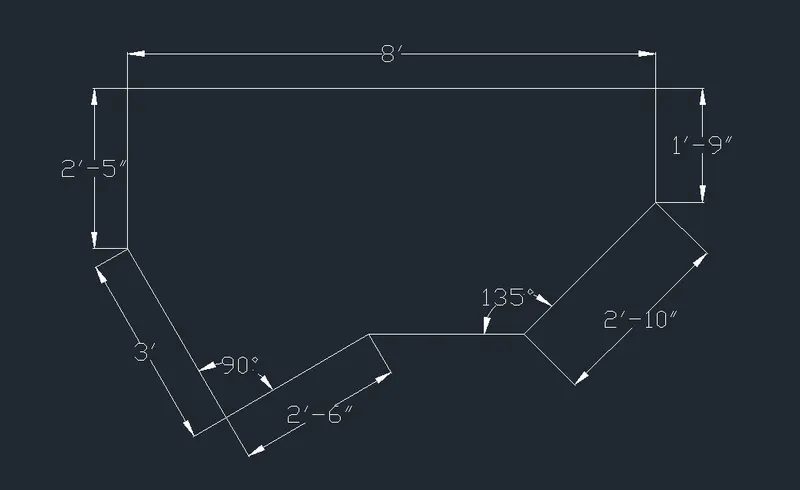
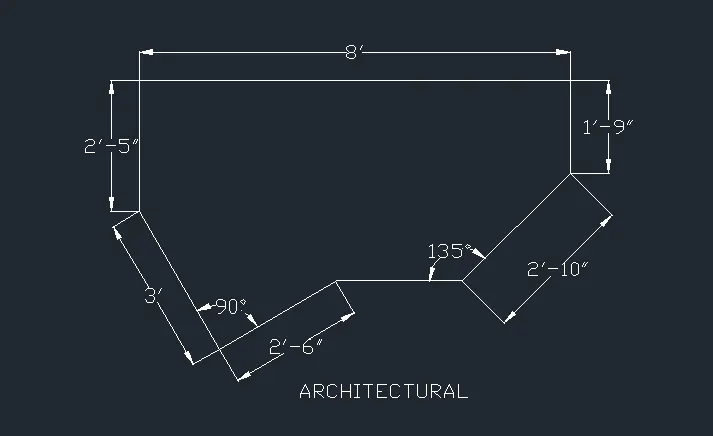
- Finally give all the dimesions and take the screenshot using the Snipping Tool
- And upload all the drawings
Drawing-03:
Step-1: Open the software and creating the units and the limits
- First of all open the AutoCAD 2023 software.
- Then, click UNITS and then give the units waht you want
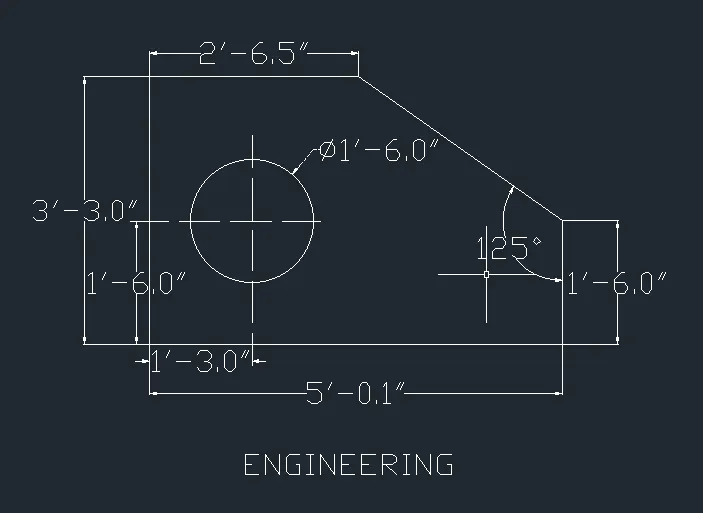
- Here the type of length is Engineering and the precision is 0'-0.0"
- Select the insertion scale is Inches
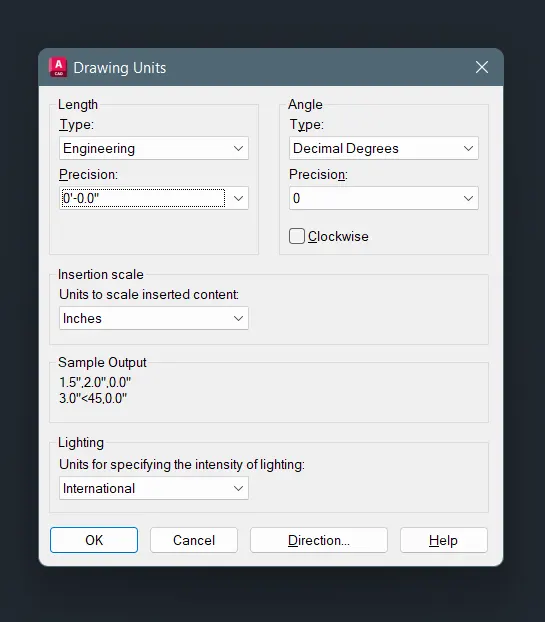
- Type LIMITS and give the limits the first point is 0,0 and the last top right corner bottom is 500,500
Step-2: To modify the dimesion style
- First type on search bar DIMSTYLE
- And select the DIMSTYLE and open the dialogue box show as below
- Click modify then, selcect primary units and then, select Engineering and the precision is 0'-0.0"
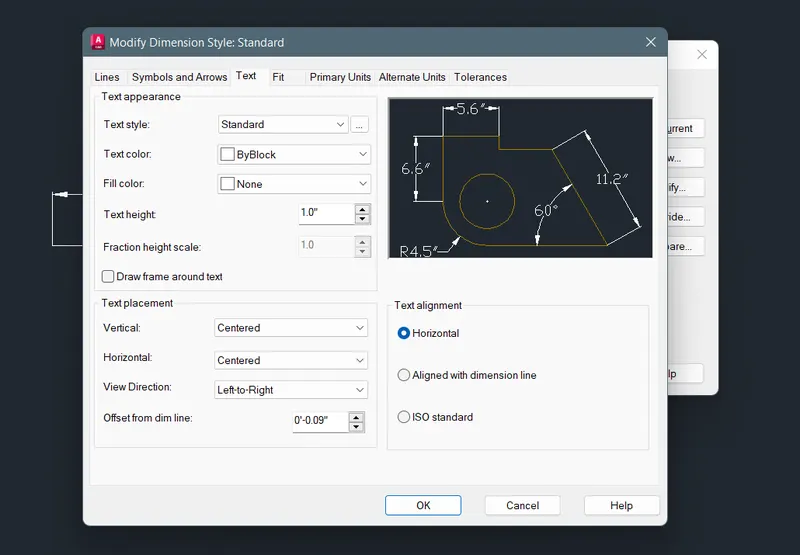
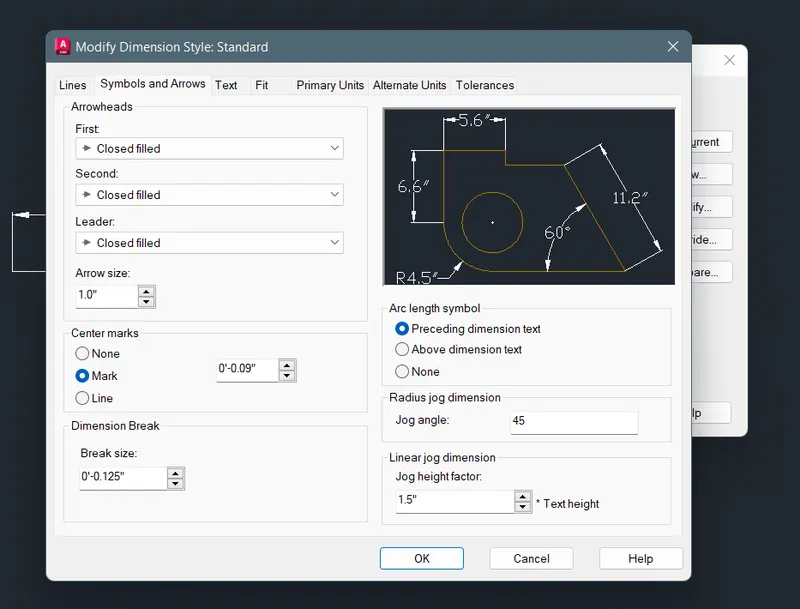
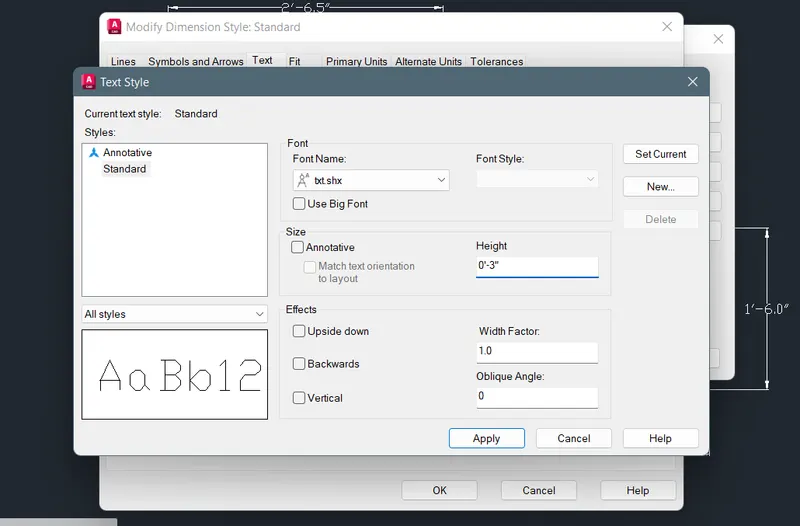
- Select Text and click standard then, edit the current text syle and the height is give 0'-3"
Step-03: To draw the sketch
- Draw using the line command the shortcut of L and click anywhere i want
- And draw the all lines using given dimensions
- And then, click the mouse anywhere in the screen move the arrow mark upward and give the dimension 3'-3.0"
- These process is using in all the lines
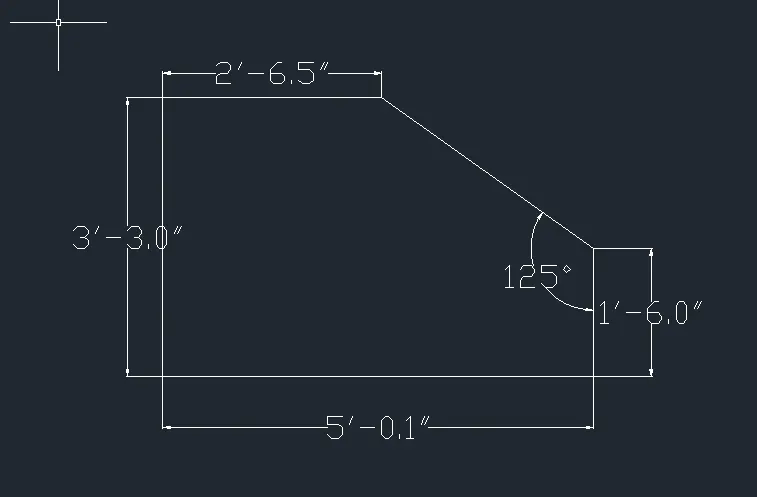
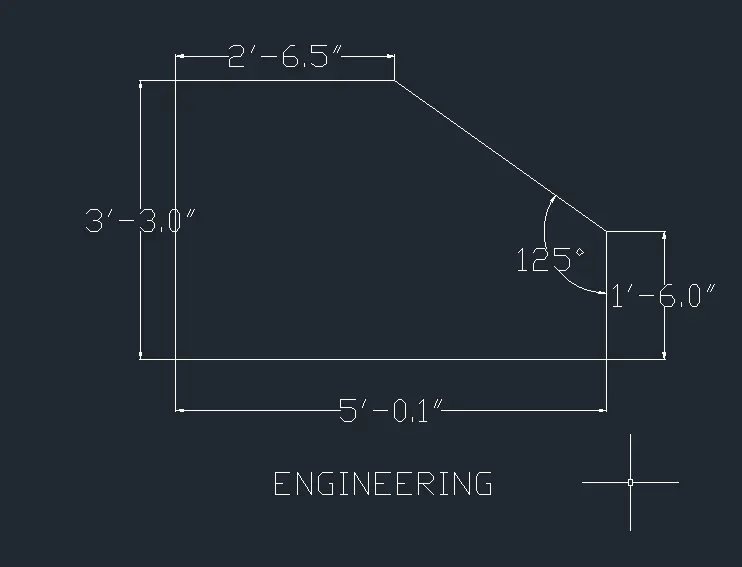
Step-04: Marking the dimensions
- The dimesions are using the DIM command or click the annotation panel - dimension
- Take the Linear, Aligned, Angular and the diameter
- The angle is click two lines which one is i want and drag the degrees and fix it
- The angle is 125 degree
- Aligned is using for inclined lines to measure the lines
- Click the first point and to the second point for where i want the dimesions and mark the distance
- Using the MText command and type the title name is ENGINEERING and finish the drawing
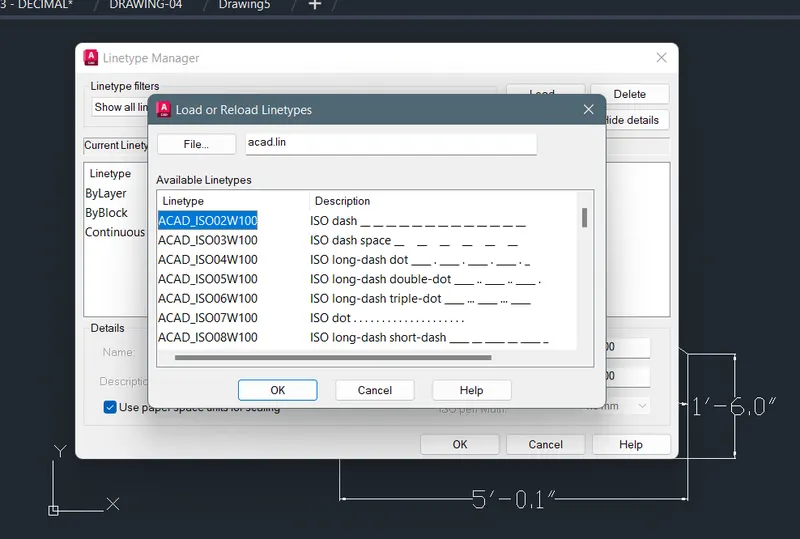
- Select the line type and give the ISO dash line
- And make the circle of the diameter 1'-6.0" in the position of the circle form the x-axis & y-axis 1'-6.0" & 1'-3.0"
- Finally give all the dimesions and take the screenshot using the Snipping Tool
- And upload all the drawings
Drawing-04:
Step-1: Open the software and creating the units and the limits
- First of all open the AutoCAD 2023 software.
- Then, click UNITS and then give the units waht you want
- Here the type of length is Decimal and the precision is 0.0
- Select the insertion scale is Meters
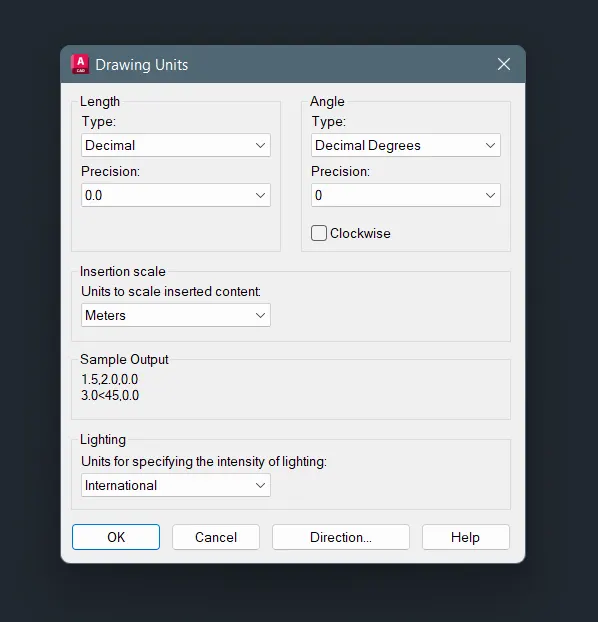
- Type LIMITS and give the limits the first point is 0,0 and the last top right corner bottom is 100,100
Step-2: To modify the dimesion style
- First type on search bar DIMSTYLE
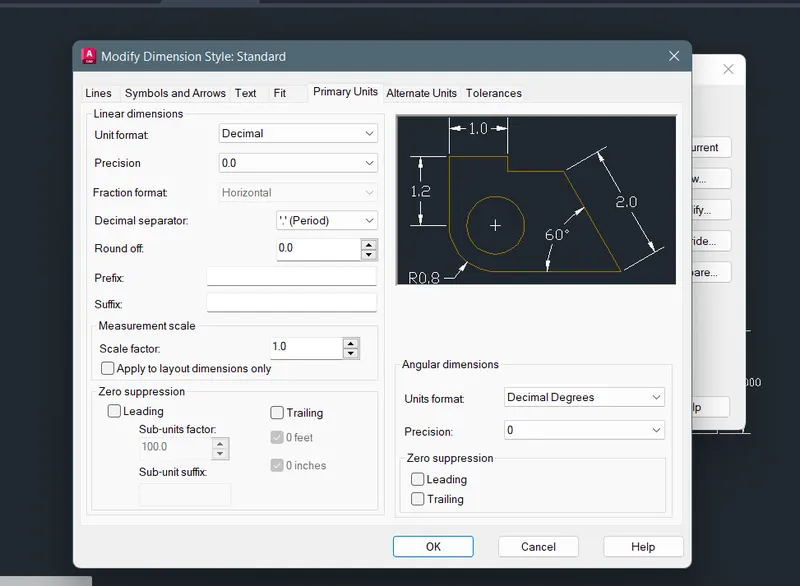
- And select the DIMSTYLE and open the dialogue box show as below
- Click modify then, selcect primary units and then, select Decimal and the precision is 0.0
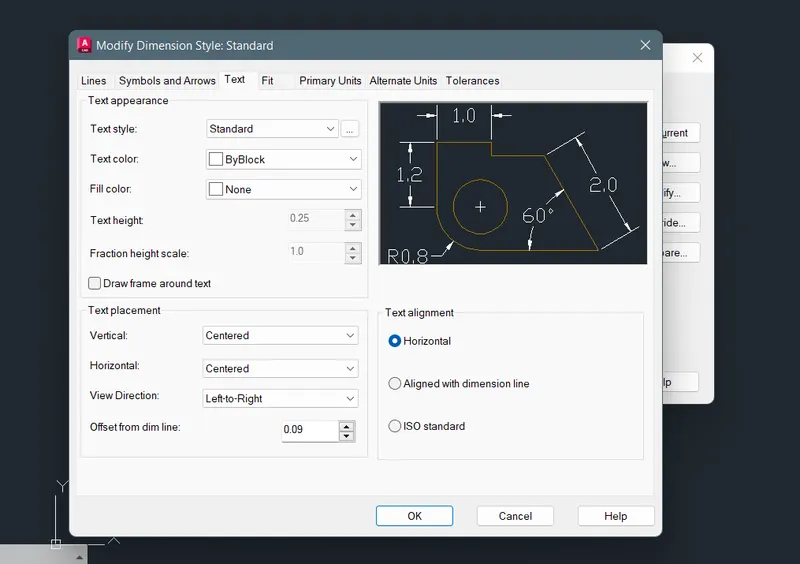
- Give the text height is 0.25 and select the point where dimension is want
Step-03: To draw the sketch
- Draw using the line command the shortcut of L and click anywhere i want
- And draw the all lines using given dimensions
- And then, click the mouse anywhere in the screen move the arrow mark upward and give the dimension 3
- These process is using in all the lines, it depends on the length of the lines
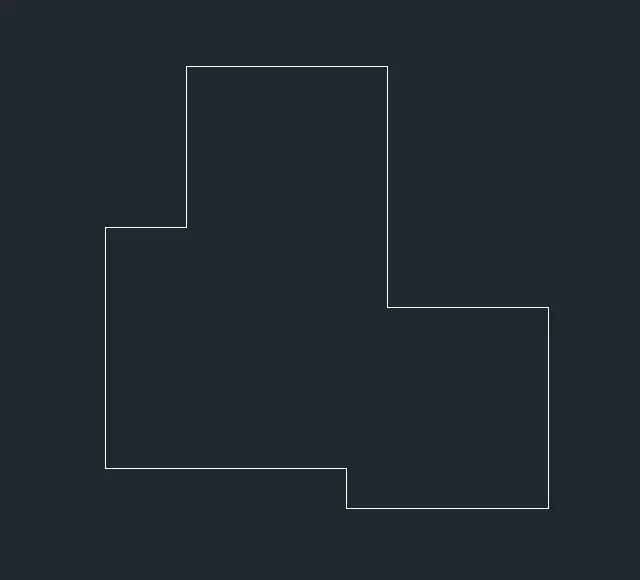
Step-04: Marking the dimensions
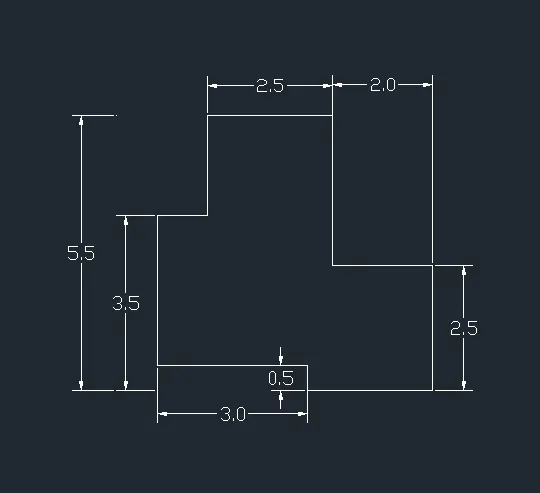
- The dimesions are using the DIM command or click the annotation panel - dimension
- Take the Linear
- Click the first point and to the second point for where i want the dimesions and mark the distance
- The dimensions are as given in the question
Drawing-05:
Step-1: Open the software and creating the units and the limits
- First of all open the AutoCAD 2023 software.
- Then, click UNITS and then give the units waht you want
- Here the type of length is Decimal and the precision is 0.00
- Select the insertion scale is Meters
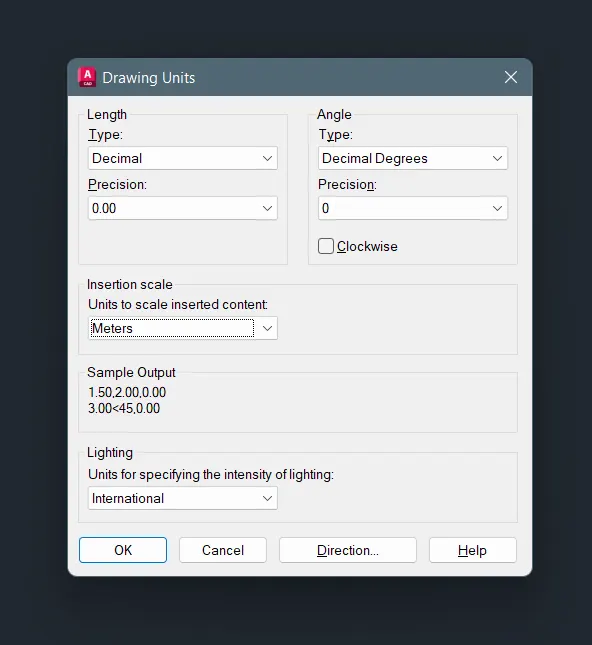
- Type LIMITS and give the limits the first point is 0,0 and the last top right corner bottom is 100,100
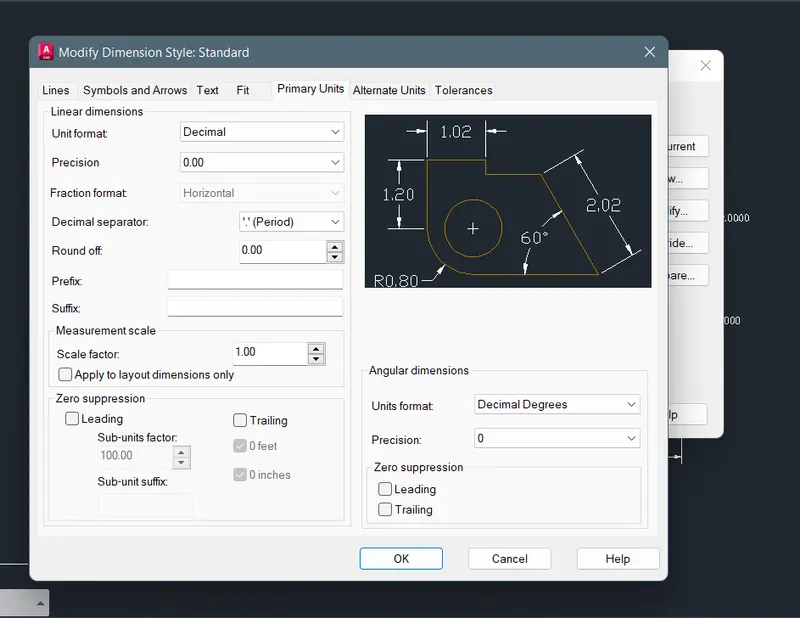
Step-2: To modify the dimesion style
- First type on search bar DIMSTYLE
- And select the DIMSTYLE and open the dialogue box show as below
- Click modify then, selcect primary units and then, select Decimal and the precision is 0.00
- Give the text height is 0.20 and select the point where dimension is want
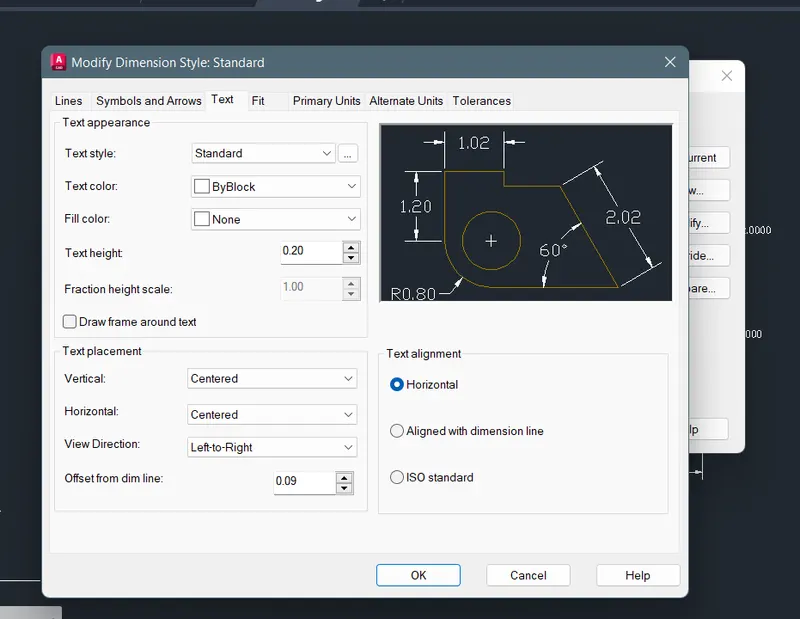
Step-03: To draw the sketch
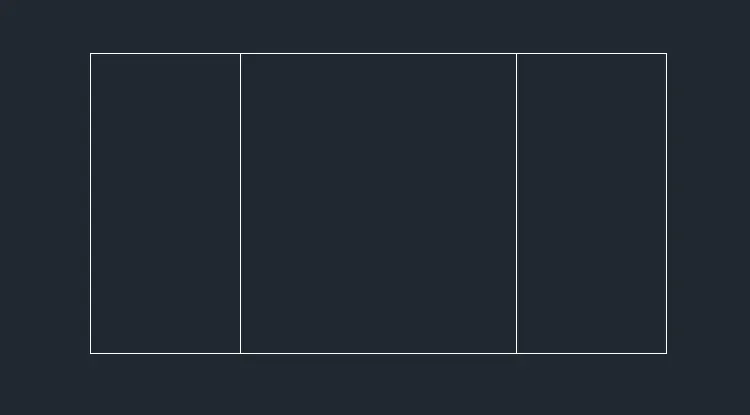
- Draw using the line command the shortcut of L and click anywhere i want
- And draw the all lines using given dimensions
- And then, click the mouse anywhere in the screen move the arrow mark upward and give the dimension 6x3
- Use the OFFSET command and give offset distance 3.0 then select the corner lines move the cursor inside of rectangle and select it
- These process is using in all the lines, it depends on the length of the lines
Step-04: Marking the dimensions
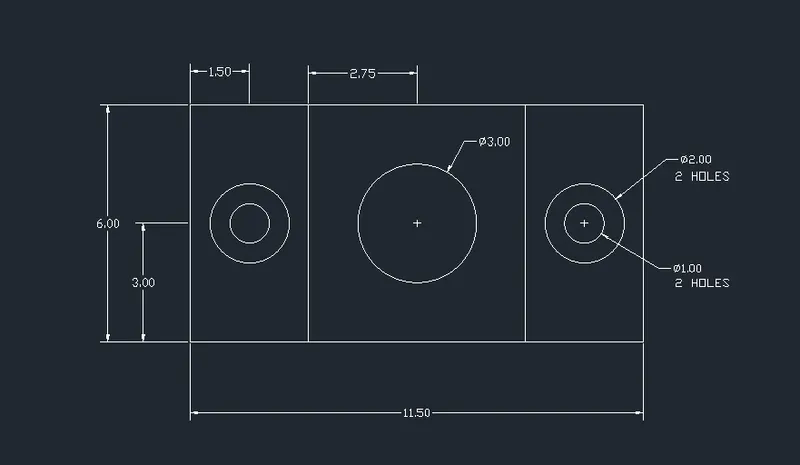
- The dimesions are using the DIM command or click the annotation panel - dimension
- Take the Linear and diameter
- The diameter is click the object and drag it and fix it
- The dia of the circle is 3.00, 2.00 and 1.00
- Click the first point and to the second point for where i want the dimesions and mark the distance
- Using the MText command and type the 2 holes and finish the drawing
- Finally give all the dimesions and take the screenshot using the Snipping Tool
- And upload all the drawings
Drawing-06:
Step-1: Open the software and creating the units and the limits
- First of all open the AutoCAD 2023 software.
- Then, click UNITS and then give the units waht you want
- Here the type of length is Decimal and the precision is 0.0
- Select the insertion scale is Meters
- Type LIMITS and give the limits the first point is 0,0 and the last top right corner bottom is 100,100
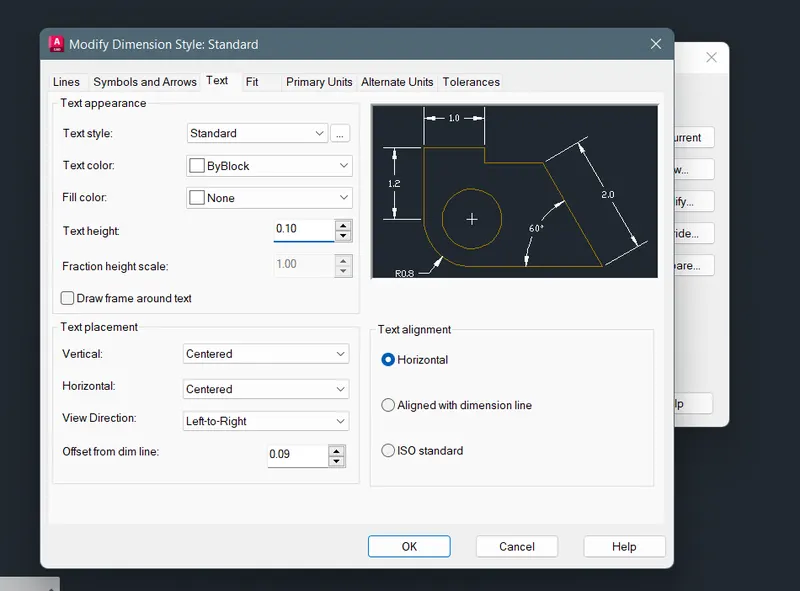
Step-2: To modify the dimesion style
- First type on search bar DIMSTYLE
- And select the DIMSTYLE and open the dialogue box show as below
- Click modify then, selcect primary units and then, select Decimal and the precision is 0.0
- Give the text height is 0.10 and select the point where dimension is want
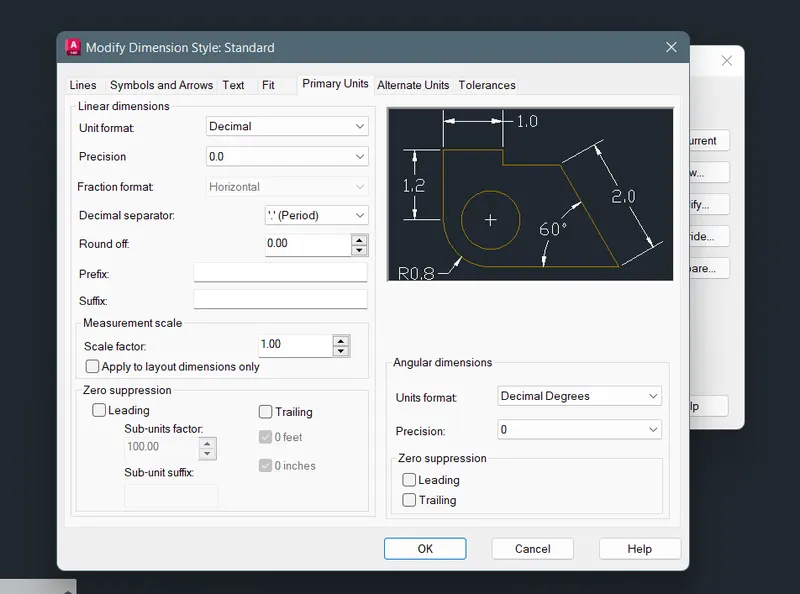
Step-03: To draw the sketch & Marking the dimensions
- Draw using the line command the shortcut of L and click anywhere i want
- And draw the all lines using given dimensions
- And then, click the mouse anywhere in the screen move the arrow mark upward and give the dimension
- Draw the lines using line command the distance of 0.5, 2.0 and 1.5
- These process is using in all the lines, it depends on the length of the lines
- The dimesions are using the DIM command or click the annotation panel - dimension
- Take the Linear and pick the point and,
- Click the first point and to the second point for where i want the dimesions and mark the distance
- These below drawings are shows plan and section drawings
- The dimensions are as given in the question
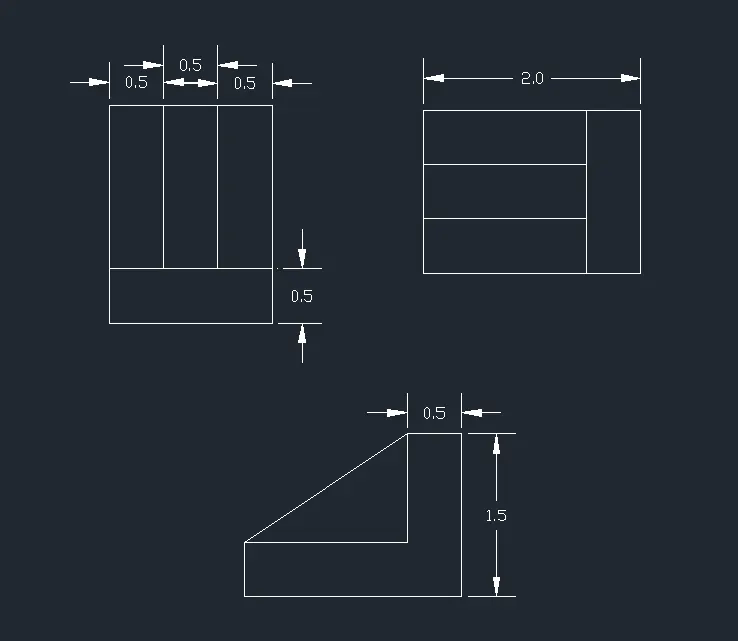
- Finally give all the dimesions and take the screenshot using the Snipping Tool
- And upload all the drawings
Drawing-07:
Step-1: Open the software and creating the units and the limits
- First of all open the AutoCAD 2023 software.
- Then, click UNITS and then give the units waht you want
- Here the type of length is Decimal and the precision is 0.0
- Select the insertion scale is Meters
- Type LIMITS and give the limits the first point is 0,0 and the last top right corner bottom is 100,100
Step-2: To draw the sketch
- Draw using the line command the shortcut of L and click anywhere i want
- And draw the all lines using given dimensions
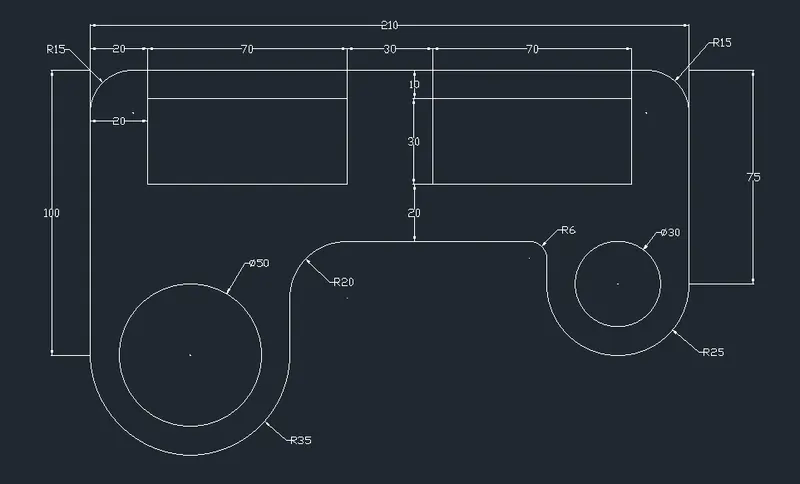
- Use the line command and draw the outer lines as in given lengths
- Using the circle command and draw the circle as in given diameter is 50 and 30
- These process is using in all the lines, it depends on the length of the lines
- Then, using the FILLET command for give a smooth edges. The fillet is created by radius it represents R
- The shortcut of fillet is F
- The radius are R15 is top two edges, R20, R25, R35 and R6

Step-3: To modify the dimesion style
- First type on search bar DIMSTYLE
- And select the DIMSTYLE and open the dialogue box show as below
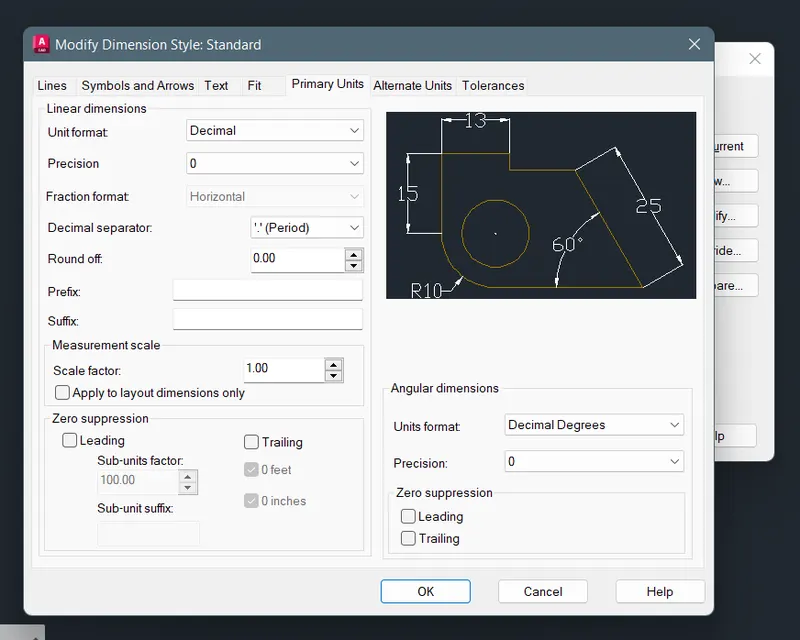
- Select Symbols and Arrows bar and give the Arrow size is 1.75
- Click modify then, selcect primary units and then, select Decimal and the precision is 0
- Give the text height is 2.50 and select the point where dimension is want
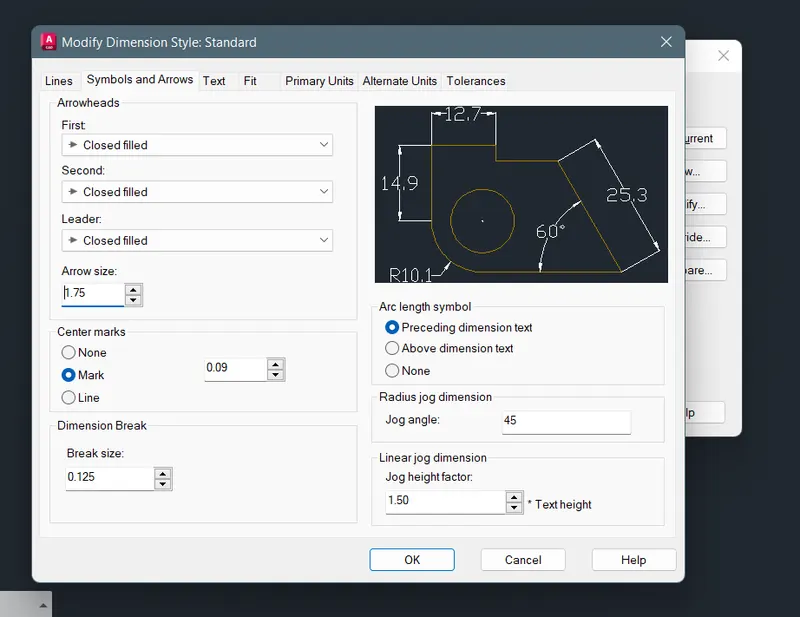
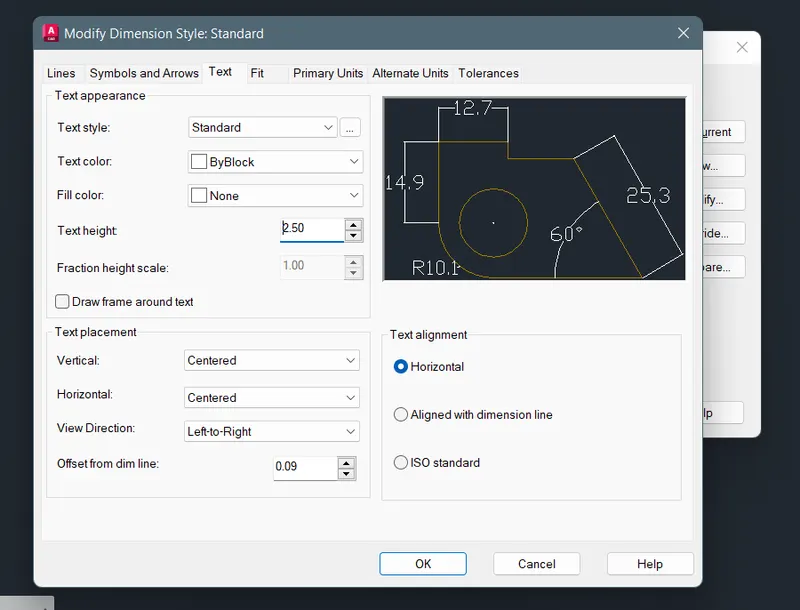
Step-04: Marking the dimensions
- The dimesions are using the DIM command or click the annotation panel - dimension
- Take the Linear and Diameter
- The diameter is click the object and drag it and fix it
- Click the first point and to the second point for where i want the dimesions and mark the distance
- Finally give all the dimesions and take the screenshot using the Snipping Tool
- And upload all the drawings
Drawing-08:
Step-1: Open the software and creating the units and the limits
- First of all open the AutoCAD 2023 software.
- Then, click UNITS and then give the units waht you want
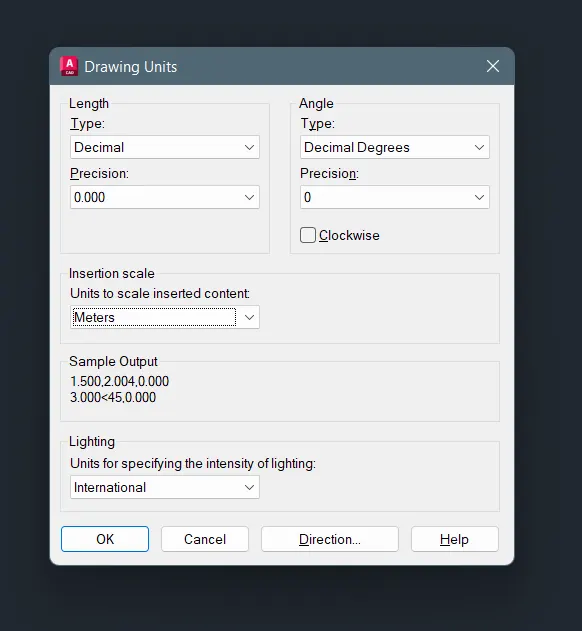
- Here the type of length is Decimal and the precision is 0.000
- Select the insertion scale is Meters
- Type LIMITS and give the limits the first point is 0,0 and the last top right corner bottom is 100,100
Step-2: To draw the sketch
- Draw using the line command the shortcut of L and click anywhere i want
- And draw the all lines using given dimensions
- Use the line command and draw the outer lines as in given lengths
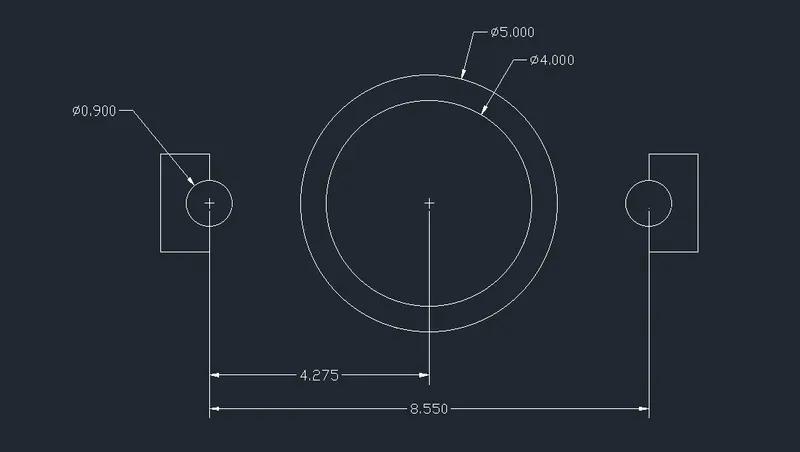
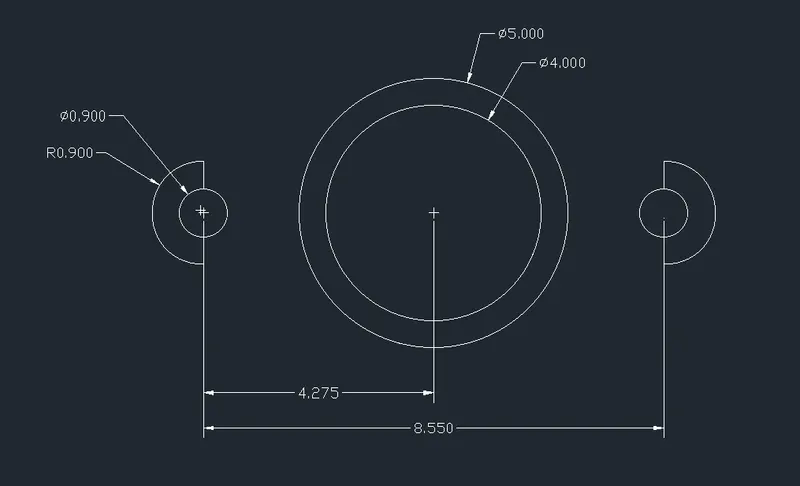
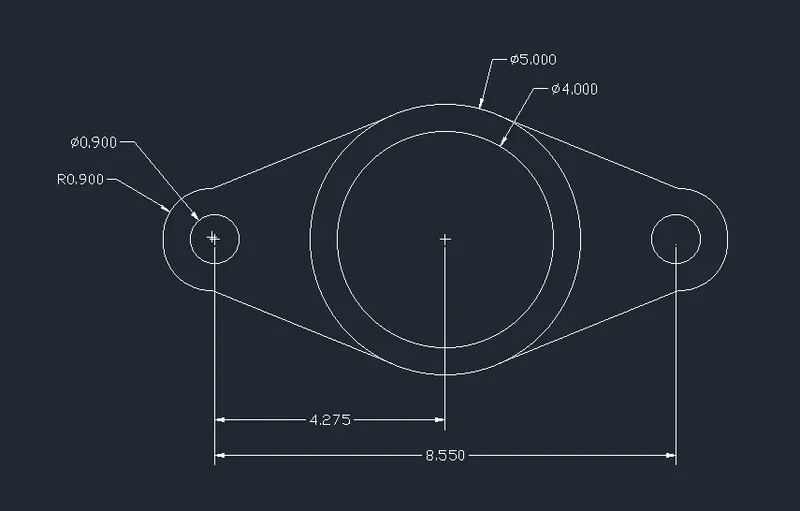
- Using the circle command and draw the circle as in given diameter is 5.000, 4.000 and 0.900
- These process is using in all the lines, it depends on the length of the lines
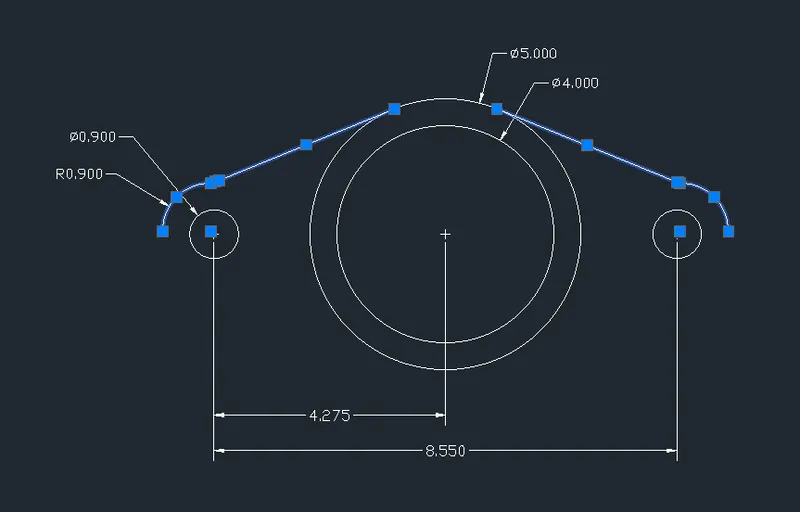
- Make the rectangle shaped lines in both edge circles from the distance of 1.000 and then use the fillet command
- Then, using the FILLET command for give a smooth edges. The fillet is created by radius it represents R
- The shortcut of fillet is F
- The radius are R0.90 for both sides in the drawing
- And then, draw the tangent line centre circle to outer circle and adjust the lines
- Then, using the MIRROR (MI) command and mirror it
Step-3: To modify the dimesion style
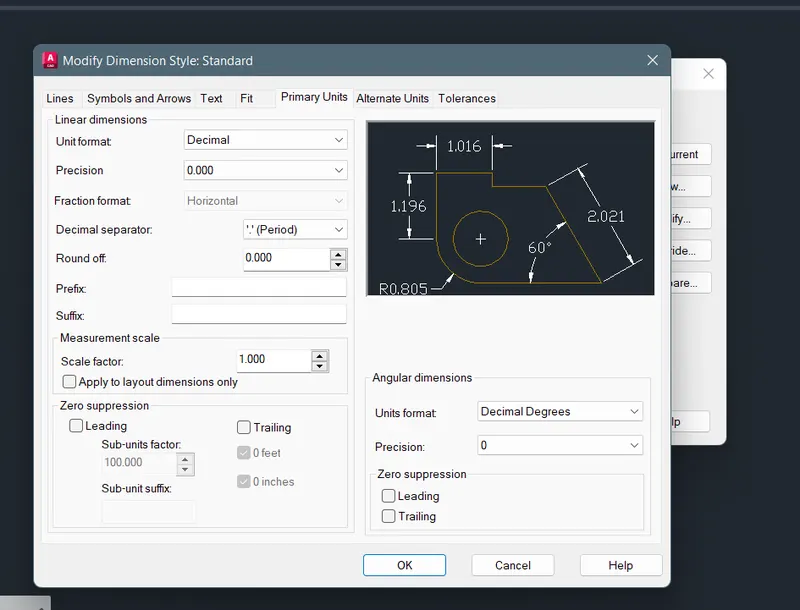
- First type on search bar DIMSTYLE
- And select the DIMSTYLE and open the dialogue box show as below
- Click modify then, selcect primary units and then, select Decimal and the precision is 0.000
Step-04: Marking the dimensions
- The dimesions are using the DIM command or click the annotation panel - dimension
- Take the Linear and Diameter
- The diameter is click the object and drag it and fix it
- Click the first point and to the second point for where i want the dimesions and mark the distance
- Finally give all the dimesions and take the screenshot using the Snipping Tool
- And upload all the drawings
Drawing-09:
Step-1: Open the software and creating the units and the limits
- First of all open the AutoCAD 2023 software.
- Then, click UNITS and then give the units waht you want
- Here the type of length is ARCHITACTURAL and the precision is 0'-0"
- Select the insertion scale is Inches
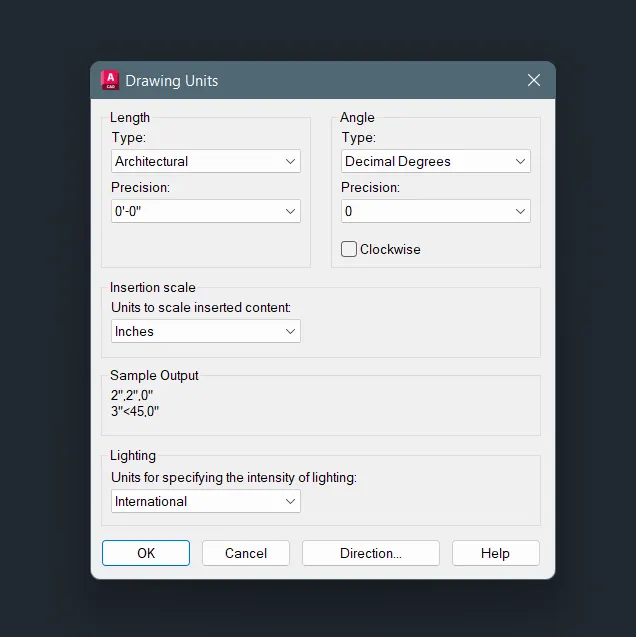
- Type LIMITS and give the limits the first point is 0,0 and the last top right corner bottom is 500,500
Step-2: To modify the dimesion style
- First type on search bar DIMSTYLE
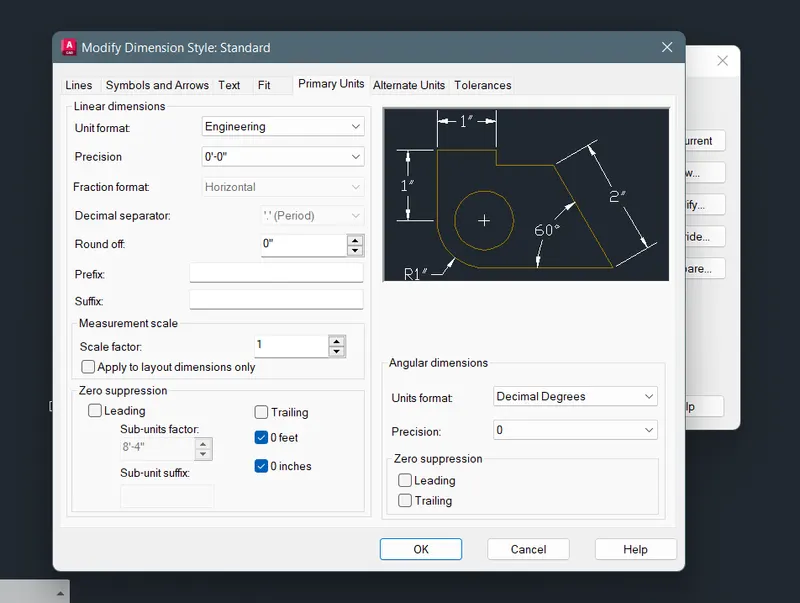
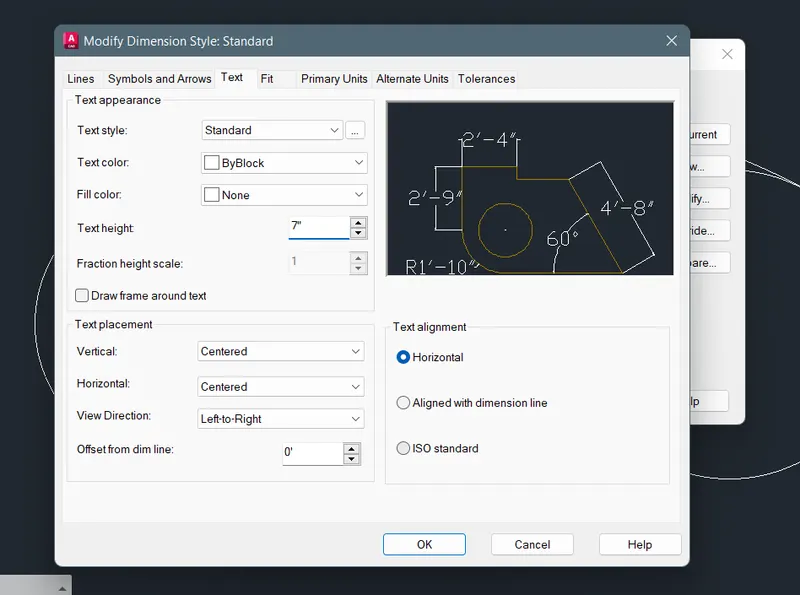
- And select the DIMSTYLE and open the dialogue box show as below
- Click modify then, selcect primary units and then, select Architectural and the precision is 0'-0"
- Give the text height is 7" and select the point where dimension is want
Step-3: To draw the sketch
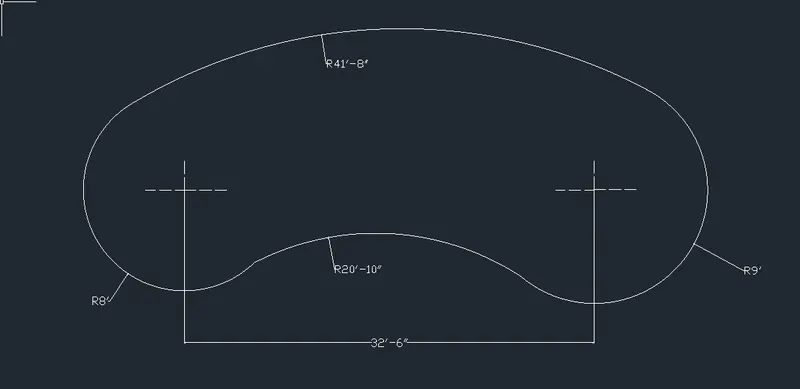
- First of all draw the circles in given diamters as R8' and R9'
- And draw a single line in the distance of 32'-6"
- Connect the two circles in the corner of the line edges
- Then, draw the tangent line and connect the circles
- Finally adjust the lines as the radius are R41'-8" & R20'-10" of the lines given in the question
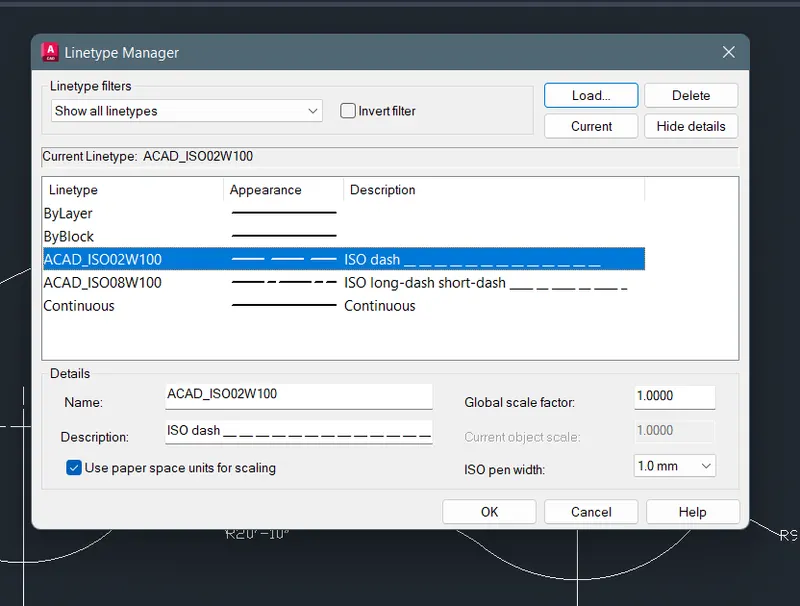
- Using the ISO dash for mark the cintre of the circle
- Use the TRIM (TR) command and delete excessive lines in the drawing
Step-04: Marking the dimensions
- The dimesions are using the DIM command or click the annotation panel - dimension
- Take the Linear and Diameter
- The diameter is click the object and drag it and fix it
- Click the first point and to the second point for where i want the dimesions and mark the distance
- Finally give all the dimesions and take the screenshot using the Snipping Tool
- And upload all the drawings
Drawing-10:
Step-1: Open the software and creating the units and the limits
- First of all open the AutoCAD 2023 software.
- Then, click UNITS and then give the units waht you want
- Here the type of length is Decimal and the precision is 0
- Select the insertion scale is Meters
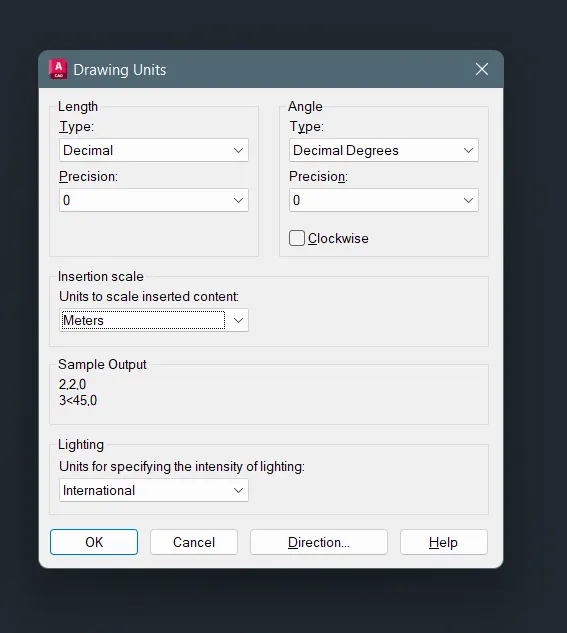
- Type LIMITS and give the limits the first point is 0,0 and the last top right corner bottom is 100,100
Step-2: To draw the sketch
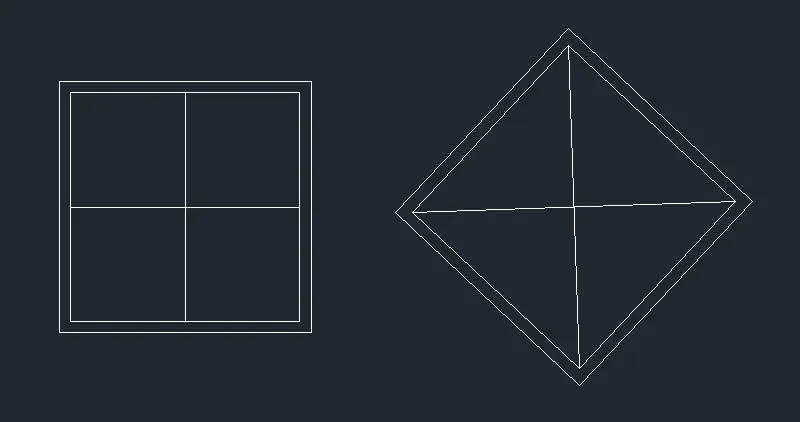
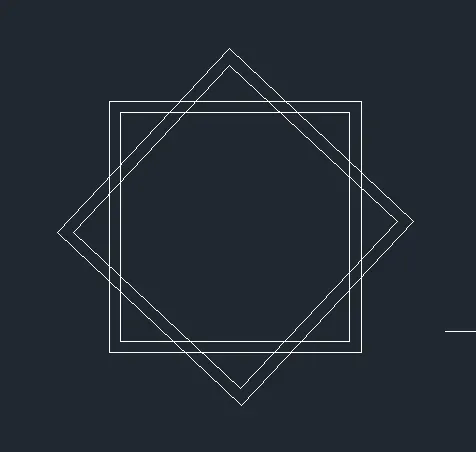
- Draw using the Line command assume the 20.00 as a square
- Using the Offset command, the offset distance is 1.00
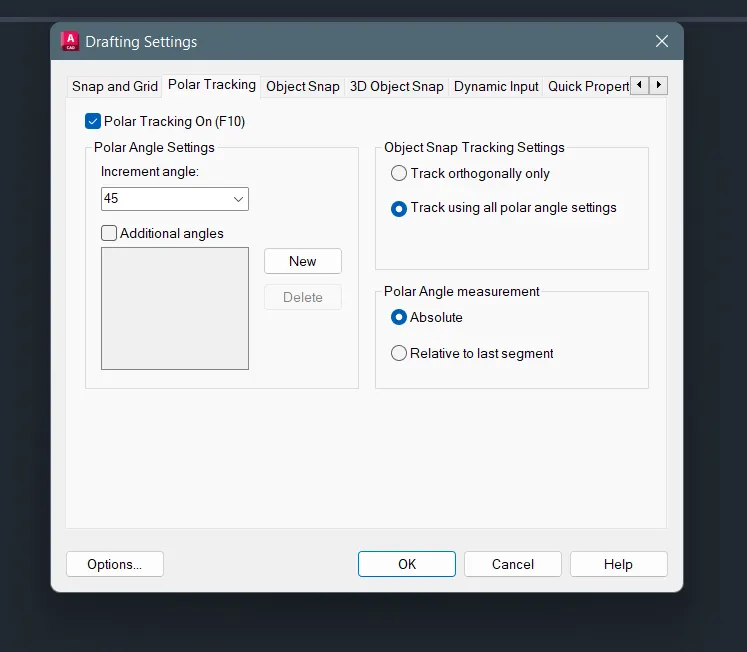
- And the Polar tracking is ON for the angle of 45 degrees
- For rotate the object to the 45 degrees
- Combine the two objects in centre
- And then, use the TR command and delete the excessive lines between the two lines

- Finally give all the dimesions and take the screenshot using the Snipping Tool
- And upload all the drawings
Drawing-11:
Step-1: Open the software and creating the units and the limits
- First of all open the AutoCAD 2023 software.
- Then, click UNITS and then give the units waht you want
- Here the type of length is ARCHITACTURAL and the precision is 0'-0"
- Select the insertion scale is Inches
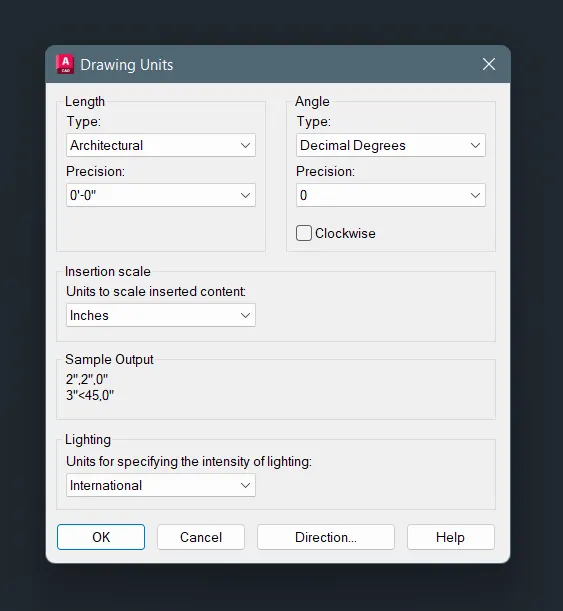
- Type LIMITS and give the limits the first point is 0,0 and the last top right corner bottom is 500,500
Step-2: To draw the sketch
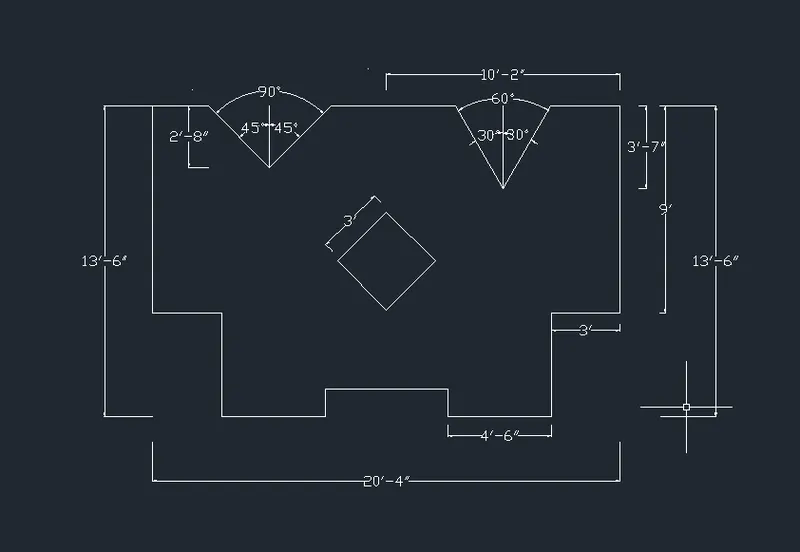
- Draw using the Line command 4'-6"
- As this procedure for other all lines
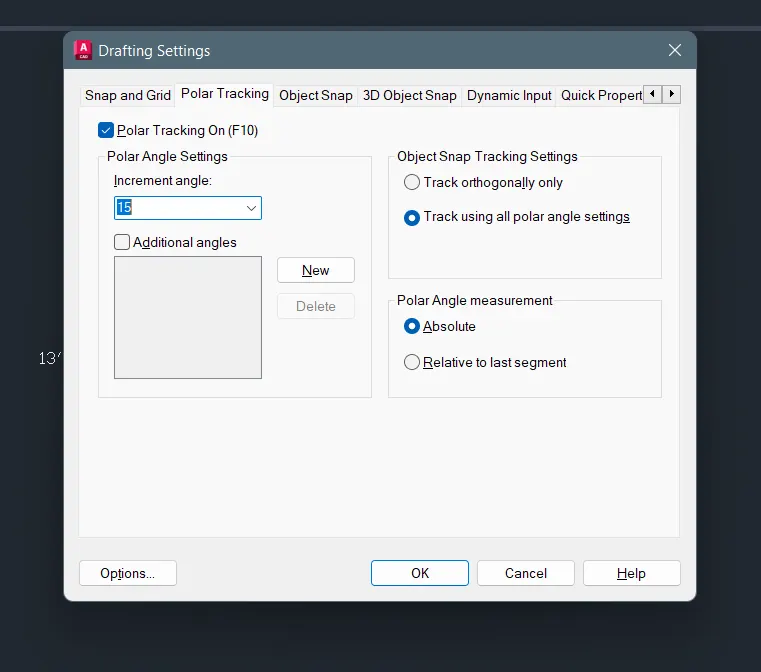
- And the Polar tracking is ON for the angle of 15 degrees
- For rotate the line to the 15 degrees
- Draw the inclined lines using polar tracking
- The dimesions are using the DIM command or click the annotation panel - dimension
- Draw the 3x3 square and rotate the square and fix it to the centreof the drawing
- Take the Linear and Angular
- Click the first point and to the second point for where i want the dimesions and mark the distance
- Finally give all the dimesions and take the screenshot using the Snipping Tool
- And upload all the drawings
Result:
The given drawings are drawn using the AutoCAD 2023 software with their specified dimensions and the procedure for drawings are as given correctly.