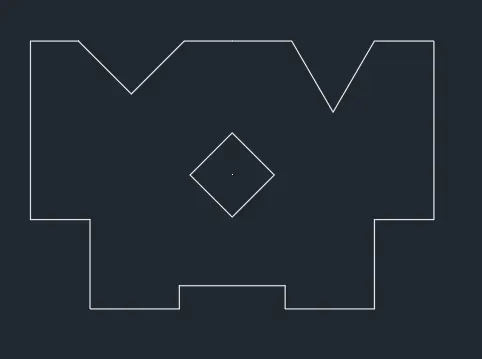
Drafting of various geometries using Chamfer, Fillet tool in AutoCad
1.
AIM : Draw the figure in decimal unit system
PROCEDURE:
STEP1
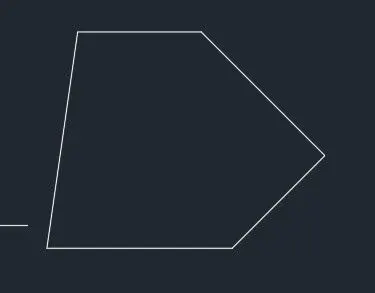
Command: L //to make the outer boundary
LINE
Specify first point: 0,0 //starting from Down left corner
Specify next point or [Undo]: @3<0 //Using polar co-ordinate method
Specify next point or [eXit/Undo]: @2.12<45
Specify next point or [Close/eXit/Undo]: @2.83<135
Specify next point or [Close/eXit/Undo]: @2<180
Specify next point or [Close/eXit/Undo]: C
STEP2
Command: POINT //To locate point for the center of the circle
Current point modes: PDMODE=34 PDSIZE=-3.00
Specify a point: 1.5,1
Command: POINT
Current point modes: PDMODE=34 PDSIZE=-3.00
Specify a point: 1.5,2.5
STEP3
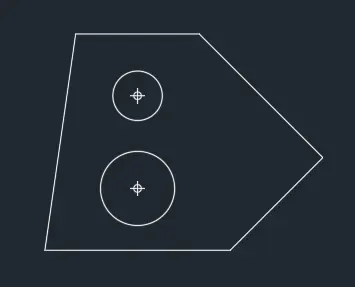
Command: C //To draw the circle in the figure
CIRCLE
Specify center point for circle or [3P/2P/Ttr (tan tan radius)]: 1.5,1 //To go to the point location
Specify radius of circle or [Diameter]: 0.6
Command: C
CIRCLE
Specify center point for circle or [3P/2P/Ttr (tan tan radius)]: 1.5,2.5
Specify radius of circle or [Diameter] <0.60>: d
Specify diameter of circle <1.20>: 0.8
RESULT:
2.
AIM : Draw the figure in Architectural unit system
PROCEDURE:
STEP1
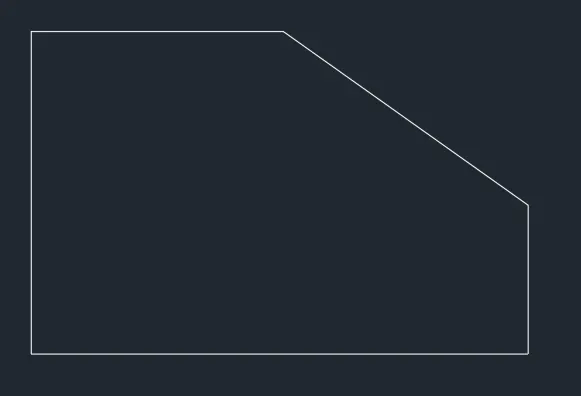
Command: L
LINE
Specify first point: 0,0 //Sarting from the top left
Specify next point or [Undo]: *Cancel*
@8'<0
Specify next point or [eXit/Undo]: @1'9"<270
Specify next point or [Close/eXit/Undo]: @2'10"<225
Specify next point or [Close/eXit/Undo]: x //To exit command

STEP2
3.
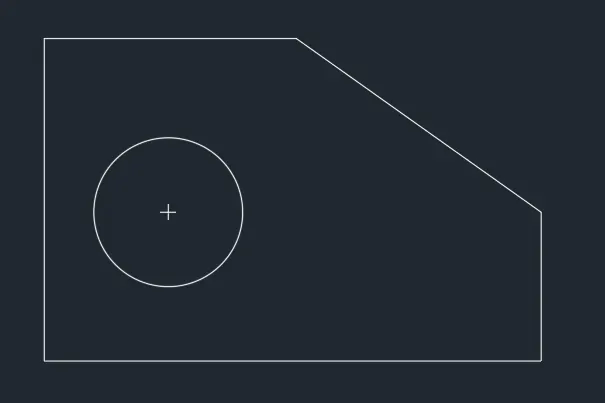
AIM : Draw the figure in engineering unit system
PROCEDURE:
STEP1
Command: L
LINE
Specify first point: 0,0 //Starting from down left corner towards right
Specify next point or [Undo]: @5'0.1"<0
Specify next point or [eXit/Undo]: @1'6"<90
Specify next point or [Close/eXit/Undo]: x
STEP2
Command: L
LINE
Specify first point: 0,0 //Startingdown left towards right
Specify next point or [Undo]: @3'3"<90
Specify next point or [eXit/Undo]: @2'6.5"<0
Specify next point or [Close/eXit/Undo]: //Using direct method to join the two openning ends
Specify next point or [Close/eXit/Undo]: x
STEP3
Command: PO
POINT
Current point modes: PDMODE=2 PDSIZE=-0'-3.00"
Specify a point: 1'3",1'6" //giving point for the center
STEP4
Command: CIRCLE
Specify center point for circle or [3P/2P/Ttr (tan tan radius)]: 1'3",1'6"
Specify radius of circle or [Diameter] <0'-9.00">: d
Specify diameter of circle <1'-6.00">: 1'6"
RESULT
4.
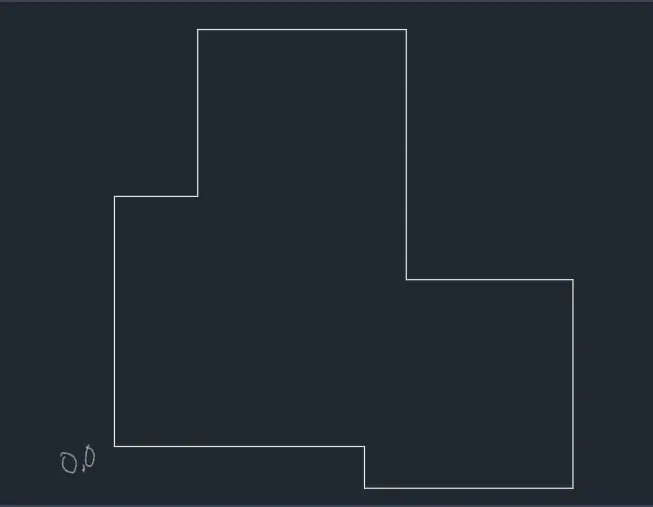
AIM : Draw the figure in decimal unit system
PROCEDURE:
STEP1
Command: L
LINE
Specify first point: 0,0 //going to the start point
Specify next point or [Undo]: @3<0
Specify next point or [eXit/Undo]: @0.5<270
Specify next point or [Close/eXit/Undo]: @2.50<0
Specify next point or [Close/eXit/Undo]: @2.50<90
Specify next point or [Close/eXit/Undo]: @2<180
Specify next point or [Close/eXit/Undo]: @3<90
Specify next point or [Close/eXit/Undo]: @2.5<180
Specify next point or [Close/eXit/Undo]: @2<270
Specify next point or [Close/eXit/Undo]: @1<180
Specify next point or [Close/eXit/Undo]: C
RESULT:
5.
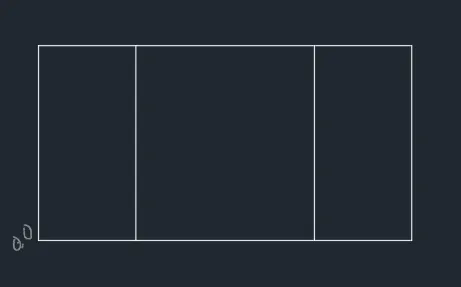
AIM : Draw the figure in decimal system
PROCEDURE:
STEP1
Command: L
LINE
Specify first point: 0,0 //down left corner starting point going anticlockwise
Specify next point or [Undo]: @11.50<0
Specify next point or [eXit/Undo]: @6<90
Specify next point or [Close/eXit/Undo]: x
STEP2
Command: O
OFFSET
Current settings: Erase source=No Layer=Source OFFSETGAPTYPE=0
Specify offset distance or [Through/Erase/Layer] <39.00>: 6 //To offset the 11.5length line
Command: OFFSET
Current settings: Erase source=No Layer=Source OFFSETGAPTYPE=0
Specify offset distance or [Through/Erase/Layer] <6.00>: 11.5 //To offset the 6length line
Command: OFFSET
Current settings: Erase source=No Layer=Source OFFSETGAPTYPE=0
Specify offset distance or [Through/Erase/Layer] <11.50>: 3 //To make the inner partition
Specify point on side to offset or [Exit/Multiple/Undo] :
Select object to offset or [Exit/Undo] : e
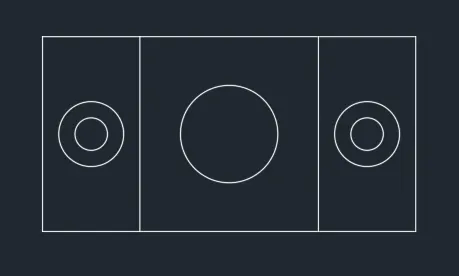
STEP3
Command: C
CIRCLE
Specify center point for circle or [3P/2P/Ttr (tan tan radius)]: 1.5,3 //To go to the point
Specify radius of circle or [Diameter] <9.00>: d
Specify diameter of circle <18.00>: 1 //Diameter of inner circle
Command: C
CIRCLE
Specify center point for circle or [3P/2P/Ttr (tan tan radius)]:
Specify radius of circle or [Diameter] <0.50>: d
Specify diameter of circle <1.00>: 2 //Diameter of outer circle
STEP4
Command: CO
COPY
Select objects: 1 found
Select objects: 1 found, 2 total //copying both inside and outside circle
Select objects:
Current settings: Copy mode = Multiple
Specify base point or [Displacement/mOde] : //Select center of circle as base point
Specify second point or [Array] : 10,3 //copy the circle to the other side
Specify second point or [Array/Exit/Undo] : *Cancel*
STEP5
Command: C
CIRCLE
Specify center point for circle or [3P/2P/Ttr (tan tan radius)]: 5.75,3 //To go to the point at center
Specify radius of circle or [Diameter] <1.00>: d
Specify diameter of circle <2.00>: 3 //Diameter of the center circle
RESULT:
6.
AIM : Draw the figure in decimal system
PROCEDURE:
STEP1
Command: _rectang
Specify first corner point or [Chamfer/Elevation/Fillet/Thickness/Width]: 0,0
Specify other corner point or [Area/Dimensions/Rotation]: @1.5,1.5 //Making the outer surface
STEP2
Command: L
LINE
Specify first point: 0,0.5 //To go to the point
Specify next point or [Undo]: @1.5,0 //Making horizontal line
Specify next point or [eXit/Undo]: *Cancel*
Command: LINE
Specify first point: 0.5,1.5
Specify next point or [Undo]: @0,-1.0 //For vertical lines
Specify next point or [eXit/Undo]: *Cancel*
STEP3
Command: O
OFFSET
Current settings: Erase source=No Layer=Source OFFSETGAPTYPE=0
Specify offset distance or [Through/Erase/Layer] <3.00>: 0.5
Select object to offset or [Exit/Undo] :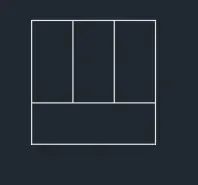
STEP4
Command: RECTANG
Specify first corner point or [Chamfer/Elevation/Fillet/Thickness/Width]: 3,0 //going to the point down left corner
Specify other corner point or [Area/Dimensions/Rotation]: @2,1.5
STEP5
Command: L
LINE
Specify first point: 3,0.5
Specify next point or [Undo]: @1.5,0
Specify next point or [eXit/Undo]: @0,1
Specify next point or [Close/eXit/Undo]: 3,0.5
Specify next point or [Close/eXit/Undo]: x
STEP6
Command: TR
TRIM
Current settings: Projection=UCS, Edge=None
Select cutting edges ...
Select objects or
Select objects: 1 found, 2 total
Select objects: //selecting the cutting edge
Select object to trim or shift-select to extend or
[Fence/Crossing/Project/Edge/eRase]: //selecting the lines to be trimmed
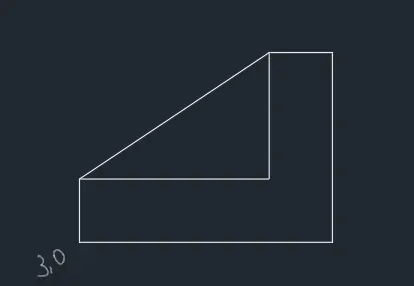
STEP7
Command: RECTANG //To make the outer rectangle of 3rd figure
Specify first corner point or [Chamfer/Elevation/Fillet/Thickness/Width]: 3,2
Specify other corner point or [Area/Dimensions/Rotation]: @2,1.5
STEP8
Command: L //Making the vertical line
LINE
Specify first point: 4.5,2
Specify next point or [Undo]: @0,1.5
Specify next point or [eXit/Undo]: *Cancel*
STEP9
Command: L //Making horizontal line
LINE
Specify first point: 3,2.5
Specify next point or [Undo]: @1.5,0
Specify next point or [eXit/Undo]: x
STEP10
Command: O
OFFSET
Current settings: Erase source=No Layer=Source OFFSETGAPTYPE=0
Specify offset distance or [Through/Erase/Layer] <0.50>: 0.5
Select object to offset or [Exit/Undo] : //selecting the horizontal line for offset
Specify point on side to offset or [Exit/Multiple/Undo] :
RESULT:
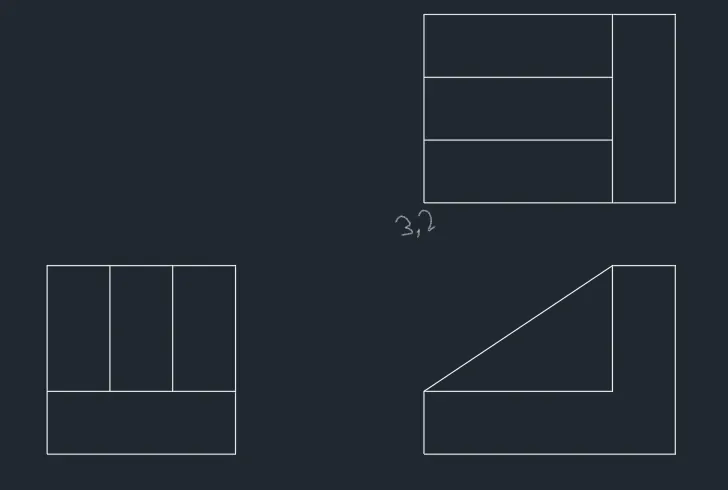
7.
AIM : Draw the figure in decimal system
PROCEDURE:
STEP1
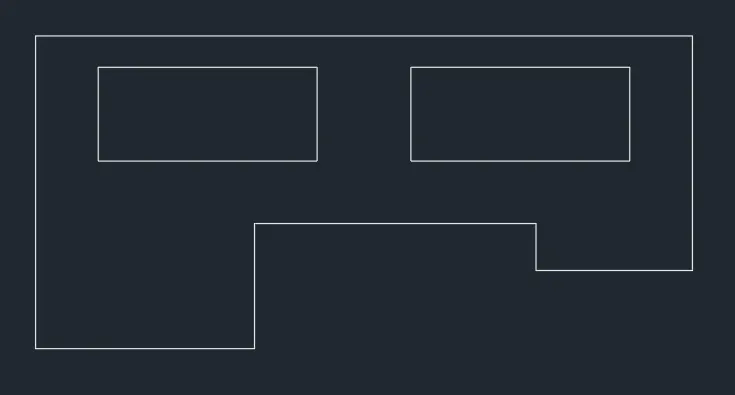
Command: L //Making outer line with direct co-ordinate method
LINE
Specify first point: 0,0 //placing the origin on down left corner
Specify next point or [Undo]: 100
Specify next point or [eXit/Undo]: 210
Specify next point or [Close/eXit/Undo]: 75
Specify next point or [Close/eXit/Undo]: 50
Specify next point or [Close/eXit/Undo]: 15
Specify next point or [Close/eXit/Undo]: 90
Specify next point or [Close/eXit/Undo]: 40
Specify next point or [Close/eXit/Undo]: c
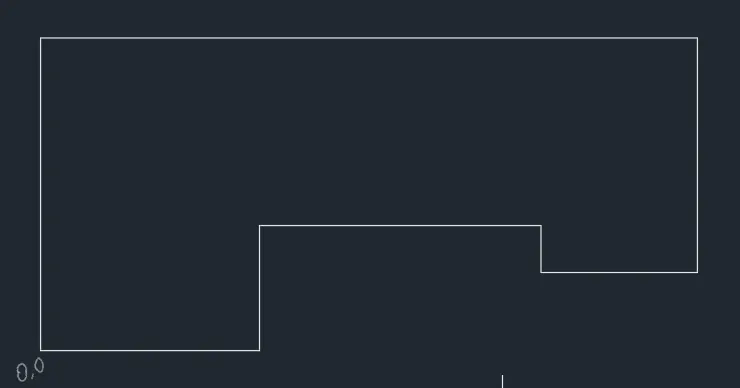
STEP2
Command: REC
RECTANG
Specify first corner point or [Chamfer/Elevation/Fillet/Thickness/Width]: 20,60 //To go to down left corner of rectangle
Specify other corner point or [Area/Dimensions/Rotation]: 90,90
STEP3
Command: CO
COPY
Select objects: 1 found
Select objects:
Current settings: Copy mode = Multiple
Specify base point or [Displacement/mOde] :
Specify second point or [Array] : @100,0 //Copy the rectangle to other side
Specify second point or [Array/Exit/Undo] : e
STEP4
Command: CIRCLE
Specify center point for circle or [3P/2P/Ttr (tan tan radius)]: 35,0 //Left circle,going to its center
Specify radius of circle or [Diameter]: 35
Command: O
OFFSET
Current settings: Erase source=No Layer=Source OFFSETGAPTYPE=0
Specify offset distance or [Through/Erase/Layer] <1.00>: 10 //Taking offset of the circle
Select object to offset or [Exit/Undo] : e
STEP5
Command: C
CIRCLE
Specify center point for circle or [3P/2P/Ttr (tan tan radius)]: 185,25 //Going to center of the circle at right side
Specify radius of circle or [Diameter] <35.00>: 25
Command: O
OFFSET
Current settings: Erase source=No Layer=Source OFFSETGAPTYPE=0
Specify offset distance or [Through/Erase/Layer] <10.00>: 10 //Taking offset of the circle
Select object to offset or [Exit/Undo] :e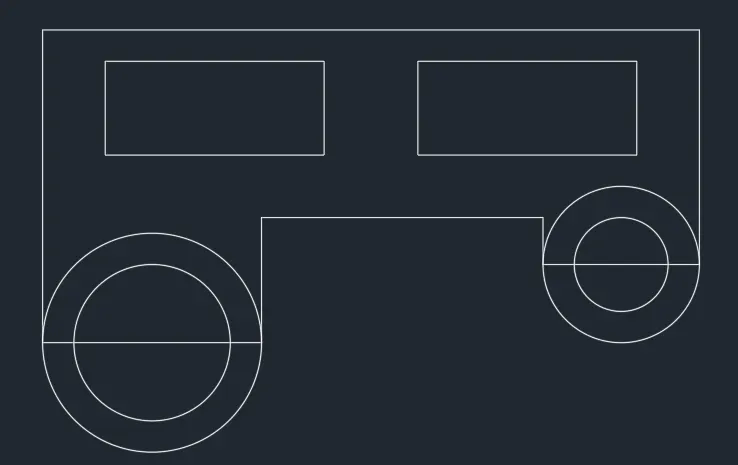
STEP6
Command: TR
TRIM
Current settings: Projection=UCS, Edge=None
Select cutting edges ...
Select objects or
Select object to trim or shift-select to extend or
[Fence/Crossing/Project/Edge/eRase]: //trimming all the extra lines of the circles
STEP7
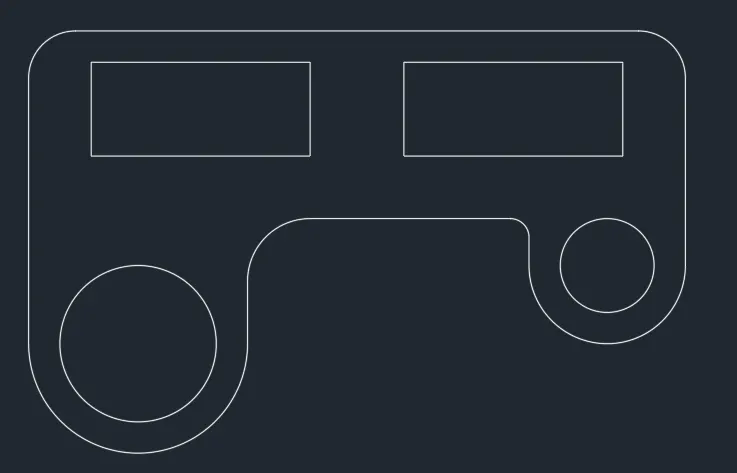
Command: FILLET
Current settings: Mode = TRIM, Radius = 0.00
Select first object or [Undo/Polyline/Radius/Trim/Multiple]: R
Specify fillet radius <0.00>: 15
Select first object or [Undo/Polyline/Radius/Trim/Multiple]:
Select second object or shift-select to apply corner or [Radius]: //Using fillet on both corners on top
Command: FILLET
Current settings: Mode = TRIM, Radius = 15.00
Select first object or [Undo/Polyline/Radius/Trim/Multiple]: R
Specify fillet radius <15.00>: 20 //Using fillet
Select first object or [Undo/Polyline/Radius/Trim/Multiple]:
Select second object or shift-select to apply corner or [Radius]:
Command: FILLET
Current settings: Mode = TRIM, Radius = 20.00
Select first object or [Undo/Polyline/Radius/Trim/Multiple]: r
Specify fillet radius <20.00>: 6
Select first object or [Undo/Polyline/Radius/Trim/Multiple]:
Select second object or shift-select to apply corner or [Radius]:
RESULT:
8.
AIM : Draw the figure in decimal system
PROCEDURE:
STEP1
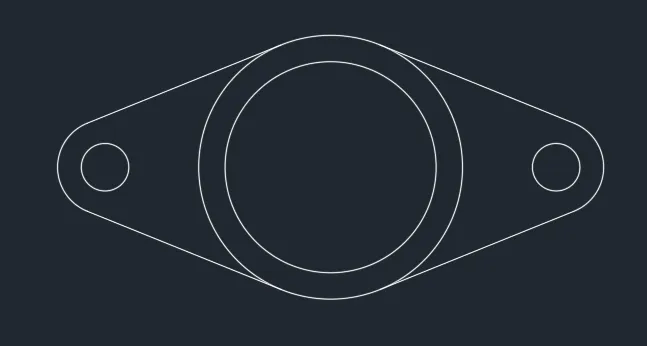
Command: C
CIRCLE
Specify center point for circle or [3P/2P/Ttr (tan tan radius)]: 0,0 //Making center circle at origin
Specify radius of circle or [Diameter]: d
Specify diameter of circle: 4
Command: O
OFFSET
Current settings: Erase source=No Layer=Source OFFSETGAPTYPE=0
Specify offset distance or [Through/Erase/Layer] <1.0000>: 0.5 //Taking offset of the circle
Select object to offset or [Exit/Undo] :
Specify point on side to offset or [Exit/Multiple/Undo] :
Select object to offset or [Exit/Undo] : e
STEP3
Command: C
CIRCLE
Specify center point for circle or [3P/2P/Ttr (tan tan radius)]: @4.275,0 //Making the right side circle
Specify radius of circle or [Diameter] <2.0000>: d
Specify diameter of circle <4.0000>: 0.9
Command: O
OFFSET
Current settings: Erase source=No Layer=Source OFFSETGAPTYPE=0
Specify offset distance or [Through/Erase/Layer] <1.0000>: 0.9 //Taking offset of the circle
Select object to offset or [Exit/Undo] :
Specify point on side to offset or [Exit/Multiple/Undo] :
STEP4
Command: L
LINE
Specify first point: tan // To make tangent line on the circle
to
Specify next point or [eXit/Undo]: x
Command: MI
MIRROR
Select objects: 1 found //Select the tangent
Select objects:
Specify first point of mirror line:
Specify second point of mirror line: //Mirror it to the lower portion
Erase source objects? [Yes/No] : n
STEP5
Command: MI //To mirror the right half to the left half
MIRROR
Window Lasso Press Spacebar to cycle options0 found
Select objects: Specify opposite corner: 0 found
Select objects: Specify opposite corner: 4 found
Select objects:
Specify first point of mirror line:
Specify second point of mirror line:
Erase source objects? [Yes/No] : n
Command: TR //Trim the inner side of the circle
TRIM
Current settings: Projection=UCS, Edge=None
Select cutting edges ...
Select objects or
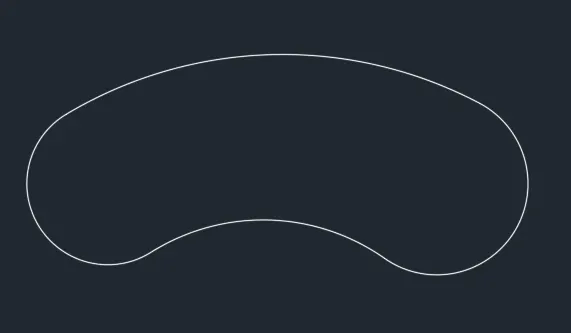
RESULT:
9.
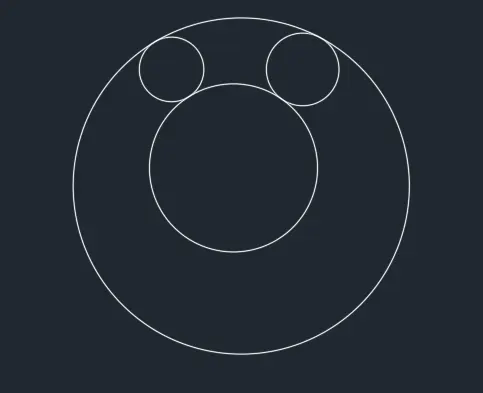
AIM : Draw the figure in Architectural system
PROCEDURE:
STEP1
Command: C
CIRCLE
Specify center point for circle or [3P/2P/Ttr (tan tan radius)]: 0,0 //To draw the left circle
Specify radius of circle or [Diameter] <8'-0">: 8'
Command: C
CIRCLE
Specify center point for circle or [3P/2P/Ttr (tan tan radius)]: @32'-6",0 //To draw the right circle
Specify radius of circle or [Diameter] <8'-0">: 9'
STEP2
Command: _circle
Specify center point for circle or [3P/2P/Ttr (tan tan radius)]: _ttr //Tangent tangent circle
Specify point on object for first tangent of circle:
Specify point on object for second tangent of circle: //Selecting farther side of the circle
Specify radius of circle <9'-0">: 41'-8"
Command: _circle
Specify center point for circle or [3P/2P/Ttr (tan tan radius)]: _ttr
Specify point on object for first tangent of circle:
Specify point on object for second tangent of circle: //Selecting closer sides on the circle
Specify radius of circle <41'-8">: 20'-10"
STEP3
Command: TR
TRIM
Current settings: Projection=UCS, Edge=None
Select cutting edges ...
Select objects or <select all>: //Trimming the xtra lines of the circles
Command:TR
TRIM
Current settings: Projection=UCS, Edge=None
Select cutting edges ...
Select objects or <select all>:
RESULT:
10.
AIM : Draw the figure in decimal system
PROCEDURE:
STEP1
Command: REC
RECTANG
Specify first corner point or [Chamfer/Elevation/Fillet/Thickness/Width]: 0,0
Specify other corner point or [Area/Dimensions/Rotation]: 2,2 //Making the square
STEP2
Command: O
OFFSET
Current settings: Erase source=No Layer=Source OFFSETGAPTYPE=0
Specify offset distance or [Through/Erase/Layer] <0.20>: 0.1
Select object to offset or [Exit/Undo] <Exit>:
STEP3
Command: RO
ROTATE
Current positive angle in UCS: ANGDIR=counterclockwise ANGBASE=0
Select objects: Specify opposite corner: 4 found
Specify base point:
Specify rotation angle or [Copy/Reference] <270>: C //Rotating the square while keeping the copy
Rotating a copy of the selected objects.
Specify rotation angle or [Copy/Reference] <270>: 45
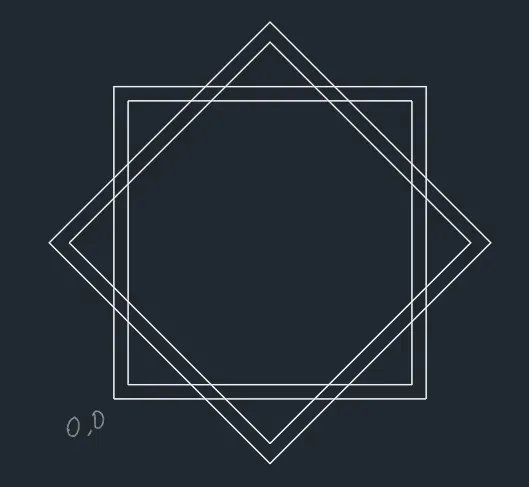
STEP4
Command: TR
TRIM
Current settings: Projection=UCS, Edge=None
Select cutting edges ...
Select objects or <select all>:
Select object to trim or shift-select to extend or //Trimming the unwanted lines
[Fence/Crossing/Project/Edge/eRase]:
RESULT:

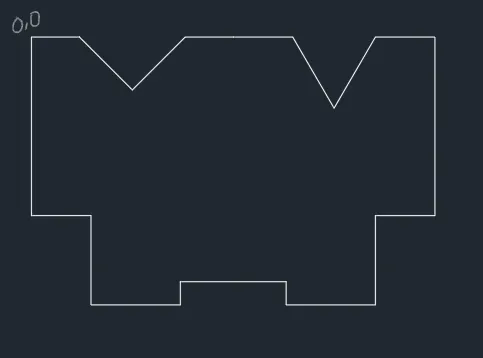
11.
AIM : Draw the figure in Architectural system
PROCEDURE:
STEP1
Command: L //making the outer surface
LINE
Specify first point: 0,0 //Going to the top left corner going clockwise direction
Specify next point or [Undo]: 2'5" //Using direct co-ordinate method for lines
Specify next point or [eXit/Undo]: @2'8",-2'8" //Making the angle using polar co-cordinate method
Specify next point or [Close/eXit/Undo]: @2'8",2'8"
Specify next point or [Close/eXit/Undo]: 2'5"
Specify next point or [Close/eXit/Undo]: 3'
Specify next point or [Close/eXit/Undo]: @2'1",-3'7"
Specify next point or [Close/eXit/Undo]: @2'1",3'7"
Specify next point or [Close/eXit/Undo]: 3'
Specify next point or [Close/eXit/Undo]: 9'
Specify next point or [Close/eXit/Undo]: 3'
Specify next point or [Close/eXit/Undo]: 4'6"
Specify next point or [Close/eXit/Undo]: 4'6"
Specify next point or [Close/eXit/Undo]: 1'2"
Specify next point or [Close/eXit/Undo]: 5'4"
Specify next point or [Close/eXit/Undo]: 1'2"
Specify next point or [Close/eXit/Undo]: 4'6"
Specify next point or [Close/eXit/Undo]: 4'6"
Specify next point or [Close/eXit/Undo]: 3'
Specify next point or [Close/eXit/Undo]: 9'
Specify next point or [Close/eXit/Undo]: *Cancel*
STEP2
Command: PO
POINT
Current point modes: PDMODE=0 PDSIZE=0'-0"
Specify a point: 10'2",-6'9" //Giving point for the square
STEP3
Command: REC
RECTANG
Specify first corner point or [Chamfer/Elevation/Fillet/Thickness/Width]:
Specify other corner point or [Area/Dimensions/Rotation]: @3',3' //Make a square at any open area
STEP3
Command: M
MOVE
Select objects: Specify opposite corner: 1 found
Select objects:
Specify base point or [Displacement] <Displacement>:
Specify second point or <use first point as displacement>: //Move the square to the point inside the drawing
STEP3
Command: RO
ROTATE
Current positive angle in UCS: ANGDIR=counterclockwise ANGBASE=0
Select objects: 1 found
Select objects:
Specify base point:
Specify rotation angle or [Copy/Reference] <0>: 45 //Rotate the square at an angle
RESULT: