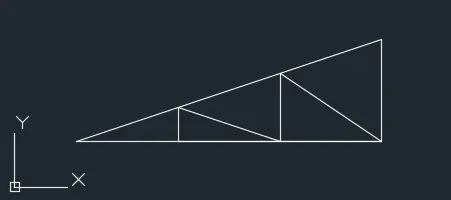
Creation of geometries by Coordinate system methods using AutoCad
- Click/Open AutoCAD
- select Metric unit
1.
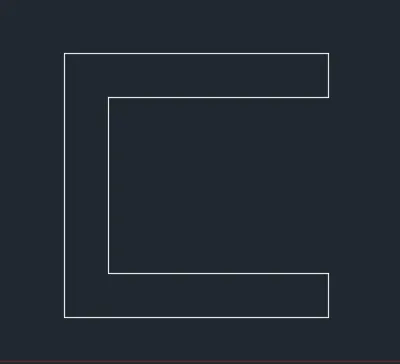
AIM: Drawing P-1 Using Relative rectangular coordinates
Command:
LINE
Specify first point: 2,1
Specify next point or [Undo]: @0,6
Specify next point or [Undo]: @6,0
Specify next point or [Close/Undo]: @0,-1
Specify next point or [Close/Undo]: @-5,0
Specify next point or [Close/Undo]: @0,-4
Specify next point or [Close/Undo]: @5,0
Specify next point or [Close/Undo]: @0,-1
Specify next point or [Close/Undo]: C
AIM Drawing P-1 Using Absolute rectangular coordinates
Command: L
LINE
Specify first point: 2,1
Specify next point or [Undo]: 8,1
Specify next point or [Undo]: 8,2
Specify next point or [Close/Undo]: 3,2
Specify next point or [Close/Undo]: 3,6
Specify next point or [Close/Undo]: 8,6
Specify next point or [Close/Undo]: 8,7
Specify next point or [Close/Undo]: 2,7
Specify next point or [Close/Undo]: C
AIM Drawing P-1 Using Polar co-ordinates method
Command: _line
Specify first point: 2,1
Specify next point or [Undo]: @6<0
Specify next point or [Undo]: @1<90
Specify next point or [Close/Undo]: @5<180
Specify next point or [Close/Undo]: @4<90
Specify next point or [Close/Undo]: @5<0
Specify next point or [Close/Undo]: @1<90
Specify next point or [Close/Undo]: @6<180
Specify next point or [Close/Undo]: @6<270
AIM Drawing P-1 Using Direct distance entry method
Command: L
LINE
Specify first point: 2,1
Specify next point or [Undo]: 6
Specify next point or [Undo]: 1
Specify next point or [Close/Undo]: 5
Specify next point or [Close/Undo]: 4
Specify next point or [Close/Undo]: 5
Specify next point or [Close/Undo]: 1
Specify next point or [Close/Undo]: 6
Specify next point or [Close/Undo]: C
2.
All method steps done in anti-clockwise direction
AIM Drawing P-2 Using Absolute rectangular coordinates
Command: L
LINE
Specify first point: 2,1
Specify next point or [Undo]: 5,1
Specify next point or [Undo]: 5,5
Specify next point or [Close/Undo]: 6,5
Specify next point or [Close/Undo]: 6,1
Specify next point or [Close/Undo]: 9,1
Specify next point or [Close/Undo]: 7,8
Specify next point or [Close/Undo]: 4,8
Specify next point or [Close/Undo]: 2,1
Specify next point or [Close/Undo]: C
AIM Drawing P-2 Using Relative rectangular coordinates
Command: L
LINE
Specify first point: 2,1
Specify next point or [Undo]: @3,0
Specify next point or [Undo]: @0,4
Specify next point or [Close/Undo]: @1,0
Specify next point or [Close/Undo]: @0,-4
Specify next point or [Close/Undo]: @3,0
Specify next point or [Close/Undo]: @-2,7
Specify next point or [Close/Undo]: @-3,0
Specify next point or [Close/Undo]: C
Drawing P-2 Using Polar co-ordinates method
AIM Drawing P-2 Using Direct distance entry method
Command: L
LINE
Specify first point: 2,1
Specify next point or [Undo]: 3
Specify next point or [Undo]: 4
Specify next point or [Close/Undo]: 1
Specify next point or [Close/Undo]: 4
Specify next point or [Close/Undo]: 3
Specify next point or [Close/Undo]: 7
Specify next point or [Close/Undo]: 2
Specify next point or [Close/Undo]:
Specify next point or [Close/Undo]: *Cancel*
Command: _erase
Select objects: 1 found
Select objects: 1 found, 2 total
Select objects:
Command: L
LINE
Specify first point:
Specify next point or [Undo]: 3
Specify next point or [Undo]: *Cancel*
Command: LINE
Specify first point:
Specify next point or [Undo]:
Specify next point or [Undo]: *Cancel*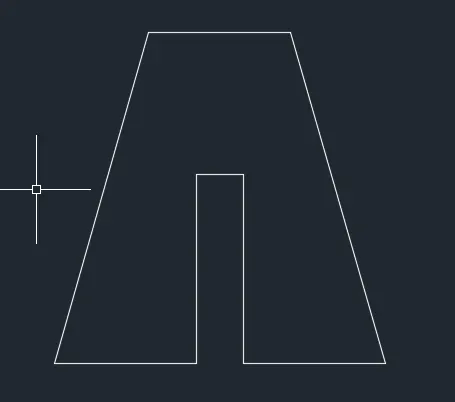
3.AIM-Drawing P-4 using Relative rectangular co-ordinate
In Anti-clockwise direction
Command: L
LINE
Specify first point: 2,1
Specify next point or [Undo]: @1,0
Specify next point or [Undo]: @0,4
Specify next point or [Close/Undo]: @2,-2
Specify next point or [Close/Undo]: @2,2
Specify next point or [Close/Undo]: @0,-4
Specify next point or [Close/Undo]: @1,0
Specify next point or [Close/Undo]: @0,7
Specify next point or [Close/Undo]: @-1,0
Specify next point or [Close/Undo]: @-2,-3
Specify next point or [Close/Undo]: @-2,3
Specify next point or [Close/Undo]: @-1,0
Specify next point or [Close/Undo]: C

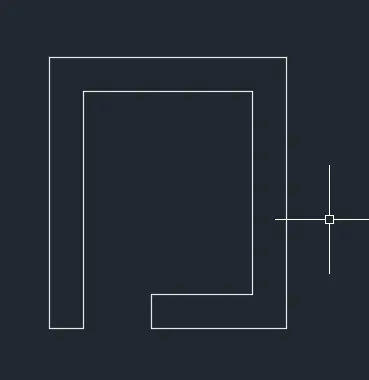
4.AIM- Drawing P-5 using Absolute Rectangular coordinates
Drawing in Anti-clockwise direction
Command: L
LINE
Specify first point: 2,1
Specify next point or [Undo]: 3,1
Specify next point or [Undo]: 3,7
Specify next point or [Close/Undo]: u
Specify next point or [Undo]: 3,8
Specify next point or [Close/Undo]: 8,8
Specify next point or [Close/Undo]: 8,2
Specify next point or [Close/Undo]: 5,2
Specify next point or [Close/Undo]: 5,1
Specify next point or [Close/Undo]: 9,1
Specify next point or [Close/Undo]: 9,9
Specify next point or [Close/Undo]: 2,9
Specify next point or [Close/Undo]: C
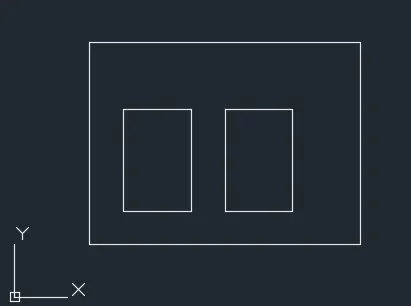
5.AIM-Drawing P-7 using Polar co-ordinates method
Command: L
LINE
Specify first point: 2,1
Specify next point or [Undo]: @8<0
Specify next point or [Undo]: @6<90
Specify next point or [Close/Undo]: @8<180
Specify next point or [Close/Undo]: C
Command: L
LINE
Specify first point: 3,2
Specify next point or [Undo]: @5<0
Specify next point or [Undo]: u
Specify next point or [Undo]: @2<0
Specify next point or [Undo]: @3<90
Specify next point or [Close/Undo]: @2<180
Specify next point or [Close/Undo]: C
Command: L
LINE
Specify first point: 6,2
Specify next point or [Undo]: @2<0
Specify next point or [Undo]: @3<90
Specify next point or [Close/Undo]: @2<180
Specify next point or [Close/Undo]: C
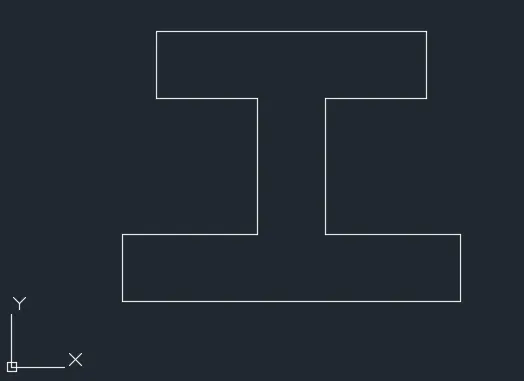
6.AIM-Drawing P-8 using Direct co-ordinate method
Command: _line
Specify first point: 0,0
Specify next point or [Undo]: 10
Specify next point or [Undo]: 2
Specify next point or [Close/Undo]: 4
Specify next point or [Close/Undo]: 4
Specify next point or [Close/Undo]: 3
Specify next point or [Close/Undo]: 2
Specify next point or [Close/Undo]: 8
Specify next point or [Close/Undo]: 2
Specify next point or [Close/Undo]: 3
Specify next point or [Close/Undo]: 4
Specify next point or [Close/Undo]: 4
Specify next point or [Close/Undo]: C
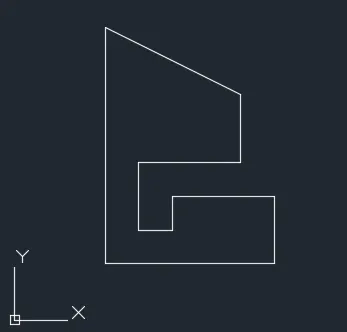
7.AIM- Drawing P-9 using Relative rectangular method
Command: L
LINE
Specify first point: 1,1
Specify next point or [Undo]: @5,0
Specify next point or [Undo]: @0,2
Specify next point or [Close/Undo]: @-3,0
Specify next point or [Close/Undo]: @0,-1
Specify next point or [Close/Undo]: @-1,0
Specify next point or [Close/Undo]: @0,2
Specify next point or [Close/Undo]: @3,0
Specify next point or [Close/Undo]: @0,2
Specify next point or [Close/Undo]: @-4,2
Specify next point or [Close/Undo]: C
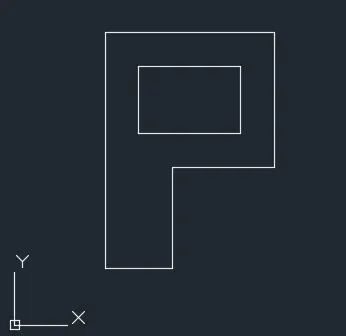
8.AIM- Drawing P-10 using Absolute Rectangular coordinates
Command: _line
Specify first point: 1,1
Specify next point or [Undo]: 2,1
Specify next point or [Undo]: 2,4
Specify next point or [Close/Undo]: _u
Specify next point or [Undo]: _u
Specify next point or [Undo]: 3,1
Specify next point or [Undo]: 3,4
Specify next point or [Close/Undo]: 6,4
Specify next point or [Close/Undo]: 6,8
Specify next point or [Close/Undo]: 1,8
Specify next point or [Close/Undo]: C
Command: L
LINE
Specify first point: 2,5
Specify next point or [Undo]: 5,5
Specify next point or [Undo]: 5,7
Specify next point or [Close/Undo]: 2,7
Specify next point or [Close/Undo]: C
9.AIM- Drawing Profile wood using polar co-ordinates method
Command: L
LINE
Specify first point: 0,0
Specify next point or [Undo]: @1<90
Specify next point or [Undo]: @2<0
Specify next point or [Close/Undo]: @5<90
Specify next point or [Close/Undo]: @2<180
Specify next point or [Close/Undo]: @5.8<30
Specify next point or [Close/Undo]: @5.8<330
Specify next point or [Close/Undo]: @1<270
Specify next point or [Close/Undo]: @2<180
Specify next point or [Close/Undo]: @4<270
Specify next point or [Close/Undo]: @2<0
Specify next point or [Close/Undo]: @1<270
Specify next point or [Close/Undo]: C
Command: L
LINE
Specify first point: 5,4
Specify next point or [Undo]: *Cancel*
Command:
Command: _circle
Specify center point for circle or [3P/2P/Ttr (tan tan radius)]: 5,4
Specify radius of circle or [Diameter] <2.0000>: 2

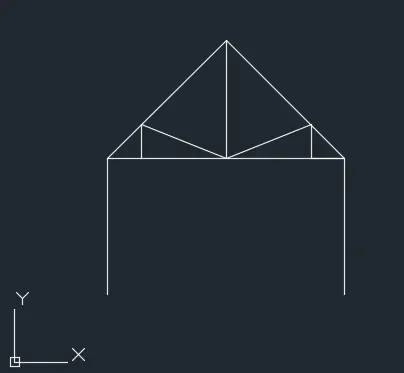
10.AIM-Drawing Queen truss post using Absolute rectangular co-ordinates
Command: L
LINE
Specify first point: 1,1
Specify next point or [Undo]: 1,5
Specify next point or [Undo]: 4.5,8.5
Specify next point or [Close/Undo]: 8,5
Specify next point or [Close/Undo]: 8,1
Specify next point or [Close/Undo]: *Cancel*
Command: L
LINE
Specify first point:
Specify next point or [Undo]: 2,1
Specify next point or [Undo]: _u
Specify next point or [Undo]: 2,5
Specify next point or [Undo]: 2,6
Specify next point or [Close/Undo]: 4.5,5
Specify next point or [Close/Undo]: 4.5,8.5
Specify next point or [Close/Undo]: *Cancel*
Command: l
LINE
Specify first point: 7,6
Specify next point or [Undo]: 7,5
Specify next point or [Undo]: _u
Specify next point or [Undo]: *Cancel*
Command: L
LINE
Specify first point:
Specify next point or [Undo]: 7,6
Specify next point or [Undo]: 7,5
Specify next point or [Close/Undo]: 8,5
Specify next point or [Close/Undo]: 2,5
11.AIM-Drawing Mono Pitch using Absolute rectangular co-ordinate method
Command: L
LINE
Specify first point: 1,1
Specify next point or [Undo]: 3,1
Specify next point or [Undo]: 5,1
Specify next point or [Close/Undo]: 7,1
Specify next point or [Close/Undo]: 7,3
Specify next point or [Close/Undo]: 1,1
Specify next point or [Close/Undo]: C
Zero length line created at (1.0000, 1.0000, 0.0000)
Command: L
LINE
Specify first point: 3,1
Specify next point or [Undo]: 3,0.667
Specify next point or [Undo]: _u
Specify next point or [Undo]: 3,1.667
Specify next point or [Undo]: 5,1
Specify next point or [Close/Undo]: 5,2.333
Specify next point or [Close/Undo]: 7,1
Specify next point or [Close/Undo]: C