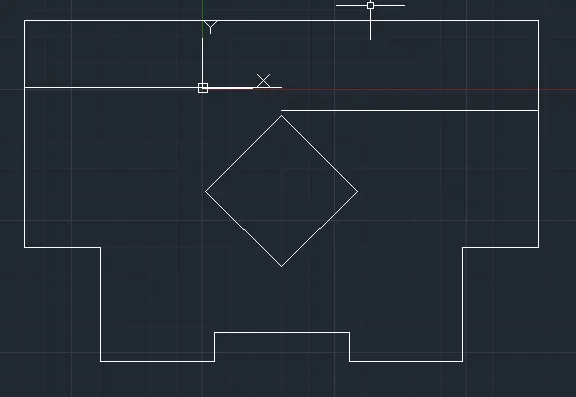
Drafting of various geometries using Chamfer, Fillet tool in AutoCad
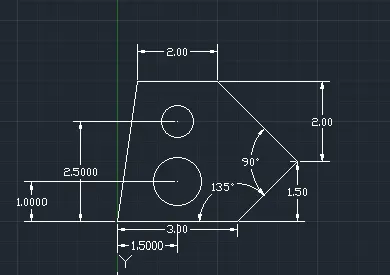
Aim: to draw the given geometries in auto cad.
1.Procedure:
Open new file and set decimal and precision to 0.00.
Command line - from random point draw 3.00m line and @2.12<45, @2.83<135 then 2m line and close.
Command offset - offset 3m line at 2.50m.
Command circle- from mindpoint of 3m line at 2.50m and 1.m draw a circle od diameter of 1,20 at 1 and .80 at 2.50m.
now erase unwanted lines.
2.Procedure:
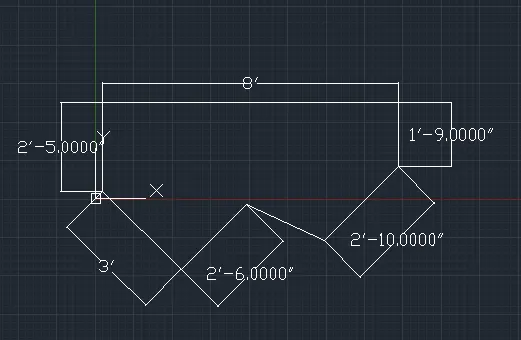
Select architectural and polar tracking.
command line- draw horizontal line and draw 2'6" line at 225 degree , 3' line perpendicular to it, 2'5" verticle line and 8' horizontal line, 1'9" verticle line and 2'10"@ 225 degree and close
3.Procedure:
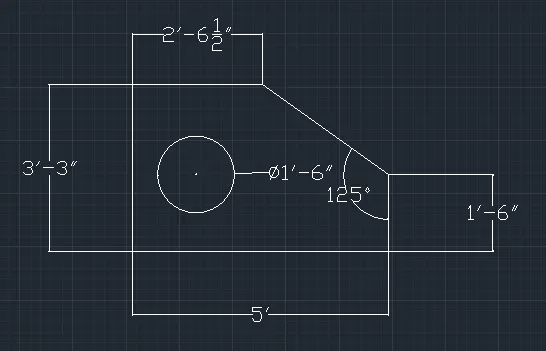
Open new page and set engineering and precision 0'0.0".
command line-draw the required lines in Xaxis and Yaxis
command offset- offset 3'3" line at a distance of 1'3" and 5'0.1" at a distance of 1'6".
command circle-draw a circle of diameter of 1'6" from the centre
erase the unwanted lines.
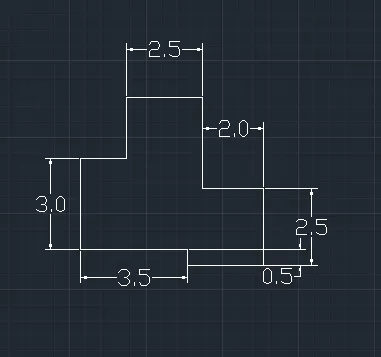
4.Procedure:
open new page and select decimal and precision 0.00 while keeping ortho on
command line- draw a line of 5.50m in positive X axis ,2.5 in positive Y axis ,2m in -ve X axis , 3m in +ve Y axis , 2.5m in -ve x axis ,
2.5m in -ve Y axis and 1m in -ve X axis and close.
5.Procedure:
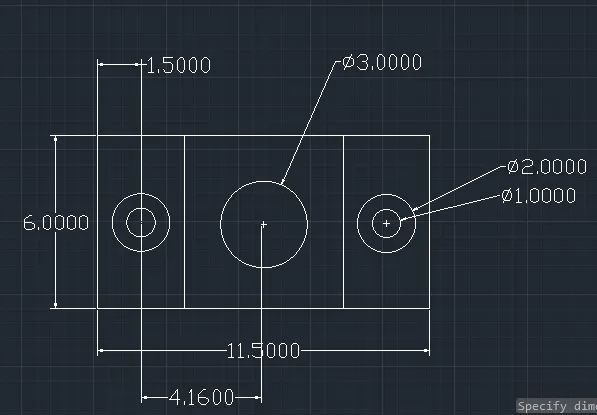
with new page set decimal and precision 0.00
command line - draw a 6m verticle line and 11.5m horizontal line and 6m line in -ve Yaxis and close
command offset- offset 6m line at a distance of 3m both side and offset 11.50 line at 3m
command circle- draw a concentric at the intersection point of diameter 1m and 2m both side
again draw a circle of diameter 3m at the centre
erase unwanted lines
6.Procedure:
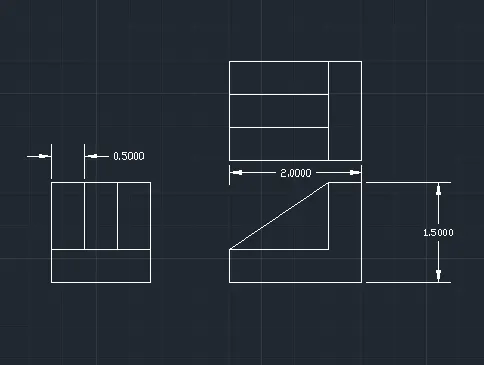
with a new page set decimal and precision 0.00
command line- draw a 1.5m horizontal line and 1.5m verticle on both side
command offset- offset 1.5m line to .5m
command divide - divide 1.5m line into 3 segments
command line - join the divided lines
command line- draw 2m line and 1.5m line and 0.5 horizontal and top and in verticle and 1.5m horizontal and 0.5m verticle and join the slant line
command offset- offset 1.5m line to .5m
command divied- divide 1.5m line into 3segments
command line - join the divided lines
7.Procedure:
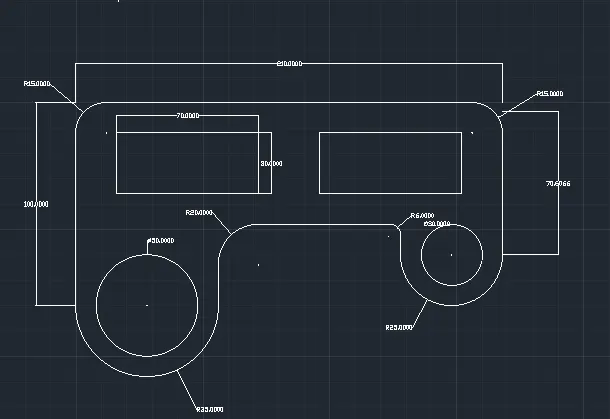
with new page set decimal and precision to 0
command line- draw 210m line horizontal line 100m verticle line on left side and 75m verticle line on right side, since arc has radius of 35m drawing a line of 70m on left side and has a radius of 25m drawing ling of 50m on right side.
command arc: from start , end and radius draw an arc of radius 35m on right side and an arc of radius 25m on left side.
command circle- from the midpoint of 70m line on let side draw a circle of diameter of 50m and 30m on right side.
command offset- offset 210m line at a distance of 60m
command fillet- filleting to radius 15m on top right and left, radius 20m on inner left and radius 6m on inner right.
command rectangle- 70m lenght and 30m width from off setted line on both side
erase unwanted lines
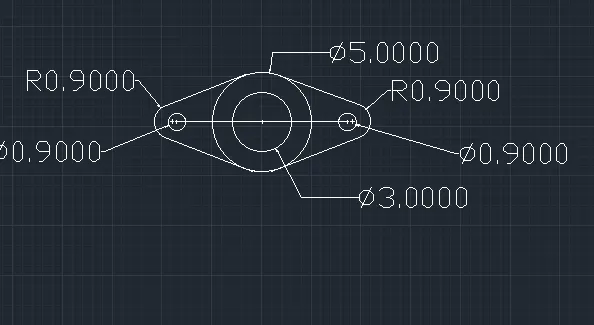
8.Procedure:
new page and set decimal and precision 0.00
command circle- draw concentric circles of diameter 5.00 and 4.00
command line- from the centre point of circle draw 4,275m line on both side
command circle- draw a circle of diameter of .90m on both side
command arc- from start ,end and radius draw an arc of radius .90 on both side
command line- join the lines on the arc
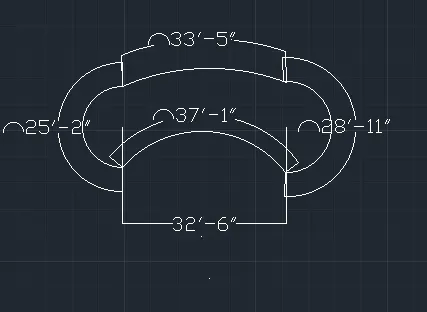
9.Procedure:
new page with engineering and precision 0'0"
command line-draw a 32'6" horizontal line
command circle - draw a circle of radius 8' on left side of line and radius of 9' on right side of line
command arc- from start , end and radius drawing a arc of 41'8" on top and 20'10" on bottom
command trim-trim the unwanted lines and curves
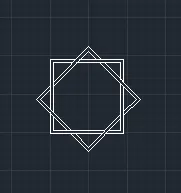
10.Procedure:
command rectangle- draw a rectangle of the same length and width
command copy- copy the rectangle
command rotate- rotating the drawn rectangle by 45 degree
command trim- trim the crossing line according to the fig
11.Procedure:
new page with engineering and precision 0'0"
command line- draw 10'2" horizontal line , 9' verticle line , 3' horizontal line , 4'6" verticle and horizontal line and 1'2" verticle line
command mirror- mirroe the above line at centre axis
command offset- offset the 20'4" to a distance of 6'9" and 13'6" to a distance of 10'2"
command rectangle - draw a rectangle of length and width of 3' frim the centre point ofn offsetted line
command move- moving the centre of rectangle of the centre of offsetted line
command rotate- rotating the rectangle by 45 degree