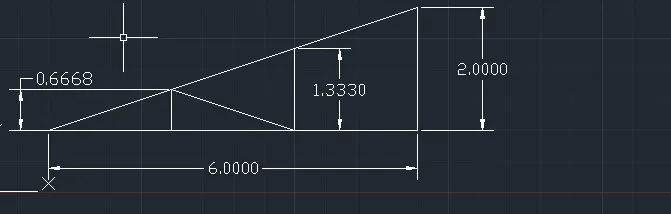
Creation of geometries by Coordinate system methods using AutoCad
1.Aim: To draw a geometrics or sketch using line tool and circle tool with Auto cad 2020.
Procedure: Line tool helps us to draw straight line in a segment.
There are 4 types where we can draw a line, they are
- Absolute
- relative rectangle
- polar
- direct distance method
Absolute method: here in this method we can draw line according to the graph where points with respect to origin.
Relative rectangle method:here the line is draw with respect to the previous point.
Polar method : here this method of line is drawn with respect to angle.
Direct distance method: here in this method the line are drawn with respect to the distance mentioned or required.
2.
Aim: To draw a geometrics or sketch using line tool and circle tool with Auto cad 2020.
Procedure: Line tool helps us to draw straight line in a segment.
There are 4 types where we can draw a line, they are
- Absolute
- relative rectangle
- polar
- direct distance method
Absolute method: here in this method we can draw line according to the graph where points with respect to origin.
Relative rectangle method:here the line is draw with respect to the previous point.
Polar method : here this method of line is drawn with respect to angle.
Direct distance method: here in this method the line are drawn with respect to the distance mentioned or required.
3.
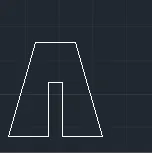
Aim: To draw a geometrics or sketch using line tool and circle tool with Auto cad 2020.
Procedure: Line tool helps us to draw straight line in a segment.
There are 4 types where we can draw a line, they are
- Absolute
- relative rectangle
- polar
- direct distance method
Relative rectangle method:here the line is draw with respect to the previous point.
4.
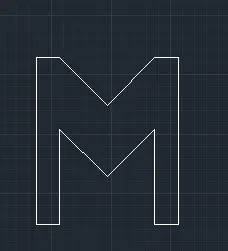
Aim: To draw a geometrics or sketch using line tool and circle tool with Auto cad 2020.
Procedure: Line tool helps us to draw straight line in a segment.
There are 4 types where we can draw a line, they are
- Absolute
- relative rectangle
- polar
- direct distance method
Relative rectangle method:here the line is draw with respect to the previous point.
5.
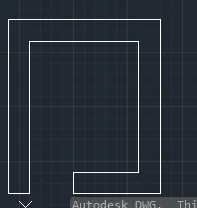
Aim: To draw a geometrics or sketch using line tool and circle tool with Auto cad 2020.
Procedure: Line tool helps us to draw straight line in a segment.
There are 4 types where we can draw a line, they are
- Absolute
- relative rectangle
- polar
- direct distance method
Relative rectangle method:here the line is draw with respect to the previous point.
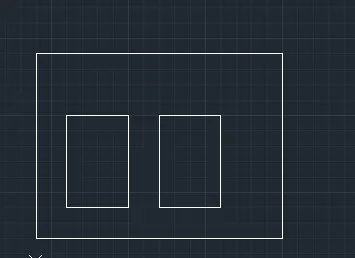
6.
Aim: To draw a geometrics or sketch using line tool and circle tool with Auto cad 2020.
Procedure: Line tool helps us to draw straight line in a segment.
There are 4 types where we can draw a line, they are
- Absolute
- relative rectangle
- polar
- direct distance method
Relative rectangle method:here the line is draw with respect to the previous point.
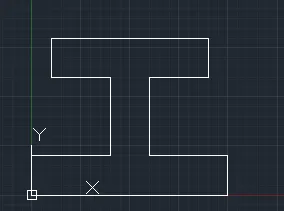
7.
Aim: To draw a geometrics or sketch using line tool and circle tool with Auto cad 2020.
Procedure: Line tool helps us to draw straight line in a segment.
There are 4 types where we can draw a line, they are
- Absolute
- relative rectangle
- polar
- direct distance method
Relative rectangle method:here the line is draw with respect to the previous point.
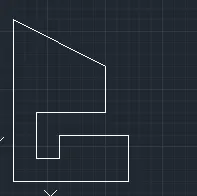
8.
Aim: To draw a geometrics or sketch using line tool and circle tool with Auto cad 2020.
Procedure: Line tool helps us to draw straight line in a segment.
There are 4 types where we can draw a line, they are
- Absolute
- relative rectangle
- polar
- direct distance method
Relative rectangle method:here the line is draw with respect to the previous point.
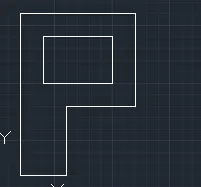
9.
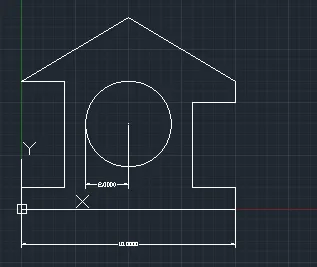
Aim:1. To draw a geometrics or sketch using line tool and circle tool with Auto cad 2020.
2. To draw circle using circle tool and using different types.
Procedure: Line tool helps us to draw straight line in a segment.
There are 4 types where we can draw a line, they are
- Absolute
- relative rectangle
- polar
- direct distance method
Relative rectangle method:here the line is draw with respect to the previous point.
In circle there are 6 types , they are
centre and radius
centre and dai
3points
2points
tan, tan, tan, and
tan, tan and radius
Procedure: here am using centre and radius method , and am specifing my centre as 5,4 and radius as 2m.
10.
Aim: To draw a geometrics or sketch using line tool and circle tool with Auto cad 2020.
Procedure: Line tool helps us to draw straight line in a segment.
There are 4 types where we can draw a line, they are
- Absolute
- relative rectangle
- polar
- direct distance method
Relative rectangle method:here the line is draw with respect to the previous point.
11.
Aim: To draw a geometrics or sketch using line tool and circle tool with Auto cad 2020.
Procedure: Line tool helps us to draw straight line in a segment.
There are 4 types where we can draw a line, they are
- Absolute
- relative rectangle
- polar
- direct distance method
Relative rectangle method:here the line is draw with respect to the previous point.