Drafting of various geometries using Chamfer, Fillet tool in AutoCad
Aim-
To draft the given diagrams using the auto cadd software
Procedure-
P1-
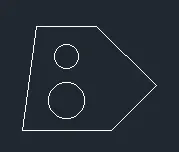
First start with the line command in the ribbon
start at point and staright line of length 3 units
Then with the same command direct length of length of 2.12 units and angle of 45 (@2.12<45)
Continue the straight line an give length of 2.83 units and angle of 135 (@2.83<135)
Draw the straight line of 2 units in backwards direction as shown in diagram
And close tthe polygon
Use off set command and do offset of top and bottom lines of length of 2 units in top and 1 units in bottom
The side offset line of length 1.50 units
There will be two points bisected
Make 2 points of centre of circles
Activate circle command ti ribbon with centre and radius
first circle of dia 0.80 and 1 unit
P2-
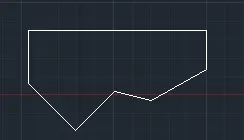
Start with line command
Start at point and length of @2'6"
Then the top line of length @8'
Then to downwards of length @1'9"
Then declined line of length and angle @2'10"<225
Come to the starting point and draw inclined line @3'<305
Then incline line of length 2'6" and angle of 90^ with reference of before line and close
P3-
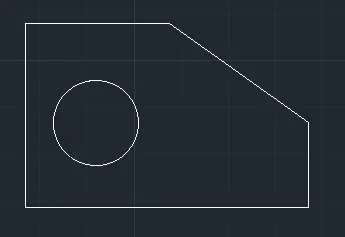
Actveate line command in the ribbon
Then start at any point and draw line of length 1'6" as shown on right line
Then draw the bottom line of length of @5'0.1"
Then the next line of length3'3"
and then length of 2'6.5"
Join then in inclined lined line as shown
Offset the bottom and left line with 1'3" and 1'6"
The as centre draw circle of radius 1'6"
P4-
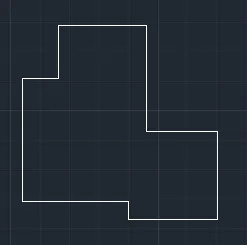
Invoke line command and start at any point
Draw a line of lenth of @3'
then @1'
Then @2' upwards
Thn@ @2.5'
Then @3' downwards
Then 2.5' right and
Then 2.5' downwards and join or close
P5-
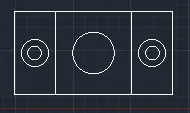
Invoke rectangle tool and draw rectangle of @11.50,6
Then offset either side with length of 3 units
Then invoke circle tool and
As a centre of the each boxes draw circles
Centre corcle of diameter @3
First and last circles of dia @2 and @1
P6-
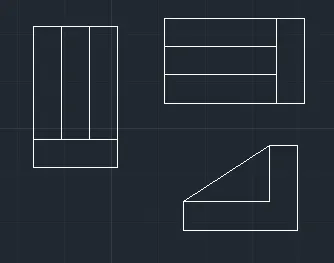
1.
Invoke rectangle command REC in command box
Then draw rec of @1.5,2 and @1.25,.5
Then oraw offsets of 0.5 either it is formed
2.
Rotate the drawing and extend 1.5 lines to 2 then the second drawing is formed
3.
Draw line of 1.5 and 2 unts length and
Offset it of 0.5
Then join edges
Then join in inclined line as triangle
P7-
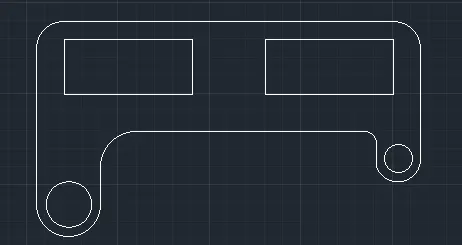
Draw with line command
Line of length 100,210 and 75 lengths
Draw semicircle of radius 35 and 25 at both the ends
And join them and fillet their ends with radius of 20 and 6
Use circle command in ribbon and draw circles of radius 50 and 25 in the semicircles
Leave 20 and 10 cover on top and bottom sides
Invoke rec command
Draw rectangles on either side leaving cover of 20 for first
Rec sizes are @70,30
P8-
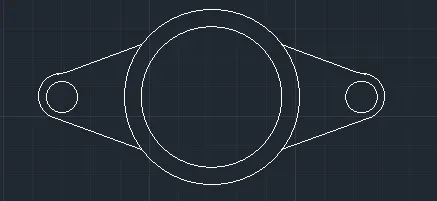
Activate circle command of centre and radius
Draw circle of dia 5 and offset of 1 for it
Then draw two circles of radius 0.45 on either sides
Then draw arcs of dia 0.90 on either side
then join tangent on the either side
P9-
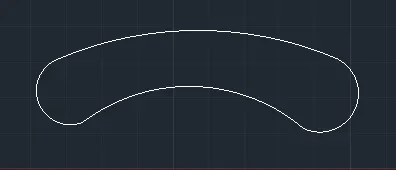
Invoke arc and radius command
Draw top and bottom arc of radius 41'8" and 20'10"
Then close both sides with arc of radius 8' and 9' both sides
P10-
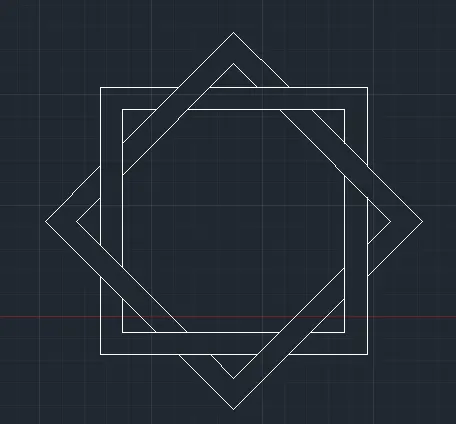
Invoke rectangle command and draw of andy size and offset it with any size
Then copy it at side and
Then use rotate command and rotate it to 45^
Fix it in the first rectangle with centre
Use trim command and trim unnecessary lines
Then it is formed
P11-
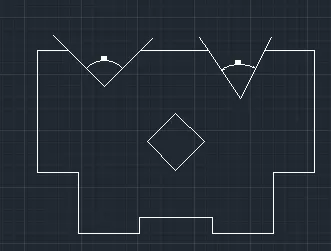
Invoke line command from ribbon
Then draw line of length @9'
Then @3'
Then @4'6"
Then @4'6"
Next is @1'2"
Then @2'7"
Then mirror the right to left as centre base
The same drawing is in right side also
Draw rectangle of @3',3'@45 whose centre is 6'9' from top
Draw inclined lines of 45^ and 60^ by angle or by reference
Of lengths 2'8" and 3'7'