Creation of Multiple viewports, Scaling the drawing and setting in Template in AutoCad
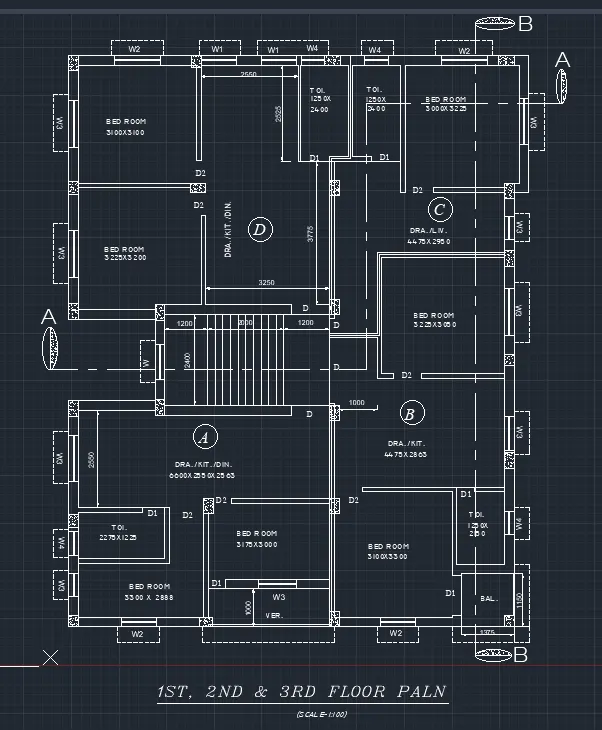
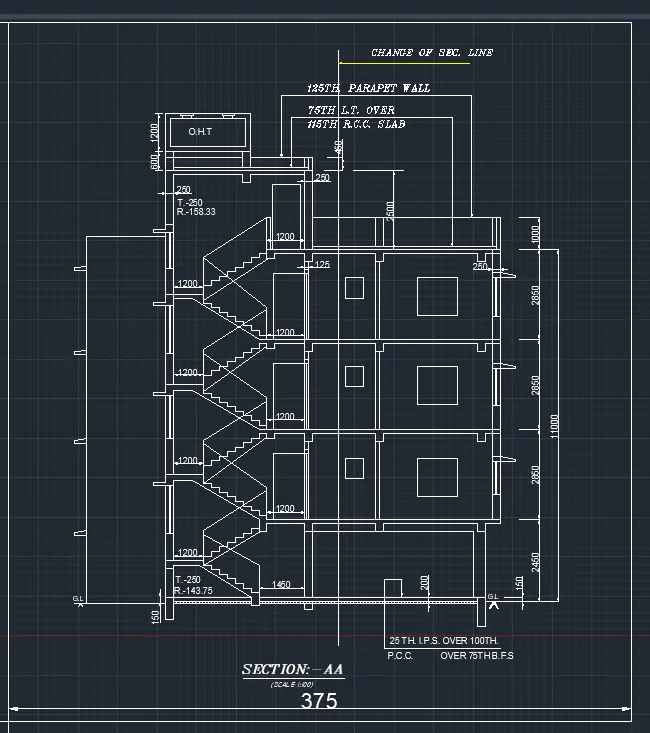
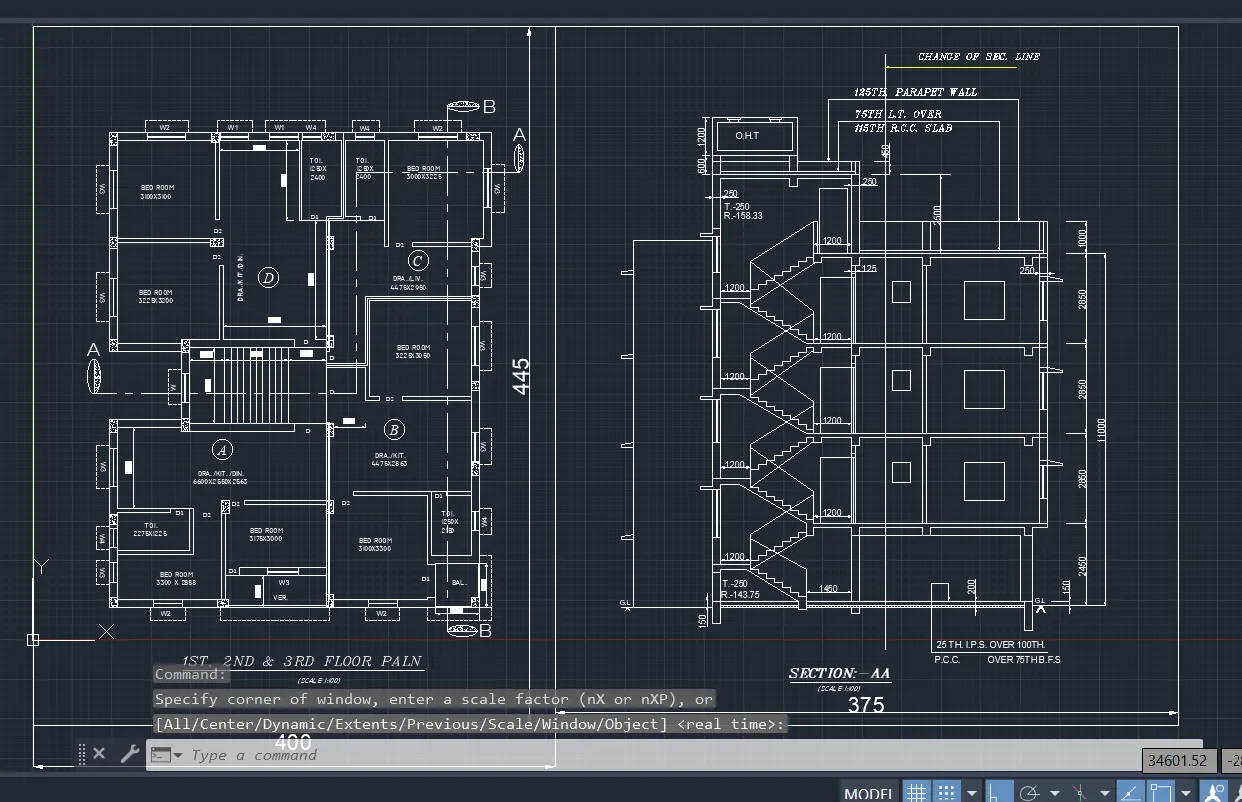
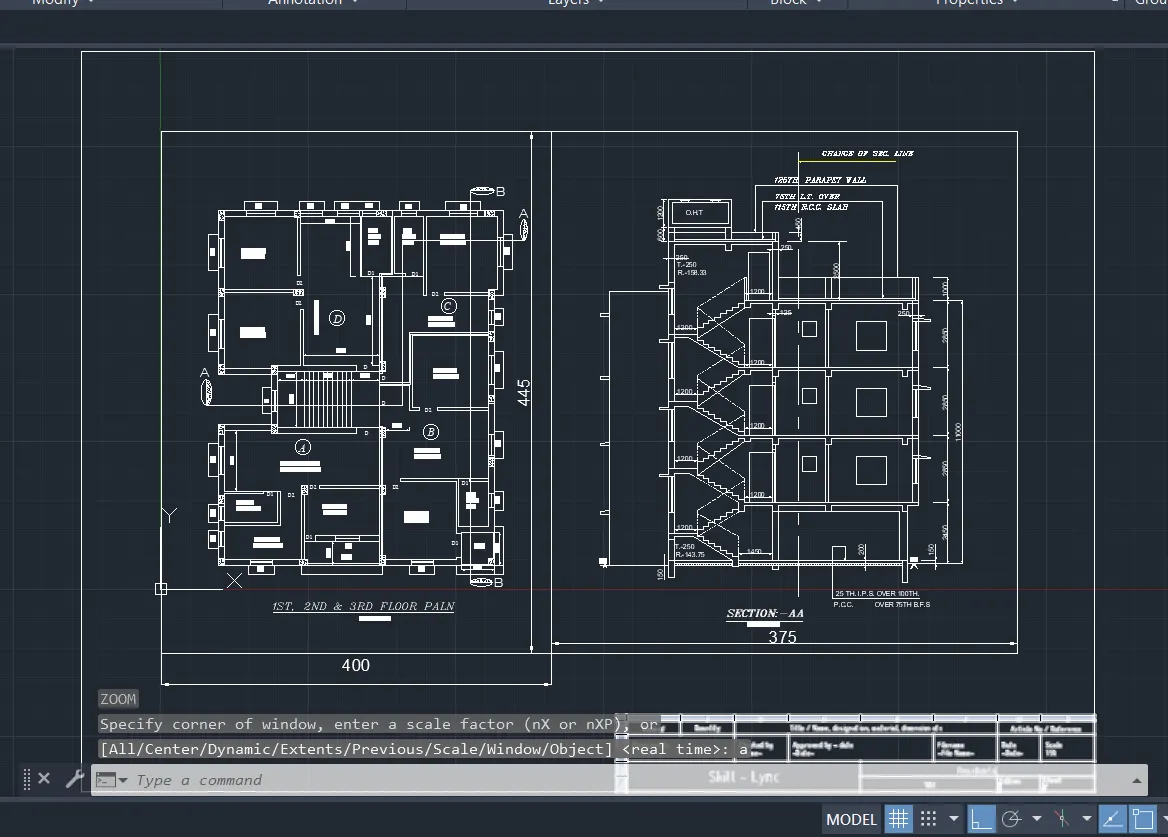
1. Create a layout of the Plan and Section A of the project in Challenges 7, using the template Tutorial-mArch.dwt in a scale as given in the Figure. Use the MV command to create the viewport of the size as shown in Figure. Also, use ATTEDIT command to edit the information in the title block. Use A1 size for the layout. Take a plot.
Select object to trim or shift-select to extend or
[cuTting edges/Crossing/mOde/Project/eRase/Undo]: *Cancel*
Command: L
LINE
Specify first point:
Specify next point or [Undo]: 125
Specify next point or [Undo]: 250
Specify next point or [Close/Undo]:
Specify next point or [Close/Undo]: *Cancel*
Command: L
LINE
Specify first point:
Specify next point or [Undo]:
Specify next point or [Undo]: *Cancel*
Command: TR
TRIM
Current settings: Projection=UCS, Edge=None, Mode=Quick
Select object to trim or shift-select to extend or
[cuTting edges/Crossing/mOde/Project/eRase]:
Select object to trim or shift-select to extend or
[cuTting edges/Crossing/mOde/Project/eRase/Undo]:
Select object to trim or shift-select to extend or
[cuTting edges/Crossing/mOde/Project/eRase/Undo]:
Select object to trim or shift-select to extend or
[cuTting edges/Crossing/mOde/Project/eRase/Undo]:
Select object to trim or shift-select to extend or
[cuTting edges/Crossing/mOde/Project/eRase/Undo]: *Cancel*
Automatic save to C:\Users\91637\AppData\Local\Temp\Drawing1_1_4940_566e4085.sv$ ...
Command:
Command: Z
ZOOM
Specify corner of window, enter a scale factor (nX or nXP), or
[All/Center/Dynamic/Extents/Previous/Scale/Window/Object] : a
Regenerating model.
Command: L
LINE
Specify first point:
Specify next point or [Undo]: *Cancel*
Command: L
LINE
Specify first point:
Specify next point or [Undo]:
Specify next point or [Undo]: *Cancel*
Command: O
OFFSET
Current settings: Erase source=No Layer=Source OFFSETGAPTYPE=0
Specify offset distance or [Through/Erase/Layer] :
Select object to offset or [Exit/Undo] :
Specify through point or [Exit/Multiple/Undo] : 300.
Select object to offset or [Exit/Undo] : *Cancel*
Command: TR
TRIM
Current settings: Projection=UCS, Edge=None, Mode=Quick
Select object to trim or shift-select to extend or
[cuTting edges/Crossing/mOde/Project/eRase]:
Select object to trim or shift-select to extend or
[cuTting edges/Crossing/mOde/Project/eRase/Undo]:
Select object to trim or shift-select to extend or
[cuTting edges/Crossing/mOde/Project/eRase/Undo]:
Select object to trim or shift-select to extend or
[cuTting edges/Crossing/mOde/Project/eRase/Undo]: *Cancel*
Command: O
OFFSET
Current settings: Erase source=No Layer=Source OFFSETGAPTYPE=0
Specify offset distance or [Through/Erase/Layer] :
Select object to offset or [Exit/Undo] : *Cancel*
Command: OFFSET
Current settings: Erase source=No Layer=Source OFFSETGAPTYPE=0
Specify offset distance or [Through/Erase/Layer] :
Select object to offset or [Exit/Undo] : *Cancel*
Command: L
LINE
Specify first point:
Specify next point or [Undo]:
Specify next point or [Undo]: *Cancel*
Command: O
OFFSET
Current settings: Erase source=No Layer=Source OFFSETGAPTYPE=0
Specify offset distance or [Through/Erase/Layer] :
Select object to offset or [Exit/Undo] :
Specify through point or [Exit/Multiple/Undo] : 1350
Select object to offset or [Exit/Undo] :
Specify through point or [Exit/Multiple/Undo] : 600
Select object to offset or [Exit/Undo] : *Cancel*
Command: L
LINE
Specify first point:
Specify next point or [Undo]:
Specify next point or [Undo]:
Specify next point or [Close/Undo]: *Cancel*
Command: O
OFFSET
Current settings: Erase source=No Layer=Source OFFSETGAPTYPE=0
Specify offset distance or [Through/Erase/Layer] :
Select object to offset or [Exit/Undo] :
Specify through point or [Exit/Multiple/Undo] : *Cancel*
Command: O
OFFSET
Current settings: Erase source=No Layer=Source OFFSETGAPTYPE=0
Specify offset distance or [Through/Erase/Layer] :
Select object to offset or [Exit/Undo] :
Specify through point or [Exit/Multiple/Undo] : 1250
Select object to offset or [Exit/Undo] : _u
Select object to offset or [Exit/Undo] :
Specify through point or [Exit/Multiple/Undo] : 125
Select object to offset or [Exit/Undo] :
Specify through point or [Exit/Multiple/Undo] : 125
Select object to offset or [Exit/Undo] :
Specify through point or [Exit/Multiple/Undo] : 100
Select object to offset or [Exit/Undo] : *Cancel*
Command:
Command: _.erase 1 found
Command: EX
EXTEND
Current settings: Projection=UCS, Edge=None, Mode=Quick
Select object to extend or shift-select to trim or
[Boundary edges/Crossing/mOde/Project]:
Select object to extend or shift-select to trim or
[Boundary edges/Crossing/mOde/Project/Undo]:
Select object to extend or shift-select to trim or
[Boundary edges/Crossing/mOde/Project/Undo]:
Select object to extend or shift-select to trim or
[Boundary edges/Crossing/mOde/Project/Undo]: *Cancel*
Command: TR
TRIM
Current settings: Projection=UCS, Edge=None, Mode=Quick
Select object to trim or shift-select to extend or
[cuTting edges/Crossing/mOde/Project/eRase]:
Select object to trim or shift-select to extend or
[cuTting edges/Crossing/mOde/Project/eRase/Undo]: *Cancel*
Command:
Command: _.erase 1 found
Command: _u ERASE
Command: *Cancel*
Command: TR
TRIM
Current settings: Projection=UCS, Edge=None, Mode=Quick
Select object to trim or shift-select to extend or
[cuTting edges/Crossing/mOde/Project/eRase]:
Select object to trim or shift-select to extend or
[cuTting edges/Crossing/mOde/Project/eRase/Undo]:
Select object to trim or shift-select to extend or
[cuTting edges/Crossing/mOde/Project/eRase/Undo]: *Cancel*
Command: TR
TRIM
Current settings: Projection=UCS, Edge=None, Mode=Quick
Select object to trim or shift-select to extend or
[cuTting edges/Crossing/mOde/Project/eRase]:
Select object to trim or shift-select to extend or
[cuTting edges/Crossing/mOde/Project/eRase/Undo]:
Select object to trim or shift-select to extend or
[cuTting edges/Crossing/mOde/Project/eRase/Undo]:
Specify next fence point or [Undo]:
Specify next fence point or [Undo]:
Select object to trim or shift-select to extend or
[cuTting edges/Crossing/mOde/Project/eRase/Undo]: _u
Command has been completely undone.
Select object to trim or shift-select to extend or
[cuTting edges/Crossing/mOde/Project/eRase]:
Select object to trim or shift-select to extend or
[cuTting edges/Crossing/mOde/Project/eRase/Undo]:
Specify next fence point or [Undo]:
Specify next fence point or [Undo]:
Select object to trim or shift-select to extend or
[cuTting edges/Crossing/mOde/Project/eRase/Undo]: *Cancel*
Command: DI
DIST
Specify first point:
Specify second point or [Multiple points]:
Distance = 3175.00, Angle in XY Plane = 0, Angle from XY Plane = 0
Delta X = 3175.00, Delta Y = 0.00, Delta Z = 0.00
Command: Specify opposite corner or [Fence/WPolygon/CPolygon]: *Cancel*
Crossing Lasso Press Spacebar to cycle options
Command: _.erase 2 found
Command: O
OFFSET
Current settings: Erase source=No Layer=Source OFFSETGAPTYPE=0
Specify offset distance or [Through/Erase/Layer] :
Select object to offset or [Exit/Undo] :
Specify through point or [Exit/Multiple/Undo] : 1130.3
Select object to offset or [Exit/Undo] :
Specify through point or [Exit/Multiple/Undo] : 914.4
Select object to offset or [Exit/Undo] : *Cancel*
Command:
Command: _.erase 1 found
Command:
Command: _.erase 1 found
Command: _u ERASE
Command:
Command: _.erase 1 found
Command: _u ERASE
Command: *Cancel*
Command:
Command: _.erase 1 found
Command: EX
EXTEND
Current settings: Projection=UCS, Edge=None, Mode=Quick
Select object to extend or shift-select to trim or
[Boundary edges/Crossing/mOde/Project]:
Select object to extend or shift-select to trim or
[Boundary edges/Crossing/mOde/Project/Undo]:
Select object to extend or shift-select to trim or
[Boundary edges/Crossing/mOde/Project/Undo]:
Specify next fence point or [Undo]:
Specify next fence point or [Undo]:
Specify next fence point or [Undo]:
Specify next fence point or [Undo]:
Select object to extend or shift-select to trim or
[Boundary edges/Crossing/mOde/Project/Undo]:
Select object to extend or shift-select to trim or
[Boundary edges/Crossing/mOde/Project/Undo]:
Specify next fence point or [Undo]:
Specify next fence point or [Undo]:
Select object to extend or shift-select to trim or
[Boundary edges/Crossing/mOde/Project/Undo]: *Cancel*
Command: L
LINE
Specify first point:
Specify next point or [Undo]: 100
Specify next point or [Undo]:
Specify next point or [Close/Undo]: *Cancel*
Automatic save to C:\Users\91637\AppData\Local\Temp\Drawing1_1_4940_566e4085.sv$ ...
Command:
Command: Specify opposite corner or [Fence/WPolygon/CPolygon]:
Command: Specify opposite corner or [Fence/WPolygon/CPolygon]: *Cancel*
Command: *Cancel*
Command:
Command: _.erase 1 found
Command: O
OFFSET
Current settings: Erase source=No Layer=Source OFFSETGAPTYPE=0
Specify offset distance or [Through/Erase/Layer] :
Select object to offset or [Exit/Undo] :
Specify through point or [Exit/Multiple/Undo] : 457.2
Select object to offset or [Exit/Undo] :
Specify through point or [Exit/Multiple/Undo] : 125
Select object to offset or [Exit/Undo] :
Specify through point or [Exit/Multiple/Undo] : 120
Select object to offset or [Exit/Undo] : _u
Select object to offset or [Exit/Undo] :
Specify through point or [Exit/Multiple/Undo] : 420
Select object to offset or [Exit/Undo] : *Cancel*
Command: *Cancel*
Window Lasso Press Spacebar to cycle options
Window Lasso Press Spacebar to cycle options
Command: Specify opposite corner or [Fence/WPolygon/CPolygon]:
Command: Specify opposite corner or [Fence/WPolygon/CPolygon]:
Command: _.erase 3 found
Command: O
OFFSET
Current settings: Erase source=No Layer=Source OFFSETGAPTYPE=0
Specify offset distance or [Through/Erase/Layer] :
Select object to offset or [Exit/Undo] :
Specify through point or [Exit/Multiple/Undo] : 609.6
Select object to offset or [Exit/Undo] :
Select object to offset or [Exit/Undo] :
Specify through point or [Exit/Multiple/Undo] : 125
Select object to offset or [Exit/Undo] :
Specify through point or [Exit/Multiple/Undo] : 320
Select object to offset or [Exit/Undo] : *Cancel*
Command:
Command:
Command: _qsave
Command:
Command:
Command: _qsave
< src alt="">
Command:
Command:
Command: _rotate
Current positive angle in UCS: ANGDIR=counterclockwise ANGBASE=0
1 found
Specify base point:
Specify rotation angle or [Copy/Reference] <270>:
Command:
Command: Specify opposite corner or [Fence/WPolygon/CPolygon]:
Command:
** STRETCH **
Specify stretch point or [Base point/Copy/Undo/eXit]:
Command:
** STRETCH **
Specify stretch point or [Base point/Copy/Undo/eXit]:
Command:
** STRETCH **
Specify stretch point or [Base point/Copy/Undo/eXit]:
Command:
** STRETCH **
Specify stretch point or [Base point/Copy/Undo/eXit]:
Command: Specify opposite corner or [Fence/WPolygon/CPolygon]:
Command:
** STRETCH **
Specify stretch point or [Base point/Copy/Undo/eXit]:
Command:
** STRETCH **
Specify stretch point or [Base point/Copy/Undo/eXit]:
Command: *Cancel*
Command:
Command:
Command:
Command: _copyclip 1 found
Command:
Command:
Command: _pasteclip Specify insertion point:
Command:
Command:
Command: _copyclip
Select objects: *Cancel*
Command:
Command:
Command:
Command: _copyclip 1 found
Command:
Command:
Command: _pasteclip Specify insertion point:
Command:
Command:
Command: _pasteclip Specify insertion point: *Cancel*
Command:
Command:
Command:
Command: _copyclip 1 found
Command:
Command:
Command: _pasteclip Specify insertion point: *Cancel*
Command:
Command: _pasteclip Specify insertion point:
Command:
Command:
Command: _pasteclip Specify insertion point:
Command:
Command:
Command:
Command: _mtedit
Command:
Command:
Command: _pasteclip Specify insertion point:
Command:
Command:
Command:
Command: _mtedit
Command:
Command:
Command: _pasteclip Specify insertion point:
Command:
Command:
Command:
Command:
Command:
Command: _mtedit
Command:
Command:
Command: _pasteclip Specify insertion point:
Command:
Command:
Command:
Command: _mtedit
Command:
Command:
Command: _pasteclip Specify insertion point:
Command:
Command:
Command: _pasteclip Specify insertion point:
Command:
Command:
Command:
Command: _rotate
Current positive angle in UCS: ANGDIR=counterclockwise ANGBASE=0
1 found
Specify base point:
Specify rotation angle or [Copy/Reference] <270>:
Command: _u Rotate GROUP
Command:
Command:
Command:
Command: _rotate
Current positive angle in UCS: ANGDIR=counterclockwise ANGBASE=0
1 found
Specify base point:
Specify rotation angle or [Copy/Reference] <270>:
Command:
Command:
** STRETCH **
Specify stretch point or [Base point/Copy/Undo/eXit]:
Command:
** STRETCH **
Specify stretch point or [Base point/Copy/Undo/eXit]:
Command:
** STRETCH **
Specify stretch point or [Base point/Copy/Undo/eXit]:
Command: *Cancel*
Command:
Command:
Command:
Command: _mtedit
Command:
Command:
Command:
Command: _copyclip 1 found
Command:
Command:
Command: _pasteclip Specify insertion point:
Command:
Command:
Command: _pasteclip Specify insertion point:
Command:
Command:
Command:
Command: _mtedit
Command:
Command:
Command:
Command: _rotate
Current positive angle in UCS: ANGDIR=counterclockwise ANGBASE=0
1 found
Specify base point:
Specify rotation angle or [Copy/Reference] <270>:
Command:
Command:
** STRETCH **
Specify stretch point or [Base point/Copy/Undo/eXit]:
Command:
** STRETCH **
Specify stretch point or [Base point/Copy/Undo/eXit]:
Command:
** STRETCH **
Specify stretch point or [Base point/Copy/Undo/eXit]:
Command:
** STRETCH **
Specify stretch point or [Base point/Copy/Undo/eXit]:
Command:
Command:
** STRETCH **
Specify stretch point or [Base point/Copy/Undo/eXit]:
Command: Specify opposite corner or [Fence/WPolygon/CPolygon]: *Cancel*
Command: *Cancel*
Command:
Command:
Command: _pasteclip Specify insertion point:
Command:
Command:
Command: _pasteclip Specify insertion point:
Command:
Command:
Command:
Command: _mtedit
Command:
Command:
Command: _pasteclip Specify insertion point:
Command: Specify opposite corner or [Fence/WPolygon/CPolygon]:
Command:
** STRETCH **
Specify stretch point or [Base point/Copy/Undo/eXit]:
Command: *Cancel*
Command: *Cancel*
Command: T
MTEXT
Current text style: "Standard" Text height: 2.5 Annotative: No
Specify first corner:
Specify opposite corner or [Height/Justify/Line spacing/Rotation/Style/Width/Columns]:
Automatic save to C:\Users\91637\AppData\Local\Temp\Drawing1_1_30900_8e2b19e2.sv$ ...
Command:
Command: Specify opposite corner or [Fence/WPolygon/CPolygon]:
Command:
Command:
Command:
Command:
Command: _mtedit
Command:
Command:
** STRETCH **
Specify stretch point or [Base point/Copy/Undo/eXit]:
Command: *Cancel*
Command: *Cancel*
Command:
Command:
Command:
Command: _pasteclip Specify insertion point: *Cancel*
Command:
Command:
Command: _copyclip
Select objects: *Cancel*
Command:
Command:
Command:
Command: _copyclip 1 found
Command:
Command:
Command: _pasteclip Specify insertion point:
Command:
Command:
Command: _pasteclip Specify insertion point:
Command:
Command:
Command:
Command: _mtedit
Command: Specify opposite corner or [Fence/WPolygon/CPolygon]:
Command:
Command:
Command:
Command: _mtedit
Command:
Command:
** STRETCH **
Specify stretch point or [Base point/Copy/Undo/eXit]:
Command: *Cancel*
Command:
Command:
Command: _pasteclip Specify insertion point: *Cancel*
Command:
Command:
Command:
Command: _copyclip 1 found
Command:
Command:
Command: _pasteclip Specify insertion point:
Command:
Command:
Command:
Command: _copyclip 1 found
Command:
Command:
Command: _pasteclip Specify insertion point:
Command:
Command:
Command: _pasteclip Specify insertion point:
Command:
Command:
Command: _pasteclip Specify insertion point:
Command:
Command:
Command: _pasteclip Specify insertion point:
Command: Specify opposite corner or [Fence/WPolygon/CPolygon]:
Command:
Command:
Command:
Command:
Command:
Command:
Command: _mtedit
Command: *Cancel*
Command: *Cancel*
Command:
Command:
Command:
Command: _mtedit
Command:
Command:
Command: _pasteclip Specify insertion point:
Command: Specify opposite corner or [Fence/WPolygon/CPolygon]:
Command:
Command:
Command:
Command: _mtedit
Command: *Cancel*
Command:
Command:
Command: _pasteclip Specify insertion point:
Command:
Command:
Command:
Command: _mtedit
Command:
Command:
Command: _pasteclip Specify insertion point:
Command:
Command:
Command:
Command: _mtedit
Command:
Command:
Command: _pasteclip Specify insertion point:
Command:
Command:
Command:
Command: _mtedit
Command:
Command:
Command: _pasteclip Specify insertion point:
Automatic save to C:\Users\91637\AppData\Local\Temp\Drawing1_1_30900_8e2b19e2.sv$ ...
Command:
Command:
Command:
Command:
Command: _mtedit
Command:
Command:
** STRETCH **
Specify stretch point or [Base point/Copy/Undo/eXit]:
Command: *Cancel*
Command:
Command:
Command: _pasteclip Specify insertion point:
Command:
Command:
Command:
Command: _mtedit
Command:
Command:
Command: _pasteclip Specify insertion point:
Command:
Command:
Command: _pasteclip Specify insertion point:
Command:
Command:
Command: _pasteclip Specify insertion point:
Command: Specify opposite corner or [Fence/WPolygon/CPolygon]:
Command:
Command:
Command:
Command: _mtedit
Command: Z
ZOOM
Specify corner of window, enter a scale factor (nX or nXP), or
[All/Center/Dynamic/Extents/Previous/Scale/Window/Object] : a
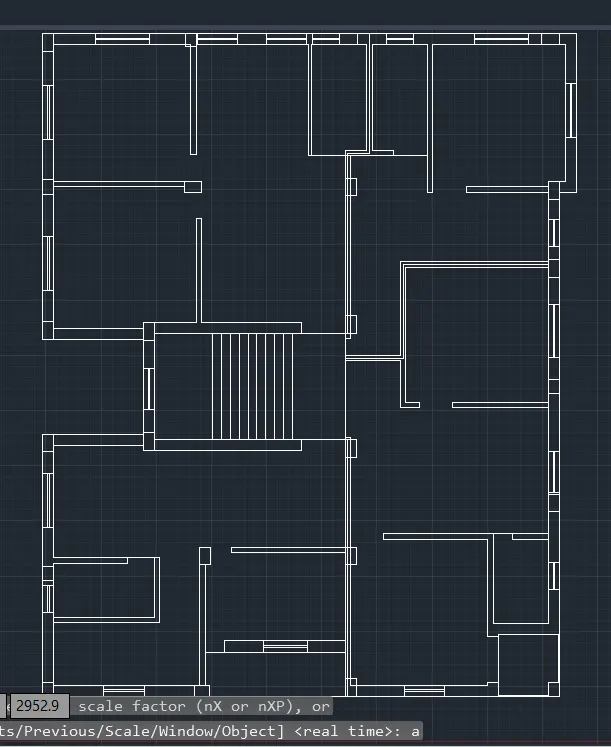
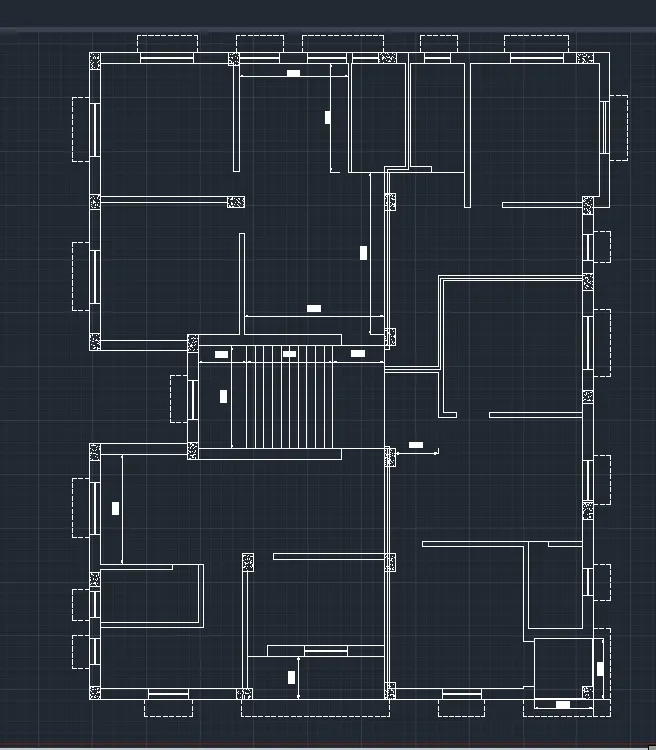
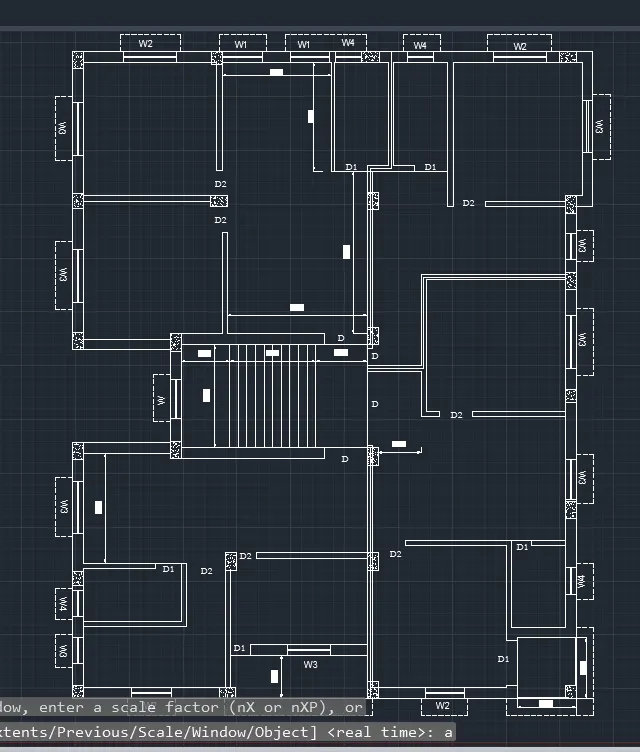
pecify stretch point or [Base point/Copy/Undo/eXit]:
Command:
** STRETCH **
Specify stretch point or [Base point/Copy/Undo/eXit]:
Command:
** STRETCH **
Specify stretch point or [Base point/Copy/Undo/eXit]:
Command:
** STRETCH **
Specify stretch point or [Base point/Copy/Undo/eXit]: *Cancel*
Command:
** STRETCH **
Specify stretch point or [Base point/Copy/Undo/eXit]:
Command:
** STRETCH **
Specify stretch point or [Base point/Copy/Undo/eXit]:
Command: TR
TRIM
Current settings: Projection=UCS, Edge=None, Mode=Quick
Select cutting edges ...1 found
Select object to trim or shift-select to extend or
[cuTting edges/Crossing/mOde/Project/eRase]:
Select object to trim or shift-select to extend or
[cuTting edges/Crossing/mOde/Project/eRase/Undo]:
Select object to trim or shift-select to extend or
[cuTting edges/Crossing/mOde/Project/eRase/Undo]:
Specify next fence point or [Undo]:
Specify next fence point or [Undo]:
Specify next fence point or [Undo]:
Specify next fence point or [Undo]:
Select object to trim or shift-select to extend or
[cuTting edges/Crossing/mOde/Project/eRase/Undo]: *Cancel*
Command: L
LINE
Specify first point:
Specify next point or [Undo]:
Specify next point or [Undo]: *Cancel*
Command: HATCH
Pick internal point or [Select objects/Undo/seTtings]: Selecting everything...
Selecting everything visible...
Analyzing the selected data...
Analyzing internal islands...
Pick internal point or [Select objects/Undo/seTtings]: *Cancel*
Command: *Cancel*
Command: EL
ELLIPSE
Specify axis endpoint of ellipse or [Arc/Center]:
Specify other endpoint of axis:
Specify distance to other axis or [Rotation]:
Command:
Command:
** STRETCH **
Specify stretch point or [Base point/Copy/Undo/eXit]:
Command:
** STRETCH **
Specify stretch point or [Base point/Copy/Undo/eXit]:
Command:
** STRETCH **
Specify stretch point or [Base point/Copy/Undo/eXit]:
Command:
** STRETCH **
Specify stretch point or [Base point/Copy/Undo/eXit]:
Command:
** STRETCH **
Specify stretch point or [Base point/Copy/Undo/eXit]:
Command:
** STRETCH **
Specify stretch point or [Base point/Copy/Undo/eXit]:
Command:
** STRETCH **
Specify stretch point or [Base point/Copy/Undo/eXit]:
Command:
** STRETCH **
Specify stretch point or [Base point/Copy/Undo/eXit]:
Command: *Cancel*
Command: TR
TRIM
Current settings: Projection=UCS, Edge=None, Mode=Quick
Select object to trim or shift-select to extend or
[cuTting edges/Crossing/mOde/Project/eRase]:
Select object to trim or shift-select to extend or
[cuTting edges/Crossing/mOde/Project/eRase/Undo]:
Select object to trim or shift-select to extend or
[cuTting edges/Crossing/mOde/Project/eRase/Undo]: *Cancel*
Command: L
LINE
Specify first point:
Specify next point or [Undo]:
Specify next point or [Undo]: *Cancel*
Command: EL
ELLIPSE
Specify axis endpoint of ellipse or [Arc/Center]:
Specify other endpoint of axis:
Specify distance to other axis or [Rotation]:
Command:
Command:
** STRETCH **
Specify stretch point or [Base point/Copy/Undo/eXit]:
Command:
** STRETCH **
Specify stretch point or [Base point/Copy/Undo/eXit]:
Command:
** STRETCH **
Specify stretch point or [Base point/Copy/Undo/eXit]:
Command:
** STRETCH **
Specify stretch point or [Base point/Copy/Undo/eXit]:
Command:
** STRETCH **
Specify stretch point or [Base point/Copy/Undo/eXit]:
Command:
** STRETCH **
Specify stretch point or [Base point/Copy/Undo/eXit]:
Command:
** STRETCH **
Specify stretch point or [Base point/Copy/Undo/eXit]:
Command: *Cancel*
Command: TR
TRIM
Current settings: Projection=UCS, Edge=None, Mode=Quick
Select object to trim or shift-select to extend or
[cuTting edges/Crossing/mOde/Project/eRase]:
Select object to trim or shift-select to extend or
[cuTting edges/Crossing/mOde/Project/eRase/Undo]:
Select object to trim or shift-select to extend or
[cuTting edges/Crossing/mOde/Project/eRase/Undo]: *Cancel*
Command: L
LINE
Specify first point:
Specify next point or [Undo]:
Specify next point or [Undo]: *Cancel*
Command: EL
ELLIPSE
Specify axis endpoint of ellipse or [Arc/Center]:
Specify other endpoint of axis:
Specify distance to other axis or [Rotation]:
Command:
Command:
** STRETCH **
Specify stretch point or [Base point/Copy/Undo/eXit]:
Command:
** STRETCH **
Specify stretch point or [Base point/Copy/Undo/eXit]:
Command:
** STRETCH **
Specify stretch point or [Base point/Copy/Undo/eXit]:
Command:
** STRETCH **
Specify stretch point or [Base point/Copy/Undo/eXit]:
Command:
** STRETCH **
Specify stretch point or [Base point/Copy/Undo/eXit]:
Command:
** STRETCH **
Specify stretch point or [Base point/Copy/Undo/eXit]:
Command:
** STRETCH **
Specify stretch point or [Base point/Copy/Undo/eXit]:
Command: Specify opposite corner or [Fence/WPolygon/CPolygon]:
Command:
** STRETCH **
Specify stretch point or [Base point/Copy/Undo/eXit]:
Command:
** STRETCH **
Specify stretch point or [Base point/Copy/Undo/eXit]:
Command: *Cancel*
Command:
Command:
** STRETCH **
Specify stretch point or [Base point/Copy/Undo/eXit]:
Command:
** STRETCH **
Specify stretch point or [Base point/Copy/Undo/eXit]:
Command:
** STRETCH **
Specify stretch point or [Base point/Copy/Undo/eXit]:
Command:
** STRETCH **
Specify stretch point or [Base point/Copy/Undo/eXit]:
Command:
** STRETCH **
Specify stretch point or [Base point/Copy/Undo/eXit]:
Command:
** STRETCH **
Specify stretch point or [Base point/Copy/Undo/eXit]:
Command: *Cancel*
Command: EX
EXTEND
Current settings: Projection=UCS, Edge=None, Mode=Quick
Select object to extend or shift-select to trim or
[Boundary edges/Crossing/mOde/Project]:
Select object to extend or shift-select to trim or
[Boundary edges/Crossing/mOde/Project/Undo]:
Select object to extend or shift-select to trim or
[Boundary edges/Crossing/mOde/Project/Undo]:
Specify next fence point or [Undo]:
Specify next fence point or [Undo]:
Select object to extend or shift-select to trim or
[Boundary edges/Crossing/mOde/Project/Undo]: *Cancel*
Command:
Command:
** STRETCH **
Specify stretch point or [Base point/Copy/Undo/eXit]:
Command:
** STRETCH **
Specify stretch point or [Base point/Copy/Undo/eXit]:
Command:
** STRETCH **
Specify stretch point or [Base point/Copy/Undo/eXit]:
Command:
** STRETCH **
Specify stretch point or [Base point/Copy/Undo/eXit]:
Command:
** STRETCH **
Specify stretch point or [Base point/Copy/Undo/eXit]:
Command: *Cancel*
Command: EX
EXTEND
Current settings: Projection=UCS, Edge=None, Mode=Quick
Select object to extend or shift-select to trim or
[Boundary edges/Crossing/mOde/Project]:
Select object to extend or shift-select to trim or
[Boundary edges/Crossing/mOde/Project/Undo]:
Select object to extend or shift-select to trim or
[Boundary edges/Crossing/mOde/Project/Undo]:
Specify next fence point or [Undo]:
Specify next fence point or [Undo]:
Select object to extend or shift-select to trim or
[Boundary edges/Crossing/mOde/Project/Undo]: *Cancel*
Command: L
LINE
Specify first point:
Specify next point or [Undo]:
Specify next point or [Undo]: *Cancel*
Command: HATCH
Pick internal point or [Select objects/Undo/seTtings]: Selecting everything...
Selecting everything visible...
Analyzing the selected data...
Analyzing internal islands...
Pick internal point or [Select objects/Undo/seTtings]: Selecting everything...
Selecting everything visible...
Analyzing the selected data...
Analyzing internal islands...
Pick internal point or [Select objects/Undo/seTtings]: Selecting everything...
Selecting everything visible...
Analyzing the selected data...
Analyzing internal islands...
Pick internal point or [Select objects/Undo/seTtings]: *Cancel*
Command: Regenerating model.
T
MTEXT
Current text style: "style1" Text height: 150 Annotative: No
Specify first corner:
Specify opposite corner or [Height/Justify/Line spacing/Rotation/Style/Width/Columns]:
Command:
Command:
** STRETCH **
Specify stretch point or [Base point/Copy/Undo/eXit]:
Command:
** STRETCH **
Specify stretch point or [Base point/Copy/Undo/eXit]:
Command: *Cancel*
Command:
Command:
Command:
Command: _properties
Command: *Cancel*
Command: *Cancel*
Command:
Automatic save to C:\Users\91637\AppData\Local\Temp\Drawing1_1_4940_e8b4d261.sv$ ...
Command:
Command:
Command:
Command: _mtedit
Command: *Cancel*
Command:
Command:
Command:
Command: _copyclip 1 found
Command:
Command:
Command: _pasteclip Specify insertion point:
Command:
Command:
Command:
Command: _copyclip 1 found
Command:
Command: Specify opposite corner or [Fence/WPolygon/CPolygon]: *Cancel*
Command:
Command:
Command: _pasteclip Specify insertion point:
Command:
Command:
Command:
Command: _mtedit
Command:
Command:
Command: _pasteclip Specify insertion point:
Command:
Command:
Command:
Command: _mtedit
Command: *Cancel*
Command:
Command:
Command: _qsave
Command: *Cancel*
Command: _EditTableCell
Enter option [Operation/Content/Format/Style/Datalink/Quit/ExecuteOneAction]: _Operation
Enter option [BAck/insert ABove/insert BElow/delete ROw/insert LEft/insert RIght/delete COlumn/Merge/Unmerge/insert FOrmula/insert BLock/insert FIeld/BOrder/Quit]: _Merge
Enter option [BAck/merge All/merge Horizontal/merge Vertical/Quit]: _Horizontal
Enter option [BAck/merge All/merge Horizontal/merge Vertical/Quit]: _Quit
Command: *Cancel*
Command: Specify opposite corner:
Command: *Cancel*
Command: Specify opposite corner:
Command:
Command:
Command: _EditTableCell
Enter option [Operation/Content/Format/Style/Datalink/Quit/ExecuteOneAction]: _Operation
Enter option [BAck/insert ABove/insert BElow/delete ROw/insert LEft/insert RIght/delete COlumn/Merge/Unmerge/insert FOrmula/insert BLock/insert FIeld/BOrder/Quit]: _Merge
Enter option [BAck/merge All/merge Horizontal/merge Vertical/Quit]: _Vertical
Enter option [BAck/merge All/merge Horizontal/merge Vertical/Quit]: _Quit
Command: *Cancel*
Command: Specify opposite corner:
Command: Specify opposite corner:
Command:
Command:
Command: _EditTableCell
Enter option [Operation/Content/Format/Style/Datalink/Quit/ExecuteOneAction]: _Operation
Enter option [BAck/insert ABove/insert BElow/delete ROw/insert LEft/insert RIght/delete COlumn/Merge/Unmerge/insert FOrmula/insert BLock/insert FIeld/BOrder/Quit]: _Merge
Enter option [BAck/merge All/merge Horizontal/merge Vertical/Quit]: _Horizontal
Enter option [BAck/merge All/merge Horizontal/merge Vertical/Quit]: _Quit
Command:
Command:
Command: _EditTableCell
Enter option [Operation/Content/Format/Style/Datalink/Quit/ExecuteOneAction]: _Operation
Enter option [BAck/insert ABove/insert BElow/delete ROw/insert LEft/insert RIght/delete COlumn/Merge/Unmerge/insert FOrmula/insert BLock/insert FIeld/BOrder/Quit]: _Merge
Enter option [BAck/merge All/merge Horizontal/merge Vertical/Quit]: _Vertical
Enter option [BAck/merge All/merge Horizontal/merge Vertical/Quit]: _Quit
Command: *Cancel*
Command: *Cancel*
Command: Specify opposite corner:
Command:
Command:
Command: _EditTableCell
Enter option [Operation/Content/Format/Style/Datalink/Quit/ExecuteOneAction]: _Operation
Enter option [BAck/insert ABove/insert BElow/delete ROw/insert LEft/insert RIght/delete COlumn/Merge/Unmerge/insert FOrmula/insert BLock/insert FIeld/BOrder/Quit]: _Merge
Enter option [BAck/merge All/merge Horizontal/merge Vertical/Quit]: _Horizontal
Enter option [BAck/merge All/merge Horizontal/merge Vertical/Quit]: _Quit
Command:
Command:
Command: _EditTableCell
Enter option [Operation/Content/Format/Style/Datalink/Quit/ExecuteOneAction]: _Operation
Enter option [BAck/insert ABove/insert BElow/delete ROw/insert LEft/insert RIght/delete COlumn/Merge/Unmerge/insert FOrmula/insert BLock/insert FIeld/BOrder/Quit]: _Merge
Enter option [BAck/merge All/merge Horizontal/merge Vertical/Quit]: _Vertical
Enter option [BAck/merge All/merge Horizontal/merge Vertical/Quit]: _Quit
Command:
Command:
Command: _EditTableCell
Enter option [Operation/Content/Format/Style/Datalink/Quit/ExecuteOneAction]: _O
Enter option [BAck/insert ABove/insert BElow/delete ROw/insert LEft/insert RIght/delete COlumn/Merge/Unmerge/insert FOrmula/insert BLock/insert FIeld/BOrder/Quit]: _U
Enter option [BAck/insert ABove/insert BElow/delete ROw/insert LEft/insert RIght/delete COlumn/Merge/Unmerge/insert FOrmula/insert BLock/insert FIeld/BOrder/Quit]: _Q
Command: *Cancel*
Command: Specify opposite corner:
Command:
Command:
Command: _EditTableCell
Enter option [Operation/Content/Format/Style/Datalink/Quit/ExecuteOneAction]: _Operation
Enter option [BAck/insert ABove/insert BElow/delete ROw/insert LEft/insert RIght/delete COlumn/Merge/Unmerge/insert FOrmula/insert BLock/insert FIeld/BOrder/Quit]: _Merge
Enter option [BAck/merge All/merge Horizontal/merge Vertical/Quit]: _Horizontal
Enter option [BAck/merge All/merge Horizontal/merge Vertical/Quit]: _Quit
Command: Specify opposite corner:
Command:
Command:
Command: _EditTableCell
Enter option [Operation/Content/Format/Style/Datalink/Quit/ExecuteOneAction]: _Operation
Enter option [BAck/insert ABove/insert BElow/delete ROw/insert LEft/insert RIght/delete COlumn/Merge/Unmerge/insert FOrmula/insert BLock/insert FIeld/BOrder/Quit]: _Merge
Enter option [BAck/merge All/merge Horizontal/merge Vertical/Quit]: _Horizontal
Enter option [BAck/merge All/merge Horizontal/merge Vertical/Quit]: _Quit
Command: *Cancel*
Command: Specify opposite corner:
Command:
Command:
Command: _EditTableCell
Enter option [Operation/Content/Format/Style/Datalink/Quit/ExecuteOneAction]: _O
Enter option [BAck/insert ABove/insert BElow/delete ROw/insert LEft/insert RIght/delete COlumn/Merge/Unmerge/insert FOrmula/insert BLock/insert FIeld/BOrder/Quit]: _U
Enter option [BAck/insert ABove/insert BElow/delete ROw/insert LEft/insert RIght/delete COlumn/Merge/Unmerge/insert FOrmula/insert BLock/insert FIeld/BOrder/Quit]: _Q
Command: Specify opposite corner:
Command:
Command:
Command: _EditTableCell
Enter option [Operation/Content/Format/Style/Datalink/Quit/ExecuteOneAction]: _O
Enter option [BAck/insert ABove/insert BElow/delete ROw/insert LEft/insert RIght/delete COlumn/Merge/Unmerge/insert FOrmula/insert BLock/insert FIeld/BOrder/Quit]: _U
Enter option [BAck/insert ABove/insert BElow/delete ROw/insert LEft/insert RIght/delete COlumn/Merge/Unmerge/insert FOrmula/insert BLock/insert FIeld/BOrder/Quit]: _Q
Command: *Cancel*
Command: Specify opposite corner:
Command:
Command:
Command: _EditTableCell
Enter option [Operation/Content/Format/Style/Datalink/Quit/ExecuteOneAction]: _Operation
Enter option [BAck/insert ABove/insert BElow/delete ROw/insert LEft/insert RIght/delete COlumn/Merge/Unmerge/insert FOrmula/insert BLock/insert FIeld/BOrder/Quit]: _Merge
Enter option [BAck/merge All/merge Horizontal/merge Vertical/Quit]: _Horizontal
Enter option [BAck/merge All/merge Horizontal/merge Vertical/Quit]: _Quit
Command: Specify opposite corner:
Command:
Command:
Command: _EditTableCell
Enter option [Operation/Content/Format/Style/Datalink/Quit/ExecuteOneAction]: _Operation
Enter option [BAck/insert ABove/insert BElow/delete ROw/insert LEft/insert RIght/delete COlumn/Merge/Unmerge/insert FOrmula/insert BLock/insert FIeld/BOrder/Quit]: _Merge
Enter option [BAck/merge All/merge Horizontal/merge Vertical/Quit]: _Horizontal
Enter option [BAck/merge All/merge Horizontal/merge Vertical/Quit]: _Quit
Command: *Cancel*
Command: Specify opposite corner:
Command:
Command:
Command: _EditTableCell
Enter option [Operation/Content/Format/Style/Datalink/Quit/ExecuteOneAction]: _Operation
Enter option [BAck/insert ABove/insert BElow/delete ROw/insert LEft/insert RIght/delete COlumn/Merge/Unmerge/insert FOrmula/insert BLock/insert FIeld/BOrder/Quit]: _Merge
Enter option [BAck/merge All/merge Horizontal/merge Vertical/Quit]: _Horizontal
Enter option [BAck/merge All/merge Horizontal/merge Vertical/Quit]: _Quit
Command: Specify opposite corner:
Command:
Command:
Command: _EditTableCell
Enter option [Operation/Content/Format/Style/Datalink/Quit/ExecuteOneAction]: _Operation
Enter option [BAck/insert ABove/insert BElow/delete ROw/insert LEft/insert RIght/delete COlumn/Merge/Unmerge/insert FOrmula/insert BLock/insert FIeld/BOrder/Quit]: _Merge
Enter option [BAck/merge All/merge Horizontal/merge Vertical/Quit]: _Horizontal
Enter option [BAck/merge All/merge Horizontal/merge Vertical/Quit]: _Quit
Command: *Cancel*
Command: Specify opposite corner:
Command:
Command:
Command: _EditTableCell
Enter option [Operation/Content/Format/Style/Datalink/Quit/ExecuteOneAction]: _Operation
Enter option [BAck/insert ABove/insert BElow/delete ROw/insert LEft/insert RIght/delete COlumn/Merge/Unmerge/insert FOrmula/insert BLock/insert FIeld/BOrder/Quit]: _Merge
Enter option [BAck/merge All/merge Horizontal/merge Vertical/Quit]: _Vertical
Enter option [BAck/merge All/merge Horizontal/merge Vertical/Quit]: _Quit
Command: _u GROUP EDITTABLECELL
Command: Specify opposite corner:
Command: Specify opposite corner:
Command: Specify opposite corner:
Command:
Command:
Command: _EditTableCell
Enter option [Operation/Content/Format/Style/Datalink/Quit/ExecuteOneAction]: _Operation
Enter option [BAck/insert ABove/insert BElow/delete ROw/insert LEft/insert RIght/delete COlumn/Merge/Unmerge/insert FOrmula/insert BLock/insert FIeld/BOrder/Quit]: _Merge
Enter option [BAck/merge All/merge Horizontal/merge Vertical/Quit]: _Vertical
Enter option [BAck/merge All/merge Horizontal/merge Vertical/Quit]: _Quit
Command: *Cancel*
Command: Specify opposite corner:
Command:
Command:
Command: _EditTableCell
Enter option [Operation/Content/Format/Style/Datalink/Quit/ExecuteOneAction]: _Operation
Enter option [BAck/insert ABove/insert BElow/delete ROw/insert LEft/insert RIght/delete COlumn/Merge/Unmerge/insert FOrmula/insert BLock/insert FIeld/BOrder/Quit]: _Merge
Enter option [BAck/merge All/merge Horizontal/merge Vertical/Quit]: _Horizontal
Enter option [BAck/merge All/merge Horizontal/merge Vertical/Quit]: _Quit
Command:
Command:
Command: _EditTableCell
Enter option [Operation/Content/Format/Style/Datalink/Quit/ExecuteOneAction]: _Operation
Enter option [BAck/insert ABove/insert BElow/delete ROw/insert LEft/insert RIght/delete COlumn/Merge/Unmerge/insert FOrmula/insert BLock/insert FIeld/BOrder/Quit]: _Merge
Enter option [BAck/merge All/merge Horizontal/merge Vertical/Quit]: _Vertical
Enter option [BAck/merge All/merge Horizontal/merge Vertical/Quit]: _Quit
Command: *Cancel*
Command: *Cancel*
Command: Specify opposite corner:
Command:
Command:
Command: _EditTableCell
Enter option [Operation/Content/Format/Style/Datalink/Quit/ExecuteOneAction]: _Operation
Enter option [BAck/insert ABove/insert BElow/delete ROw/insert LEft/insert RIght/delete COlumn/Merge/Unmerge/insert FOrmula/insert BLock/insert FIeld/BOrder/Quit]: _Merge
Enter option [BAck/merge All/merge Horizontal/merge Vertical/Quit]: _Horizontal
Enter option [BAck/merge All/merge Horizontal/merge Vertical/Quit]: _Quit
Command:
Command: Specify opposite corner:
Command:
Command:
Command: _EditTableCell
Enter option [Operation/Content/Format/Style/Datalink/Quit/ExecuteOneAction]: _Format
Enter option [BAck/ALignment/BG color/Lock/Unlock/Quit]: _ALignment
Enter option [BAck/TL/TC/TR/ML/MC/MR/BL/BC/BR/Quit]: _MC
Enter option [BAck/TL/TC/TR/ML/MC/MR/BL/BC/BR/Quit]: _Quit
Command: Specify opposite corner:
Command: Specify opposite corner:
Command:
Command:
Command: _EditTableCell
Enter option [Operation/Content/Format/Style/Datalink/Quit/ExecuteOneAction]: _Operation
Enter option [BAck/insert ABove/insert BElow/delete ROw/insert LEft/insert RIght/delete COlumn/Merge/Unmerge/insert FOrmula/insert BLock/insert FIeld/BOrder/Quit]: _Merge
Enter option [BAck/merge All/merge Horizontal/merge Vertical/Quit]: _Horizontal
Enter option [BAck/merge All/merge Horizontal/merge Vertical/Quit]: _Quit
Command: Specify opposite corner:
Command:
Command: Specify opposite corner:
Command: Specify opposite corner:
Command:
Command: Specify opposite corner:
Command:
Command:
Command: _EditTableCell
Enter option [Operation/Content/Format/Style/Datalink/Quit/ExecuteOneAction]: _Format
Enter option [BAck/ALignment/BG color/Lock/Unlock/Quit]: _ALignment
Enter option [BAck/TL/TC/TR/ML/MC/MR/BL/BC/BR/Quit]: _MC
Enter option [BAck/TL/TC/TR/ML/MC/MR/BL/BC/BR/Quit]: _Quit
Command:
Command: Specify opposite corner:
Command: Specify opposite corner:
Command:
Command:
Command: _EditTableCell
Enter option [Operation/Content/Format/Style/Datalink/Quit/ExecuteOneAction]: _Content
Enter option [BAck/Datatype/Lock/Unlock/Manage/Quit]: _Datatype
Enter option [BAck/General/Text/Angle/POint/Date/CurrencY/DecNumber/Percentage/WholeNumber/CustoM/Quit]: _Text
Enter option [BAck/General/Text/Angle/POint/Date/CurrencY/DecNumber/Percentage/WholeNumber/CustoM/Quit]: _Quit
Command:
Command:
Command: _EditTableCell
Enter option [Operation/Content/Format/Style/Datalink/Quit/ExecuteOneAction]: _Content
Enter option [BAck/Datatype/Lock/Unlock/Manage/Quit]: _Datatype
Enter option [BAck/General/Text/Angle/POint/Date/CurrencY/DecNumber/Percentage/WholeNumber/CustoM/Quit]: _DecNumber
Enter option [BAck/General/Text/Angle/POint/Date/CurrencY/DecNumber/Percentage/WholeNumber/CustoM/Quit]: _Quit
Command:
Command:
Command: _EditTableCell
Enter option [Operation/Content/Format/Style/Datalink/Quit/ExecuteOneAction]: _Content
Enter option [BAck/Datatype/Lock/Unlock/Manage/Quit]: _Datatype
Enter option [BAck/General/Text/Angle/POint/Date/CurrencY/DecNumber/Percentage/WholeNumber/CustoM/Quit]: _General
Enter option [BAck/General/Text/Angle/POint/Date/CurrencY/DecNumber/Percentage/WholeNumber/CustoM/Quit]: _Quit
Command: Specify opposite corner:
Command:
Command: Specify opposite corner:
Command:
Command: Specify opposite corner:
Command:
Command:
Command: _EditTableCell
Enter option [Operation/Content/Format/Style/Datalink/Quit/ExecuteOneAction]: _Content
Enter option [BAck/Datatype/Lock/Unlock/Manage/Quit]: _Datatype
Enter option [BAck/General/Text/Angle/POint/Date/CurrencY/DecNumber/Percentage/WholeNumber/CustoM/Quit]: _WholeNumber
Enter option [BAck/General/Text/Angle/POint/Date/CurrencY/DecNumber/Percentage/WholeNumber/CustoM/Quit]: _Quit
Command:
Command: Specify opposite corner:
Command:
Command: *Cancel*
Command: *Cancel*
Command: *Cancel*
Command: Specify opposite corner:
Command:
Command: Specify opposite corner:
Command:
Command:
Command: _EditTableCell
Enter option [Operation/Content/Format/Style/Datalink/Quit/ExecuteOneAction]: _Format
Enter option [BAck/ALignment/BG color/Lock/Unlock/Quit]: _ALignment
Enter option [BAck/TL/TC/TR/ML/MC/MR/BL/BC/BR/Quit]: _ML
Enter option [BAck/TL/TC/TR/ML/MC/MR/BL/BC/BR/Quit]: _Quit
Command: Specify opposite corner:
Command:
Command: Specify opposite corner:
Command:
Command: Specify opposite corner:
Command:
Command:
Command: _EditTableCell
Enter option [Operation/Content/Format/Style/Datalink/Quit/ExecuteOneAction]: _Format
Enter option [BAck/ALignment/BG color/Lock/Unlock/Quit]: _ALignment
Enter option [BAck/TL/TC/TR/ML/MC/MR/BL/BC/BR/Quit]: _ML
Enter option [BAck/TL/TC/TR/ML/MC/MR/BL/BC/BR/Quit]: _Quit
Command: Specify opposite corner:
Command:
Command:
Command: _EditTableCell
Enter option [Operation/Content/Format/Style/Datalink/Quit/ExecuteOneAction]: _Content
Enter option [BAck/Datatype/Lock/Unlock/Manage/Quit]: _Datatype
Enter option [BAck/General/Text/Angle/POint/Date/CurrencY/DecNumber/Percentage/WholeNumber/CustoM/Quit]: _Percentage
Enter option [BAck/General/Text/Angle/POint/Date/CurrencY/DecNumber/Percentage/WholeNumber/CustoM/Quit]: _Quit
Command:
Command:
Command: _EditTableCell
Enter option [Operation/Content/Format/Style/Datalink/Quit/ExecuteOneAction]: _Content
Enter option [BAck/Datatype/Lock/Unlock/Manage/Quit]: _Datatype
Enter option [BAck/General/Text/Angle/POint/Date/CurrencY/DecNumber/Percentage/WholeNumber/CustoM/Quit]: _CurrencY
Enter option [BAck/General/Text/Angle/POint/Date/CurrencY/DecNumber/Percentage/WholeNumber/CustoM/Quit]: _Quit
Command:
Command:
Command: _EditTableCell
Enter option [Operation/Content/Format/Style/Datalink/Quit/ExecuteOneAction]: _Content
Enter option [BAck/Datatype/Lock/Unlock/Manage/Quit]: _Datatype
Enter option [BAck/General/Text/Angle/POint/Date/CurrencY/DecNumber/Percentage/WholeNumber/CustoM/Quit]: _WholeNumber
Enter option [BAck/General/Text/Angle/POint/Date/CurrencY/DecNumber/Percentage/WholeNumber/CustoM/Quit]: _Quit
Command:
Command:
Command: _EditTableCell
Enter option [Operation/Content/Format/Style/Datalink/Quit/ExecuteOneAction]: _Content
Enter option [BAck/Datatype/Lock/Unlock/Manage/Quit]: _Datatype
Enter option [BAck/General/Text/Angle/POint/Date/CurrencY/DecNumber/Percentage/WholeNumber/CustoM/Quit]: _General
Enter option [BAck/General/Text/Angle/POint/Date/CurrencY/DecNumber/Percentage/WholeNumber/CustoM/Quit]: _Quit
Command: Specify opposite corner:
Command:
Command: Specify opposite corner:
Command:
Command:
Command: _EditTableCell
Enter option [Operation/Content/Format/Style/Datalink/Quit/ExecuteOneAction]: _Operation
Enter option [BAck/insert ABove/insert BElow/delete ROw/insert LEft/insert RIght/delete COlumn/Merge/Unmerge/insert FOrmula/insert BLock/insert FIeld/BOrder/Quit]: _Merge
Enter option [BAck/merge All/merge Horizontal/merge Vertical/Quit]: _All
Enter option [BAck/merge All/merge Horizontal/merge Vertical/Quit]: _Quit
Command: Specify opposite corner:
Command:
Command:
Command: _EditTableCell
Enter option [Operation/Content/Format/Style/Datalink/Quit/ExecuteOneAction]: _Operation
Enter option [BAck/insert ABove/insert BElow/delete ROw/insert LEft/insert RIght/delete COlumn/Merge/Unmerge/insert FOrmula/insert BLock/insert FIeld/BOrder/Quit]: _Merge
Enter option [BAck/merge All/merge Horizontal/merge Vertical/Quit]: _All
Enter option [BAck/merge All/merge Horizontal/merge Vertical/Quit]: _Quit
Command: Specify opposite corner:
Command:
Command:
Command: _EditTableCell
Enter option [Operation/Content/Format/Style/Datalink/Quit/ExecuteOneAction]: _Operation
Enter option [BAck/insert ABove/insert BElow/delete ROw/insert LEft/insert RIght/delete COlumn/Merge/Unmerge/insert FOrmula/insert BLock/insert FIeld/BOrder/Quit]: _Merge
Enter option [BAck/merge All/merge Horizontal/merge Vertical/Quit]: _All
Enter option [BAck/merge All/merge Horizontal/merge Vertical/Quit]: _Quit
Command:
Automatic save to C:\Users\91637\AppData\Local\Temp\Drawing1_1_18662_95511fc4.sv$ ...
Command:
Command: Specify opposite corner:
Command:
Command:
Command: _EditTableCell
Enter option [Operation/Content/Format/Style/Datalink/Quit/ExecuteOneAction]: _Format
Enter option [BAck/ALignment/BG color/Lock/Unlock/Quit]: _ALignment
Enter option [BAck/TL/TC/TR/ML/MC/MR/BL/BC/BR/Quit]: _ML
Enter option [BAck/TL/TC/TR/ML/MC/MR/BL/BC/BR/Quit]: _Quit
Command:
Command:
Command: _EditTableCell
Enter option [Operation/Content/Format/Style/Datalink/Quit/ExecuteOneAction]: _Format
Enter option [BAck/ALignment/BG color/Lock/Unlock/Quit]: _ALignment
Enter option [BAck/TL/TC/TR/ML/MC/MR/BL/BC/BR/Quit]: _MC
Enter option [BAck/TL/TC/TR/ML/MC/MR/BL/BC/BR/Quit]: _Quit
Command: *Cancel*
Command:
Specify corner of window, enter a scale factor (nX or nXP), or
[All/Center/Dynamic/Extents/Previous/Scale/Window/Object] :
Regenerating model.
Crossing Lasso Press Spacebar to cycle options
Command: MOVE
1 found
Specify base point or [Displacement] :
Specify second point or :
Crossing Lasso Press Spacebar to cycle options
Command: MOVE
1 found
Specify base point or [Displacement] :
Specify second point or :
Command: *Cancel*
Command: RE
REGEN Regenerating model.
Command: *Cancel*
Command: REC
RECTANG
Specify first corner point or [Chamfer/Elevation/Fillet/Thickness/Width]:
Specify other corner point or [Area/Dimensions/Rotation]:

Command: _.PAGESETUP
Command: _.PAGESETUP
Command: Regenerating layout.
Specify opposite corner or [Fence/WPolygon/CPolygon]:
Command:
** STRETCH **
Specify stretch point or [Base point/Copy/Undo/eXit]:
Command:
** STRETCH **
Specify stretch point or [Base point/Copy/Undo/eXit]:
Command: Specify opposite corner or [Fence/WPolygon/CPolygon]:
Command: DI
DIST
Specify first point:
Specify second point or [Multiple points]:
Distance = 591.49, Angle in XY Plane = 270, Angle from XY Plane = 0
Delta X = 0.00, Delta Y = -591.49, Delta Z = 0.00
Command: Specify opposite corner or [Fence/WPolygon/CPolygon]:
Command: Specify opposite corner or [Fence/WPolygon/CPolygon]:
Command:
Command:
Command: *Cancel*
Crossing Lasso Press Spacebar to cycle options
Command: _.erase 1 found
Command: MVIEW
Specify corner of viewport or [ON/OFF/Fit/Shadeplot/Lock/NEw/NAmed/Object/Polygonal/Restore/LAyer/2/3/4]
Specify opposite corner: Regenerating model.
Command: *Cancel*
Automatic save to C:\Users\91637\AppData\Local\Temp\Drawing1_1_13829_b9d513fe.sv$ ...
Command:
Command: Specify opposite corner or [Fence/WPolygon/CPolygon]:
Command: Specify opposite corner or [Fence/WPolygon/CPolygon]:
Command: Specify opposite corner or [Fence/WPolygon/CPolygon]:
Command: Specify opposite corner or [Fence/WPolygon/CPolygon]:
Command:
Command: *Cancel*
Command:
Command:
Command: _plot
Press ESC or ENTER to exit, or right-click to display shortcut menu.
Command:
Command:
Command: _plot Effective plotting area: 594.00 wide by 841.00 high
Effective plotting area: 318.85 wide by 465.84 high
Plotting viewport 4.
Plotting viewport 1.
2. Create a layout of the Kitchen drawn in Challenge 9 as shown in Figure. Use the scale as shown in the Figure. Use A4 Size page for the layout. Take a plot.
Command: *Cancel*
Command:
Restoring cached viewports - Regenerating layout.
Command: _.PAGESETUP
Command:
Command: _.erase 1 found
Command: MV
MVIEW
Specify corner of viewport or [ON/OFF/Fit/Shadeplot/Lock/NEw/NAmed/Object/Polygonal/Restore/LAyer/2/3/4]
Specify first corner or [Fit]
Specify opposite corner: Regenerating model.
Command: Specify opposite corner or [Fence/WPolygon/CPolygon]:
Command: *Cancel*
Crossing Lasso Press Spacebar to cycle options
Command: _.VIEWSTD
Command: Specify opposite corner or [Fence/WPolygon/CPolygon]:
Command: Specify opposite corner or [Fence/WPolygon/CPolygon]: *Cancel*
Command: _.MSPACE
Command:
Command:
Command: *Cancel*
Command: Specify opposite corner or [Fence/WPolygon/CPolygon]: *Cancel*
Command: Z
ZOOM
Specify corner of window, enter a scale factor (nX or nXP), or
[All/Center/Dynamic/Extents/Previous/Scale/Window/Object]
Crossing Lasso Press Spacebar to cycle options147 found
Select objects: *Cancel*
Command: *Cancel*
Command: PS
PSPACE
Command: *Cancel*
Command: MO
PROPERTIES
Command:
Command: Regenerating layout.
Specify opposite corner or [Fence/WPolygon/CPolygon]: *Cancel*
Command: _.MSPACE
Command:
Command:
Command: Specify opposite corner or [Fence/WPolygon/CPolygon]:
Command: Specify opposite corner or [Fence/WPolygon/CPolygon]: *Cancel*
Command: *Cancel*
Command: *Cancel*
Command: PS
PSPACE
Command: Specify opposite corner or [Fence/WPolygon/CPolygon]:
Command:
Command:
Automatic save to C:\Users\91637\AppData\Local\Temp\Kitchen_1_4940_17727bc7.sv$ ...
Command:
Command: *Cancel*
Command: *Cancel*
Command: PS
PSPACE
Already in paper space.
Command: PS
PSPACE
Already in paper space.
Command: *Cancel*
Command:
Command:
Command: _qsave
Command: *Cancel*
Command:
Command:
Command: _line
Specify first point: *Cancel*
Command: Specify opposite corner or [Fence/WPolygon/CPolygon]:
Command: Specify opposite corner or [Fence/WPolygon/CPolygon]: *Cancel*
Command: _.MSPACE
Command: Specify opposite corner or [Fence/WPolygon/CPolygon]:
Command: Specify opposite corner or [Fence/WPolygon/CPolygon]:
Command: *Cancel*
Command: *Cancel*
Command: MS
MSPACE
Already in model space.
Command: Z
ZOOM
Specify corner of window, enter a scale factor (nX or nXP), or
[All/Center/Dynamic/Extents/Previous/Scale/Window/Object]
Crossing Lasso Press Spacebar to cycle options68 found
Select objects:
Regenerating model.
Command: *Cancel*
Command: Z
ZOOM
Specify corner of window, enter a scale factor (nX or nXP), or
[All/Center/Dynamic/Extents/Previous/Scale/Window/Object]
Specify first corner: Specify opposite corner:
Command: PS
PSPACE
Command: *Cancel*
Command:
Command:
Command:
Command: _properties
Command:
Command:
Command: _u Grip Edit
Command: Specify opposite corner or [Fence/WPolygon/CPolygon]:
Command:
Command: *Cancel*
Command: MS
MSPACE
Command: Z
ZOOM
Specify corner of window, enter a scale factor (nX or nXP), or
[All/Center/Dynamic/Extents/Previous/Scale/Window/Object]
Specify first corner: Specify opposite corner:
Command: PS
PSPACE
Command:
Command:
Command: *Cancel*
Command: Specify opposite corner or [Fence/WPolygon/CPolygon]: *Cancel*
Command: *Cancel*
Command: MS
MSPACE
Command:
Viewport is view-locked. Switching to Paper space.
Switching back to Model space.
Viewport is view-locked. Switching to Paper space.
Switching back to Model space.
Command:
Viewport is view-locked. Switching to Paper space.
Switching back to Model space.
Viewport is view-locked. Switching to Paper space.
Switching back to Model space.
Command:
Viewport is view-locked. Switching to Paper space.
Switching back to Model space.
Viewport is view-locked. Switching to Paper space.
Switching back to Model space.
Command:
Viewport is view-locked. Switching to Paper space.
Switching back to Model space.
Viewport is view-locked. Switching to Paper space.
Switching back to Model space.
Command:
Viewport is view-locked. Switching to Paper space.
Switching back to Model space.
Viewport is view-locked. Switching to Paper space.
Switching back to Model space.
Command:
Viewport is view-locked. Switching to Paper space.
Switching back to Model space.
Viewport is view-locked. Switching to Paper space.
Switching back to Model space.
Command: *Cancel*
Command: MS
MSPACE
Already in model space.
Command: Z
ZOOM
Specify corner of window, enter a scale factor (nX or nXP), or
[All/Center/Dynamic/Extents/Previous/Scale/Window/Object]
Specify first corner: Specify opposite corner:
Command: PS
PSPACE
Command:
Command:
Command: *Cancel*
Command: Specify opposite corner or [Fence/WPolygon/CPolygon]:
Command: MS
MSPACE
Command: Z
ZOOM
Specify corner of window, enter a scale factor (nX or nXP), or
[All/Center/Dynamic/Extents/Previous/Scale/Window/Object]
Specify first corner: Specify opposite corner:
Command: PS
PSPACE
Command:
Command:
Command: *Cancel*
Command: Specify opposite corner or [Fence/WPolygon/CPolygon]:
Command: MS
MSPACE
Command: Z
ZOOM
Specify corner of window, enter a scale factor (nX or nXP), or
[All/Center/Dynamic/Extents/Previous/Scale/Window/Object]
Specify first corner: Specify opposite corner:
Command: Z
ZOOM
Specify corner of window, enter a scale factor (nX or nXP), or
[All/Center/Dynamic/Extents/Previous/Scale/Window/Object]
Specify first corner: Specify opposite corner:
Command: *Cancel*
Command: PS
PSPACE
Command: *Cancel*
Command: MS
MSPACE
Command: *Cancel*
Command: *Cancel*
Command: Specify opposite corner or [Fence/WPolygon/CPolygon]: *Cancel*
Command: Specify opposite corner or [Fence/WPolygon/CPolygon]: *Cancel*
Command: MS
MSPACE
Already in model space.
Command: *Cancel*
Command: *Cancel*
Command: MS
MSPACE
Already in model space.
Command: *Cancel*
Command: PS
PSPACE
Command: Specify opposite corner or [Fence/WPolygon/CPolygon]:
Command: *Cancel*
Command:
Command:
Command: *Cancel*
Command: T
MTEXT
Current text style: "Standard" Text height: 2.5 Annotative: No
Specify first corner:
Specify opposite corner or [Height/Justify/Line spacing/Rotation/Style/Width/Columns]:
Command: *Cancel*
Command: T
MTEXT
Current text style: "Standard" Text height: 2.5 Annotative: No
Specify first corner:
Specify opposite corner or [Height/Justify/Line spacing/Rotation/Style/Width/Columns]:
Command: T
MTEXT
Current text style: "Standard" Text height: 2.5 Annotative: No
Specify first corner:
Specify opposite corner or [Height/Justify/Line spacing/Rotation/Style/Width/Columns]: *Cancel*
Command: T
MTEXT
Current text style: "Standard" Text height: 2.5 Annotative: No
Specify first corner:
Specify opposite corner or [Height/Justify/Line spacing/Rotation/Style/Width/Columns]:
Command: *Cancel*
Command: Specify opposite corner or [Fence/WPolygon/CPolygon]:
Command: T
MTEXT
Current text style: "Standard" Text height: 2.5 Annotative: No
Specify first corner:
Specify opposite corner or [Height/Justify/Line spacing/Rotation/Style/Width/Columns]:
Command:
Command:
** STRETCH **
Specify stretch point or [Base point/Copy/Undo/eXit]:
Command:
** STRETCH **
Specify stretch point or [Base point/Copy/Undo/eXit]:
Command:
** STRETCH **
Specify stretch point or [Base point/Copy/Undo/eXit]:
Command: *Cancel*
Command: *Cancel*
Command: Specify opposite corner or [Fence/WPolygon/CPolygon]:
Command:
Command:
** STRETCH **
Specify stretch point or [Base point/Copy/Undo/eXit]:
Command: *Cancel*
Command:
Command:
Command: _plot
Press ESC or ENTER to exit, or right-click to display shortcut menu.
Command: Z
ZOOM
Specify corner of window, enter a scale factor (nX or nXP), or
[All/Center/Dynamic/Extents/Previous/Scale/Window/Object]
Regenerating layout.
Command: *Cancel*
Command:
Automatic save to C:\Users\91637\AppData\Local\Temp\Kitchen_1_20851_5c7b1186.sv$ ...
Command:
Command:
Command:
Command: _qsave
Command: *Cancel*
Command: *Cancel*
Command:
Restoring cached viewports.
Command: Z
ZOOM
Specify corner of window, enter a scale factor (nX or nXP), or
[All/Center/Dynamic/Extents/Previous/Scale/Window/Object]
Specify first corner: Specify opposite corner:
3. Create a layout of the section created in Challenges 9.
Use scale as mentioned in the Figure. Use MV command create multiple viewports. Take a plot.
Command:
Regenerating layout.
Regenerating layout.
Regenerating model - caching viewports.
Command: _.PAGESETUP
Command: Specify opposite corner or [Fence/WPolygon/CPolygon]:
Command: _.erase 1 found
Command: MV
MVIEW
Specify corner of viewport or [ON/OFF/Fit/Shadeplot/Lock/NEw/NAmed/Object/Polygonal/Restore/LAyer/2/3/4]
Enter viewport arrangement
[Horizontal/Vertical/Above/Below/Left/Right]
Specify first corner or [Fit]
Specify opposite corner: Regenerating model.
Command: _u MVIEW
Command: Specify opposite corner or [Fence/WPolygon/CPolygon]:
Command: *Cancel*
Command: MV
MVIEW
Specify corner of viewport or [ON/OFF/Fit/Shadeplot/Lock/NEw/NAmed/Object/Polygonal/Restore/LAyer/2/3/4]
Enter viewport arrangement
[Horizontal/Vertical/Above/Below/Left/Right]
Specify first corner or [Fit]
Specify opposite corner: Regenerating model.
Command: Specify opposite corner or [Fence/WPolygon/CPolygon]:
Command: Specify opposite corner or [Fence/WPolygon/CPolygon]:
Command: MS
MSPACE
Command: Z
ZOOM
Specify corner of window, enter a scale factor (nX or nXP), or
[All/Center/Dynamic/Extents/Previous/Scale/Window/Object]
Specify first corner: Specify opposite corner:
Command: PS
PSPACE
Command: MO
PROPERTIES
Command:
Command:
Command: *Cancel*
Command: MS
MSPACE
Command: *Cancel*
Command: PS
PSPACE
Command: MS
MSPACE
Command: Z
ZOOM
Specify corner of window, enter a scale factor (nX or nXP), or
[All/Center/Dynamic/Extents/Previous/Scale/Window/Object]
Specify first corner: Specify opposite corner:
Command: Z
ZOOM
Specify corner of window, enter a scale factor (nX or nXP), or
[All/Center/Dynamic/Extents/Previous/Scale/Window/Object]
Specify first corner: Specify opposite corner:
Command: Z
ZOOM
Specify corner of window, enter a scale factor (nX or nXP), or
[All/Center/Dynamic/Extents/Previous/Scale/Window/Object]
Specify first corner: Specify opposite corner:
Command: Z
ZOOM
Specify corner of window, enter a scale factor (nX or nXP), or
[All/Center/Dynamic/Extents/Previous/Scale/Window/Object]
Specify first corner: Specify opposite corner:
Command:
Command:
** STRETCH **
Specify stretch point or [Base point/Copy/Undo/eXit]:
Command: *Cancel*
Command: Z
ZOOM
Specify corner of window, enter a scale factor (nX or nXP), or
[All/Center/Dynamic/Extents/Previous/Scale/Window/Object]
Specify first corner: Specify opposite corner:
Command: PS
PSPACE
Command:
Command:
Command: *Cancel*
Command: Specify opposite corner or [Fence/WPolygon/CPolygon]:
Command: *Cancel*
Command: MS
MSPACE
Command: Z
ZOOM
Specify corner of window, enter a scale factor (nX or nXP), or
[All/Center/Dynamic/Extents/Previous/Scale/Window/Object]
Command: Z
ZOOM
Specify corner of window, enter a scale factor (nX or nXP), or
[All/Center/Dynamic/Extents/Previous/Scale/Window/Object]
Command: PS
PSPACE
Command: Specify opposite corner or [Fence/WPolygon/CPolygon]:
Command:
Command: *Cancel*
Command: Specify opposite corner or [Fence/WPolygon/CPolygon]: MS
MSPACE
Command: Specify opposite corner or [Fence/WPolygon/CPolygon]:
Command: Z
ZOOM
Specify corner of window, enter a scale factor (nX or nXP), or
[All/Center/Dynamic/Extents/Previous/Scale/Window/Object]
Command: *Cancel*
Command: *Cancel*
Command: PS
PSPACE
Command:
Command:
Command: *Cancel*
Command: Specify opposite corner or [Fence/WPolygon/CPolygon]: *Cancel*
Command: MS
MSPACE
Command:
Press ESC or ENTER to exit, or right-click to display shortcut menu.
Command: PS
PSPACE
Command:
Command:
Command: *Cancel*
Command: MS
MSPACE
Command: *Cancel*
Command: PS
PSPACE
Command:
Command:
Command: *Cancel*
Automatic save to C:\Users\91637\AppData\Local\Temp\Section_1_13829_aedafee0.sv$ ...
Command:
Command: T
MTEXT
Current text style: "Standard" Text height: 2.5 Annotative: No
Specify first corner:
Specify opposite corner or [Height/Justify/Line spacing/Rotation/Style/Width/Columns]:
Command: T
MTEXT
Current text style: "Standard" Text height: 2.5 Annotative: No
Specify first corner:
Specify opposite corner or [Height/Justify/Line spacing/Rotation/Style/Width/Columns]:
Command: T
MTEXT
Current text style: "Standard" Text height: 2.5 Annotative: No
Specify first corner:
Specify opposite corner or [Height/Justify/Line spacing/Rotation/Style/Width/Columns]:
Command: *Cancel*
Command:
Command:
Command: _qsave
Command: *Cancel*
Command: *Cancel*
Command:
Restoring cached viewports.
Regenerating 1 modified entities.
Command: Specify opposite corner or [Fence/WPolygon/CPolygon]: *Cancel*
Command: MA
MATCHPROP
Select source object: *Cancel*
Command: MS
MSPACE
** Command not allowed in Model Tab **
Command: *Cancel*
Command: Z
ZOOM
Specify corner of window, enter a scale factor (nX or nXP), or
[All/Center/Dynamic/Extents/Previous/Scale/Window/Object]
Enter a scale factor (nX or nXP): *Cancel*
Command: Z
ZOOM
Specify corner of window, enter a scale factor (nX or nXP), or
[All/Center/Dynamic/Extents/Previous/Scale/Window/Object]
Command: *Cancel*
Command: *Cancel*
Command:
Restoring cached viewports - Regenerating layout.
Command: Z
ZOOM
Specify corner of window, enter a scale factor (nX or nXP), or
[All/Center/Dynamic/Extents/Previous/Scale/Window/Object]
Regenerating layout.
Command:
Command:
Command: _plot
Press ESC or ENTER to exit, or right-click to display shortcut menu.
Effective plotting area: 200.00 wide by 263.00 high
Effective plotting area: 97.07 wide by 128.23 high
Plotting viewport 3.
Effective plotting area: 97.07 wide by 128.19 high
Plotting viewport 4.
Effective plotting area: 97.07 wide by 256.46 high
Plotting viewport 5.
Plotting viewport 1.