Creation of geometries by Coordinate system methods using AutoCad
ANSWERS
CHALLENGE 1
AIM:-To create Geometries (P-1) by using coordinate systems with line tool.
PROCEDURE:- open the Auto cad software and we need to set the units and page setup .
Then the following steps are to be followed to create geometry by absolute system.
- First enter the line command.
- Give the first coordinate is (2,1) then enter.
- Give the second point is (8,1) then enter.
- Give the next point is (8,2) then enter.
- Give the next point is (3,2) then enter.
- Give the next point is (3,6) then enter.
- Give the next point is (8,6) then enter.
- Give the next point is (8,7) then enter.
- Give the next point is (2,7) then enter.
- Give the next point is (2,1) then enter or use the close command.
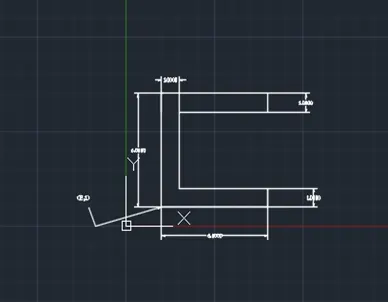
P-1
AIM:-To create Geometries (P-1) by using coordinate systems with line tool.
PROCEDURE:- Open the Auto cad software and we need to set the units and page setup .
Then the following steps are to be followed to create geometry by relative coordinate system.
- First enter the line command.
- Give the first coordinate is@ (2,1) then enter.
- Give the second point is @(6,0) then enter.
- Give the next point is@ (0,1) then enter.
- Give the next point is@(-5,0) then enter.
- Give the next point is @(0,4) then enter.
- Give the next point is @(5,0) then enter.
- Give the next point is @(0,1) then enter.
- Give the next point is @(-6,0) then enter.
- Give the next point is @(0,-6) then enter or use the close command.
- Use DIM command to give the dimensions
P-1
AIM:-To create Geometries (P-1) by using coordinate systems with line tool.
PROCEDURE:- Open the Auto cad software and we need to set the units and page setup .
Then the following steps are to be followed to create geometry by polar coordinate system.
- First enter the line command.
- Give the first coordinate is@ (2,1) then enter.
- Give the second point is @6<90 then enter.
- Give the next point is@ 6<0then enter.
- Give the next point is@1<270 then enter.
- Give the next point is @5<180 then enter.
- Give the next point is @4<270 then enter.
- Give the next point is @5<0 then enter.
- Give the next point is @1<270 then enter.
- Give the next point is @6<180 then enter or use the close command.
- Use DIM command to give the dimensions
AIM:-To create Geometries (P-2) by using coordinate systems with line tool.
PROCEDURE:- open the Auto cad software and we need to set the units and page setup .
Then the following steps are to be followed to create geometry by absolute coordinate system.
- First enter the line command.
- Give the first coordinate is (2,1) then enter.
- Give the second point is (4,8) then enter.
- Give the next point is (7,8) then enter.
- Give the next point is (9,1) then enter.
- Give the next point is (6,1) then enter.
- Give the next point is (6,5) then enter.
- Give the next point is (5,5) then enter.
- Give the next point is (5,1) then enter.
- Give the next point is (2,1) then enter or use the close command.
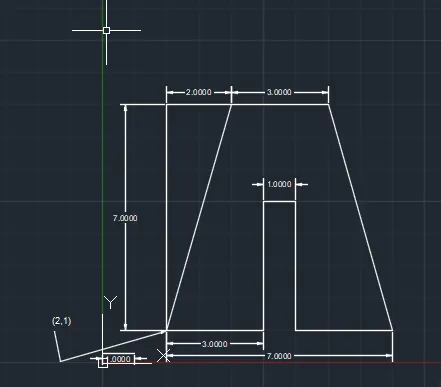
P-2
AIM:-To create Geometries (P-2) by using coordinate systems with line tool.
PROCEDURE:- open the Auto cad software and we need to set the units and page setup .
Then the following steps are to be followed to create geometry by absolute coordinate system.
- First enter the line command.
- Give the first coordinate is (2,1) then enter.
- Give the second point is (4,8) then enter.
- Give the next point is (7,8) then enter.
- Give the next point is (9,1) then enter.
- Give the next point is (6,1) then enter.
- Give the next point is (6,5) then enter.
- Give the next point is (5,5) then enter.
- Give the next point is (5,1) then enter.
- Give the next point is (2,1) then enter or use the close command.
P-2
AIM:-To create Geometries (P-2) by using coordinate systems with line tool.
PROCEDURE:- open the Auto cad software and we need to set the units and page setup .
Then the following steps are to be followed to create geometry by polar coordinate system.
- First enter the line command.
- Give the first coordinate is (2,1) then enter.
- Give the second point is @3<0 then enter.
- Give the next point is @4<90then enter.
- Give the next point is@ 1<0 then enter.
- Give the next point is@4<270 then enter.
- Give the next point is@3<0 then enter.
- Give the next point is@ 7<105 then enter.
- Give the next point is@ 3<180 then enter.
- use the close command.
P-2
AIM:-To create Geometries (P-4) by using coordinate systems with line tool.
PROCEDURE:- open the Auto cad software and we need to set the units and page setup .
Then the following steps are to be followed to create geometry by absolute coordinate system.
- First enter the line command.
- Give the first coordinate is (2,1) then enter.
- Give the second point is (3,1) then enter.
- Give the next point is (3,5) then enter.
- Give the next point is (5,3) then enter.
- Give the next point is (7,5) then enter.
- Give the next point is (7,1) then enter.
- Give the next point is (8,1) then enter.
- Give the next point is (8,8) then enter.
- Give the next point is (7,8) then enter.
- Give the next point is (5,5) then enter.
- Give the next point is (3,8) then enter.
- Give the next point is (2,8) then enter.
- Give the next point is (2,1) then enter or use the close command.
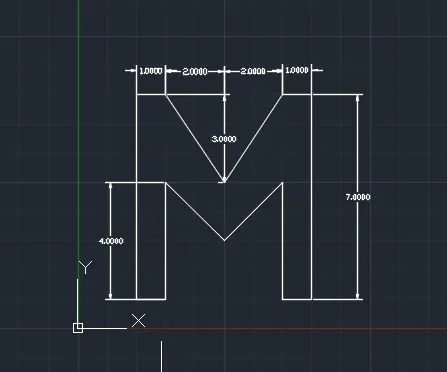
P-5
AIM:-To create Geometries (P-5) by using coordinate systems with line tool.
PROCEDURE:- open the Auto cad software and we need to set the units and page setup .
Then the following steps are to be followed to create geometry by Absolute coordinate system.
- First enter the line command.
- Give the first coordinate is (2,1) then enter.
- Give the second point is (2,9) then enter.
- Give the next point is (9,9) then enter.
- Give the next point is (9,1) then enter.
- Give the next point is (5,1) then enter.
- Give the next point is (5,2) then enter.
- Give the next point is (8,2) then enter.
- Give the next point is (8,8) then enter.
- Give the next point is (3,8) then enter.
- Give the next point is (3,1) then enter.
- Give the next point is (2,1) then enter or use the close command.
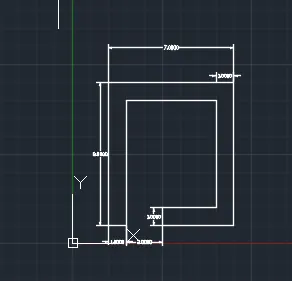
(p-5)
AIM:-To create Geometries (P-7) by using coordinate systems with line tool.
PROCEDURE:- open the Auto cad software and we need to set the units and page setup .
Then the following steps are to be followed to create geometry by Absolute coordinate system.
- First enter the line command.
- Give the first coordinate is (2,1) then enter.
- Give the second point is (10,1) then enter.
- Give the next point is (10,7) then enter.
- Give the next point is (2,7) then enter.
- Use close command and again we use line command give the below points.
- Give the first point is (3,2) then enter.
- Give the next point is (5,2) then enter.
- Give the next point is (5,5) then enter.
- Give the next point is (3,5) then enter. Then use close command .
- Again we use line command give the below points.
- Give the first point is (6,2) then enter.
- Give the next point is (8,2) then enter.
- Give the next point is (8,5) then enter
- Give the next point (6,5) and enter.
- use the close command.
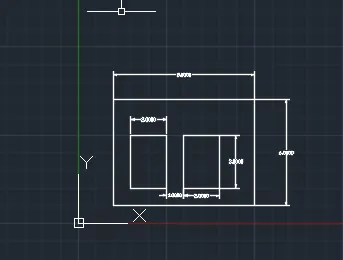
(P-7)
AIM:-To create Geometries (P-8) by using coordinate systems with line tool.
PROCEDURE:- open the Auto cad software and we need to set the units and page setup .
Then the following steps are to be followed to create geometry by Absolute coordinate system.
- First enter the line command.
- Give the first coordinate is (0,0) then enter.
- Give the second point is (10,0) then enter.
- Give the next point is (10,2) then enter.
- Give the next point is (6,2)then enter.
- Give the next point is (6,6) then enter.
- Give the next point is (9,6) then enter.
- Give the next point is (9,8) then enter.
- Give the next point is (1,8) then enter.
- Give the next point is (1,6) then enter.
- Give the next point is (4,6) then enter.
- Give the next point is (4,2) then enter
- Give the next point is (0,0) then enter or use the close command.
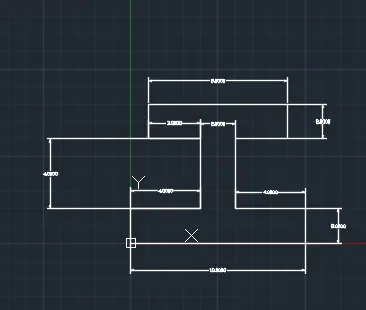
( P-8)
AIM:-To create Geometries (P-9) by using coordinate systems with line tool.
PROCEDURE:- open the Auto cad software and we need to set the units and page setup .
Then the following steps are to be followed to create geometry by Absolute coordinate system.
- First enter the line command.
- Give the first coordinate is (1,1) then enter.
- Give the second point is (1,8) then enter.
- Give the next point is (5,6)then enter.
- Give the next point is (5,4)then enter.
- Give the next point is (2,4) then enter.
- Give the next point is (2,2) then enter.
- Give the next point is (3,2) then enter.
- Give the next point is (3,3) then enter.
- Give the next point is (6,3) then enter.
- Give the next point is (6,1) then enter.
- Give the next point is (1,1) then enter or use the close command.
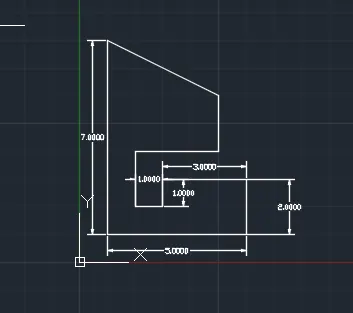
(P-9)
AIM:-To create Geometries (P-10) by using coordinate systems with line tool.
PROCEDURE:- open the Auto cad software and we need to set the units and page setup .
Then the following steps are to be followed to create geometry by Absolute coordinate system.
- First enter the line command.
- Give the first coordinate is (1,1) then enter.
- Give the second point is (3,1) then enter.
- Give the next point is (3,4) then enter.
- Give the next point is (6,4) then enter.
- Give the next point is (6,8) then enter.
- Give the next point is (1,8) then enter
- Use close command and again we use line command give the below points.
- Give the first point is (2,5) then enter.
- Give the next point is (5,5) then enter.
- Give the next point is (5,7) then enter.
Give the next point is (2,7) then enter (or) use close command.
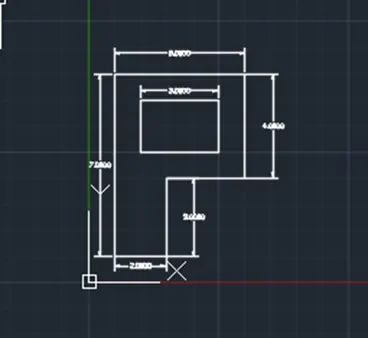
(P-10)
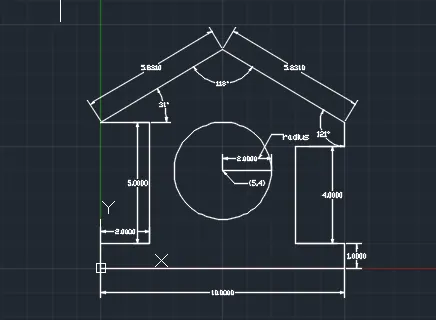
AIM:- To draw the profile wood by using the coordinate system with line and circle command.
PROCEDURE:- open the Auto cad software and we need to set the units and page setup .
Then the following steps are to be followed to create geometry by Absolute coordinate system.
- First enter the line command.
- Give the first coordinate is (0,0) then enter.
- Give the second point is (0,1) then enter.
- Give the next point is (2,1) then enter.
- Give the next point is (2,6) then enter.
- Give the next point is (0,6) then enter.
- Give the next point is (5,9) then enter.
- Give the next point is (10,6) then enter.
- Give the next point is (8,5) then enter.
- Give the next point is (8,1) then enter.
- Give the next point is (10,1) then enter.
- Give the next point is (10,0) then enter.
- Use the close command or point (0,0)
Again we use the circle command and enter then give the center point (5,4)and radius is 2 units.
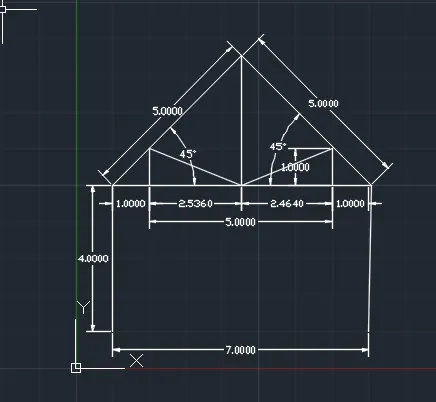
AIM:- To draw A QUEEN POST TRUSS by using the coordinate systems with line command.
PROCEDURE:- open the Auto cad software and we need to set the units and page setup .
Then the following steps are to be followed to create geometry by Absolute coordinate system.
- First enter the line command.
- Give the first coordinate is (1,1) then enter.
- Give the second point is (1,5) then enter.
- Give the next point is @5<45 then enter.
- Give the next point is @5<315 then enter.
- Give the next point is (8,1) then enter.
- Give the next point is (1,5) then enter.
- Give the next point is (2,5) then enter.
- Give the next point is (2,6) then enter.
- Give the next point is (4.536,5) then enter.
- Give the next point is (4.536,8.536) then enter.
- Again ues the line command and give point as (8,5)
- Give the next point is (7,5) then enter.
- Give the next point is (7,6) then enter.
- Give the next point is (4.536,5) then enter.
- Give the next point is (7,5) then enter.
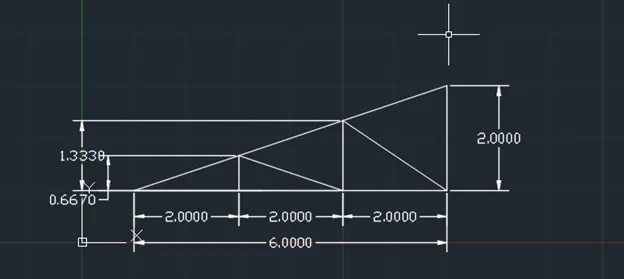
AIM:- To draw MONO PITCH TRUSS by using the coordinate systems with line command.
PROCEDURE:- open the Auto cad software and we need to set the units and page setup .
Then the following steps are to be followed to create geometry by Absolute coordinate system.
- First enter the line command.
- Give the first coordinate is (3,1) then enter.
- Give the second point is (1,1) then enter.
- Give the next point is (3,1.667) then enter.
- Give the next point is (3,1) then enter.
- Give the next point is (5,1) then enter.
- Give the next point is (5,2.333) then enter.
- Give the next point is (3,1.667) then enter.
- Give the next point is (5,1) then enter.
- Give the next point is (7,1) then enter.
- Give the next point is (7,3) then enter.
- Give the next point is (5,2.333) then enter.
- Give the next point is (7,1) then enter.
- EXIT
--------------- THANKING YOU MADAM