Creation of geometries by Coordinate system methods using AutoCad
Create the geometries from P1 to P2 using all the coordinates system methods. You need to use the Line tool to create the geometries. Where required you need to use the circle tool.
Please read the drawings and find out the missing dimensions before working on the sketches.
Note: Use the Imperial Template and the Decimal Units to draft the features. Dimensions are there for
references.
P - 1 ( ABSOLUTE CO-ORDINATE SYSTEM )
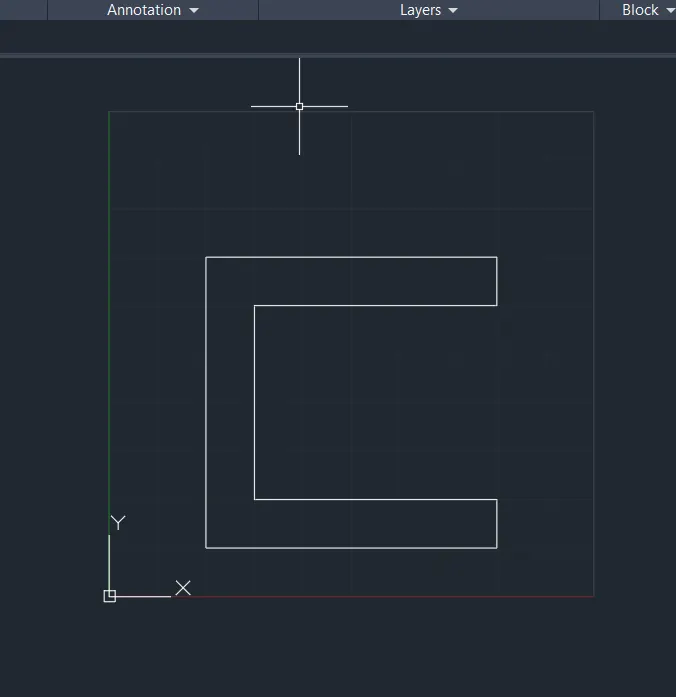
LINE Command: L Enter
Specify first point: 2,1 Enter
Specify next point or [Undo]: 8,1 Enter
Specify next point or [eXit/Undo]: 8,2 Enter
Specify next point or [Close/eXit/Undo]: 3,2 Enter
Specify next point or [Close/eXit/Undo]: 3,6 Enter
Specify next point or [Close/eXit/Undo]: 8,6 Enter
Specify next point or [Close/eXit/Undo]: 8,7 Enter
Specify next point or [Close/eXit/Undo]: 2,7 Enter
Specify next point or [Close/eXit/Undo]: 2,1 Enter
Specify next point or [Close/eXit/Undo]: Esc / Enter
P - 1 ( RELATIVE RECTANGULAR CO-ORDINATE SYSTEM )
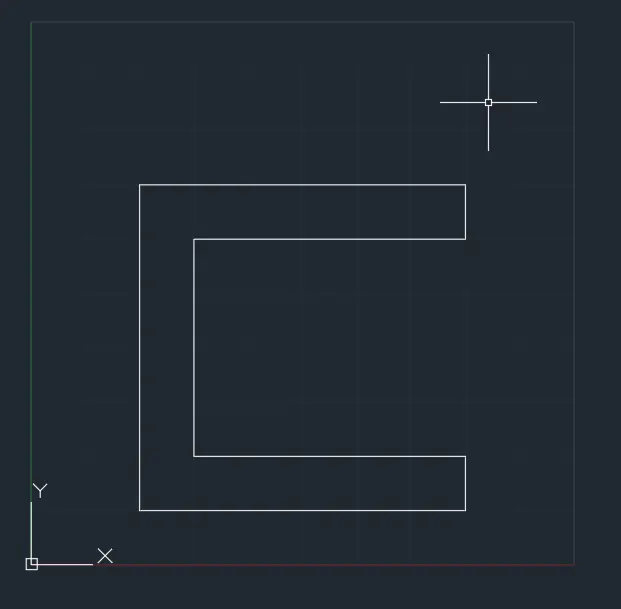
LINE Command: L Enter
Specify first point: 2,1 Enter
Specify next point or [Undo]: @6,0 Enter
Specify next point or [eXit/Undo]: @0,1 Enter
Specify next point or [Close/eXit/Undo]: @-5,0 Enter
Specify next point or [Close/eXit/Undo]: @0,4 Enter
Specify next point or [Close/eXit/Undo]: @5,0 Enter
Specify next point or [Close/eXit/Undo]: @0,1 Enter
Specify next point or [Close/eXit/Undo]: @-6,0 Enter
Specify next point or [Close/eXit/Undo]: @0,-6 Enter
Specify next point or [Close/eXit/Undo]: Esc / Enter
P - 1 ( RELATIVE POLAR CO-ORDINATE SYSTEM )
LINE Command: L Enter
Specify first point: 2,1 Enter
Specify next point or [Undo]: @6<0 Enter
Specify next point or [eXit/Undo]: @1<90 Enter
Specify next point or [Close/eXit/Undo]: @5<180 Enter
Specify next point or [Close/eXit/Undo]: @4<90 Enter
Specify next point or [Close/eXit/Undo]: @5<0 Enter
Specify next point or [Close/eXit/Undo]: @1<90 Enter
Specify next point or [Close/eXit/Undo]: @6<180 Enter
Specify next point or [Close/eXit/Undo]: @6<270 Enter
Specify next point or [Close/eXit/Undo]: Esc / Enter
P - 2 ( ABSOLUTE CO-ORDINATE SYSTEM )
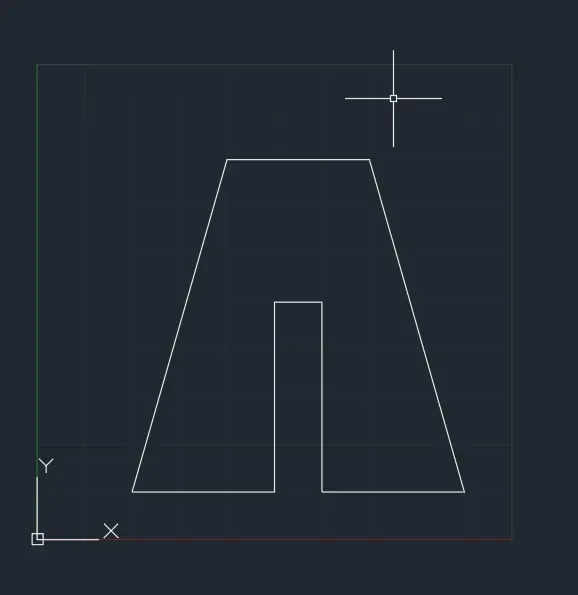
LINE Command: L Enter
Specify first point: 2,1 Enter
Specify next point or [Undo]: 5,1 Enter
Specify next point or [eXit/Undo]: 5,5 Enter
Specify next point or [Close/eXit/Undo]: 6,5 Enter
Specify next point or [Close/eXit/Undo]: 6,1 Enter
Specify next point or [Close/eXit/Undo]: 9,1 Enter
Specify next point or [Close/eXit/Undo]: 7,8 Enter
Specify next point or [Close/eXit/Undo]: 4,8 Enter
Specify next point or [Close/eXit/Undo]: 2,1 Enter
Specify next point or [Close/eXit/Undo]: Esc / Enter
P - 2 ( RELATIVE RECTANGULAR CO-ORDINATE SYSTEM )
LINE Command: L Enter
Specify first point: 2,1 Enter
Specify next point or [Undo]: @3,0 Enter
Specify next point or [eXit/Undo]: @0,4 Enter
Specify next point or [Close/eXit/Undo]: @1,0 Enter
Specify next point or [Close/eXit/Undo]: @0,-4 Enter
Specify next point or [Close/eXit/Undo]: @3,0 Enter
Specify next point or [Close/eXit/Undo]: @-2,7 Enter
Specify next point or [Close/eXit/Undo]: @-3,0 Enter
Specify next point or [Close/eXit/Undo]: @-2,-7 Enter
Specify next point or [Close/eXit/Undo]: Esc / Enter
P - 3
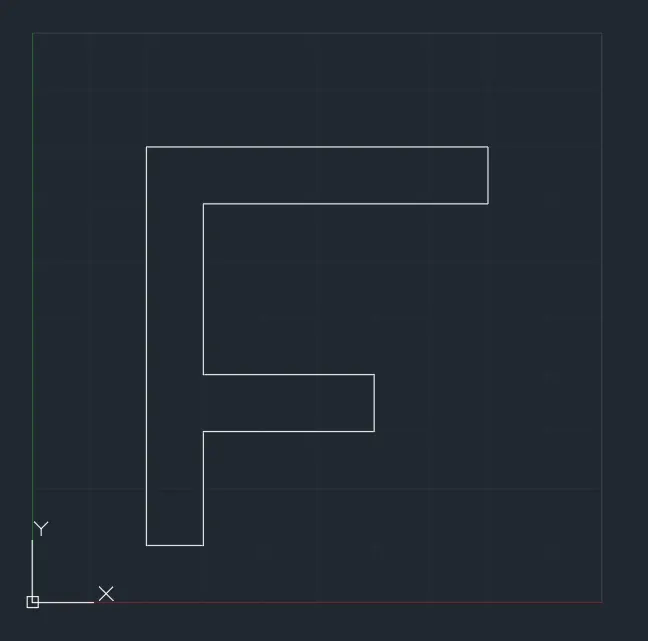
LINE Command: L Enter
Specify first point: 2,1 Enter
Specify next point or [Undo]: 3,1 Enter
Specify next point or [eXit/Undo]: 3,3 Enter
Specify next point or [Close/eXit/Undo]: 6,3 Enter
Specify next point or [Close/eXit/Undo]: 6,4 Enter
Specify next point or [Close/eXit/Undo]: 3,4 Enter
Specify next point or [Close/eXit/Undo]: 3,7 Enter
Specify next point or [Close/eXit/Undo]: 8,7 Enter
Specify next point or [Close/eXit/Undo]: 8,8 Enter
Specify next point or [Close/eXit/Undo]: 2,8 Enter
Specify next point or [Close/eXit/Undo]: 2,1 Enter
Specify next point or [Close/eXit/Undo]: Esc / Enter
P - 4
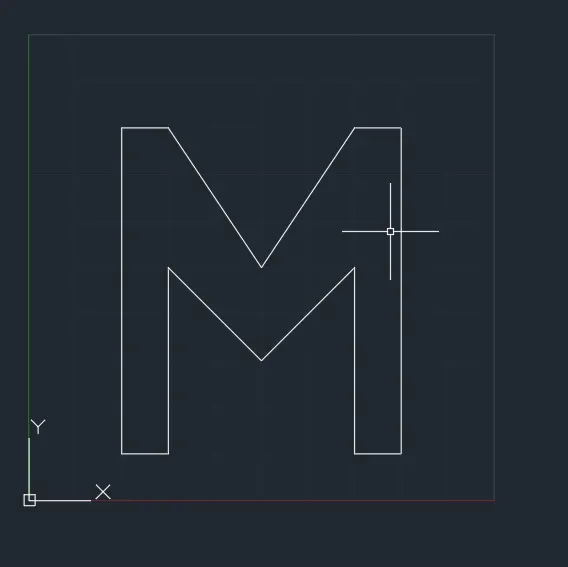
LINE Command: L Enter
Specify first point: 2,1 Enter
Specify next point or [Undo]: 3,1 Enter
Specify next point or [eXit/Undo]: 3,5 Enter
Specify next point or [Close/eXit/Undo]: 5,3 Enter
Specify next point or [Close/eXit/Undo]: 7,5 Enter
Specify next point or [Close/eXit/Undo]: 7,1 Enter
Specify next point or [Close/eXit/Undo]: 8,1 Enter
Specify next point or [Close/eXit/Undo]: 8,8 Enter
Specify next point or [Close/eXit/Undo]: 7,8 Enter
Specify next point or [Close/eXit/Undo]: 5,5 Enter
Specify next point or [Close/eXit/Undo]: 3,8 Enter
Specify next point or [Close/eXit/Undo]: 2,8 Enter
Specify next point or [Close/eXit/Undo]: 2,1 Enter
Specify next point or [Close/eXit/Undo]: Esc / Enter
P - 5
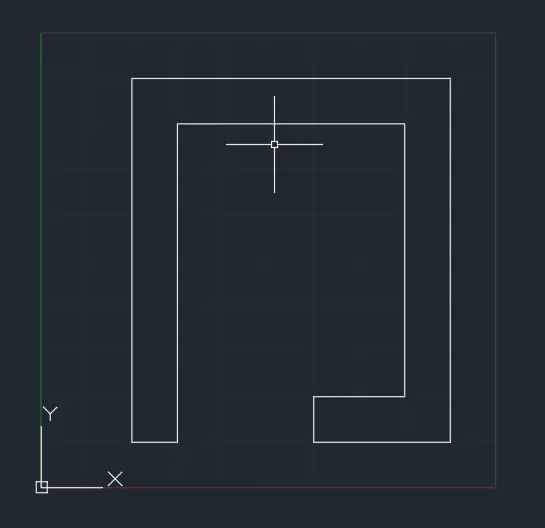
LINE Command: L Enter
Specify first point: 2,1 Enter
Specify next point or [Undo]: 3,1 Enter
Specify next point or [eXit/Undo]: 3,8 Enter
Specify next point or [Close/eXit/Undo]: 8,8 Enter
Specify next point or [Close/eXit/Undo]: 8,2 Enter
Specify next point or [Close/eXit/Undo]: 6,2 Enter
Specify next point or [Close/eXit/Undo]: 6,1 Enter
Specify next point or [Close/eXit/Undo]: 9,1 Enter
Specify next point or [Close/eXit/Undo]: 9,9 Enter
Specify next point or [Close/eXit/Undo]: 2,9 Enter
Specify next point or [Close/eXit/Undo]: 2,1 Enter
Specify next point or [Close/eXit/Undo]: Esc / Enter
P - 6
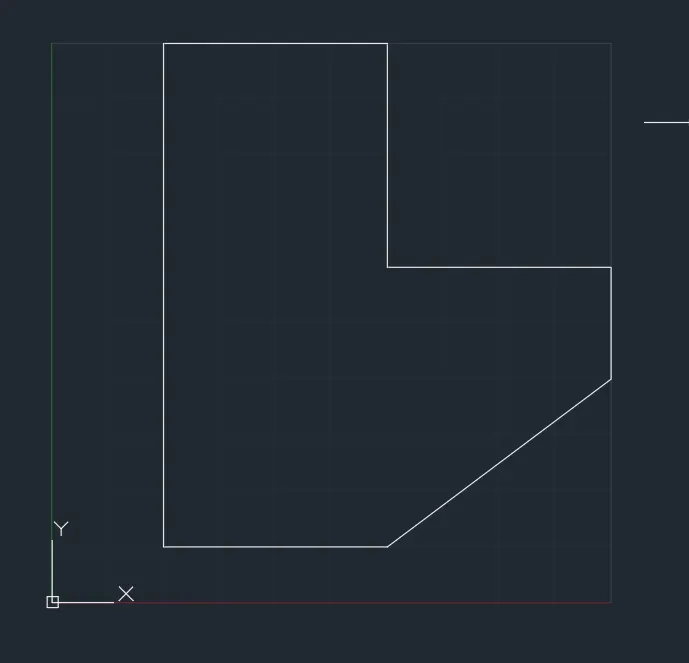
LINE Command: L Enter
Specify first point: 2,1 Enter
Specify next point or [Undo]: 6,1 Enter
Specify next point or [eXit/Undo]: 10,4 Enter
Specify next point or [Close/eXit/Undo]: 10,6 Enter
Specify next point or [Close/eXit/Undo]: 6,6 Enter
Specify next point or [Close/eXit/Undo]: 6,10 Enter
Specify next point or [Close/eXit/Undo]: 2,10 Enter
Specify next point or [Close/eXit/Undo]: 2,1 Enter
Specify next point or [Close/eXit/Undo]: Esc / Enter
P - 7
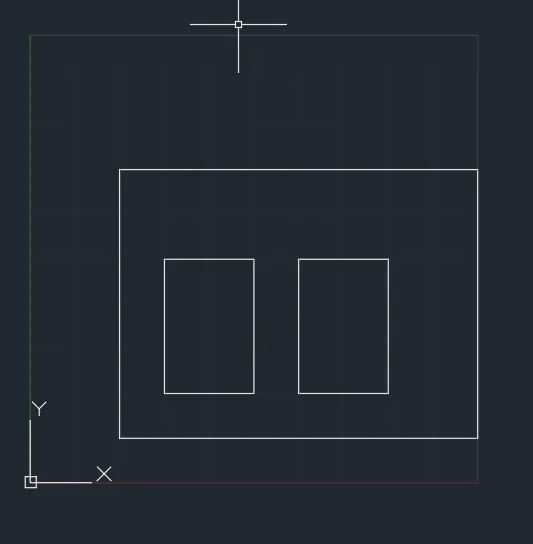
LINE Command: L Enter
Specify first point: 2,1 Enter
Specify next point or [Undo]: 10,1 Enter
Specify next point or [eXit/Undo]: 10,7 Enter
Specify next point or [Close/eXit/Undo]: 2,7 Enter
Specify next point or [Close/eXit/Undo]: 2,1 Enter
Specify next point or [Close/eXit/Undo]: Esc / Enter
LINE Command: L Enter
Specify first point: 3,2 Enter
Specify next point or [Undo]: 5,2 Enter
Specify next point or [eXit/Undo]: 5,5 Enter
Specify next point or [Close/eXit/Undo]: 3,5 Enter
Specify next point or [Close/eXit/Undo]: 3,2 Enter
Specify next point or [Close/eXit/Undo]: Esc / Enter
LINE Command: L Enter
Specify first point: 6,2 Enter
Specify next point or [Undo]: 8,2 Enter
Specify next point or [eXit/Undo]: 8,5 Enter
Specify next point or [Close/eXit/Undo]: 6,5 Enter
Specify next point or [Close/eXit/Undo]: 6,2Enter
Specify next point or [Close/eXit/Undo]: Esc / Enter
P - 8
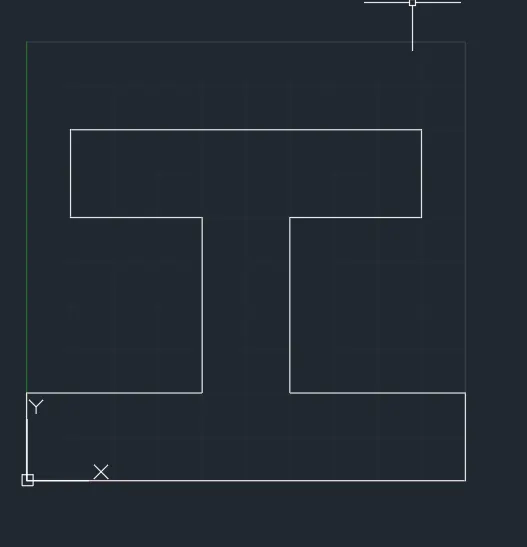
LINE Command: L Enter
Specify first point: 0,0 Enter
Specify next point or [Undo]: 10,0 Enter
Specify next point or [eXit/Undo]: 10,2 Enter
Specify next point or [Close/eXit/Undo]: 6,2 Enter
Specify next point or [Close/eXit/Undo]: 6,6 Enter
Specify next point or [Close/eXit/Undo]: 9,6 Enter
Specify next point or [Close/eXit/Undo]: 9,8 Enter
Specify next point or [Close/eXit/Undo]: 1,8 Enter
Specify next point or [Close/eXit/Undo]: 1,6 Enter
Specify next point or [Close/eXit/Undo]: 4,6 Enter
Specify next point or [Close/eXit/Undo]: 4,2 Enter
Specify next point or [Close/eXit/Undo]: 0,2 Enter
Specify next point or [Close/eXit/Undo]: 0,0 Enter
Specify next point or [Close/eXit/Undo]: Esc / Enter
P - 9
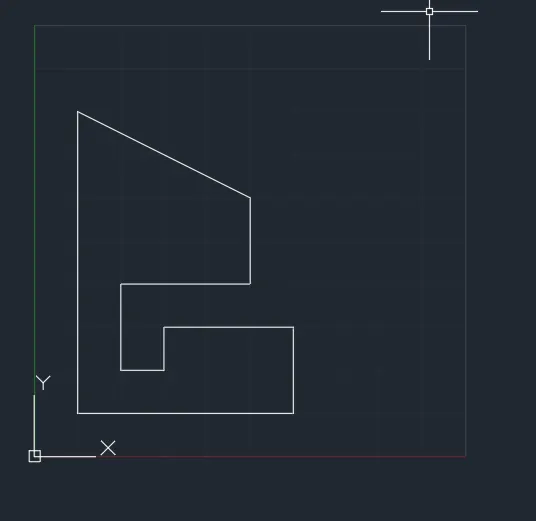
LINE Command: L Enter
Specify first point: 1,1 Enter
Specify next point or [Undo]: 6,1 Enter
Specify next point or [eXit/Undo]: 6,3 Enter
Specify next point or [Close/eXit/Undo]: 3,3 Enter
Specify next point or [Close/eXit/Undo]: 3,2 Enter
Specify next point or [Close/eXit/Undo]: 2,2 Enter
Specify next point or [Close/eXit/Undo]: 2,4 Enter
Specify next point or [Close/eXit/Undo]: 5,4 Enter
Specify next point or [Close/eXit/Undo]: 5,6 Enter
Specify next point or [Close/eXit/Undo]: 1,8 Enter
Specify next point or [Close/eXit/Undo]: 1,1 Enter
Specify next point or [Close/eXit/Undo]: Esc / Enter
P - 10
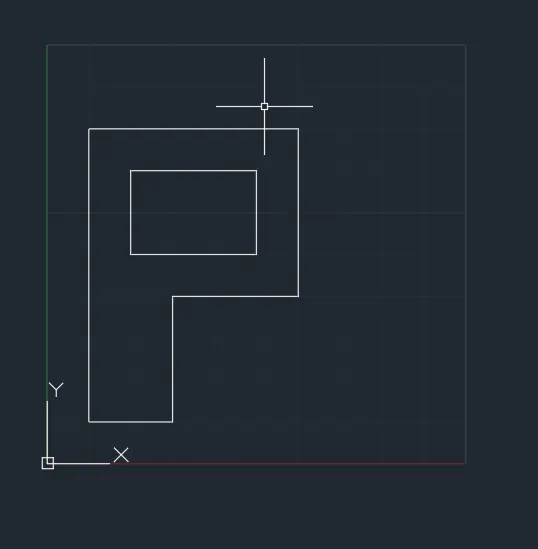
LINE Command: L Enter
Specify first point: 1,1 Enter
Specify next point or [Undo]: 3,1 Enter
Specify next point or [eXit/Undo]: 3,4 Enter
Specify next point or [Close/eXit/Undo]: 6,4 Enter
Specify next point or [Close/eXit/Undo]: 6,8 Enter
Specify next point or [Close/eXit/Undo]: 1,8 Enter
Specify next point or [Close/eXit/Undo]: 1,1 Enter
Specify next point or [Close/eXit/Undo]: Esc / Enter
LINE Command: L Enter
Specify first point: 2,5 Enter
Specify next point or [Undo]: 5,5 Enter
Specify next point or [eXit/Undo]: 5,7 Enter
Specify next point or [Close/eXit/Undo]: 2,7 Enter
Specify next point or [Close/eXit/Undo]: 2,5 Enter
Specify next point or [Close/eXit/Undo]: Esc / Enter
PROFILE - WOOD
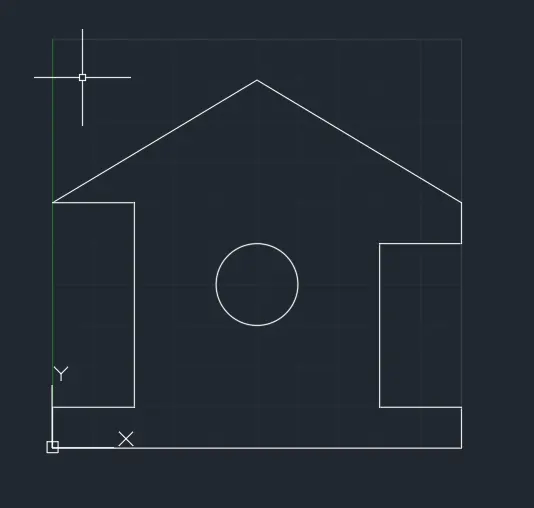
LINE Command: L Enter
Specify first point: 0,0 Enter
Specify next point or [Undo]: 10,0 Enter
Specify next point or [eXit/Undo]: 10,1 Enter
Specify next point or [Close/eXit/Undo]: 8,1 Enter
Specify next point or [Close/eXit/Undo]: 8,5 Enter
Specify next point or [Close/eXit/Undo]: 10,5 Enter
Specify next point or [Close/eXit/Undo]: 10,6 Enter
Specify next point or [Close/eXit/Undo]: 5,9 Enter
Specify next point or [Close/eXit/Undo]: 0,6 Enter
Specify next point or [Close/eXit/Undo]: 2,6 Enter
Specify next point or [Close/eXit/Undo]: 2,1 Enter
Specify next point or [Close/eXit/Undo]: 0,1 Enter
Specify next point or [Close/eXit/Undo]: 0,0 Enter
Specify next point or [Close/eXit/Undo]: Enter / Esc
CIRCLE Command: C Enter
Specify center point for circle or [3P/2P/Ttr (tan tan radius)]: 5,4 Enter
Specify radius of circle or [Diameter]: 1 Enter
QUEEN POST TRUSS
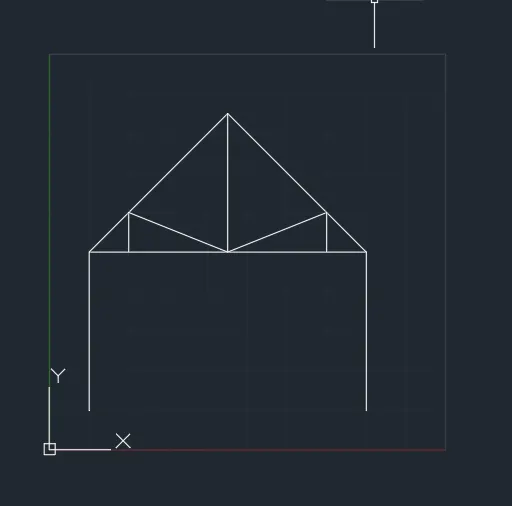
LINE Command: L Enter
Specify first point: 1,1 Enter
Specify next point or [Undo]: 1,5 Enter
Specify next point or [eXit/Undo]: 8,5 Enter
Specify next point or [Close/eXit/Undo]: 8,1 Enter
Specify next point or [Close/eXit/Undo]: Esc / Enter
LINE Command: L Enter
Specify first point: 1,5 Enter
Specify next point or [Undo]: 4.5,8.5 Enter
Specify next point or [eXit/Undo]: 8,5 Enter
Specify next point or [Close/eXit/Undo]: Esc / Enter
LINE Command: L Enter
Specify first point: 4.5,5 Enter
Specify next point or [Undo]: 4.5,8.5 Enter
Specify next point or [eXit/Undo]: Esc / Enter
LINE Command: L Enter
Specify first point: 2,5 Enter
Specify next point or [Undo]: 2,6 Enter
Specify next point or [eXit/Undo]: 4.5,5 Enter
Specify next point or [Close/eXit/Undo]: 7,6 Enter
Specify next point or [Close/eXit/Undo]: 7,5 Enter
Specify next point or [Close/eXit/Undo]: Esc / Enter
MONO PITCH
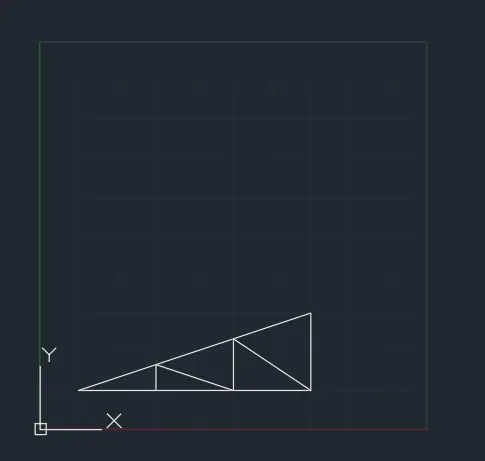
LINE Command: L Enter
Specify first point: 1,1 Enter
Specify next point or [Undo]: 7,1 Enter
Specify next point or [eXit/Undo]: 7,3 Enter
Specify next point or [Close/eXit/Undo]: 1,1 Enter
Specify next point or [Close/eXit/Undo]: Esc / Enter
LINE Command: L Enter
Specify first point: 3,1 Enter
Specify next point or [Undo]: 3,1.667 Enter
Specify next point or [eXit/Undo]: 5,1 Enter
Specify next point or [Close/eXit/Undo]: 5,2.333 Enter
Specify next point or [Close/eXit/Undo]: 7,1 Enter
Specify next point or [Close/eXit/Undo]: Esc / Enter
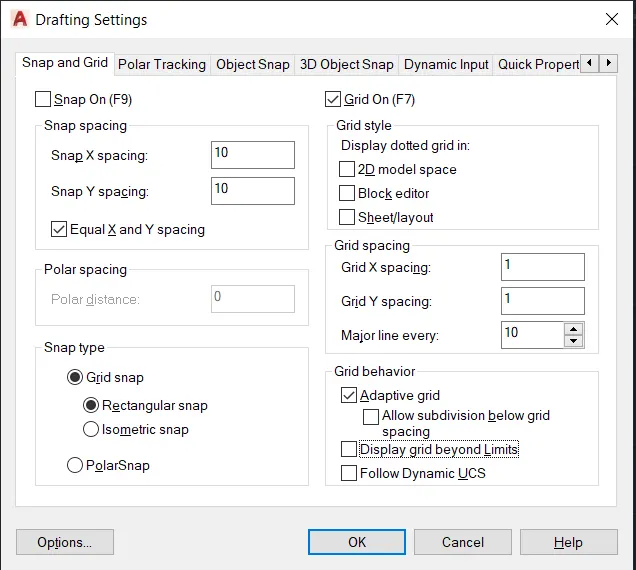
GRID
Drafting Setting Command DS Emter
Go to Snap and Grid
Go to Grid spacing
Grid X Spacing - 1
Grid Y Spacing - 1
Turn off / uncheck the Display grid beyond limits
Finaly click on OK
LIMITS Command: LIMITS Enter
Reset Model space limits:
Specify lower left corner or [ON/OFF] <0.0000,0.0000>: 0,0 Enter
Specify upper right corner <420.0000,297.0000>: 10,10 Enter