Creating a Residence Layout, Seating plan, Toilet and Utility room plan using AutoCad
1) Residence Plan:
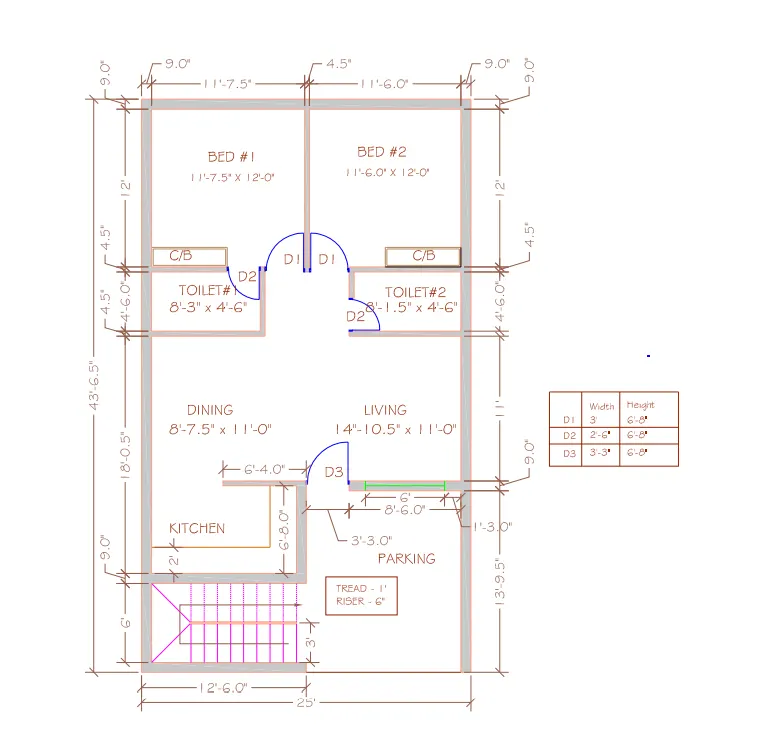
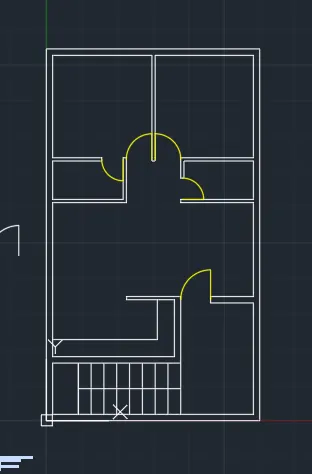
Sketch the layout of a residence as shown in the Figure 1. Consider all dimensions as reference to sketch the unit plan. Also the text in the layout are only for reference. Assume the missing dimensions. Also, refer the schedule for size of the doors.
Command: REC RECTANG
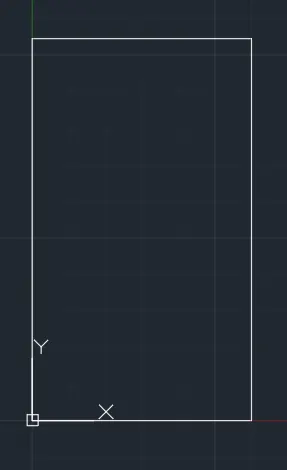
Specify first corner point or [Chamfer/Elevation/Fillet/Thickness/Width]: 0,0
Specify other corner point or [Area/Dimensions/Rotation]: d
Specify length for rectangles <43'-6.50">: 25'
Specify width for rectangles <25'-0.00">: 43'6.5"
Specify other corner point or [Area/Dimensions/Rotation]:
Command: O OFFSET
Current settings: Erase source=No Layer=Source OFFSETGAPTYPE=0
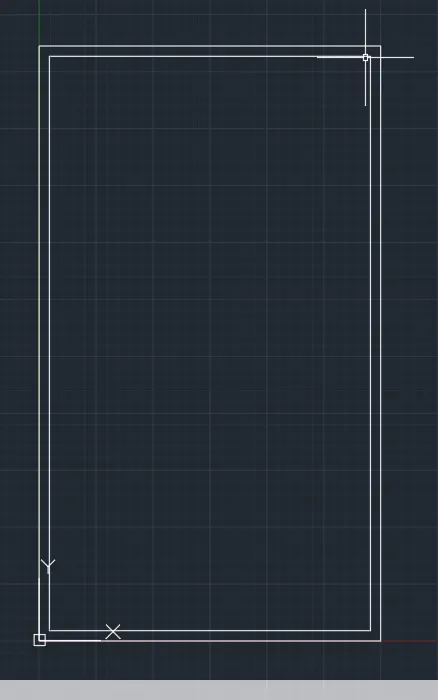
Specify offset distance or [Through/Erase/Layer] <Through>: 9"
Select object to offset or [Exit/Undo] <Exit>:
Specify point on side to offset or [Exit/Multiple/Undo] <Exit>:
Select object to offset or [Exit/Undo] <Exit>: *Cancel*
Command: o OFFSET
Current settings: Erase source=No Layer=Source OFFSETGAPTYPE=0
Specify offset distance or [Through/Erase/Layer] <0'-9.00">: 12'
Select object to offset or [Exit/Undo] <Exit>:
Specify point on side to offset or [Exit/Multiple/Undo] <Exit>:
Select object to offset or [Exit/Undo] <Exit>:
Command:
OFFSET
Current settings: Erase source=No Layer=Source OFFSETGAPTYPE=0
Specify offset distance or [Through/Erase/Layer] <12'-0.00">: 4.5"
Select object to offset or [Exit/Undo] <Exit>:
Specify point on side to offset or [Exit/Multiple/Undo] <Exit>:
Select object to offset or [Exit/Undo] <Exit>: *Cancel*
Command: tr TRIM
Current settings: Projection=UCS, Edge=None
Select cutting edges ...
Select objects or <select all>:
Select object to trim or shift-select to extend or
[Fence/Crossing/Project/Edge/eRase]:
Does not intersect with the cutting edge.
Select object to trim or shift-select to extend or
[Fence/Crossing/Project/Edge/eRase]:
Select object to trim or shift-select to extend or
[Fence/Crossing/Project/Edge/eRase/Undo]:
Does not intersect with the cutting edge.
Select object to trim or shift-select to extend or
[Fence/Crossing/Project/Edge/eRase/Undo]:
Select object to trim or shift-select to extend or
[Fence/Crossing/Project/Edge/eRase/Undo]: *Cancel*
Command: O
OFFSET
Current settings: Erase source=No Layer=Source OFFSETGAPTYPE=0
Specify offset distance or [Through/Erase/Layer] <0'-4.50">: 11'7.5"
Select object to offset or [Exit/Undo] <Exit>:
Specify point on side to offset or [Exit/Multiple/Undo] <Exit>:
Select object to offset or [Exit/Undo] <Exit>:
Command:
OFFSET
Current settings: Erase source=No Layer=Source OFFSETGAPTYPE=0
Specify offset distance or [Through/Erase/Layer] <11'-7.50">: 11'6"
Select object to offset or [Exit/Undo] <Exit>:
Specify point on side to offset or [Exit/Multiple/Undo] <Exit>:
Select object to offset or [Exit/Undo] <Exit>: *Cancel*
Command: TR TRIM
Current settings: Projection=UCS, Edge=None
Select cutting edges ...
Select objects or <select all>:
Select object to trim or shift-select to extend or
[Fence/Crossing/Project/Edge/eRase]:
Does not intersect with the cutting edge.
Select object to trim or shift-select to extend or
[Fence/Crossing/Project/Edge/eRase]:
Does not intersect with the cutting edge.
Select object to trim or shift-select to extend or
[Fence/Crossing/Project/Edge/eRase]:
Select object to trim or shift-select to extend or
[Fence/Crossing/Project/Edge/eRase/Undo]:
Does not intersect with the cutting edge.
Select object to trim or shift-select to extend or
[Fence/Crossing/Project/Edge/eRase/Undo]:
Select object to trim or shift-select to extend or
Command: O
OFFSET
Current settings: Erase source=No Layer=Source OFFSETGAPTYPE=0
Specify offset distance or [Through/Erase/Layer] <0'-4.50">: 8'3"
Select object to offset or [Exit/Undo] <Exit>:
Specify point on side to offset or [Exit/Multiple/Undo] <Exit>:
Select object to offset or [Exit/Undo] <Exit>:
Command:
OFFSET
Current settings: Erase source=No Layer=Source OFFSETGAPTYPE=0
Specify offset distance or [Through/Erase/Layer] <8'-3.00">: 8'1.5"
Select object to offset or [Exit/Undo] <Exit>:
Specify point on side to offset or [Exit/Multiple/Undo] <Exit>:
Select object to offset or [Exit/Undo] <Exit>:
Command:
OFFSET
Current settings: Erase source=No Layer=Source OFFSETGAPTYPE=0
Specify offset distance or [Through/Erase/Layer] <8'-1.50">: 4.5"
Select object to offset or [Exit/Undo] <Exit>:
Specify point on side to offset or [Exit/Multiple/Undo] <Exit>:
Select object to offset or [Exit/Undo] <Exit>:
Specify point on side to offset or [Exit/Multiple/Undo] <Exit>:
Select object to offset or [Exit/Undo] <Exit>: *Cancel*
Command: TR TRIM
Current settings: Projection=UCS, Edge=None
Select cutting edges ...
Select objects or <select all>:
Select object to trim or shift-select to extend or
[Fence/Crossing/Project/Edge/eRase]:
Does not intersect with the cutting edge.
Select object to trim or shift-select to extend or
[Fence/Crossing/Project/Edge/eRase]:
Select object to trim or shift-select to extend or
[Fence/Crossing/Project/Edge/eRase]: Specify opposite corner:
Select object to trim or shift-select to extend or
[Fence/Crossing/Project/Edge/eRase/Undo]:
Does not intersect with the cutting edge.
Select object to trim or shift-select to extend or
[Fence/Crossing/Project/Edge/eRase/Undo]:
Select object to trim or shift-select to extend or
[Fence/Crossing/Project/Edge/eRase/Undo]: Specify opposite corner:
Select object to trim or shift-select to extend or
[Fence/Crossing/Project/Edge/eRase/Undo]:
Does not intersect with the cutting edge.
Select object to trim or shift-select to extend or
[Fence/Crossing/Project/Edge/eRase/Undo]:
Select object to trim or shift-select to extend or
[Fence/Crossing/Project/Edge/eRase/Undo]:
Does not intersect with the cutting edge.
Select object to trim or shift-select to extend or
[Fence/Crossing/Project/Edge/eRase/Undo]:
Select object to trim or shift-select to extend or
[Fence/Crossing/Project/Edge/eRase/Undo]:
Does not intersect with the cutting edge.
Select object to trim or shift-select to extend or
[Fence/Crossing/Project/Edge/eRase/Undo]:
Does not intersect with the cutting edge.
Select object to trim or shift-select to extend or
[Fence/Crossing/Project/Edge/eRase/Undo]:
Select object to trim or shift-select to extend or
[Fence/Crossing/Project/Edge/eRase/Undo]: *Cancel*
Command: O
OFFSET
Current settings: Erase source=No Layer=Source OFFSETGAPTYPE=0
Specify offset distance or [Through/Erase/Layer] <0'-9.00">: 8'6"
Select object to offset or [Exit/Undo] <Exit>:
Specify point on side to offset or [Exit/Multiple/Undo] <Exit>:
Select object to offset or [Exit/Undo] <Exit>:
Command:
OFFSET
Current settings: Erase source=No Layer=Source OFFSETGAPTYPE=0
Specify offset distance or [Through/Erase/Layer] <8'-6.00">: 9"
Select object to offset or [Exit/Undo] <Exit>:
Specify point on side to offset or [Exit/Multiple/Undo] <Exit>:
Select object to offset or [Exit/Undo] <Exit>: *Cancel*
Command: O
OFFSET
Current settings: Erase source=No Layer=Source OFFSETGAPTYPE=0
Specify offset distance or [Through/Erase/Layer] <0'-9.00">: 6'
Select object to offset or [Exit/Undo] <Exit>:
Specify point on side to offset or [Exit/Multiple/Undo] <Exit>:
Select object to offset or [Exit/Undo] <Exit>:
Command:
OFFSET
Current settings: Erase source=No Layer=Source OFFSETGAPTYPE=0
Specify offset distance or [Through/Erase/Layer] <6'-0.00">: 9"
Select object to offset or [Exit/Undo] <Exit>:
Specify point on side to offset or [Exit/Multiple/Undo] <Exit>:
Select object to offset or [Exit/Undo] <Exit>:
Command:
OFFSET
Current settings: Erase source=No Layer=Source OFFSETGAPTYPE=0
Specify offset distance or [Through/Erase/Layer] <0'-9.00">: 6'8"
Select object to offset or [Exit/Undo] <Exit>:
Specify point on side to offset or [Exit/Multiple/Undo] <Exit>:
Select object to offset or [Exit/Undo] <Exit>: *Cancel*
Command: TR TRIM
Current settings: Projection=UCS, Edge=None
Select cutting edges ...
Select objects or <select all>:
Select object to trim or shift-select to extend or
[Fence/Crossing/Project/Edge/eRase]:
Select object to trim or shift-select to extend or
[Fence/Crossing/Project/Edge/eRase/Undo]:
Select object to trim or shift-select to extend or
[Fence/Crossing/Project/Edge/eRase/Undo]:
Select object to trim or shift-select to extend or
[Fence/Crossing/Project/Edge/eRase/Undo]:
Select object to trim or shift-select to extend or
[Fence/Crossing/Project/Edge/eRase/Undo]:
Command:
TRIM
Current settings: Projection=UCS, Edge=None
Select cutting edges ...
Select objects or <select all>:
Select object to trim or shift-select to extend or
[Fence/Crossing/Project/Edge/eRase]:
Select object to trim or shift-select to extend or
[Fence/Crossing/Project/Edge/eRase/Undo]: Specify opposite corner:
Select object to trim or shift-select to extend or
[Fence/Crossing/Project/Edge/eRase/Undo]:
Select object to trim or shift-select to extend or
[Fence/Crossing/Project/Edge/eRase/Undo]: Specify opposite corner:
Select object to trim or shift-select to extend or
[Fence/Crossing/Project/Edge/eRase/Undo]:
Select object to trim or shift-select to extend or
[Fence/Crossing/Project/Edge/eRase/Undo]:
Select object to trim or shift-select to extend or
[Fence/Crossing/Project/Edge/eRase/Undo]:
Does not intersect with the cutting edge.
Select object to trim or shift-select to extend or
[Fence/Crossing/Project/Edge/eRase/Undo]:
Select object to trim or shift-select to extend or
[Fence/Crossing/Project/Edge/eRase/Undo]: *Cancel*
Command: O
OFFSET
Current settings: Erase source=No Layer=Source OFFSETGAPTYPE=0
Specify offset distance or [Through/Erase/Layer] <6'-8.00">: 6'4"
Select object to offset or [Exit/Undo] <Exit>:
Specify point on side to offset or [Exit/Multiple/Undo] <Exit>:
Select object to offset or [Exit/Undo] <Exit>: *Cancel*
Command: TR TRIM
Current settings: Projection=UCS, Edge=None
Select cutting edges ...
Select objects or <select all>:
Select object to trim or shift-select to extend or
[Fence/Crossing/Project/Edge/eRase]:
Select object to trim or shift-select to extend or
[Fence/Crossing/Project/Edge/eRase/Undo]:
Select object to trim or shift-select to extend or
[Fence/Crossing/Project/Edge/eRase/Undo]:
Select object to trim or shift-select to extend or
[Fence/Crossing/Project/Edge/eRase/Undo]: Specify opposite corner:
Select object to trim or shift-select to extend or
[Fence/Crossing/Project/Edge/eRase/Undo]: *Cancel*
Command: Specify opposite corner or [Fence/WPolygon/CPolygon]:
Command: _.erase 1 found
Command: TR TRIM
Current settings: Projection=UCS, Edge=None
Select cutting edges ...
Select objects or <select all>:
Select object to trim or shift-select to extend or
[Fence/Crossing/Project/Edge/eRase]:
Select object to trim or shift-select to extend or
[Fence/Crossing/Project/Edge/eRase]: Specify opposite corner:
Select object to trim or shift-select to extend or
[Fence/Crossing/Project/Edge/eRase/Undo]: *Cancel*
Command: O
OFFSET
Current settings: Erase source=No Layer=Source OFFSETGAPTYPE=0
Specify offset distance or [Through/Erase/Layer] <6'-4.00">: 2'
Select object to offset or [Exit/Undo] <Exit>:
Specify point on side to offset or [Exit/Multiple/Undo] <Exit>:
Select object to offset or [Exit/Undo] <Exit>:
Specify point on side to offset or [Exit/Multiple/Undo] <Exit>:
Select object to offset or [Exit/Undo] <Exit>: *Cancel*
Command: F FILLET
Current settings: Mode = TRIM, Radius = 0'-0.00"
Select first object or [Undo/Polyline/Radius/Trim/Multiple]:
Select second object or shift-select to apply corner or [Radius]:
Command: L LINE
Specify first point:
Specify next point or [Undo]:
Specify next point or [eXit/Undo]: *Cancel*
Command: O OFFSET
Current settings: Erase source=No Layer=Source OFFSETGAPTYPE=0
Specify offset distance or [Through/Erase/Layer] <2'-0.00">: 9"
Select object to offset or [Exit/Undo] <Exit>:
Specify point on side to offset or [Exit/Multiple/Undo] <Exit>:
Select object to offset or [Exit/Undo] <Exit>:
Command: OFFSET
Current settings: Erase source=No Layer=Source OFFSETGAPTYPE=0
Specify offset distance or [Through/Erase/Layer] <0'-9.00">: *Cancel*
Command: Specify opposite corner or [Fence/WPolygon/CPolygon]:
Command: _.erase 1 found
Command: O OFFSET
Current settings: Erase source=No Layer=Source OFFSETGAPTYPE=0
Specify offset distance or [Through/Erase/Layer] <0'-9.00">: 3'
Select object to offset or [Exit/Undo] <Exit>:
Specify point on side to offset or [Exit/Multiple/Undo] <Exit>:
Select object to offset or [Exit/Undo] <Exit>:
Command: L LINE
Specify first point:
Specify next point or [Undo]:
Specify next point or [eXit/Undo]: *Cancel*
Command: O OFFSET
Current settings: Erase source=No Layer=Source OFFSETGAPTYPE=0
Specify offset distance or [Through/Erase/Layer] <3'-0.00">:
Select object to offset or [Exit/Undo] <Exit>:
Specify point on side to offset or [Exit/Multiple/Undo] <Exit>:
Select object to offset or [Exit/Undo] <Exit>: *Cancel*
Command: TR TRIM
Current settings: Projection=UCS, Edge=None
Select cutting edges ...
Select objects or <select all>:
Select object to trim or shift-select to extend or
[Fence/Crossing/Project/Edge/eRase]:
Select object to trim or shift-select to extend or
[Fence/Crossing/Project/Edge/eRase]: Specify opposite corner:
Select object to trim or shift-select to extend or
[Fence/Crossing/Project/Edge/eRase/Undo]:
Select object to trim or shift-select to extend or
[Fence/Crossing/Project/Edge/eRase/Undo]: Specify opposite corner:
Select object to trim or shift-select to extend or
[Fence/Crossing/Project/Edge/eRase/Undo]: *Cancel*
Command: L LINE
Specify first point:
Specify next point or [Undo]:
Specify next point or [eXit/Undo]: *Cancel*
Command: O
OFFSET
Current settings: Erase source=No Layer=Source OFFSETGAPTYPE=0
Specify offset distance or [Through/Erase/Layer] <3'-0.00">: 2'6"
Select object to offset or [Exit/Undo] <Exit>:
Specify point on side to offset or [Exit/Multiple/Undo] <Exit>:
Select object to offset or [Exit/Undo] <Exit>: *Cancel*
Command: TR TRIM
Current settings: Projection=UCS, Edge=None
Select cutting edges ...
Select objects or <select all>:
Select object to trim or shift-select to extend or
[Fence/Crossing/Project/Edge/eRase]:
Select object to trim or shift-select to extend or
[Fence/Crossing/Project/Edge/eRase]: Specify opposite corner:
Select object to trim or shift-select to extend or
[Fence/Crossing/Project/Edge/eRase/Undo]: *Cancel*
Command: L LINE
Specify first point:
Specify next point or [Undo]:
Specify next point or [eXit/Undo]:
Command: O OFFSET
Current settings: Erase source=No Layer=Source OFFSETGAPTYPE=0
Specify offset distance or [Through/Erase/Layer] <2'-6.00">:
Select object to offset or [Exit/Undo] <Exit>:
Specify point on side to offset or [Exit/Multiple/Undo] <Exit>:
Select object to offset or [Exit/Undo] <Exit>: *Cancel*
Command: TR TRIM
Current settings: Projection=UCS, Edge=None
Select cutting edges ...
Select objects or <select all>:
Select object to trim or shift-select to extend or
[Fence/Crossing/Project/Edge/eRase]:
Select object to trim or shift-select to extend or
[Fence/Crossing/Project/Edge/eRase]: Specify opposite corner:
Select object to trim or shift-select to extend or
[Fence/Crossing/Project/Edge/eRase/Undo]: *Cancel*
Command: L LINE
Specify first point:
Specify next point or [Undo]:
Specify next point or [eXit/Undo]: *Cancel*
Command: O OFFSET
Current settings: Erase source=No Layer=Source OFFSETGAPTYPE=0
Specify offset distance or [Through/Erase/Layer] <2'-6.00">: 3'6"
Select object to offset or [Exit/Undo] <Exit>:
Specify point on side to offset or [Exit/Multiple/Undo] <Exit>:
Select object to offset or [Exit/Undo] <Exit>: *Cancel*
Command: TR TRIM
Current settings: Projection=UCS, Edge=None
Select cutting edges ...
Select objects or <select all>:
Select object to trim or shift-select to extend or
[Fence/Crossing/Project/Edge/eRase]:
Select object to trim or shift-select to extend or
[Fence/Crossing/Project/Edge/eRase]: Specify opposite corner:
Select object to trim or shift-select to extend or
[Fence/Crossing/Project/Edge/eRase/Undo]: *Cancel*
Command: Specify opposite corner or [Fence/WPolygon/CPolygon]:
Command: MI MIRROR 2 found
Specify first point of mirror line:
Specify second point of mirror line:
Erase source objects? [Yes/No] <No>: Y
Command: Specify opposite corner or [Fence/WPolygon/CPolygon]:
Command: CO COPY 2 found
Current settings: Copy mode = Multiple
Specify base point or [Displacement/mOde] <Displacement>:
Specify second point or [Array] <use first point as displacement>:
Specify second point or [Array/Exit/Undo] <Exit>: *Cancel*
Command:
Command:
Command: CO COPY 2 found
Current settings: Copy mode = Multiple
Specify base point or [Displacement/mOde] <Displacement>:
Specify second point or [Array] <use first point as displacement>:
Specify second point or [Array/Exit/Undo] <Exit>: *Cancel*
Command: Specify opposite corner or [Fence/WPolygon/CPolygon]:
Command: RO ROTATE
Current positive angle in UCS: ANGDIR=counterclockwise ANGBASE=0
2 found
Specify base point:
Specify rotation angle or [Copy/Reference] <0>:
Command:
Command: Specify opposite corner or [Fence/WPolygon/CPolygon]:
Command: MI MIRROR 2 found
Specify first point of mirror line:
Specify second point of mirror line:
Erase source objects? [Yes/No] <No>: Y
Command:
Command: Specify opposite corner or [Fence/WPolygon/CPolygon]:
Command: M MOVE 2 found
Specify base point or [Displacement] <Displacement>:
Specify second point or <use first point as displacement>:
Command: Specify opposite corner or [Fence/WPolygon/CPolygon]:
Command: CO COPY 2 found
Current settings: Copy mode = Multiple
Specify base point or [Displacement/mOde] <Displacement>:
Specify second point or [Array] <use first point as displacement>:
Specify second point or [Array/Exit/Undo] <Exit>: *Cancel*
Command:
Command: Specify opposite corner or [Fence/WPolygon/CPolygon]:
Command: MI MIRROR 2 found
Specify first point of mirror line:
Specify second point of mirror line:
Erase source objects? [Yes/No] <No>:
Command: Specify opposite corner or [Fence/WPolygon/CPolygon]:
Command: MI MIRROR 2 found
Specify first point of mirror line:
Specify second point of mirror line:
Erase source objects? [Yes/No] <No>: Y
Command: Specify opposite corner or [Fence/WPolygon/CPolygon]:
Command: _u INTELLIZOOM
Command: _u MIRROR
Command: Specify opposite corner or [Fence/WPolygon/CPolygon]:
Command: CO COPY 2 found
Current settings: Copy mode = Multiple
Specify base point or [Displacement/mOde] <Displacement>:
Specify second point or [Array] <use first point as displacement>:
Specify second point or [Array/Exit/Undo] <Exit>: *Cancel*
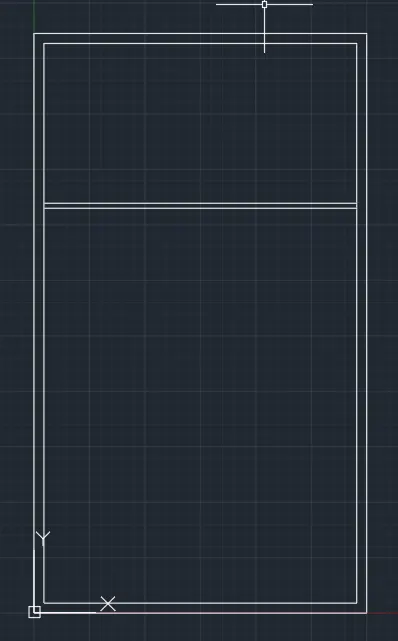
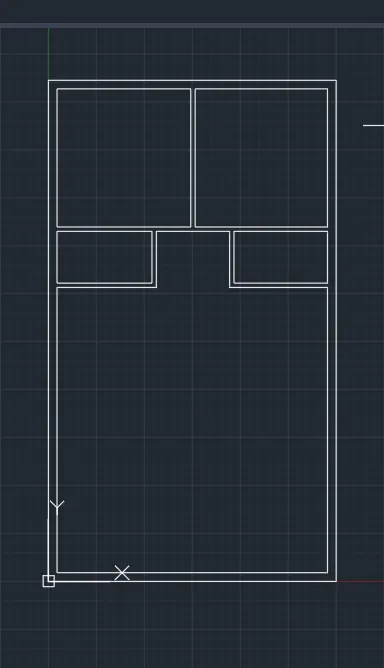
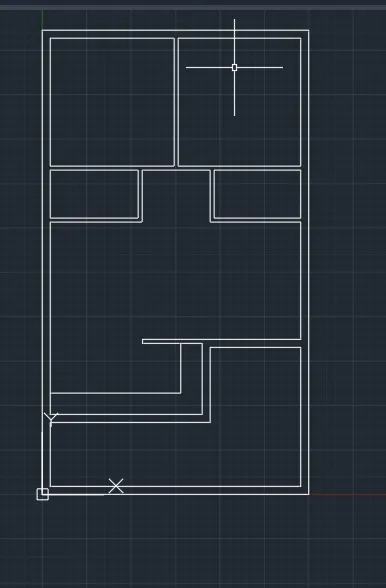
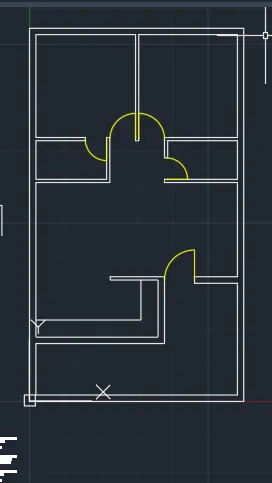
- Finl Result :
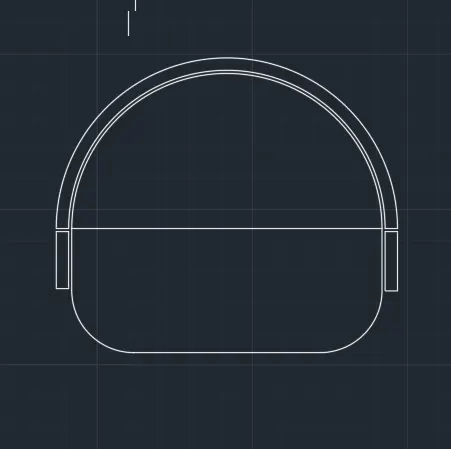
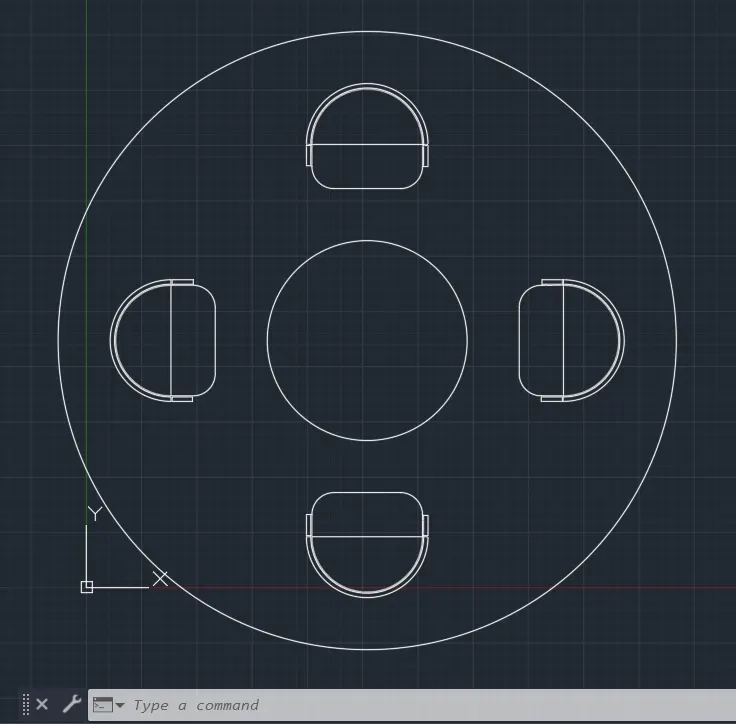
2) Sketch the seating plan for an outdoor canopy. Assume the dimensions for the seating. Also, consider the dimensions in mm.
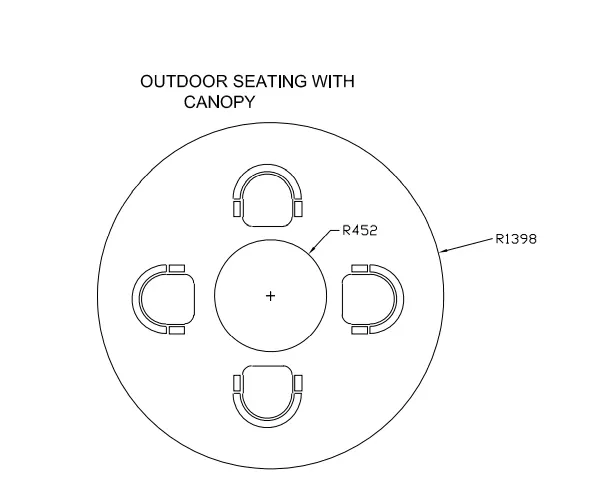
Command: C CIRCLE
Specify center point for circle or [3P/2P/Ttr (tan tan radius)]:
Specify radius of circle or [Diameter]: 1398
Command:
CIRCLE
Specify center point for circle or [3P/2P/Ttr (tan tan radius)]:
Specify radius of circle or [Diameter] <1398.0000>: 452
Command: REC RECTANG
Specify first corner point or [Chamfer/Elevation/Fillet/Thickness/Width]:
Specify other corner point or [Area/Dimensions/Rotation]: D
Specify length for rectangles <10.0000>: 500
Specify width for rectangles <10.0000>: 200
Specify other corner point or [Area/Dimensions/Rotation]:
Command:
Command:
Command: _arc
Specify start point of arc or [Center]:
Specify second point of arc or [Center/End]: _c
Specify center point of arc:
Specify end point of arc (hold Ctrl to switch direction) or [Angle/chord Length]:
Command: REC RECTANG
Specify first corner point or [Chamfer/Elevation/Fillet/Thickness/Width]:
Specify other corner point or [Area/Dimensions/Rotation]: D
Specify length for rectangles <10.0000>: 500
Specify width for rectangles <10.0000>: 200
Specify other corner point or [Area/Dimensions/Rotation]:
Command:
Command:
Command: _arc
Specify start point of arc or [Center]:
Specify second point of arc or [Center/End]: _c
Specify center point of arc:
Specify end point of arc (hold Ctrl to switch direction) or [Angle/chord Length]:
Command:
Command:
Command: _pasteclip
Specify insertion point:
Command: *Cancel*
Command: O OFFSET
Current settings: Erase source=No Layer=Source OFFSETGAPTYPE=0
Specify offset distance or [Through/Erase/Layer] <Through>: 20
Select object to offset or [Exit/Undo] <Exit>:
Specify point on side to offset or [Exit/Multiple/Undo] <Exit>: *Cancel*
Command:
OFFSET
Current settings: Erase source=No Layer=Source OFFSETGAPTYPE=0
Specify offset distance or [Through/Erase/Layer] <20.0000>: 1
Select object to offset or [Exit/Undo] <Exit>:
Specify point on side to offset or [Exit/Multiple/Undo] <Exit>:
Select object to offset or [Exit/Undo] <Exit>: *Cancel*
Command:
Command: _cutclip
Select objects: *Cancel*
Command: *Cancel*
Command: _u GROUP CUTCLIP
Command: _u OFFSET
Command: O OFFSET
Current settings: Erase source=No Layer=Source OFFSETGAPTYPE=0
Specify offset distance or [Through/Erase/Layer] <20.0000>: 5
Select object to offset or [Exit/Undo] <Exit>:
Specify point on side to offset or [Exit/Multiple/Undo] <Exit>:
Select object to offset or [Exit/Undo] <Exit>:
Command: OFFSET
Current settings: Erase source=No Layer=Source OFFSETGAPTYPE=0
Specify offset distance or [Through/Erase/Layer] <5.0000>: 20
Select object to offset or [Exit/Undo] <Exit>:
Specify point on side to offset or [Exit/Multiple/Undo] <Exit>:
Select object to offset or [Exit/Undo] <Exit>: *Cancel*
Command: Specify opposite corner or [Fence/WPolygon/CPolygon]:
Command: X EXPLODE 1 found
Command: O OFFSET
Current settings: Erase source=No Layer=Source OFFSETGAPTYPE=0
Specify offset distance or [Through/Erase/Layer] <20.0000>: 5
Select object to offset or [Exit/Undo] <Exit>:
Specify point on side to offset or [Exit/Multiple/Undo] <Exit>:
Select object to offset or [Exit/Undo] <Exit>:
Specify point on side to offset or [Exit/Multiple/Undo] <Exit>:
Select object to offset or [Exit/Undo] <Exit>:
Command: OFFSET
Current settings: Erase source=No Layer=Source OFFSETGAPTYPE=0
Specify offset distance or [Through/Erase/Layer] <5.0000>: 20
Select object to offset or [Exit/Undo] <Exit>:
Specify point on side to offset or [Exit/Multiple/Undo] <Exit>:
Select object to offset or [Exit/Undo] <Exit>:
Specify point on side to offset or [Exit/Multiple/Undo] <Exit>:
Select object to offset or [Exit/Undo] <Exit>: *Cancel*
Command: L LINE
Specify first point:
Specify next point or [Undo]:
Specify next point or [eXit/Undo]:
Command: LINE
Specify first point:
Specify next point or [Undo]:
Specify next point or [eXit/Undo]: *Cancel*
Command: O OFFSET
Current settings: Erase source=No Layer=Source OFFSETGAPTYPE=0
Specify offset distance or [Through/Erase/Layer] <20.0000>:
Select object to offset or [Exit/Undo] <Exit>:
Command:
OFFSET
Current settings: Erase source=No Layer=Source OFFSETGAPTYPE=0
Specify offset distance or [Through/Erase/Layer] <20.0000>: 150
Select object to offset or [Exit/Undo] <Exit>:
Specify point on side to offset or [Exit/Multiple/Undo] <Exit>:
Select object to offset or [Exit/Undo] <Exit>:
Specify point on side to offset or [Exit/Multiple/Undo] <Exit>:
Select object to offset or [Exit/Undo] <Exit>: *Cancel*
Command: O OFFSET
Current settings: Erase source=No Layer=Source OFFSETGAPTYPE=0
Specify offset distance or [Through/Erase/Layer] <150.0000>: 5
Select object to offset or [Exit/Undo] <Exit>:
Specify point on side to offset or [Exit/Multiple/Undo] <Exit>:
Select object to offset or [Exit/Undo] <Exit>:
Specify point on side to offset or [Exit/Multiple/Undo] <Exit>:
Select object to offset or [Exit/Undo] <Exit>: *Cancel*
Command: *Cancel*
Command: TR TRIM
Current settings: Projection=UCS, Edge=None
Select cutting edges ...
Select objects or <select all>:
Select object to trim or shift-select to extend or
[Fence/Crossing/Project/Edge/eRase]:
Does not intersect with the cutting edge.
Select object to trim or shift-select to extend or
[Fence/Crossing/Project/Edge/eRase]:
Select object to trim or shift-select to extend or
[Fence/Crossing/Project/Edge/eRase/Undo]:
Select object to trim or shift-select to extend or
[Fence/Crossing/Project/Edge/eRase/Undo]:
Select object to trim or shift-select to extend or
[Fence/Crossing/Project/Edge/eRase/Undo]:
Select object to trim or shift-select to extend or
[Fence/Crossing/Project/Edge/eRase/Undo]: Specify opposite corner:
Select object to trim or shift-select to extend or
[Fence/Crossing/Project/Edge/eRase/Undo]:
Does not intersect with the cutting edge.
Select object to trim or shift-select to extend or
[Fence/Crossing/Project/Edge/eRase/Undo]:
Select object to trim or shift-select to extend or
[Fence/Crossing/Project/Edge/eRase/Undo]:
Select object to trim or shift-select to extend or
[Fence/Crossing/Project/Edge/eRase/Undo]:
Does not intersect with the cutting edge.
Select object to trim or shift-select to extend or
[Fence/Crossing/Project/Edge/eRase/Undo]:
Does not intersect with the cutting edge.
Select object to trim or shift-select to extend or
[Fence/Crossing/Project/Edge/eRase/Undo]:
Does not intersect with the cutting edge.
Select object to trim or shift-select to extend or
[Fence/Crossing/Project/Edge/eRase/Undo]:
Select object to trim or shift-select to extend or
[Fence/Crossing/Project/Edge/eRase/Undo]:
Select object to trim or shift-select to extend or
[Fence/Crossing/Project/Edge/eRase/Undo]: *Cancel*
Command: F FILLET
Current settings: Mode = TRIM, Radius = 0.0000
Select first object or [Undo/Polyline/Radius/Trim/Multiple]: R Specify fillet radius <0.0000>: 100
Select first object or [Undo/Polyline/Radius/Trim/Multiple]:
Select second object or shift-select to apply corner or [Radius]:
Command:
FILLET
Current settings: Mode = TRIM, Radius = 100.0000
Select first object or [Undo/Polyline/Radius/Trim/Multiple]:
Command:
FILLET
Current settings: Mode = TRIM, Radius = 100.0000
Select first object or [Undo/Polyline/Radius/Trim/Multiple]:
Select second object or shift-select to apply corner or [Radius]:
Command: M MOVE
Select objects: Specify opposite corner: 19 found
Select objects:
Specify base point or [Displacement] <Displacement>: _m2p First point of mid: Second point of mid:
Specify second point or <use first point as displacement>: _m2p First point of mid: Second point of mid:
Command: M MOVE
Select objects: Specify opposite corner: 19 found
Select objects:
Specify base point or [Displacement] <Displacement>: _m2p First point of mid: Second point of mid:
Specify second point or <use first point as displacement>: _m2p First point of mid: Second point of mid:
Command:
Command:
Command: _pasteclip
Specify insertion point:
Command: *Cancel*
Command: Specify opposite corner or [Fence/WPolygon/CPolygon]:
Command: *Cancel*
Command: *Cancel*
Command: AER Unknown command "AER". Press F1 for help.
Command: *Cancel*
Command: *Cancel*
Command: AR ARRAY
Select objects: Specify opposite corner: 19 found
Select objects: Enter array type [Rectangular/PAth/POlar] <Rectangular>: PO
Type = Polar Associative = Yes
Specify center point of array or [Base point/Axis of rotation]:
Select grip to edit array or [ASsociative/Base point/Items/Angle between/Fill angle/ROWs/Levels/ROTate items/eXit]<eXit>:
Select grip to edit array or [ASsociative/Base point/Items/Angle between/Fill angle/ROWs/Levels/ROTate items/eXit]<eXit>:
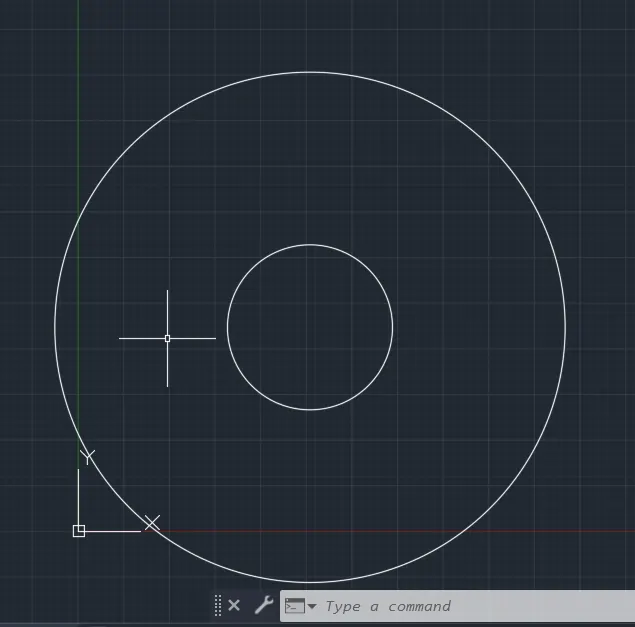
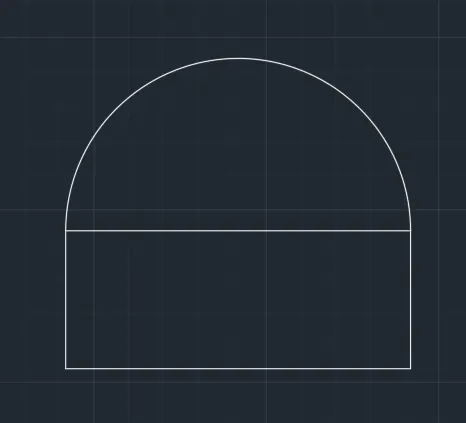
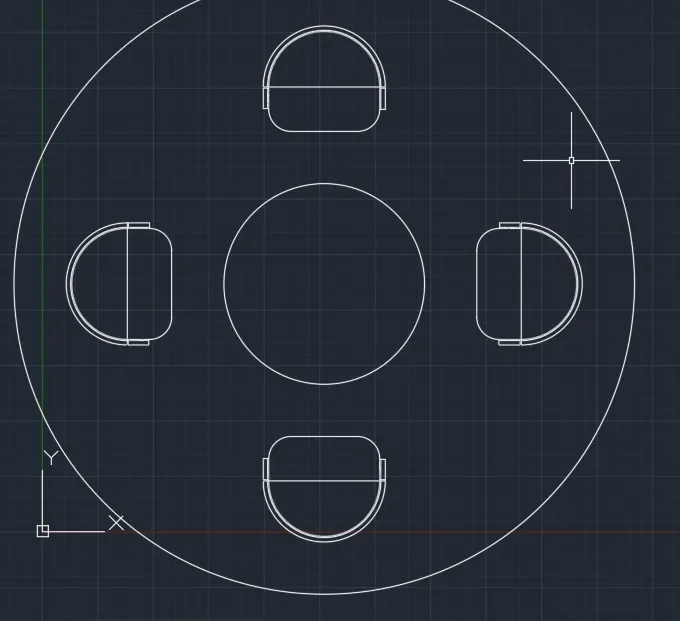
- Finl Result :
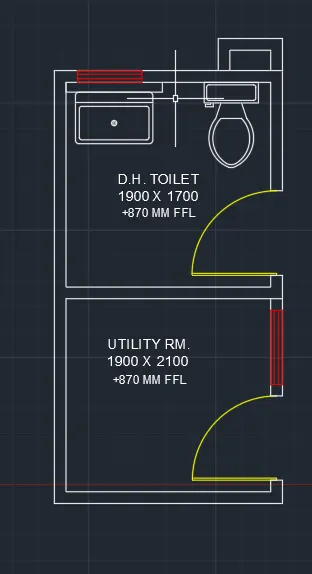
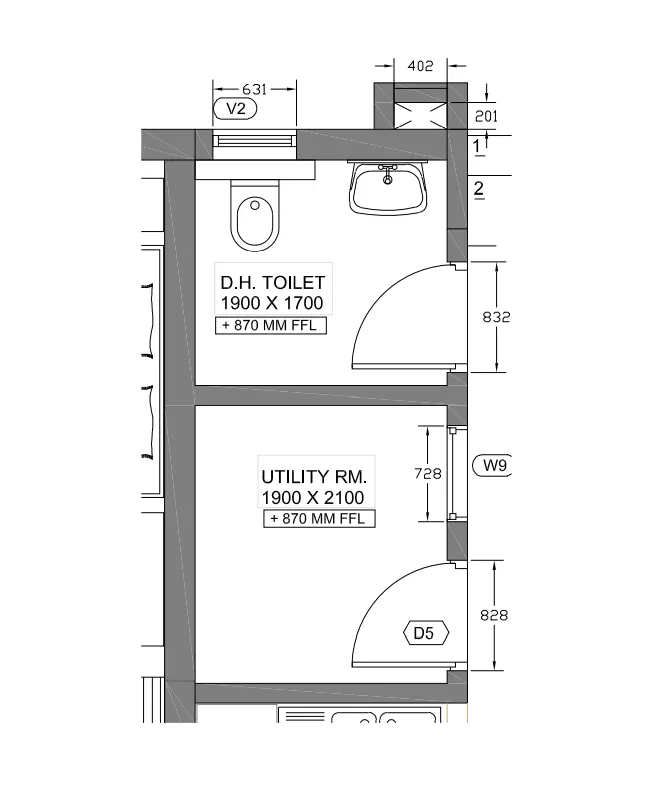
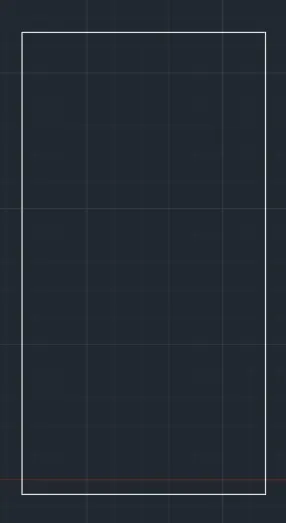
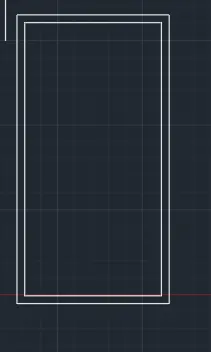
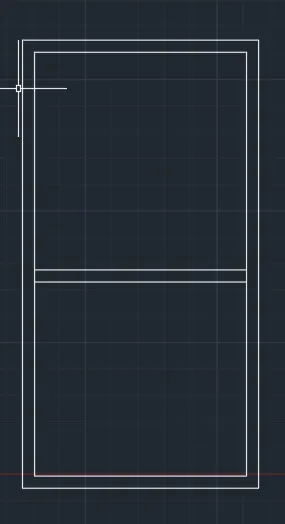
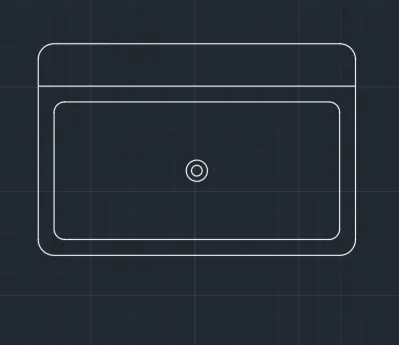
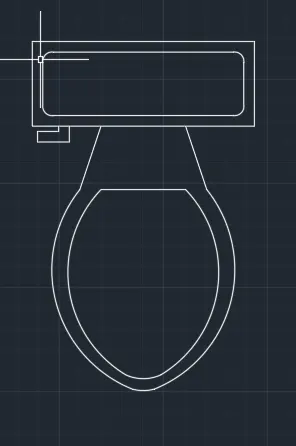
3) Sketch the part plan for the toilers and utilities room. Consider the outer wall thickness as 300mm and inner wall thickness as 150mm. Also, assume the missing dimension, Texts, dimensions, and hatches are only for references. Also, symbols for toilets and w/c are also for references.
Command: O
OFFSET
Current settings: Erase source=No Layer=Source OFFSETGAPTYPE=0
Specify offset distance or [Through/Erase/Layer] <5.0000>: 9"
Requires numeric distance, two points, or option keyword.
Specify offset distance or [Through/Erase/Layer] <5.0000>: 8
Select object to offset or [Exit/Undo] <Exit>:
Command:
OFFSET
Current settings: Erase source=No Layer=Source OFFSETGAPTYPE=0
Specify offset distance or [Through/Erase/Layer] <8.0000>: 8{
Requires numeric distance, two points, or option keyword.
Specify offset distance or [Through/Erase/Layer] <8.0000>:
Select object to offset or [Exit/Undo] <Exit>:
Specify point on side to offset or [Exit/Multiple/Undo] <Exit>:
Select object to offset or [Exit/Undo] <Exit>: *Cancel*
Command:
Command: _.erase 1 found
Command: O
OFFSET
Current settings: Erase source=No Layer=Source OFFSETGAPTYPE=0
Specify offset distance or [Through/Erase/Layer] <8.0000>: 230
Select object to offset or [Exit/Undo] <Exit>:
Select object to offset or [Exit/Undo] <Exit>:
Specify point on side to offset or [Exit/Multiple/Undo] <Exit>:
Select object to offset or [Exit/Undo] <Exit>: *Cancel*
Command: S STRETCH
Select objects to stretch by crossing-window or crossing-polygon...
Select objects: Specify opposite corner: 1 found
Select objects:
Specify base point or [Displacement] <Displacement>:
Specify second point or <use first point as displacement>: 230
Command: _u STRETCH
Command: S STRETCH
Select objects to stretch by crossing-window or crossing-polygon...
Select objects: Specify opposite corner: 1 found
Select objects:
Specify base point or [Displacement] <Displacement>:
Specify second point or <use first point as displacement>: 115
Command: S STRETCH
Select objects to stretch by crossing-window or crossing-polygon...
Select objects: Specify opposite corner: 1 found
Select objects:
Specify base point or [Displacement] <Displacement>:
Specify second point or <use first point as displacement>: 115
Command: L LINE
Specify first point:
Specify next point or [Undo]:
Specify next point or [eXit/Undo]:
Command:
LINE
Specify first point: 57.5
Specify next point or [Undo]: *Cancel*
Command: *Cancel*
Command: O
OFFSET
Current settings: Erase source=No Layer=Source OFFSETGAPTYPE=0
Specify offset distance or [Through/Erase/Layer] <230.0000>: 57.5
Select object to offset or [Exit/Undo] <Exit>:
Specify point on side to offset or [Exit/Multiple/Undo] <Exit>:
Select object to offset or [Exit/Undo] <Exit>:
Specify point on side to offset or [Exit/Multiple/Undo] <Exit>:
Select object to offset or [Exit/Undo] <Exit>: *Cancel*
Command:
Command: _.erase 1 found
Command: TR TRIM
Current settings: Projection=UCS, Edge=None
Select cutting edges ...
Select objects or <select all>:
Select object to trim or shift-select to extend or
[Fence/Crossing/Project/Edge/eRase]:
Select object to trim or shift-select to extend or
[Fence/Crossing/Project/Edge/eRase/Undo]:
Does not intersect with the cutting edge.
Select object to trim or shift-select to extend or
[Fence/Crossing/Project/Edge/eRase/Undo]:
Select object to trim or shift-select to extend or
[Fence/Crossing/Project/Edge/eRase/Undo]: *Cancel*
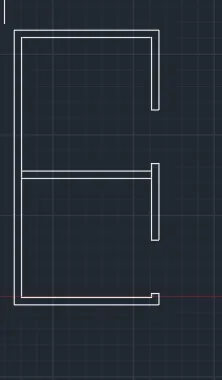
- Finl Result :