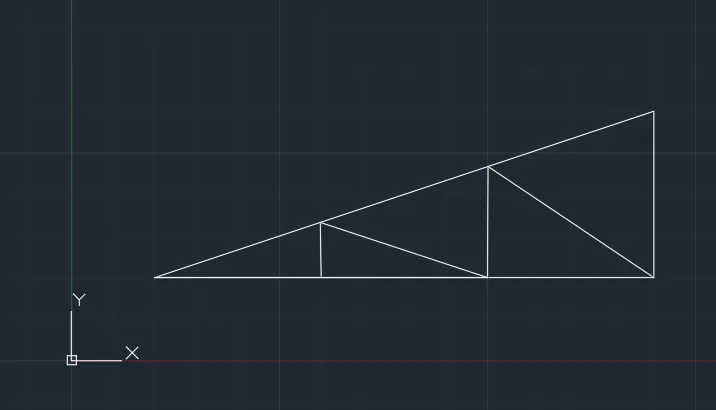
Creation of geometries by Coordinate system methods using AutoCad
1)Aim:To create the given geometry from P1 to P2 using all the coordinates system methods.
Procedure:
Open the autodesk autocad software.
OPen a new project
Select the line tool
Command: _line
Specify first point: 2,1
Specify next point or [Undo]: 7
Specify next point or [Undo]: 6
Specify next point or [Close/Undo]: 7
Specify first point: 3,1
Specify next point or [Undo]: 3
Specify next point or [Undo]: 2
Specify next point or [Undo]: 2
Command: _SAVEAS
2)
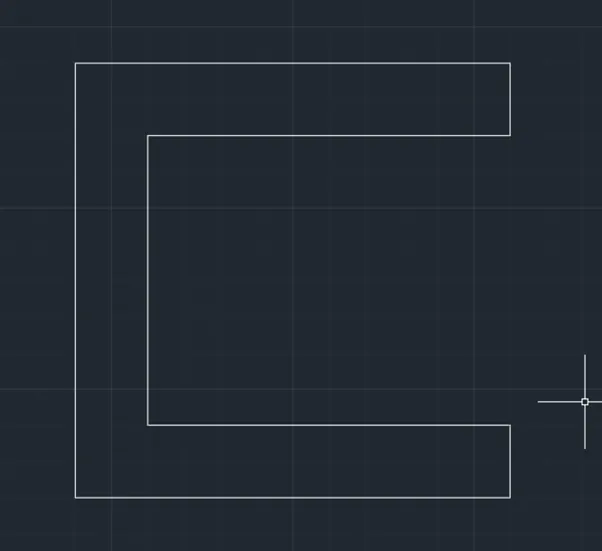
Aim:To create the given geometry from P1 to P2 using all the coordinates system methods.
Procedure:
Open a new tab
Command: _line
Specify first point: 2,1
Specify next point or [Undo]:
>>Press ESC or ENTER to exit, or right-click to display shortcut menu.
Resuming LINE command.
Specify next point or [Undo]: *Cancel*
Command:
Command: _line
Specify first point: 2,1
Specify next point or [Undo]: 3
Specify next point or [Undo]: _u
Specify next point or [Undo]: 3
Specify next point or [Undo]: 4
Specify next point or [Close/Undo]: 1
Specify next point or [Close/Undo]: 4
Specify next point or [Close/Undo]: _u
Specify next point or [Close/Undo]:
>>Press ESC or ENTER to exit, or right-click to display shortcut menu.
Resuming LINE command.
Specify next point or [Close/Undo]: *Cancel*
Command:
Command: _line
Specify first point:
Specify next point or [Undo]: 1
Specify next point or [Undo]: 4
Specify next point or [Close/Undo]: 3
Specify next point or [Close/Undo]: 7
Specify next point or [Close/Undo]: *Cancel*
Command:
Command:
Command:
Command:
Command: _line
Specify first point:
Specify next point or [Undo]:
Specify next point or [Undo]: -3
Specify next point or [Close/Undo]: _u
Specify next point or [Undo]: 3
Specify next point or [Close/Undo]:
Specify next point or [Close/Undo]: *Cancel*
Command: DELETE
ERASE
Select objects: 1 found
Select objects: 1 found (1 duplicate), 1 total
Select objects:
Command:
Command: _.erase 1 found
Command:
Command: _.erase 1 found
Command:
Command:
Command: _line
Specify first point:
Specify next point or [Undo]: 3
Specify next point or [Undo]:
Specify next point or [Close/Undo]: *Cancel*
Command:
Press ESC or ENTER to exit, or right-click to display shortcut menu.
Command:
Command:
Command: _SAVEAS
3)
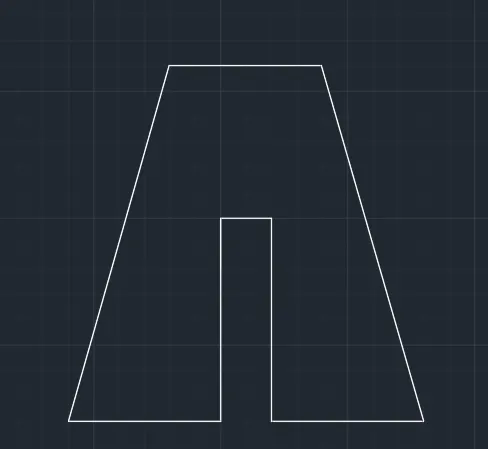
Aim:To create the given geometry from P1 to P2 using all the coordinates system methods.
Procedure:
Open a new tab
Command: _line
Specify first point:2,1
Specify next point or [Undo]:3
Specify next point or [Undo]:4
Specify next point or [Close/Undo]:1
Specify next point or [Close/Undo]:4
Specify next point or [Close/Undo]:3
Specify next point or [Close/Undo]:
Specify next point or [Close/Undo]:3
Specify next point or [Close/Undo]:
Specify next point or [Close/Undo]: *Cancel*
Command: _SAVEAS
4)
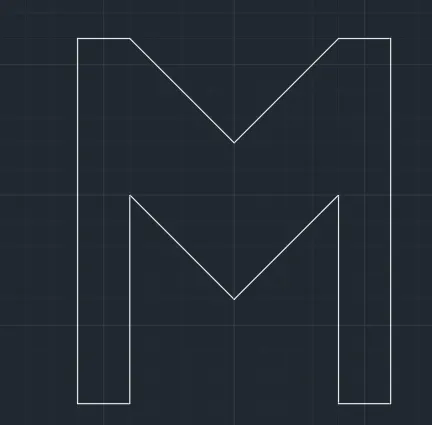
Aim:To create the given geometry from P1 to P2 using all the coordinates system methods.
Procedure:
Open a new tab
Specify first point: 2,1
Specify next point or [Undo]: 1
Specify next point or [Undo]: 4
Specify next point or [Close/Undo]: 2
Specify next point or [Close/Undo]: *Cancel*
_u
Specify next point or [Close/Undo]: 2.90
Specify next point or [Close/Undo]: _u
Specify next point or [Close/Undo]:
Specify next point or [Close/Undo]:
Specify next point or [Close/Undo]: 4
Specify next point or [Close/Undo]: 1
Specify next point or [Close/Undo]: 7
Specify next point or [Close/Undo]: 1
Specify next point or [Close/Undo]:
Specify next point or [Close/Undo]:
Specify next point or [Close/Undo]: 1
Specify next point or [Close/Undo]: 7
Specify next point or [Close/Undo]: *Cancel*
Command: _SAVEAS
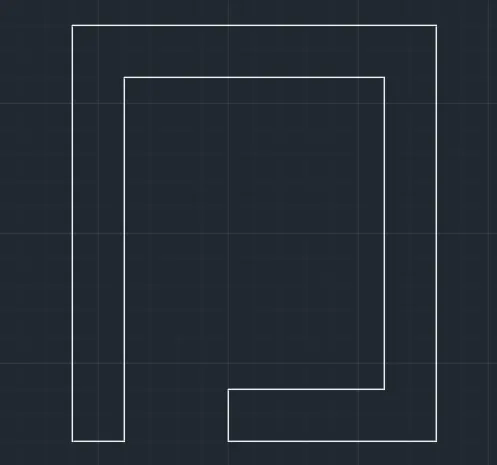
5)
Aim:To create the given geometry from P1 to P2 using all the coordinates system methods.
Procedure:
Open a new tab
Command: _line
Specify first point: 2,1
Specify next point or [Undo]: 1
Specify next point or [Undo]: 7
Specify next point or [Close/Undo]: 5
Specify next point or [Close/Undo]: 6
Specify next point or [Close/Undo]: 3
Specify next point or [Close/Undo]: 1
Specify next point or [Close/Undo]: 4
Specify next point or [Close/Undo]: 8
Specify next point or [Close/Undo]: 7
Specify next point or [Close/Undo]: 8
Specify next point or [Close/Undo]: *Cancel*
Command: _SAVEAS
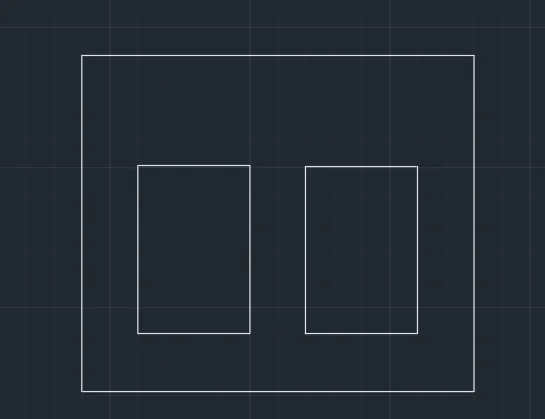
6)Aim:To create the given geometry from P1 to P2 using all the coordinates system methods.
Procedure:
Open a new tab
Command: _line
Specify first point: 0,0
Specify next point or [Undo]: 10
Specify next point or [Undo]: 2
Specify next point or [Close/Undo]: 4
Specify next point or [Close/Undo]: 4
Specify next point or [Close/Undo]: 3
Specify next point or [Close/Undo]: 2
Specify next point or [Close/Undo]: 8
Specify next point or [Close/Undo]: 1
Specify next point or [Close/Undo]: _u
Specify next point or [Close/Undo]: 2
Specify next point or [Close/Undo]: 3
Specify next point or [Close/Undo]: 4
Specify next point or [Close/Undo]: *Cancel*
Command: _SAVEAS
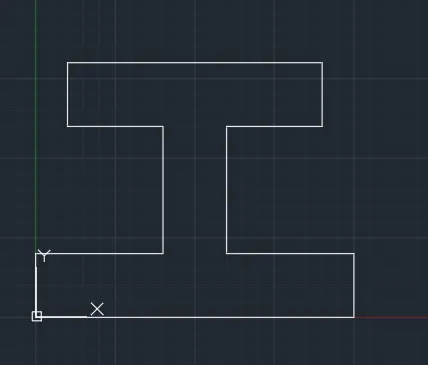
7) Aim:To create the given geometry from P1 to P2 using all the coordinates system methods.
Procedure:
Open a new tab
Command: _line
Specify first point: 1,1
Specify next point or [Undo]: 5
Specify next point or [Undo]: 2
Specify next point or [Close/Undo]: 3
Specify next point or [Close/Undo]: 1
Specify next point or [Close/Undo]: 1
Specify next point or [Close/Undo]: 2
Specify next point or [Close/Undo]: 3
Specify next point or [Close/Undo]: 2
Specify next point or [Close/Undo]:
Specify first point:
Specify next point or [Undo]: 7
Specify next point or [Undo]: _u
Specify next point or [Undo]: 7
Specify next point or [Undo]:
Command: _SAVEAS
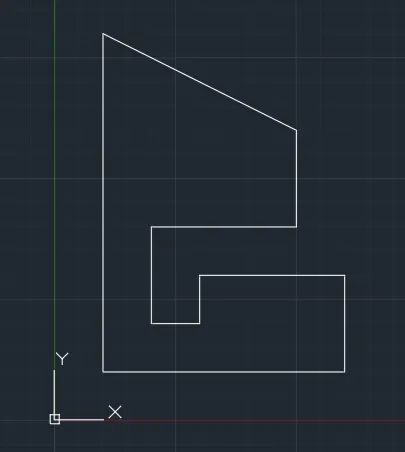
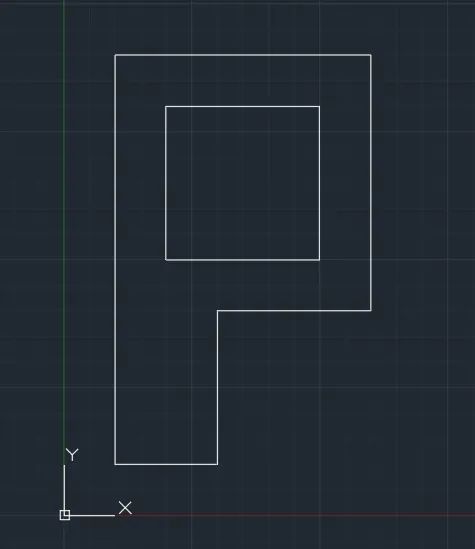
8)Aim:To create the given geometry from P1 to P2 using all the coordinates system methods.
Procedure:
Open a new tab
Command:
Command:
Command:
Command: _line
Specify first point: 1,1
Specify next point or [Undo]: 2
Specify next point or [Undo]: 3
Specify next point or [Close/Undo]: 3
Specify next point or [Close/Undo]: 5
Specify next point or [Close/Undo]: 5
Specify next point or [Close/Undo]:
Specify next point or [Close/Undo]: *Cancel*
Command: _line
Specify first point:
Specify next point or [Undo]:
Specify next point or [Undo]: 3
Specify next point or [Close/Undo]: 3
Specify next point or [Close/Undo]:
Specify next point or [Close/Undo]: *Cancel*
Command: DELETE
ERASE
Select objects: 1 found
Select objects:
Command: _SAVEAS
9)
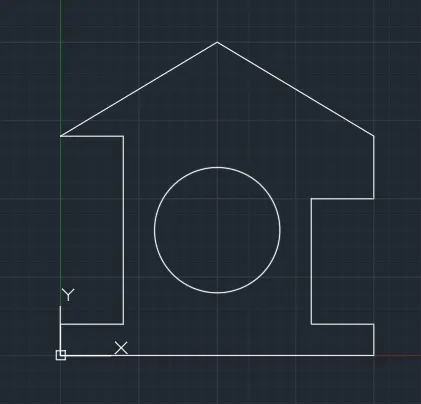
Aim:To create the given geometry from P1 to P2 using all the coordinates system methods.
Procedure:
Open a new tab
Command: _line
Specify first point: *Cancel*
Command:
Command: _line
Specify first point: 0,0
Specify next point or [Undo]: 10
Specify next point or [Undo]: 1
Specify next point or [Close/Undo]: 2
Specify next point or [Close/Undo]: 4
Specify next point or [Close/Undo]: 2
Specify next point or [Close/Undo]: 2
Specify next point or [Close/Undo]: 10
Specify next point or [Close/Undo]: *Cancel*
Command:
Command:
Command: _line
Specify first point:
Specify next point or [Undo]: 3
Specify next point or [Undo]: *Cancel*
Command:
Command:
Command: _line
Specify first point:
Specify next point or [Undo]:
Specify next point or [Undo]:
Specify next point or [Close/Undo]: _u
Specify next point or [Undo]:
Specify next point or [Close/Undo]: *Cancel*
Command: _line
Specify first point:
Specify next point or [Undo]: 2
Specify next point or [Undo]: 6
Specify next point or [Close/Undo]: 2
Specify next point or [Close/Undo]:
Specify next point or [Close/Undo]: *Cancel*
Command: DELETE
ERASE
Select objects: 1 found
Select objects: 1 found, 2 total
Command: _circle
Specify center point for circle or [3P/2P/Ttr (tan tan radius)]: *Cancel*
Command: _circle
Specify center point for circle or [3P/2P/Ttr (tan tan radius)]: 5,4
Specify radius of circle or [Diameter]: 2
Command: _SAVEAS
10)
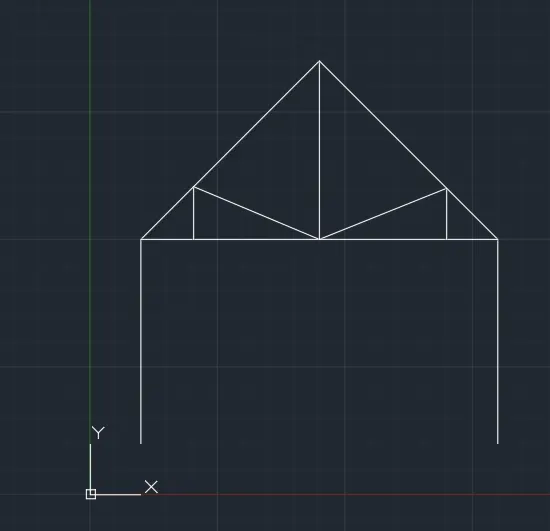
Aim:To create the given geometry from P1 to P2 using all the coordinates system methods.
Procedure:
Open a new tab
Command:
Command: _line
Specify first point: 1,1
Specify next point or [Undo]: 4
Specify next point or [Undo]: 3.5
Specify next point or [Close/Undo]: 3.5
Specify next point or [Close/Undo]:
Specify next point or [Close/Undo]: *Cancel*
Command: _line
Specify first point:
Specify next point or [Undo]:
Specify next point or [Undo]:
Specify next point or [Close/Undo]: *Cancel*
Command: _line
Specify first point:
Specify next point or [Undo]: 3.5
Specify next point or [Undo]:
Specify next point or [Close/Undo]: *Cancel*
Command: _line
Specify first point:
Specify next point or [Undo]:
Specify next point or [Undo]:
Specify next point or [Close/Undo]: *Cancel*
Command: _line
Specify first point:
Specify next point or [Undo]: 4
Specify next point or [Undo]: *Cancel*
Command: _SAVEAS
11)
Aim:To create the given geometry from P1 to P2 using all the coordinates system methods.
Procedure:
Open a new tab
Command: _line
Specify first point: *Cancel*
Command:
Command: _line
Specify first point: 1,1
Specify next point or [Undo]: 6
Specify next point or [Undo]: *Cancel*
2
Specify next point or [Close/Undo]:
Specify next point or [Close/Undo]: *Cancel*
Command: _line
Specify first point:
Specify next point or [Undo]: 2
Specify next point or [Undo]:
Specify next point or [Close/Undo]: *Cancel*
Command: _line
Specify first point:
Specify next point or [Undo]: 2
Specify next point or [Undo]:
Specify next point or [Close/Undo]: *Cancel*
Command: _line
Specify first point:
Specify next point or [Undo]:
Specify next point or [Undo]: *Cancel*
Command: _line
Specify first point:
Specify next point or [Undo]:
Specify next point or [Undo]: *Cancel*
Command: _SAVEAS