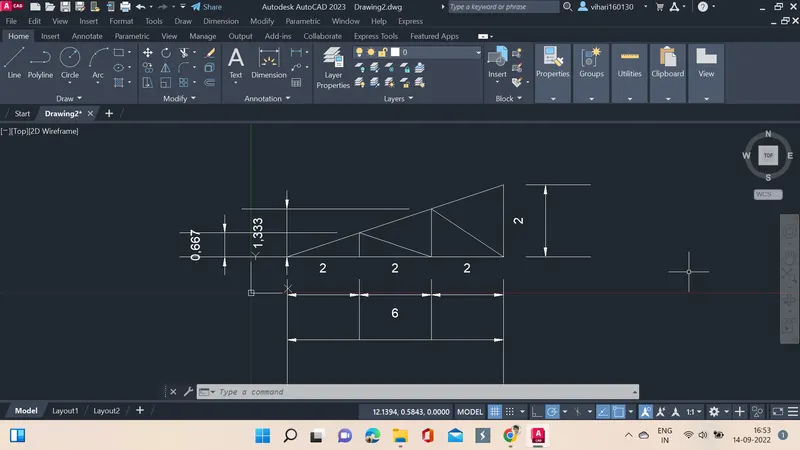
Creation of geometries by Coordinate system methods using AutoCad
AIM: Create the geometries from P1 to P2 using all the coordinates system methods.
INTRODUCTION: CAD is a technology used for drafting in civil, mechanical and also electrical circuits.
PROCEDURE:
To draw the geometrics given line command is used, when rerquired circle command is also used.
- Command Line: Line or L
- Draw Bar
- Menu Bar: Draw - Line
- Tool palettes: Draw - Line
- Ribbon: Home - Draw panel - Line
1.
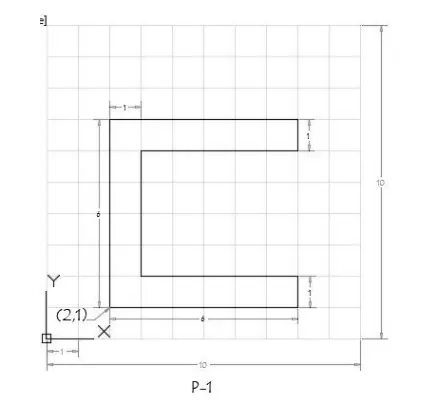
Steps:
| S.no | Command | Points specified |
| 1. | Line command | 2,1 |
| 2. | Specifying nect point | 8,1 |
| 3. | Specifying next point | 8,2 |
| 4. | Specifying next point | 3,2 |
| 5. | Specifying next point | 3,6 |
| 6. | Specifying next point | 8,6 |
| 7. | Specifying next point | 8,7 |
| 8. | Specifying next point | 2,7 |
| 9. | Specifying next point | 2,1 |
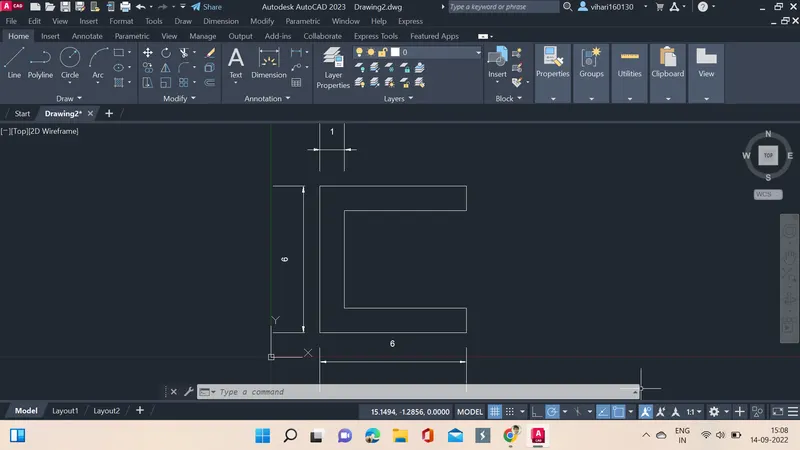
RESULT:
2.
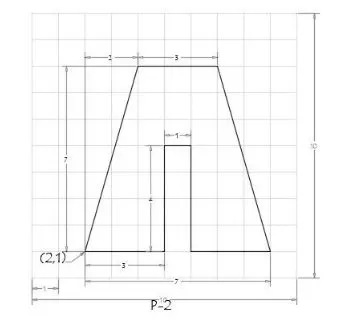
STEPS:
| S.no | Command | Points specified |
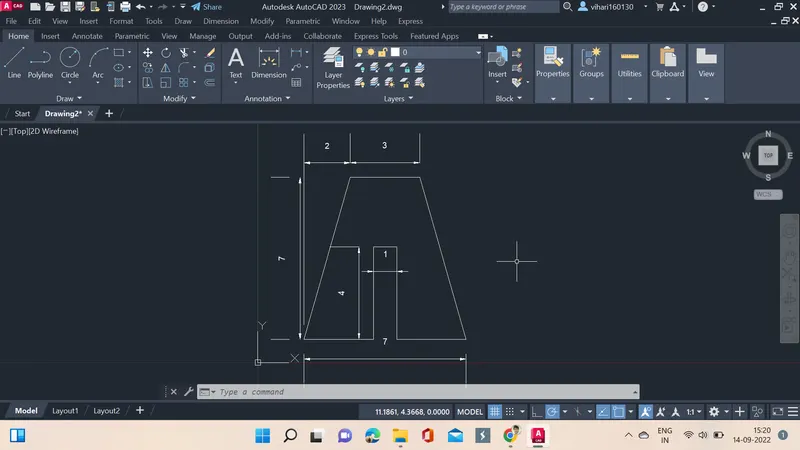
| 1. | Line command | 2,1 |
| 2. | Specifying nect point | 5,1 |
| 3. | Specifying next point | 5,5 |
| 4. | Specifying next point | 6,5 |
| 5. | Specifying next point | 6,1 |
| 6. | Specifying next point | 9,1 |
| 7. | Specifying next point | 7,8 |
| 8. | Specifying next point | 4,8 |
| 9. | Specifying next point | 2,1 |
RESULT:
3.
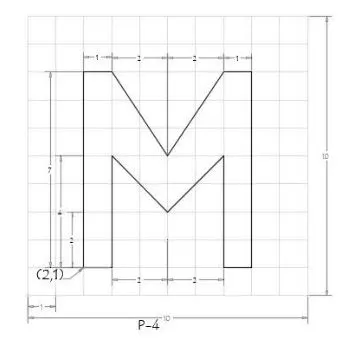
STEPS:
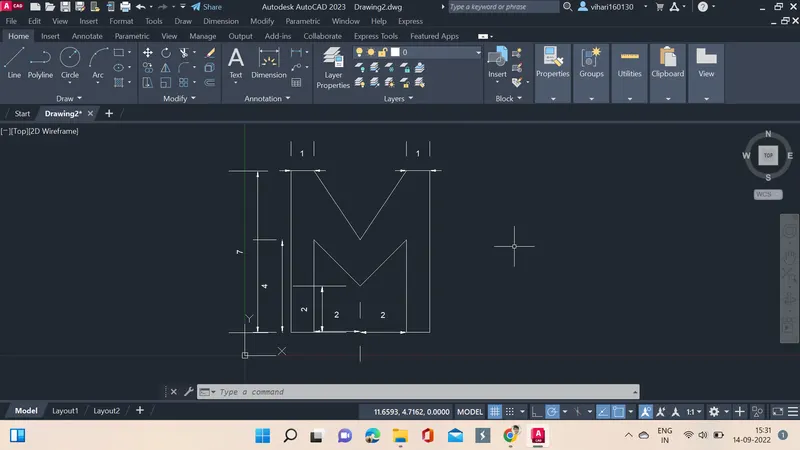
| S.no | Command | Points specified |
| 1. | Line command | 2,1 |
| 2. | Specifying nect point | 3,1 |
| 3. | Specifying next point | 3,5 |
| 4. | Specifying next point | 5,3 |
| 5. | Specifying next point | 7,5 |
| 6. | Specifying next point | 7,1 |
| 7. | Specifying next point | 8,1 |
| 8. | Specifying next point | 8,8 |
| 9. | Specifying next point | 7,8 |
| 10. | Specifying next point | 5,5 |
| 11. | Specifying next point | 3,8 |
| 12. | Specifying next point | 2,8 |
| 13. | Specifying next point | 2,1 |
RESULT:
4.
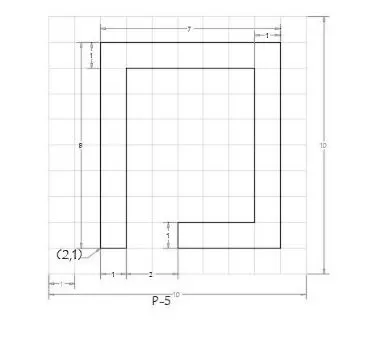
STEPS:
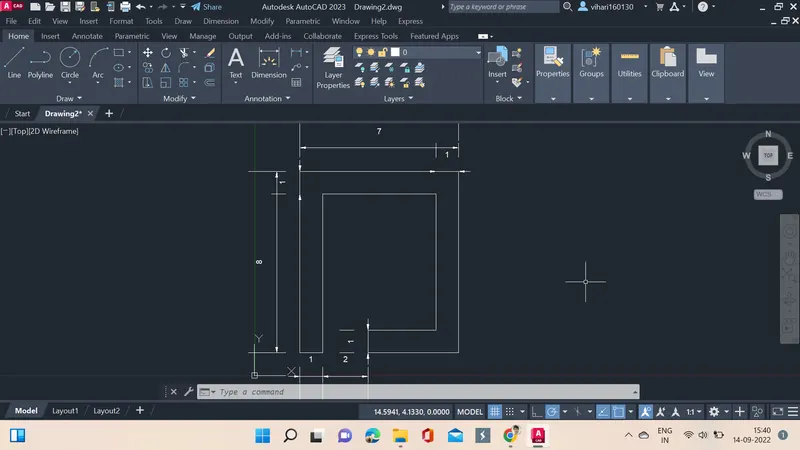
| S.no | Command | Points specified |
| 1. | Line command | 2,1 |
| 2. | Specifying nect point | 3,1 |
| 3. | Specifying next point | 3,8 |
| 4. | Specifying next point | 8,8 |
| 5. | Specifying next point | 8,2 |
| 6. | Specifying next point | 5,2 |
| 7. | Specifying next point | 5,1 |
| 8. | Specifying next point | 9,1 |
| 9. | Specifying next point | 9,9 |
| 10. | Specifying next point | 2,9 |
| 11. | Specifying next point | 2,1 |
RESULT:
5.
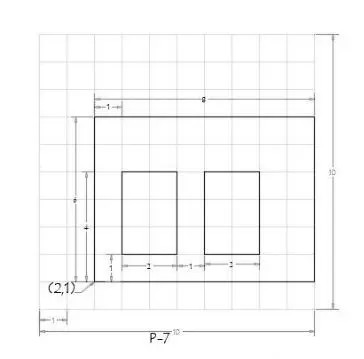
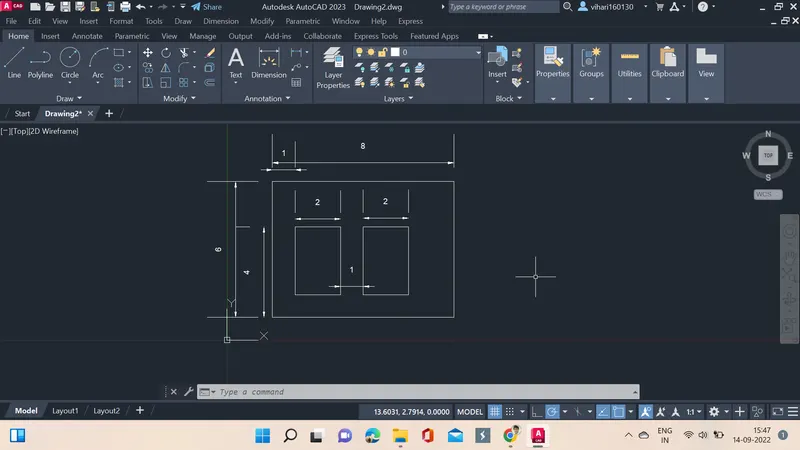
STEPS:
| S.no | Command | Points specified |
| 1. | Line command | 2,1 |
| 2. | Specifying nect point | 10,1 |
| 3. | Specifying next point | 10,7 |
| 4. | Specifying next point | 2,7 |
| 5. | Specifying next point | 2,1 |
| 6. | Specifying next point | 3,2 |
| 7. | Specifying next point | 5,2 |
| 8. | Specifying next point | 5,5 |
| 9. | Specifying next point | 3,5 |
| 10. | Specifying next point | 3,2 |
| 11. | Specifying next point | 6,2 |
| 12. | Specifying next point | 8,2 |
| 13. | Specifying next point | 8,5 |
| 14. | Specifying next point | 6,5 |
| 15. | Specifying next point | 6,2 |
RESULT:
6.
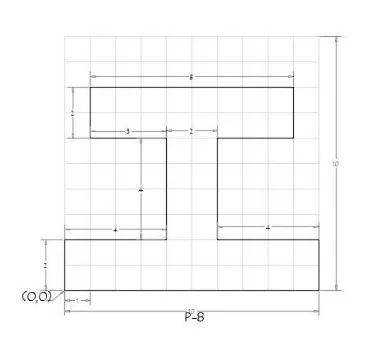
STEPS:
| S.no | Command | Points specified |
| 1. | Line command | 0,0 |
| 2. | Specifying nect point | 10,0 |
| 3. | Specifying next point | 10,2 |
| 4. | Specifying next point | 6,2 |
| 5. | Specifying next point | 6,6 |
| 6. | Specifying next point | 9,6 |
| 7. | Specifying next point | 9,8 |
| 8. | Specifying next point | 1,8 |
| 9. | Specifying next point | 1,6 |
| 10. | Specifying next point | 4,6 |
| 11. | Specifying next point | 4,2 |
| 12. | Specifying next point | 0,2 |
| 13. | Specifying next point | 0,0 |
RESULT:
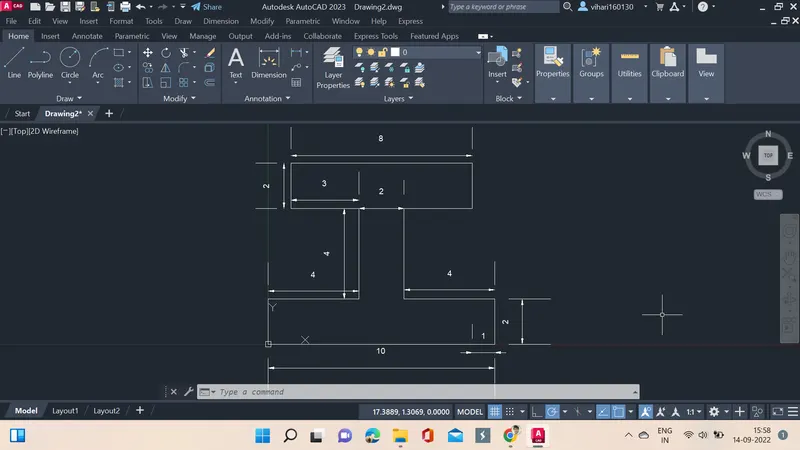
7.
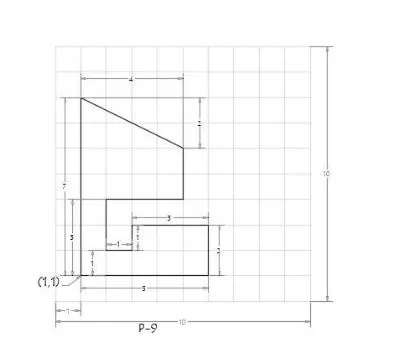
STEPS:
| S.no | Command | Points specified |
| 1. | Line command | 1,1 |
| 2. | Specifying nect point | 6,1 |
| 3. | Specifying next point | 6,3 |
| 4. | Specifying next point | 3,3 |
| 5. | Specifying next point | 3,2 |
| 6. | Specifying next point | 2,2 |
| 7. | Specifying next point | 2,4 |
| 8. | Specifying next point | 5,4 |
| 9. | Specifying next point | 5,6 |
| 10. | Specifying next point | 1,8 |
| 11. | Specifying next point | 1,1 |
RESULT:
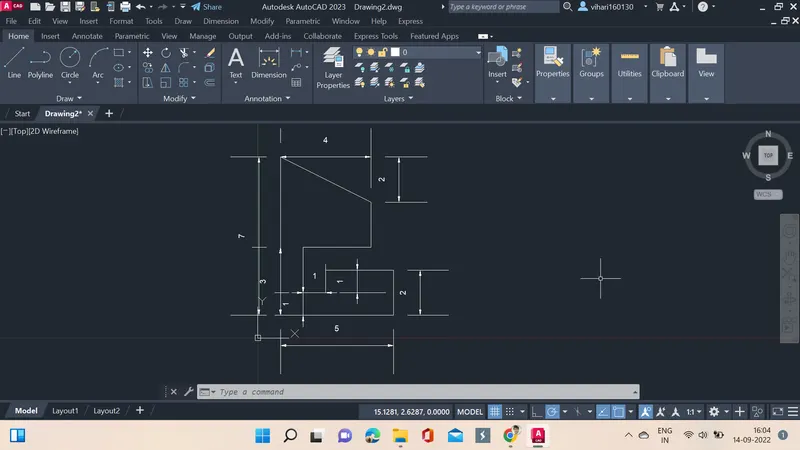
8.
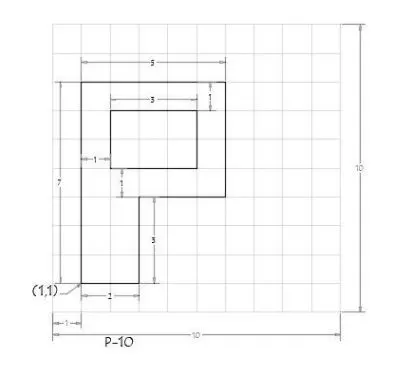
STEPS:
| S.no | Command | Points specified |
| 1. | Line command | 1,1 |
| 2. | Specifying nect point | 3,1 |
| 3. | Specifying next point | 3,4 |
| 4. | Specifying next point | 6,4 |
| 5. | Specifying next point | 6,8 |
| 6. | Specifying next point | 1,8 |
| 7. | Specifying next point | 1,1 |
| 8. | Specifying next point | 2,5 |
| 9. | Specifying next point | 5,5 |
| 10. | Specifying next point | 5,7 |
| 11. | Specifying next point | 2,7 |
| 12. | Specifying next point | 2,5 |
RESULT:
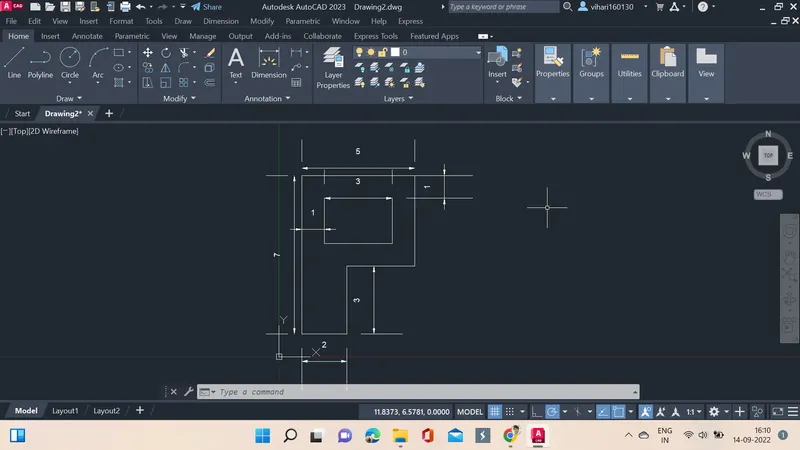
9. Civil Related Problems
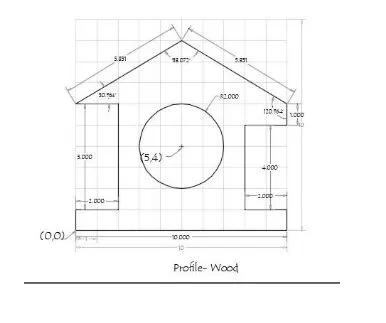
STEPS:
| S.no | Command | Points specified |
| 1. | Line command | 0,0 |
| 2. | Specifying nect point | 10,0 |
| 3. | Specifying next point | 10,1 |
| 4. | Specifying next point | 8,1 |
| 5. | Specifying next point | 8,5 |
| 6. | Specifying next point | 10,5 |
| 7. | Specifying next point | 10,6 |
| 8. | Specifying next point | 5,9 |
| 9. | Specifying next point | 0,6 |
| 10. | Specifying next point | 2,6 |
| 11. | Specifying next point | 2,1 |
| 12. | Specifying next point | 0,1 |
| 13. | Specifying next point | 0,0 |
| 14. | Circle | 5,4 |
| 15. | Circle radius | 2 |
RESULT:
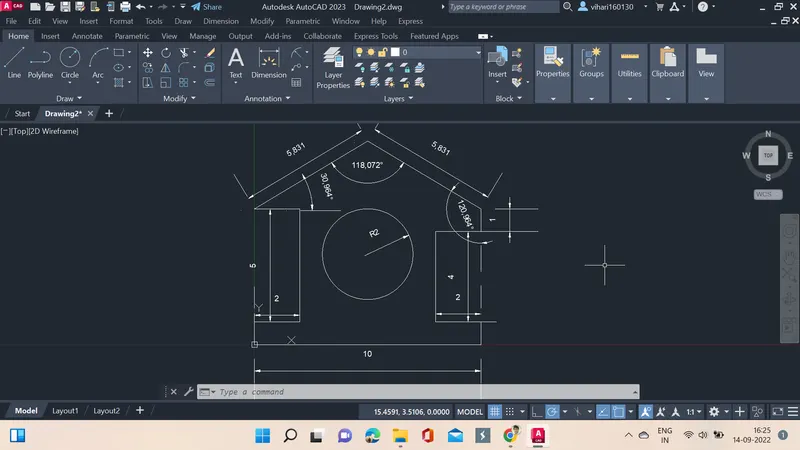
10.
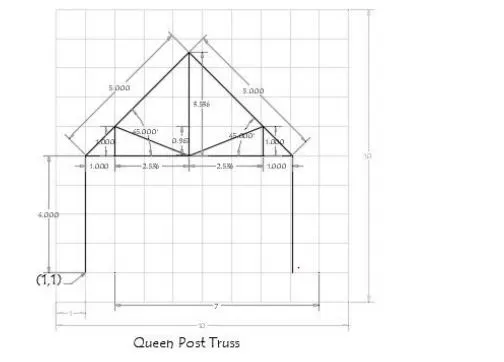
STEPS:
| S.no | Command | Points specified |
| 1. | Line command | 1,1 |
| 2. | Specifying nect point | 1,5 |
| 3. | Specifying next point | 4,5 |
| 4. | Specifying next point | 8,5 |
| 5. | Specifying next point | 6,1 |
| 6. | Specifying next point | 9,1 |
| 7. | Specifying next point | 7,8 |
| 8. | Specifying next point | 4,8 |
| 9. | Specifying next point | 2,1 |
RESULT:
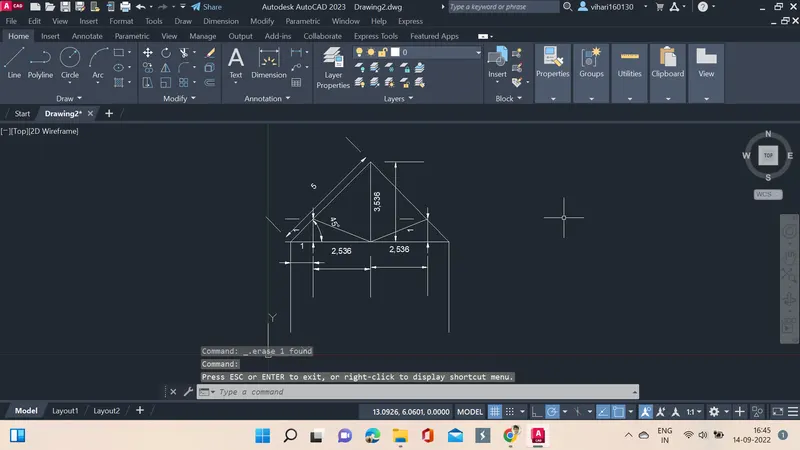
11.
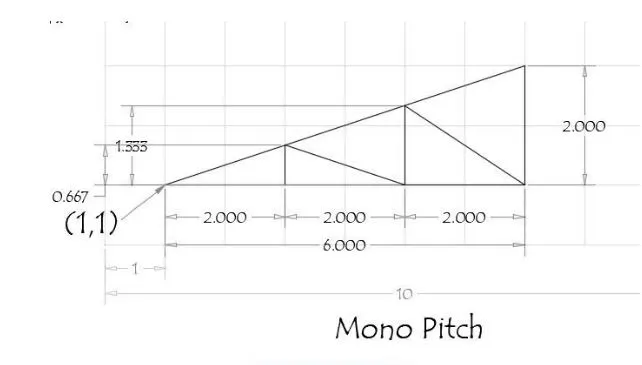
STEPS:
| S.no | Command | Points specified |
| 1. | Line command | 1,1 |
| 2. | Specifying nect point | 7,1 |
| 3. | Specifying next point | 7,3 |
| 4. | Specifying next point | 1,1 |
| 5. | Specifying next point | 3,1 |
| 6. | Specifying next point | 3,1.667 |
| 7. | Specifying next point | 5,1 |
| 8. | Specifying next point | 5,2.333 |
| 9. | Specifying next point | 7,1 |
RESULT: