Creation of geometries by Coordinate system methods using AutoCad
AIM:
To create the geometries from P1 to P2 using all the coordinates system methods, to use the Line tool and circle to create the geometries.
PROCEDURE
To Draw Line simple lines or series of lines segments by one way of the following:
- Command Line: Line or L
- Menu Bar: Draw- Line
- Draw Bar
- Tool palettes: Draw- Line
- Ribbon: Home- Draw panel -Line
Q1.
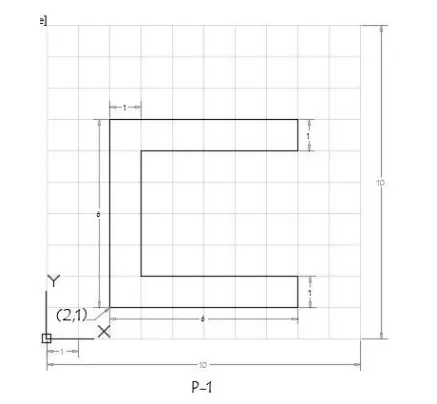
Steps :-
|
COMMAND |
LINE |
|
Specify first point: |
2, 1 |
|
Specify next point: |
8, 1 |
|
Specify next point: |
8, 2 |
|
Specify next point: |
3, 2 |
|
Specify next point: |
3, 6 |
|
Specify next point: |
8, 6 |
|
Specify next point: |
8, 7 |
|
Specify next point: |
2, 7 |
|
Specify next point: |
2, 1 or C |
RESULT
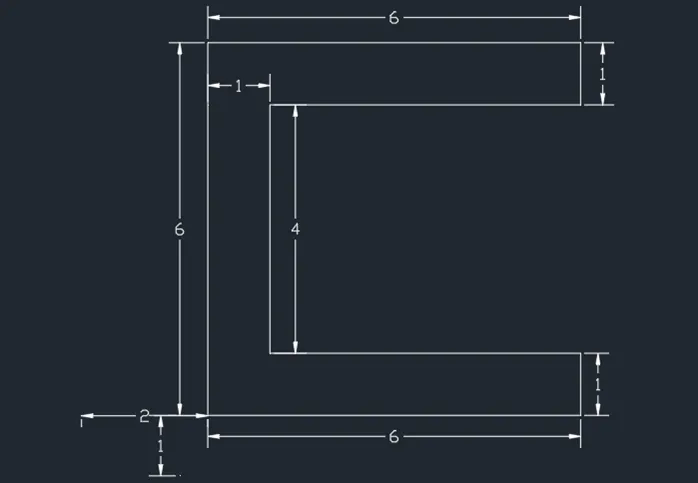 |
Q2.
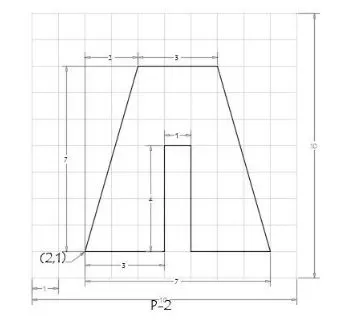
Steps :-
|
COMMAND |
Absolute Coordinates |
Relative rectangular coordinates |
|
COMMAND |
Line |
Line |
|
Specify first point: |
2, 1 |
2,1 |
|
Specify next point: |
5, 1 |
@3, 0 |
|
Specify next point: |
5, 5 |
@0, 4 |
|
Specify next point: |
6, 5 |
@1, 0 |
|
Specify next point: |
6,1 |
@0, -4 |
|
Specify next point: |
9, 1 |
@3, 0 |
|
Specify next point: |
7, 8 |
@-2, 7 |
|
Specify next point: |
4, 8 |
@-3, 0 |
|
Specify next point: |
2, 1 or C |
@-2, -7 or C |
RESULT :-
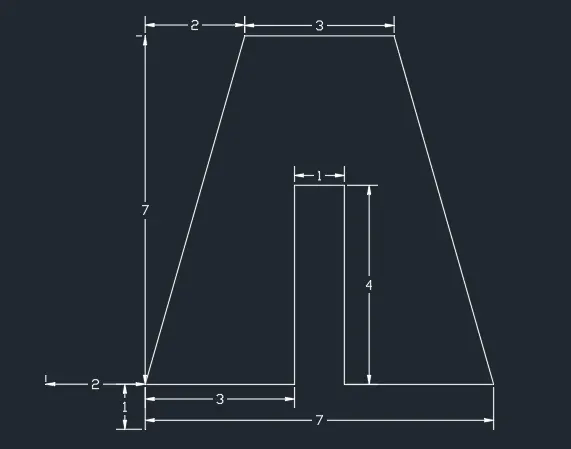 |
Q3.
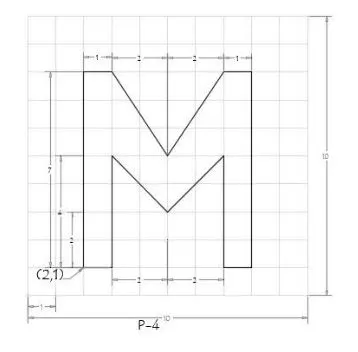
Steps :-
|
COMMAND |
Absolute Coordinates |
Relative rectangular coordinates |
|
COMMAND |
Line |
Line |
|
Specify first point: |
2, 1 |
2,1 |
|
Specify next point: |
2,8 |
@0, 7 |
|
Specify next point: |
3, 8 |
@1, 0 |
|
Specify next point: |
5, 5 |
@2, -3 |
|
Specify next point: |
7, 8 |
@2, 3 |
|
Specify next point: |
8, 8 |
@1, 0 |
|
Specify next point: |
8,1 |
@0, -7 |
|
Specify next point: |
7,1 |
@-1, 0 |
|
Specify next point: |
7, 5 |
@0, 4 |
|
Specify next point: |
5, 3 |
@-2, -2 |
|
Specify next point: |
3, 5 |
@-2, 2 |
|
Specify next point: |
3,1 |
@0, -4 |
|
Specify next point: |
2, 1 or C |
@2, 1 or C |
RESULT :-
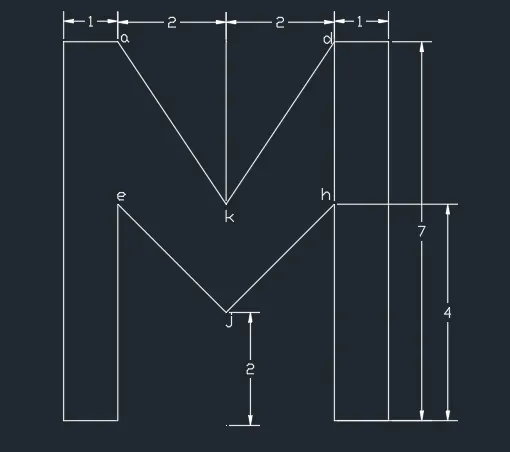 |
Q4.
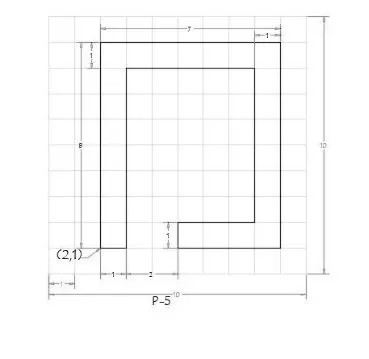
Steps :-
|
COMMAND |
Absolute Coordinates |
Relative rectangular coordinates |
|
COMMAND |
Line |
Line |
|
Specify first point: |
2, 1 |
2,1 |
|
Specify next point: |
2,9 |
@0, 8 |
|
Specify next point: |
9, 9 |
@7, 0 |
|
Specify next point: |
9, 1 |
@0, -8 |
|
Specify next point: |
5, 1 |
@-4, 0 |
|
Specify next point: |
5, 2 |
@0, 1 |
|
Specify next point: |
8, 2 |
@3, 0 |
|
Specify next point: |
8, 8 |
@0, 6 |
|
Specify next point: |
3, 8 |
@-5, 0 |
|
Specify next point: |
3, 1 |
@0, -7 |
|
Specify next point: |
2, 1 or C |
@-1, 0 or C |
RESULT :-
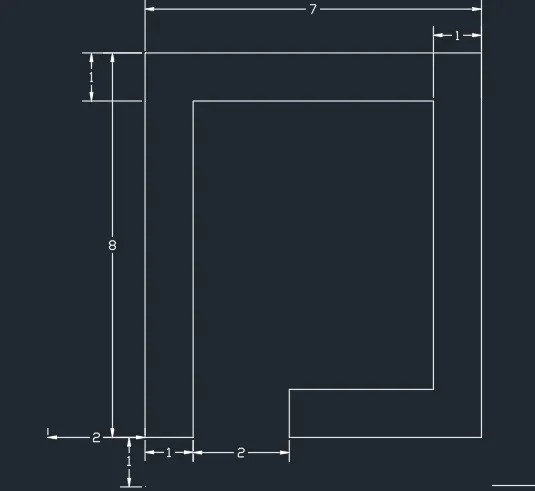 |
Q5.
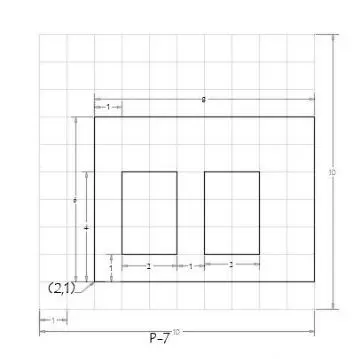
Steps :-
|
COMMAND |
Absolute Coordinates |
Relative rectangular coordinates |
|
COMMAND |
Line |
Line |
|
Specify first point: |
2, 1 |
2,1 |
|
Specify next point: |
2,7 |
@0, 6 |
|
Specify next point: |
10, 7 |
@8, 0 |
|
Specify next point: |
10, 1 |
@0, -6 |
|
Specify next point: |
2, 1 or C |
@-8, 0 |
|
Specify first point: |
3, 2 |
3, 2 |
|
Specify next point: |
3, 5 |
@0, 3 |
|
Specify next point: |
5, 5 |
@2, 0 |
|
Specify next point: |
5, 2 |
@0, -3 |
|
Specify next point: |
3, 2 or C |
@-2, 0 or C |
|
Specify first point: |
6, 2 |
6, 2 |
|
Specify next point: |
6, 5 |
@0, 3 |
|
Specify next point: |
8, 5 |
@2, 0 |
|
Specify next point: |
8, 2 |
@0, -3 |
|
Specify next point: |
6,2 or C |
@-2, 0 or C |
RESULT :-
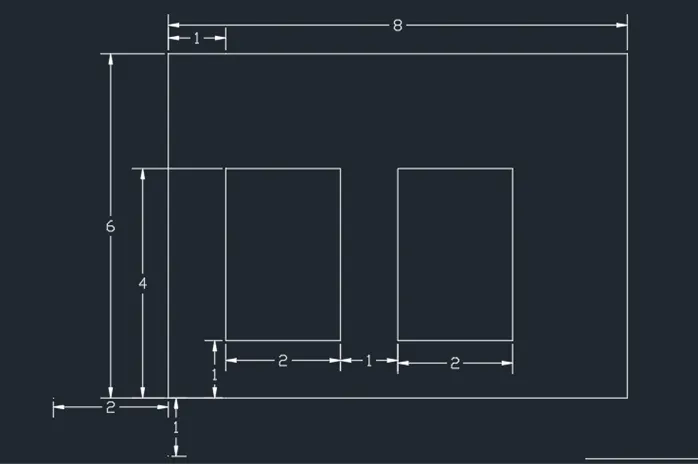 |
Q6.
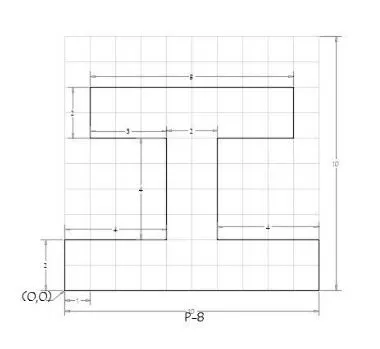
Steps :-
|
COMMAND |
Absolute Coordinates |
Relative rectangular coordinates |
|
COMMAND |
Line |
Line |
|
Specify first point: |
0, 0 |
0,0 |
|
Specify next point: |
10, 0 |
@10, 0 |
|
Specify next point: |
10, 2 |
@2, 0 |
|
Specify next point: |
6, 2 |
@-4, 0 |
|
Specify next point: |
6, 6 |
@0, 4 |
|
Specify next point: |
9, 6 |
@3, 0 |
|
Specify next point: |
9, 8 |
@0, 2 |
|
Specify next point: |
1, 8 |
@-8, 0 |
|
Specify next point: |
1, 6 |
@0, -2 |
|
Specify next point: |
4, 6 |
@3, 0 |
|
Specify next point: |
4, 2 |
@0, -4 |
|
Specify next point: |
0, 2 |
@-4, 0 |
|
Specify next point: |
0, 0 or C |
@0, -2 or C |
RESULT :-
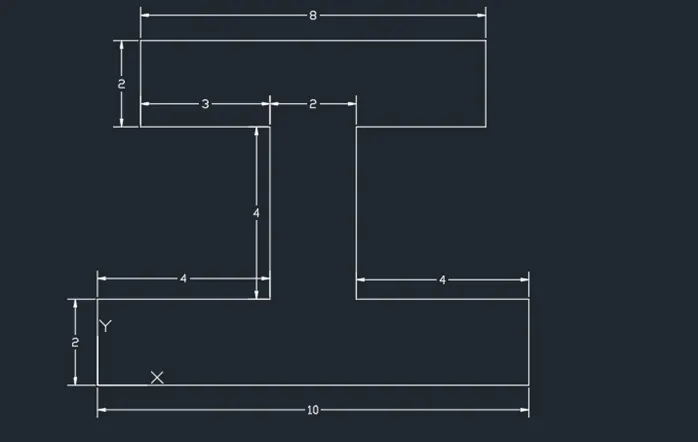 |
Q7.
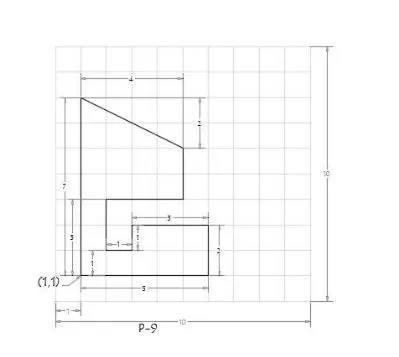
Steps :-
|
COMMAND |
Absolute Coordinates |
Relative rectangular coordinates |
|
COMMAND |
Line |
Line |
|
Specify first point: |
1,1 |
1,1 |
|
Specify next point: |
6, 1 |
@5, 0 |
|
Specify next point: |
6, 3 |
@2, 0 |
|
Specify next point: |
3, 3 |
@-3, 0 |
|
Specify next point: |
3, 2 |
@0, -1 |
|
Specify next point: |
2, 2 |
@-1, 0 |
|
Specify next point: |
2, 4 |
@0, 2 (a) |
|
Specify next point: |
5, 4 |
Line |
|
Specify next point: |
5, 6 |
1, 1 |
|
Specify next point: |
1, 8 |
@0, 7 (b) |
|
Specify next point: |
1, 1 or C |
Join a and b |
RESULT :-
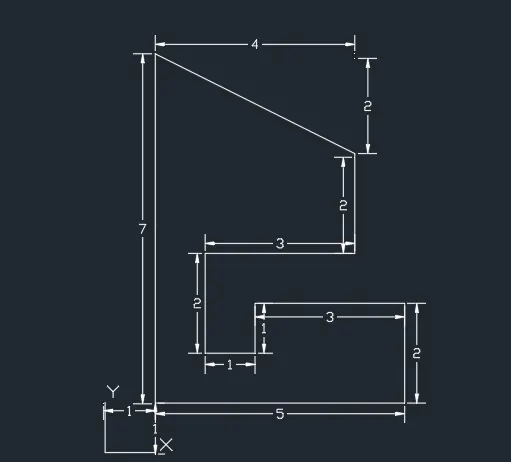 |
Q8.
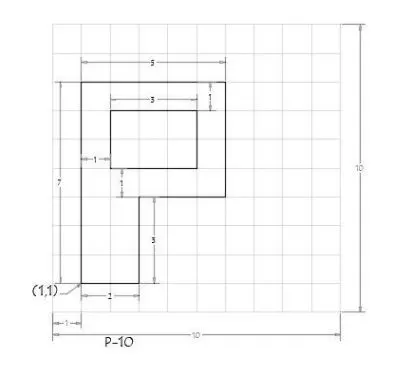
Steps :-
|
COMMAND |
Absolute Coordinates |
Relative rectangular coordinates |
|
COMMAND |
Line |
Line |
|
Specify first point: |
1, 1 |
1,1 |
|
Specify next point: |
3, 1 |
@2, 0 |
|
Specify next point: |
3, 4 |
@0, 3 |
|
Specify next point: |
6, 4 |
@3, 0 |
|
Specify next point: |
6, 8 |
@0, 4 |
|
Specify next point: |
1, 8 |
@-5, 0 |
|
Specify next point: |
1, 1 or C |
@0, -7 or C |
|
Specify first point: |
2, 5 |
2,5 |
|
Specify next point: |
5, 5 |
@3, 0 |
|
Specify next point: |
5, 7 |
@0, 2 |
|
Specify next point: |
2, 7 |
@-3, 0 |
|
Specify next point: |
2, 5 or C |
@0, -2 or C |
RESULT :-
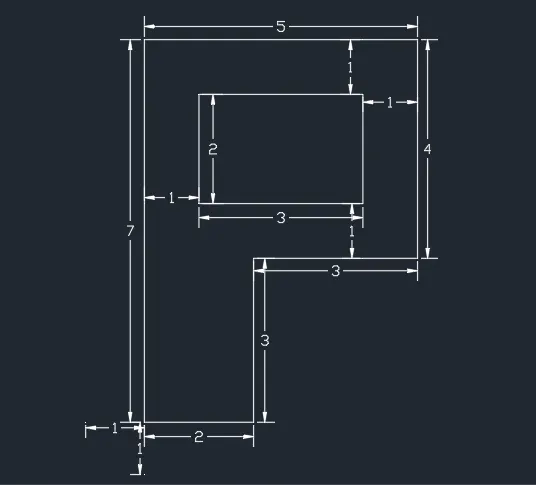 |
Q9.
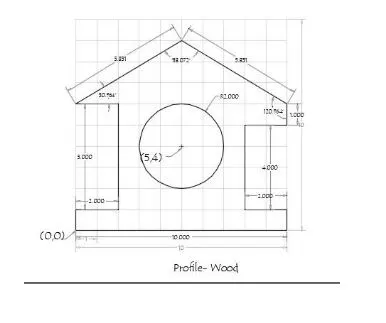
Steps :-
| COMMAND | Absolute Coordinates |
| COMMAND | LINE |
| Specify first point | 0, 0 |
| Specify next point | 10, 0 |
| Specify next point | 10, 1 |
| Specify next point | 8, 1 |
| Specify first point | 8, 5 |
| Specify next point | 10, 5 |
| Specify first point | 10, 6 |
| Specify next point | 5, 9 |
| Specify next point | 0, 6 |
| Specify next point | 2, 6 |
| Specify first point | 2, 1 |
| Specify next point | 0, 1 |
| Specify next point | 0, 0 or c |
| Command | circle |
| Specify centre point for circle | 5, 4 |
| Specify radius of circle | 2 |
RESULT :-
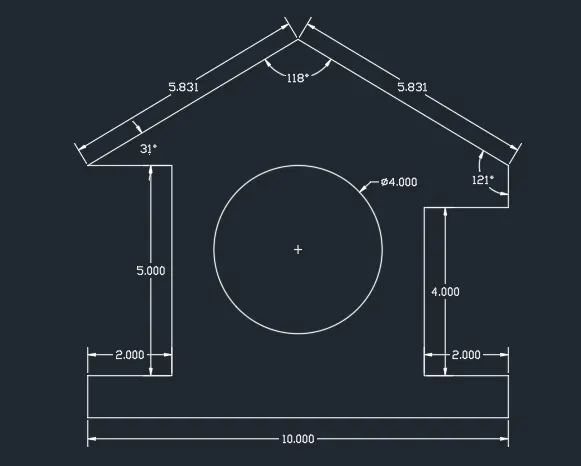 |
Q10.
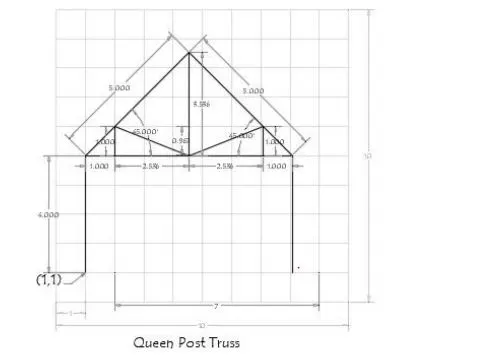
Steps :-
| COMMAND | Absolute Coordinates |
| COMMAND | LINE |
| Specify first point | 1, 1 |
| Specify next point | 1, 5 |
| Specify next point | 4.5, 8.5 |
| Specify next point | 8, 5 |
| Specify first point | 8, 1 |
| Specify first point | 1, 5 |
| Specify next point | 8, 5 |
| Specify next point | 2, 5 |
| Specify first point | 2, 6 |
| Specify next point | 4.5, 5 |
| Specify next point | 7, 6 |
| Specify next point | 7, 5 |
| Specify first point | 4.5, 5 |
| Specify next point | 4.5, 8.5 |
RESULT :-
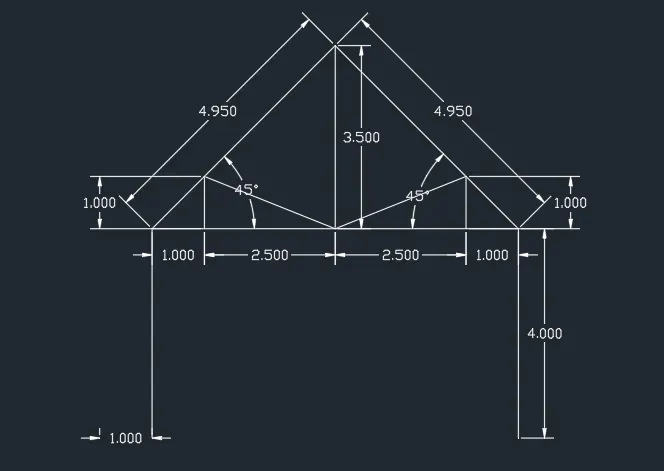 |
Q11.
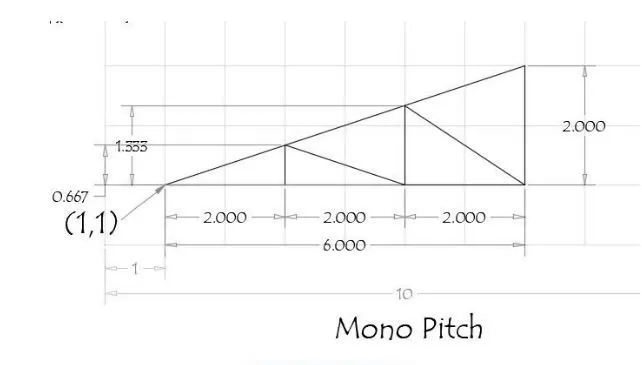
Steps :-
| COMMAND | Absolute Coordinates |
| COMMAND | LINE |
| Specify first point | 1, 1 |
| Specify next point | 7, 1 |
| Specify next point | 7, 3 |
| Specify next point | 1, 1 or C |
| Specify first point | 3, 1 |
| Specify next point | 3, 1.667 |
| Specify next point | 5, 1 |
| Specify next point | 5, 2.333 |
| Specify next point | 7, 1 |
RESULT :-
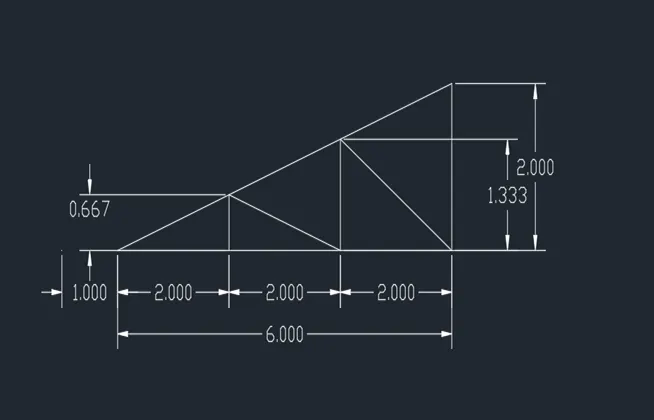 |
RESULTS:
Created the geometries from P1 to P2 using all the coordinates system methods and used Line tool and circle tool to create the geometries.