Creation of geometries by Coordinate system methods using AutoCad
Aim:
To create the given geometries and trusses in AutoCAD, using different coordinate sysytem methods. Geometries from P1 and P2 using all the coordinates sysytem methods, and eash other solved by any one coordinate sysytem method.
Introduction:
Coordinate sysytem:
Coordinate system is a system where number are used to determine the unique postion of points or other geometric ekements.
1.Absolute Coordinate system: In this system all ponts are established at some disrtance in the X and Y axis from the common orgin usually (0,0).
2.Relative Coordinate System: The location of arelative coordinate is defined by its distance from a reference point. In AutoCAD, When using this system, the first point of the drawing is always absolute, i.,it is established with respect to orgin (0,0) and then all the successive position are established with respect to their preceding point. this sysytem is further calssified as :
- Relative Rectangular Coordinate: It is a coordinate sysytem that specifies eash point by a pair of numerical coordinates in the x and y axis. In this system the points succeeding the first point are typed is as '@x,y in command line.
- Relative Polar Coordinate: This system specifies the distance and amgle of a particular point with respect to its previous point. In this system, points are established by typing '@distance<angle' and press enter in command line.
3.Direct Distance Entry Method: It is another popular method used for drawing different sgapes, geometries in AutoCAD. Direct distance entry method enable the user to draw an object by simple point the curdor in the desired direction and entering the required distance in the command line.
Procedure: Launching AutoCAD software
- Go to Start Menu, click on Start Drawing
- In the command line type in 'Startup' and give value as 1
- From Advance setup 'imperial' and decimal is selected
- Now start drwaing my "L" command in command line and give points according to drawing.
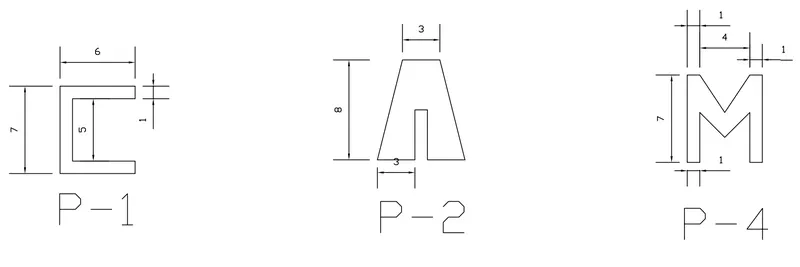
i.Drawing P-1:
a.Absolute Coordinates:
- Dynamic Input is off before ploting
- As shown in Fid first point is (2,1), Give L command in command line and type 2,1 in command line and enter
- The 2 command is 2,7 press enter
- The 3 command is 8,7 press enter
- The 4 command is 8,6 press enter
- The 5 command is 3,6 press enter
- The 6 command is 3,2 press enter
- The 7 command is 8,2 press enter
- The 8 command is 8,1 press enter
- Then last command is in command line just click close
b.Relative Rectangular Coordinate:
- Dynamic Input is off before ploting
- As shown in Fid first point is (2,1), Give L command in command line and type 2,1 in command line and enter
- The 2 command is @0,7 press enter
- The 3 command is @6,0 press enter
- The 4 command is @0,-1 press enter
- The 5 command is @-5,0 press enter
- The 6 command is @0,-5 press enter
- The 7 command is @5,0 press enter
- The 8 command is 0,-1 press enter
- Then last command is in command line just click close
c.Relative Polar Coordinate:
- As shown in Fid first point is (2,1), Give L command in command line and type 2,1 in command line and enter
- The 2 command is @7<90 press enter
- The 3 command is @6<0 press enter
- The 4 command is @1<230 press enter
- The 5 command is @5<180 press enter
- The 6 command is @4<270 press enter
- The 7 command is @5<0 press enter
- The 8 command is @1<270 press enter
- Then last command is in command line just click close
d.Direct Direction method:
- As shown in Fid first point is (2,1), Give L command in command line and type 2,1 in command line and enter
- Place the mouse in 90 degree and give 6 and hit enter
- Place the mouse in 0 degree and give 6 and hit enter
- Place the mouse in 270 degree and give 1 and hit enter
- Place the mouse in 180 degree and give 5 and hit enter
- Place the mouse in 270 degree and give 4 and hit enter
- Place the mouse in 0 degree and give 5 and hit enter
- Place the mouse in 270 degree and give 1 and hit enter
- Place the mouse in 180 degree and give 6 and hit enter
ii. Drawing P-2:
a.Absolute Coordinate :
- Dynamic Input is off before ploting
- As shown in Fid first point is (2,1), Give L command in command line and type 2,1 in command line and enter
- The 2 command is 4,7 press enter
- The 3 command is 7,7 press enter
- The 4 command is 9,1 press enter
- The 5 command is 6,1 press enter
- The 6 command is 6,5 press enter
- The 7 command is 5,5 press enter
- The 8 command is 5,1 press enter
- Then last command is in command line just click close
b.Relative Rectangular Coordinates:
- Dynamic Input is off before ploting
- As shown in Fid first point is (2,1), Give L command in command line and type 2,1 in command line and enter
- The 2 command is @2,7 press enter
- The 3 command is @3,0 press enter
- The 4 command is @2,-7 press enter
- The 5 command is @-3,0 press enter
- The 6 command is @0,4 press enter
- The 7 command is @-1,0 press enter
- The 8 command is @0,-4 press enter
- Then last command is in command line just click close
c.Relative Polor Coordinate:
- As shown in Fid first point is (2,1), Give L command in command line and type 2,1 in command line and enter
- The 2 command is @7<76 press enter
- The 3 command is @3<0 press enter
- The 4 command is @7<286 press enter
- The 5 command is @3<180 press enter
- The 6 command is @4<90 press enter
- The 7 command is @1<180 press enter
- The 8 command is @4<270 press enter
- Then last command is in command line just click close
d.Direct Direction method
- As shown in Fid first point is (2,1), Give L command in command line and type 2,1 in command line and enter
- Using L command place mouse in 0 degree and give 3 hit enter
- Place mouse in 90 degree and give 4 and hit enter
- Place mouse in 0 degree and give 1 and hit enter
- Place mouse in 270 degree and give 4 and hit enter
- Place mouse in 0 degree and give 3 and hit enter
- Then From my point 4 which we given 1 and hit enter off set that above to it with 3 and hit enter and extend that line 1 in 0 degree and 1 in 180 degree now join the both end with 6th point.
iii. Drawing P-4 Using Absolute coordinate method:
- As shown in Fid first point is (2,1), Give L command in command line and type 2,1 in command line and enter
- The 2 command is 2,1 press enter
- The 3 command is 2,8 press enter
- The 4 command is 3,8 press enter
- The 5 command is 5,5 press enter
- The 6 command is 7,8 press enter
- The 7 command is 8,8 press enter
- The 8 command is 8,1 press enter
- The 9 command is 7,1 press enter
- The 10 command is 7,5 press enter
- The 11 command is 5,3 press enter
- The 12 command is 3,5 press enter
- The 13 command is 3,1 press enter
- The 14 command is 2,1 press enter
- Then press Esc
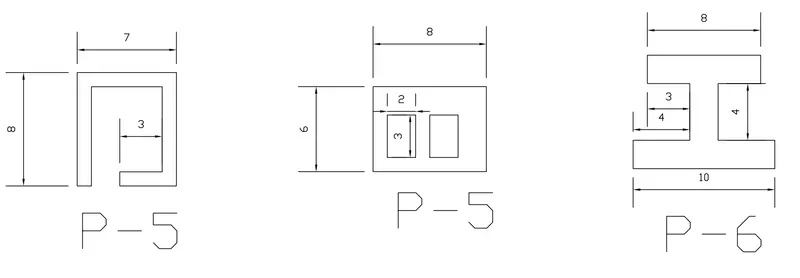
iv.Drawing P-5 Using Absolute Coordinate method:
- As shown in Fid first point is (2,1), Give L command in command line and type 2,1 in command line and enter
- The 2 command is 2,9 press enter
- The 3 command is 9,9 press enter
- The 4 command is 9,1 press enter
- The 5 command is 5,1 press enter
- The 6 command is 5,2 press enter
The 7 command is 8,2 press enter
- The 8 command is 8,8 press enter
- The 9 command is 3,8 press enter
- The 10 command is 3,1 press enter
- The 11 command is 2,1 press enter
- Then press Esc
v. Drawing P-7 Using Absolute coordinate method:
- In P-7 there are Three Rectangles, So we have solved one by one
- Outer rectangular 1 command L enter and points 2,1 press enter
- The 2 command is 2,7 press enter
- The 3 command is 10,7 press enter
- The 4 command is 10,1 press enter
- The 5 command is 2,1 press enter and press Esc
- 1st inner rectangle press L enter 1 point is 3,2 press enter
- The 2 command is 3,5 press enter
- The 3 command is 5,5 press enter
- The 4 command is 5,2 press enter
- The 5 command is 3,2 press enter and press Esc
- 2nd inner rectangle press L enter 1 command is 6,2 press enter
- 2 command is 6,5 press enter
- The 3 command is 8,5 press enter
- The 4 command is 8,2 press enter
- The 5 command is 6,2 press enter and press Esc.
vi.Drawing P-8 Using Relative Rectangular Coordinate method:
- 1st command press L enter plot piont 0,0 press enter
- The 2 command is @0,2 press enter
- The 3 command is @4,0 press enter
- The 4 command is @0,4 press enter
- The 5 command is @-3,0 press enter
- The 6 command is @0,2 press enter
- The 7 command is @8,0 press enter
- The 8 command is @0,-2 press enter
- The 9 command is @-3,0 press enter
- The 10 command is @0,-4 press enter
- The 11 command is @4,0 press enter
- The 12 command is @0,-2 press enter
- The 13 command is @-10,0 press enter and press Esc
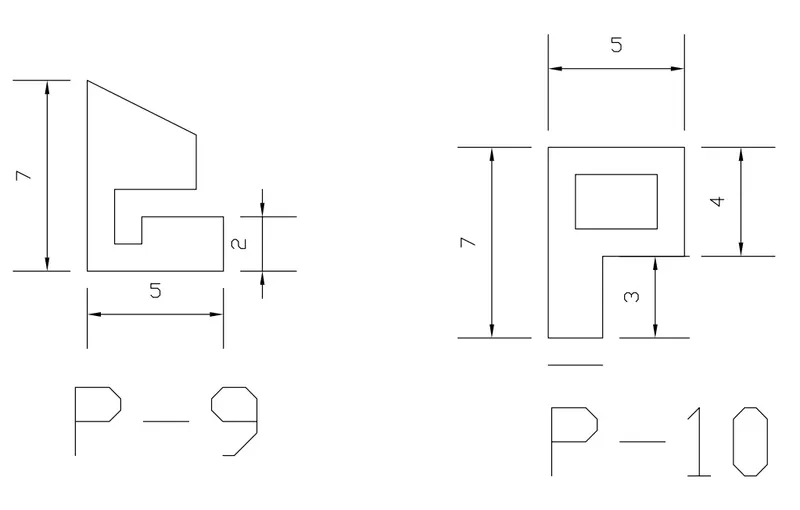
vii.Drawing P-9 Using Relative Rectangular Coordinate method:
- 1 command press L enter plot point 1,1 press enter
- The 2 command @0,7 press enter
- The 3 command is @4,-2 press enter
- The 4 command is @0,-2 press enter
- The 5 command is @1,0 press enter
- The 6 command is @0,1 press enter
- The 7 command is @3,0 press enter
- The 8 command is @0,-2 press enter
- The 9 command is @-5,0 press enter amd press Esc
viii.Drawing P-10 Using Relative Rectangular coordinate method:
- The drawing have two part inner and outer
- For outer drawing give command L enter and plotpoint 1,1 and press enter
- The 2 command is @0,7 press enter
- The 3 command is @5,0 press enter
- The 4 command is @0,-4 press enter
- The 5 command is @-3,0 press enter
- The 6 command is @-2,0 press enter and press Esc
- For inner drawing give L enter and plot point 2,5 and press enter
- The 2 command is @0,2 press enter
- The 3 command is @3,0 press enter
- The 4 command is @0,-2 press enter
- The 5 command is @-3,0 press enter
- Press Esc
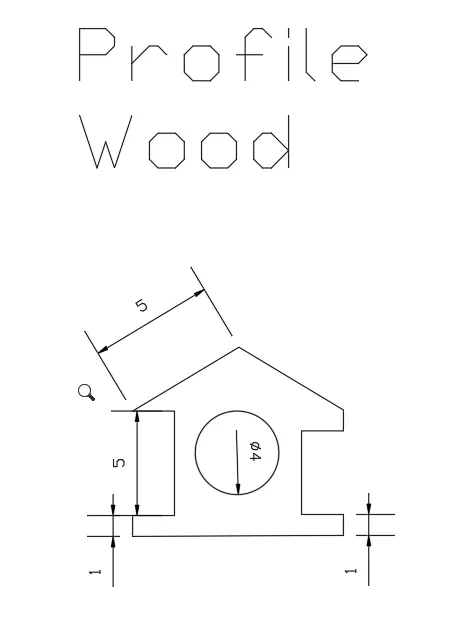
ix.Drawing Profile wood Using Relative Polar method:
- The drawing have two part outer line and inner circle
- For outer line 1 command is L enter and plot point 0,0 press enter
- The 2 command is @1<90 press enter
- The 3 command is @2<0 press enter
- The 4 command is @5<90 press enter
- The 5 command is @2<180 press enter
- The 6 command is @5.931<30.964 press enter
- The 7 command is @5.931<329.036 press enter
- The 8 command is @1<270 press enter
- The 9 command is @2<180 press enter
- The 10 command is @4<270 press enter
- The 11 command is @2<0 press enter
- The 12 command is @1<270 press enter
- The 13 command is @10<180 press enter and press Esc
- Then give circle command in command line and give point as 5,4 as given in drawing press enter and it ask for radius give it as 2 and enter
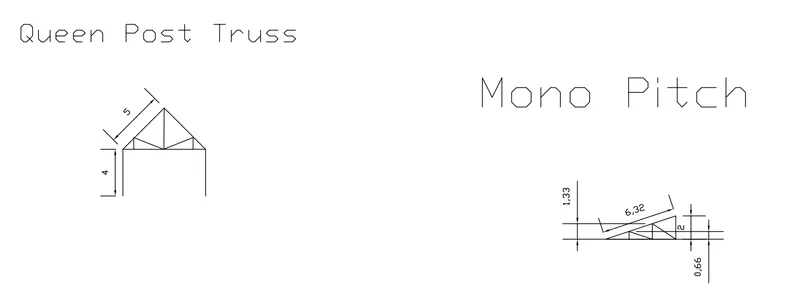
x.Drawing Queen Post Truss:
- This drawing have both Relative polar and relative rectangular.
- 1 command L enter and plot 1,1 and press enter
- The 2 command is @4<90 press enter
- The 3 command is @5<45 press enter
- The 4 command is @5<315 press enter
- The 5 command is @4<270 press enter
- Press Esc and from command 5 give L enter and give @7.07<180 and press Esc.
- Again give command L enter and plot 7,5 and press enter
- Next command is 7,6 and press enter
- Next command is @2.726<201.524 press enter
- Next command is @2.726<158.476 press enter
- Next command is @1<270 press enter and press Esc
- Again L enter and give plot value as @4.5,5 press enter
- Last command is @3.536@90 press enter and press Esc
xi. Drawing Mono pitch:
- This drawing have both Relative polar and relative rectangular
- 1 command is L enter and enter value 7,1 and press enter
- The 2 command is @0,2 press enter
- The 3 command is @-6,-2 press enter
- The 4 command is @6,0 press enter
- The 5 command is @2.40<146.377 press enter
- The 6 command is @0,-1.333 press enter
- The 7 command is @2.10<161.557 press enter
- The 8 command is @0,-0.667 p[ress enter and give Esc.
Conclusion:
Conclusion is given by drwaings.