Menu

Executive Programs

Workshops

Projects

Blogs

Careers

Student Reviews


More

Academic Training

Informative Articles

Find Jobs

We are Hiring!


All Courses

Choose a category

Loading...

All Courses

All Courses

logo

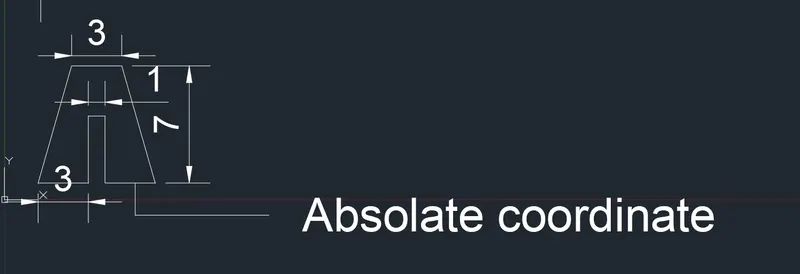
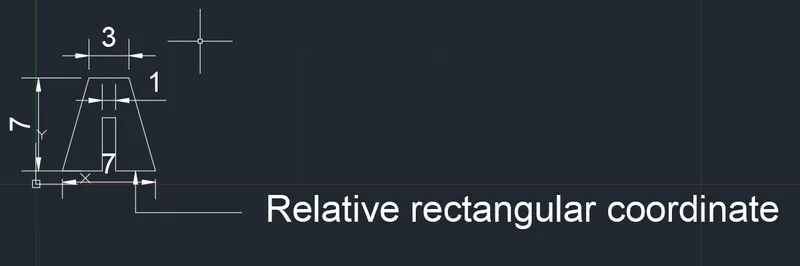
Creation of geometries by Coordinate system methods using AutoCad

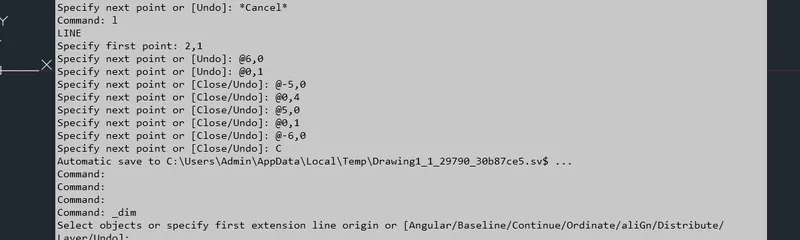
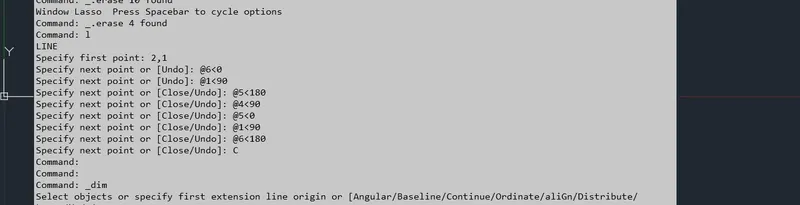
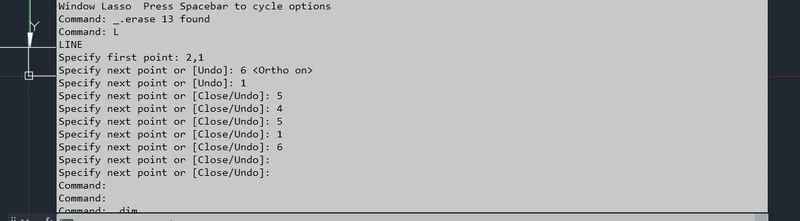
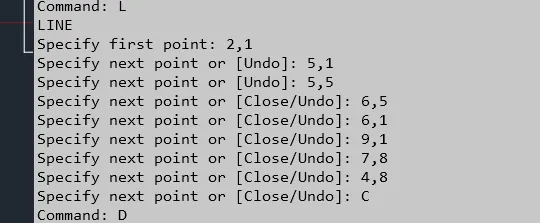
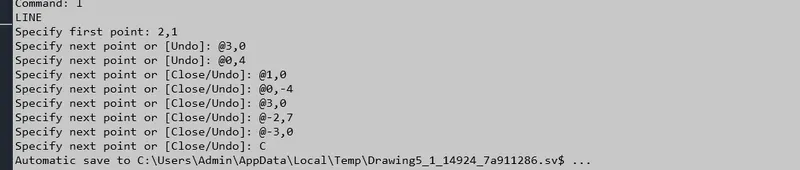
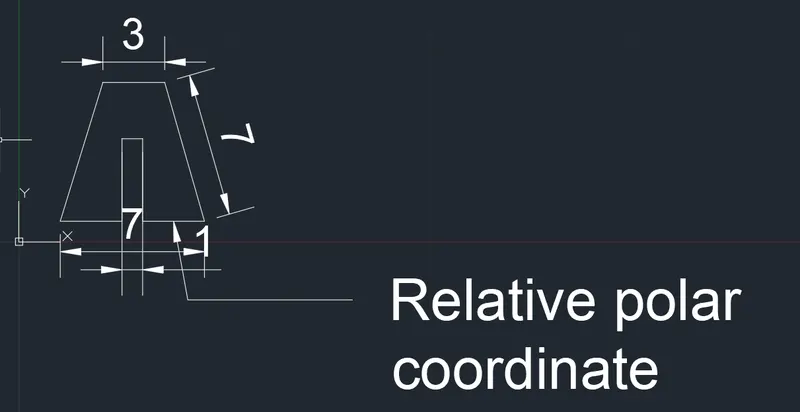
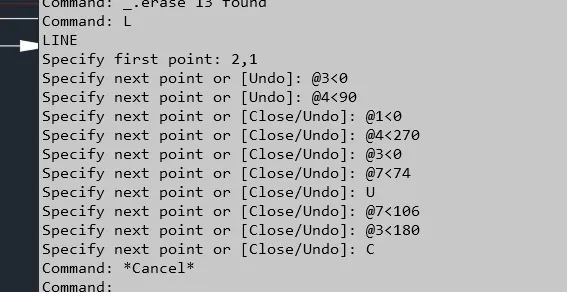
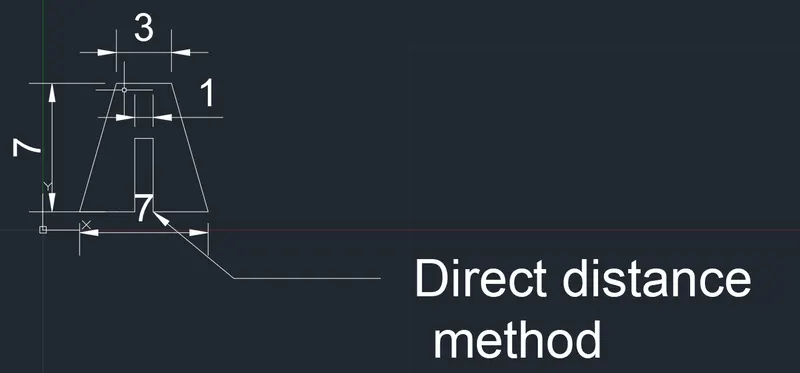
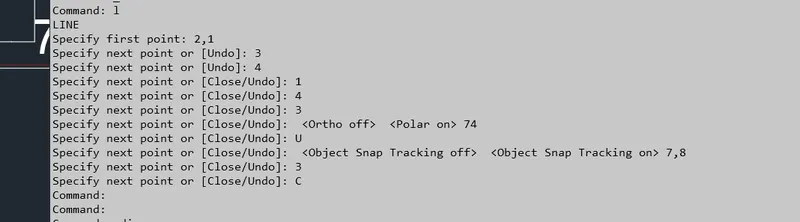
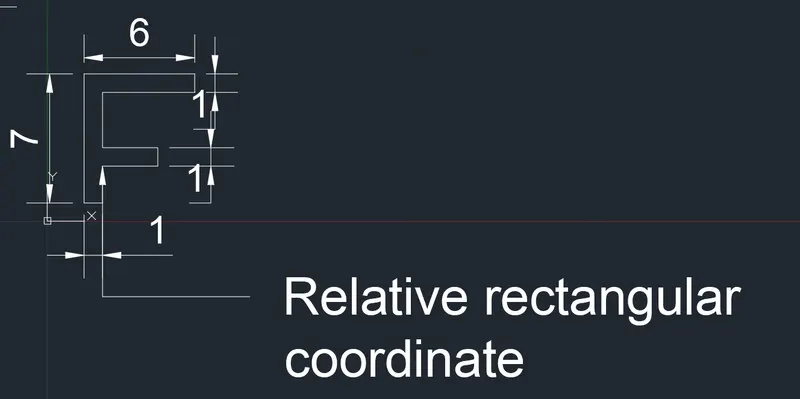
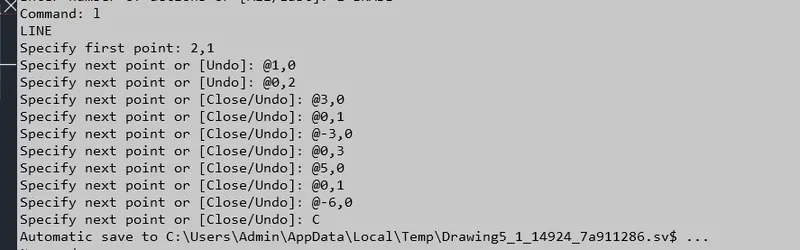
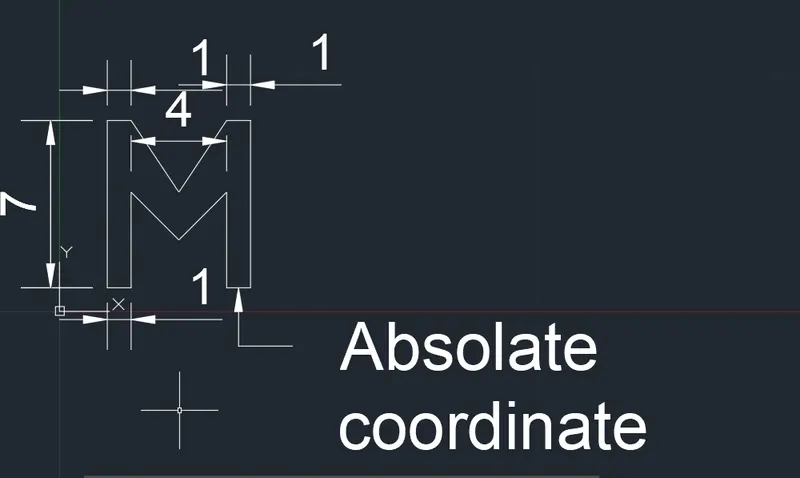
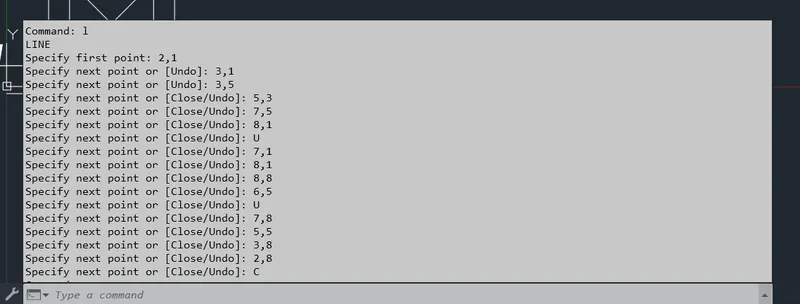
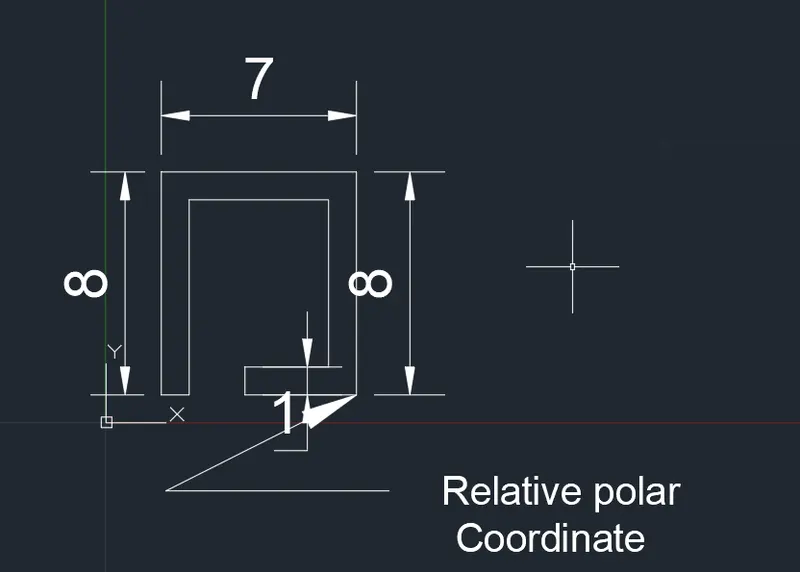
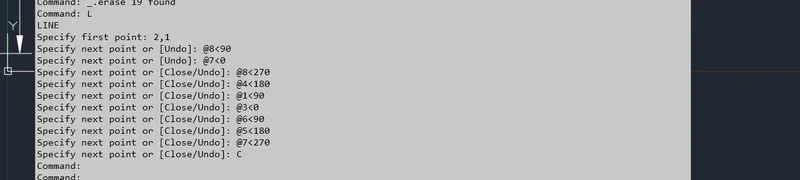
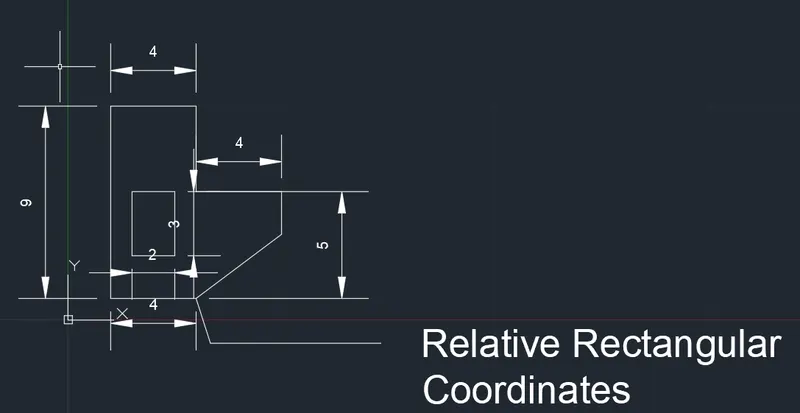
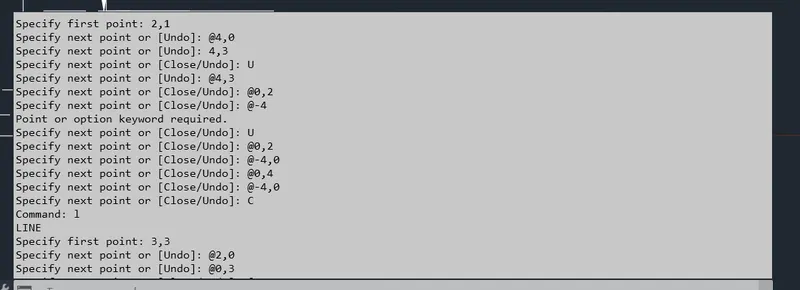
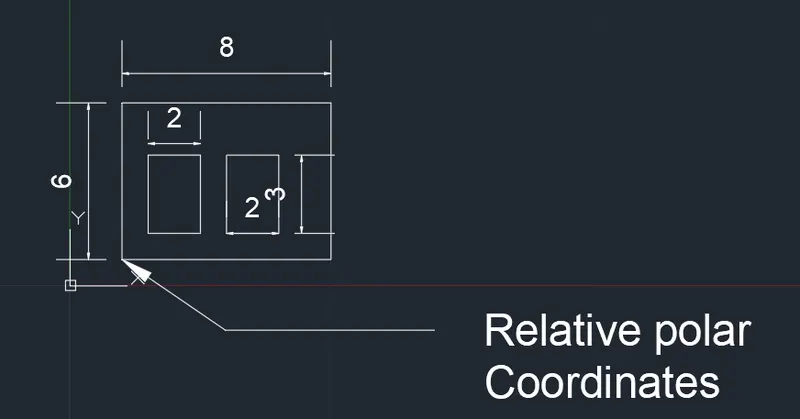
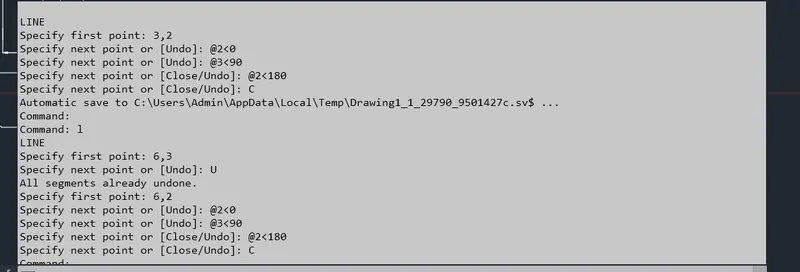
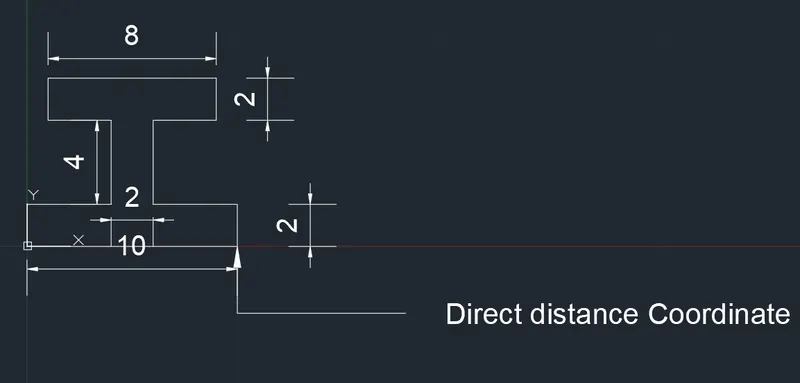
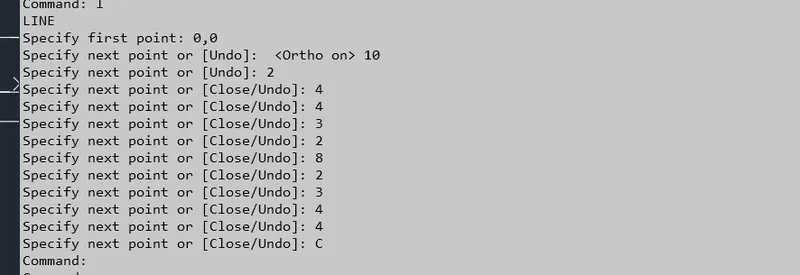
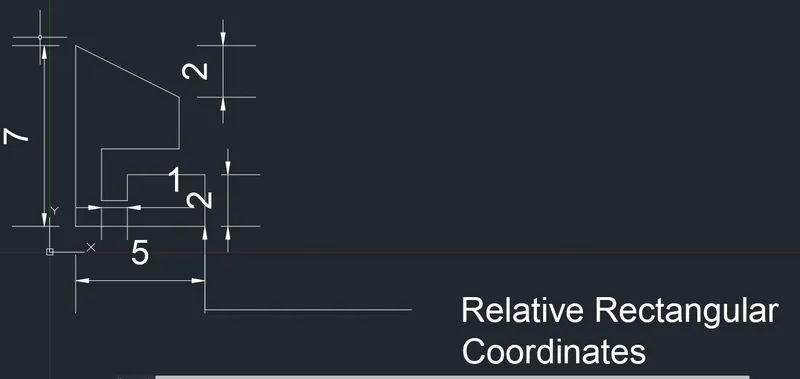
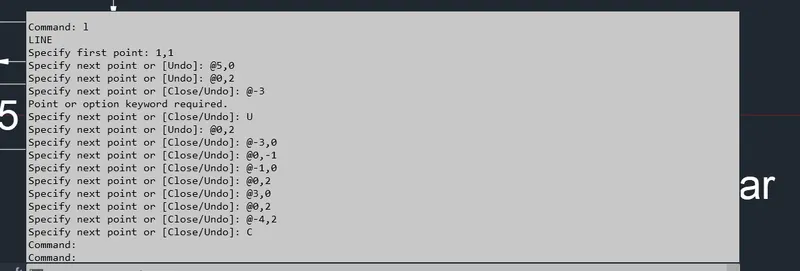
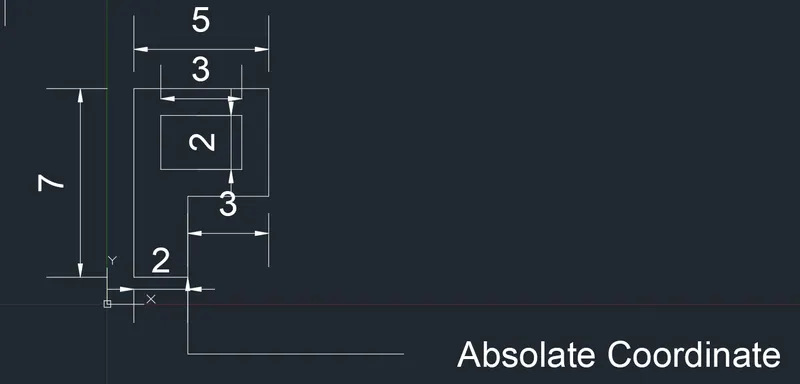
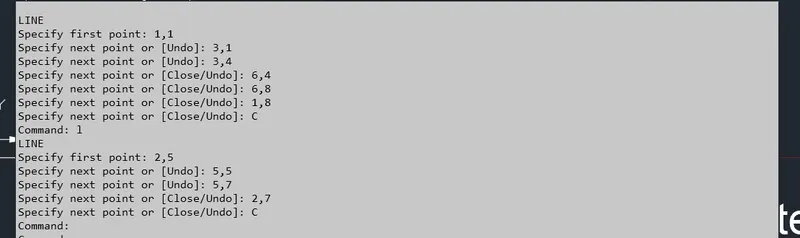
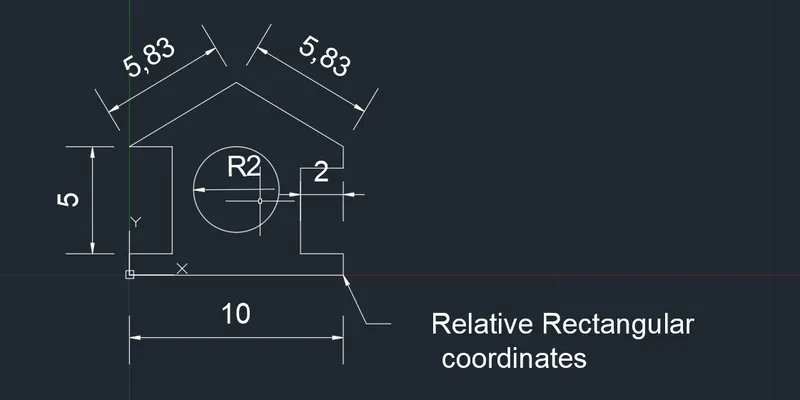
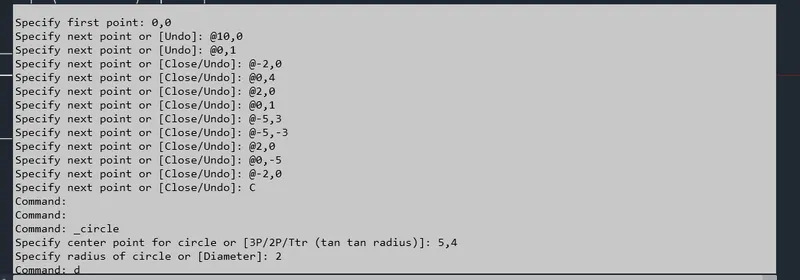
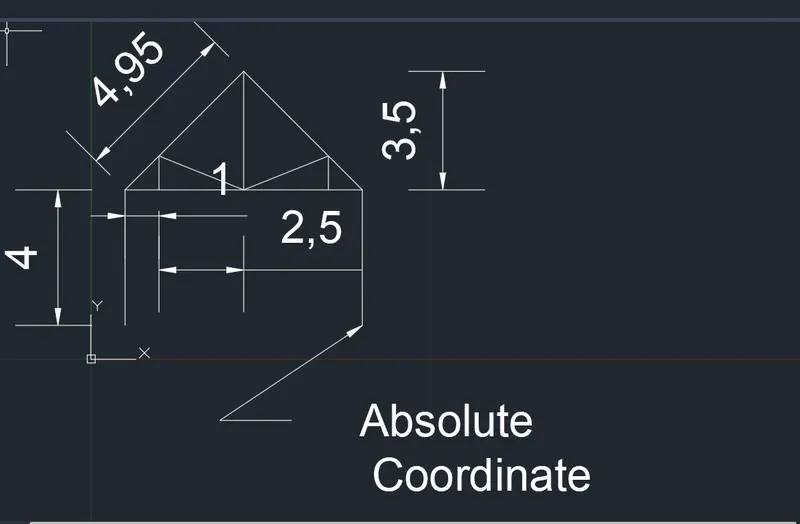
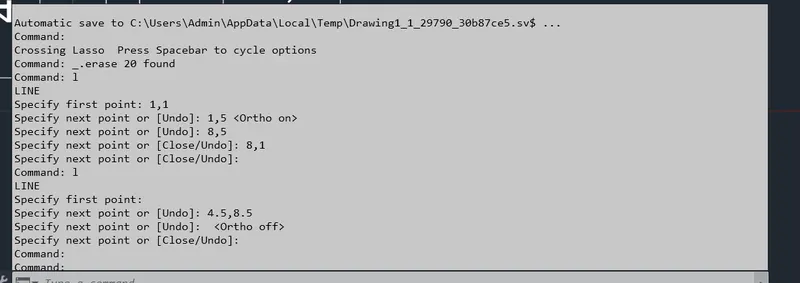
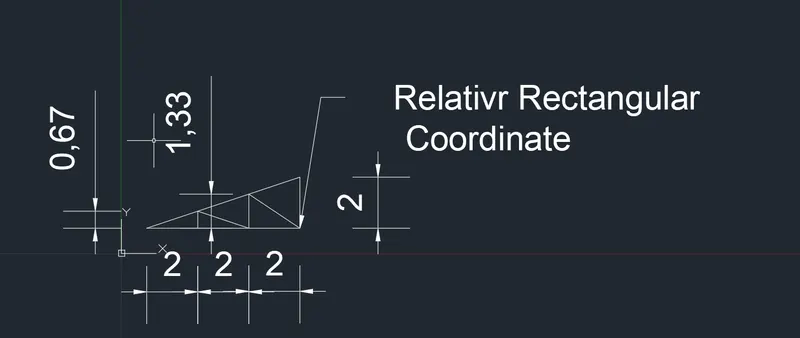
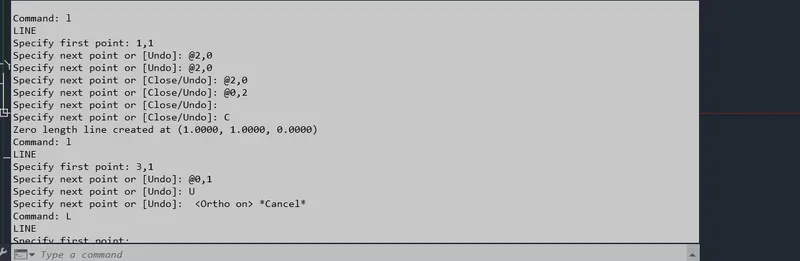
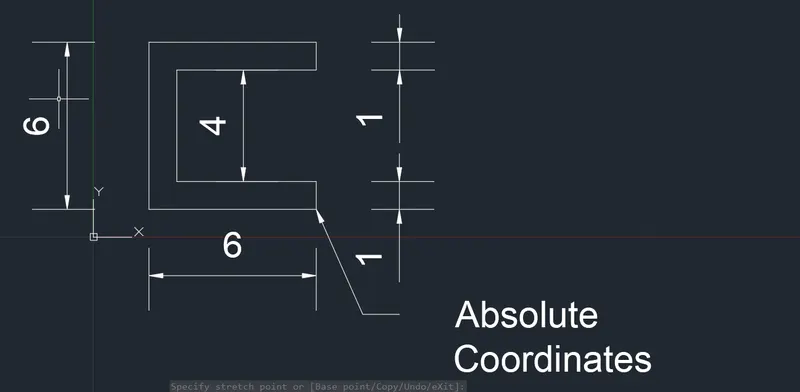
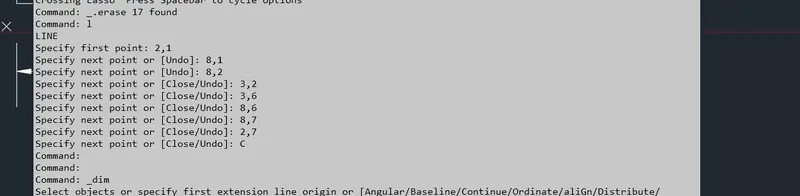
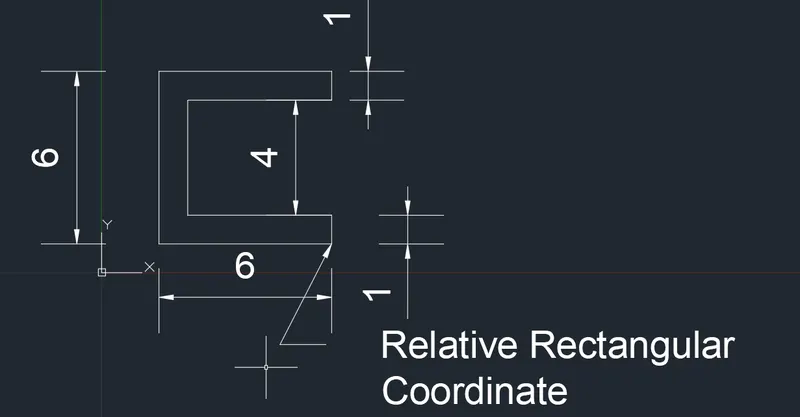
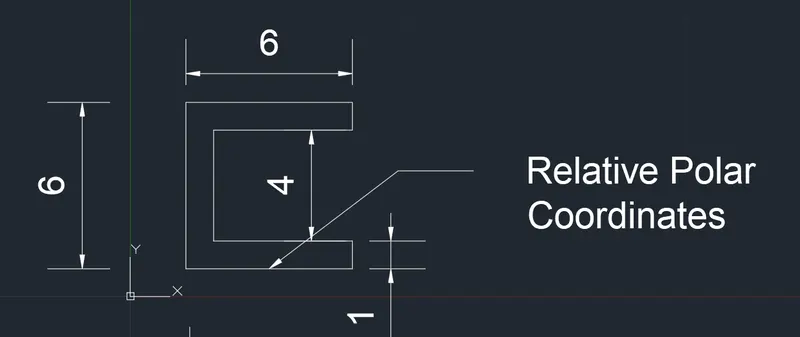
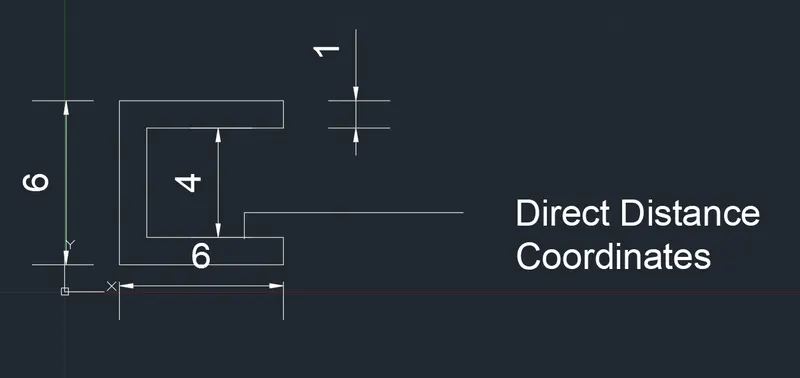
Aim: To Create the geometries for the given drawing using all the coordinates system methods. By using the line tool and circle tool  P1 Absolute Coordinate     P1 Relative Rectangular Coordinate  P1 Relative Polar Coordinate  P1 Direct Distance Coordinate    P2 Absolute Coordinate method  P2 Relative Rectangular coordinate …
    Project Details

    Loading...

    Leave a comment

    Thanks for choosing to leave a comment. Please keep in mind that all the comments are moderated as per our comment policy, and your email will not be published for privacy reasons. Please leave a personal & meaningful conversation.

    Please  login to add a comment

    Other comments...

    No comments yet!
    Be the first to add a comment

    Read more Projects by Patel Mohammedali (33)

    Project 2_Design & Analysis of a Hostel building at Guwahati, Assam

    Objective:

    AIM: 1. To calculate and assume data from the given Architectural and site information    2. To model, Analysis and design the frame structure using Etabs Software  3. To model, Analysis and design the foundation using safe software 4. To produce a structural typical floor plan& typical Rebar Drawing …

    calendar

    22 Jan 2023 05:43 AM IST

    • DESIGN
    • ETABS
    Read more

    Foundation Design using SAFE

    Objective:

    AIM: 1. To Know the general design procedure of spread footing with safe software  2. To Know the general design procedure of pile foundation with safe software  PROCEDURE: SPREAD FOOTING : 1. Open the software  2. Select the New Model  3. Determine the units and other aspects  4. Determine the…

    calendar

    20 Jan 2023 03:55 PM IST

      Read more

      Design of Shallow Foundation (Isolated Footings)

      Objective:

      OBJECTIVE : 1. To know the general design procedure for spread footing  2. To practice how the inputs can be collaborated and arrived as data for calculation AIM: To Design of Shallow Foundation (Isolated Footings)

      calendar

      17 Jan 2023 04:20 PM IST

        Read more

        Structural Modelling using Etabs 2018

        Objective:

        OBJECTIVE:  1. To model an apartment with all seismic considerations based on architectiral input  2. To Know how to check the seismic performance of an apartment using Etab    AIM: Using Etabs for structural modeling  PROCEDURE:  1. Open a new Etabs file for analysis and designing  2.…

        calendar

        15 Jan 2023 02:42 PM IST

          Read more

          Analysis & Design of RCC shear walls in the model using ETABS

          Objective:

          Objective: 1. To know the design of the RC shear wall using Etabs analysis  2. To know the basics of shear wall reinforcement dealing with respect to the primary standard  3. To ensure the ductility reinforcement required by IS13920:2016 has been satisfied in the reinforcement drawing  AIM: To Analysis…

          calendar

          12 Jan 2023 06:53 AM IST

          Read more

          Reinforcement detailing of Columns from ETABS output

          Objective:

          Objectives of the challenges : 1. To know the design of the RC column Using Etabs Analysis  2. To know the basics of RC column Reinforcement Detailing with respect to primary standards  3. To ensure the Ductility reinforcement required by IS-13920-2016 has been Satisfied in the reinforcement drawing  AIM: To design Reinforcement…

          calendar

          06 Jan 2023 03:54 PM IST

          Read more

          Reinforcement Detailing of Beams from ETABS output

          Objective:

          AIM:          i) To design the beams in detail from the Etabs           ii) To provide the detailing of longitudinal and shear reinforcement for two continuous beams.         iii) To calculate the value of maximum shear force in any one of…

          calendar

          04 Jan 2023 06:18 PM IST

          Read more

          Project 1_Comparative study of different storey buildings for Seismic forces

          Objective:

          OBJECTIVE = 1. To know how to extract Different seismic responses for the structure. 2. How to alter certain properties in the Etab model  3. Know the factor influencing the Dynamin characteristic of the building  4. Know the Factor influencing the time period of the building  5. know the Factor influencing…

          calendar

          01 Jan 2023 07:22 AM IST

          Read more

          Modelling of 25 storey building with the specified properties using ETABS

          Objective:

          OBJECTIVE : 1. To know the modeling of high-rise buildings in Etab Software  2. To verify the seismic code requirements from Etabs Analysis  AIM: To Model a 25-story building on ETABS with structural properties as specified  PROCEDURE:  1. Open the ETABS software. Click the file menu and choose…

          calendar

          22 Dec 2022 07:34 AM IST

          Read more

          Conceptual design of a building with columns and shear walls

          Objective:

          OBJECTIVE: 1] To investigate the suitability of the given plan With respect to seismic behavior 2] To schematically draw a viable seismic structure.  Question 1:The building shown, 20 × 35 m in plan, has columns on a 5 × 5 m grid and shear walls (with dimensions shown in m, 250 mm in thickness) in three…

          calendar

          11 Dec 2022 02:04 PM IST

            Read more

            Concept on positioning of Columns

            Objective:

            OBJECTIVE=1. To understand the impact of vertical and horizontal load members in a seismic behavior of a structure structure  2. To understand different irregularities in the building    Question 1: Comment on the layout of the framing plan concerning earthquake resistance in the two horizontal directions…

            calendar

            08 Dec 2022 03:37 PM IST

              Read more

              Understanding the concepts on Degrees of Freedom

              Objective:

              A five storey structure with 5 translational DOF is shown here. Each storey has mass ‘m’. The eigenvalue problem has been solved and the 5 periods of vibration Tn and their corresponding mode shapes, φn has been derived. The fundamental period of vibration (T1 = 2 seconds) and its associated…

              calendar

              06 Dec 2022 06:37 AM IST

                Read more

                Structural dynamics

                Objective:

                Q1. Differentiate Static analysis and Dynamic analysis by properly representing pictures ANSWER= STATIC ANALYSIS: 1. A Static Structural analysis calculates the effect of steady loading conditions on the structure  2. Static means stationary or fixed  3. Eg. Dead load  its intensity doesn't change over the…

                calendar

                03 Dec 2022 04:52 AM IST

                Read more

                Identification of Cracks

                Objective:

                1a]  OBSERVATION:  1. Concrete is crushed and the reinforcement is exposed  2. Concrete spalled beyond the reinforcement which may be a sign of the rupture. 3. Beam top portion look safe because of the flange advantage from the slab  4. The crack develops from bottom to top means rebar yielding occurs…

                calendar

                29 Nov 2022 06:17 AM IST

                  Read more

                  Usage of Navigation tool , Timeliner and Clash Detection test using Naviswork

                  Objective:

                  1) Use the Architecture/ Structure Project file developed by you in weeks 6 to 8. Export the Revit architecture and structure model to the Navisworks Cache file following the export settings discussed in class ANSWER= AIM: To Export the Revit architecture model to the Navisworks Cache file following the export settings…

                  calendar

                  25 Nov 2022 05:45 AM IST

                    Read more

                    Creating Conceptual mass in REVIT and Creation of Sinusoidal curve and a Parametric stadium using Dynamo

                    Objective:

                     1) Using Dynamo creates a set of sinusoidal points and creates a curve and create a surface out of the curve. ANSWER= AIM: To Use Dynamo and create a set of sinusoidal points and create a curve and create a surface out of the curve. PROCEDURE: 1. Just open thy Dynamo 2. In order to create the sinusoidal point…

                    calendar

                    23 Nov 2022 03:50 PM IST

                      Read more

                      Creating Architectural and Structural model with 3D rendering using REVIT

                      Objective:

                      1) Select the type of structure you want to build from one of the three below:        a. Multi-Unit Residential Apartment        b. Office Buildings        c. School ANSWER: Office Building  2) Assume reasonable assumptions for geographic and location details…

                      calendar

                      14 Nov 2022 12:40 PM IST

                      Read more

                      3D Creation of Celing, Roof, Architectural plan, Structural plan, Sectional view, Elevation view and Camera specific view for a house plan using REVIT

                      Objective:

                      1) Based on the project saved from Week 3, proceed from the First Floor Level. Model a Ceiling from the architecture tab above the walls at the first-floor level AIM: To Model a Ceiling from the architecture tab above the walls at the first-floor level. PROCEDURE: 1. Open the project from challenge 3 2. click on the…

                      calendar

                      03 Nov 2022 02:02 PM IST

                        Read more

                        Creating a Wardrobe detailed drawing, Floor Plan, Kitchen Layout and Column Detail using AutoCad

                        Objective:

                        1.  AIM: To Draw the elevation and details of a wardrobe as shown in the Figure. PROCEDURE: 1. First and for most set the unit to decimal and mm  2. Then setup the dimension setting  3. Sketch the plan with the given dimension with the help of line and rectangular command  4. make sure you hatch…

                        calendar

                        15 Oct 2022 12:50 PM IST

                          Read more

                          Project 2_Creating a 3D rendered model for a Residential Building in AutoCad

                          Objective:

                          AIM: To draw a 3D-rendered model for a residential building in Autocad PROCEDURE: 1. First and foremost change the unit to decimal and mm 2. Now create the layer for the model  3. Now create the plan for the building with the help of the layer created  4. BUILD-UP size of the building is 15450x6000mm  External…

                          calendar

                          15 Oct 2022 12:05 PM IST

                            Read more

                            Creating 3D Isometric view of various structural elements in AutoCAD

                            Objective:

                            1.  AIM: To Create a 3D Isometric View of the building with a plan and elevation given PROCEDURE: 1. First set the unit to engineering and inches  2. Creating the necessary layer for the project  3. Create the first object with the help of the BOX command of size 10'9"x10'9"x4" 4. Over that box create…

                            calendar

                            11 Oct 2022 02:14 PM IST

                              Read more

                              Creating various 3D Models like Furniture, Footing, Girder, Column drop with panel and Gable Wall in AutoCad

                              Objective:

                              1. AIM: To Create a 3D Furniture element PROCEDURE: 1. First change the unit to engineering and inches 2. Then create a plan for the table with the help of the polyline command  3. Then turn it into REGION with the help of the region command  4. With the help of EXTRUDE command extrude it in the z-axis as per…

                              calendar

                              06 Oct 2022 02:28 PM IST

                                Read more

                                Creation of Multiple viewports, Scaling the drawing and setting in Template in AutoCad

                                Objective:

                                1.  AIM: To Create a layout of the Plan and Section A of the project in Challenges 7 PROCEDURE: 1. First set the page setup manager to opt for A1 paper size 841x594mm  2. Select the template from the cade file that is  Tutorial-mArch.dwt 3. Now with the help of the ATTEDIT command  edit the…

                                calendar

                                02 Oct 2022 05:59 AM IST

                                  Read more

                                  Creating Kitchen layout, Hatching of Architectural elements and sectional view of an Industrial Building in AutoCad

                                  Objective:

                                  AIM: Create the layouts of the Kitchen and provide a hatches pattern  PROCEDURE: Set the unit to decimal and mm  First create a wall of thickness of 250mm Now create the counter wherever it's required as per the given dimension  Making all components required on the counter And label them with the number…

                                  calendar

                                  01 Oct 2022 07:29 AM IST

                                    Read more

                                    Creating Bar Bending schedule, Different Door types, and Creation of standard drawing templates using AutoCad

                                    Objective:

                                    1.  AIM: To create the template as shown in figure PROCEDURE:  1. So basically we can use line, rectangle, offset and text commands to draw the templates. 2. And to convert it into the block we have to first invoke the block command 3. Make sure we have to invoke the command after creating the object  4.…

                                    calendar

                                    28 Sep 2022 10:36 AM IST

                                      Read more

                                      Project 1 _Creating an Architectural plan for the provided plot size and develop relevant basic structural drawings

                                      Objective:

                                      AIM= To design and draft a layout of a residential building for plot size 18.3x6m  PROCEDURE=  PLAN  1. Start with changing the unit to decimal and mm  2. Set the dimensional style manager  3. Creating the appropriate layer for drafting  4. Now start with the Architecture plan by drawing the…

                                      calendar

                                      25 Sep 2022 07:21 AM IST

                                        Read more

                                        Creation of Column Schedule and Drawing Template using AutoCad

                                        Objective:

                                          1. AIM: TO  Create a column schedule PROCEDURE :  1. Change the unit to engineering and inches. 2. Draw the tabular column with line and rectangular command 3. Use the Text command to create text in a tabular column  4. Use font name: Romans.shx; Height: 8”, Justify: Left 5. Create the…

                                        calendar

                                        12 Sep 2022 02:12 PM IST

                                          Read more

                                          Creating a Residence Layout, Seating plan, Toilet and Utility room plan using AutoCad

                                          Objective:

                                          1.O AIM:  To sketch the layout of the residence. Consider all dimensions as a reference to sketch the unit plan.  Procedure: 1. Change the unit to Engineering and inch  2. Determine the number of layers you need to create the layout  3. Eg: Layer 1 = Internal and External Walls Layer 2 = Staircase  Layer 3 =  Furniture …

                                          calendar

                                          08 Sep 2022 09:04 AM IST

                                            Read more

                                            Drafting of various geometries using Chamfer, Fillet tool in AutoCad

                                            Objective:

                                            1. AIM: To create geometries using the given command  PROCEDURE: 1. Change the unit to decimal and MM  2. Draw the outer boundary with the help of a line command  3. Use the relative Rectangular method and relative polar method for the outer boundary  4. Now use the circle command to draw the circle…

                                            calendar

                                            06 Sep 2022 03:28 AM IST

                                              Read more

                                              Creating a Floor plan, Footing detail and Isometric view using AutoCad

                                              Objective:

                                              C1 AIM: To create the C.S of load bearing wall on the spread footing as per the given dimension in the attachment in the auto-cad with the help of the commands    COMMANDS USED:  LINE COMMAND  RECTANGULAR COMMAND  OFFSET COMMAND  DIMENSION COMMAND  TEXT COMMAND  TRIM COMMAND …

                                              calendar

                                              02 Sep 2022 07:13 AM IST

                                                Read more

                                                Creation of geometries by Coordinate system methods using AutoCad

                                                Objective:

                                                Aim: To Create the geometries for the given drawing using all the coordinates system methods. By using the line tool and circle tool  P1 Absolute Coordinate     P1 Relative Rectangular Coordinate  P1 Relative Polar Coordinate  P1 Direct Distance Coordinate    P2 Absolute Coordinate method  P2 Relative Rectangular coordinate …
                                                calendar

                                                30 Aug 2022 06:01 AM IST

                                                  Read more

                                                  Sketch a G+1 residential plan according to Vaastu Shastra and Calculation of Loads as per IS code

                                                  Objective:

                                                  AIM= To Sketch a G+1 Floor residential plan, According to Vaastu Shastra, list down the names of the structural drawing required to be provided to the site for construction, and compute the required load for column, beam and slab.    IMPORTANT STRUCTURAL DRAWINGS FOR A PROJECT Centre line drawing Footing and…

                                                  calendar

                                                  26 Aug 2022 02:43 PM IST

                                                    Read more

                                                    Project on Concrete Mix Design for various grades of Concrete

                                                    Objective:

                                                    Aim: to determine the mix proportion of M30 Grade concrete using fly ash. 1] Stipulation for proportioning  a. Grade of desigination= M35  b. Type of cement= OPC43 c.Type of mineral admixture= Fly ash  d.Maximum nominal size of aggregate= 20mm e.Minimum cement content= 320kg/m^2 f.Maximum W/C ratio=0.45…

                                                    calendar

                                                    30 Jul 2022 06:04 AM IST

                                                      Read more
                                                      Showing 1 of 33 projects