Creation of geometries by Coordinate system methods using AutoCad
AIM - To create the geometries of the given figures using different coordinate systems in Autocad
- P-1
- Absolute coordinate system: In this the distances are measured from origin.
Procedure:
- Type the command “L” for line and then give the coordinates for point 1 (2,1) in the command box.
- Type the next coordinate of point 2 (2,7) in the command box.
- Type the next coordinate of point 3 (8,7) in the command box.
- Type the next coordinate of point 4 (8,6) in the command box.
- Type the next coordinate of point 5 (3,6) in the command box.
- Type the next coordinate of point 6 (3,2) in the command box.
- Type the next coordinate of point 7 (8,2) in the command box.
- Type the next coordinate of point 8 (8,1) in the command box
Now click Enter or click close command and the geometry will be created.
Result:
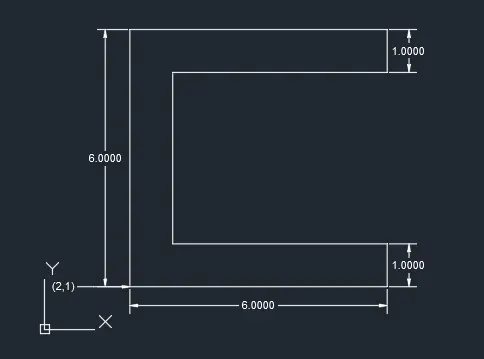
- Relative coordinate system: In this we measure the coordinates from the last point.
Procedure:
- Type the command “L” for line and give the coordinates for point 1 (2,1)
- Type the next coordinate of point 2 (@0,6) in the command box.
- Type the next coordinate of point 3 (@6,0) in the command box.
- Type the next coordinate of point 4 (@0,-1) in the command box.
- Type the next coordinate of point 5 (@-5,0) in the command box.
- Type the next coordinate of point 6 (@0,-4) in the command box.
- Type the next coordinate of point 7 (@5,0) in the command box.
- Type the next coordinate of point 8 (@0,-1) in the command box.
- Type the next coordinate of point 9 (@-6,0) in the command box and then the geometry will be created or click on close command.
Result:
- Polar coordinate system: In this the coordinate is given and angle with respect to x axis is given.
Procedure:
- Type the command “L” for line and give coordinates for point 1(2,1).
- Type the next coordinate of point 2(@6<90) in the command box.
- Type the next coordinate of point 3 (@6<0) in the command box.
- Type the next coordinate of point 4 (@1<270) in the command box.
- Type the next coordinate of point 5 (@5<180) in the command box.
- Type the next coordinate of point 6 (@4<270) in the command box.
- Type the next coordinate of point 7 (@5<0) in the command box.
- Type the next coordinate of point 8 (@1<270) in the command box.
- Type the next coordinate of point 9 (@6<180) in the command box or click on close command and then the geometry will be created.
Result:
- P-2
- Absolute coordinate system:
Procedure:
- Type the command “L” for line and give the coordinates for point 1 (2,1).
- Type the next coordinate of point 2 (5,1) in the command box.
- Type the next coordinate of point 3 (5,5) in the command box.
- Type the next coordinate of point 4 (6,5) in the command box.
- Type the next coordinate of point 5 (6,1) in the command box.
- Type the next coordinate of point 6 (9,1) in the command box.
- Type the next coordinate of point 7 (7,8) in the command box.
- Type the next coordinate of point 8(4,8) in the command box.
- Enter or click the command close and then the geometry will be created.
Result:
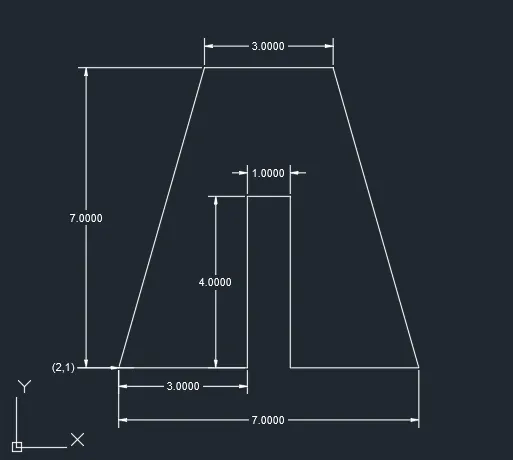
- Relative coordinate system:
Procedure:
- Type the command “L” for line and give the coordinates for point 1 (2,1).
- Type the next coordinate of point 2 (@3,0) in the command box.
- Type the next coordinate of point 3 (@0,4) in the command box.
- Type the next coordinate of point 4 (@1,0) in the command box.
- Type the next coordinate of point 5 (@0,-4) in the command box.
- Type the next coordinate of point 6 (@3,0) in the command box.
- Type the next coordinate of point 7 (@-2,7) in the command box.
- Type the next coordinate of point 8 (@-3,0) in the command box.
- Enter or click on the close command.
Result:
- Polar coordinate system:
Procedure:
- Type the command “L” for line and give the coordinates for (2,1)
- Type the next coordinate of point 2 (@3<0) in the command box.
- Type the next coordinate of point 3 (@4<90) in the command box.
- Type the next coordinate of point 4 (@1<0) in the command box.
- Type the next coordinate of point 5 (@4<270) in the command box.
- Type the next coordinate of point 6 (@3<0) in the command box.
- Type the next coordinate of point 7 (@7.28<105.95) in the command box.
- Type the next coordinate of point 8 (@3<180) in the command box.
- Type the next coordinate of point 9 (@7.28<254.058) in the command box.
- Enter or click on close command.
Result:
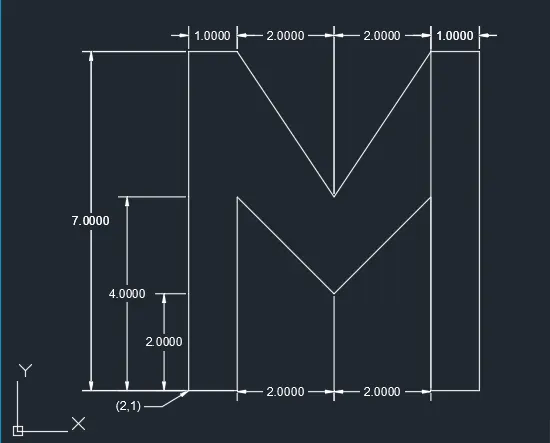
- P-4
- Relative coordinate system:
Procedure:
- Type the command “L” for line and give the coordinates for point 1 (2,1)
- Type the next coordinate of point 2 (@0,7) in the command box.
- Type the next coordinate of point 3 (@1,0) in the command box.
- Type the next coordinate of point 4 (@2,-3) in the command box.
- Type the next coordinate of point 5 (@2,3) in the command box.
- Type the next coordinate of point 6 (@1,0) in the command box.
- Type the next coordinate of point 7 (@0,-7) in the command box.
- Type the next coordinate of point 8 (@-1,0) in the command box.
- Type the next coordinate of point 9 (@0,4) in the command box.
- Type the next coordinate of point 10 (@-2,-2) in the command box.
- Type the next coordinate of point 11 (@-2,2) in the command box.
- Type the next coordinate of point 12 (@0,-4) in the command box.
- Enter or click on close command
Result:
- P-5
- Relative coordinate system:
Procedure:
- Type the command “L” for line and give the coordinates for point 1 (2,1)
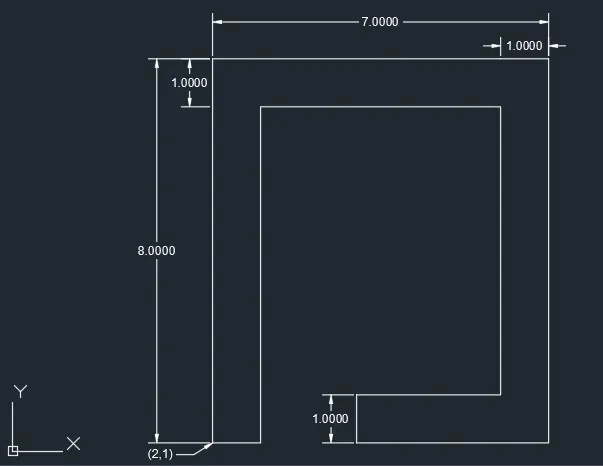
- Type the next coordinate of point 2 (@0,8) in the command box.
- Type the next coordinate of point 3 (@7,0) in the command box.
- Type the next coordinate of point 4 (@0,-8) in the command box.
- Type the next coordinate of point 5 (@-4,0) in the command box.
- Type the next coordinate of point 6 (@0,1) in the command box.
- Type the next coordinate of point 7 (@3,0) in the command box.
- Type the next coordinate of point 8 (@0,6) in the command box.
- Type the next coordinate of point 9 (@-5,0) in the command box.
- Type the next coordinate of point 10 (@0,-7) in the command box.
- Enter or click on close command.
Result:
- P-7
- Relative coordinate system:
Procedure:
- Type the command “L” for line and give the coordinates for point 1 (2,1)
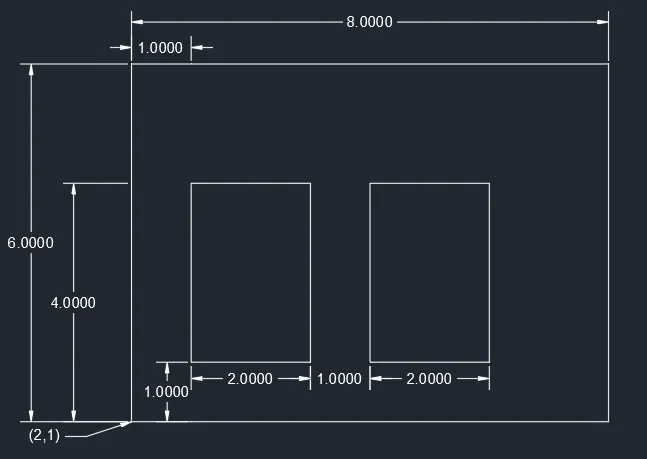
- Type the next coordinate of point 2 (@0,7) in the command box.
- Type the next coordinate of point 3 (@8,0) in the command box.
- Type the next coordinate of point 4 (@0,-7) in the command box.
- Enter or click on the close command.
- Type the command “L” for line and give coordinates for point 5 (3,2)
- Type the next coordinate of point 6 (@0,3) in the command box.
- Type the next coordinate of point 7 (@2,0) in the command box.
- Type the next coordinate of point 8 (@0,-3) in the command box.
- Enter or click the close command.
- Type the command “L” for line and give coordinates for point 9 (6,2)
- Type the next coordinate of point 10 (@0,3) in the command box.
- Type the next coordinate of point 11 (@2,0) in the command box.
- Type the next coordinate of point 12 (@0,-3) in the command box.
- Enter or click on close command.
Result:
- P-8
- Relative coordinate system:
Procedure:
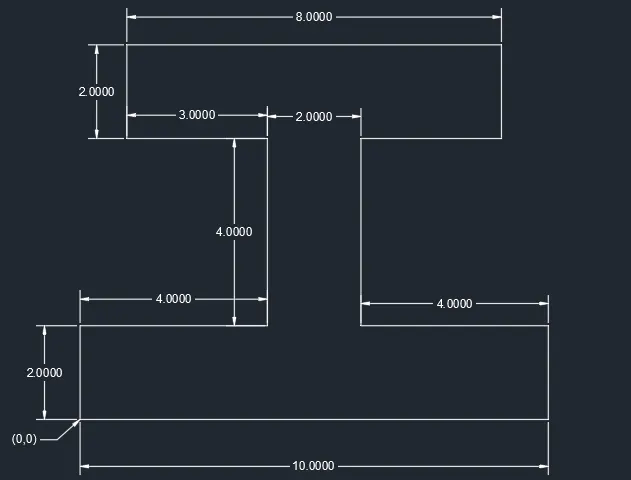
- Type the command “L” for line and give the coordinates for point 1 (0,0)
- Type the next coordinate of point 2 (@0,2) in the command box.
- Type the next coordinate of point 3 (@4,0) in the command box.
- Type the next coordinate of point 4 (@0,4) in the command box.
- Type the next coordinate of point 5 (@-4,0) in the command box.
- Type the next coordinate of point 6 (@0,2) in the command box.
- Type the next coordinate of point 7 (@8,0) in the command box.
- Type the next coordinate of point 8 (@0,-2) in the command box.
- Type the next coordinate of point 9 (@-3,0) in the command box.
- Type the next coordinate of point 10 (@0,-4) in the command box.
- Type the next coordinate of point 11 (@4,0) in the command box
- Type the next coordinate of point 12 (@0,-2) in the command box
- Enter or click on close command.
Result:
- P-9
- Relative coordinate system:
Procedure:
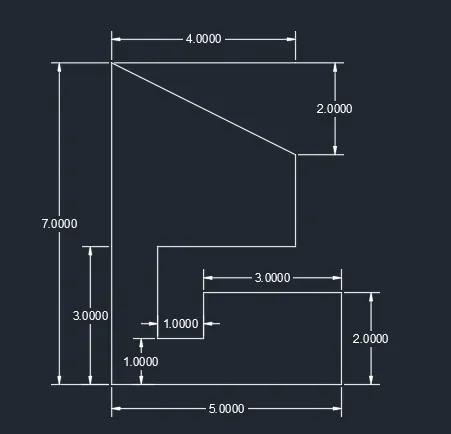
- Type the command “L” for line and give the coordinates for point 1 (1,1)
- Type the next coordinate of point 2 (@0,7) in the command box.
- Type the next coordinate of point 3 (@4,-2) in the command box.
- Type the next coordinate of point 4 (@0,-2) in the command box.
- Type the next coordinate of point 5 (@-3,0) in the command box.
- Type the next coordinate of point 6 (@0,-2) in the command box.
- Type the next coordinate of point 7 (@1,0) in the command box.
- Type the next coordinate of point 8 (@0,1) in the command box.
- Type the next coordinate of point 9 (@3,0) in the command box.
- Type the next coordinate of point 10 (@0,-2) in the command box.
- Enter or click on close command
Result:
- P-10
- Relative coordinate system:
Procedure:
- Type the command “L” for line and give the coordinates for point 1 (0,0)
- Type the next coordinate of point 2 (@0,7) in the command box.
- Type the next coordinate of point 3 (@5,0) in the command box.
- Type the next coordinate of point 4 (@0,-4) in the command box.
- Type the next coordinate of point 5 (@3,0) in the command box.
- Type the next coordinate of point 6 (@0,-3) in the command box.
- Enter or click on the close command.
- Type the command “L” for line and give coordinates for point 7 (2,5)
- Type the next coordinate of point 8 (@0,2) in the command box.
- Type the next coordinate of point 9 (@3,0) in the command box.
- Type the next coordinate of point 10 (@0,-2) in the command box.
- Enter or click the close command
Result:
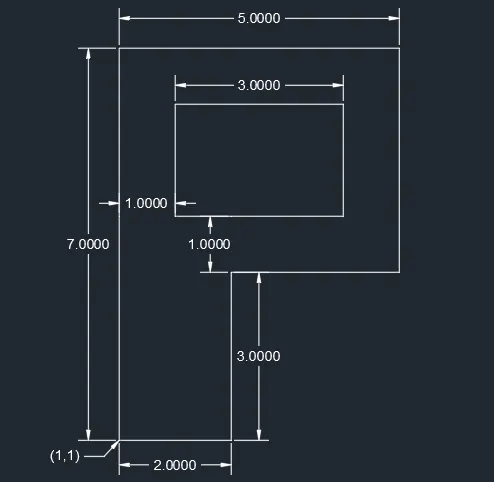
- Profile wood
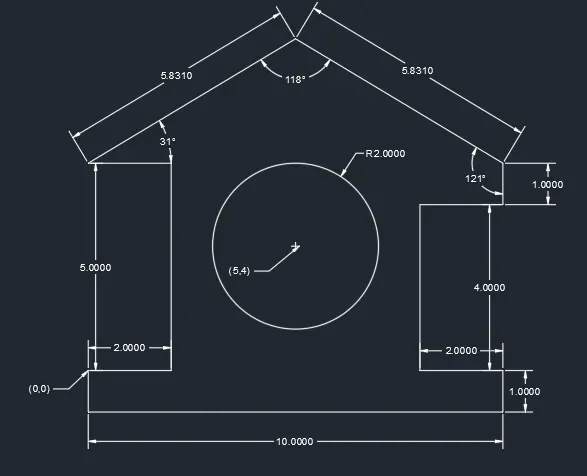
- Absolute coordinate system:
Procedure:
- Type the command “L” for line and give the coordinates for point 1 (0,0)
- Type the next coordinate of point 2 (10,0) in the command box.
- Type the next coordinate of point 3 (10,1) in the command box.
- Type the next coordinate of point 4 (8,1) in the command box.
- Type the next coordinate of point 5 (8,5) in the command box.
- Type the next coordinate of point 6 (10,5) in the command box.
- Type the next coordinate of point 7 (2,7) in the command box.
- Type the next coordinate of point 8 (5,9) in the command box.
- Type the next coordinate of point 9 (0,6) in the command box.
- Type the next coordinate of point 10 (2,6) in the command box.
- Type the next coordinate of point 11 (2,1) in the command box.
- Type the next coordinate of point 12 (0,6) in the command box.
- Draw the circle of radius 2 for the coordinate of point 13 at center point (5,4) and the geometry will be created.
Result:
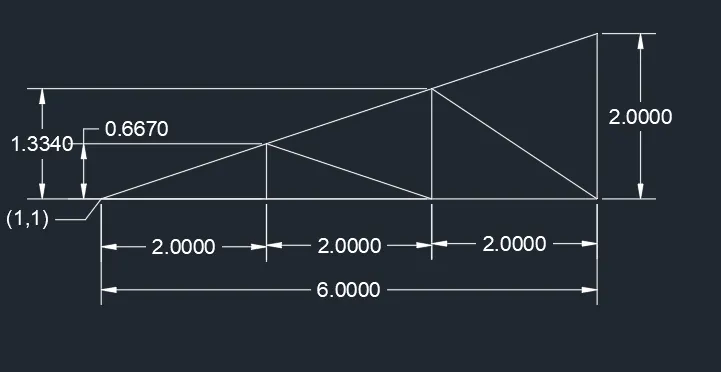
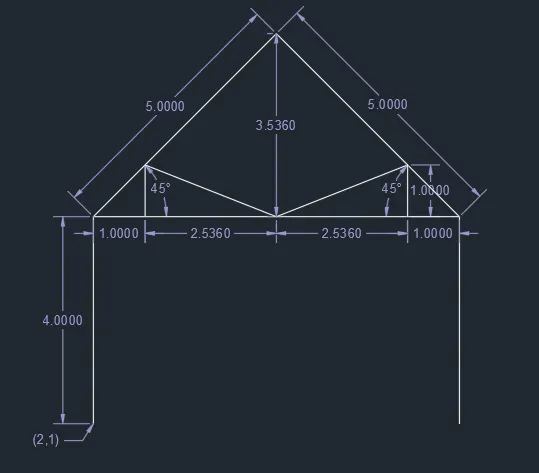
- Queen post truss
- Absolute coordinate system:
Procedure:
- Type the command “L” for line and give the coordinates for point 1 (1,1)
- Type the next coordinate of point 2 (1,5) in the command box.
- Type the next coordinate of point 3 (8,5) in the command box.
- Type the next coordinate of point 4 (8,1) in the command box.
- Enter or click on the close command.
- Go back on the point 2 and give the coordinates of point 5 (4.5,8.5)
- Type the next coordinate of point 6 (8,5) in the command box.
- Type the next coordinate of point 7 (2,5) in the command box.
- Type the next coordinate of point 8 (2,6) in the command box.
- Type the next coordinates for point 9 (4.5,5) in the command box
- Type the next coordinate of point 10 (7,5) in the command box.
- Type the next coordinate of point 11 from (4.5,5) to (4.5,8.5) in the command box and the geometry will be created.
Result:
- Monopitch:
- Relative coordinate system:
Procedure:
- Type the command “L” for line and give the coordinates for point 1 (1,1)
- Type the next coordinate of point 2 (@6,2) in the command box.
- Type the next coordinate of point 3 (@0,-2) in the command box.
- Enter or click on the close command.
- Type the command “L” and give the coordinates for point 4 (3,1)
- Type the next coordinate of point 5 (@0,0.667) in the command box.
- Type the next coordinate of point 6 (@2,-0.0667) in the command box.
- Type the next coordinate of point 7 (@0,1.333) in the command box.
- Type the next coordinates for point 8 (@2,-1.333) in the command box and he geometry will be created.
Result: