Creation of geometries by Coordinate system methods using AutoCad
To design the above mentioned P-1 and P-2 drawings using coordinate system methods.
Introduction:-
There are 2 types of coordinate systems.
1. Absolute Coordinate system:- Absolute coordinate system is whenever we mention any point with respect to the origin 0,0.
2. Relative coordinate system:- Relative coordinate system is with respect to the previous point. Relative means not with respect to the origin with respect to the last point. There are 2 menthods in Relative coordinate system.
- Relative Rectangular coordinate system
- Relative Polar coordinate system
Aim: Using Coordinate system methods, P-1 Drawing is shown below
Procedure:-1. For P-1 model,
Now using the Absolute coordinate system method,
- Using the Line command,
- Step-1: First point is, we have to take the point from the origin and the starting point is given as (2,1).
- Step 2: Second point A to B ( dx=2, dy=7) (A)
- Step 3: B to C is (dx=8,dy=7) (B)
- Step 4: C to D is (dx=8, dy=6) (C)
- Step 5: D to E is (dx=3, dy=6) (D)
- Step 6: E to F is (dx=3, dy=2) (E)
- Step 7: F to G is (dx=8, dy=2) (F)
- Step 8: G to H is (dx=8, dy=1)(G)
- Step 9: H is Close
Now using the Relative rectangular coordinate system method,
- Using the line command, P-1 model,
- Step-1: First point is we have to take the point from the origin to the previous point and the starting point is given as (2,1).
- Step 2: In this Relative rectangular coordinate system, we have to take special character before the point.
- Step 3:- Starting point from A to B @ (dx=0, dy=6) (A)
- Step 3: B to C is @ (dx=6, dy=0) (B)
- Step 4: C to D is @ (dx=0, dy= -1) (C)
- Step 5: D to E is @ (dx=-5, dy=0) (D)
- Step 6: E to F is @ (dx=0, dy=-4) (E)
- Step 7: F to G is @ (dx=5, dy=0) (F)
- Step 8: G to H is @ (dx=0, dy=-1)(G)
- H is Close
Now using Polar coordinate system, we are designing P-1 model.
- Using the line command, P-1 model,
- Step-1: First point is the starting point given as (2,1). (@ Length < Angle)
- Step 2: A @ 6 < 90deg
- Step 3: B @ 6 < 0deg
- Step 4: C @ 1 < 270deg
- Step 5: D @ 5 < -180deg
- Step 6: E @ 4 < 270deg
- Step 7: F @ 5 < 0deg
- Step 8: G @ 1 < 270deg
- H Close
Result:- Using Coordinate system methods, P-1 Drawing is shown below
1. Absolute Coordinate system method:
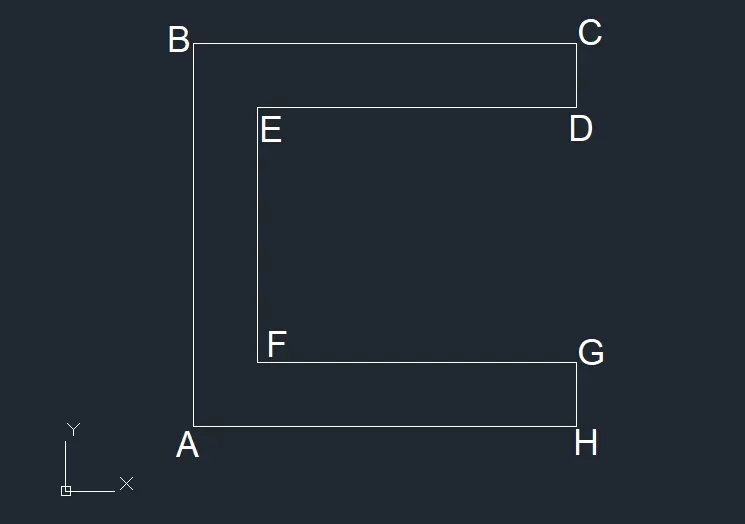
- A (2,1)
- B (2,7)
- C (8,7)
- D (8,6)
- E (3,6)
- F (3,2)
- G (8,2)
- H (8,1)
- Close
2. Relative Rectangular Coordinate method:
- A @ 2,1
- B @ 0,6
- C @ 6,0
- D @ 0,-1
- E @ -5,0
- F @ 0,-4
- G @ 5,0
- H @ 0,-1
- Close
3. Polar Coordinate Method:-
- A @ 6 < 90deg
- B @ 6 < 0deg
- C @ 1 < 270deg
- D @ 5 < -180deg
- E @ 4 < 270deg
- F @ 5 < 0deg
- G @ 1 < 270deg
- H is close
Aim: Using Coordinate system methods, P-2 Drawing is shown below
Procedure: For Drawing P-2, Using these coordinates system methods,
Now using Absolute Coordinate system method
- Using the Line command,
- Step-1: First point is, we have to take the point from the origin and the starting point is given as (2,1).
- Step2: A (2,1)
- Step 3: B (4,8)
- Step 4: C (7,8)
- Step 5: D (9,1)
- Step 6: E (6,1)
- Step 7: F (6,5)
- Step 8: G (5,5)
- Step 9: H (5,1)
- Close
Now using Relative Rectangular Coordinate system method
- Using the Line command,
- Step-1: First point is, we have to take the point from the origin and the starting point is given as (2,1).
- Step 2: A @ 2,1
- Step 3: B @ 2,7
- Step 4: C @ 3,0
- Step 5: D @ 2,-7
- Step 6: E @ -3,0
- Step 7: F @ 0,4
- Step 8: G @ -1,0
- Step 9: H @ 0,-4
- Close
Now using Relative Polar Coordinate system method
- Using the Line command,
- Here there is no angle given in the question. so we have to calculate X and Y distances and we can assume the angles.
- First we have to take from the starting point as 2,1 from A to H and angle is 0deg.
- Then from H to G we have to draw the line usig the given distance and angle is 90deg.
- Later from G to F and F to E and E to D we have to draw the lines using distance given in the drawing and asuume the angle.
- Next from the point A to B, we have to calculate the distance form X direction and Y direction and then we have to draw the line,.
- Next from B to C the distance is given and we have to draw using line command.
- Again from C to D, we have to close the drawing.
Result: Using the same procedure for P-1 drawing, we are designing for P-2 drawing by using above 3 methods.
Absolute Coordinate system,
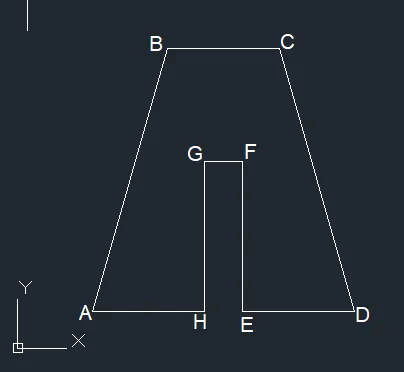
- A (2,1)
- B (4,8)
- C (7,8)
- D (9,1)
- E (6,1)
- F (6,5)
- G (5,5)
- H (5,1)
- Close
Relative rectangular method:
- A @ 2,1
- B @ 2,7
- C @ 3,0
- D @ 2,-7
- E @ -3,0
- F @ 0,4
- G @ -1,0
- H @ 0,-4
- Close
Polar Coordinate method:
- A @2,1
- B @ 7 < 60deg.
- C @ 3 < 0deg
- D @ 7 < 270deg
- E @ 3 < -180deg
- F @ 4 < 90deg
- G @ 1 < -180deg
- H @ 4 < 270deg.
- Close.
2. Using the Relative rectangular coordinate system, The design is as shown below,
Aim: To design the truss using Relative coordinate method.
Procedure:-
- First we have to take starting point as 0,0.
- using the line command, fisrt point we have to take as @10,0 and draw the line towards X-direction.
- Then Form the last point we have to take in Y-Direction positive as @0,1 and then the next point is towards X-Direction(Negative) as -2,0.
- And then towards Positive Y-Direction, take line @0,4 and draw the line using line command.
- The next point is towards X-direction positive as @2,0 and then towards Y-direction poistive as @0,1.
- Then from the other starting point, the same procedure is repeated and from the end point we have to take angle with the line 5.6 distance.
- For taking the angle, here we have to use polar coordinate method as @ 5.6< 45deg. and then close to the other ending point.
Result:
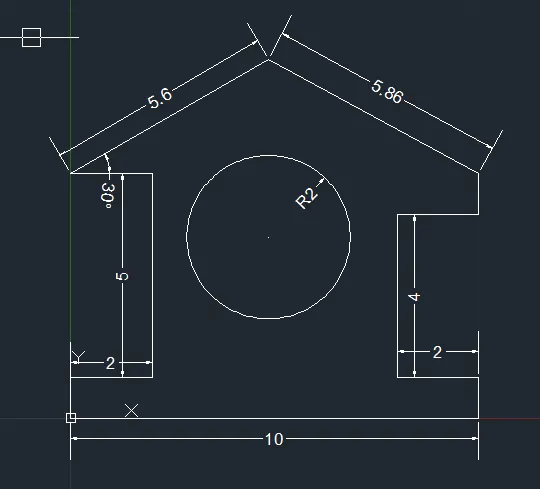
Profile - Wood
Aim: To design the truss using Relative coordinate method.
Procedure:
- Here the starting point is given as 1,1 and for the starting point by using line command we have to draw the line towards Y-direction positive as length @ 0,4
- Then using line command towards X-direction positive we have to draw the lines as @1,0, @ 2.53,0, @2.53,0 , @1,0.
- Then from the first point using polar coordinate method, we have to take line as @5< 45deg.
- then close to another point.
- Take the centre point and draw the lines as shown in the drawing.
Result:
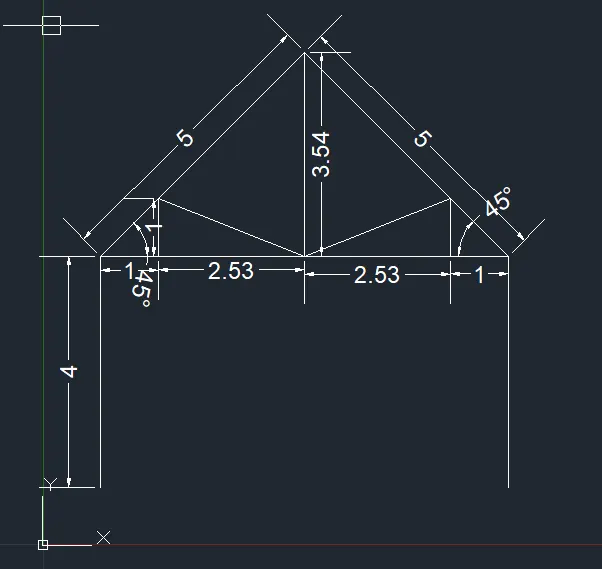
Queen Post Truss
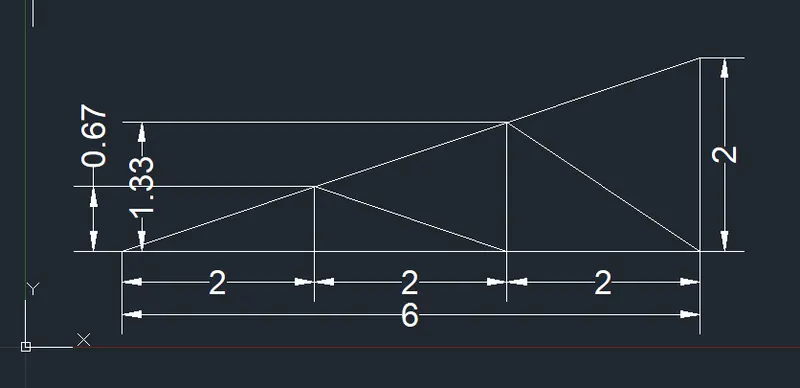
Aim: To design the truss using Relative coordinate method.
Procedure:
- Take the starting point as 1,1.
- using the line command draw the line from the starting point towards X-direction as positive to the given distance as shown in drawing.
- The point is @2,0, @2,0, @2,0 to the positive side of X-direction.
- From the last point, take the line command and draw the line towards positive Y-direction with the distance of 2, the point will be @0,2
- Then close to the starting point.
- Then draw the lines using line command as shown in the drawing.
Result:
Mono Pitch