Creation of geometries by Coordinate system methods using AutoCad
Question :- Create the geometries from P1 to P2 using all the coordinates system methods. You need to use the Line tool to create the geometries. Where required you need to use the circle tool.
Please read the drawings and find out the missing dimensions before working on the sketches.
Answer =
AIM :-
- To create geometries P1 and P2 using all the co-ordinate system methods by using line tool
- To create geometries from P4 to P10 by using any one co-ordinate system method by using line tool
- To draw the profile and the trusses using any co-ordinate system methods by using line tool and circle tool
INTRODUCTION :- There are three types of co-ordinate systems
- Absolute co-ordinate system
- Relative co-ordinate system = 1.Realtive rectangle co-ordinate system 2.Polar Co-ordinate System
- Direct distance entry system
- Creating P1 Geometries by using all co-ordinate system =
1.P1 By Absolute co-ordinate system =
Procedure :-
Choose the line tool
Command : Line Tool
Line specify first point : 2,1 (Start point) and press enter
Line Specify next point or [undo] : 8,1 and press enter
Line Specify next point or [undo] : 8,2 and press enter
Line Specify next point or [Close/undo] : 3,2 and press enter
Line Specify next point or [Close/undo] : 3,6 and press enter
Line Specify next point or [Close/undo] : 8,6 and press enter
Line Specify next point or [Close/undo] : 8,7 and press enter
Line Specify next point or [Close/undo] : 2,7 and press enter
Specify next point or [Close/undo] : Close
Output =

2.P1 By Relative rectangular co-ordinate system =
Procedure :-
Choose the line tool
Command: Line Tool
Line specify first point : 2,1 and press enter
Line specify next point or [Undo] : @6,0 and press enter
Line specify next point or [Undo] : @0,1 and press enter
Line specify next point or [Close / Undo] : @-5,0 and press enter
Line specify next point or [Close / Undo] : @0,4 and press enter
Line specify next point or [Close / Undo] : @5,0 and press enter
Line specify next point or [Close / Undo] : @0,1 and press enter
Line specify next point or [Close / Undo] : @-6,0 and press enter
specify next point or [Close / undo] : Close
Output =
3.P1 By polar Co-ordinate System =
Procedure :-
Choose line tool
Command : Line tool
Line specify first point : 2,1 and press enter
Line specify next point or [undo] :@6<0 and press enter
Line specify next point or [undo] :@1<90 and press enter
Line specify next point or [Close / undo] :@5<180 and press enter
Line specify next point or [Close / undo] :@4<90 and press enter
Line specify next point or [Close / undo] :@5<0 and press enter
Line specify next point or [Close / undo] :@1<90 and press enter
Line specify next point or [Close / undo] :@6<180 and press enter
specify next point or [Close / undo] : Close
Output =
- Creating P2 Geometries by using all co-ordinate system =
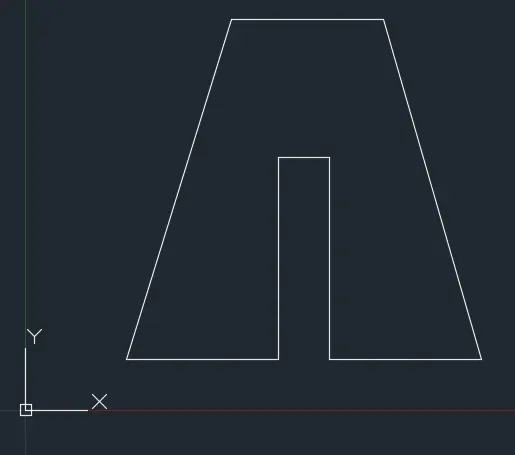
1.P2 By Absolute co-ordinate system =
Procedure :-
Command : _Line
Line specify first point : 2,1 (start point) and press enter
Line Specify next point or [undo] : 5,1 and press enter
Line Specify next point or [undo] : 5,5 and press enter
Line Specify next point or [Close/undo] : 6,5 and press enter
Line Specify next point or [Close/undo] : 6,1 and press enter
Line Specify next point or [Close/undo] : 9,1 and press enter
Line Specify next point or [Close/undo] : 7,8 and press enter
Line Specify next point or [Close/undo] : 4,8 and press enter
specify next point or [Close / undo] : Close
Output =
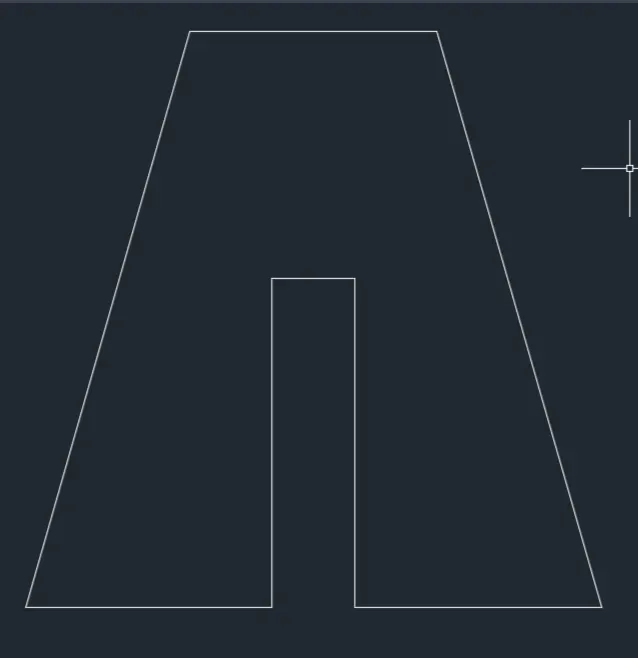
2.P2 By Relative rectangular co-ordinate system =
Procedure :-
Choose the line tool
Command: Line Tool
Line specify first point : 2,1 and press enter
Line specify next point or [Undo] : @3,0 and press enter
Line specify next point or [Undo] : @0,4 and press enter
Line specify next point or [Close / Undo] : @1,0 and press enter
Line specify next point or [Close / Undo] : @0,-4 and press enter
Line specify next point or [Close / Undo] : @3,0 and press enter
Line specify next point or [Close / Undo] : @-2,7 and press enter
Line specify next point or [Close / Undo] : @-3,0 and press enter
specify next point or [Close / undo] : Close
Output =
3.P1 By polar Co-ordinate System =
Procedure :-
Choose line tool
Command : Line tool
Line specify first point : 2,1 and press enter
Line specify next point or [undo] :@3<0 and press enter
Line specify next point or [undo] :@4<90 and press enter
Line specify next point or [Close / undo] : @1<0 and press enter
Line specify next point or [Close / undo] :@4<270 and press enter
Line specify next point or [Close / undo] : @3<0 and press enter
Line specify next point or [Close / undo] : @7<105 and press enter
Line specify next point or [Close / undo] : @3<180 and press enter
specify next point or [Close / undo] : Close
Output =
- P3 Geometrics = By Relative Rectangular Co-ordinate system
Procedure :-
Command : _Line Tool
Line specify first point : 2,1 (start point) and press enter
Line specify next point or [ Undo ] : @1,0 and press enter
Line specify next point or [Undo ] : @0,2 and press enter
Line specify next point or [Close/ Undo ] : @3,0 and press enter
Line specify next point or [Close/ Undo ] : @0,1 and press enter
Line specify next point or [Close/ Undo ] : @-3,0 and press enter
Line specify next point or [Close/ Undo ] : @0,3 and press enter
Line specify next point or [Close/ Undo ] : @5,0and press enter
Line specify next point or [Close/ Undo ] : @0,1 and press enter
Line specify next point or [Close/ Undo ] : @-6,0 and press enter
specify next point or [Close/ Undo ] : Close
Output =

- P4 Geometrics = By Relative Rectangular Co-ordinate system
Procedure :-
Command = _line tool
Line specify first point : 2,1 (start point) and press enter
Line specify next point or [ Undo ] : @1,0 and press enter
Line specify next point or [Undo ] : @0,4and press enter
Line specify next point or [Close/ Undo ] : @2,-2 and press enter
Line specify next point or [Close/ Undo ] : @2,2 and press enter
Line specify next point or [Close/ Undo ] : @0,-4 and press enter
Line specify next point or [Close/ Undo ] : @1,0 and press enter
Line specify next point or [Close/ Undo ] : @0,7 and press enter
Line specify next point or [Close/ Undo ] : @-1,0 and press enter
Line specify next point or [Close/ Undo ] : @-2,-3 and press enter
Line specify next point or [Close/ Undo ] : @-2,3 and press enter
Line specify next point or [Close/ Undo ] : @-1,0 and press enter
specify next point or [Close/ Undo ] : Close
Output =

- P5 Geometrics = By Relative Rectangular Co-ordinate system
Procedure :-
Command = _line tool
Line specify first point : 2,1 (start point) and press enter
Line specify next point or [ Undo ] : @1,0 and press enter
Line specify next point or [Undo ] : @0,7 and press enter
Line specify next point or [Close/ Undo ] : @5,0 and press enter
Line specify next point or [Close/ Undo ] : @0,-6 and press enter
Line specify next point or [Close/ Undo ] : @-3,0 and press enter
Line specify next point or [Close/ Undo ] : @0,-1 and press enter
Line specify next point or [Close/ Undo ] : @4,0 and press enter
Line specify next point or [Close/ Undo ] : @0,8 and press enter
Line specify next point or [Close/ Undo ] : @-7,0 and press enter
specify next point or [Close/ Undo ] : Close
Output =
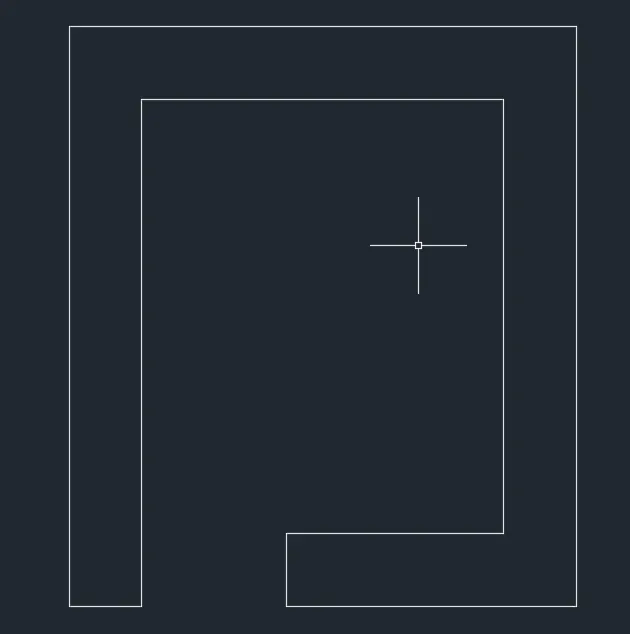
- P6 Geometrics = By Relative Rectangular Co-ordinate system
Procedure :-
Command = _line tool
Line specify first point : 2,1 (start point) and press enter
Line specify next point or [ Undo ] : @4,0 and press enter
Line specify next point or [Undo ] : @4,3 and press enter
Line specify next point or [Close/ Undo ] : @0,2 and press enter
Line specify next point or [Close/ Undo ] : @-4,0 and press enter
Line specify next point or [Close/ Undo ] : @0,4 and press enter
Line specify next point or [Close/ Undo ] : @-4,0 and press enter
specify next point or [Close/ Undo ] : Close
Command = line tool
Line specify first point : 3,3 and press enter
Line specify next point or [ Undo ] : @2,0 and press enter
Line specify next point or [ Undo ] : @0,3 and press enter
Line specify next point or [Close/ Undo ] : @-2,0 and press enter
specify next point or [Close/ Undo ] : Close
Output =
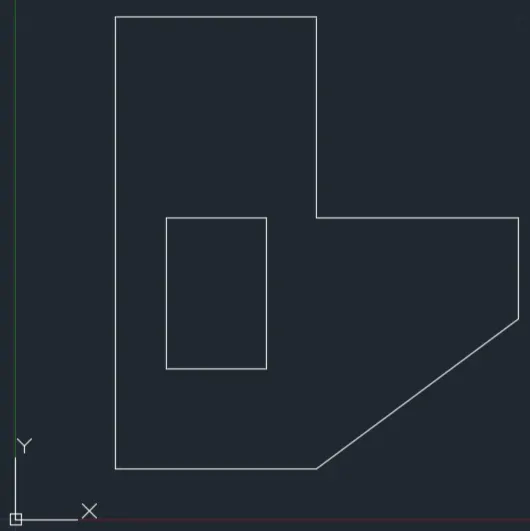
- P7 Geometrics = By Relative Rectangular Co-ordinate system
Procedure :-
Command = _line tool
Line specify first point : 2,1 (start point) and press enter
Line specify next point or [ Undo ] : @8,0 and press enter
Line specify next point or [Undo ] : @0,6 and press enter
Line specify next point or [Close/ Undo ] : @-8,0 and press enter
specify next point or [Close/ Undo ] : Close
Line specify first point : 3,2 (start point) and press enter
Line specify next point or [ Undo ] : @2,0 and press enter
Line specify next point or [ Undo ] : @0,3 and press enter
Line specify next point or [Close/ Undo ] : @-2,0 and press enter
specify next point or [Close/ Undo ] : Close
Line specify first point : 6,2 (start point) and press enter
Line specify next point or [ Undo ] : @2,0 and press enter
Line specify next point or [ Undo ] : @0,3 and press enter
Line specify next point or [Close/ Undo ] : @-2,0 and press enter
specify next point or [Close/ Undo ] : Close
Output =
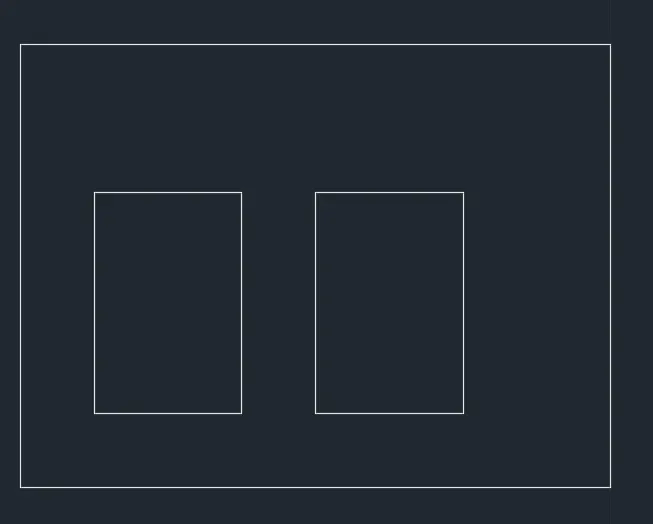
- P8 Geometrics = By Relative Rectangular Co-ordinate system
Procedure :-
Command = _line tool
Line specify first point : 0,0 (start point) and press enter
Line specify next point or [ Undo ] : @10,0 and press enter
Line specify next point or [Undo ] : @0,2 and press enter
Line specify next point or [Close/ Undo ] : @-4,0 and press enter
Line specify next point or [Close/ Undo ] : @0,4 and press enter
Line specify next point or [Close/ Undo ] : @3,0 and press enter
Line specify next point or [Close/ Undo ] : @0,2 and press enter
Line specify next point or [Close/ Undo ] : @-8,0 and press enter
Line specify next point or [Close/ Undo ] : @0,-2 and press enter
Line specify next point or [Close/ Undo ] : @3,0 and press enter
Line specify next point or [Close/ Undo ] : @0,-4 and press enter
Line specify next point or [Close/ Undo ] : @-4,0 and press enter
specify next point or [Close/ Undo ] : Close
Output =
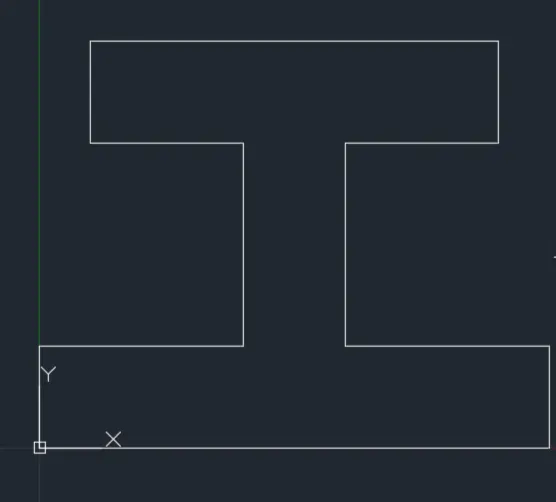
- P9 Geometrics = By Relative Rectangular Co-ordinate system
Procedure :-
Command = _line tool
Line specify first point : 1,1 (start point) and press enter
Line specify next point or [ Undo ] : @5,0 and press enter
Line specify next point or [Undo ] : @0,2 and press enter
Line specify next point or [Close/ Undo ] : @-3,0 and press enter
Line specify next point or [Close/ Undo ] : @0,-1 and press enter
Line specify next point or [Close/ Undo ] : @-1,0 and press enter
Line specify next point or [Close/ Undo ] : @0,2 and press enter
Line specify next point or [Close/ Undo ] : @-3,0 and press enter
Line specify next point or [Close/ Undo ] : @0,2 and press enter
Line specify next point or [Close/ Undo ] : @-4,2 and press enter
specify next point or [Close/ Undo ] : Close
Output =
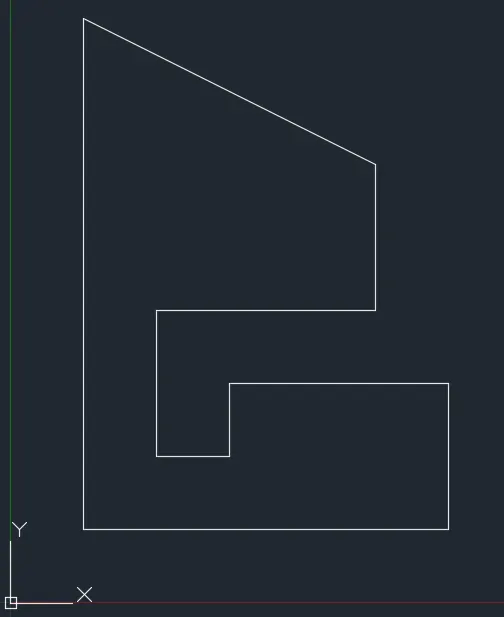
- P10 Geometrics = By Relative Rectangular Co-ordinate system
Procedure :-
Command = _line tool
Line specify first point : 1,1 (start point) and press enter
Line specify next point or [ Undo ] : @2,0 and press enter
Line specify next point or [Undo ] : @0,3 and press enter
Line specify next point or [Close/ Undo ] : @3,0 and press enter
Line specify next point or [Close/ Undo ] : @0,4 and press enter
Line specify next point or [Close/ Undo ] : @-5,0 and press enter
specify next point or [Close/ Undo ] : Close
Command = line tool
Line specify first point : 2,5 (start point) and press enter
Line specify next point or [ Undo ] : @3,0 and press enter
Line specify next point or [ Undo ] : @0,2 and press enter
Line specify next point or [Close/ Undo ] : @-3,0 and press enter
specify next point or [Close/ Undo ] : Close
Output =
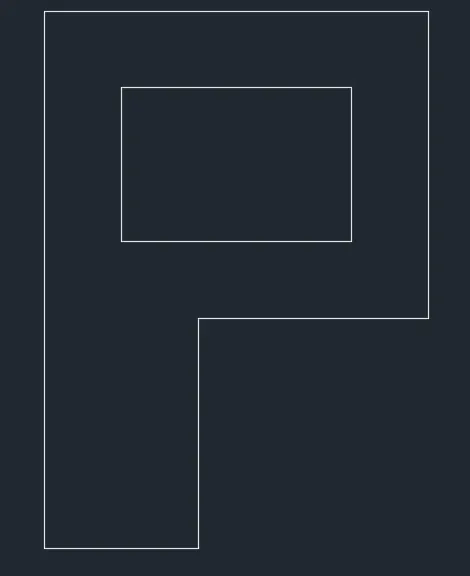
The profile and the trusses using any co-ordinate system method
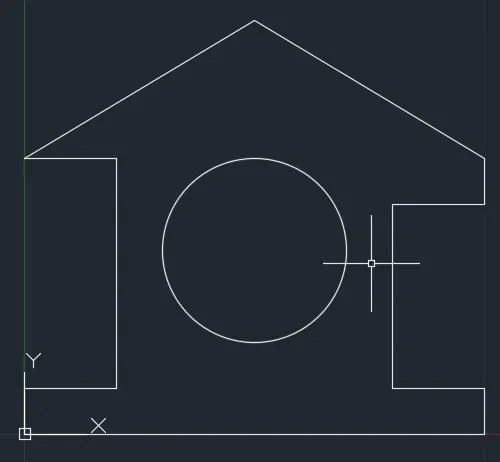
Truss 1 using Relative rectangle co-ordinate system = Profile of wood
Procedure :-
Command = _line tool
Line specify first point : 0,0 (start point) and press enter
Line specify next point or [ Undo ] : @10,0 and press enter
Line specify next point or [Undo ] : @0,1 and press enter
Line specify next point or [Close/ Undo ] : @-2,0 and press enter
Line specify next point or [Close/ Undo ] : @0,4 and press enter
Line specify next point or [Close/ Undo ] : @2,0 and press enter
Line specify next point or [Close/ Undo ] : @0,1 and press enter
Line specify next point or [Close/ Undo ] : @-5,3 and press enter
Line specify next point or [Close/ Undo ] : @-5,-3 and press enter
Line specify next point or [Close/ Undo ] : @2,0 and press enter
Line specify next point or [Close/ Undo ] : @0,-5 and press enter
Line specify next point or [Close/ Undo ] : @-2,0 and press enter
specify next point or [Close/ Undo ] : Close
Circle specify center point or [3P 2P Ttr tan tan radius] : 5,4 and press enter
specify radius of circle or [Diameter] : 2 and press enter tice
Output =
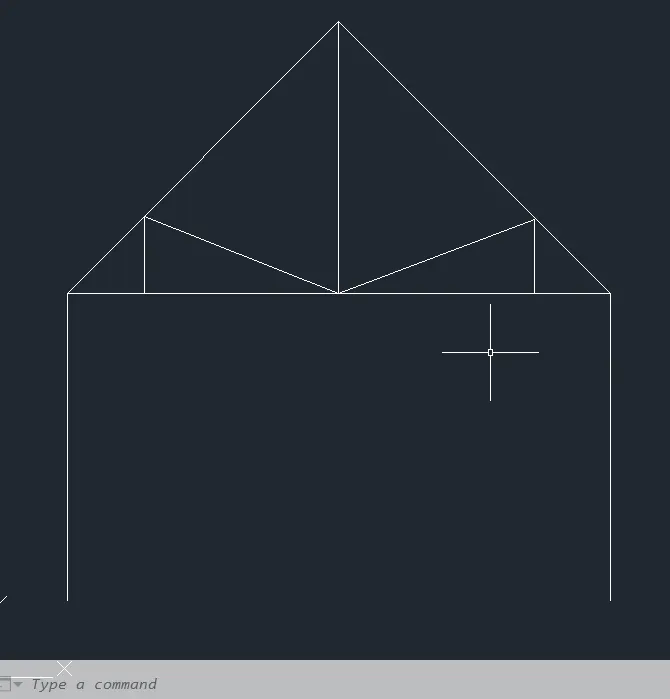
Truss 2 Using polar co-ordinate system = Queen post truss
Procedure :-
Command = _line tool
Line specify first point : 1,1 (start point) and press enter
Line specify next point or [ Undo ] : @4<90 and press enter
Line specify next point or [Undo ] : @5<45 and press enter
Line specify next point or [Close/ Undo ] : @4<270 and press enter
Line specify next point or [Close/ Undo ] : @4<90 and press enter
Command :- Line tool
Line specify first point : @7.072<0 and press enter twice
Command :- Line tool
Line specify first point : 1,5 and press enter
Line specify next point or [Close/ Undo ] : @1<90 and press enter
Line specify next point or [Close/ Undo ] : @2.726<338.480 and press enter
Line specify next point or [Close/ Undo ] : @2.726<21.520 and press enter
Line specify next point or [Close/ Undo ] : @1<270 and press enter
Command :- Line tool
Line specify first point : 4.536,5 and press enter
Line specify next point or [Undo ] : @2.536<90 and press enter twice
Output =
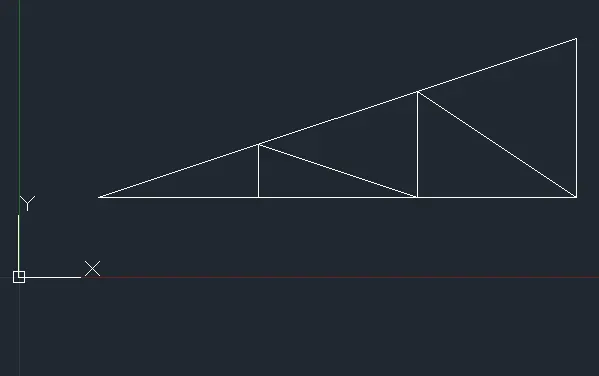
Truss 3 using Absolute Co-ordinate system = Mono-Pitch
Procedure :-
Choose line command
Line specify first point : 1,1 (start point) and press enter
Line specify next point or [ Undo ] : 7,1 and press enter
Line specify next point or [Undo ] : 7,3 and press enter
specify next point or [Close/ Undo ] : Close
Choose line command
Line specify first point : 3,1 and press enter
Line specify next point or [Undo ] : 3,1.667 and press enter
Line specify next point or [Undo ] : 5,1 and press enter
Line specify next point or [Close/ Undo ] : 5,2.333 and press enter
Line specify next point or [Close/ Undo ] : 7,1 and press enter twice
Result :-
- Geometries P1 and P2 are drawn successfully using all the co-ordinates system methods
- Geometries from P4 to P10nare drawn successfully by using one of the co-ordinates system methods as mentioned above
- Profile of wood, Queen post truss and mono pitch is drawn successfully by using the above methods
- By following the procedure as mentioned above the outputs are obtained as shown above