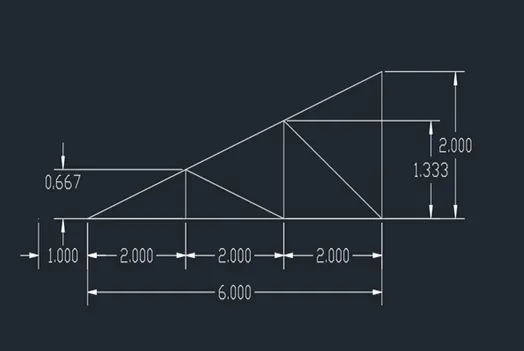
Creation of geometries by Coordinate system methods using AutoCad
AIM : TO CREATE THE DIFFERENT GEOMETRIES USING VARIOUS CO-ORDINATE SYSTEMS WITH THE HELP OF LINE TOOL AND CIRCLE TOOL IN AUTOCAD.
INTRODUCATION : Autocad is a most commonly used drafting software , presently it is used in almost every field, in this project also iam using autocad to drasft geometries with the help of line and circle tools.
There are different methods to create or draft geometries in autocad named as follows ;
1. Absolute co-ordinate system.
2. Relative co-ordinate system.
a. Relative rectangular co-ordinate system.
b. Relative polar co-ordinate system.
3. Direct Distance Entry syastem.
Absolute co-ordinate system: It is atype of co-ordinate system in which we use magnitude as well as direction of X & Y axis as required.Using absolute coordinate system ,enter the points as they relate to the origin of the
WCS(world coordinate system).the origin of the WCS is at the lower left corner of the
drawing area. Where the USC icon is.
Relative co-ordinate system:
Relative rectangular co-ordinate system: The relative coordinate entry method allows to enter points in reference to the last point picked. The @ symbol tells AutoCAD that use the relative coordinate entry to locate
another point. This symbol must always be put in front of X and Y coordinate.
Relative polar co-ordinate system: Using polar coordinate entry if want to draw a line certain distance at a particular angle.
Direct Distance Entry syastem : It is a common method to draw, in this method using line tool slecting a starting point further for the next point we need to drag the line directly with help of mouse in desired direction by putting required magnitued.
PROCEDURE :
* Initially set the template ( IMPIRIAL) AND UNITS ( decimal).
*Type startup in the command and then enter the values.then go to application menu >select new>then a daioluge box appears, that is create drawing , to start from scratch.
* In this dailouge box , initially set the deafult settings as impirial and in the advanced set up choose the unit as decimal.
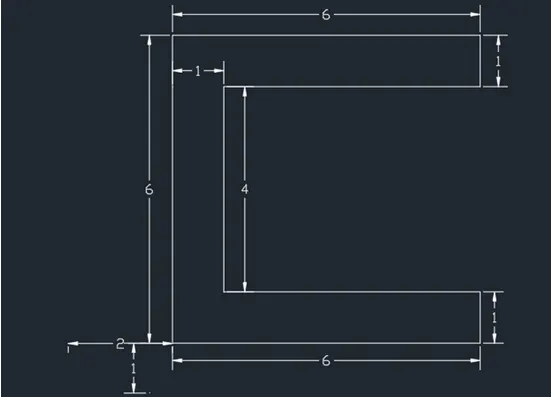
Q-1 :
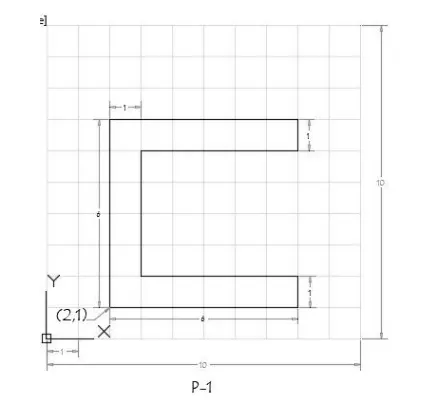
Procedure to draw above diagram using Absolute co-ordinate system as follow :
Commnas : DS
DSETTINGS
Command : L
LINE
Specify first point : 2,1
Specify next point or [Undo] : 8,1
Specify next point or [Undo] : 8,2
Specify next point or [Close/Undo]: 3,2
Specify next point or [Close/Undo]: 3,6
Specify next point or [Close/Undo]: 8,6
Specify next point or [Close/Undo]: 8,7
Specify next point or [Close/Undo]: 2,7
Specify next point or [Close/Undo]: C
Procedure to draw above diagram using Relative co-ordinate system as follow :
By Relative Rectangular Co-ordinates
Commnas : DS
DSETTINGS
Command : L
LINE
Specify first point : 2,1
Specify next point or [Undo] : @6,0
Specify next point or [Undo] : @0,1
Specify next point or [Close/Undo]: @-5,0
Specify next point or [Close/Undo]: @0,4
Specify next point or [Close/Undo]: @5,0
Specify next point or [Close/Undo]: @0,1
Specify next point or [Close/Undo]: @-6,0
Specify next point or [Close/Undo]: C
By Relative polar Co-ordinates
Commnas : DS
DSETTINGS
Command : L
LINE
Specify first point : 1,1
Specify next point or [Undo] : @6<0
Specify next point or [Undo] : @1<90
Specify next point or [Close/Undo]: @5<180
Specify next point or [Close/Undo]: @4<90
Specify next point or [Close/Undo]: @5<0
Specify next point or [Close/Undo]: @1<90
Specify next point or [Close/Undo]: @6<180
Specify next point or [Close/Undo]: C
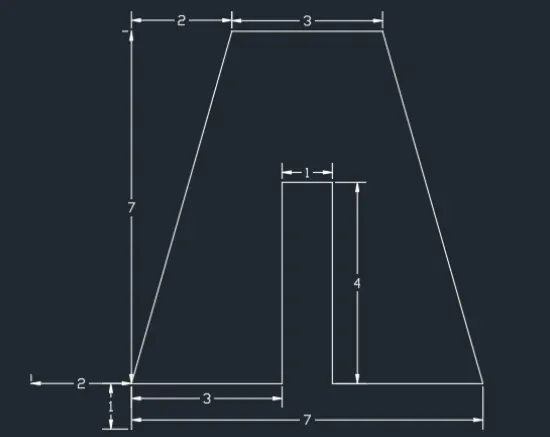
Q-2 :
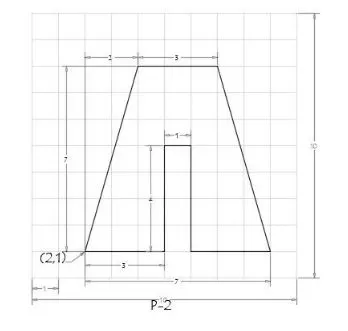
Procedure to draw above diagram using Absolute co-ordinate system as follow :
Commnas : DS
DSETTINGS
Command : L
LINE
Specify first point : 2,1
Specify next point or [Undo] : 5,1
Specify next point or [Undo] : 5,5
Specify next point or [Close/Undo]: 6,5
Specify next point or [Close/Undo]: 6,1
Specify next point or [Close/Undo]: 9,1
Specify next point or [Close/Undo]: 7,8
Specify next point or [Close/Undo]: 4,8
Specify next point or [Close/Undo]: C
Procedure to draw above diagram using Relative co-ordinate system as follow :
By Relative Rectangular Co-ordinates
Commnas : DS
DSETTINGS
Command : L
LINE
Specify first point : 2,1
Specify next point or [Undo] : @3,0
Specify next point or [Undo] : @0,4
Specify next point or [Close/Undo]: @1,0
Specify next point or [Close/Undo]: @0,-4
Specify next point or [Close/Undo]: @3,0
Specify next point or [Close/Undo]: @-2,7
Specify next point or [Close/Undo]: @-3,0
Specify next point or [Close/Undo]: C
By Relative polar Co-ordinates
Commnas : DS
DSETTINGS
Command : L
LINE
Specify first point : 2,1
Specify next point or [Undo] : @3<0
Specify next point or [Undo] : @4<90
Specify next point or [Close/Undo]: @1<0
Specify next point or [Close/Undo]: @4<270
Specify next point or [Close/Undo]: @3<0
Specify next point or [Close/Undo]: @7.28<105.90
Specify next point or [Close/Undo]: @3<180
Specify next point or [Close/Undo]: C
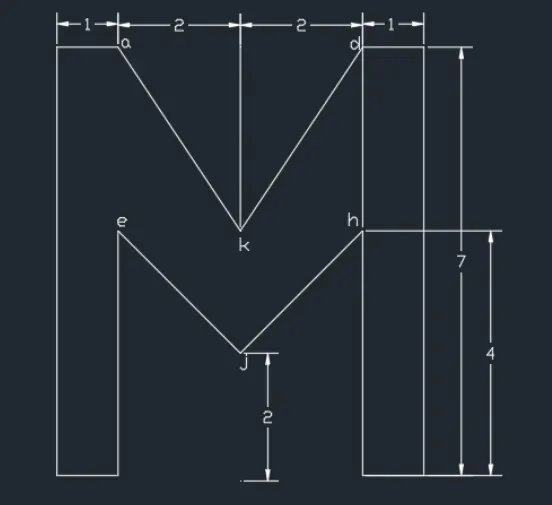
Q-3 :
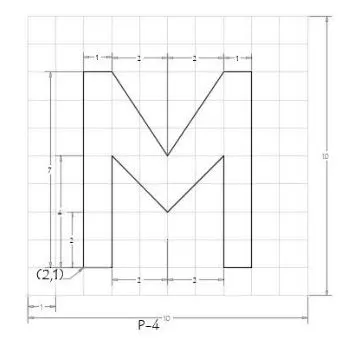
Procedure to draw above diagram using Absolute co-ordinate system as follow :
Commnas : DS
DSETTINGS
Command : L
LINE
Specify first point : 2,1
Specify next point or [Undo] : 3,1
Specify next point or [Undo] : 3,3
Specify next point or [Close/Undo]: 3,6
Specify next point or [Close/Undo]: 5,3
Specify next point or [Close/Undo]: 7,6
Specify next point or [Close/Undo]: 7,1
Specify next point or [Close/Undo]: 8,1
Specify next point or [Close/Undo]: 8,8
Specify next point or [Close/Undo]: 7,8
Specify next point or [Close/Undo]: 5,5
Specify next point or [Close/Undo]: 3,8
Specify next point or [Close/Undo]: 2,8
Specify next point or [Close/Undo]: C
Procedure to draw above diagram using Relative co-ordinate system as follow :
By Relative Rectangular Co-ordinates
Commnas : DS
DSETTINGS
Command : L
LINE
Specify first point : 2,1
Specify next point or [Undo] : @1,0
Specify next point or [Undo] : @0,4
Specify next point or [Close/Undo]: @2,-2
Specify next point or [Close/Undo]: @2,2
Specify next point or [Close/Undo]: @0,-4
Specify next point or [Close/Undo]: @1,0
Specify next point or [Close/Undo]: @0,7
Specify next point or [Close/Undo]: -1,0
Specify next point or [Close/Undo]:@-2,3
Specify next point or [Close/Undo]: @-1,0
Specify next point or [Close/Undo]: C
By Relative polar Co-ordinates
Commnas : DS
DSETTINGS
Command : L
LINE
Specify first point : 2,1
Specify next point or [Undo] : @1<0
Specify next point or [Undo] : @4<90
Specify next point or [Close/Undo]: @2.82<315
Specify next point or [Close/Undo]: @2.82<45
Specify next point or [Close/Undo]: @4<270
Specify next point or [Close/Undo]: @1<0
Specify next point or [Close/Undo]: @7<90
Specify next point or [Close/Undo]: @1<180
Specify next point or [Close/Undo]: @3.6<236
Specify next point or [Close/Undo]: @3.6<123.5
Specify next point or [Close/Undo]: @1<180
Specify next point or [Close/Undo]: C
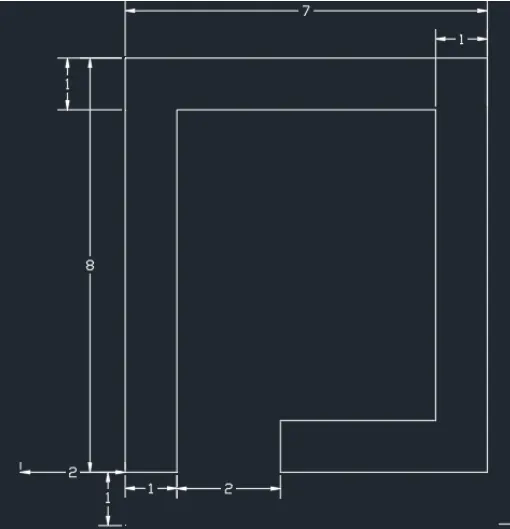
Q-4 :
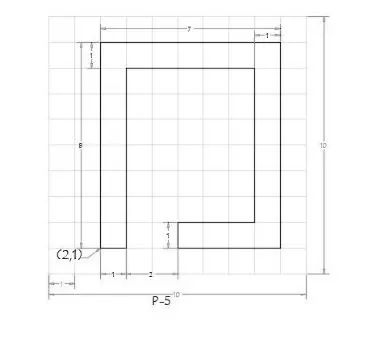
Procedure to draw above diagram using Absolute co-ordinate system as follow :
Commnas : DS
DSETTINGS
Command : L
LINE
Specify first point : 2,1
Specify next point or [Undo] : 2,9
Specify next point or [Undo] : 9,1
Specify next point or [Close/Undo]: 5,1
Specify next point or [Close/Undo]: 5,2
Specify next point or [Close/Undo]: 8,2
Specify next point or [Close/Undo]: 8,8
Specify next point or [Close/Undo]: 3,8
Specify next point or [Close/Undo]: 3,1
Specify next point or [Close/Undo]: C
Procedure to draw above diagram using Relative co-ordinate system as follow :
By Relative Rectangular Co-ordinates
Commnas : DS
DSETTINGS
Command : L
LINE
Specify first point : 2,1
Specify next point or [Undo] : @0,8
Specify next point or [Undo] : @7,0
Specify next point or [Close/Undo]: @0,-8
Specify next point or [Close/Undo]: @-3,0
Specify next point or [Close/Undo]: @0,1
Specify next point or [Close/Undo]: @2,0
Specify next point or [Close/Undo]: 0,6
Specify next point or [Close/Undo]:@-5,0
Specify next point or [Close/Undo]: @0,-7
Specify next point or [Close/Undo]: C
By Relative polar Co-ordinates
Commnas : DS
DSETTINGS
Command : L
LINE
Specify first point : 2,1
Specify next point or [Undo] : @8<90
Specify next point or [Undo] : @7<0
Specify next point or [Close/Undo]: @8<270
Specify next point or [Close/Undo]: @4<180
Specify next point or [Close/Undo]: @1<90
Specify next point or [Close/Undo]: @3<0
Specify next point or [Close/Undo]: @6<90
Specify next point or [Close/Undo]: @5<180
Specify next point or [Close/Undo]: @7<270
Specify next point or [Close/Undo]: C
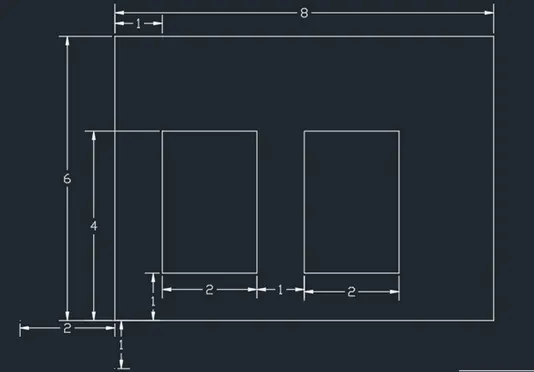
Q-5 :
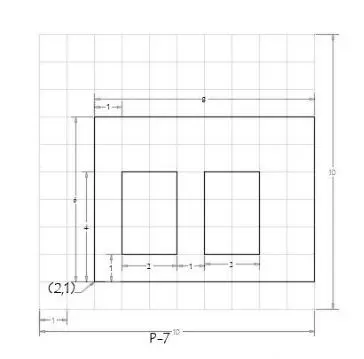
Procedure to draw above diagram using Absolute co-ordinate system as follow :
Commnas : DS
DSETTINGS
Command : L
LINE
Specify first point : 2,1
Specify next point or [Undo] : 10,1
Specify next point or [Undo] : 10,7
Specify next point or [Close/Undo]: 2,7
Specify next point or [Close/Undo]: C
Command : L
LINE
Specify firstt point: 3,2
Specify next point or [Undo]: 5,2
Specify next point or [Undo]: 5,5
Specify next point or [Close/Undo]: 3,5
Specify next point or [Close/Undo]: C
Command : L
LINE
Specify firstt point: 6,2
Specify next point or [Undo]: 8,2
Specify next point or [Undo]: 8,5
Specify next point or [Close/Undo]: 6,5
Specify next point or [Close/Undo]: C
Procedure to draw above diagram using Relative co-ordinate system as follow :
By Relative Rectangular Co-ordinates
Commnas : DS
DSETTINGS
Command : L
LINE
Specify first point : 2,1
Specify next point or [Undo] : @8,0
Specify next point or [Undo] : @0,6
Specify next point or [Close/Undo]: @-8,0
Specify next point or [Close/Undo]: C
Command : L
LINE
Specify first point : 3,2
Specify next point or [Undo] : @2,0
Specify next point or [Undo] : @0,3
Specify next point or [Close/Undo]: @-2,0
Specify next point or [Close/Undo]: C
Command : L
LINE
Specify first point : 6,2
Specify next point or [Undo] : @2,0
Specify next point or [Undo] : @0,3
Specify next point or [Close/Undo]: @-2,0
Specify next point or [Close/Undo]: C
By Relative polar Co-ordinates
Commnas : DS
DSETTINGS
Command : L
LINE
Specify first point : 2,1
Specify next point or [Undo] : @8<0
Specify next point or [Undo] : @6<90
Specify next point or [Close/Undo]: @-8<180
Specify next point or [Close/Undo]: C
Command : L
LINE
Specify first point : 3,2
Specify next point or [Undo] : @2<0
Specify next point or [Undo] : @3<90
Specify next point or [Close/Undo]: @-2<180
Specify next point or [Close/Undo]: C
Command:L
LINE
Specify first point : @6,2
Specify next point or [Close/Undo]: @2<0
Specify next point or [Close/Undo]: @3<90
Specify next point or [Close/Undo]: @2<180
Specify next point or [Close/Undo]: C
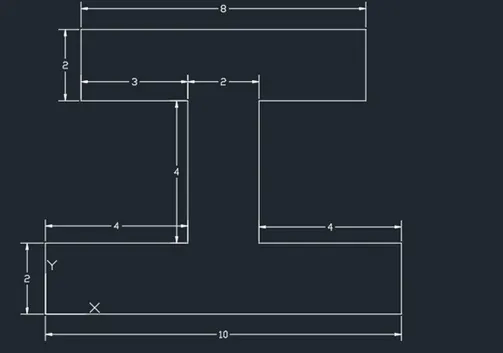
Q-6 :
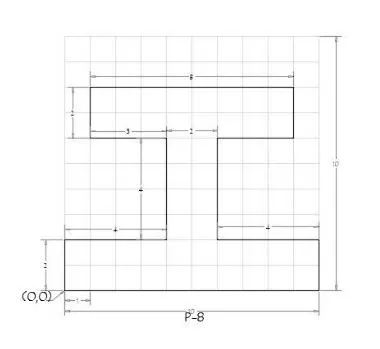
Procedure to draw above diagram using Absolute co-ordinate system as follow :
Commnas : DS
DSETTINGS
Command : L
LINE
Specify first point : 0,0
Specify next point or [Undo] : 10,0
Specify next point or [Undo]: 10,2
Specify next point or [Close/Undo]: 6,2
Specify next point or [Close/Undo]: 6,6
Specify next point or [Close/Undo]: 9,6
Specify next point or [Close/Undo]: 9,8
Specify next point or [Close/Undo]: 1,8
Specify next point or [Close/Undo]: 1,6
Specify next point or [Close/Undo]: 4,6
Specify next point or [Close/Undo]: 4,2
Specify next point or [Close/Undo]: 0,2
Specify next point or [Close/Undo]: C
Procedure to draw above diagram using Relative co-ordinate system as follow :
By Relative Rectangular Co-ordinates
Commnas : DS
DSETTINGS
Command : L
LINE
Specify first point : 0,0
Specify first point [Undo]: 0
Zero length line created at (0.0000,0.0000,0.0000)
Specify first point [Close/Undo]: @10,0
Specify next point or [Close/Undo] : @0,2
Specify next point or [Close/Undo] : @-4,0
Specify next point or [Close/Undo] : @0,3
Specify next point or [Close/Undo]: @3,0
Specify next point or [Close/Undo]: @0,2
Specify next point or [Close/Undo]: @-8,0
Specify next point or [Close/Undo]: @0,-2
Specify next point or [Close/Undo]: @3,0
Specify next point or [Close/Undo]: @0,-4
Specify next point or [Close/Undo]:@0,-3
Specify next point or [Close/Undo]: @-4,0
Specify next point or [Close/Undo]: C
By Relative polar Co-ordinates
Commnas : DS
DSETTINGS
Command : L
LINE
Specify first point : 0,0
Specify next point or [Undo] : @10<0
Specify next point or [Undo] : @2<90
Specify next point or [Close/Undo]: @4<180
Specify next point or [Close/Undo]: @3<90
Specify next point or [Close/Undo]: @3<0
Specify next point or [Close/Undo]: @2<90
Specify next point or [Close/Undo]: @8<180
Specify next point or [Close/Undo]: @2<270
Specify next point or [Close/Undo]: @3<0
Specify next point or [Close/Undo]: @3<270
Specify next point or [Close/Undo]: @4<180
Specify next point or [Close/Undo]: C
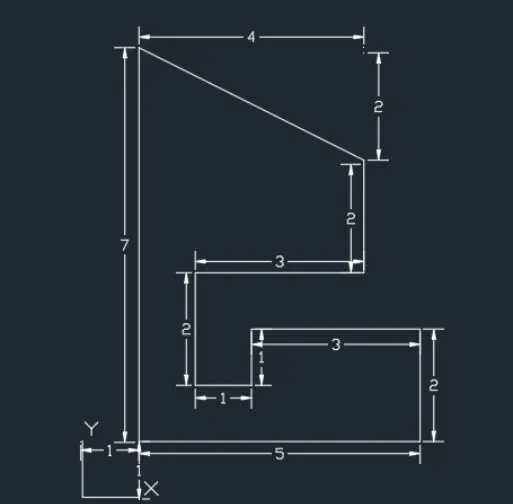
Q-7 :
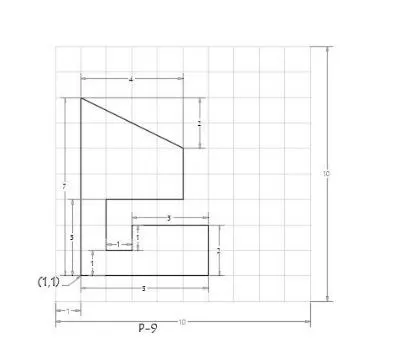
Procedure to draw above diagram using Absolute co-ordinate system as follow :
Commnas : DS
DSETTINGS
Command : L
LINE
Specify first point : 1,1
Specify next point or [Close/Undo]: 6,1
Specify next point or [Close/Undo]: 6,3
Specify next point or [Close/Undo]: 3,3
Specify next point or [Close/Undo]: 3,2
Specify next point or [Close/Undo]: 2,2
Specify next point or [Close/Undo]: 2,4
Specify next point or [Close/Undo]: 5,4
Specify next point or [Close/Undo]: 5,6
Specify next point or [Close/Undo]: 1,8
Specify next point or [Close/Undo]: C
Procedure to draw above diagram using Relative co-ordinate system as follow :
By Relative Rectangular Co-ordinates
Commnas : DS
DSETTINGS
Command : L
LINE
Specify first point : 1,1
Specify next point or [Undo] : @5,0
Specify next point or [Undo]: @0,2
Specify next point or [Close/Undo]: @-3,0
Specify next point or [Close/Undo]: @0,-1
Specify next point or [Close/Undo]: @-1,0
Specify next point or [Close/Undo]: @0,2
Specify next point or [Close/Undo]: @3,0
Specify next point or [Close/Undo]:@0,2
Specify next point or [Close/Undo]: @-4,2
Specify next point or [Close/Undo]: C
By Relative polar Co-ordinates
Commnas : DS
DSETTINGS
Command : L
LINE
Specify first point : 1,1
Specify next point or [Undo]: @5<0
Specify next point or [Undo]: @2<90
Specify next point or [Close/Undo]: @3<180
Specify next point or [Close/Undo]: @1<270
Specify next point or [Close/Undo]: @1<180
Specify next point or [Close/Undo]: @2<90
Specify next point or [Close/Undo]: @3<0
Specify next point or [Close/Undo]: @2<90
Specify next point or [Close/Undo]: @4.47<154.15
Specify next point or [Close/Undo]: C
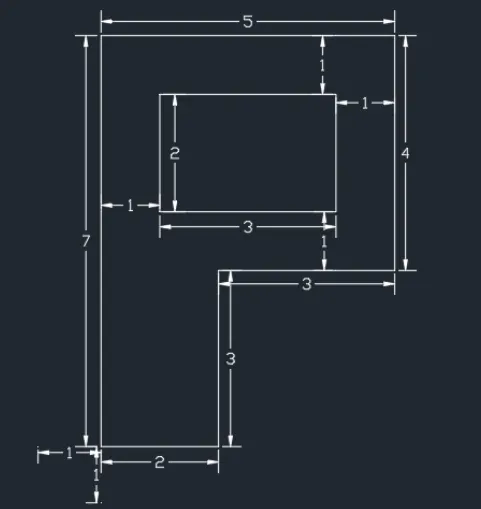
Q-8 :
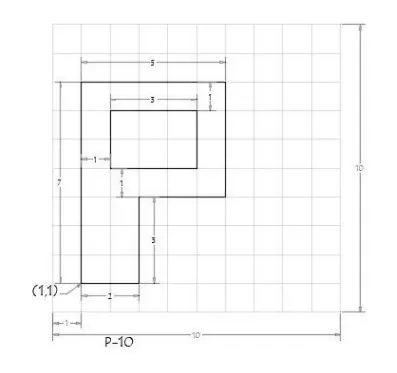
Procedure to draw above diagram using Absolute co-ordinate system as follow :
Commnas : DS
DSETTINGS
Command : L
LINE
Specify first point : 1,1
Specify next point or [Undo]: 3,1
Specify next point or [Undo]: 3,4
Specify next point or [Close/Undo]: 6,4
Specify next point or [Close/Undo]: 6,8
Specify next point or [Close/Undo]: 1,8
Specify next point or [Close/Undo]: C
Command : L
LINE
Specify first point : 2,5
Specify next point or [Close/Undo]: 5,5
Specify next point or [Close/Undo]: 5,7
Specify next point or [Close/Undo]: 2,7
Specify next point or [Close/Undo]: C
Procedure to draw above diagram using Relative co-ordinate system as follow :
By Relative Rectangular Co-ordinates
Commnas : DS
DSETTINGS
Command : L
LINE
Specify first point : 1,1
Specify next point or [Undo] : @2,0
Specify next point or [Undo] : @0,3
Specify next point or [Close/Undo]: @3,0
Specify next point or [Close/Undo]: @0,4
Specify next point or [Close/Undo]: @-5,0
Specify next point or [Close/Undo]: C
Command :L
LINE
Specify first point : 2,5
Specify next point or [Close/Undo]: @3,0
Specify next point or [Close/Undo]:@0,2
Specify next point or [Close/Undo]: @-3.,0
Specify next point or [Close/Undo]: C
By Relative polar Co-ordinates
Commnas : DS
DSETTINGS
Command : L
LINE
Specify first point : 1,1
Specify next point or [Undo]: @2<0
Specify next point or [Undo]: @3<0
Specify next point or [Close/Undo]: @4<90
Specify next point or [Close/Undo]: @5<180
Specify next point or [Close/Undo]: C
Command :L
LINE
Specify FIRSt point :@ 2,5
Specify next point or [Close/Undo]: @3<0
Specify next point or [Close/Undo]: @2<90
Specify next point or [Close/Undo]: @3<180
Specify next point or [Close/Undo]: C
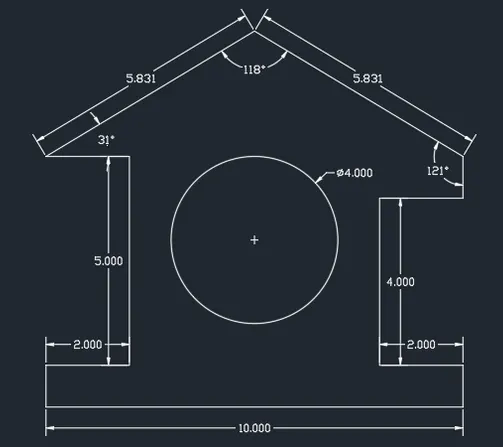
Q-9 : Draw the profile and the trusses using any coordinate system methods.
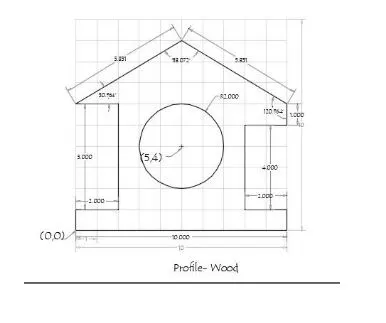
Procedure to draw above diagram using Absolute co-ordinate system as follow :
Commnas : DS
DSETTINGS
Command : L
LINE
Specify first point : 0,0
Specify next point or [Undo]: 10,0
Specify next point or [Undo]: 10,1
Specify next point or [Close/Undo]: 8,1
Specify next point or [Close/Undo]: 8,5
Specify next point or [Close/Undo]: 10,5
Specify next point or [Close/Undo]: 10,6
Specify next point or [Close/Undo]: 5,9
Specify next point or [Close/Undo]: 0,6
Specify next point or [Close/Undo]: 2,6
Specify next point or [Close/Undo]: 2,1
Specify next point or [Close/Undo]: 0,1
Specify next point or [Close/Undo]: C
Command : C
CIRCLE
Specify center point for circle or [ 3P/2P/Ttr ( tan tan radius ) ] : 5,4
Specify radius of circle or [ Diameter ]: D
Specify diameter of Circle : 4
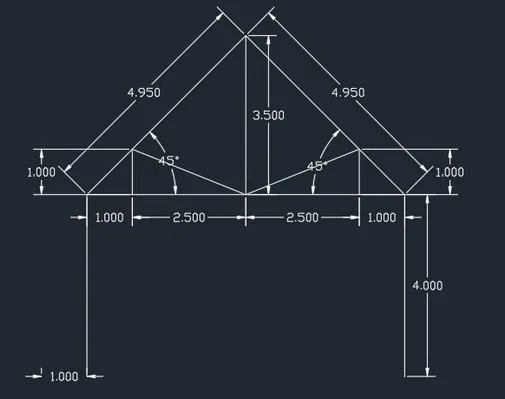
Q-10 : Drawthe profile and the trusses using any coordinate system methods.
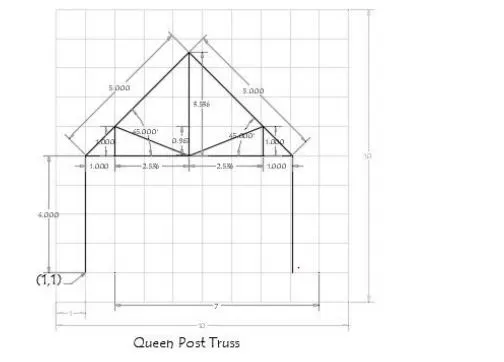
Procedure to draw above diagram using Relative polar co-ordinate system as follow :
Commnas : DS
DSETTINGS
Command : L
LINE
Specify first point : 1,1
Specify next point or [Undo]: @4<90
Specify next point or [Undo]: @5<45
Specify next point or [Close/Undo]: @5<315
Specify next point or [Close/Undo]: @4<270
Specify next point or [Close/Undo]: @0.95<90
Specify next point or [Close/Undo]: @10<0
Q-11 : Draw the profile and the trusses using any coordinate system methods.
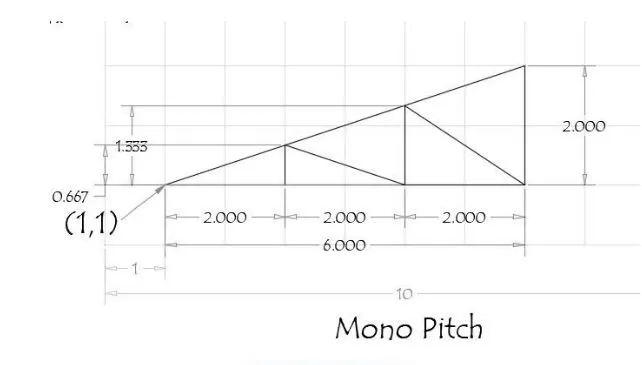
Procedure to draw above diagram using Relative co-ordinate system as follow :
By Relative Rectangular Co-ordinates
Commnas : DS
DSETTINGS
Command : L
LINE
Specify first point : 1,1
Specify next point or [Undo] : @2,0
Specify next point or [Undo]: @2,0
Specify next point or [Close/Undo]: @2,0
Specify next point or [Close/Undo]: @0,2
Specify next point or [Close/Undo]: C
Command : L
LINE
Specify first point : 5,1
Specify next point or [Undo]: @0,1.333
Specify next point or [Undo]:@2,-1.333
Specify next point or [Close/Undo]: C
Command : L
LINE
Specify first point : 3,1
Specify next point or [Undo]: @0,0.667
Specify next point or [Undo]:@2,-0.667
Specify next point or [Close/Undo]: C
RESULTS : FOLLOWING ARE THE IMAGES OF DIFFERENT GEOMETRIES OBTAINED BY DOING FINAL DRAFTING IN AUTOCAD
Q-1 :
Q-2 :
Q-3 :
Q-4:
Q-5 :
Q-6 :
Q- 7 :
Q-8:
Q-9 :
Q-10 :
Q-11 :