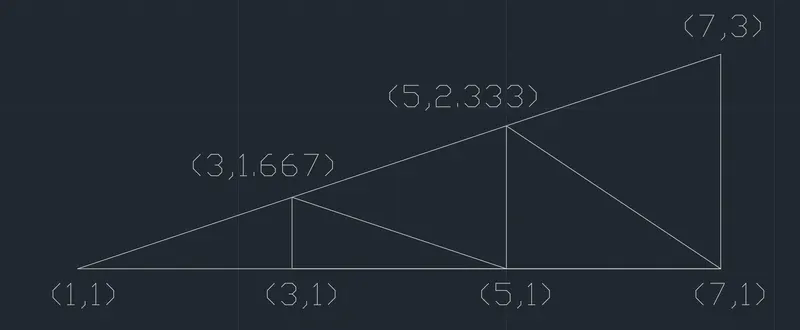
Creation of geometries by Coordinate system methods using AutoCad
1Q]
AIM: -
To create the geometry using all the co-ordinates system using LINE tool in AutoCad
PROCEDURE
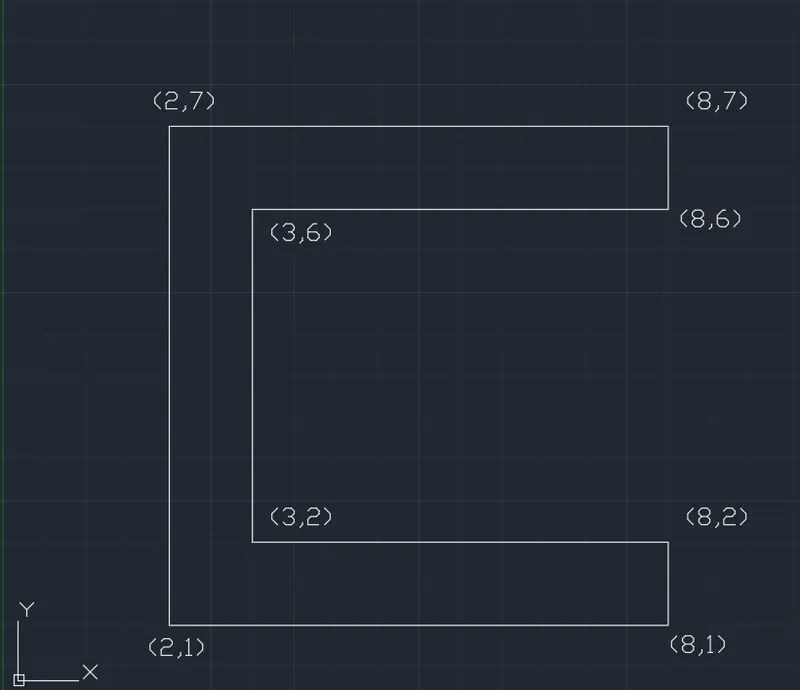
- ABSOLUTE CO-ORDINANTE SYSTEM
Choose the Line tool.
Line Specify first point: 2,1 (X= 2,Y= 1)
Specify next point: 8,1
Specify next point: 8,2
Specify next point: 3,2
Specify next point: 3,6
Specify next point: 8,6
Specify next point: 8,7
Specify next point: 2,7
Specify next point: close.
RESULT:
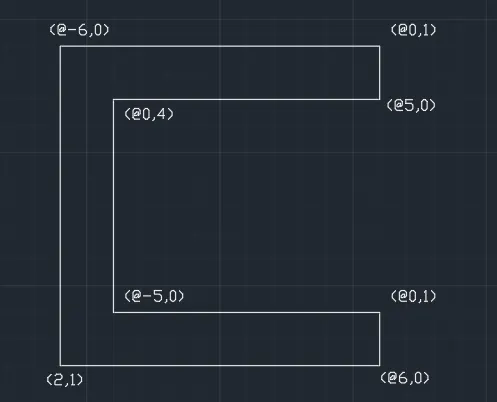
- RELATIVE RECTANGULAR CO-ORDINATE SYSTEM: -
AIM:
To create geometry in Relative Rectangular co-ordinate system
PROCEDURE: -
Choose the Line tool.
Line Specify first point: 2,1 (X= 2,Y= 1)
Specify next point: @6,0 (Dx= 6, Dy= 0)
Specify next point: @0,1
Specify next point: @-5,0
Specify next point: @0,4
Specify next point: @5,0
Specify next point: @0,1
Specify next point: @-6,0
Specify next point: close.
RESULT: -
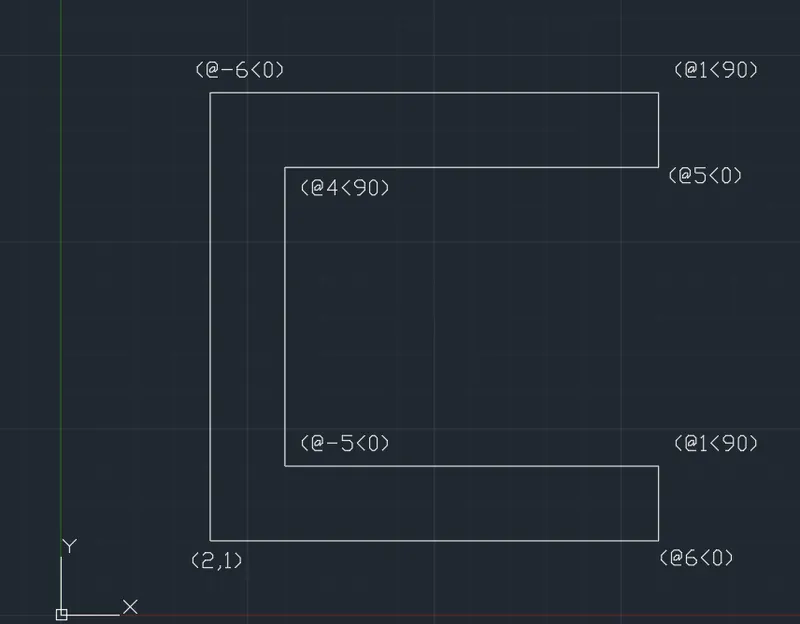
- RELATIVE POLAR CO-ORDINATE SYSTEM: -
AIM:
To create geometry in Relative polar co-ordinate system.
PROCEDURE:
Choose the Line tool.
Line Specify first point: 2,1 (X= 2,Y= 1)
Specify next point: @6<0
Specify next point: @1<90
Specify next point: @-5<0
Specify next point: @4<90
Specify next point: @5<0
Specify next point: @1<90
Specify next point: @-6<0
Specify next point: close.
RESULT: -
- DISTANCE ENTRY METHOD: -
AIM:
To create geometry using Distance Entry Method
PROCEDURE: -
Choose the Line tool.
Line Specify first point: 2,1 (X= 2,Y= 1)
Specify next point: Position the cursor in the required direction then enter distance 6 units
Specify next point: Position the cursor in the required direction then enter distance 1 units
Specify next point: Position the cursor in the required direction then enter distance 5 units
Specify next point: Position the cursor in the required direction then enter distance 4 units
Specify next point: Position the cursor in the required direction then enter distance 5 units
Specify next point: Position the cursor in the required direction then enter distance 1 units
Specify next point: Position the cursor in the required direction then enter distance 6 units
Specify next point: close
RESULT: -
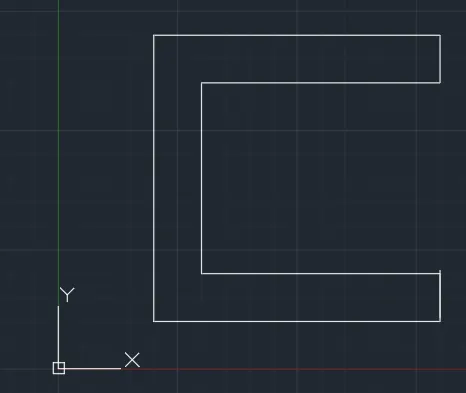
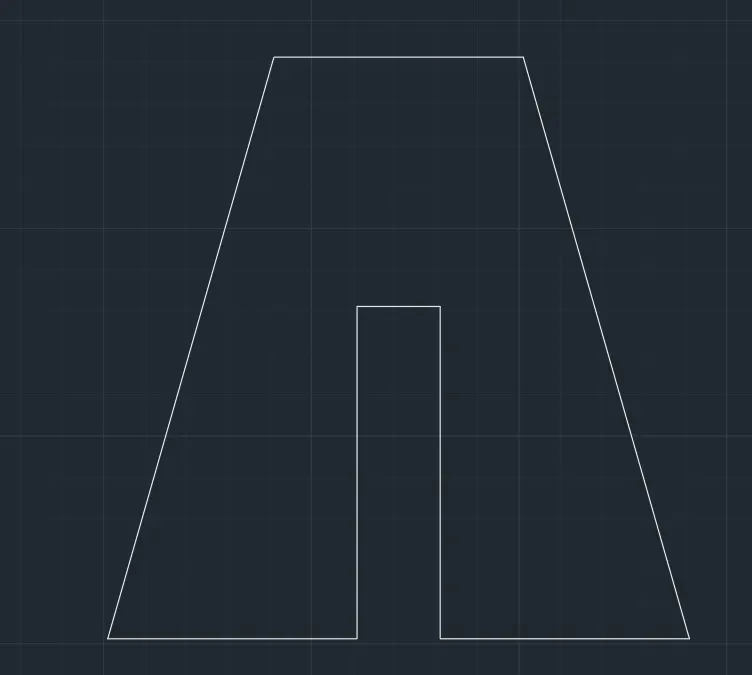
2Q]
AIM: -
To create the geometry using all the co-ordinates system.
PROCEDURE
- ABSOLUTE CO-ORDINANTE SYSTEM
Choose the Line tool.
Line Specify first point: 2,1 (X= 2,Y= 1)
Specify next point: 5,1
Specify next point: 5,5
Specify next point: 6,5
Specify next point: 6,1
Specify next point: 9,1
Specify next point: 7,8
Specify next point: 4,8
Specify next point: close.
RESULT: -
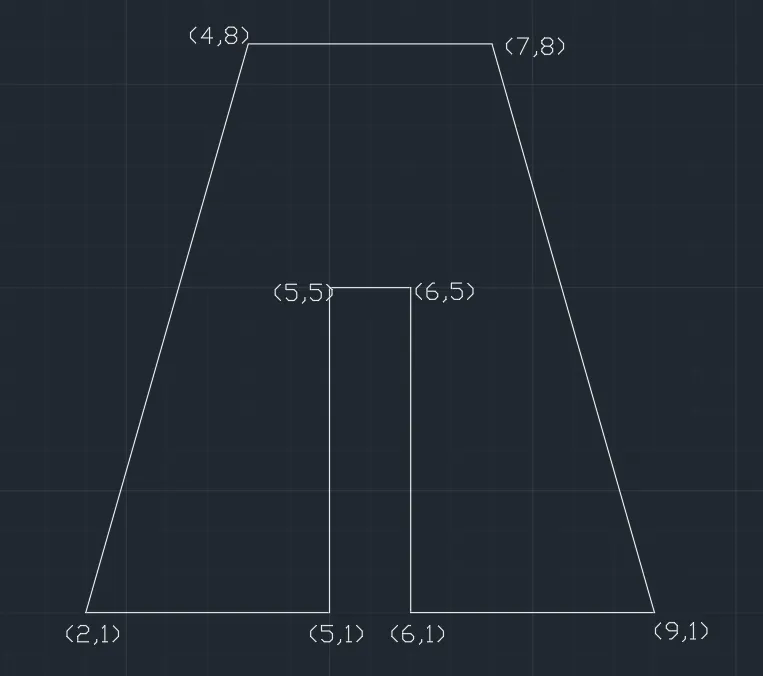
- RELATIVE RECTANGULAR CO-ORDINATE SYSTEM: -
AIM:
To create geometry in Relative Rectangular co-ordinate system
PROCEDURE: -
Choose the Line tool.
Line Specify first point: 2,1 (X= 2,Y= 1)
Specify next point: @3,0 (Dx= 3, Dy= 0)
Specify next point: @0,4
Specify next point: @1,0
Specify next point: @0,-4
Specify next point: @3,0
Specify next point: @-2,7
Specify next point: @-3,0
Specify next point: close.
RESULT: -
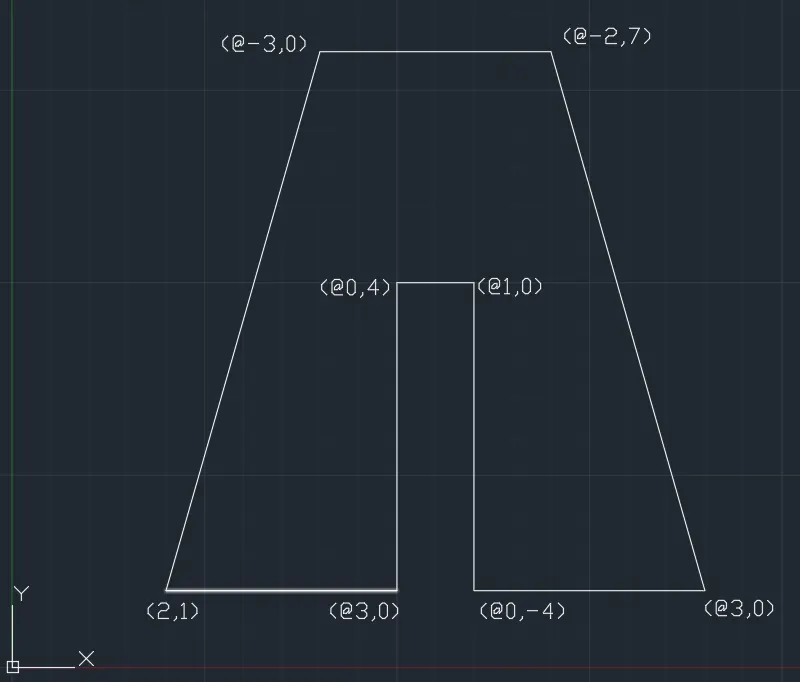
- RELATIVE POLAR CO-ORDINATE SYSTEM: -
AIM:
To create geometry in Relative polar co-ordinate system.
PROCEDURE:
Choose the Line tool.
Line Specify first point: 2,1 (X= 2,Y= 1)
Specify next point: @3<0
Specify next point: @4<90
Specify next point: @1<0
Specify next point: @-4<90
Specify next point: @3<0
Specify next point: @7.2801<106
Specify next point: @-3<0
Specify next point: close.
RESULT: -
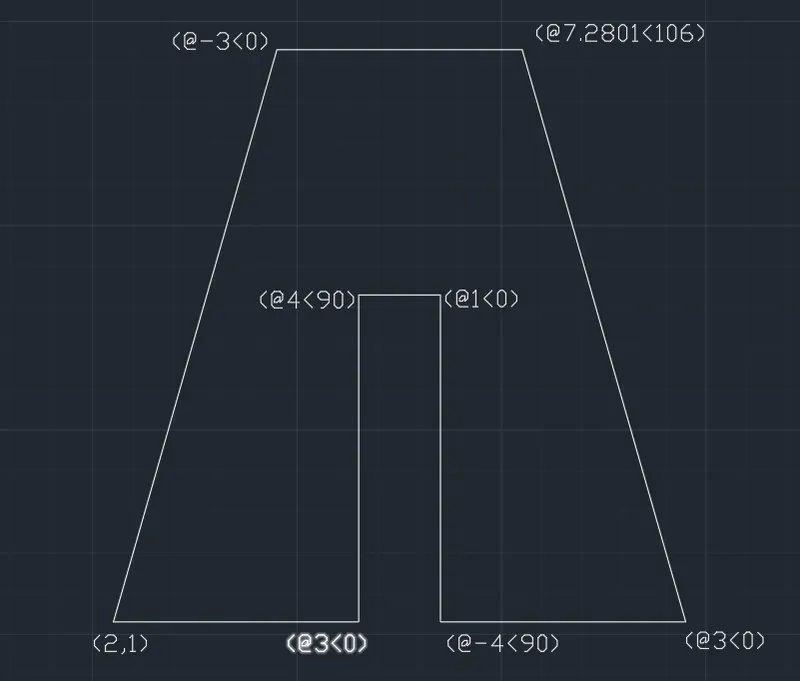
- DISTANCE ENTRY METHOD: -
AIM:
To create geometry using Distance Entry Method
PROCEDURE: -
Choose the Line tool.
Line Specify first point: 2,1 (X= 2,Y= 1)
Specify next point: Position the cursor in the required direction then enter distance 3 units
Specify next point: Position the cursor in the required direction then enter distance 4 units
Specify next point: Position the cursor in the required direction then enter distance 1 units
Specify next point: Position the cursor in the required direction then enter distance 4 units
Specify next point: Position the cursor in the required direction then enter distance 3 units
Specify next point: Position the cursor in the required direction then enter distance 7.2801 units
Specify next point: Position the cursor in the required direction then enter distance 3 units
Specify next point: close
RESULT: -
3Q]
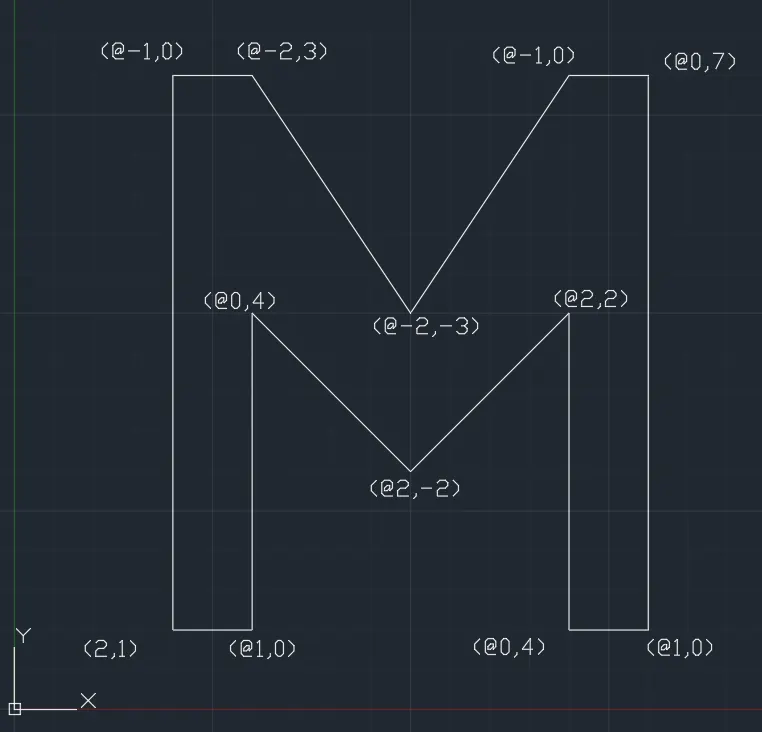
AIM: -
To create the geometry using the co-ordinates system using LINE tool in AutoCad
PROCEDURE
Choose the Line tool.
Line Specify first point: 2,1 (X= 2,Y= 1)
Specify next point: @1,0 (Dx= 1, Dy= 0)
Specify next point: @0,4
Specify next point: @2,-2
Specify next point: @2,2
Specify next point: @0,4
Specify next point: @1,0
Specify next point: @0,7
Specify next point: @-1,0
Specify next point: @-2,-3
Specify next point: @-2,3
Specify next point: @-1,0
Specify next point: close.
RESULT: -
4Q]
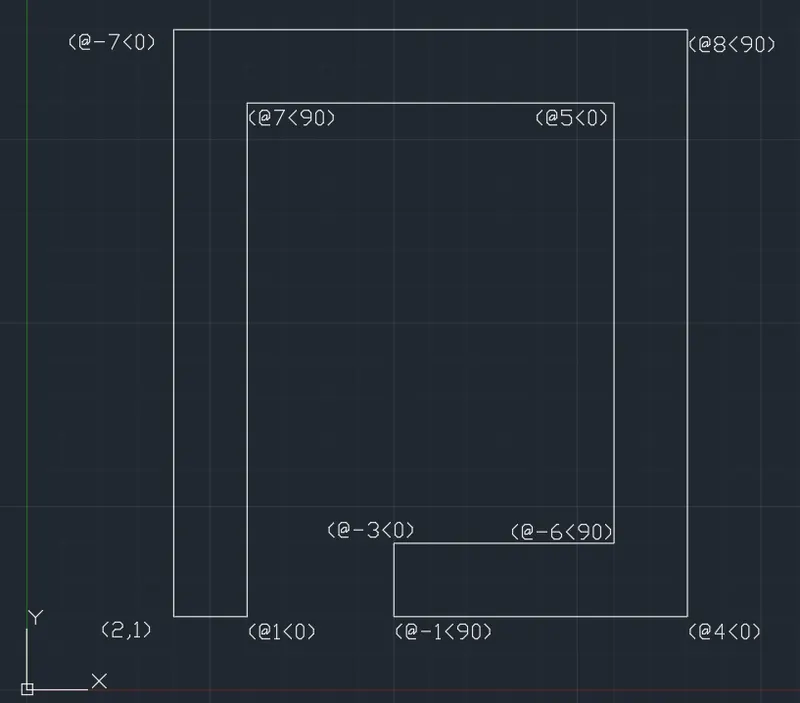
AIM: -
To create the geometry using the co-ordinates system using LINE tool in AutoCad
PROCEDURE
Choose the Line tool.
Line Specify first point: 2,1 (X= 2,Y= 1)
Specify next point: @1<0
Specify next point: @7<90
Specify next point: @5<0
Specify next point: @-6<90
Specify next point: @-3<0
Specify next point: @-1<90
Specify next point: @4<0
Specify next point: @8<90
Specify next point: @-7<0
Specify next point: close.
RESULT: -
5Q]
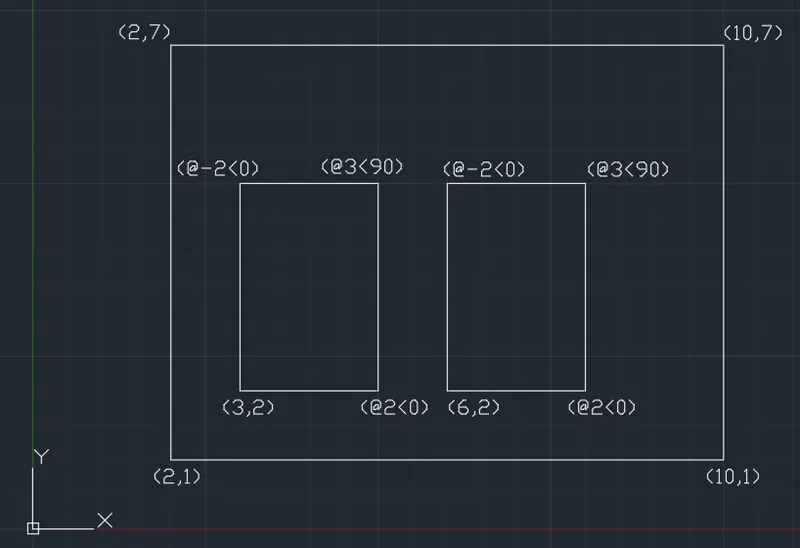
AIM: -
To create the geometry using the co-ordinates system using LINE tool in AutoCad
PROCEDURE
Choose the Line tool.
Line Specify first point: 2,1 (X= 2,Y= 1)
Specify next point: 10,1
Specify next point: 10,7
Specify next point: 2,7
Specify next point: close.
Choose the Line tool.
Line Specify first point: 3,2 (X= 3,Y= 2)
Specify next point: @2<0
Specify next point: @3<90
Specify next point: @-2<0
Specify next point: close
Choose the Line tool.
Line Specify first point: 6,2 (X= 6,Y= 2)
Specify next point: @2<0
Specify next point: @3<90
Specify next point: @-2<0
Specify next point: close
RESULT: -
6Q]
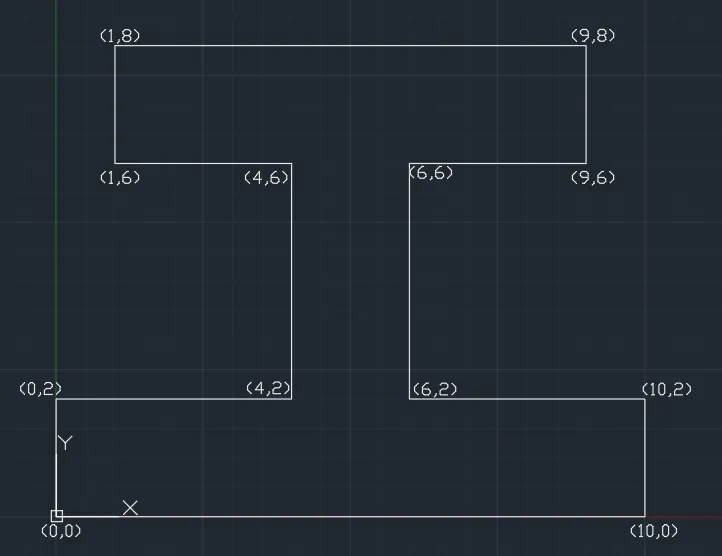
AIM: -
To create the geometry using the co-ordinates system using LINE tool in AutoCad
PROCEDURE
Choose the Line tool.
Line Specify first point: 0,0
Specify next point: 0,2
Specify next point: 4,2
Specify next point: 4,6
Specify next point: 1,6
Specify next point: 1,8
Specify next point: 9,8
Specify next point: 9,6
Specify next point: 6,6
Specify next point: 6,2
Specify next point: 10,2
Specify next point: 10,0
Specify next point: close.
RESULT: -
7Q]
AIM: -
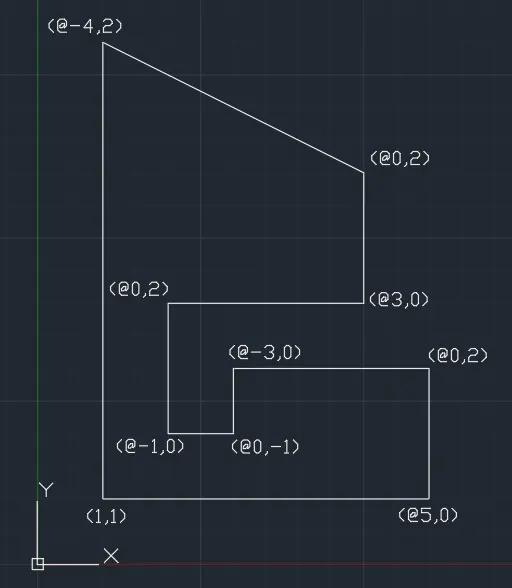
To create the geometry using the co-ordinates system using LINE tool in AutoCad
PROCEDURE
Choose the Line tool.
Line Specify first point: 1,1
Specify next point: @5,0
Specify next point: @0,2
Specify next point: @-3,0
Specify next point: @0,-1
Specify next point: @-1,0
Specify next point: @0,2
Specify next point: @3,0
Specify next point: @0,2
Specify next point: @-4,2
Specify next point: close
RESULT: -
8Q]
AIM: -
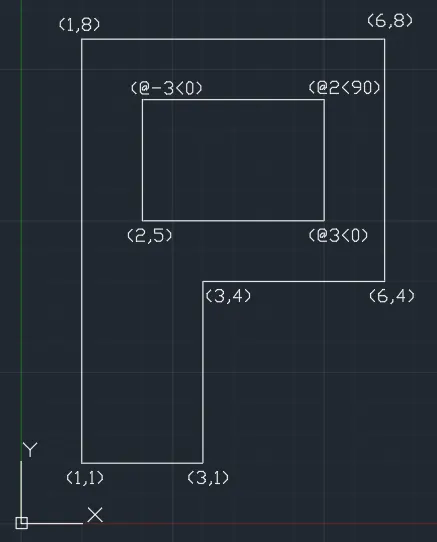
To create the geometry using the co-ordinates system using LINE tool in AutoCad
PROCEDURE
Choose the Line tool.
Line Specify first point: 1,1
Specify next point: 1,8
Specify next point: 6,8
Specify next point: 6,4
Specify next point: 3,4
Specify next point: 3,1
Specify next point: close
Choose the Line tool.
Line Specify first point: 2,5
Specify next point: @3<0
Specify next point: @2<90
Specify next point: @-3<0
Specify next point: close
RESULT: -
9Q]
AIM: -
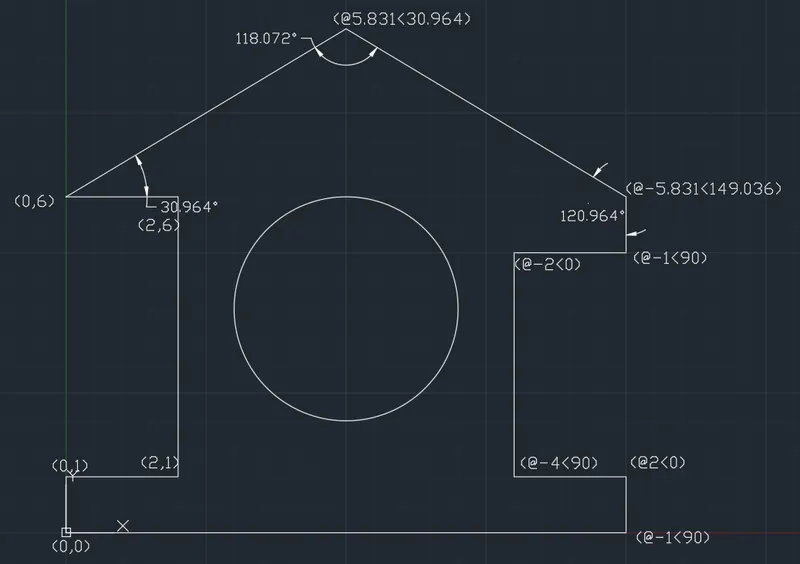
To create the geometry using the co-ordinates system using DRAWING tools in AutoCad
PROCEDURE
Choose the Line tool.
Line Specify first point: 0,0
Specify next point: 0,1
Specify next point: 2,1
Specify next point: 2,6
Specify next point: 0,6
Specify next point: @5.831<30.964
Specify next point: @-5.831<149.036
Specify next point: @-1<90
Specify next point: @-2<0
Specify next point: @-4<90
Specify next point: @2<0
Specify next point: @-1<90
Specify next point: close
Choose the Circle tool.
Select the centre,radius method to draw the circle.
Specify centre point: 5,4
Specify Radius: 2
Specify next point : close
RESULT: -
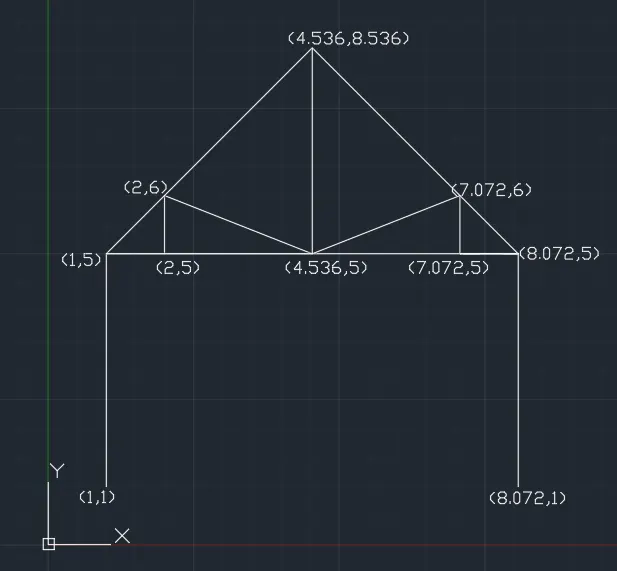
10Q]
AIM: -
To create the geometry using the co-ordinates system using LINE tool in AutoCad
PROCEDURE
Choose the Line tool.
Line Specify first point: 1,1
Specify next point: 1,5
Specify next point: 2,5
Specify next point: 4.536,5
Specify next point: 7.072,5
Specify next point: 8.072,5
Specify next point: 8.072,1
Specify next point: close
Choose the Line tool.
Line Specify first point: 2,5
Specify next point: 2,6
Specify next point: 4.536,5
Specify next point: 4.536,8.536
Specify next point: 1,5
Specify next point: close
Choose the Line tool.
Line Specify first point: 4.536,8.536
Specify next point: 8.072,5
Specify next point: 7.072,5
Specify next point: 7.072,6
Specify next point: 4.536,5
Specify next point: close
RESULT: -
11Q]
AIM: -
To create the geometry using the co-ordinates system using LINE tool in AutoCad
PROCEDURE
Choose the Line tool.
Line Specify first point: 7,1
Specify next point: 1,1
Specify next point: 7,3
Specify next point: 7,1
Specify next point: 5,2.33
Specify next point: 5,1
Specify next point: 3,1.667
Specify next point: 3,1
Specify next point: close
RESULT: -