Creation of geometries by Coordinate system methods using AutoCad
Aim:-
To creat the geometries from P1 to P2 using all coordinates system methods.
- Absolute Coordinates system
- Relative coordinates system
- Polar coordinates system
Introduction:-
Using the absolute coordinate system and ralative coordinate system, polar coordinate system.
Click the autocad icon from desktop and go to the star >all program>program>autocad.
Click new icon to open a new drawing.
Set the limits and units.
Using commands line command and circle command.
Procedure:-
1.p1.
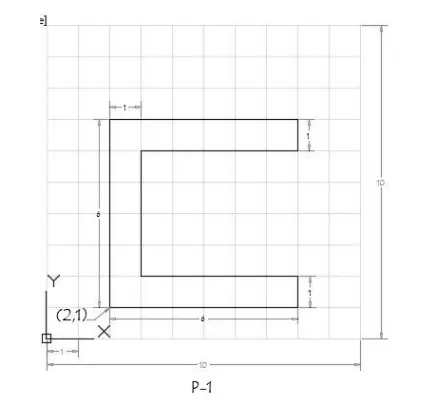
First solve this drawing using absolute coordinate system:- Enter the line command,
- then specify the first point: type 2,1 and command prompt and press enter (as a starting point)
- specify next point ;at 8,1 and press enter
- specify next point ;at 8,2 and press enter
- specify next point ;at 5,2 and press enter
- specify next point ;at 3,6 and press enter
- specify next point ;at 8,6 and press enter
- specify next point ;at 8,7 and press enter
- specify next point ;at 8,2 and press enter
- specify next point or close ;select close option and press enter
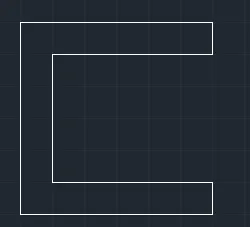
Relative rectangular coordinate:-
- line command enter
- then specify the first point: type 2,1 and command prompt and press enter (as a starting point)
- specify next point ;at @8,0 and press enter
- specify next point ;at @0,2 and press enter
- specify next point ;at @-5,0 and press enter
- specify next point ;at @0,6 and press enter
- specify next point ;at @8,0 and press enter
- specify next point ;at @0,7 and press enter
- specify next point ;at @0,-2 and press enter
- specify next point or close ;select close option and press enter
Relative polar coordinate:- Enter line command
- then specify the first point: type 2,1 and command prompt and press enter (as a starting point)
- specify next point ;at @6<0
- specify next point ;at @1<90
- specify next point ;at @5<180
- specify next point ;at @4<90
- specify next point ;at @5<0
- specify next point ;at @1<90
- specify next point ;at @6<180
- specify next point or close ;select close option and press enter
2.)
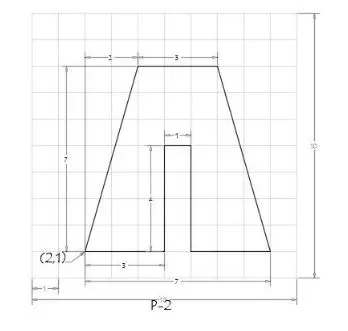
First solve this drawing using absolute coordinate system:
Enter the line command,
- then specify the first point: type 2,1 and command prompt and press enter (as a starting point)
- specify next point ;at 5,1 and press enter
- specify next point ;at 5,5 and press enter
- specify next point ;at 6,5 and press enter
- specify next point ;at 6,1 and press enter
- specify next point ;at 9,1 and press enter
- specify next point ;at 7,8 and press enter
- specify next point ;at 4,8 and press enter
- specify next point or close ;select close option and press enter
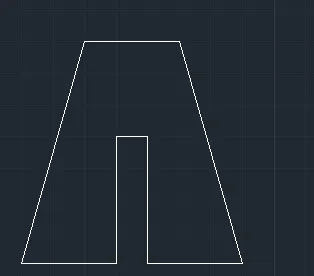
Relative rectangular coordinate:-
- line command enter
- then specify the first point: type 2,1 and command prompt and press enter (as a starting point)
- specify next point ;at @3,0 and press enter
- specify next point ;at @0,4 and press enter
- specify next point ;at @1,0 and press enter
- specify next point ;at @0,-4 and press enter
- specify next point ;at @3,0 and press enter
- specify next point ;at @-2,7 and press enter
- specify next point ;at @-3,0 and press enter
- specify next point or close ;select close option and press enter
Relative polar coordinate:-Enter line command
- then specify the first point: type 2,1 and command prompt and press enter (as a starting point)
- specify next point ;at @3<0
- specify next point ;at @4<90
- specify next point ;at @1<0
- specify next point ;at @4<270
- specify next point ;at @3<0
- specify next point ;at @7<90(line 1)
- specify next point ;at @2<180(line 2)
- now join end point of line 2 nad starting poont of line 1
- delete line 1 and 2
- @3<180
- specify next point or close ;select close option and press enter
3.)
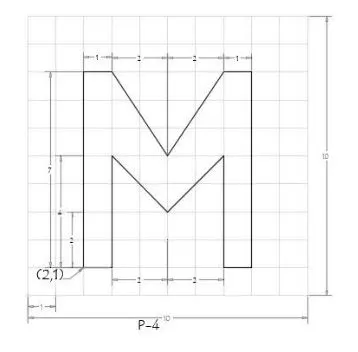
First solve this drawing using absolute coordinate system:- Enter the line command,
- then specify the first point: type 2,1 and command prompt and press enter (as a starting point)
- specify next point ;at 3,1 and press enter
- specify next point ;at 3,5 and press enter
- specify next point ;at 5,3 and press enter
- specify next point ;at 7,5 and press enter
- specify next point ;at 7,1 and press enter
- specify next point ;at 8,1 and press enter
- specify next point ;at 8,8 and press enter
- specify next point ;at 7,8 and press enter
- specify next point ;at 5,5 and press enter
- specify next point ;at 3,8 and press enter
- specify next point ;at 2,8 and press enter
- specify next point or close ;select close option and press enter
Relative rectangular coordinate:-
- line command enter
- then specify the first point: type 2,1 and command prompt and press enter (as a starting point)
- specify next point ;at @1,0 and press enter
- specify next point ;at @0,4 and press enter
- specify next point ;at @2,-2 and press enter
- specify next point ;at @2,2nand press enter
- specify next point ;at @0,-4 and press enter
- specify next point ;at @1,8 and press enter
- specify next point ;at @0,7 and press enter
- specify next point ;at @-1,0 and press enter
- specify next point ;at @-2,-3 and press enter
- specify next point ;at @-2,3 and press enter
- specify next point ;at @-1,0 and press enter
- specify next point or close ;select close option and press enter
Relative polar coordinate:- Enter line command
- then specify the first point: type 2,1 and command prompt and press enter (as a starting point)
- specify next point ;at @7<0
- specify next point ;at @1<90
- specify next point ;at @3<135
- specify next point ;at @3<45
- specify next point ;at @1<0
- specify next point ;at @7<270
- specify next point ;at @1<180
- specify next point ;at @4<90
- specify next point ;at @3<225
- specify next point ;at @3<135
- specify next point ;at @4<270
- specify next point or close ;select close option and press enter
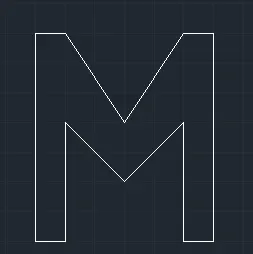
4.)
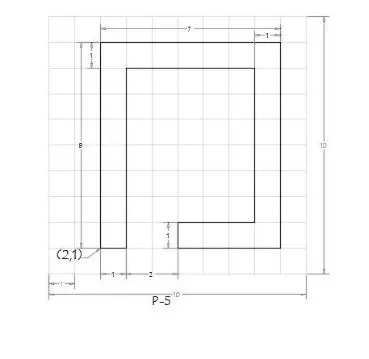
First solve this drawing using absolute coordinate system:- Enter the line command,
- then specify the first point: type 2,1 and command prompt and press enter (as a starting point)
- specify next point ;at 2,9 and press enter
- specify next point ;at 9,9 and press enter
- specify next point ;at 5,-1 and press enter
- specify next point ;at 5,2 and press enter
- specify next point ;at 8,2 and press enter
- specify next point ;at 8,8 and press enter
- specify next point ;at -3,8 and press enter
- specify next point or close ;select close option and press enter
Relative rectangular coordinate:-
- line command enter
- then specify the first point: type 2,1 and command prompt and press enter (as a starting point)
- specify next point ;at @1,0 and press enter
- specify next point ;at @0,4 and press enter
- specify next point ;at @2,0 and press enter
- specify next point ;at @0,2 and press enter
- specify next point ;at @0,-2 and press enter
- specify next point ;at @1,0 and press enter
- specify next point ;at @0,7 and press enter
- specify next point ;at @1,0 and press enter
- specify next point ;at @0,-2 and press enter
- specify next point ;at @0,3 and press enter
- specify next point ;at @0,7 and press enter
- specify next point or close ;select close option and press enter
Relative polar coordinate:- Enter line command
- then specify the first point: type 2,1 and command prompt and press enter (as a starting point)
- specify next point ;at @8<90
- specify next point ;at @7<0
- specify next point ;at @8<270
- specify next point ;at @4<180
- specify next point ;at @1<90
- specify next point ;at @3<0
- specify next point ;at @6<90
- specify next point ;at @5<180
- specify next point ;at @7<270
- specify next point or close ;select close option and press enter
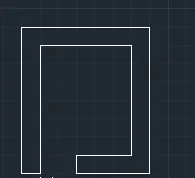
5.)
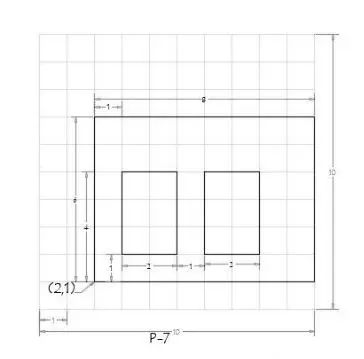
First solve this drawing using absolute coordinate system:- Enter the line command,
- then specify the first point: type 2,1 and command prompt and press enter (as a starting point)
- specify next point ;at 2,6 and press enter
- specify next point ;at 2,10 and press enter
- specify next point ;at 10,10 and press enter
- specify next point ;at 10,2 and press enter
- specify next point ;at 3,2 and press enter
- specify next point ;at 3,3 and press enter
- specify next point ;at 3,5 and press enter
- specify next point ;at 5,5 and press enter
- specify next point or close ;select close option and press enter
- Again line command specify point ;at 6,2 and press enter
- specify next point ;at 6,3 and press enter
- specify next point ;at 6,8 and press enter
- specify next point ;at 8,1 and press enter
- specify next point or close ;select close option and press enter
Relative rectangular coordinate:-
- line command enter
- then specify the first point: type 2,1 and command prompt and press enter (as a starting point)
- specify next point ;at @1,0 and press enter
- specify next point ;at @0,4 and press enter
- specify next point ;at @8,0 and press enter
- specify next point ;at @0,10 and press enter
- specify next point ;at @-8,0 and press enter
- specify next point ;at @3,1 and press enter
- specify next point ;at @0,3 and press enter
- specify next point ;at @2,0 and press enter
- specify next point ;at @0,2 and press enter
- specify next point ;at @6,1 and press enter
- specify next point ;at @0,3 and press enter
- specify next point ;at @2,0 and press enter
- specify next point ;at @0,2 and press enter
- specify next point or close ;select close option and press enter
Relative polar coordinate:- Enter line command
- then specify the first point: type 2,1 and command prompt and press enter (as a starting point)
- specify next point ;at @8<0
- specify next point ;at @6<90
- specify next point ;at @8<180
- specify next point ;at @2<0
- specify next point ;at @3<90
- specify next point ;at @2<180
- specify next point ;at @2<0
- specify next point ;at @3<90
- specify next point ;at @2<180
- specify next point or close ;select close option and press enter
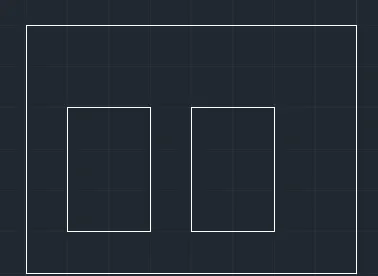
6.)
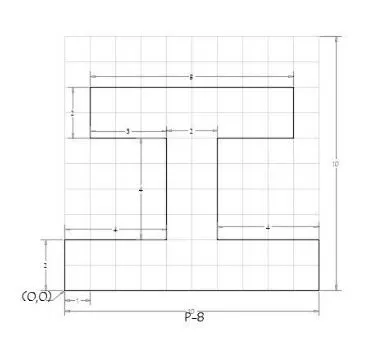
First solve this drawing using absolute coordinate system:- Enter the line command,
- then specify the first point: type 0,0 and command prompt and press enter (as a starting point)
- specify next point ;at 10,2 and press enter
- specify next point ;at 10,2 and press enter
- specify next point ;at 6,2 and press enter
- specify next point ;at 6,6 and press enter
- specify next point ;at 9,6 and press enter
- specify next point ;at 9,8 and press enter
- specify next point ;at 1,8 and press enter
- specify next point ;at 1,6 and press enter
- specify next point ;at 4,6 and press enter
- specify next point ;at 4,2 and press enter
- specify next point ;at 0,2 and press enter
- specify next point or close ;select close option and press enter
Relative rectangular coordinate:-
- line command enter
- then specify the first point: type 0,0 and command prompt and press enter (as a starting point)
- specify next point ;at @10,0 and press enter
- specify next point ;at @0,2 and press enter
- specify next point ;at @-4,0 and press enter
- specify next point ;at @0,4 and press enter
- specify next point ;at @3,0 and press enter
- specify next point ;at @0,2 and press enter
- specify next point ;at @-8,0 and press enter
- specify next point ;at @0,-2 and press enter
- specify next point ;at @3,0 and press enter
- specify next point ;at @0,-4 and press enter
- specify next point ;at @-4,0 and press enter
- specify next point or close ;select close option and press enter
Relative polar coordinate:- Enter line command
- then specify the first point: type 0,0 and command prompt and press enter (as a starting point)
- specify next point ;at @10<0
- specify next point ;at @2<90
- specify next point ;at @4<180
- specify next point ;at @4<90
- specify next point ;at @3<0
- specify next point ;at @2<90
- specify next point ;at @8<180
- specify next point ;at @2<270
- specify next point ;at @3<0
- specify next point ;at @4<270
- specify next point ;at @4<180
- specify next point or close ;select close option and press enter
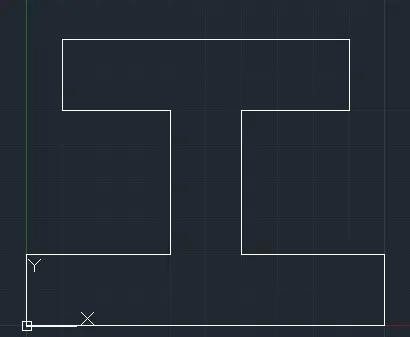
7.)
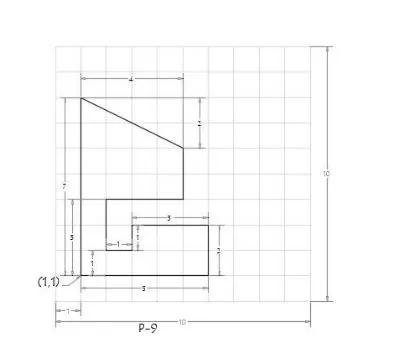
First solve this drawing using absolute coordinate system:- Enter the line command,
- then specify the first point: type 1,1 and command prompt and press enter (as a starting point)
- specify next point ;at 6,1 and press enter
- specify next point ;at 6,3 and press enter
- specify next point ;at 3,3 and press enter
- specify next point ;at 3,2 and press enter
- specify next point ;at 2,2 and press enter
- specify next point ;at 2,4 and press enter
- specify next point ;at 5,4 and press enter
- specify next point ;at 5,6 and press enter
- specify next point ;at 1,8 and press enter
- specify next point or close ;select close option and press enter
Relative rectangular coordinate:-
- line command enter
- then specify the first point: type 1,1 and command prompt and press enter (as a starting point)
- specify next point ;at @5,0 and press enter
- specify next point ;at @0,2 and press enter
- specify next point ;at @-3,0 and press enter
- specify next point ;at @0,-1 and press enter
- specify next point ;at @-1,0 and press enter
- specify next point ;at @0,2 and press enter
- specify next point ;at @3,0 and press enter
- specify next point ;at @0,2 and press enter
- specify next point ;at @-4,2 and press enter
- specify next point or close ;select close option and press enter
Relative polar coordinate:- Enter line command
- then specify the first point: type 1,1 and command prompt and press enter (as a starting point)
- specify next point ;at @5<0
- specify next point ;at @2<90
- specify next point ;at @3<180
- specify next point ;at @1<270
- specify next point ;at @1<180
- specify next point ;at @2<90
- specify next point ;at @3<0
- specify next point ;at @2<90
- specify next point ;at @4.5<153 or from take @2<90 to get #. from # enter @4<180 to get point. join j and i points using kine , delete line i to # and # to j.
- specify next point or close ;select close option and press enter
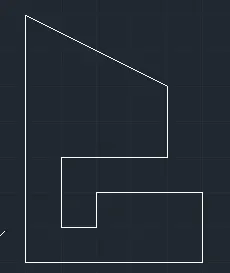
8.)
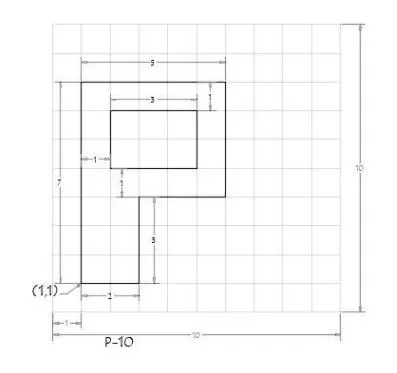
First solve this drawing using absolute coordinate system:- Enter the line command,
- then specify the first point: type 1,1 and command prompt and press enter (as a starting point)
- specify next point ;at 3,1 and press enter
- specify next point ;at 3,4 and press enter
- specify next point ;at 6,4 and press enter
- specify next point ;at 6,8 and press enter
- specify next point ;at 1,8 and press enter
- Close and line command
- specify next point ;at 2,5 and press enter
- specify next point ;at 5,5 and press enter
- specify next point ;at 5,7 and press enter
- specify next point ;at 2,7 and press enter
- specify next point or close ;select close option and press enter
Relative rectangular coordinate:-
- line command enter
- then specify the first point: type 1,1 and command prompt and press enter (as a starting point)
- specify next point ;at @2,0 and press enter
- specify next point ;at @0,3 and press enter
- specify next point ;at @3,0 and press enter
- specify next point ;at @0,4 and press enter
- specify next point ;at @-5,0 and press enter
- Close and again line command 2,5
- specify next point ;at @3,0 and press enter
- specify next point ;at @0,2 and press enter
- specify next point ;at @-3,0 and press enter
- specify next point or close ;select close option and press enter
Relative polar coordinate:- Enter line command
- then specify the first point: type 1,1 and command prompt and press enter (as a starting point)
- specify next point ;at @2<0
- specify next point ;at @3<90
- specify next point ;at @3<0
- specify next point ;at @4<90
- specify next point ;at @5<180
- Close and again line command 2,5
- specify next point ;at @3<0
- specify next point ;at @2<90
- specify next point ;at @3<180
- specify next point or close ;select close option and press enter
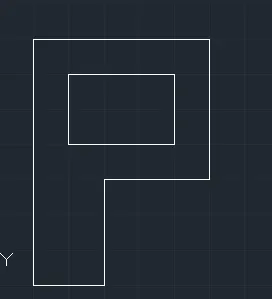
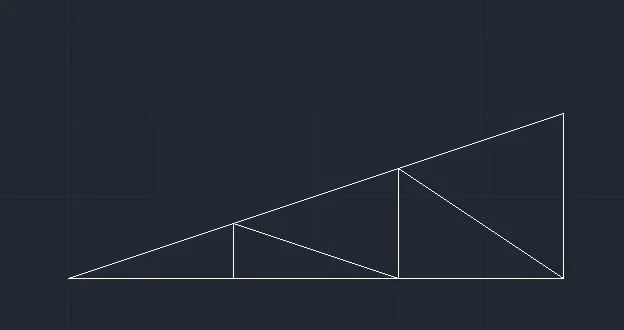
Draw the profile and the trusses using any coordinate system methods.
1.)
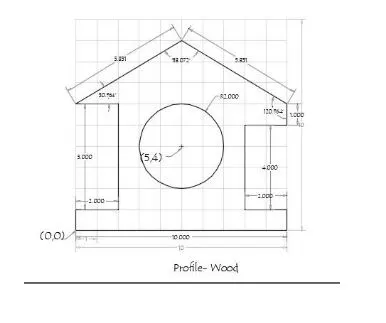
Absolute coordinate method:-
- then specify the first point: type 0,0 and command prompt and press enter (as a starting point)
- specify next point ;at 10,0 and press enter
- specify next point ;at 10,1 and press enter
- specify next point ;at 8,1 and press enter
- specify next point ;at 8,5 and press enter
- specify next point ;at 10,5 and press enter
- specify next point ;at 10,6 and press enter
- specify next point ;at 5,9 and press enter
- specify next point ;at 0,6 and press enter
- specify next point ;at 2,6 and press enter
- specify next point ;at 2,1 and press enter
- specify next point ;at 0,1 and press enter
- specify next point or close
- Circle command(5,4)
- centre radius
- radius =2
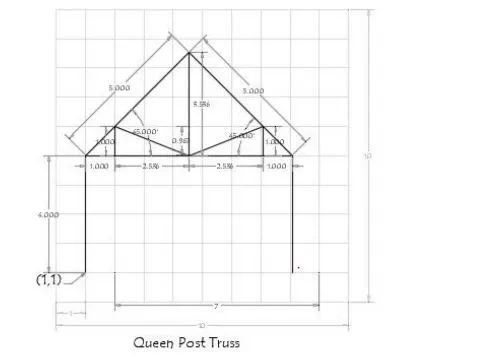
Relative polar coordinate system:-
- line
- 1,1
- @4<90
- @7<0
- @4<270
- enter
- line
- 1,5
- @5<45
- enter
- line
- 8,5
- @5<45
- @3.5<270
- enter
- line
- 1,5
- @1<0
- @1<90
- using line joint q to w
- enter
- line
- 8,5
- @1<180
- @1<90
- using line joint z to w
- enter
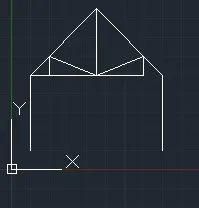
3.)
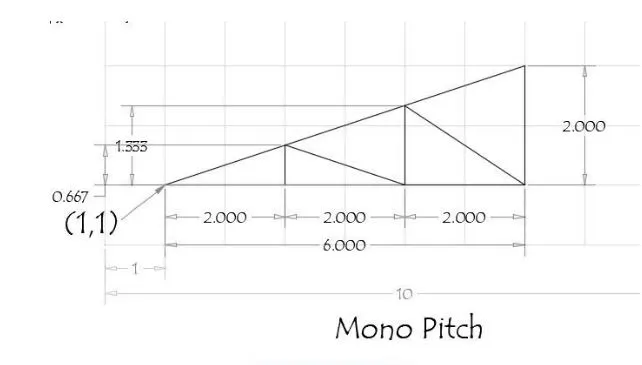
Absolute coordinate system:-
- line
- 1,1
- 3,1
- 5,1
- 7,1
- 7,3
- close
- line
- 3,1
- 3,1.66
- 5,1
- 5,2.33
- 7,1
- enter