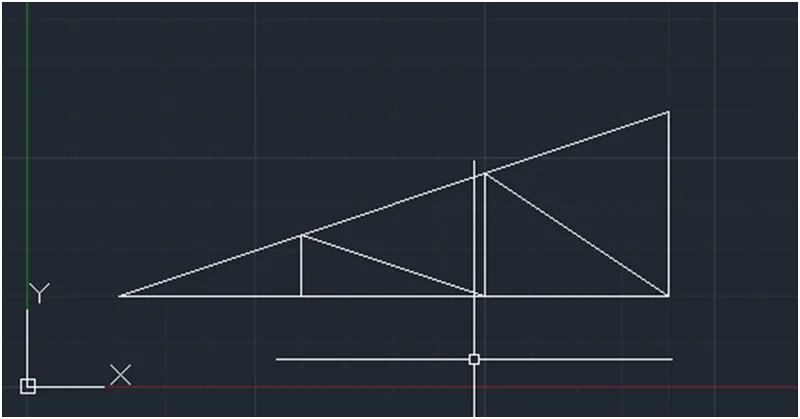
Creation of geometries by Coordinate system methods using AutoCad
Aim : To Create the geometries for given drawings using all the coordinates system methods. By using the Line tool and circle tool to create the geometries
The coordinate systems that are used in auto CAD are
- Absolute coordinates
- Relative coordinates
- Relative rectangular coordinates
- Relative polar coordinates
- Direct distance entry
Procedure:
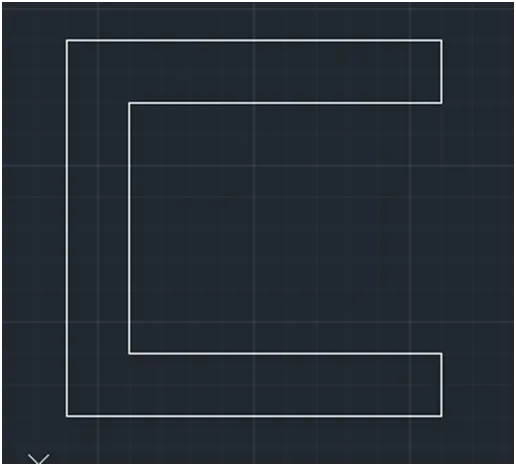
1.
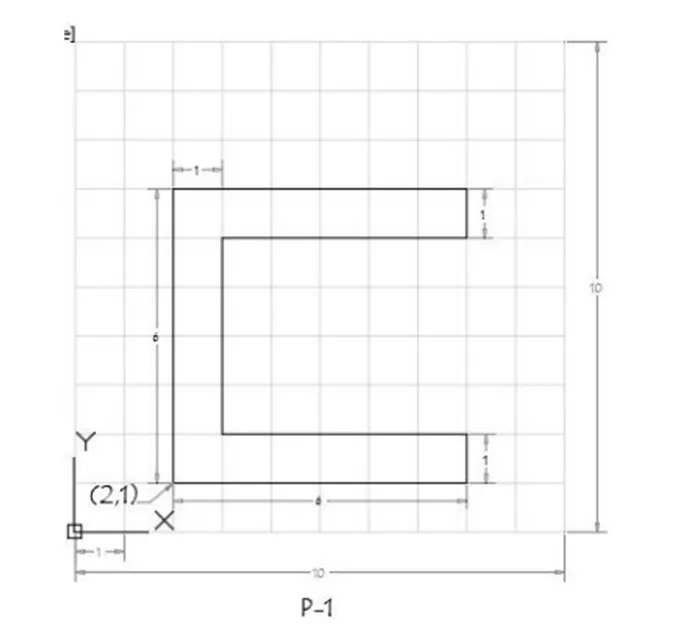
Absolute coordinates
- choose the line tool
- line specify the first point 2,1 start point
- specify the next point 8,1
- specify the next point 8,2
- specify the next point 3,2
- specify the next point 3,6
- specify the next point 8,6
- specify the next point 8,7
- specify the next point 2,7
- specify the last point by close command
Relative rectangular coordinates
- choose the line tool
- line specify the first point 2,1 start point
- specify the next point @6,0 (DX=6 & DY=0)
- specify the next point @0,1 (DX=0 & DY=1)
- specify the next point @-5,0 (DX=-5 & DY=0)
- specify the next point @0,4 (DX=0 & DY=4)
- specify the next point @5,0 (DX=5 & DY=0)
- specify the next point @0,1 (DX=0 & DY=1)
- specify the next point @-6,0 (DX=-6 & DY=0)
- specify the last point by close command
Relative polar coordinates
- choose the line tool
- line specify the first point 2,1 start point
- specify the next point @6<0
- specify the next point @1<90
- specify the next point @5<180
- specify the next point @4<90
- specify the next point @5<0
- specify the next point @1<90
- specify the next point @6<180
- specify the last point by close command
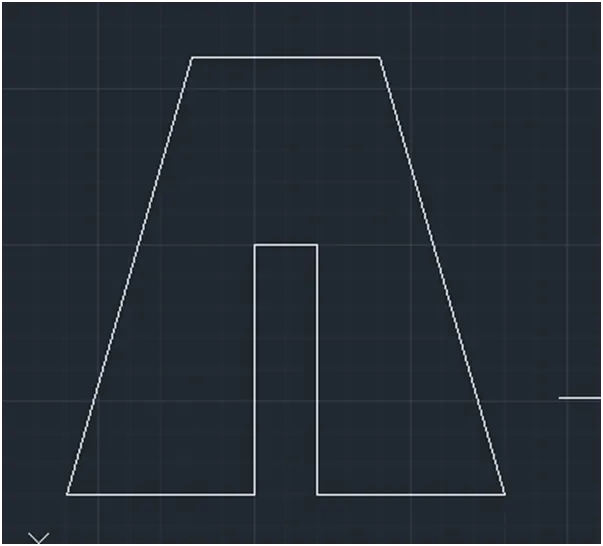
2.
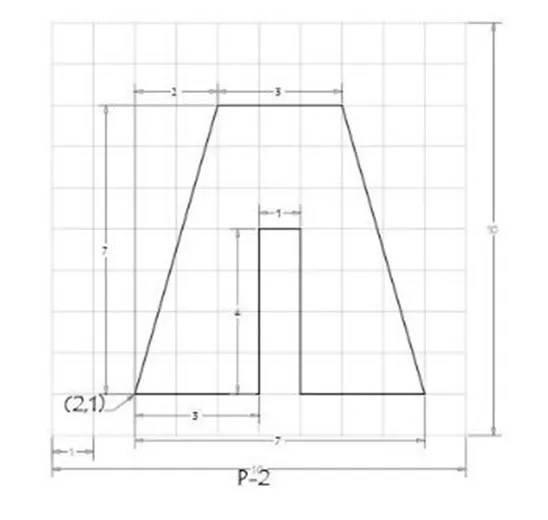
Absolute coordinates
- choose the line tool
- line specify the first point 2,1 start point
- specify the next point 5,1
- specify the next point 5,5
- specify the next point 6,5
- specify the next point 6,1
- specify the next point 9,1
- specify the next point 7,8
- specify the next point 4,8
- specify the last point by close command
Relative rectangular coordinates
- choose the line tool
- line specify the first point 2,1 start point
- specify the next point @3,0
- specify the next point @0,4
- specify the next point @1,0
- specify the next point @0,-4
- specify the next point @3,0
- specify the next point @-2,7
- specify the next point @-3,0
- specify the last point by close command
Relative polar coordinates
- choose the line tool
- line specify the first point 2,1 start point
- specify the next point @3<0
- specify the next point @4<90
- specify the next point @1<0
- specify the next point @4<270
- specify the next point @3<0
- specify the next point @2<100
- specify the next point @3<180
- specify the last point by close command
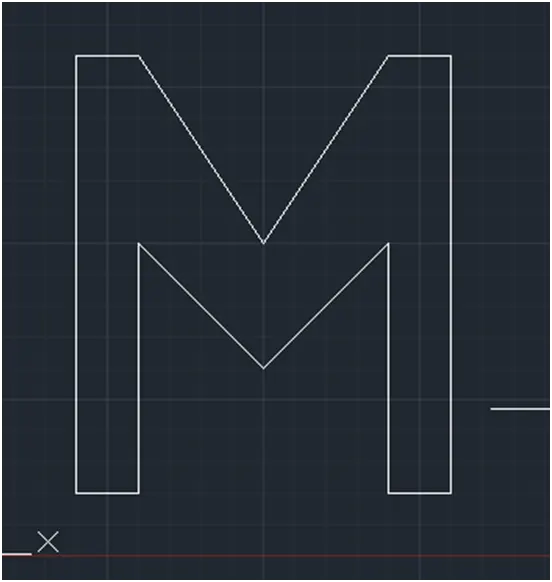
3.
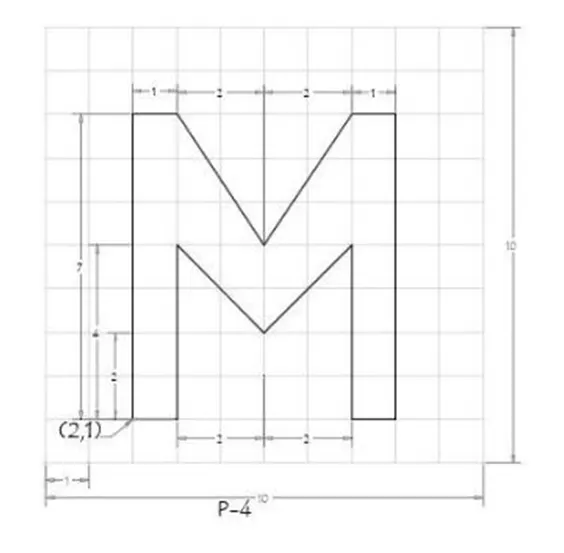
Absolute coordinates
- choose the line tool
- line specify the first point 2,1 start point
- specify the next point 3,1
- specify the next point 3,5
- specify the next point 5,3
- specify the next point 7,5
- specify the next point 7,1
- specify the next point 8,1
- specify the next point 8,8
- specify the next point 7,8
- specify the next point 5,5
- specify the next point 3,8
- specify the next point 2,8
- specify the last point by close command
Relative rectangular coordinates
- choose the line tool
- line specify the first point 2,1 start point
- specify the next point @1,0
- specify the next point @0,5
- specify the next point @2,-2
- specify the next point @2,2
- specify the next point @0,-4
- specify the next point @1,0
- specify the next point @0,7
- specify the next point @-1,0
- specify the next point @-2,-3
- specify the next point @-2,3
- specify the next point @-1,0
- specify the last point by close command
Relative polar coordinates
- choose the line tool
- line specify the first point 2,1 start point
- specify the next point @1<0
- specify the next point @4<90
- specify the next point @2<315
- specify the next point @2<45
- specify the next point @4<270
- specify the next point @1<0
- specify the next point @7<90
- specify the next point @1<180
- specify the next point @2<225
- specify the next point @2<135
- specify the next point @1<180
- specify the last point by close command
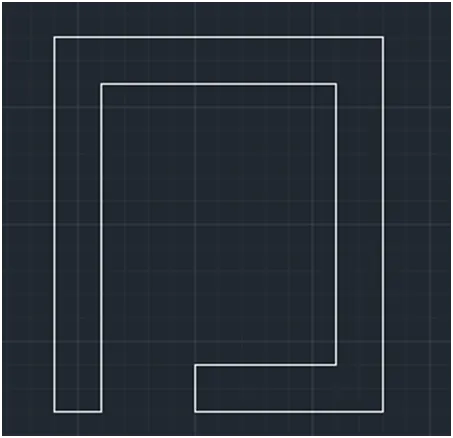
4.
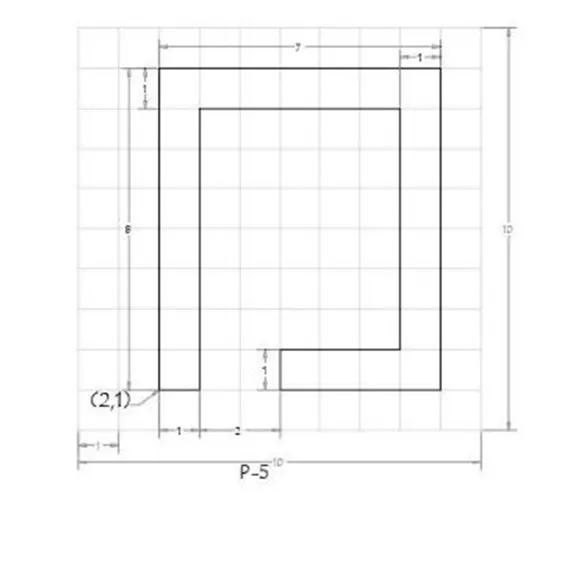
Absolute coordinates
- choose the line tool
- line specify the first point 2,1 start point
- specify the next point 3,1
- specify the next point 3,8
- specify the next point 8,8
- specify the next point 8,2
- specify the next point 5,2
- specify the next point 5,1
- specify the next point 9,1
- specify the next point 9,9
- specify the next point 2,9
- specify the last point by close command
Relative rectangular coordinates
- choose the line tool
- line specify the first point 2,1 start point
- specify the next point @1,0
- specify the next point @0,7
- specify the next point @5,0
- specify the next point @0,-6
- specify the next point @-3,0
- specify the next point @0,-1
- specify the next point @4,0
- specify the next point @0,8
- specify the next point @-7,0
- specify the last point by close command
Relative polar coordinates
- choose the line tool
- line specify the first point 2,1 start point
- specify the next point @1<0
- specify the next point @7<90
- specify the next point @5<0
- specify the next point @6<270
- specify the next point @3<180
- specify the next point @1<270
- specify the next point @4<0
- specify the next point @8<90
- specify the next point @7<180
- specify the last point by close command
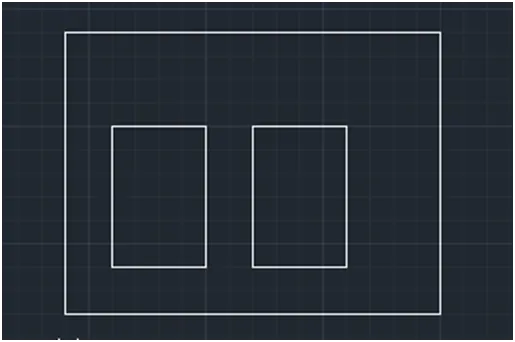
5.
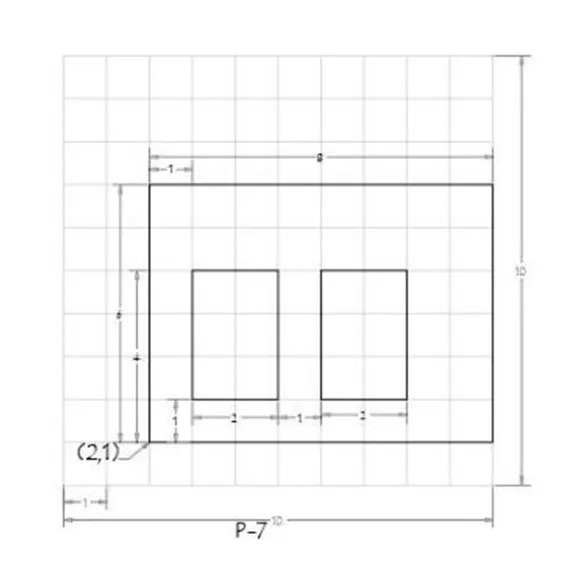
Absolute coordinates
- choose the line tool
- line specify the first point 2,1 start point
- specify the next point 10,1
- specify the next point 10,7
- specify the next point 2,7
- specify the last point by close command
- choose the line tool
- specify the first point 3,2
- specify the next point 5,2
- specify the next point 5,5
- specify the next point 2,5
- specify the last point by close command
- choose the line tool
- specify the first point 6,2
- specify the next point 8,2
- specify the next point 8,5
- specify the next point 6,5
- specify the last point by close command
Relative rectangular coordinates
- choose the line tool
- line specify the first point 2,1 start point
- specify the next point @8,0
- specify the next point @0,6
- specify the next point @-8,0
- specify the last point by close command
- choose the line tool
- specify the first point 3,2
- specify the next point @2,0
- specify the next point @0,3
- specify the next point @-2,0
- specify the last point by close command
- choose the line tool
- specify the first point 6,2
- specify the next point @2,0
- specify the next point @0,3
- specify the next point @-2,0
- specify the last point by close command
.Relative polar coordinates
- choose the line tool
- line specify the first point 2,1 start point
- specify the next point @8<0
- specify the next point @6<90
- specify the next point @8<180
- specify the last point by close command
- choose the line tool
- specify the first point 3,2
- specify the next point @2<0
- specify the next point @3<90
- specify the next point @2<180
- specify the last point by close command
- choose the line tool
- specify the first point 6,2
- specify the next point @2<0
- specify the next point @3<90
- specify the next point @2<180
- specify the last point by close command
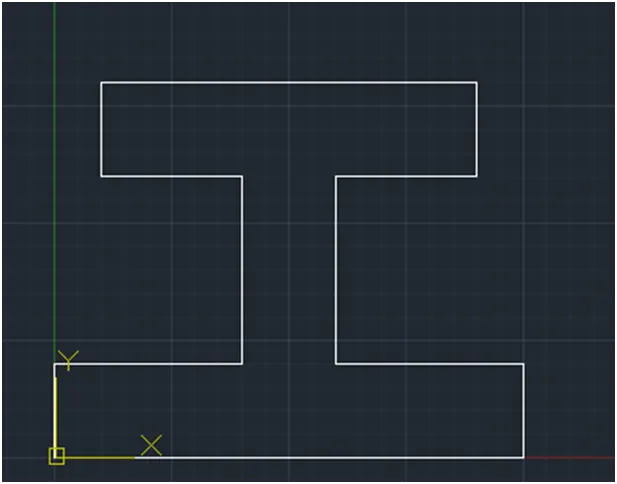
6.
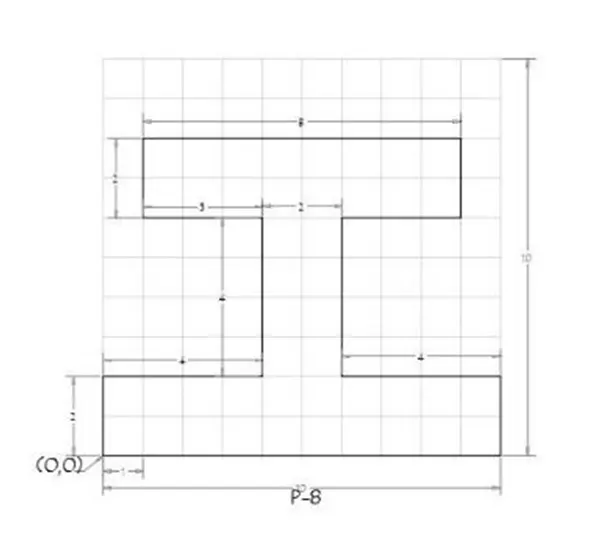
Absolute coordinates
- choose the line tool
- line specify the first point 0,0 start point
- specify the next point 10,0
- specify the next point 10,2
- specify the next point 6,2
- specify the next point 6,6
- specify the next point 9,6
- specify the next point 9,8
- specify the next point 1,8
- specify the next point 1,6
- specify the next point 4,6
- specify the next point 4,2
- specify the next point 0,2
- specify the last point by close command
Relative rectangular coordinates
- choose the line tool
- line specify the first point 0,0 start point
- specify the next point @10,0
- specify the next point @0,2
- specify the next point @-4,0
- specify the next point @0,4
- specify the next point @3,0
- specify the next point @0,2
- specify the next point @-8,0
- specify the next point @0,-2
- specify the next point @3,0
- specify the next point @0,-4
- specify the next point @-4,0
- specify the last point by close command
Relative polar coordinates
- choose the line tool
- line specify the first point 0,0 start point
- specify the next point @10<0
- specify the next point @2<90
- specify the next point @4<180
- specify the next point @4<90
- specify the next point @3<0
- specify the next point @2<90
- specify the next point @8<180
- specify the next point @2<270
- specify the next point @3<0
- specify the next point @4<270
- specify the next point @4<180
- specify the last point by close command
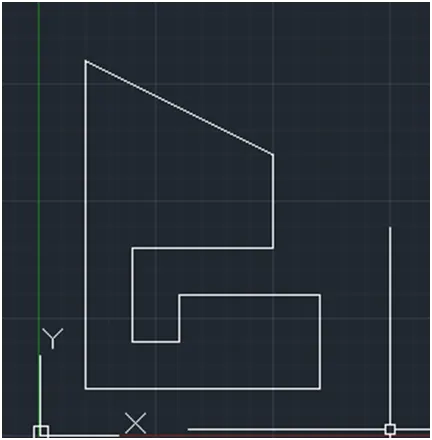
7.
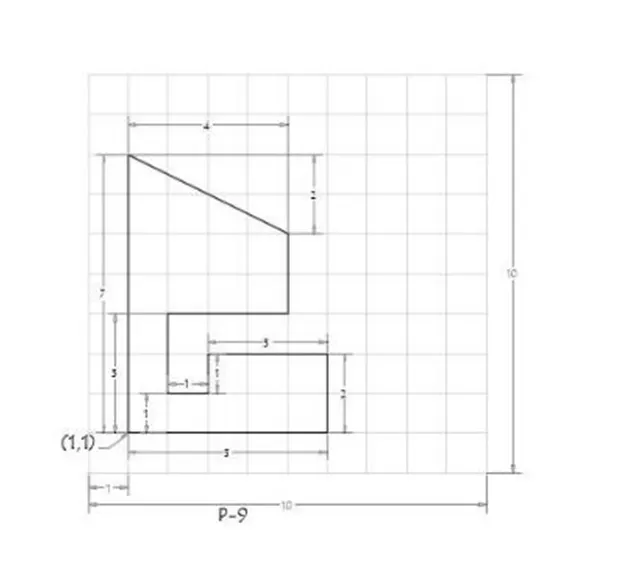
Absolute coordinates
- choose the line tool
- line specify the first point 1,1 start point
- specify the next point 6,1
- specify the next point 6,3
- specify the next point 3,3
- specify the next point 3,2
- specify the next point 2,2
- specify the next point 2,4
- specify the next point 5,4
- specify the next point 5,6
- specify the next point 1,8
- specify the last point by close command
Relative rectangular coordinates
- choose the line tool
- line specify the first point 1,1 start point
- specify the next point @5,0
- specify the next point @0,2
- specify the next point @-3,0
- specify the next point @0,-1
- specify the next point @-1,0
- specify the next point @0,2
- specify the next point @3,0
- specify the next point @0,2
- specify the next point @-4,2
- specify the last point by close command
Relative polar coordinates
- choose the line tool
- line specify the first point 1,1 start point
- specify the next point @5<0
- specify the next point @2<90
- specify the next point @3<180
- specify the next point @1<270
- specify the next point @1<180
- specify the next point @2<90
- specify the next point @3<0
- specify the next point @2<90
- specify the next point @4<116.56
- specify the last point by close command
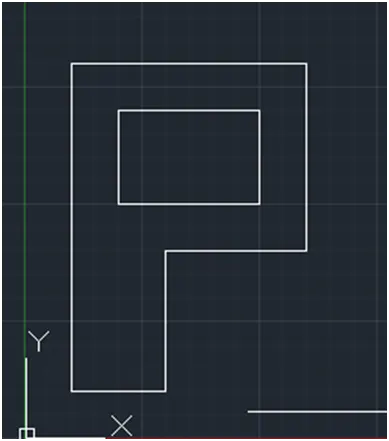
8.
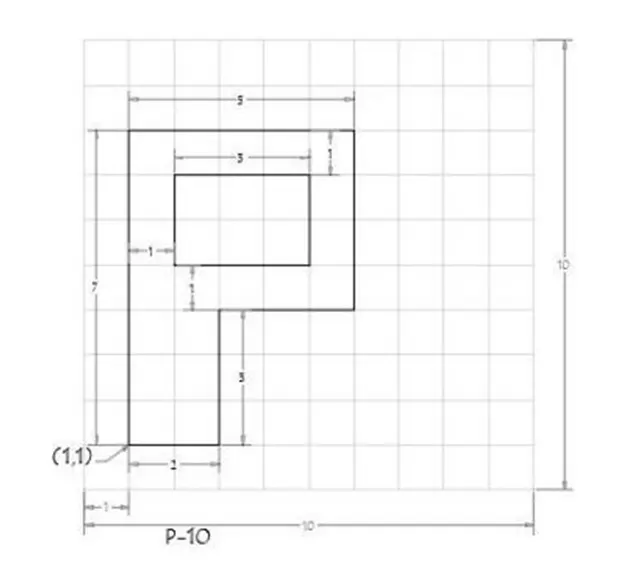
Absolute coordinates
- choose the line tool
- line specify the first point 1,1 start point
- specify the next point 3,1
- specify the next point 3,4
- specify the next point 6,4
- specify the next point 6,8
- specify the next point 1,8
- specify the last point by close command
- choose the line tool
- line specify the first point 2,5 start point
- specify the next point 5,5
- specify the next point 5,7
- specify the next point 2,7
- specify the last point by close command
Relative rectangular coordinates
- choose the line tool
- line specify the first point 1,1 start point
- specify the next point @2,0
- specify the next point @0,3
- specify the next point @3,0
- specify the next point @0,4
- specify the next point @-5,0
- specify the last point by close command
- choose the line tool
- line specify the first point 2,5 start point
- specify the next point @3,0
- specify the next point @0,2
- specify the next point @-3,0
- specify the last point by close command
Relative polar coordinates
- choose the line tool
- line specify the first point 1,1 start point
- specify the next point @2<0
- specify the next point @3<90
- specify the next point @3<0
- specify the next point @4<90
- specify the next point @5< 180
- specify the last point by close command
- choose the line tool
- line specify the first point 2,5 start point
- specify the next point @3<0
- specify the next point @2<90
- specify the next point @3<180
- specify the last point by close command
9.
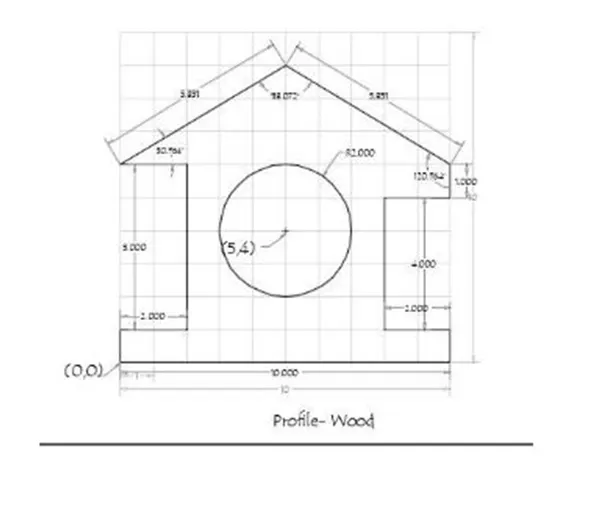
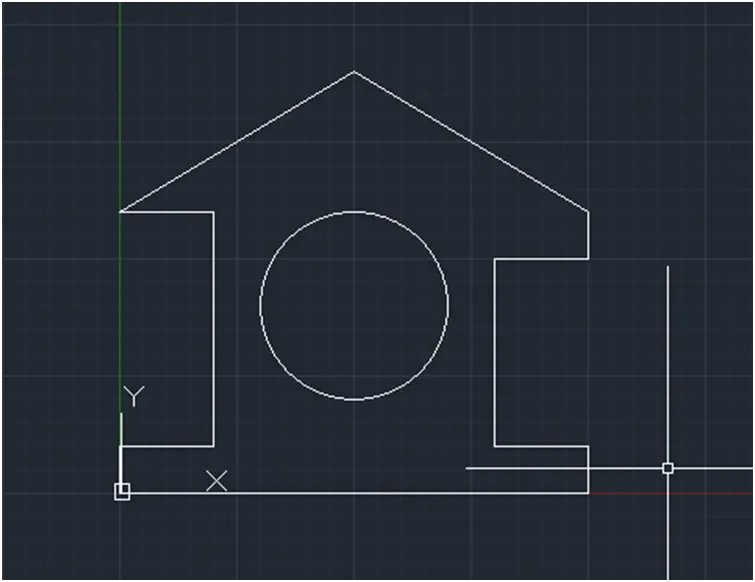
Absolute coordinates
- choose the line tool
- line specify the first point 0,0 start point
- specify the next point 10,0
- specify the next point 10,1
- specify the next point 8,1
- specify the next point 8,5
- specify the next point 10,5
- specify the next point 5,9
- specify the next point 0,6
- specify the next point 2,6
- specify the next point 2,1
- specify the next point 0,1
- specify the last point by close command
- choose the circle tool
- line specify the first point 5,4 start point
- specify the radius 2
10.
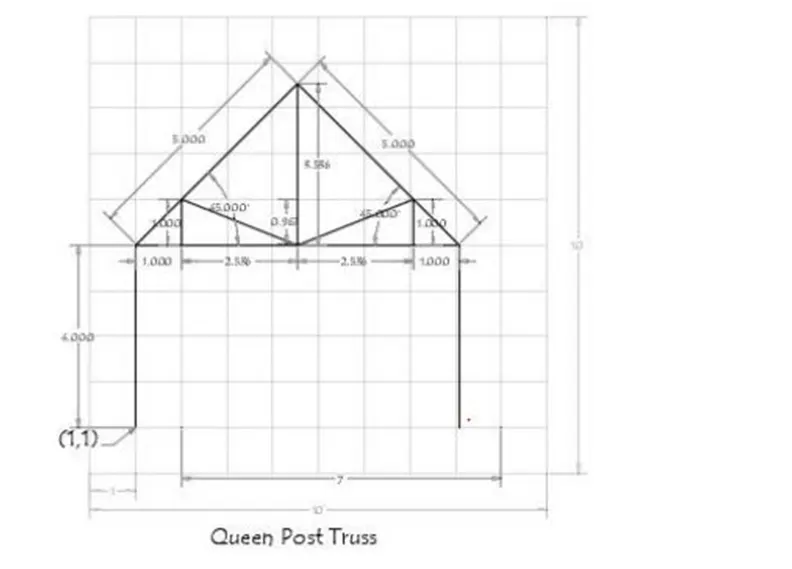
- choose the line tool
- line specify the first point 1,1 start point
- specify the next point @4<90
- specify the next point @5<45
- specify the next point @5<315
- specify the next point @4,270
- click esc
- choose the line tool
- line specify the first point 2,5
- specify the next point 2,6
- specify the next point 4.5,5
- specify the next point 7,6
- specify the next point 7,5
- enter esc tool
- choose the line tool
- line specify the first point 1,5
- specify the next point 8,5
- enter esc tool
- choose the line tool
- By joining the 2 points using cursor to draw the line and press esc
11.
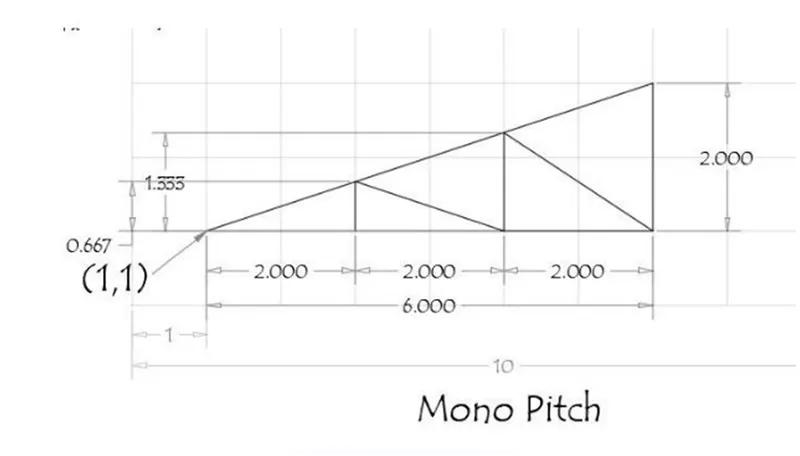
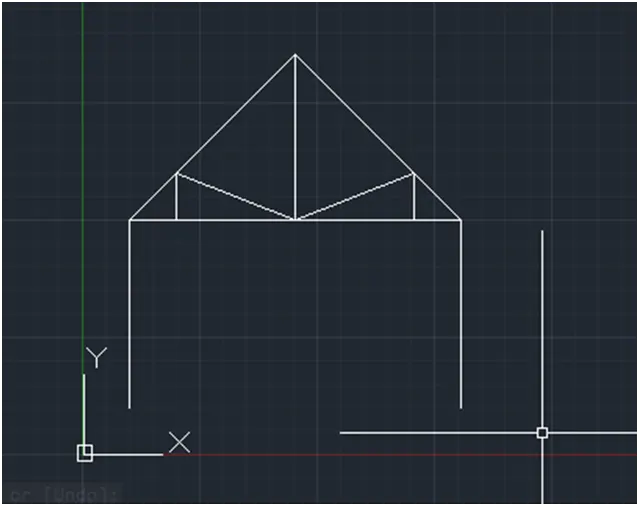
- choose the line tool
- line specify the first point 1,1 start point
- specify the next point @6<0
- specify the next point @2<90
- specify the last point by close command
- choose the line tool
- line specify the first point 3,1 start point
- move the cursor vertically upwards and choose the point where it touches the line
- specify the next point 5,1
- move the cursor vertically upwards and choose the point where it touches the line
- specify the next point 7,1
- press esc key to complete the structure
Result:
The geometries drawn for given drawings as given below
1.
2.
3.
4.
5.
6.
7.
8.
9.
10.
11.