Creation of geometries by Coordinate system methods using AutoCad
AIM
T0 create geometrics using the coordinates systems methods using the line tool
INTRODUCTION
In this we are dealing with three main methods of coordinate system
1.ABSOLUTE COORDINATE SYSTEM
Absolute cordinate system refers to the caresian system that uses x-axis , y-axis and sometimes z-axis to establish a point some distance from acommon origin.When entering the absolute coordinates, just enter the coordinates of points in the command line.while using absolute coordinate , we need to know the exact position of points of the objects .
2.RELATIVE COORDINATE SYSTEM
The distance or angle of axes relative to the last point, need to enter @ before entering coordinate values
3.POLAR COORDINATE SYSTEM
Polar coordinates is to position points by entering distance and angle separated by<.Both absolute coordinates and relative coordinates can be entered , but @ needs to be added when entering relative coordinates such as @ 10<45
4.DIRECT DISTANCE ENTRY METHOD
Used for drawing different shapes/ geometrics in AUTOCAD by simply pointing the cursor in the desired direction and entering the required distance in the command line
PROCEDURE
STARTING AUTOCAD
- Select AutoCAD 2023 from the start menu
- In the command line type in:STARTUP then enter
- Enter the new value of startup:1
- Then from application menu select NEW
- 'Create New Drawing' dialog box will appear and from that select the Imperial System in the 'Start from the Scratch' option
- Next select the 'Decimal' unit system from the Advanced setup option
- set the limits by entering LIMITS in the command tab.lower left corner is specified as 0,0 and upper right corner is specified as 200,200
PROCEDURE FOR DRAFTING P1
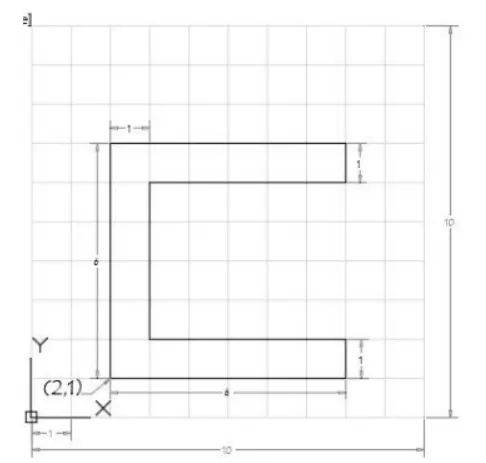
1.USING ABSOLUTE COORDINATE SYSTEM
- Select line tool by entering 'LINE ' or 'L' command in the command tab
- Specify the first point as 2,1 in the command line
- Specify the next point as 2,7 in the command line
- Specify the next point as 8,7 in the command line
- Specify the next point as 8,6in the command line
- Specify the next point as 3,6 in the command line
- Specify the next point as 3,2 in the command line
- Specify the next point as 8,2 in the command line
- Specify the next point as 8,1 in the command line
- Type CLOSE OR C in the command line
- Save
RESULT
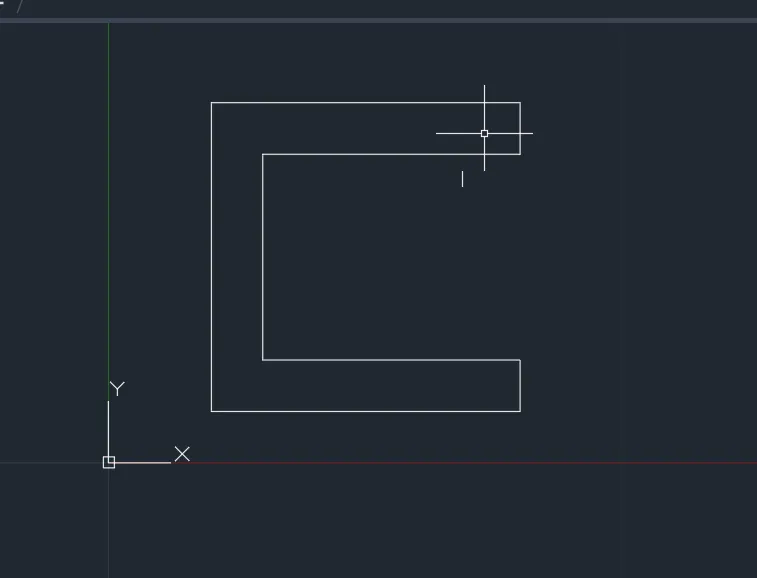
2.USING RELATIVE RECTANGULAR COORDINATE SYSTEM
- Select line tool by entering 'LINE ' or 'L' command in the command tab
- Specify the first point as2,1 in the command line
- Specify the next point as @6,0in the command line
- Specify the next point as @0,1in the command line
- Specify the next point as @-5,0in the command line
- Specify the next point as @0,4 in the command line
- Specify the next point as @5,0 in the command line
- Specify the next point as @0,1 in the command line
- Specify the next point as @-6,0 in the command line
- Type CLOSE OR C in the command line
- Save
RESULT
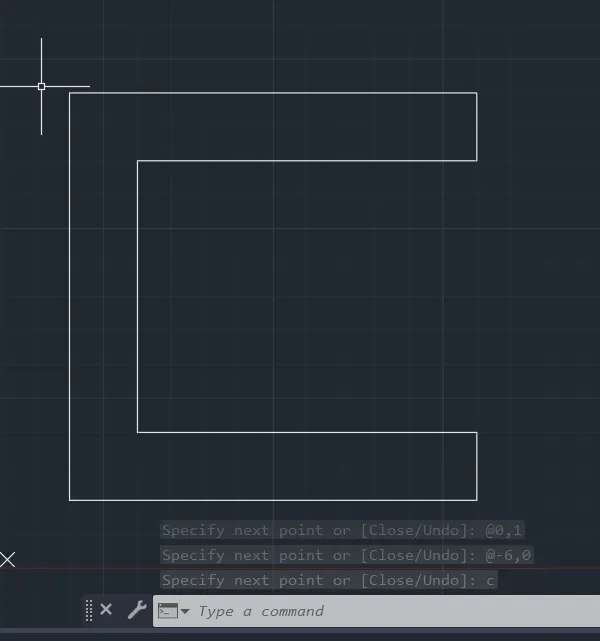
3.USING RELATIVE POLAR COORDINATE SYSTEM
- Select line tool by entering 'LINE ' or 'L' command in the command tab
- Specify the first point as2,1 in the command line
- Specify the next point as @6<0in the command line
- Specify the next point as @1<90in the command line
- Specify the next point as @5<180in the command line
- Specify the next point as @4<90 in the command line
- Specify the next point as @5<0 in the command line
- Specify the next point as @1 <90in the command line
- Specify the next point as @6<180in the command line
- Type CLOSE OR C in the command line
- Save
RESULT
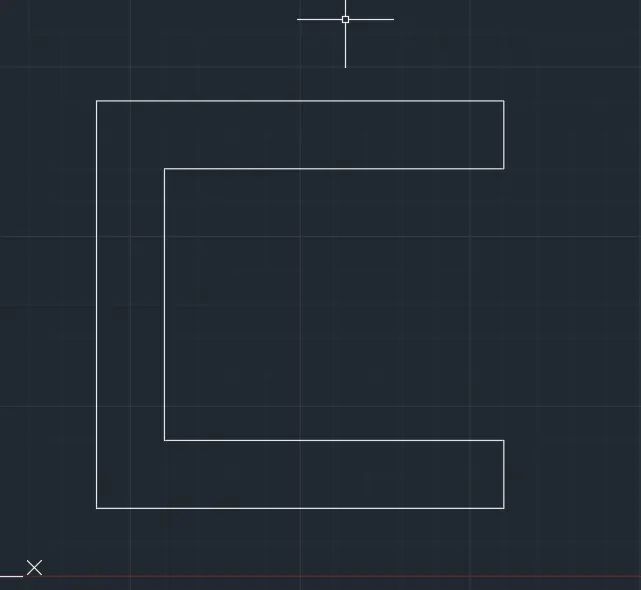
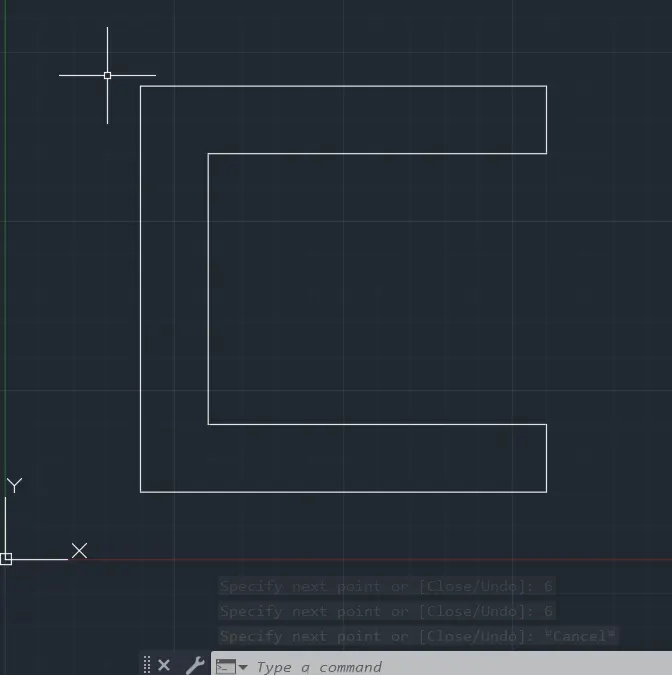
4.USING DIRECT DISTANCE ENTRY METHOD
- Select line tool by entering 'LINE ' or 'L' command in the command tab
- Specify the first point as2,1 in the command line
- Enter the length of point 2 as 6 in the command line towards +ve x-axis
- Enter the length of point 3 as 1 in the command line towards +ve y-axis
- Enter the length of point 4 as 5 in the command line towards -ve x-axis
- Enter the length of point 5 as 4 in the command line towards +ve y-axis
- Enter the length of point 6 as 5in the command line towards +ve x-axis
- Enter the length of point 7 as 1 in the command line towards +ve y-axis
- Enter the length of point 8 as 6 in the command line towards -ve x-axis
- Enter the length of point 9 as 6 in the command line towards -ve y-axis
- press ESCAPE in the command line
- save
RESULT
PROCEDURE FOR DRAFTING P2
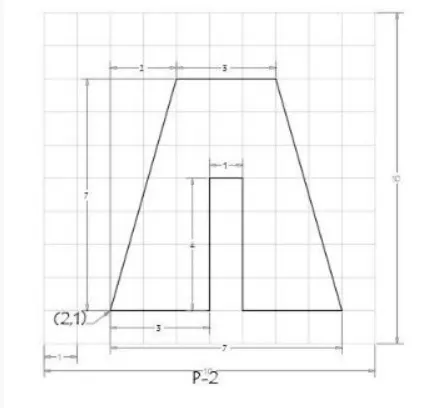
1.USING ABSOLUTE COORDINATE SYSTEM
- Select line tool by entering 'LINE ' or 'L' command in the command tab
- Specify the first point as 2,1in the command line
- Specify the next point as 5,1 in the command line
- Specify the next point as 5,5 in the command line
- Specify the next point as 6,5 in the command line
- Specify the next point as 6,1 in the command line
- Specify the next point as 9,1 in the command line
- Specify the next point as 7,8 in the command line
- Specify the next point as 4,8 in the command line
- Type CLOSE OR C in the command line
- Save
RESULT
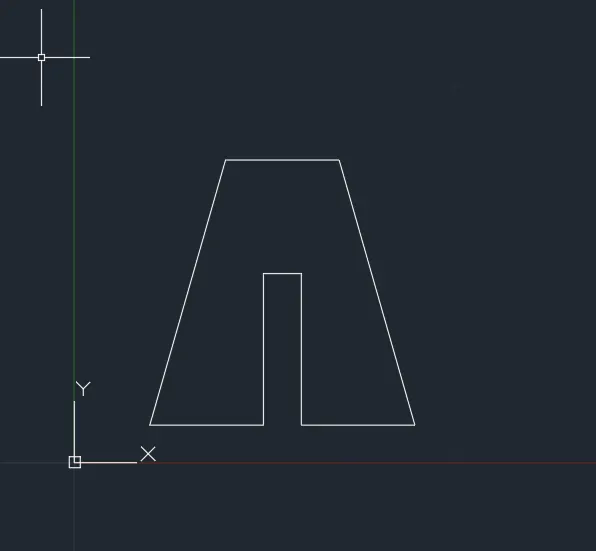
2.USING RELATIVE RECTANGULAR COORDINATE SYSTEM
- Select line tool by entering 'LINE ' or 'L' command in the command tab
- Specify the first point as2,1 in the command line
- Specify the next point as @3,0in the command line
- Specify the next point as @0,4in the command line
- Specify the next point as @1,0in the command line
- Specify the next point as @0,-4 in the command line
- Specify the next point as @3,0 in the command line
- Specify the next point as @-2,7 in the command line
- Specify the next point as @-3,0 in the command line
- Type CLOSE OR C in the command line
- Save
RESULT
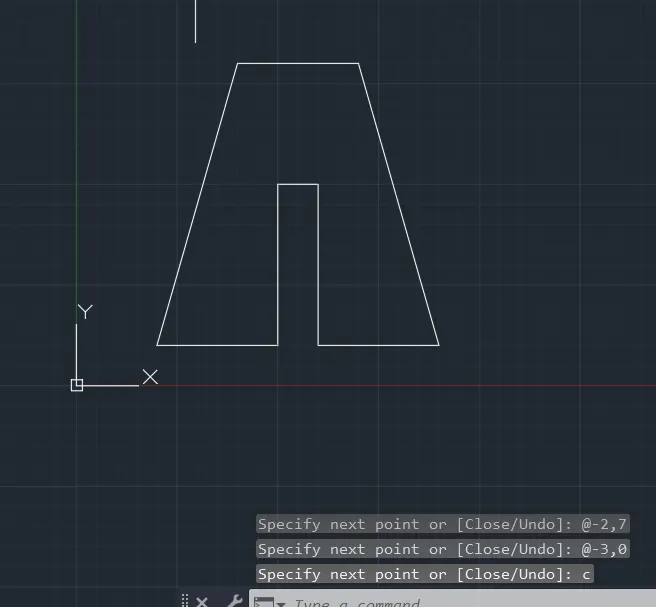
3.USING RELATIVE POLAR COORDINATE SYSTEM
- Select line tool by entering 'LINE ' or 'L' command in the command tab
- Specify the first point as2,1 in the command line
- Specify the next point as @3<0in the command line
- Specify the next point as @4<90in the command line
- Specify the next point as @1<0in the command line
- Specify the next point as @4<270 in the command line
- Specify the next point as @3<0 in the command line
- Specify the next point as @7 <106in the command line
- Specify the next point as @3<180in the command line
- Type CLOSE OR C in the command line
- Save
RESULT
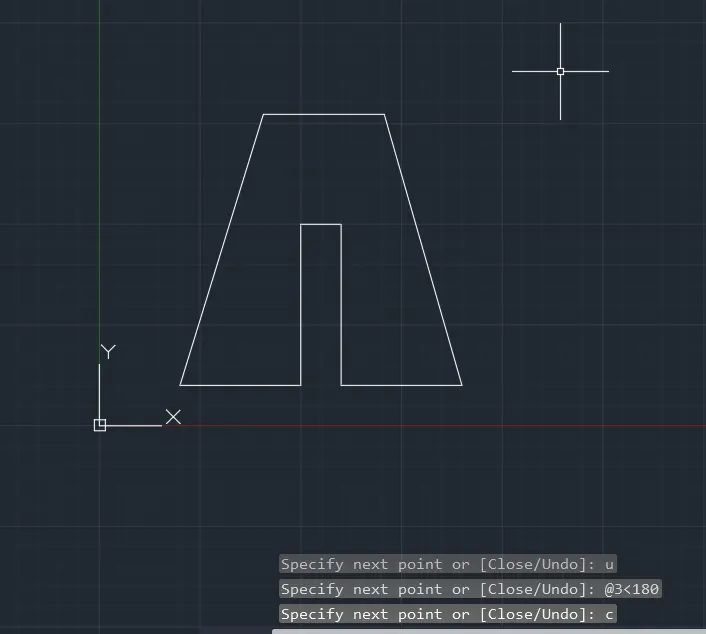
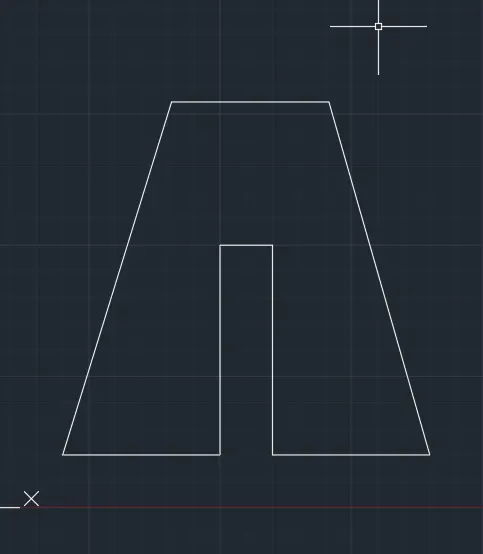
4.USING DIRECT DISTANCE ENTRY METHOD
- Select line tool by entering 'LINE ' or 'L' command in the command tab
- Specify the first point as2,1 in the command line
- Enter the length of point 2 as 3 in the command line towards +ve x-axis
- Enter the length of point 3 as 4 in the command line towards +ve y-axis
- Enter the length of point 4 as 1 in the command line towards +ve x-axis
- Enter the length of point 5 as 4 in the command line towards -ve y-axis
- Enter the length of point 6 as 3in the command line towards +ve x-axis
- Enter the length of point 7 as 7in the command line at an angle of<106 from the +ve x-axisdirection while keeping the polar tracking on
- Enter the length of point 8 as 3 in the command line towards -ve x-axis
- Type CLOSE OR C in the command line
- save
RESULT
PROCEDURE FOR DRAFTING P4
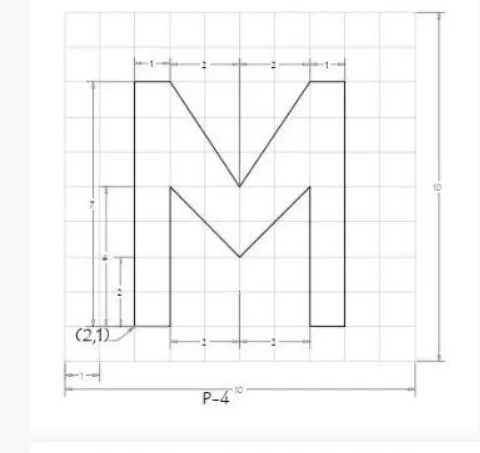
USING ABSOLUTE COORDINATE SYSTEM
- Select line tool by entering 'LINE ' or 'L' command in the command tab
- Specify the first point as 2,1in the command line
- Specify the next point as 3,1 in the command line
- Specify the next point as 3,4 in the command line
- Specify the next point as 5,2 in the command line
- Specify the next point as 7,4 in the command line
- Specify the next point as 7,1 in the command line
- Specify the next point as 8,1in the command line
- Specify the next point as 8,7in the command line
- Specify the next point as 8,7in the command line
- Specify the next point as 7,7in the command line
- Specify the next point as 5,4in the command line
- Specify the next point as 3,7in the command line
- Specify the next point as 2,7in the command line
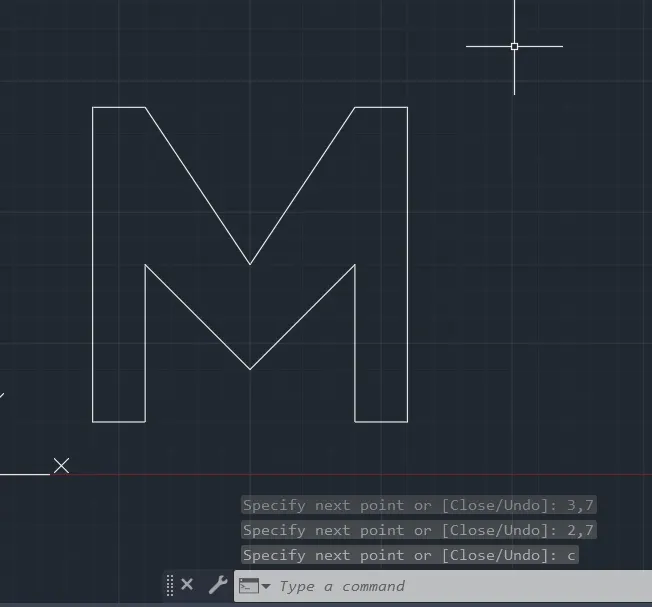
- Type CLOSE OR C in the command line
- Save
RESULT
PROCEDURE FOR DRAFTING P5
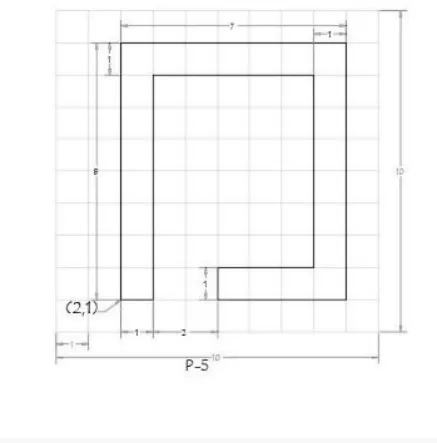
USING RELATIVE RECTANGULAR COORDINATE SYSTEM
- Select line tool by entering 'LINE ' or 'L' command in the command tab
- Specify the first point as2,1 in the command line
- Specify the next point as @1,0in the command line
- Specify the next point as @0,7in the command line
- Specify the next point as @5,0in the command line
- Specify the next point as @0,-6 in the command line
- Specify the next point as @-3,0 in the command line
- Specify the next point as @0,1in the command line
- Specify the next point as @4,0 in the command line
- Specify the next point as @0,8in the command line
- Specify the next point as @-7,0 in the command line
- Type CLOSE OR C in the command line
- Save
RESULT
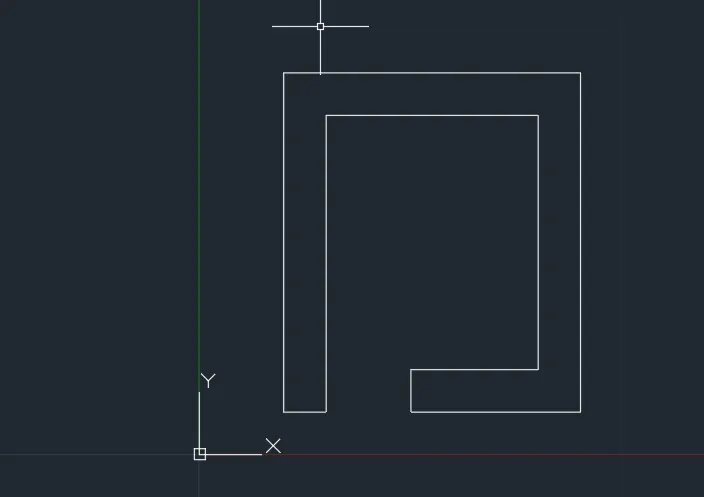
PROCEDURE FOR DRAFTING P5
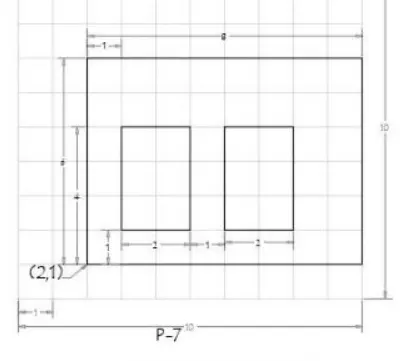
USING RELATIVE RECTANGULAR COORDINATE SYSTEM
- Select line tool by entering 'LINE ' or 'L' command in the command tab
- Specify the first point as2,1 in the command line
- Specify the next point as @8,0in the command line
- Specify the next point as @0,6in the command line
- Specify the next point as @-8,0in the command line
- Specify the next point as @0,-6 in the command line
- press escape
- Select line tool
- Specify the first point as 3,2 in the command line
- Specify the next point as @2,0in the command line
- Specify the next point as @0,3in the command line
- Specify the next point as @-2,0in the command line
- Specify the next point as @0,-3 in the command line
- press escape
- Select line tool
- Specify the first point as 6,2 in the command line
- Specify the next point as @2,0in the command line
- Specify the next point as @0,3in the command line
- Specify the next point as @-2,0in the command line
- Type CLOSE OR C in the command line
- Save
RESULT
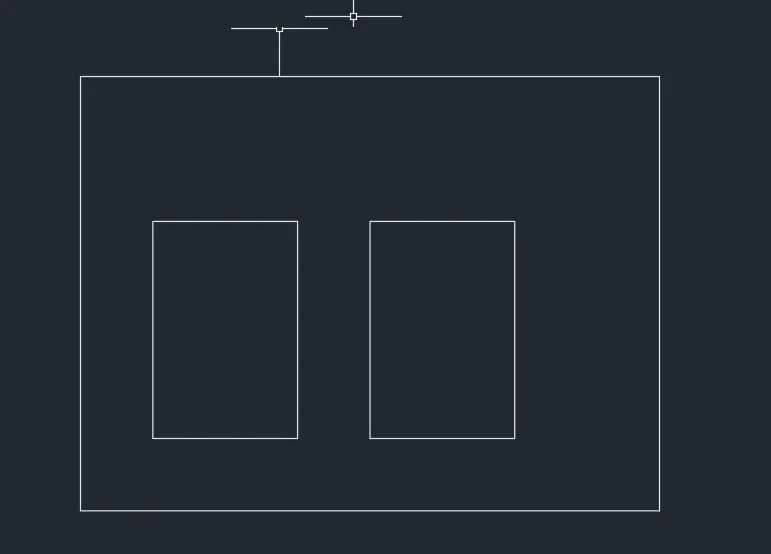
PROCEDURE FOR DRAFTING P8
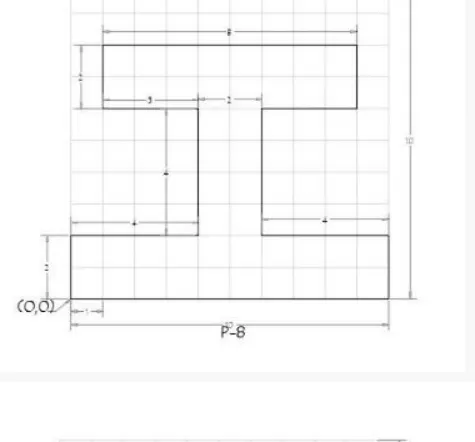
USING RELATIVE RECTANGULAR COORDINATE SYSTEM
- Select line tool by entering 'LINE ' or 'L' command in the command tab
- Specify the first point as0,0 in the command line
- Specify the next point as @10,0in the command line
- Specify the next point as @0,2in the command line
- Specify the next point as @-4,0in the command line
- Specify the next point as @0,4in the command line
- Specify the next point as @3,0 in the command line
- Specify the next point as @0,2in the command line
- Specify the next point as @-8,0 in the command line
- Specify the next point as @0,-2in the command line
- Specify the next point as @3,0 in the command line
- Specify the next point as @0,-4 in the command line
- Specify the next point as @-4,0 in the command line
- Type CLOSE OR C in the command line
- Save
RESULT
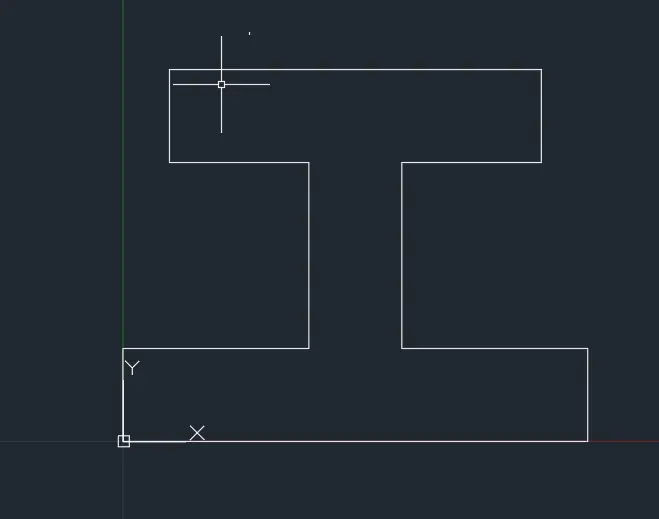
PROCEDURE FOR DRAFTING P9
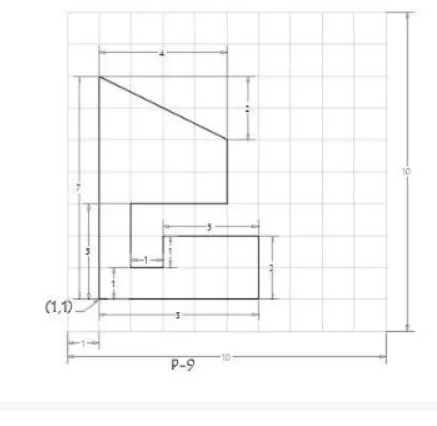
USING ABSOLUTE COORDINATE SYSTEM
- Select line tool by entering 'LINE ' or 'L' command in the command tab
- Specify the first point as 1,1in the command line
- Specify the next point as 6,1 in the command line
- Specify the next point as 6,2 in the command line
- Specify the next point as 3,3 in the command line
- Specify the next point as 3,2 in the command line
- Specify the next point as 2,2 in the command line
- Specify the next point as 2,4in the command line
- Specify the next point as 5,4in the command line
- Specify the next point as 5,6in the command line
- Specify the next point as 1,7in the command line
- Type CLOSE OR C in the command line
- Save
RESULT
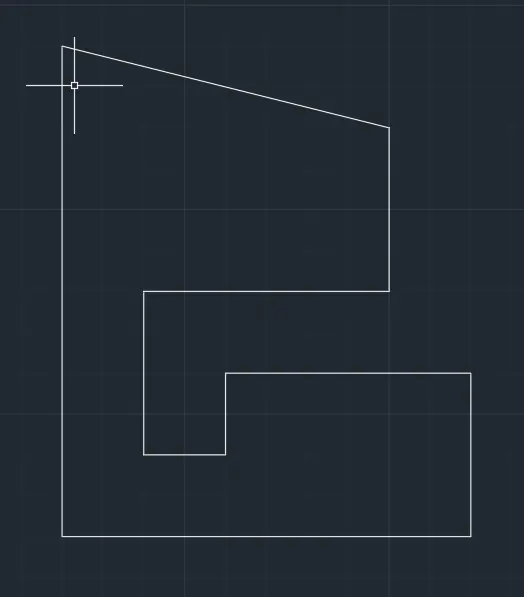
PROCEDURE FOR DRAFTING P10
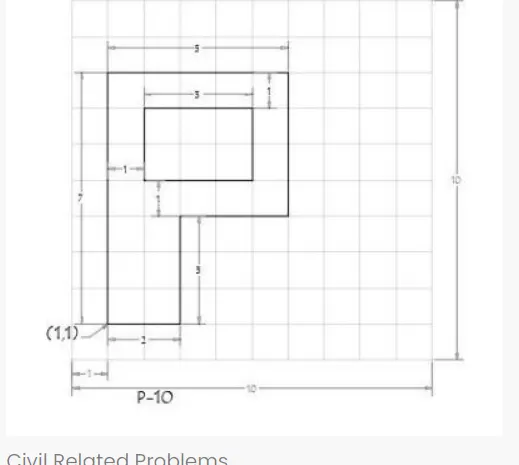
USING RELATIVE RECTANGULAR COORDINATE SYSTEM
- Select line tool by entering 'LINE ' or 'L' command in the command tab
- Specify the first point as1,1 in the command line
- Specify the next point as @2,0in the command line
- Specify the next point as @0,3in the command line
- Specify the next point as @3,0in the command line
- Specify the next point as @0,4in the command line
- Specify the next point as @-5,0in the command line
- Specify the next point as @0,-7in the command line
- Press escape
- Select line tool
- Specify the first point as 2,5 in the command line
- Specify the next point as @3,0in the command line
- Specify the next point as @0,2in the command line
- Specify the next point as @-3,0in the command line
- Type CLOSE OR C in the command line
- save
RESULT
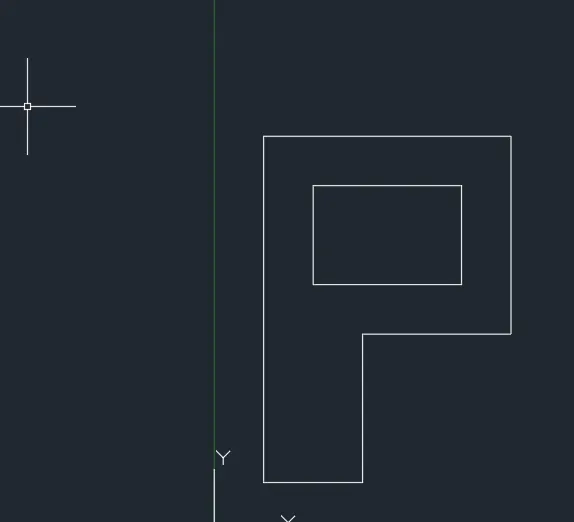
Civil Related Problems
1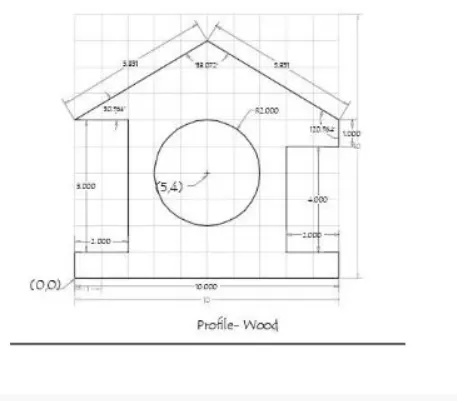
USING DIRECT DISTANCE ENTRY METHOD
- Select line tool by entering 'LINE ' or 'L' command in the command tab
- Specify the first point as 10,6in the command line
- Enter the length of point 2 as 1in the command line towards -ve y-axis
- Enter the length of point 3 as 2 in the command line towards -ve x-axis
- Enter the length of point 4 as 4 in the command line towards -ve y-axis
- Enter the length of point 5 as 2in the command line towards +ve x-axis
- Enter the length of point 6 as 1in the command line towards -ve y-axis
- Enter the length of point 7 as 10in the command line towards -ve x-axis
- Enter the length of point 8 as 1 in the command line towards +ve y-axis
- Enter the length of point 9 as 2in the command line towards +ve x-axis
- Enter the length of point 10 as 5in the command line towards +ve y-axis
- Enter the length of point 11 as 2 in the command line towards -ve x-axis
- Enter the length of point 12 as 5.83l in the command line at an angle of <30.964 by keeping the polar tracking on
- Type CLOSE OR C in the command line
- Select the circle tool by entering CIRCLE command in the command tab
- Specify the centre point of the circle as 5,4
- Specify the radius of the circle as 2
- save
RESULT
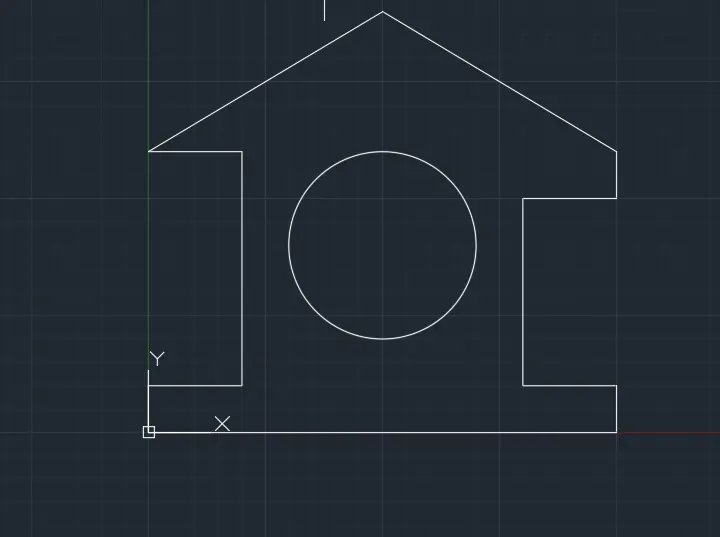
2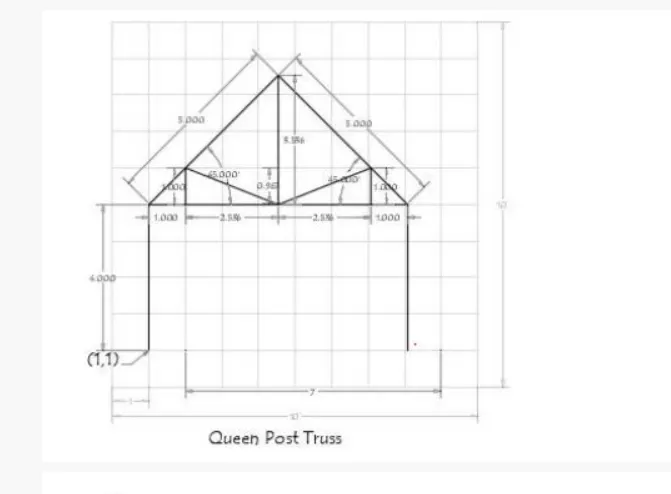
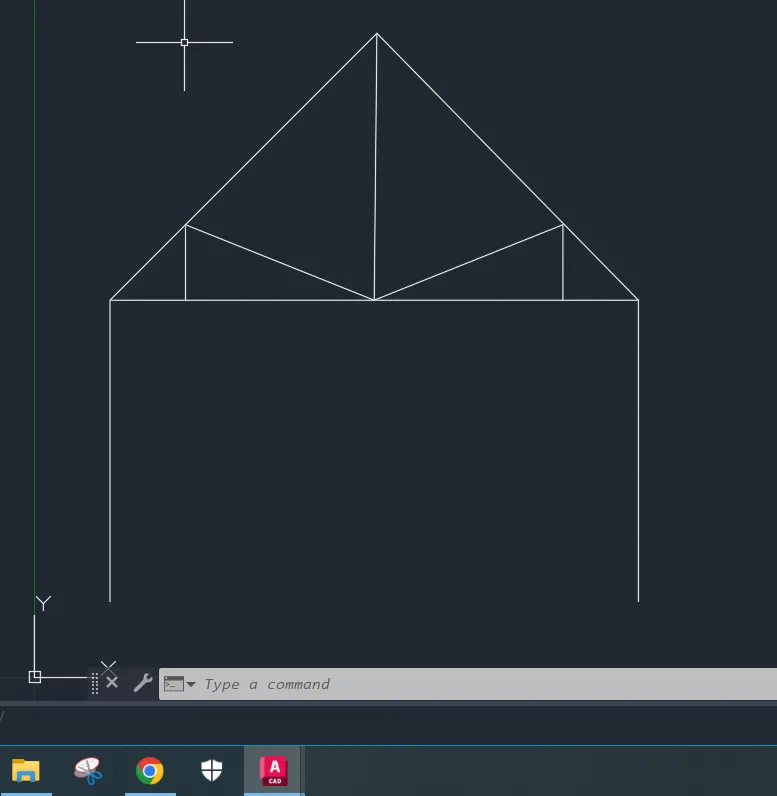
STEPS FOR CREATING QUEEN POST TRUSS USING RELATIVE RECTANGULAR COORDINATE SYSTEM
- Select line tool by entering 'LINE ' or 'L' command in the command tab
- Specify the first point as1,1 in the command line
- Specify the next point1 as @0,4in the command line
- Specify the next point2 as @1,0in the command line
- Specify the next point 3as @0,1in the command line
- Specify the next point4 as @2.536,-0.967in the command line
- Specify the next point 5as @2.536,0.967in the command line
- Specify the next point 6 as @0,-1in the command line
- Specify the next point 7 as @1,0in the command line
- Specify the next point 8 as @0,-4in the command line
- Press escape
- Select the line tool again by entering 'LINE ' or 'L' command in the command tab
- join point 2to 4 and 4to 6
- press escape
- Select line tool again by entering 'LINE ' or 'L' command in the command tab
- Specify the next point 9 as 1,5 in the command line
- Specify the next point10 as @3.536.3.536in the command line
- Specify the next point11 as @3.536,-3.536in the command line
- Press escape
- Select the line tool again by entering 'LINE ' or 'L' command in the command tab
- join point and 4
- press escape
- save
RESULT
3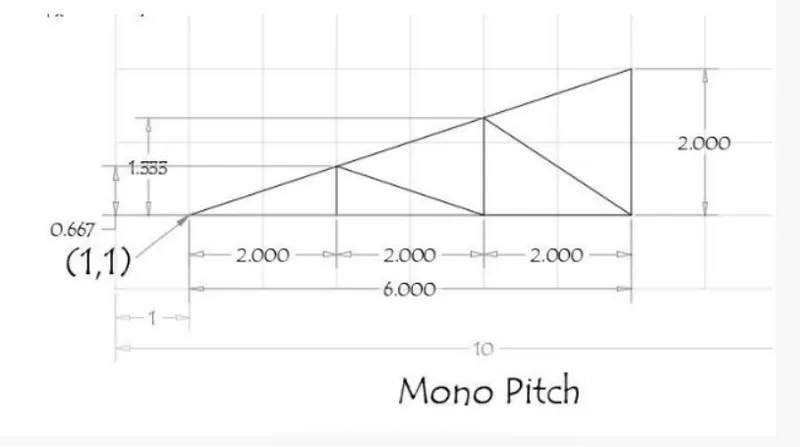
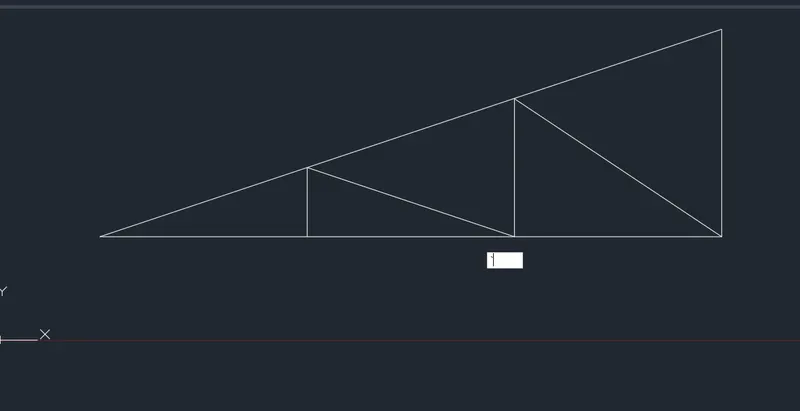
STEPS FOR MONO PITCH USING ABSOLUTE COORDINATE SYSTEM
- Select line tool by entering 'LINE ' or 'L' command in the command tab
- Specify the first point as 1,1in the command line
- Specify the next point as 7,1 in the command line
- Specify the next point as 7,3 in the command line
- Type CLOSE OR C in the command line
- Select line tool by entering 'LINE ' or 'L' command in the command tab
- Specify the next point as 3,1 in the command line
- Specify the next point as 3,1.667 in the command line
- Specify the next point as 5,1 in the command line
- Specify the next point as 5,2.333in the command line
- Specify the next point as 7,1in the command line
- Press ESCAPE to cancel the line command
- save
RESULT
RESULT
Learned to draw different geometrics using different coordinate systems