Creation of geometries by Coordinate system methods using AutoCad
Using imperial templates and decimal units to create geometries from co-ordinate systems.
After opening Auto-cad, type startup. Type 1 for creating a new template file we can then go to file on top left in order to open a new file. After all initial settings are completed, we can now start the project.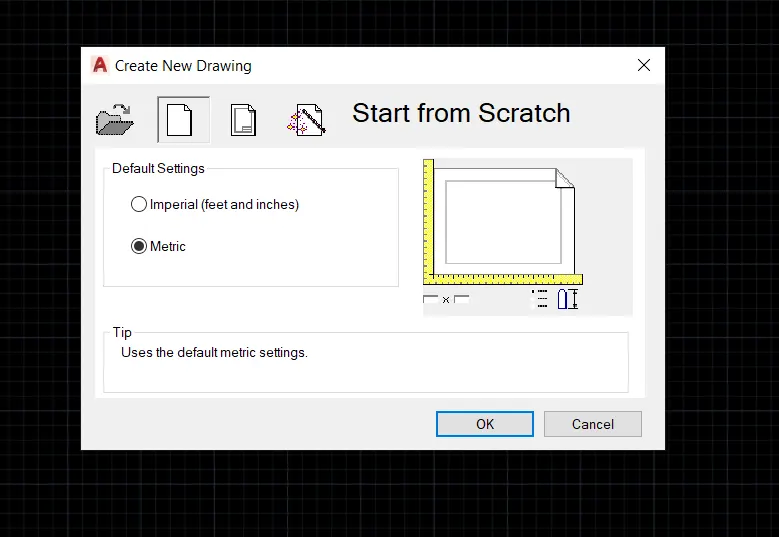
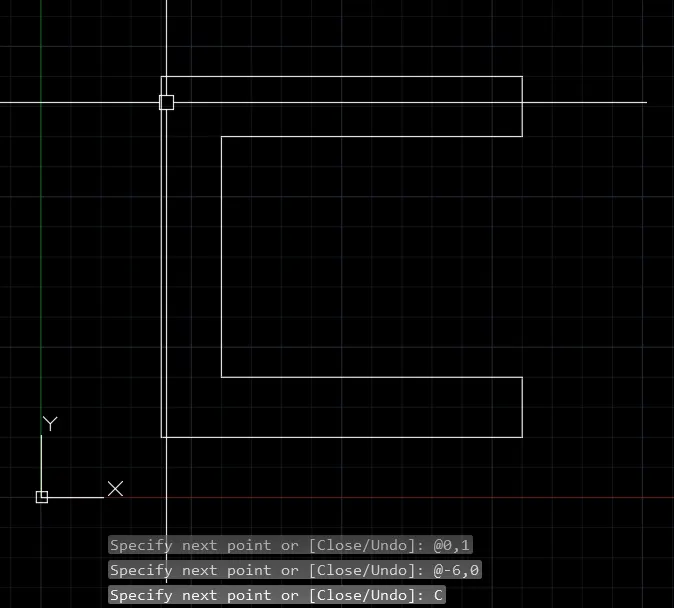
Solution P-1,
A question on relative coordinate system.
Choose the line tool
Line specify first point: 2,1(start point)
Specify next point or [Undo]: @6,0(second point DX=6, DY=0)
Specify next point : @0,1(third point DX=0, DY=1)
Specify next point : @-5,0(fourth point DX=-5, DY=0)
Specify next point : @0,4(fifth point DX=0, DY=4)
Specify next point : @5,0(fifth point DX=5, DY=0)
Specify next point : @-6,0(6th point DX=-6, DY=0)
C and space bar for close.
Solution P2,
Choose the line tool
Line specify first point: 2,1(start point)
Specify next point or [Undo]: @3,0(second point DX=3, DY=0)
Specify next point : @0,4(third point DX=0, DY=4)
Specify next point : @1,0(fourth point DX=1, DY=0)
Specify next point : @-4,0(fifth point DX=-4, DY=0)
Specify next point : @7,0(fifth point DX=7, DY=0)
Specify next point : @-2,7(6th point DX=-2, DY=7)
Specify next point : @-3,0(7th point DX=-3, DY=0)
C and space bar for close.
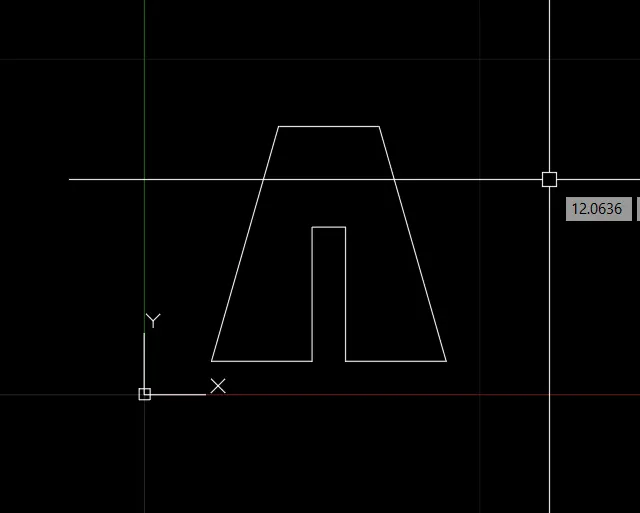
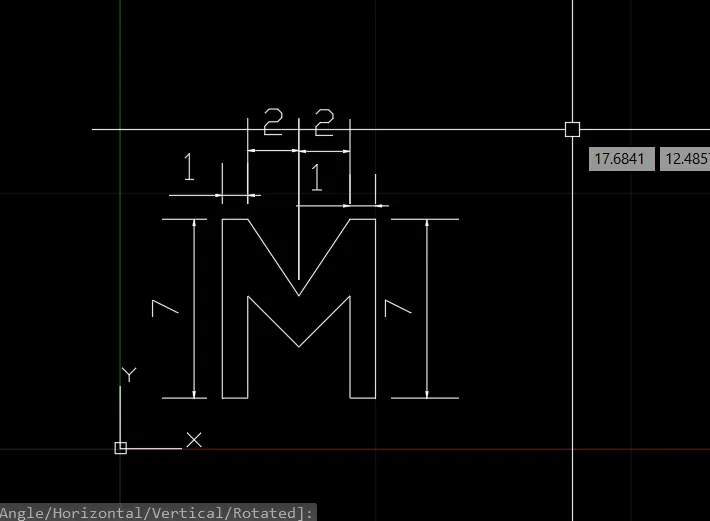
Solution P4,
For relative coordinate systems.
Line specify first point: 2,1(start point)
Specify next point or [Undo]: @1,0(second point DX=1, DY=0)
Specify next point : @0,4(third point DX=0, DY=4)
Specify next point : @2,-2(fourth point DX=2, DY=-2)
Specify next point : @2,2(fifth point DX=2, DY=2)
Specify next point : @0,-4(fifth point DX=0, DY=-4)
Specify next point : @1,0(6th point DX=1, DY=0)
Specify next point : @0,7(7th point DX=0, DY=7)
Specify next point : @-1,0(8th point DX=-1, DY=0)
Specify next point : @-2,-3(9th point DX=-2, DY=-3)
Specify next point : @-2,3(10th point DX=-2, DY=3)
Specify next point : @-1,0(11th point DX=-2, DY=3)
C and space bar for close.
Solution P5,
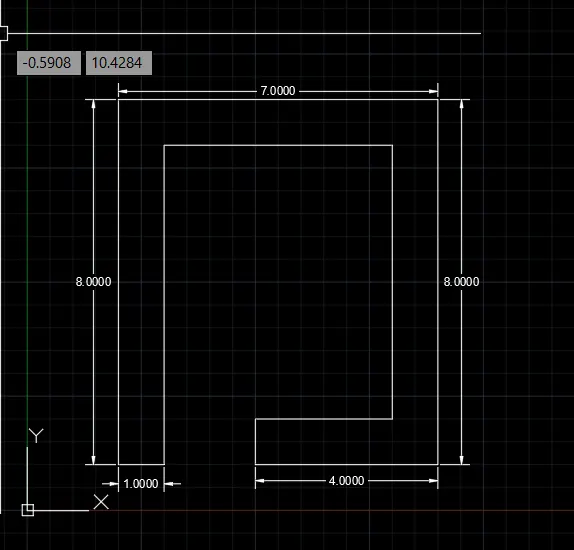
For relative coordinate systems.
Line specify first point: 2,1(start point)
Specify next point or [Undo]: @1,0(second point DX=1, DY=0)
Specify next point : @0,7(third point DX=0, DY=7)
Specify next point : @5,0(fourth point DX=5, DY=0)
Specify next point : @0,-6(fifth point DX=0, DY=-6)
Specify next point : @-3,0(fifth point DX=-3, DY=0)
Specify next point : @0,-1(6th point DX=0, DY=-1)
Specify next point : @4,0(7th point DX=4, DY=0)
Specify next point : @0,8(8th point DX=0, DY=8)
Specify next point : @-7,0(9th point DX=-7, DY=0)
C and space bar for close.
Solution P7,
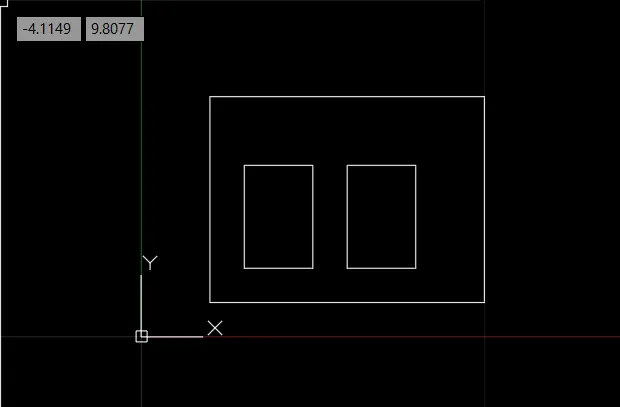
For relative coordinate systems.
Line specify first point: 2,1(start point)
Specify next point or [Undo]: @8,0(second point DX=8, DY=0)
Specify next point : @0,6(third point DX=0, DY=6)
Specify next point : @-8,0(fourth point DX=-8, DY=0)
Specify next point : @0,-6(fifth point DX=0, DY=-6)
Press Enter
Specify next point : @1,1(fifth point DX=1, DY=1)
Specify next point : @2,0(6th point DX=2, DY=0)
Specify next point : @0,3(7th point DX=0, DY=3)
Specify next point : @-2,0(8th point DX=-2, DY=0)
Specify next point : @0,-3(9th point DX=0, DY=-3)
Press Enter
Specify next point : @3,0(10th point DX=3, DY=0)
Specify next point : @2,0(11th point DX=2, DY=0)
Specify next point : @0,3(12th point DX=0, DY=3)
Specify next point : @-2,0(13th point DX=-2, DY=0)
Specify next point : @0,-3(14th point DX=0, DY=-3)
Press Enter.
Solution P8,
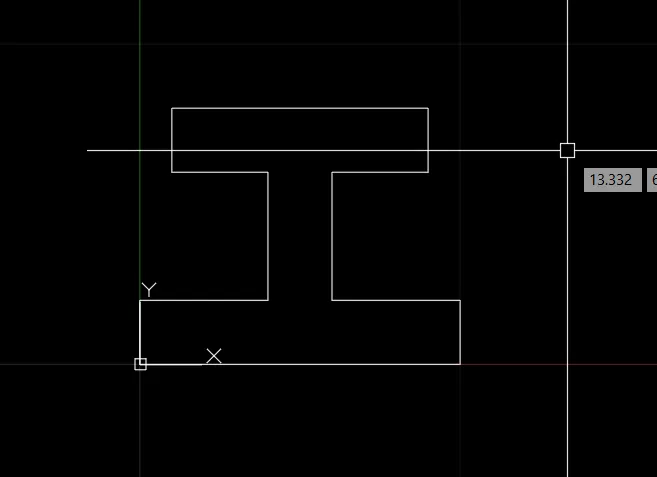
For Absolute coordinate systems.
Type "DS" in command line. Under dynamic input and under enable pointer input check absolute coordinate system.
Line specify first point: 0,0(start point)
Specify next point or [Undo]: 10,0
Specify next point : 10,2
Specify next point : 6,2
Specify next point : 6,6
Specify next point : 9,6
Specify next point : 9,8
Specify next point : 1,8
Specify next point : 1,6
Specify next point : 4,2
Specify next point : 0,2
C and space bar for close.
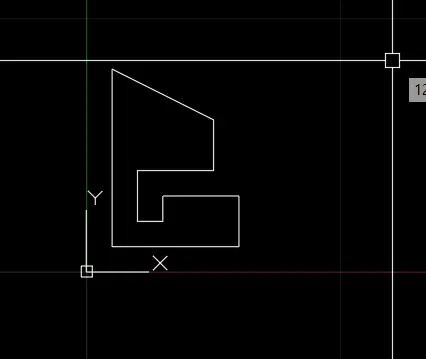
Solution P-9,
For relative coordinate systems.
Line specify first point: (1,1)(start point)
Specify next point or [Undo]: @5,0(second point DX=5, DY=0)
Specify next point : @0,2(third point DX=0, DY=2)
Specify next point : @-3,0(fourth point DX=-3, DY=0)
Specify next point : @0,-1(fifth point DX=0, DY=-1)
Specify next point : @-1,0(6th point DX=-1, DY=0)
Specify next point : @0,2(7th point DX=0, DY=2)
Specify next point : @3,0(8th point DX=3, DY=0)
Specify next point : @0,2(9th point DX=0, DY=2)
after that (-4,2) and (0,-7)
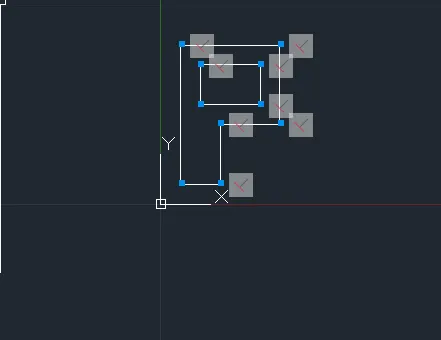
Solution P10,
Line specify first point: (1,1)(start point)
Specify next point or [Undo]: @2,0(second point DX=2, DY=0)
Specify next point : @0,3(third point DX=0, DY=3)
Specify next point : @3,0(fourth point DX=-3, DY=0)
Specify next point : @0,4(fifth point DX=0, DY=4)
Specify next point : @-5,0(6th point DX=-5, DY=0)
Specify next point : @0,-7(7th point DX=0, DY=-7)
Specify next point : @1,4(8th point DX=1, DY=4)
Specify next point : @3,0(9th point DX=3, DY=0)
Specify next point : @0,2(9th point DX=0, DY=2)
Specify next point : @-3,0(9th point DX=-3, DY=0)
Specify next point : @0,-2(9th point DX=0, DY=-2)
CLOSE
Solution,
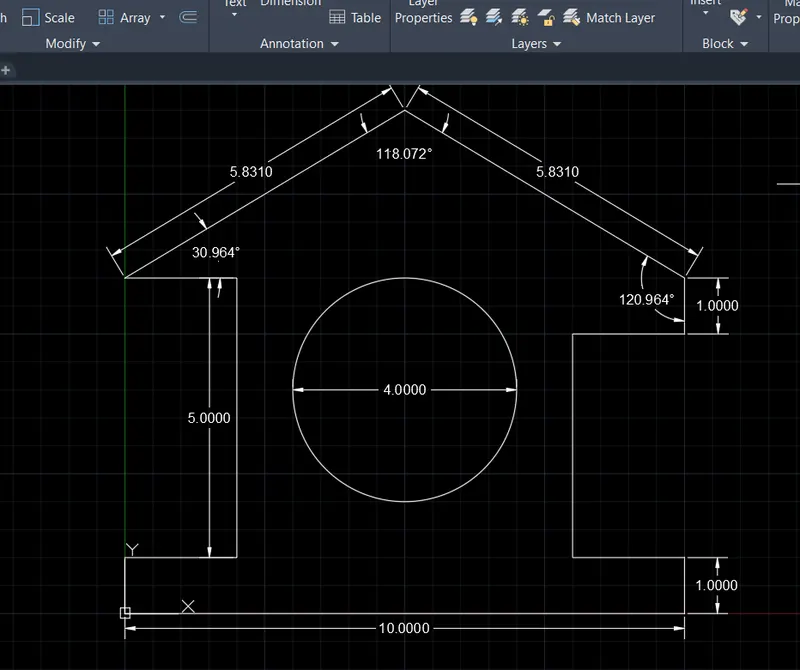
"Profile wood"
Solution P8,
For Absolute coordinate systems.
Type "DS" in command line. Under dynamic input and under enable pointer input check absolute coordinate system.
Line specify first point: 0,0(start point)
Specify next point or [Undo]: 0,1
Specify next point : 2,1
Specify next point : 2,6
Specify next point : 0,6
Specify next point : 5,9
Specify next point : 10,6
Specify next point : 10,5
Specify next point : 8,5
Specify next point : 8,1
Specify next point : 10,1
followed by (10,0) and (0,0) then close.
Now choose circle from ribbon with radius. And enter (5,4) followed by giving value of 2 for circle with radius 2.
Solution,
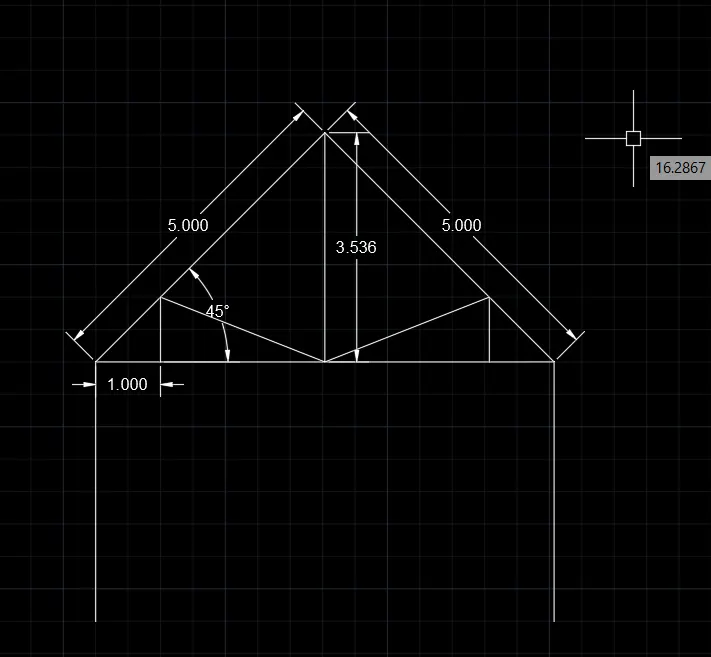
Queen post truss,
By relative coordinate systems.
"L" space bars followed by following commands, @(1,1),@(0,4),@(5<45),@(3.536<270),(@3.536<180) (close). (@1,0), (0,1), (2,-1). Take the mirror command afterwards.
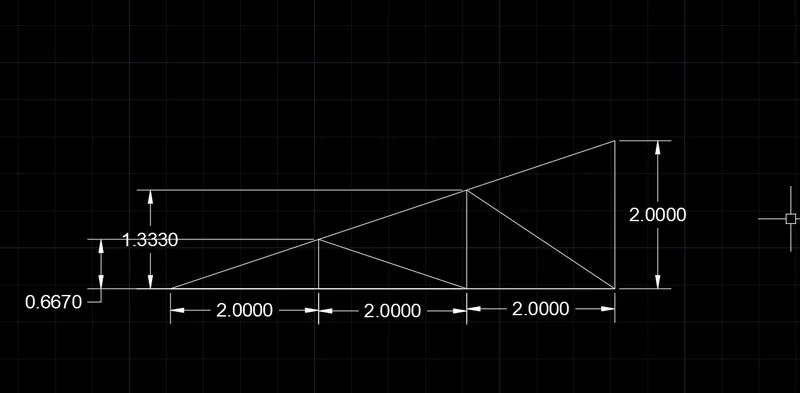
Solution of Mono pitch,
Following commands.
(@1,1)(@6,0)(@0,2)(@-6,-2) followed by close(@2,0)(@0,0.667)(@2,-0.667)(@0,1.333)(@2,-1.33) then close