Creation of geometries by Coordinate system methods using AutoCad
AIM: Create the geometries from P1 to P2 using all the coordinates system methods. You need to use the Line tool to create the geometry.
About:
- There are two coordinate systems in AutoCAD. World Coordinate System (WCS) and User Coordinate System (UCS) define the angle of the XY plane you are working in.
- The WCS should always be used to reference geometry to ensure everything aligns to the center of a file in a real-world location.
- The UCS can be used to orientate the screen to a site. Drawing files will usually have the WCS set by default.
- The current WCS or UCS orientation is indicated by the UCS icon in the bottom left corner of the screen.
- The following questions are done using the coordinate system methods in AutoCAD.
QUESTION 1:
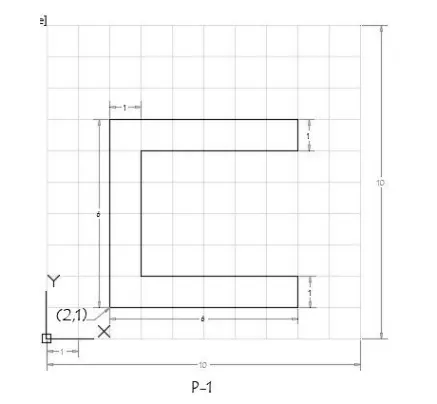
Procedure:
- Type line in the command.
- Command: LINE
- Specify first point: 2,1
- Specify next point or [Undo]: @6<0
- Specify next point or [Undo]:
>>Enter new value for ORTHOMODE <1>: - Resuming LINE command.
- Specify next point or [Undo]: @1<90
- Specify next point or [Close/Undo]: _u
- Specify next point or [Undo]: 1
- Specify next point or [Close/Undo]: 5
- Specify next point or [Close/Undo]: 4
- Specify next point or [Close/Undo]: 5
- Specify next point or [Close/Undo]: 1
- Specify next point or [Close/Undo]: 6
- Specify next point or [Close/Undo]: C
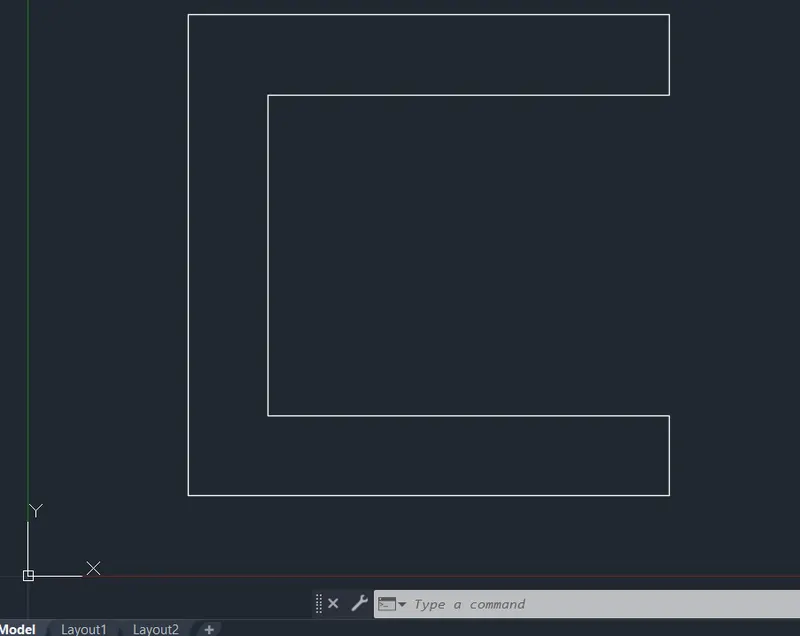
Result:-
QUESTION 2:
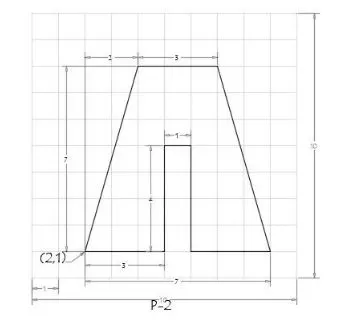
Procedure:-
- LINE GROUP
- Command: _u ERASE
- Command: _u INTELLIPAN INTELLIZOOM
- Command: *Cancel*
- Command: Specify opposite corner or [Fence/WPolygon/CPolygon]:
- Command: _.erase 8 found
- Command: LINE
- Specify first point: 2,1
- Specify next point or [Undo]: 3
- Specify next point or [Undo]: 4
- Specify next point or [Close/Undo]: 1
- Specify next point or [Close/Undo]: 4
- Specify next point or [Close/Undo]: 3
- Specify next point or [Close/Undo]: 7,8
- Specify next point or [Close/Undo]: 3
- Specify next point or [Close/Undo]: C
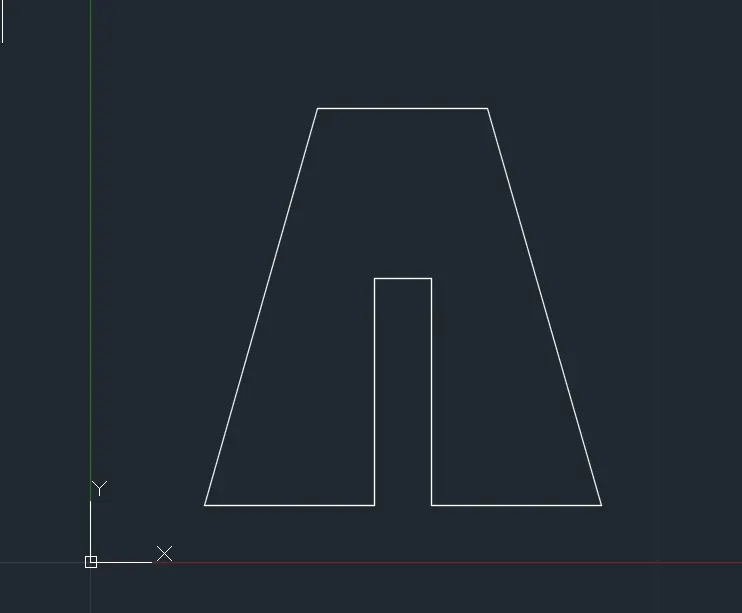
QUESTION 3:
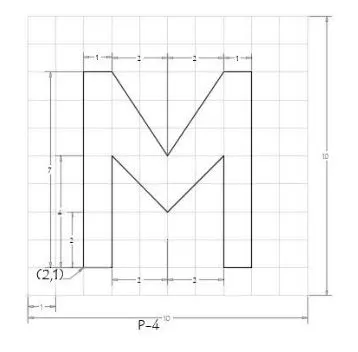
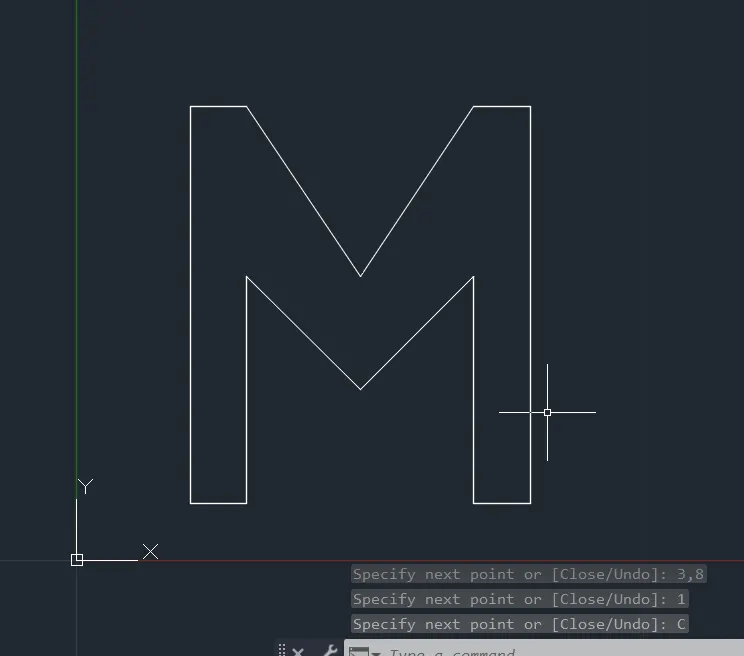
Procedure:
- Command: LINE
- Specify first point: 2,1
- Specify next point or [Undo]: 1
- Specify next point or [Undo]: 4
- Specify next point or [Close/Undo]: 5,3
- Specify next point or [Close/Undo]: 7,5
- Specify next point or [Close/Undo]: 4
- Specify next point or [Close/Undo]: 1
- Specify next point or [Close/Undo]: 7
- Specify next point or [Close/Undo]: 1
- Specify next point or [Close/Undo]: 5,5
- Specify next point or [Close/Undo]: 3,8
- Specify next point or [Close/Undo]: 1
- Specify next point or [Close/Undo]: C
QUESTION 4:
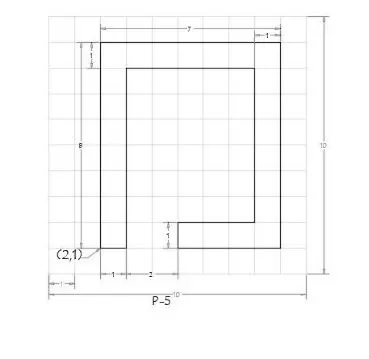
Procedure:
- Command: LINE
- Specify first point: 2,1
- Specify next point or [Undo]: 1
- Specify next point or [Undo]: 7
- Specify next point or [Close/Undo]: 5
- Specify next point or [Close/Undo]: 6
- Specify next point or [Close/Undo]: 3
- Specify next point or [Close/Undo]: 1
- Specify next point or [Close/Undo]: 4
- Specify next point or [Close/Undo]: 8
- Specify next point or [Close/Undo]: 7
- Specify next point or [Close/Undo]: C
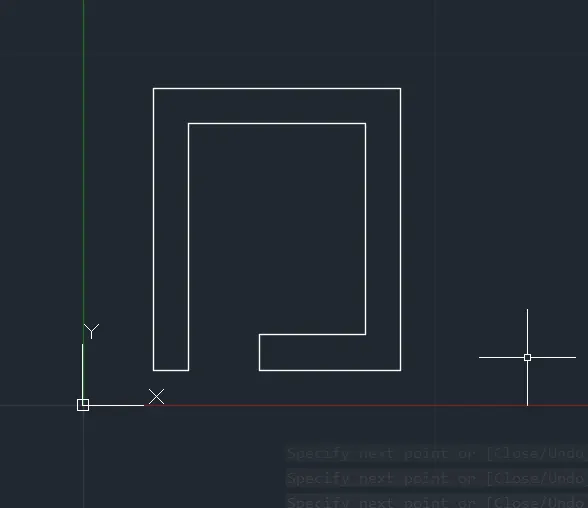
QUESTION 5:
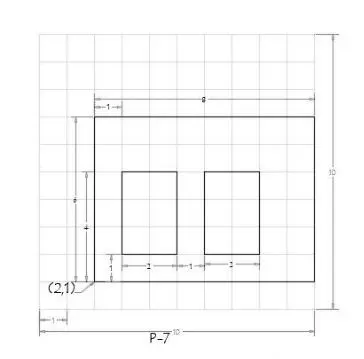
Procedure:
- Command: LINE
- Specify first point: 2,1
- Specify next point or [Undo]: 6
- Specify next point or [Undo]: 8
- Specify next point or [Close/Undo]: 6
- Specify next point or [Close/Undo]: C
- Command: LINE
- Specify first point: 3,2
- Specify next point or [Undo]: 3
- Specify next point or [Undo]: 2
- Specify next point or [Close/Undo]: 3
- Specify next point or [Close/Undo]: 2
- Specify next point or [Close/Undo]: *Cancel*
- Command:LINE
- Specify first point: 7,2
- Specify next point or [Undo]: *Cancel*
- Command:LINE
- Specify first point: 6,2
- Specify next point or [Undo]: 3
- Specify next point or [Undo]: 2
- Specify next point or [Close/Undo]: 3
- Specify next point or [Close/Undo]: C
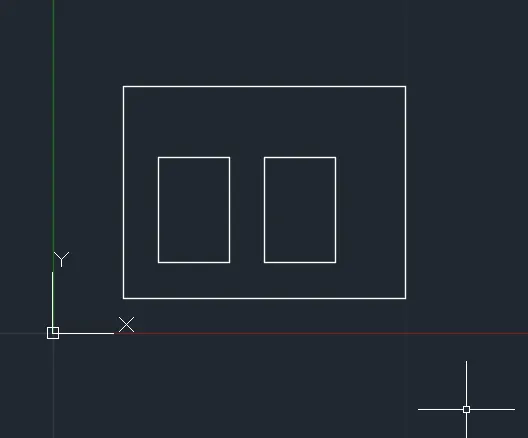
QUESTION 6:
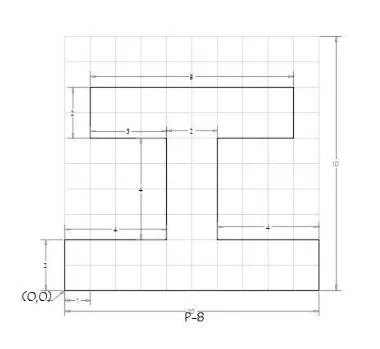
Procedure:
- Command: LINE
- Specify first point: 0,0
- Specify next point or [Undo]: 2
- Specify next point or [Undo]: 4
- Specify next point or [Close/Undo]: 4
- Specify next point or [Close/Undo]: 3
- Specify next point or [Close/Undo]: 2
- Specify next point or [Close/Undo]: 8
- Specify next point or [Close/Undo]: 2
- Specify next point or [Close/Undo]: 3
- Specify next point or [Close/Undo]: 4
- Specify next point or [Close/Undo]: 4
- Specify next point or [Close/Undo]: 2
- Specify next point or [Close/Undo]: C
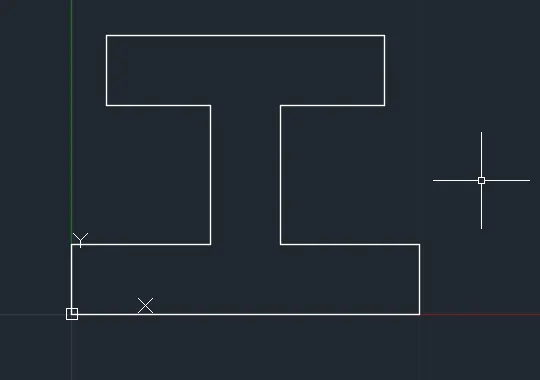
QUESTION 7:
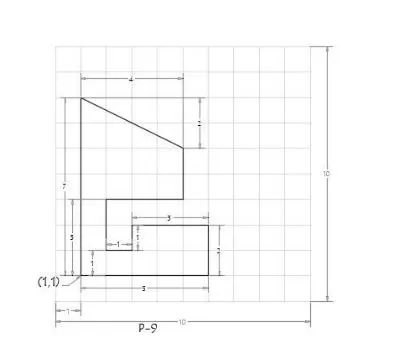
Procedure:
- Command: line
- Specify first point: 1,1
- Specify next point or [Undo]: 5
- Specify next point or [Undo]: 2
- Specify next point or [Close/Undo]: 3
- Specify next point or [Close/Undo]: 1
- Specify next point or [Close/Undo]: 1
- Specify next point or [Close/Undo]: 2
- Specify next point or [Close/Undo]: 3
- Specify next point or [Close/Undo]: 2
- Specify next point or [Close/Undo]: 8,1
- Specify next point or [Close/Undo]: _u
- Specify next point or [Close/Undo]: 1,8
- Specify next point or [Close/Undo]: c
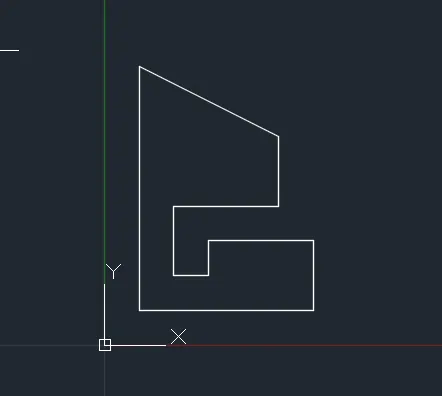
QUESTION 8:
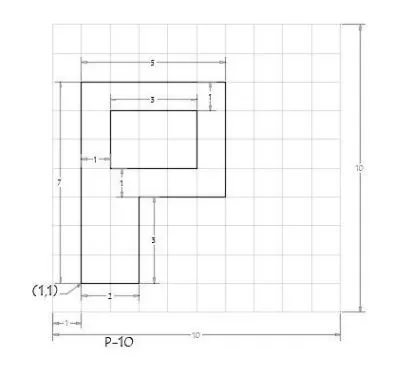
Procedure:
- Command: LINE
- Specify first point: 1,1
- Specify next point or [Undo]: 7
- Specify next point or [Undo]: 5
- Specify next point or [Close/Undo]: 4
- Specify next point or [Close/Undo]: 3
- Specify next point or [Close/Undo]: 3
- Specify next point or [Close/Undo]: c
- Command: line
- Specify first point: 2,5
- Specify next point or [Undo]: 2
- Specify next point or [Undo]: 3
- Specify next point or [Close/Undo]: 2
- Specify next point or [Close/Undo]: c
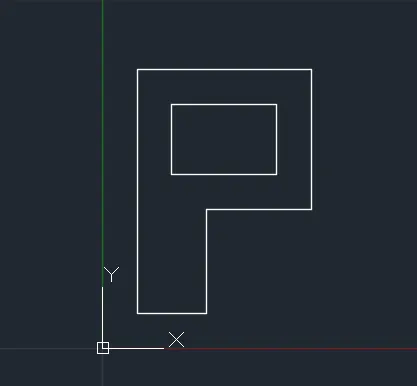
QUESTION 9:
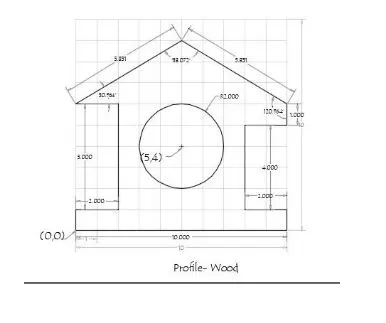
Procedure:
- Command: LINE
- Specify first point: 0,0
- Specify next point or [Undo]: 0,0
- Zero length line created at (0.0000, 0.0000, 0.0000)
- Specify next point or [Undo]: 1
- Specify next point or [Close/Undo]: 2
- Specify next point or [Close/Undo]: 5
- Specify next point or [Close/Undo]: 2
- Specify next point or [Close/Undo]: 9,5
- Specify next point or [Close/Undo]: _u
- Specify next point or [Close/Undo]: 5,9
- Specify next point or [Close/Undo]: 10,6
- Specify next point or [Close/Undo]: 1
- Specify next point or [Close/Undo]: 2
- Specify next point or [Close/Undo]: 4
- Specify next point or [Close/Undo]: 2
- Specify next point or [Close/Undo]: 1
- Specify next point or [Close/Undo]: C
- Command: _circle
- Specify center point for circle or [3P/2P/Ttr (tan tan radius)]: 5,4
- Specify radius of circle or [Diameter]: 2
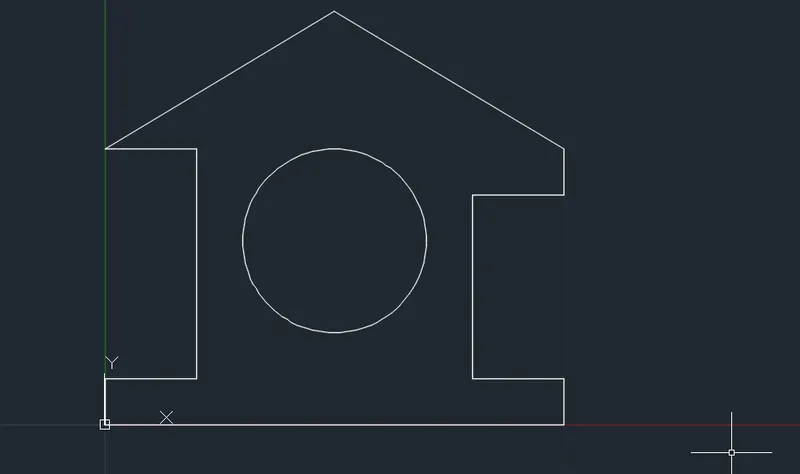
QUESTION 10:
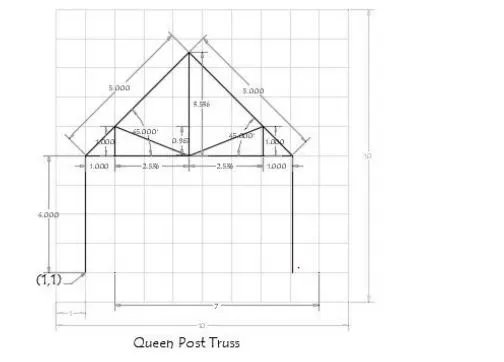
Procedure:
- Command: LINE
- Specify first point: 1,1
- Specify next point or [Undo]: 4
- Specify next point or [Undo]: @5<45
- Specify next point or [Close/Undo]:>>Enter new value for ORTHOMODE <1>:
- Resuming LINE command.
- Specify next point or [Close/Undo]: @5<315
- Specify next point or [Close/Undo]: 4
- Specify next point or [Close/Undo]: *Cancel*
- Command: LINE
- Specify first point:
- Specify next point or [Undo]: *Cancel*
- Command:LINE
- Command: tr
- TRIM
- Current settings: Projection=UCS, Edge=None, Mode=Quick
- Select object to trim or shift-select to extend or[cuTting edges/Crossing/mOde/Project/eRase]:
- Select object to trim or shift-select to extend or[cuTting edges/Crossing/mOde/Project/eRase/Undo]: _u
- Command has been completely undone.
- Command:
- Command: _line
- Specify first point: 2,5
- Specify next point or [Undo]: 1
- Specify next point or [Undo]:
- Specify next point or [Close/Undo]: *Cancel*
- Command:LINE
- Specify first point: 7,5
- Specify next point or [Undo]: 1
- Specify next point or [Undo]:
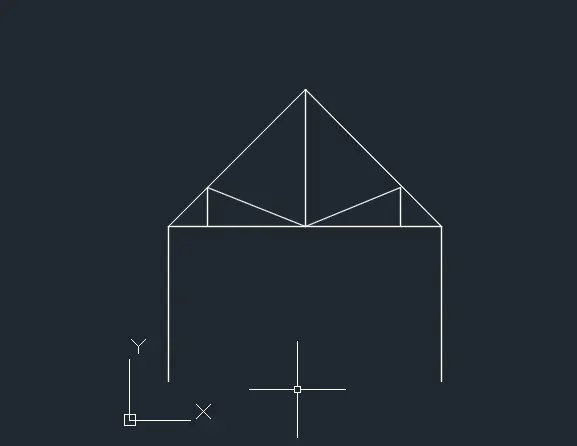
QUESTION 11:
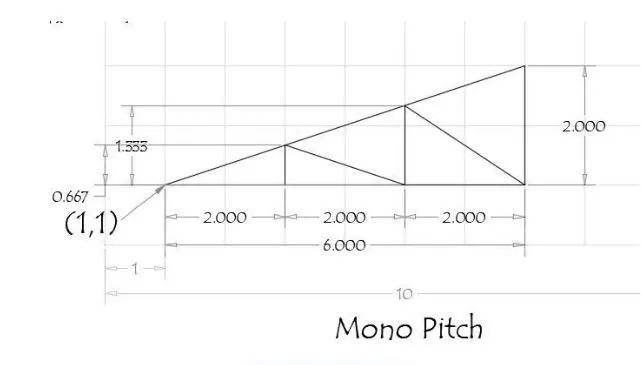
Procedure:
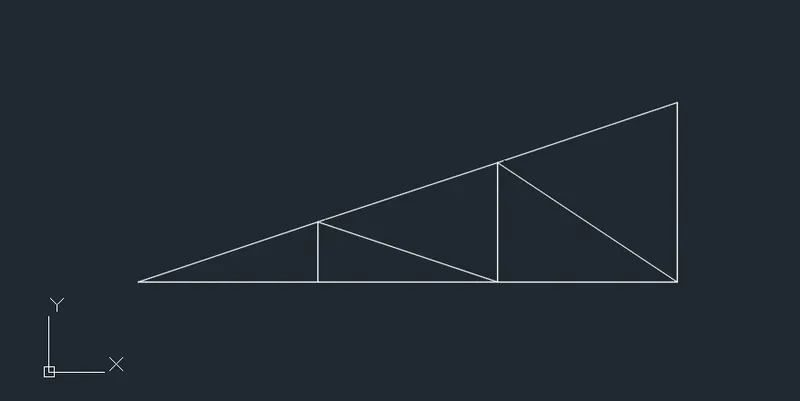
- Command: _u LINE
- Command: LINE
- Specify first point: 3,1
- Specify next point or [Undo]: 0.667
- Specify next point or [Undo]: *Cancel*
- Command:LINE
- Specify first point: 5,1
- Specify next point or [Undo]: 1.333
- Specify next point or [Undo]: *Cancel*
- Command:LINE
- Specify first point: 7,1
- Specify next point or [Undo]: 2
- Specify next point or [Undo]:
- Specify next point or [Close/Undo]:
- Specify next point or [Close/Undo]: *Cancel*
- Command:LINE
- Specify first point:
- Specify next point or [Undo]: 6
- Specify next point or [Undo]:
- Specify next point or [Close/Undo]:
- Specify next point or [Close/Undo]:
- Command:LINE
- Specify first point:
- Specify next point or [Undo]:
- Specify next point or [Undo]: *Cancel*