Creation of geometries by Coordinate system methods using AutoCad
Create the geometries from P1 to P2 using all the coordinates system methods. You need to use the Line tool to create the geometries. Where required you need to use the circle tool.
Answer:-
Aim:- Create the geometries from P1 to P2 using all the coordinates system methods
Coordinate Systems
1. Absolute coordinates
2. Relative coordinate
a) Relative rectangular coordinates
b) Relative polar coordinates
3. Direct distance enter
Apparatus:- Autocad software
Procedure:-
Q.1) P-1
open AutoCAD in your system
type NEW/QNEW command or press CTRL+N or go to file and press NEW
complete all the initial settings like
a) Templet as acad.dwg
b) selected as a wizard
c) then advance setup in that units, decimal, angle, decimal degree, direction, and area of the page
1. Absolute coordinates
type line command or select line from draw or type 'L' in command and press enter
- Point - a = 2 , 1 (starting point)
Point - b = 8 , 1
Point - c = 8 , 2
Point - d = 3 , 2
Point - e = 3 , 6
Point - f = 8 , 6
Point - g = 8 , 7
Point - h = 2 , 7
close or select point 'a' through crosser
Result :- 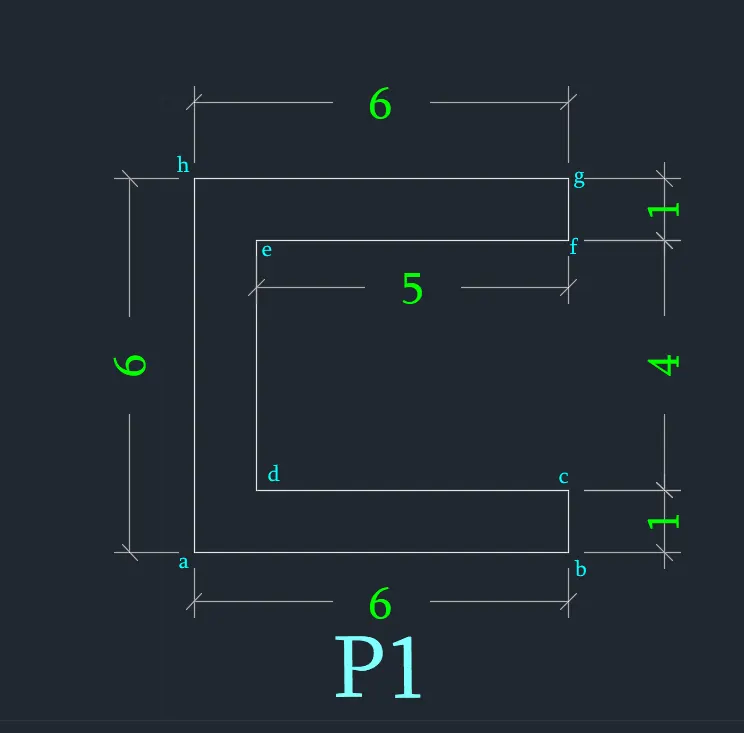
2.a) Relative rectangular coordinates
'L' enter
starting point, Point - a = 2 , 1
Point - b = @6,0 ( it means 6 unit in X- direction and 0 unit in y- direction , like this all point will be drawn)
Point - c = @0,1
Point - d = @-5,0
Point - e = @0,4
Point - f = @5,0
Point - g = @1,0
Point - h = @-6,0
close
Result :-
2.b) Relative polar coordinates
'L' enter
starting point, Point - a = 2 , 1
Point - b = @6<0 ( it means 6 unit in X- direction at zero degree and 0 unit in y- direction , like this all point will be drawn)
Point - c = @1<90
Point - d = @5<180
Point - e = @4<90
Point - f = @5<0
Point - g = @1<90
Point - h = @6<180
close
Result:-
3. Direct distance enter
'L' enter
switch on the orthomode
6 ( cursor facing right side or east direction )
1 ( cursor facing upward or north direction )
5 ( cursor facing left side or west direction )
4 ( cursor facing upward or north direction )
5 ( cursor facing right side or east direction )
1 ( cursor facing upward or north direction )
6 ( cursor facing left side or west direction )
close \ 6 ( cursor facing downward or south direction )
Result:-
Q.2) P-2
open AutoCAD in your system
type NEW/QNEW command or press CTRL+N or go to file and press NEW
complete all the initial settings like
a) Templet as acad.dwg
b) selected as a wizard
c) then advance setup in that units, decimal, angle, decimal degree, direction, and area of the page
1. Absolute coordinates
type line command or select line from draw or type 'L' in command and press enter
Point - a = 2 , 1 (starting point)
Point - b = 5 , 1
Point - c = 5 , 5
Point - d = 6 , 5
Point - e = 6 , 1
Point - f = 9 , 1
Point - g = 7 , 8
Point - h = 4 , 8
close or select point 'a' through crosser
Result :- 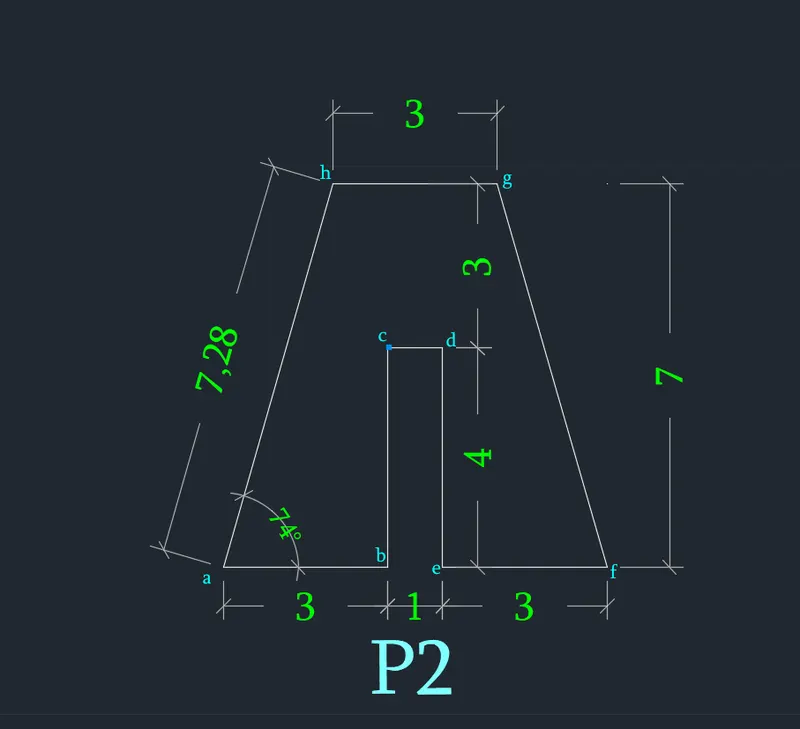
2.a) Relative rectangular coordinates
'L' enter
starting point, Point - a = 2 , 1
Point - b = @3,0 ( it means 3 unit in X- direction and 0 unit in y- direction , like this all point will be drawn)
Point - c = @0,4
Point - d = @1,0
Point - e = @0,-4
Point - f = @3,0
Point - g = @-2,7
Point - h = @-3,0
close
Result :-
2.b) Relative polar coordinates
'L' enter
starting point, Point - a = 2 , 1
Point - b = @3<0 ( it means 3 unit in X- direction at zero degree and 0 unit in y- direction , like this all point will be drawn)
Point - c = @4<90
Point - d = @1<0
Point - e = @4<360
Point - f = @3<0
else
'L' enter, move cursor 2 unit back from point 'g'
Point - g = @7<90
Point - h = @3<180
close
join 'g' & 'f' and erase line which is draw from g (7 unit im dpwnword)- else
Result:-
3. Direct distance enter
'L' enter
switch on the orthomode
3 ( cursor facing right side or east direction )
4 ( cursor facing upward or north direction )
1 ( cursor facing right side or east direction )
4 ( cursor facing downward or south direction )
3 ( cursor facing right side or east direction )
else
Line, go 2 units back from 'g' and draw a line with 7 units in an upward direction to get point 'g'
3 ( cursor facing left side or west direction )
close
join 'g' & 'f' and erase line which is drawn from g (7 units in downward)- else
Result:-
Q.3) P-3
Absolute coordinates
type line commant or select line from draw or type 'L' in command and press enter
Point - a = 2 , 1 (starting point)
Point - b = 3 , 1
Point - c = 3 , 5
Point - d = 5 , 3
Point - e = 7 , 5
Point - f = 7 , 1
Point - g = 8 , 1
Point - h = 8 , 8
Point - i = 7 , 8
Point - j = 5 , 5
Point - k = 3 , 8
Point - l = 2 , 8
close
Result :- 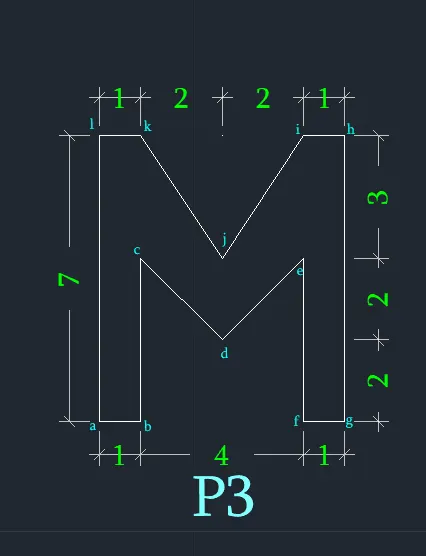
Q.4) P-4
Absolute coordinates
type line commant or select line from draw or type 'L' in command and press enter
Point - a = 2 , 1 (starting point)
Point - b = 3 , 1
Point - c = 3 , 8
Point - d = 7 , 8
Point - e = 7 , 2
Point - f = 5 , 2
Point - g = 5, 1
Point - h = 9 , 1
Point - i = 9 , 9
Point - j = 2 , 9
close
Result :- 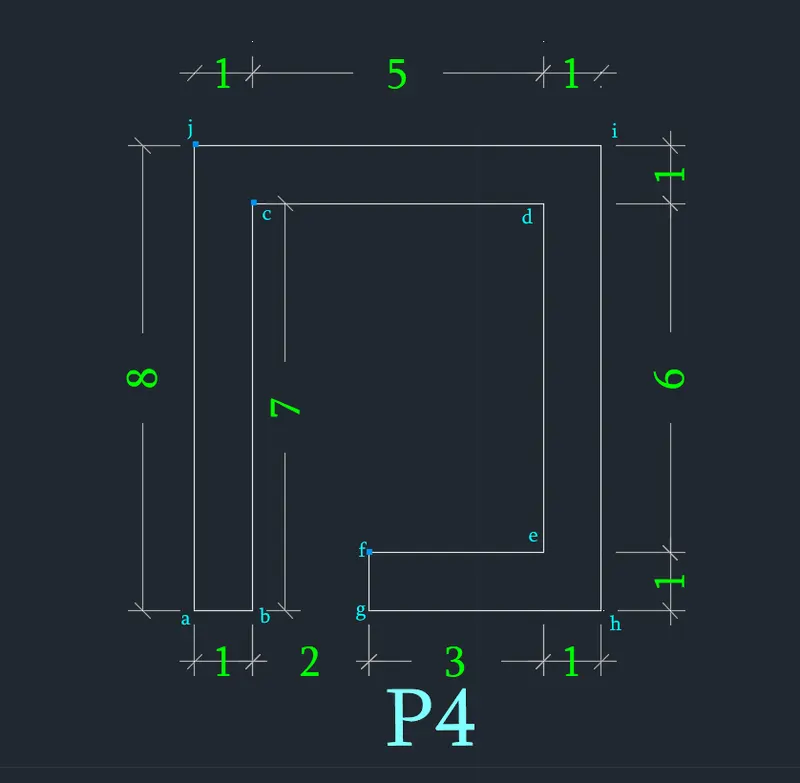
Q.5) P-5
Absolute coordinates
type line commant or select line from draw or type 'L' in command and press enter
Point - a = 2 , 1 (starting point)
Point - b = 10 , 1
Point - c = 10 , 7
Point - d = 2 , 7
close
Point - e = 3 , 2
Point - f = 5 , 2
Point - g = 5 , 5
Point - h = 5 , 5
close
Point - i = 6 , 2
Point - j = 8 , 2
Point - k = 8 , 5
Point - l = 6 , 5
close
Result :- 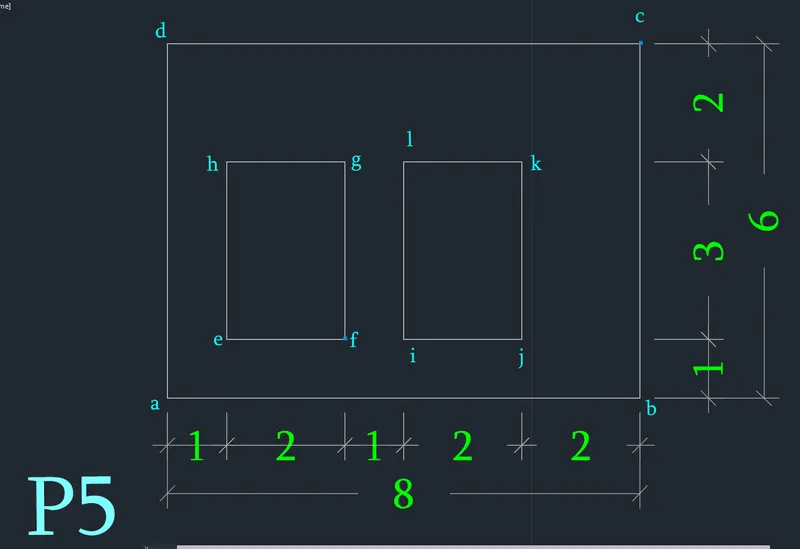
Q.6) P-6
. Direct distance enter
'L' enter
switch on the orthomode
10 ( cursor facing right side or east direction )
2 ( cursor facing upward or north direction )
4 ( cursor facing left side or west direction )
4 ( cursor facing upward or north direction )
3 ( cursor facing right side or east direction )
2 ( cursor facing upward or north direction )
8 ( cursor facing left side or west direction )
2 ( cursor facing downward or south direction )
3 ( cursor facing RIGHT side or east direction )
4 ( cursor facing downward or south direction )
4 ( cursor facing left side or west direction )
2 ( cursor facing downward or south direction )
close
Result:- 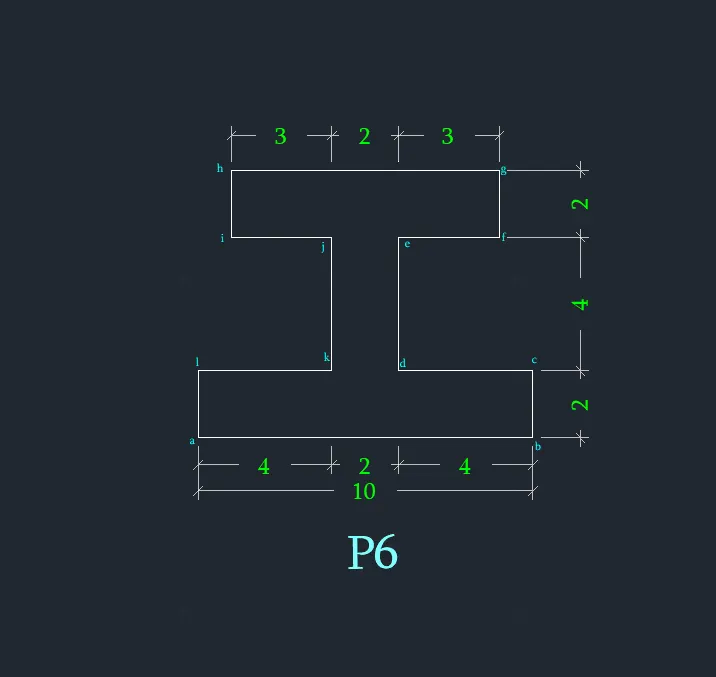
Q.7) P-7
. Direct distance enter
'L' enter
switch on the orthomode
5 ( cursor facing right side or east direction )
2 ( cursor facing upward or north direction )
3 ( cursor facing left side or west direction )
1 ( cursor facing downward or south direction )
1 ( cursor facing left side or west direction )
2 ( cursor facing upward or north direction )
3 ( cursor facing right side or east direction )
2 ( cursor facing upward or north direction )
else
line
from 'a' 5 unit upward
join 'j' & 'i'- else
Result :-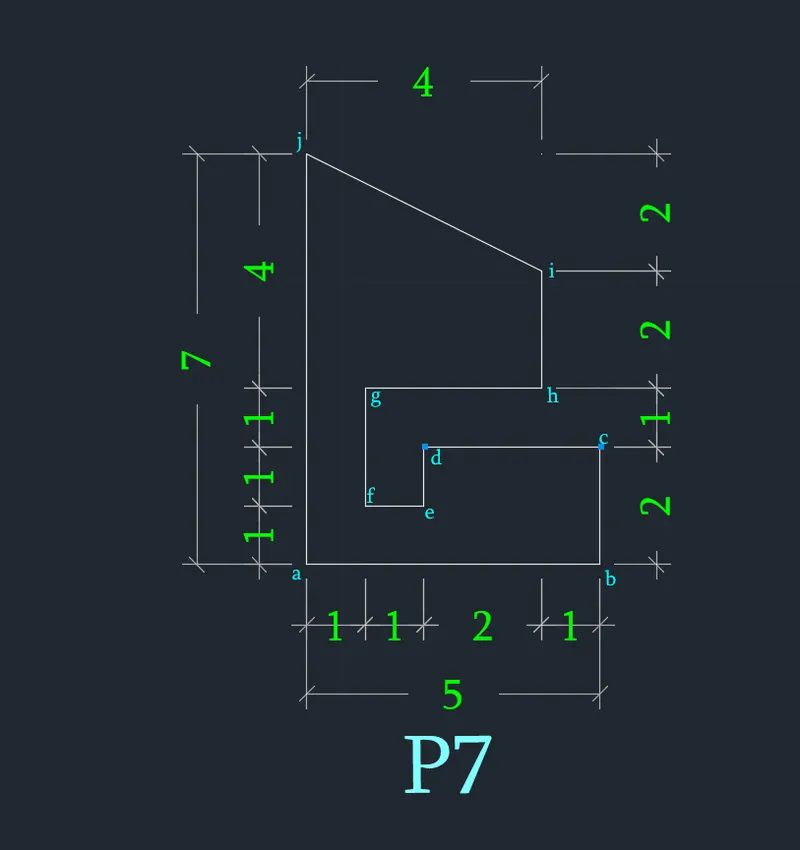
Q.8) P-8
Relative polar coordinates
'L' enter
starting point, Point - a = 1 , 1
Point - b = @2<0
Point - c = @3<90
Point - d = @3<0
Point - e = @4<90
Point - f = @5<180
close
Point - g = 2, 5
Point - h = @3<0
Point - i = @2<90
Point - j = @3<180
close
Result :- 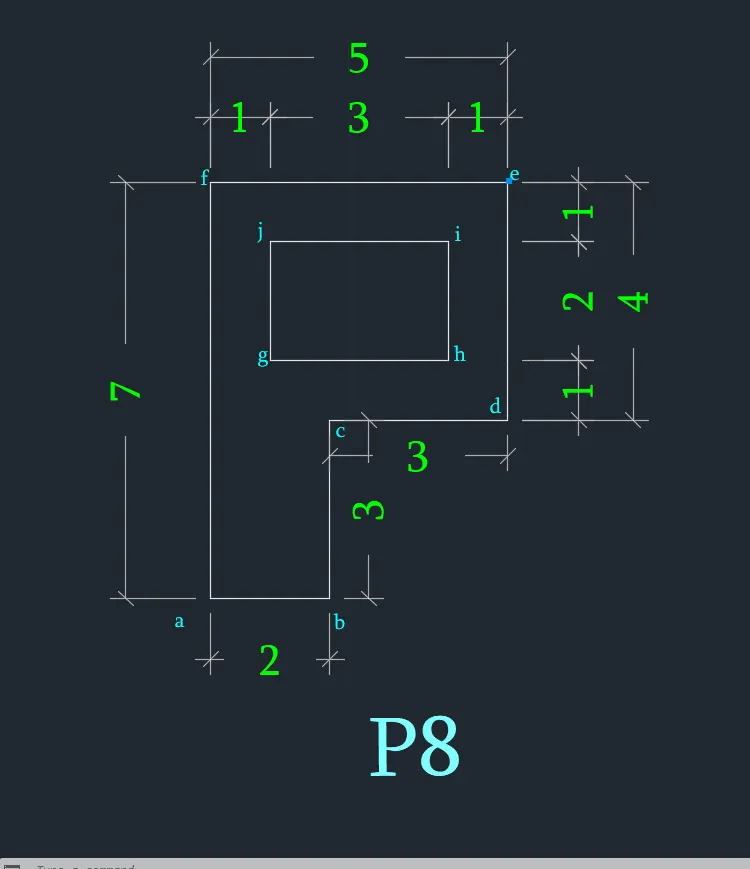
Q.9) P-9
Relative rectangular coordinates
'L' enter
starting point, Point - a = 0 , 0
Point - b = @10,0
Point - c = @0,1
Point - d = @-2,0
Point - e = @0,4
Point - f = @2,0
Point - g = @0,1
Point - h = @5.831<149.036
else
line
select point 'a'
Point - l = @0,1
Point - k = @2,0
Point - j = @0,5
Point - i = @-2,0
join 'i' & 'h'
else
'circle' enter
center of circle point - m = 5, 4
put radius of 2
else
Result:- 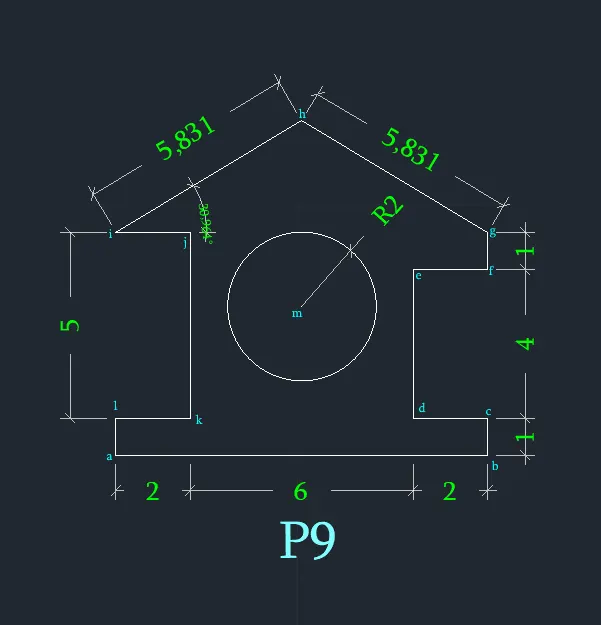
Q.10) P-10
Relative rectangular coordinates
'L' enter
starting point, Point - a = 1 , 1
Point - b = @0 , 4
Point - c = @5<45
Point - d = @5<315
Point - e = @0, -4
else
line
Point - f = from 'd' @-1,0
Point - j = @0,1
else
line
Point - g = from 'f' @ -2.54,0
Point - h = @-2.54,1
Point - i = @0,1
else
line
join 'b' & 'h'
else
line
join 'i' & 'g' and 'g' & 'c'
else
line
join 'g' & 'j'
else
Result:-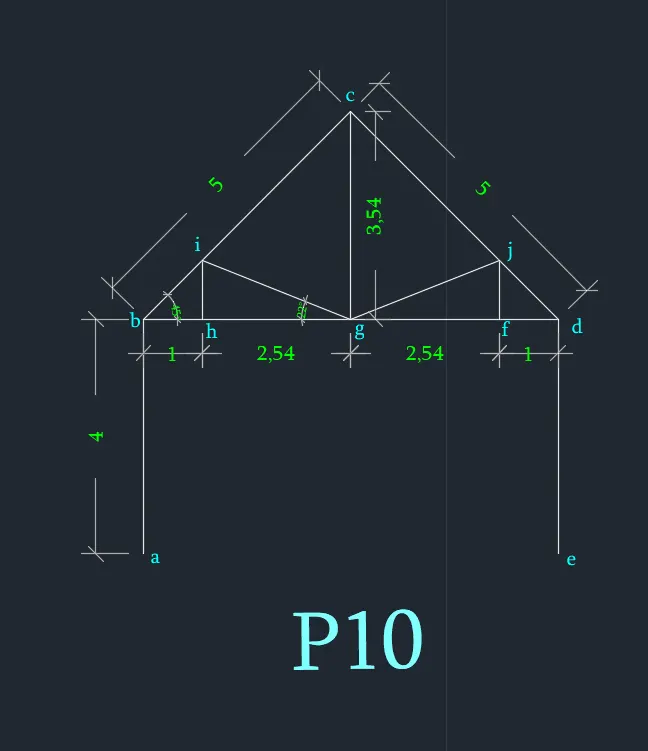
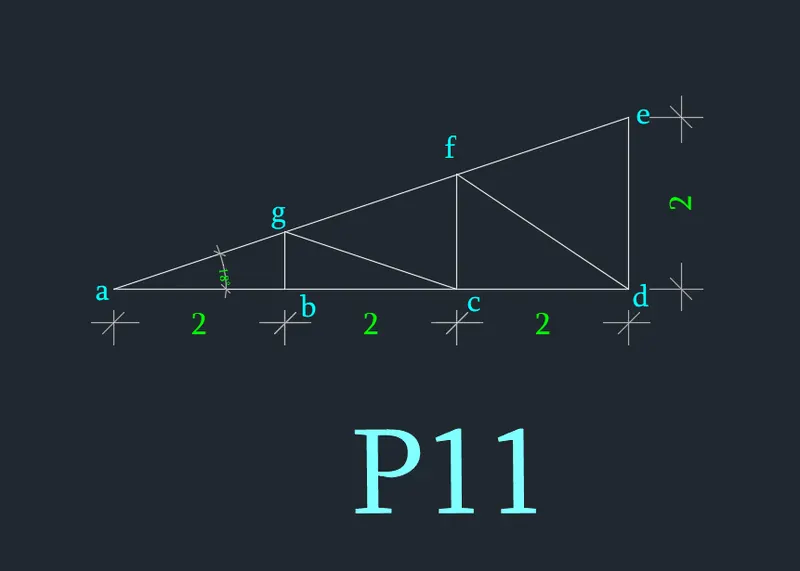
Q.11) P-11
Relative rectangular coordinates
'L' enter
starting point, Point - a = 1 , 1
Point - b = @2,0
Point - c = @2,0
Point - d = @2,0
Point - e = @0,2
close
Point - g = from point 'b' @ 0 , 0.667
join 'g' & 'c'
Point - f = from 'c' @ 0, 1.333
join 'f' & 'd'
else
Result :- (