Creation of geometries by Coordinate system methods using AutoCad

for p1 :
using point cordinate system:
give command line
specify first point (2,1)press enter then next point (2,7)then next point (8,7)then next point (8,6)then next point (3,6)then next point (3,2)then next point (8,2)then next point (8,1)then close.
using rectangular or polar cordinate system:
give command line
specify first point (2,1)press enter then next point @(0,6)then next point @(6,0)then next point @(0,-1)then next point @(-5,0)then next point @(0,-4)then next point @(5,0)then next point @(0,-1)then close.
using direct cordinate system
give command line
specify first point (2,1)then move the cursor in the direction to which the line is to be drawn and give the cordinates.

for p2:
using point cordinate system:
give command line
specify first point (2,1)press enter then next point (4,8)then next point (7,8)then next point (9,1)then next point (6,1)then next point (6,5)then next point (5,5)then next point (5,1)then close.
using rectangular or polar cordinate system:
give command line
specify first point (2,1)press enter then next point @(2,7)then next point @(3,0)then next point@(2,-7)then next point@(-3,0)then next point @(0,4)then next point @(-1,0)then next point @(0,-4)then close.
using direct cordinate system
give command line
specify first point (2,1)then move the cursor in the direction to which the line is to be drawn and give the cordinates.

for p3:
using rectangular or polar cordinate system:
give command line
specify first point (2,1)press enter then next point @(0,7)then next point @(6,0)then next point@(0,-1)then next point@(-5,0)then next point @(0,-3)then next point @(3,0)then next point @(0,-1)then next point @(-3,0) then next point @(0,-2)then close.

for p4:
using rectangular or polar cordinate system:
give command line
specify first point (2,1)press enter then next point @(0,7)then next point @(2,-3)then next point@(2,3)then next point@(1,0)then next point @(0,-7)then next point @(-1,0)then next point @(0,4)then next point @(-2,-2)then next point @(-2,2)then next point @(0,-4)thenclose.

for p5:
using rectangular or polar cordinate system:
give command line
specify first point (2,1)press enter then next point @(0,8)then next point @(7,0)then next point@(0,-8)then next point@(-4,0)then next point @(0,1)then next point @(0,3)then next point @(0,6)then next point @(-5,0)then next point (0,-7)then close.
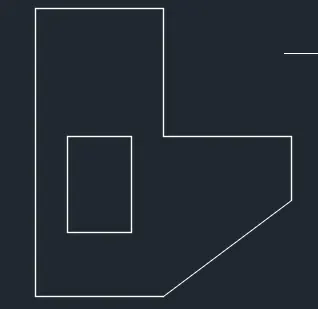
for p6:
using rectangular or polar cordinate system:
give command line
specify first point (2,1)press enter then next point @(0,9)then next point @(4,0)then next point@(0,-4)then next point@(4,0)then next point @(-2,0)then next point @(-4,-3)then close. again give line command specify first point(3,3)then next point @(0,3)then next point @(2,0)then next point @(0,-3)then close
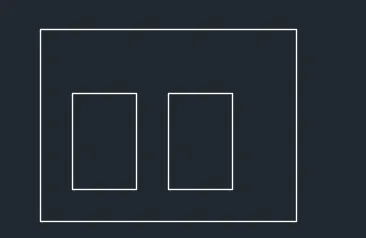
for p7:
using rectangular or polar cordinate system:
give command line
specify first point (2,1)press enter then next point @(0,6)then next point @(8,0)then next point @(0,-6)then close. give line command again specify first point(3,2) next point@(0,3)then next point @(2,0)then next point @(0,-3)then close. again give line command specify first point(6,2) next point @(0,3) then next point @(2,0)then next point@(0,-3)then close.
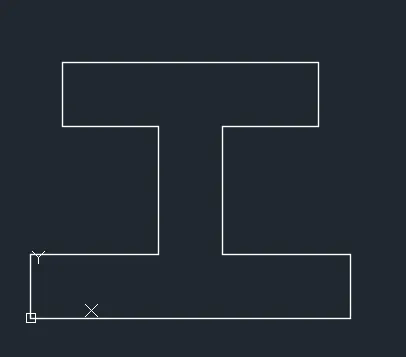
for p8:
using rectangular or polar cordinate system:
give command line
specify first point (0,0)press enter then next point @(0,2)then next point @(4,0)then next point@(0,4)then next point@(-3,0)then next point @(0,2)then next point @(8,0)then next point @(0,-2)then next point@ (-3,0)then next point @(0,-4)then next point @(4,0)then next point (0,-2) then close.
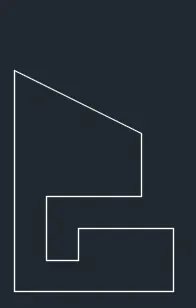
fpr p9:
using rectangular or polar cordinate system:
give command line
specify first point (1,1)press enter then next point @(0,7)then next point @(4,-2)then next point@(0,-2)then next point@(-3,0)then next point @(0,-2)then next point @(1,0)then next point @(0,1)then next point @(3,0)then next point @(0,-2) then close.

for p10:
using rectangular or polar cordinate system:
give command line
specify first point (1,1)press enter then next point @(0,7)then next point @(5,0)then next point@(0,-4)then next point@(-3,0)then next point @(0,-3)then close. give line command specify first line (2,5)next point @(0,2)then next point @(3,0)then next point @(0,-2)then close.
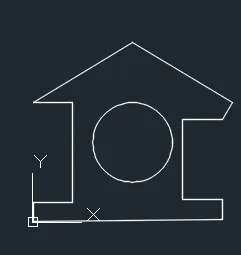
for profile:
using rectangular or polar cordinate system:
give command line
specify first point (0,0)then next point @(0,1)then next point @(2,0)then next point @(0,5)then next point @(-2,0)then next point @(5,5.831)then next point @(5,-5.831)then next point @(0,-1)then next point @(-2,0)then next point @(0,-4)then next point @(2,0)then next point @(0,-1)then close.
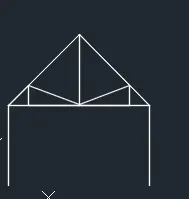
for tuss 1:
using rectangular or polar cordinate system:
give command line
specify first point (1,1)then next point @(0,4)then next point @(5<45)then next point @(5<135)then next point @(0,-4)then close . again give command line specify first point(1,5)then next point @(7.072,0)then next point @(1,1)then next point @(0,-1)then next point @(-5.072,0)then next point @(0,1)then next point @(2.536,-1)then next point @(2.536,1)then close.again command line specify first point (4.536,4)then next point @(0,-3.536)then close.
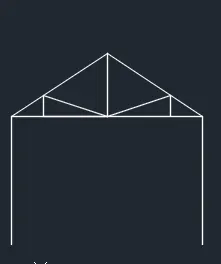
for tuss 2:
using rectangular or polar cordinate system:
give command line specify first point (1,1)then next point @(0,4)then next point @(3,2)then next point @(3,-2)then next point @(0,-4)then close . again give command line specify first point(1,5)then next point @(6,0)then next point @(1,0.067)then next point @(0,-0.067)then next point @(4,0)then next point @(0,0.067)then next point @(2,-0.067)then next point @(2,0.067)then close.again command line specify first point (4,5)then next point @(0,2)then close.
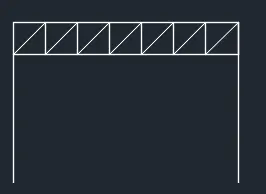
for tuss 3:
using rectangular or polar cordinate system:
give command line
specify first point (1,1)then next point @(0,5)then next point @(7,0)then next point @(0,-5)then close.again command line specify first point(1,5)then next point @(1.414,1)then next point @(0,-1)then next point @(1.414,1)then next point @(0,-1)then next point @(1.414,1)then next point @(0,-1)then next point @(1.414,1)then next point @(0,-1)then next point @(1.414,1)then next point @(0,-1)then next point @(1.414,1)then next point @(0,-1)then next point @(1.414,1)then next point @(0,-1)then next point (-7,0)then close.
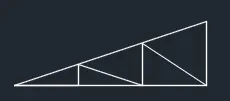
for tuss 4:
using rectangular or polar cordinate system:
give command line
specify first point(1,1)then next point @(6,2)then next point @(0,-2)then next point @(-6,0)then next point @(2,0)then next point @(0,0.667)then next point @(2,-0.667)then next point @(0,1.333)then next point @(2,-1.333)then close.