Creating a Residence Layout, Seating plan, Toilet and Utility room plan using AutoCad
AIM: sketch the drawings and give the steps used.
(1) Sketch the layout of a residence as shown in the Figure 1. Consider all dimensions as reference to sketch the unit plan. Also the text in the layout are only for reference. Assume the missing dimensions. Also, refer the schedule for size of the doors.
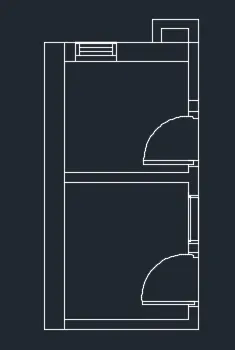
(2)Sketch the seating plan for an outdoor canopy. Assume the dimensions for the seating. Also, consider the dimensions in mm.
(3)Sketch the part plan for the toilers and utilities room. Consider the outer wall thickness as 300mm and inner wall thickness as 150mm. Also, assume the missing dimension, Texts, dimensions, and hatches are only for references. Also, symbols for toilets and w/c are also for references.
PROCEDURE:
figure 1:
Command: XLINE
Specify a point or [Hor/Ver/Ang/Bisect/Offset]: h
Specify through point: (select any point)
Specify through point: *Cancel*
Command: _offset
Select object to offset or [Exit/Undo] : (select the xline)
Specify point on side to offset or [Exit/Multiple/Undo] : (take the cursor in above direction)
*Cancel*
Command: _offset
Specify offset distance or [Through/Erase/Layer] <0'-9.0000">: 6'
Select object to offset or [Exit/Undo] : (select the last line)
*Cancel*
Command: _offset
Specify offset distance or [Through/Erase/Layer] <6'-0.0000">: 9"
Select object to offset or [Exit/Undo] : (select the last line)
*Cancel*
Command: _offset
Specify offset distance or [Through/Erase/Layer] <0'-9.0000">: 18'-0.5"
Select object to offset or [Exit/Undo] : (select the last line)
*Cancel*
Command: _offset
Specify offset distance or [Through/Erase/Layer] <18'-0.5000">: 4.5"
Select object to offset or [Exit/Undo] : (select the last line)
*Cancel*
Command: _offset
Specify offset distance or [Through/Erase/Layer] <0'-4.5000">: 4'6"
Select object to offset or [Exit/Undo] : (select the last line)
*Cancel*
Command: _offset
Specify offset distance or [Through/Erase/Layer] <4'-6.0000">: 4.5"
Select object to offset or [Exit/Undo] : (select the last line)
Command: _offset
Specify offset distance or [Through/Erase/Layer] <0'-4.5000">: 12'
Select object to offset or [Exit/Undo] : (select the last line)
*Cancel*
Command: _offset
Specify offset distance or [Through/Erase/Layer] <12'-0.0000">: 9"
Select object to offset or [Exit/Undo] : (select the last line)
*Cancel*
Command: XLINE
Specify a point or [Hor/Ver/Ang/Bisect/Offset]: v
Specify through point: (any point )
Specify through point: *Cancel*
Command: _offset
Specify offset distance or [Through/Erase/Layer] <0'-9.0000">: 9"
Select object to offset or [Exit/Undo] : (select the vertical xline)
*Cancel*
Command: _offset
Specify offset distance or [Through/Erase/Layer] <0'-9.0000">: 11'-7.5"
Select object to offset or [Exit/Undo] : (select the last line)
*Cancel*
Command: _offset
Specify offset distance or [Through/Erase/Layer] <11'-7.5000">: 4.5"
Select object to offset or [Exit/Undo] : (select the last line)
*Cancel*
Command: _offset
Specify offset distance or [Through/Erase/Layer] <0'-4.5000">: 11'6"
Select object to offset or [Exit/Undo] : (select the last line)
*Cancel*
Command: _offset
Specify offset distance or [Through/Erase/Layer] <11'-6.0000">: 9"
Select object to offset or [Exit/Undo] : (select the last line)
*Cancel*
Command: _offset
Specify offset distance or [Through/Erase/Layer] <0'-9.0000">: 8'-3"
Select object to offset or [Exit/Undo] :
Command: _offset (select the inner wall of left side )
Specify offset distance or [Through/Erase/Layer] <8'-3.0000">: 8'-1.5"
Select object to offset or [Exit/Undo] : (select the inner wall of right side )
*Cancel*
Command: _offset
Specify offset distance or [Through/Erase/Layer] <8'-1.5000">: 4.5"
Select object to offset or [Exit/Undo] : (for the thickness of wall)
*Cancel*
Command: TR
TRIMSpecify point on side to offset or [Exit/Multiple/Undo] :
(all the outer edges of the drawing) (all the lines not needed in the drawing that is the space for doors etc.)
Command: _offset
Specify offset distance or [Through/Erase/Layer] <0'-4.5000">: 13'-9.5"
Select object to offset or [Exit/Undo] : (select the horizontal xline)
*Cancel*
Command: _offset
Specify offset distance or [Through/Erase/Layer] <13'-9.5000">: 9"
Select object to offset or [Exit/Undo] : (for the thickness of wall)
*Cancel*
Command: _offset
Specify offset distance or [Through/Erase/Layer] <0'-9.0000">: 12'-6"
Select object to offset or [Exit/Undo] : (select the horizontal xline)
*Cancel*
Command: _offset
Specify offset distance or [Through/Erase/Layer] <12'-6.0000">: 9"
Select object to offset or [Exit/Undo] : (select the horizontal xline)
*Cancel*
Command: _offset
Specify offset distance or [Through/Erase/Layer] <0'-9.0000">: 6'-8"
Select object to offset or [Exit/Undo] :
Command: _offset
Specify offset distance or [Through/Erase/Layer] <6'-8.0000">: 6'-4"
Select object to offset or [Exit/Undo] :
*Cancel*
Command: TR
TRIMSpecify point on side to offset or [Exit/Multiple/Undo] :
trim all the lines not needed .
now for the doors
for d1.
Command: l
LINE
Specify first point:
Specify next point or [Undo]: 1"
Specify next point or [Undo]: 3'
Specify next point or [Close/Undo]: *Cancel*
Command: _arc
Specify start point of arc or [Center]:
Specify second point of arc or [Center/End]: E
Specify end point of arc:
Specify center point of arc (hold Ctrl to switch direction) or [Angle/Direction/Radius]:
similarly draw d2 and d3.
now for staircaseCommand: L
LINE
Specify first point: (the starting poi nt of the staircase)
Specify next point or [Undo]: 3'
Specify next point or [Undo]: *Cancel*
Command: _copy 1 found
Current settings: Copy mode = Multiple
Specify base point or [Displacement/mOde] :
Specify second point or [Array] : A
Enter number of items to array: 10
Specify second point or [Fit]: @-1',0
Specify second point or [Array/Exit/Undo] : *Cancel*
Command: l
LINE
Specify first point: (starting of stairs)
Specify next point or [Undo]: (end of stairs)
Specify next point or [Undo]: (diagonal of stairs)
Specify next point or [Close/Undo]: *Cancel*
Command: l
LINE
Specify first point: (center of stairs)
Specify next point or [Undo]: ((diagonal of stairs))
Specify next point or [Undo]: *Cancel*
Command: EX
EXTEND
extend the stairs .
slab of kitchen and bedroom
Command: l (for vertical )
LINE
Specify first point:
Specify next point or [Undo]: 2'
Specify next point or [Undo]:
Specify next point or [Close/Undo]: *Cancel*
Command: l (for horizontal)
LINE
Specify first point:
Specify next point or [Undo]: 2'
Specify next point or [Undo]:
Specify next point or [Close/Undo]: *Cancel*.
Command: tr
TRIM
trim the inside part
Command: _rectang
Specify first corner point or [Chamfer/Elevation/Fillet/Thickness/Width]:
Specify other corner point or [Area/Dimensions/Rotation]:
Command: _rectang
Specify first corner point or [Chamfer/Elevation/Fillet/Thickness/Width]:
Specify other corner point or [Area/Dimensions/Rotation]:
Command: *Cancel*.
figure 2:
Command: c
CIRCLE
Specify center point for circle or [3P/2P/Ttr (tan tan radius)]: (any point)
Specify radius of circle or [Diameter]: 452
C
CIRCLE
Specify center point for circle or [3P/2P/Ttr (tan tan radius)]: (center of the circle)
Specify radius of circle or [Diameter] <452.0000>: 1398
*Cancel*
Command: l
LINE
Specify first point: (center of the circle)
Specify next point or [Undo]: ( in the up direction)
Specify next point or [Undo]: (in the left direction)
Specify next point or [Close/Undo]: ( in the up direction)
Specify next point or [Close/Undo]: 1*Cancel*
Command: _mirror 2 found
Specify first point of mirror line: (center of the seating )
Specify second point of mirror line: (after the seating is in square shape)
Command: _arc
Specify start point of arc or [Center]:
Specify second point of arc or [Center/End]: E
Specify end point of arc:
Command: _offset
Specify offset distance or [Through/Erase/Layer] <1.0000>: T
Specify through point or [Exit/Undo] :
Specify through point or [Exit/Undo] :
Specify through point or [Exit/Undo] : *Cancel*
LINE
Specify first point:
Specify next point or [Undo]:
Specify next point or [Undo]: *Cancel*
Command: l
LINE
Specify first point:
Specify next point or [Undo]:
Specify next point or [Undo]: *Cancel*
Command: _rectang
Specify first corner point or [Chamfer/Elevation/Fillet/Thickness/Width]: *Cancel*
Command: _rectang
Specify first corner point or [Chamfer/Elevation/Fillet/Thickness/Width]:
Specify other corner point or [Area/Dimensions/Rotation]:
Command: *Cancel*
Command: _rotate
12 found ( select the seating)
Specify base point: (center of the circle)
Specify rotation angle or [Copy/Reference] <0>: C
Rotating a copy of the selected objects.
Specify rotation angle or [Copy/Reference] <0>: 270
Command: _rotate
12 found ( select the seating)
Specify base point: (center of the circle)
Specify rotation angle or [Copy/Reference] <270>: C
Rotating a copy of the selected objects.
Specify rotation angle or [Copy/Reference] <270>: 270
Command: _rotate
12 found ( select the seating)
Specify base point: (center of the circle)
Specify rotation angle or [Copy/Reference] <270>: C
Rotating a copy of the selected objects.
Specify rotation angle or [Copy/Reference] <270>:
Command: e
ERASE 4 found (all the lines connecting center of circle and seating).
figure 3:
Command: XL
XLINE
Specify a point or [Hor/Ver/Ang/Bisect/Offset]: H
Specify through point:
Specify through point: 150
Specify through point: *Cancel*
Command: _offset
Specify offset distance or [Through/Erase/Layer] : 2100
Select object to offset or [Exit/Undo] :
Specify point on side to offset or [Exit/Multiple/Undo] : *Cancel*
Current settings: Erase source=No Layer=Source OFFSETGAPTYPE=0
Specify offset distance or [Through/Erase/Layer] <2100.0000>: 150
Select object to offset or [Exit/Undo] :
Specify point on side to offset or [Exit/Multiple/Undo] :
Select object to offset or [Exit/Undo] : *Cancel*
Command: _offset
Current settings: Erase source=No Layer=Source OFFSETGAPTYPE=0
Specify offset distance or [Through/Erase/Layer] <150.0000>: 1700
Select object to offset or [Exit/Undo] :
Specify point on side to offset or [Exit/Multiple/Undo] :
Select object to offset or [Exit/Undo] :
Select object to offset or [Exit/Undo] : *Cancel*
Specify offset distance or [Through/Erase/Layer] <1700.0000>: 300
Select object to offset or [Exit/Undo] :
Specify point on side to offset or [Exit/Multiple/Undo] :
Select object to offset or [Exit/Undo] : *Cancel*
Command: XL
XLINE
Specify a point or [Hor/Ver/Ang/Bisect/Offset]: v
Specify through point:
Specify through point: *Cancel*
Command:
Command: _offset
Specify offset distance or [Through/Erase/Layer] <300.0000>: 300
Select object to offset or [Exit/Undo] :
Specify point on side to offset or [Exit/Multiple/Undo] :
Select object to offset or [Exit/Undo] :
Select object to offset or [Exit/Undo] : *Cancel*
Command:
Command: _offset
Specify offset distance or [Through/Erase/Layer] <300.0000>: 1900
Select object to offset or [Exit/Undo] :
Specify point on side to offset or [Exit/Multiple/Undo] :
Select object to offset or [Exit/Undo] :
Select object to offset or [Exit/Undo] : *Cancel*
Command:
Command: _offset
Specify offset distance or [Through/Erase/Layer] <1900.0000>: 150
Select object to offset or [Exit/Undo] :
Specify point on side to offset or [Exit/Multiple/Undo] :
Select object to offset or [Exit/Undo] : *Cancel*
Command:
Command:
Command: _trim
( trim all the outer edges of drawing).
Command: _offset
Specify offset distance or [Through/Erase/Layer] <150.0000>: 201
Select object to offset or [Exit/Undo] :
Specify point on side to offset or [Exit/Multiple/Undo] :
Select object to offset or [Exit/Undo] :
Specify point on side to offset or [Exit/Multiple/Undo] : *Cancel*
Command: _offset
Specify offset distance or [Through/Erase/Layer] <201.0000>: 150
Select object to offset or [Exit/Undo] :
Specify point on side to offset or [Exit/Multiple/Undo] :
Select object to offset or [Exit/Undo] : *Cancel*
Command: EX
EXTEND
(to extend the vertical lines of the outer region for offsetting)
Command: _offset
Specify offset distance or [Through/Erase/Layer] <150.0000>: 402
Select object to offset or [Exit/Undo] :
Specify point on side to offset or [Exit/Multiple/Undo] :
Select object to offset or [Exit/Undo] : *Cancel*
Command: _offset
Specify offset distance or [Through/Erase/Layer] <402.0000>: 150
Select object to offset or [Exit/Undo] :
Specify point on side to offset or [Exit/Multiple/Undo] :
Select object to offset or [Exit/Undo] : *Cancel*
Command: TR
TRIM
(to trim all the unnecessary lines)
for v2
Command: l
LINE
Specify first point: ( midpoint of the starting of ventilator)
Specify next point or [Undo]: 631
Specify next point or [Undo]: *Cancel*
Command: OFFSET (to create the ventilator)
Specify offset distance or [Through/Erase/Layer] : Specify second point:
Specify point on side to offset or [Exit/Multiple/Undo] :
Select object to offset or [Exit/Undo] :
Specify point on side to offset or [Exit/Multiple/Undo] :
Select object to offset or [Exit/Undo] :
Specify point on side to offset or [Exit/Multiple/Undo] :
Select object to offset or [Exit/Undo] :
Specify point on side to offset or [Exit/Multiple/Undo] :
Select object to offset or [Exit/Undo] :
Specify point on side to offset or [Exit/Multiple/Undo] :
Select object to offset or [Exit/Undo] : tr
*Invalid selection*
Expects a point or Exit
Select object to offset or [Exit/Undo] : *Cancel*
Command: TR
TRIM
for w9
Command: _offset
Specify offset distance or [Through/Erase/Layer] <61.6949>: t
Select object to offset or [Exit/Undo] <Exit>:
Specify through point or [Exit/Multiple/Undo] <Exit>:
Select object to offset or [Exit/Undo] <Exit>: *Cancel*
Command:
Command: l
LINE
Specify first point:
Specify next point or [Undo]: 728
Specify next point or [Undo]: *Cancel*
Command: OFFSET
Current settings: Erase source=No Layer=Source OFFSETGAPTYPE=0
Specify offset distance or [Through/Erase/Layer] <Through>: t
Select object to offset or [Exit/Undo] <Exit>:
Specify through point or [Exit/Multiple/Undo] <Exit>:
Select object to offset or [Exit/Undo] <Exit>: *Cancel*
Command: _line
Specify first point:
Specify next point or [Undo]:
Specify next point or [Undo]: *Cancel*
Command:
Command:
Command: _line
Specify first point:
Specify next point or [Undo]: *Cancel*
Command: _rectang
Specify first corner point or [Chamfer/Elevation/Fillet/Thickness/Width]:
Specify other corner point or [Area/Dimensions/Rotation]:
Command: *Cancel*
Command:
Command:
Command: _rectang
Specify first corner point or [Chamfer/Elevation/Fillet/Thickness/Width]:
>>Press ESC or ENTER to exit, or right-click to display shortcut menu.
Resuming RECTANG command.
Specify first corner point or [Chamfer/Elevation/Fillet/Thickness/Width]:
Specify other corner point or [Area/Dimensions/Rotation]:
Command: *Cancel*
Command: tr
TRIM (to trim all the unwanted objects.)
for doors
Command: _offset
Specify offset distance or [Through/Erase/Layer] <Through>: 828
Select object to offset or [Exit/Undo] <Exit>:
Specify point on side to offset or [Exit/Multiple/Undo] <Exit>:
Select object to offset or [Exit/Undo] <Exit>: *Cancel
Command: _offset
Specify offset distance or [Through/Erase/Layer] <828.0000>: Specify second point: T
Select object to offset or [Exit/Undo] <Exit>:
Specify through point or [Exit/Multiple/Undo] <Exit>:
Select object to offset or [Exit/Undo] <Exit>: *Cancel*
Command: _rectang ()
Specify first corner point or [Chamfer/Elevation/Fillet/Thickness/Width]: (from the midpoint)
Specify other corner point or [Area/Dimensions/Rotation]: (assumed)
Command: _arc
Specify start point of arc or [Center]:
Specify second point of arc or [Center/End]: E
Specify end point of arc:
Command: _line (to close the arc )
Specify first point:
Specify next point or [Undo]:
Specify next point or [Undo]: *Cancel*
Command: _offset
Specify offset distance or [Through/Erase/Layer] <Through>: 832
Select object to offset or [Exit/Undo] <Exit>:
Specify point on side to offset or [Exit/Multiple/Undo] <Exit>:
Select object to offset or [Exit/Undo] <Exit>: *Cancel
Command: _offset
Specify offset distance or [Through/Erase/Layer] <32.0000>: Specify second point: T
Select object to offset or [Exit/Undo] <Exit>:
Specify through point or [Exit/Multiple/Undo] <Exit>:
Select object to offset or [Exit/Undo] <Exit>: *Cancel*
Command: _rectang ()
Specify first corner point or [Chamfer/Elevation/Fillet/Thickness/Width]: (from the midpoint)
Specify other corner point or [Area/Dimensions/Rotation]: (assumed)
Command: _arc
Specify start point of arc or [Center]:
Specify second point of arc or [Center/End]: E
Specify end point of arc:
Command: _line (to close the arc )
Specify first point:
Specify next point or [Undo]:
Specify next point or [Undo]: *Cancel*.
command : tr
TRIM(all the unnecessary points)
RESULT:
figure 1:
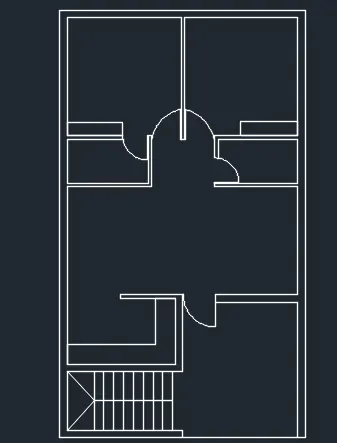
figure 2:
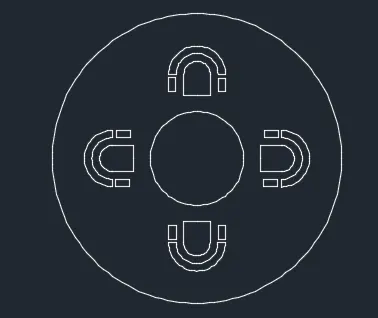
figure 3: