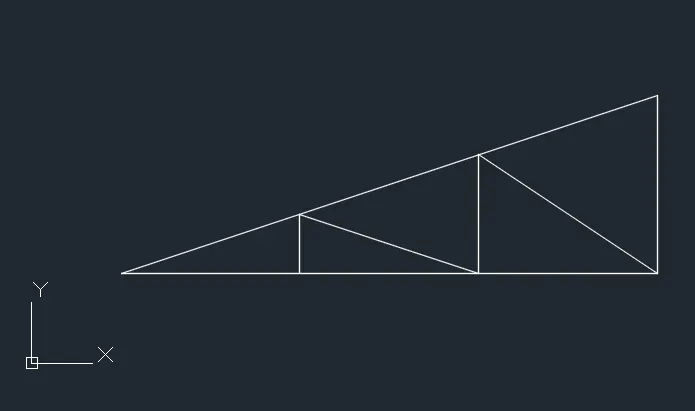
Creation of geometries by Coordinate system methods using AutoCad
Q1: Aim: To draw the geometry P1 using the absolute coordinate method, relative rectangular coordinates method and relative polar coordinates method and illustrate the procedure involved.
1. Absolute coordinate method
- Create a new drawing from the dropdown menu
- Select the imperial system and decimal units
- Type L in the command bar to activate the line tool
- Type the first point coordinate (2,1)
- Type the next point coordinate (8,1)
- Type the next point coordinate (8,2)
- Type the next point coordinate (3,2)
- Type the next point coordinate (3,6)
- Type the next point coordinate (8,6)
- Type the next point coordinate (8,7)
- Type the next point coordinate (2,7)
- Click on the close option in the command bar
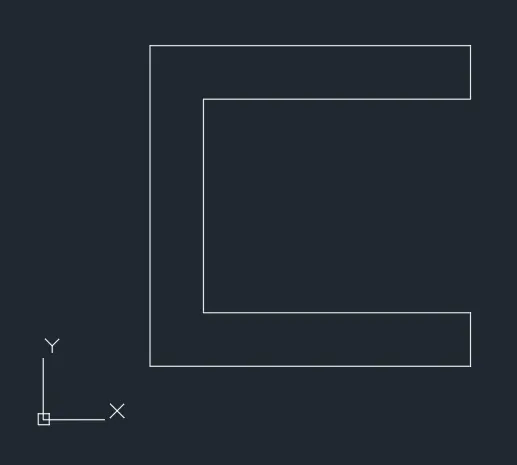
2. Relative rectangular coordinates method
- Create a new drawing from the dropdown menu
- Select the imperial system and decimal units
- Type L in the command bar to activate the line tool
- Type the first point coordinate (2,1)
- Type the next relative coordinate as @6,0
- Type the next relative coordinate as @0,1
- Type the next relative coordinate as @-5,0
- Type the next relative coordinate as @0,4
- Type the next relative coordinate as @5,0
- Type the next relative coordinate as @0,1
- Type the next relative coordinate as @-6,0
- Click on the close option in the command bar
3. Relative polar coordinates method
- Create a new drawing from the dropdown menu
- Select the imperial system and decimal units
- Type L in the command bar to activate the line tool
- Type the first point coordinate (2,1)
- Type the next relative polar coordinate @6<0
- Type the next relative polar coordinate @1<90
- Type the next relative polar coordinate @5<180
- Type the next relative polar coordinate @4<90
- Type the next relative polar coordinate @5<0
- Type the next relative polar coordinate @1<90
- Type the next relative polar coordinate @6<180
- Click on the close option in the command bar
4. Direct distance entry method
- Create a new drawing from the dropdown menu
- Select the imperial system and decimal units
- Type L in the command bar to activate the line tool
- Type the first point coordinate (2,1)
- Position the cursor in the horizontal direction and enter the distance 6
- Position the cursor in the vertical direction and enter the distance 1
- Position the cursor in the horizontal direction and enter the distance 5
- Position the cursor in the vertical direction and enter the distance 4
- Position the cursor in the horizontal direction and enter the distance 5
- Position the cursor in the vertical direction and enter the distance 1
- Position the cursor in the horizontal direction and enter the distance 6
- Click on the close option in the command bar
Q2: Aim: To draw the geometry P1 using the absolute coordinate method, relative rectangular coordinates method and relative polar coordinates method and illustrate the procedure involved.
1. Absolute coordinate method
- Create a new drawing from the dropdown menu
- Select the imperial system and decimal units
- Type L in the command bar to activate the line tool
- Type the first point coordinate (2,1)
- Type the next point coordinate (5,1)
- Type the next point coordinate (5,5)
- Type the next point coordinate (6,5)
- Type the next point coordinate (6,1)
- Type the next point coordinate (9,1)
- Type the next point coordinate (7,8)
- Type the next point coordinate (4,8)
- Click on the close option in the command bar

2. Relative rectangular coordinates method
- Create a new drawing from the dropdown menu
- Select the imperial system and decimal units
- Type L in the command bar to activate the line tool
- Type the first point coordinate (2,1)
- Type the relative coordinate as @3,0
- Type the next relative coordinate as @0,4
- Type the next relative coordinate as @1,0
- Type the next relative coordinate as @0,-4
- Type the next relative coordinate as @3,0
- Type the next relative coordinate as @-2,7
- Type the next relative coordinate as @3,0
- Click on the close option in the command bar
3. Relative polar coordinates method
- Create a new drawing from the dropdown menu
- Select the imperial system and decimal units
- Type L in the command bar to activate the line tool
- Type the first point coordinate (2,1)
- Type the relative polar coordinate @3<0
- Type the next relative polar coordinate @4<90
- Type the next relative polar coordinate @1<0
- Type the next relative polar coordinate @4<90
- Type the next relative polar coordinate @4<270
- Type the next relative polar coordinate @3<0
- Type the next relative polar coordinate @7.28<106
- Type the next relative polar coordinate @3<180
- Click on the close option in the command bar
4. Direct distance entry method
- Create a new drawing from the dropdown menu
- Select the imperial system and decimal units
- Type L in the command bar to activate the line tool
- Type the first point coordinate (2,1)
- Position the cursor in the horizontal direction and enter the distance 3
- Position the cursor in the vertical direction and enter the distance 4
- Position the cursor in the horizontal direction and enter the distance 1
- Position the cursor in the vertical direction and enter the distance 4
- Position the cursor in the horizontal direction and enter the distance 3
- Position the cursor in the angle and enter the distance 7.28
- Position the cursor in the horizontal direction and enter the distance 3
- Click on the close option in the command bar
Q3: Aim: To draw the geometry P4 using the relative rectangular coordinates method and illustrate the procedure involved.
Relative rectangular coordinates method
- Create a new drawing from the dropdown menu
- Select the imperial system and decimal units
- Type L in the command bar to activate the line tool
- Type the first point coordinate (2,1)
- Type the relative coordinate as @1,0
- Type the next relative coordinate as @0,4
- Type the next relative coordinate as @2,-2
- Type the next relative coordinate as @2,2
- Type the next relative coordinate as @0,-4
- Type the next relative coordinate as @1,0
- Type the next relative coordinate as @0,7
- Type the next relative coordinate as @-1,0
- Type the next relative coordinate as @-2,-3
- Type the next relative coordinate as @-2,3
- Type the next relative coordinate as @-1,0
- Click on the close option in the command bar

Q4: Aim: To draw the geometry P5 using the relative rectangular coordinates method and illustrate the procedure involved.
Relative rectangular coordinate
- Create a new drawing from the dropdown menu
- Select the imperial system and decimal units
- Type L in the command bar to activate the line tool
- Type the first point coordinate (2,1)
- Type the relative coordinate as @1,0
- Type the next relative coordinate as @0,7
- Type the next relative coordinate as @5,0
- Type the next relative coordinate as @0,-6
- Type the next relative coordinate as @-3,0
- Type the next relative coordinate as @0,-1
- Type the next relative coordinate as @4,0
- Type the next relative coordinate as @0,8
- Type the next relative coordinate as @-7,0
- Click on the close option in the command bar
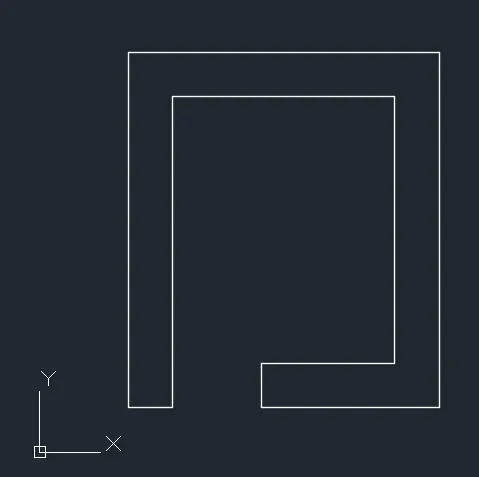
Q5: Aim: To draw the geometry P7 using the relative rectangular coordinates method and illustrate the procedure involved.
Relative rectangular coordinate
- Create a new drawing from the dropdown menu
- Select the imperial system and decimal units
- Type L in the command bar to activate the line tool
- Type the first point coordinate (2,1)
- Type the relative coordinate as @8,0
- Type the next relative coordinate as @0,6
- Type the next relative coordinate as @-8,0
- Click on the close option in the command bar
- Type L in the command bar to activate the line tool
- Type the first point coordinate (3,2)
- Type the next relative coordinate as @2,0
- Type the next relative coordinate as @0,3
- Type the next relative coordinate as @-2,0
- Click on the close option in the command bar
- Type L in the command bar to activate the line tool
- Type the first point coordinate (6,2)
- Type the next relative coordinate as @2,0
- Type the next relative coordinate as @0,3
- Type the next relative coordinate as @-2,0
- Click on the close option in the command bar
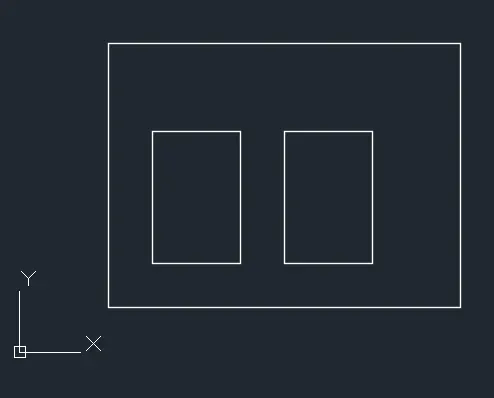
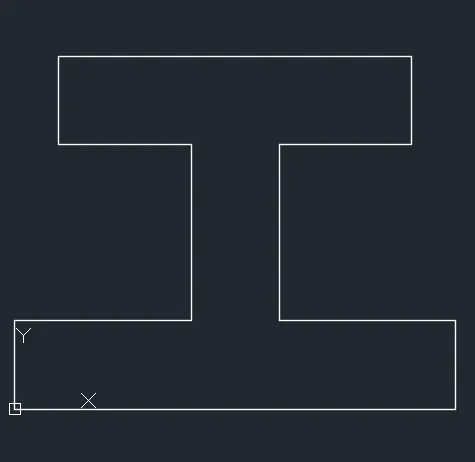
Q6: Aim: To draw the geometry P8 using the relative rectangular coordinates method and illustrate the procedure involved.
Relative rectangular coordinate
- Create a new drawing from the dropdown menu
- Select the imperial system and decimal units
- Type L in the command bar to activate the line tool
- Type the first point coordinate (0,0)
- Type the relative coordinate as @10,0
- Type the next relative coordinate as @0,2
- Type the next relative coordinate as @-4,0
- Type the next relative coordinate as @0,4
- Type the next relative coordinate as @3,0
- Type the next relative coordinate as @0,2
- Type the next relative coordinate as @-8,0
- Type the next relative coordinate as @0,-2
- Type the next relative coordinate as @3,0
- Type the next relative coordinate as @0,-4
- Type the next relative coordinate as @-4,0
- Click on the close option in the command bar
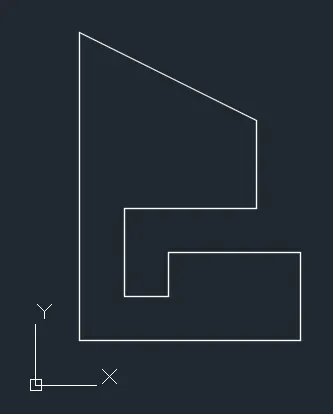
Q7: Aim: To draw the geometry P9 using the relative rectangular coordinates method and illustrate the procedure involved.
Relative rectangular coordinate
- Create a new drawing from the dropdown menu
- Select the imperial system and decimal units
- Type L in the command bar to activate the line tool
- Type the first point coordinate (1,1)
- Type the relative coordinate as @5,0
- Type the next relative coordinate as @0,2
- Type the next relative coordinate as @-3,0
- Type the next relative coordinate as @0,-1
- Type the next relative coordinate as @-1,0
- Type the next relative coordinate as @0,2
- Type the next relative coordinate as @0,3
- Type the next relative coordinate as @0,2
- Type the next relative coordinate as @-4,2
- Click on the close option in the command bar
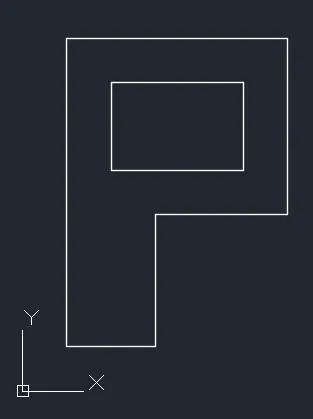
Q8: Aim: To draw the geometry P10 using the relative rectangular coordinates method and illustrate the procedure involved.
Relative rectangular coordinate
- Create a new drawing from the dropdown menu
- Select the imperial system and decimal units
- Type L in the command bar to activate the line tool
- Type the first point coordinate (1,1)
- Type the relative coordinate as @2,0
- Type the next relative coordinate as @0,3
- Type the next relative coordinate as @3,0
- Type the next relative coordinate as @0,4
- Type the next relative coordinate as @-5,0
- Click on the close option in the command bar
- Type the first point coordinate (2,5)
- Type the next relative coordinate as @3,0
- Type the next relative coordinate as @0,2
- Type the next relative coordinate as @-3,0
- Click on the close option in the command bar
Civil Related Problems
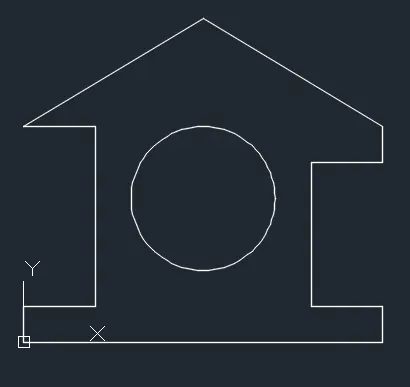
Profile Wood
Aim: To draw the Profile-Wood using the relative rectangular coordinates method and illustrate the procedure involved.
Relative rectangular coordinate
- Create a new drawing from the dropdown menu
- Select the imperial system and decimal units
- Type L in the command bar to activate the line tool
- Type the first point coordinate (0,0)
- Type the relative coordinate as @10,0
- Type the next relative coordinate as @0,1
- Type the next relative coordinate as @-2,0
- Type the next relative coordinate as @0,4
- Type the next relative coordinate as @2,0
- Type the next relative coordinate as @0,1
- Type the next relative coordinate as @-5,3
- Type the next relative coordinate as @-5,-3
- Type the next relative coordinate as @2,0
- Type the next relative coordinate as @0,-5
- Type the next relative coordinate as @-2,0
- Click on the close option in the command bar
- From home tab select the center radius option in circle drop down
- Type the coordinates of the center of the circle (5,4)
- Type the radius of the circle as 2
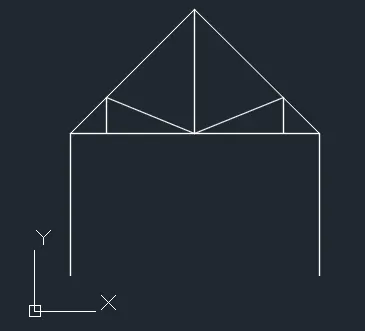
Queen Post Truss
Aim: To draw the Queen post truss using the relative rectangular coordinates method and illustrate the procedure involved.
Relative rectangular coordinate
- Create a new drawing from the dropdown menu
- Select the imperial system and decimal units
- Type L in the command bar to activate the line tool
- Type the first point coordinate (1,1)
- Type the relative coordinate as @0,4
- Type the next relative coordinate as @3.5,3.5
- Type the next relative coordinate as @3.5,-3.5
- Type the next relative coordinate as @0,-4 and press escape
- Type L in the command bar to activate the line tool
- Type the first point coordinate (1,5)
- Type the next relative coordinate as @7,0 and press escape
- Type L in the command bar to activate the line tool
- Type the first point coordinate (2,5)
- Type the next relative coordinate as @0,1
- Type the next relative coordinate as @2.5,-1
- Type the next relative coordinate as @0,3.5 and press escape
- Type L in the command bar to activate the line tool
- Type the first point coordinate (2,5)
- Type the next relative coordinate as @0,1
- Type the next relative coordinate as @-2.5,-1 and press escape
Mono Pitch
Aim: To draw the Mono pitch using the relative rectangular coordinates method and illustrate the procedure involved.
Relative rectangular coordinate
- Create a new drawing from the dropdown menu
- Select the imperial system and decimal units
- Type L in the command bar to activate the line tool
- Type the first point coordinate (1,1)
- Type the relative coordinate as @6,0
- Type the next relative coordinate as @0,2
- Click on the close option in the command bar
- Type the first point coordinate (3,1)
- Type the next relative coordinate as @0,0.667
- Type the next relative coordinate as @2,-0.667
- Type the next relative coordinate as @0,1.333
- Type the next relative coordinate as @2,-1.333 and press escape